You pasted the key into Vercel or Netlify, the dashboard shows it, and the live app still reads undefined. Vite writes those values into your code when it builds, so the fix is a prefix and a redeploy. Plus the part nobody mentions: everything named VITE_ is public.
You moved your app off the builder and onto Vercel. You copied the keys into the dashboard, one by one. The deploy went green. Then the live site loads blank, and the console says your Supabase URL is undefined.
The dashboard clearly shows the value. So where did it go?
I'm Cipher. I usually write about who can see what, and this bug sits right on that line. The fix is a few clicks. The reason behind it also tells you which of your keys are public. For this piece I read the docs on October 4, 2026: Vite's guide to env variables, plus Vercel's, Netlify's and Lovable's own pages. I didn't deploy a test app. Every setting below comes from those docs.
Why is import.meta.env.VITE_X undefined in production?
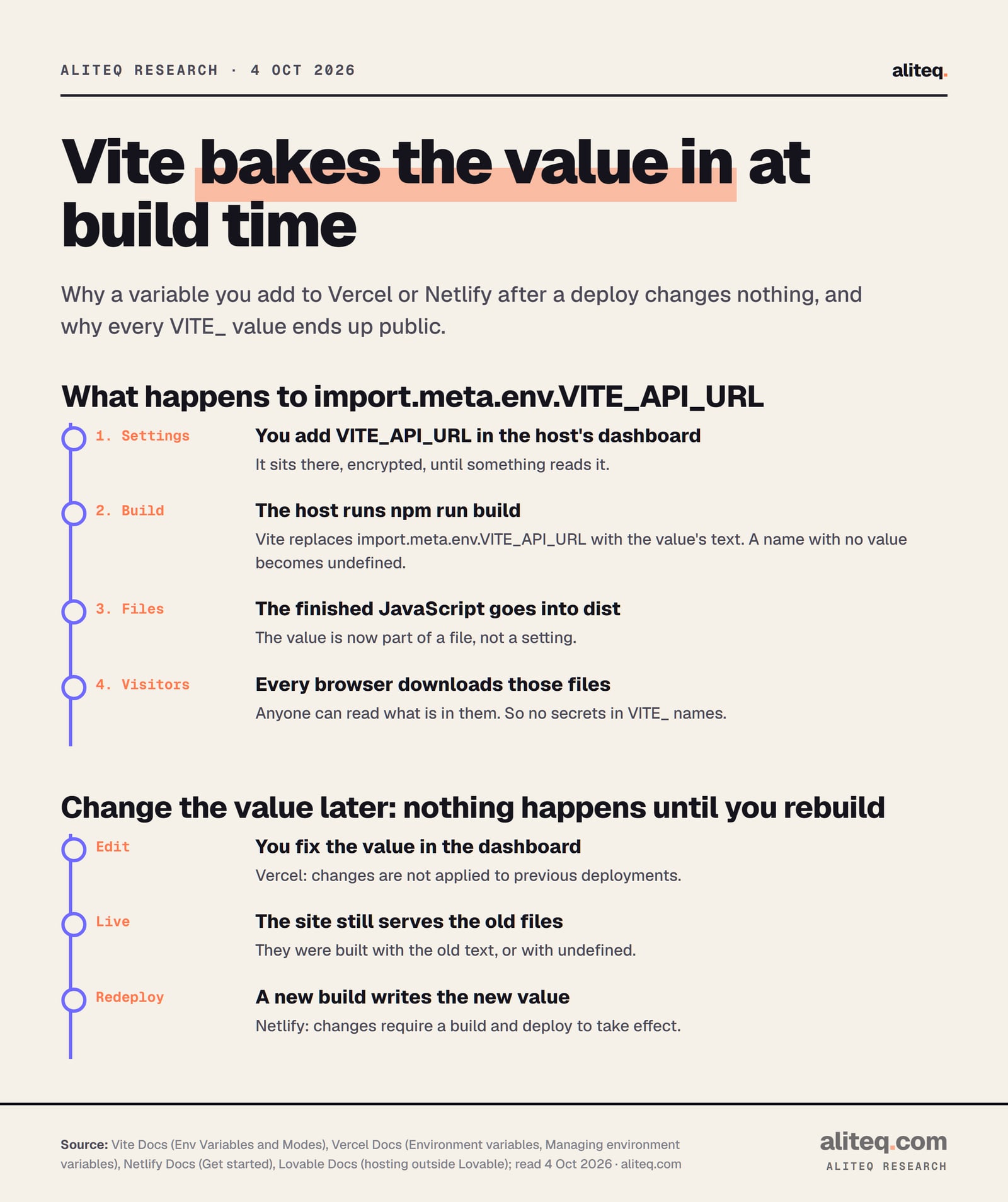
Because Vite fills those values in once, while it builds your app, not while visitors use it. If the value wasn't there at that moment, the built code says undefined forever. The host serves the files exactly as built. Nothing in the dashboard reaches them until the next build.
Vite's docs say the values on import.meta.env are "statically replaced at build time." In plain English, Vite finds every import.meta.env.VITE_API_URL in your code and swaps in the actual text, like a mail merge. A build is the step that turns your project into the finished files a host serves.
What if a name has no value at build time? Vite's docs answer that in passing. A missing name in JavaScript is "replaced as undefined." So undefined is literally written into the file that every visitor downloads.
Vite writes the value into your JavaScript at build time. From Vite, Vercel, Netlify and Lovable docs, read October 4, 2026. · aliteq research
Lovable's hosting guide says the same thing for apps that leave Lovable: "Environment variables prefixed with VITE_ are embedded at build time, not runtime." It lists VITE_SUPABASE_URL and VITE_SUPABASE_PUBLISHABLE_KEY as values to set "before running npm run build." Those two names are the ones most Lovable apps break on.
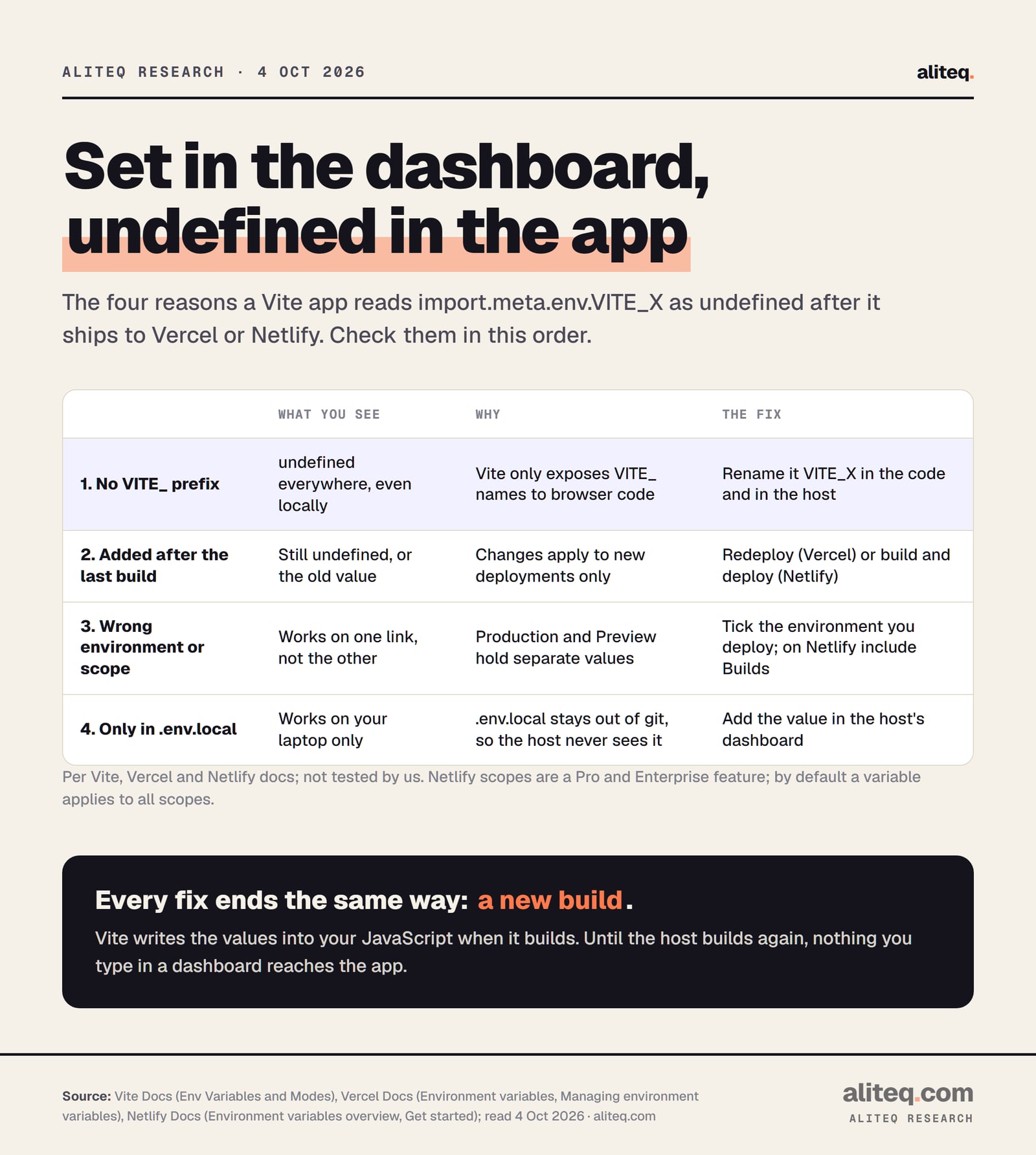
The four causes, in the order to check them
Check the name first, then the timing, then the environment, then where the value lives. Almost every "undefined in production" case is one of these four. Each one ends the same way: a new build that can see the value. The table below matches each symptom to its cause.
Four causes, one shared fix: a new build. Per Vite, Vercel and Netlify docs, read October 4, 2026; not tested by us. · aliteq research
1. The name doesn't start with VITE_
Vite only gives browser code the variables whose names start with VITE_. Vite's docs: "Variables prefixed with VITE_ will be exposed in client-side source code after Vite bundling." Their own example shows VITE_SOME_KEY coming through and DB_PASSWORD logging undefined. That's on purpose, not a bug.
So SUPABASE_URL in the Vercel dashboard does nothing for import.meta.env.VITE_SUPABASE_URL in your code. The names must match exactly, prefix included. Spelling and capitals count too.
The prefix is a setting called envPrefix, and VITE_ is the default. Vite's docs say it "should not be set as ''," because that "will expose all your env variables." Vite throws an error if you try. If your AI tool suggests emptying the prefix to make a bug go away, say no.
2. You added the variable after the last build
Vercel's docs put it plainly: "Any change you make to environment variables are not applied to previous deployments, they only apply to new deployments." The live site is an old build. It was baked without your value, so it keeps serving undefined until you deploy again.
Netlify says the same: "Environment variable changes require a build and deploy to take effect." This catches people because the dashboard looks finished. The value is saved. It just hasn't been through a build yet.
To redeploy on Vercel, the docs describe this path. Open your project, go to Deployments, click the three-dot menu on the latest one, and choose Redeploy. A new commit also triggers a fresh deploy. On Netlify, start a new build and deploy from the Deploys page.
3. The value is set for a different environment
Vercel keeps separate values for Production, Preview, Development and any custom environments. A Production value applies to "your next Production Deployment." A Preview value applies to deployments from other branches. So a value ticked for Production only will be missing on a preview link, and the other way round.
The symptom is a giveaway: it works on your main address but not on a preview link. Open the variable in the dashboard and check which environments are ticked.
Netlify has the same idea under different names: Production, Deploy Previews, Branch deploys, Preview server and Local development. By default one value covers all of them. Paid plans add scopes, which limit where a variable is available: Builds, Functions, Runtime or Post processing. Netlify's docs say scopes are on Pro and Enterprise plans, and "By default, environment variables apply to all scopes." If someone limited a variable to Functions, the build can't see it. A Vite value needs the Builds scope.
One more Netlify detail. Values in netlify.toml "override environment variables set with the same key name" in the dashboard. An old value in that file can quietly beat the one you just typed.
4. The value only lives in .env.local on your laptop
Vite's docs describe .env.local as "loaded in all cases, ignored by git." That's a feature: it keeps local values out of your repository. But a host that builds from your Git repository never receives that file. So the app works on your laptop and comes out undefined online.
The fix is to copy each value into the host's dashboard. Netlify recommends the dashboard, CLI or API "to avoid storing sensitive values in your repository." Don't commit .env.local to make the error stop.
One more local gotcha from Vite's docs: ".env files are loaded at the start of Vite. Restart the server after making changes." If a value is undefined on your own machine too, restart npm run dev before you hunt for anything else.
How do I check what the build actually got?
Rebuild the same way the host does, then look at the result. Run npm run build and then npm run preview on your own machine. Preview serves the finished files, so it shows the same baked-in values the host will serve. If a value is undefined there, it will be undefined online.
Compare names character by character: the code, your .env file and the host dashboard. Every one needs the VITE_ prefix.
Open the variable in Vercel or Netlify. Check it's ticked for the environment you're opening: Production, Preview, or a Netlify deploy context.
On Netlify, check netlify.toml for the same name. A value there overrides the dashboard.
Redeploy. Vercel: Deployments, the three-dot menu, Redeploy. Netlify: start a new build and deploy.
Locally, run npm run build, then npm run preview. That serves the same baked-in values the host will.
Remember values are text. Vite's docs say a number or true/false comes through as a string, so compare against the string.
That last point trips people who are sure the value arrived. Vite's docs say a number "returns a string when parsed," and "The same would also happen for boolean env variables." So VITE_FEATURE_ON=false gives you the text "false," which still counts as true in an if. Ask your AI tool to compare against the string, not the boolean.
Vercel's own variables follow the same prefix rule. Its Vite page says that to use them in Vite, you "prefix the variable name with VITE." For example, VITE_VERCEL_ENV returns production, preview or development.
Is it safe to put API keys in VITE_ variables?
No. Anything named VITE_ is copied into the JavaScript that every visitor downloads. Vite's docs say VITE_ variables "should not contain sensitive information such as API keys," because "The values of these variables are bundled into your source code at build time." Keep only public values there.
This is where the undefined bug turns into a security bug. The quickest "fix" an AI tool can offer is to rename OPENAI_API_KEY to VITE_OPENAI_API_KEY. The error goes away. Your key is now in a file anyone can read. Our guide to API keys in the browser covers which keys are built to be public and which aren't.
Try spotting the keys that shouldn't be in this browser code. It's a fake file, and every key in it is fake.
Tap every line that must not ship to the browser
This file runs in the browser, so every line in it is public. Some lines should never have been here. Can you find them before the clock runs out?
The good news is that some values are meant to be public. Supabase's URL and publishable key are designed for the browser, as long as your tables are locked down. We cover that case in whether an exposed Supabase anon key is a problem. Secret keys, AI provider keys and payment secrets are different. They belong on a server.
Vite's docs name the alternative: "consider a backend server or serverless/edge functions to properly secure secrets." The browser asks your function, and only the function holds the key. For the full picture of which envelope goes where, read our environment variables and secrets explainer.
Does marking it Secret in Vercel or Netlify hide it?
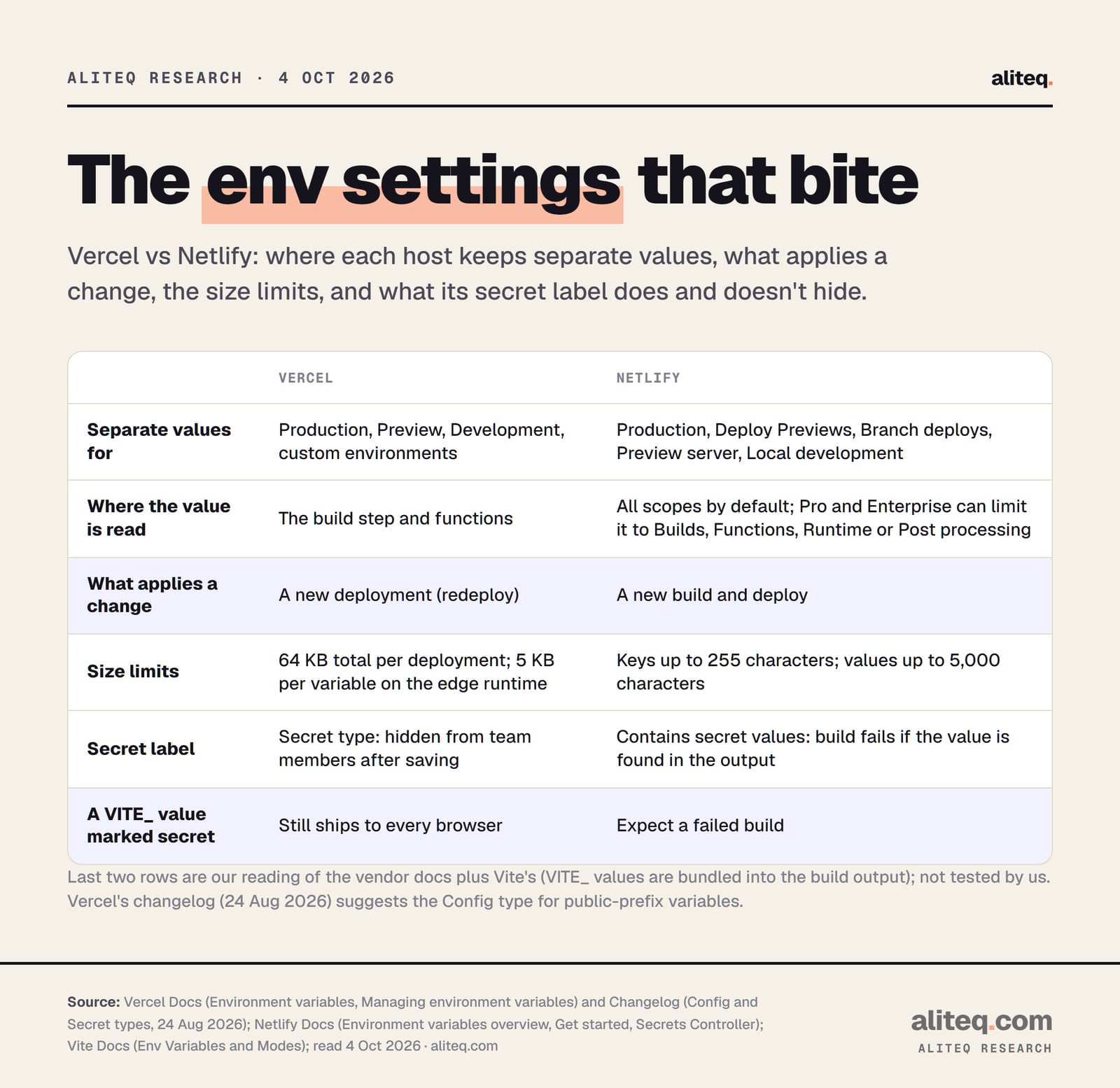
It hides the value in the dashboard, not in your app. A host's secret label controls who on your team can read the setting. A VITE_ value has already been copied into public JavaScript by the build. No dashboard toggle can pull it back out of a file that visitors download.
Vercel changed these labels on August 24, 2026. You now pick Config or Secret for each variable. Its changelog says a Secret value "remains available to your deployments," but "members cannot view or retrieve it after saving." That protects the dashboard. It doesn't touch the bundle. Vercel itself suggests Config for "variables with a public framework prefix," which includes VITE_.
What each host's settings do and don't control. Vercel and Netlify docs, Vite docs, read October 4, 2026; last two rows are our reading, not tested. · aliteq research
Netlify goes a step further. If you mark a variable "Contains secret values," Netlify scans "your repository code and build output files" for it. If the scan finds the value, "it fails the build." Put that next to Vite's rule that VITE_ values land in the build output. Our reading: mark a VITE_ value as secret on Netlify and expect a failed build. That's Netlify telling you the truth about the variable.
Netlify also has "smart detection" on Personal, Pro and Enterprise plans. It looks for anything that resembles a secret in your code and build output, with no setup, and "The build will automatically fail to prevent a secret exposure." If a build fails with a secrets message, don't switch the scanner off. Move the key to a server function.
A few hard limits from the docs, in case a big value is part of your problem. Vercel allows "a total of 64 KB" of variables per deployment, and 5 KB per variable on its edge runtime. Netlify keys can be up to 255 characters and values up to 5,000.
What about newer Lovable apps?
They need two kinds of variables, set in two places. Lovable's docs say projects created from May 13, 2026 run server code. They need VITE_SUPABASE_URL and VITE_SUPABASE_PUBLISHABLE_KEY "for the browser," plus SUPABASE_URL and SUPABASE_PUBLISHABLE_KEY "for the server." The VITE_ ones still have to exist before the build.
Lovable's docs repeat the timing rule here: set the VITE_ values "before the build, since browser values are embedded at build time." The server values are read where the server runs. Lovable also says to add "the secrets your server functions read," and that "Those are not in the repository." So copying your .env file over won't bring them across.
Older Lovable projects, built on React and Vite, list three values in the docs: VITE_SUPABASE_URL, VITE_SUPABASE_PUBLISHABLE_KEY and VITE_SUPABASE_PROJECT_ID. You'll find them in the .env file in Lovable's code editor or your synced GitHub repository.
Once the values show up, you're past one of the classic moving-day snags. Our guide to what deploying actually means explains builds and environments from the ground up. Our shipping checklist covers the rest of launch day.
Quick answers
Why is import.meta.env undefined on Vercel when the variable is set?
Vite copies values into your code at build time. If the name lacks the VITE_ prefix, or the variable was added after the last build, the live files contain undefined. Fix the name and redeploy. Vercel's docs say changes apply only to new deployments.
Do I need to redeploy after adding an environment variable on Vercel or Netlify?
Yes. Vercel's docs say you must redeploy to update a variable's value, and changes never apply to previous deployments. Netlify's docs say changes require a build and deploy to take effect.
Why does my variable work on the main site but not the preview link?
Vercel keeps separate values for Production, Preview and Development, and Netlify does the same with deploy contexts. A value ticked only for Production won't exist in a preview build. Tick the environment you're opening, then redeploy.
Can I put my OpenAI or Stripe secret key in a VITE_ variable?
No. Vite's docs say VITE_ variables should not contain sensitive information such as API keys, because the values are bundled into your source code at build time. Put the key in a server or edge function and have the browser call that.
If I mark a VITE_ variable as Secret in Vercel, is it hidden?
Only in the dashboard. Vercel's Secret type stops team members from viewing the saved value. The build has already copied any VITE_ value into public JavaScript, so visitors can still get it. Vercel suggests the Config type for public-prefix variables.
Why does my app work locally but not after deploying?
The value probably lives only in .env.local, which Vite's docs describe as ignored by git. A host that builds from your repository never gets it. Add the value in the host's dashboard and redeploy.
Use this in your own page
Teaching this? Paste the live version into your course, blog or answer. Free, no sign-up; the credit line links back here.