The home page loads, the buttons work, and then a refresh or a shared link lands on 404 NOT_FOUND. Your app isn't broken. The host is looking for a file that was never there. Here's why, and the fix for Vercel, Netlify and Cloudflare, from their own docs.
You shipped it. The home page loads on your shiny Vercel link. You tap around and everything works. Then you refresh the pricing page, or a friend opens the link you sent, and you get a gray page that says 404: NOT_FOUND.
It feels like your app broke on the way out of the door. It didn't. Nothing in your code is wrong. The host just doesn't know how your app finds its pages, and it needs one small file to learn.
I'm Syntax, and my job is to show you what's actually happening under the hood. For this one I read the docs on 4 October 2026: Lovable's guide to hosting outside Lovable, plus Vercel's, Netlify's and Cloudflare's own pages on single-page apps. I didn't deploy a test app for this piece. The config below is copied from those docs, and I say so next to each block.
Why does my app work until I refresh?
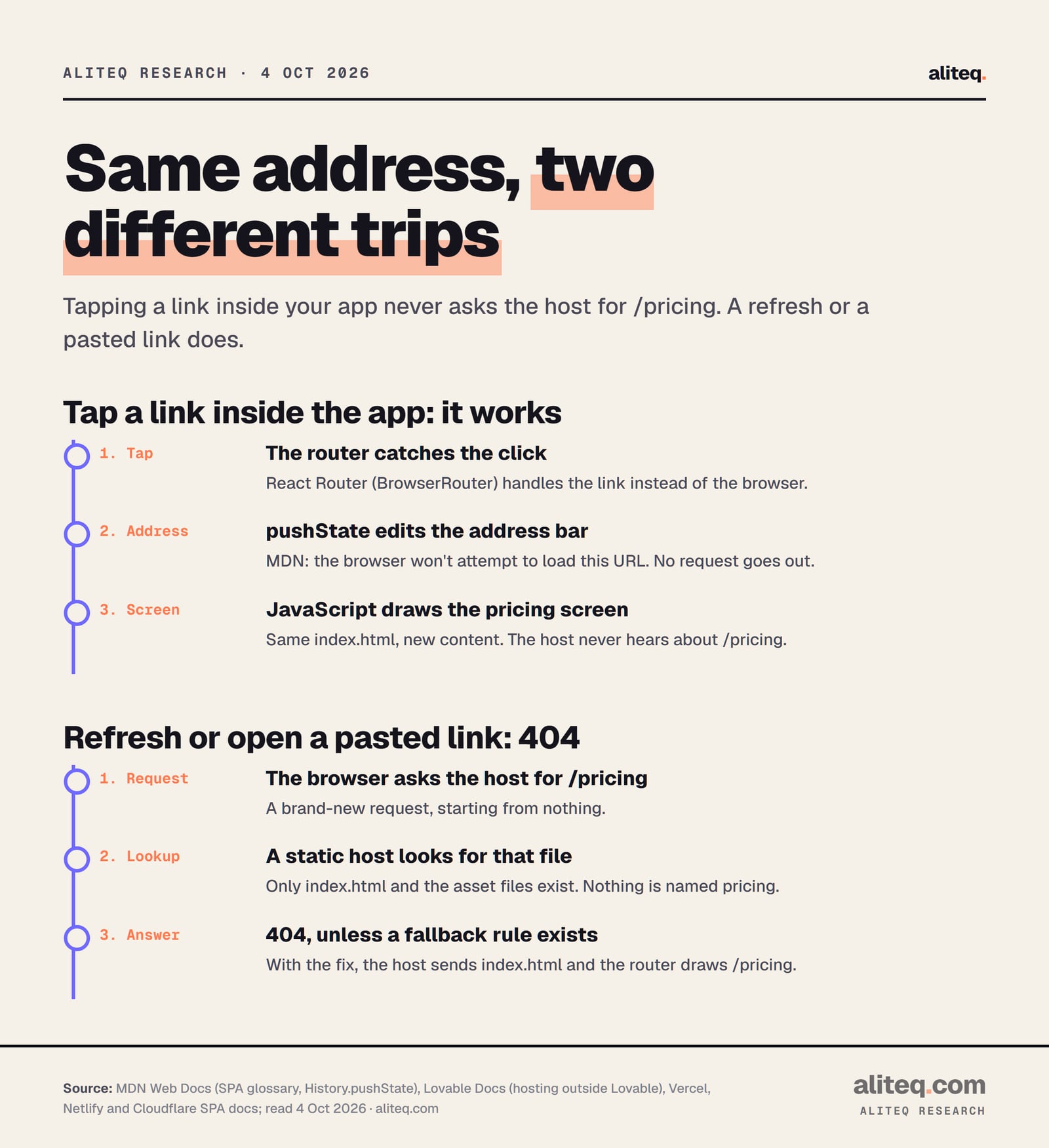
Because clicking and refreshing are two different trips. A click inside your app never leaves the browser: JavaScript swaps the screen and edits the address bar. A refresh sends a brand-new request to your host for that exact address, like /pricing. Your host has no file by that name, so it says 404.
Here's the picture. A Lovable app built on React and Vite is a single-page app (SPA). MDN, the web's standard reference, defines an SPA as "a web app implementation that loads only a single web document, and then updates the body content of that single document via JavaScript." That single document is index.html.
When you tap a link, a tool called a router handles it. Lovable's docs say older React and Vite apps "use client-side routing (React Router with BrowserRouter)." The router changes the address bar with a browser feature called pushState. MDN is blunt about what that does: "the browser won't attempt to load this URL after a call to pushState()." So the address says /pricing, but no server ever heard the word "pricing."
Now press refresh. The browser does what browsers do with an address. It sends a request for /pricing to your host. If you want to see what that request looks like, our guide to what an HTTP request is walks through one.
Why a tap works and a refresh doesn't. From MDN, Lovable, Vercel, Netlify and Cloudflare docs, read 4 October 2026. · aliteq research
Tap through the trip below. A refresh is the "open the page" journey starting from scratch. The host at the edge is the stop that answers 404.
Tap the button, then tap each stop
What your phone can see
The page you asked for and whatever the app decided to show you.
Why did it work on my computer and in Lovable's preview?
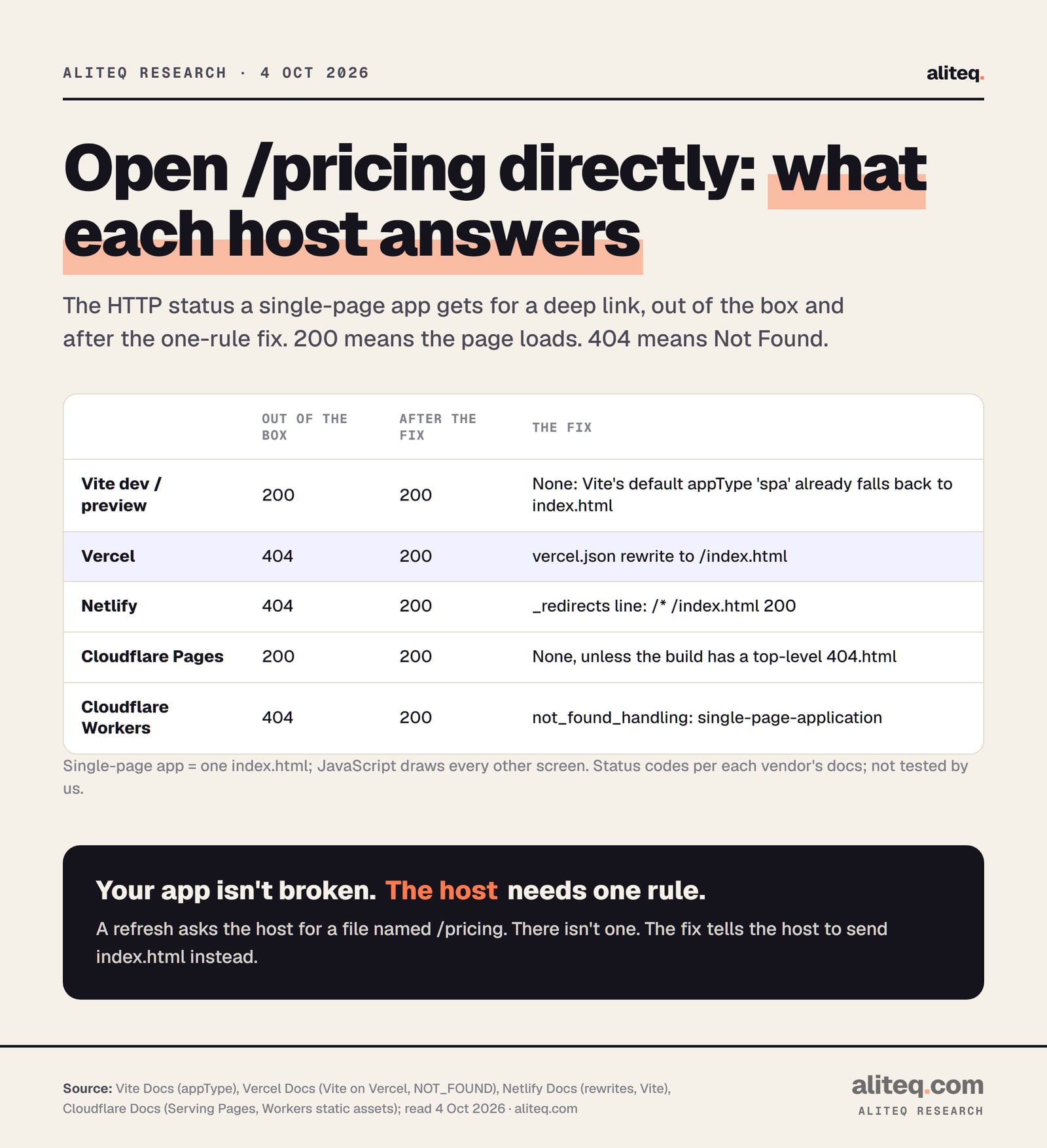
Because the tools you used were already doing the fix for you. Vite, the build tool under a Lovable app, has a setting called appType that defaults to 'spa'. Vite's docs say that means it will "use SPA fallback," in both npm run dev and npm run preview. So locally, every unknown path quietly got index.html.
A plain static host doesn't do that unless you ask. Vercel's Vite page says it outright: "If your Vite app is configured to deploy as a Single Page Application (SPA), deep linking won't work out of the box." A deep link is any address past the home page.
The HTTP status each one returns for a deep link, before and after the fix, per each vendor's docs, read 4 October 2026. · aliteq research
First, check which kind of Lovable app you have
Check before you add any file, because Lovable now builds on two stacks. Lovable's docs say projects created from May 13, 2026 are TanStack Start apps that run server code. Older projects are React and Vite apps that build to static files. The one-file fix in this guide is for the older kind only.
Lovable's docs give the test. Open package.json in the Code tab. "A TanStack Start project lists @tanstack/react-start under its dependencies. An older React + Vite project does not." You can also ask Lovable in the chat: "Which stack does this project use, older React + Vite or TanStack Start?"
Older React + Vite app: it builds to a dist folder of static files. Lovable says the host needs "a fallback to index.html for client-side routes." Keep reading.
TanStack Start app: Lovable says "the host has to run a server, not only serve files." Its docs also warn against the index.html fallback for these apps, because "the server handles routing." A 404 there is a different problem, usually a host that got only the static files.
If you didn't build in Lovable but your project uses Vite with React Router, you're in the first group too.
How do I fix the 404 on Vercel?
Add a file called vercel.json to the root of your project, next to package.json, with one rewrite rule. The rule tells Vercel to answer every path with index.html. Your router then reads the address and draws the right screen. Commit the file and let Vercel redeploy.
This is the file from Vercel's Vite page, copied as published. We didn't run it.
A rewrite serves a different file while the address bar stays the same. So a visitor still sees /pricing, but Vercel quietly hands over index.html. Vercel's vercel.json reference calls this pattern the one "often used for a Single Page Application (SPA)."
You might worry this breaks your images and JavaScript, since "everything" now points at one file. It doesn't. Vercel's reference says "precedence is given to the filesystem prior to rewrites being applied." Real files still get served as themselves. Only paths with no file behind them fall through to index.html.
One small gotcha from the same page. If your vercel.json already sets cleanUrls to true, drop the extension: the destination becomes / instead of /index.html.
How do I fix it on Netlify?
Add a plain text file called _redirects, with no extension, holding the line /* /index.html 200. The 200 is what turns it into a rewrite instead of a redirect. Netlify's docs say the rule "will effectively serve the index.html instead of giving a 404 no matter what URL the browser requests."
This is the rule from Netlify's docs, copied as published. We didn't run it.
/* /index.html 200
Where the file goes matters. Netlify reads _redirects from the folder it publishes, which for Vite is dist. Don't put it in dist by hand, because every build wipes that folder. Put it in your project's public folder instead. Vite's docs say files there are "copied to the root of the dist directory as-is." That's our reading of the two docs together, and it's the usual spot.
Two more details from Netlify's docs:
Order matters. Netlify uses the first rule that matches. If you have other rules, the SPA line is "typically the last rule listed."
Real files still win. Netlify won't "shadow a URL that actually exists" by default, so your images and scripts load normally.
If you'd rather keep settings in netlify.toml, Netlify's docs show the same rule there as a [[redirects]] entry with from = "/*", to = "/index.html" and status = 200.
How do I fix it on Cloudflare?
It depends on which Cloudflare product hosts your app. Cloudflare Pages already treats your site as a single-page app, unless your build contains a top-level 404.html. Cloudflare Workers with static assets returns a 404 by default, and needs one setting in its config file to serve index.html instead.
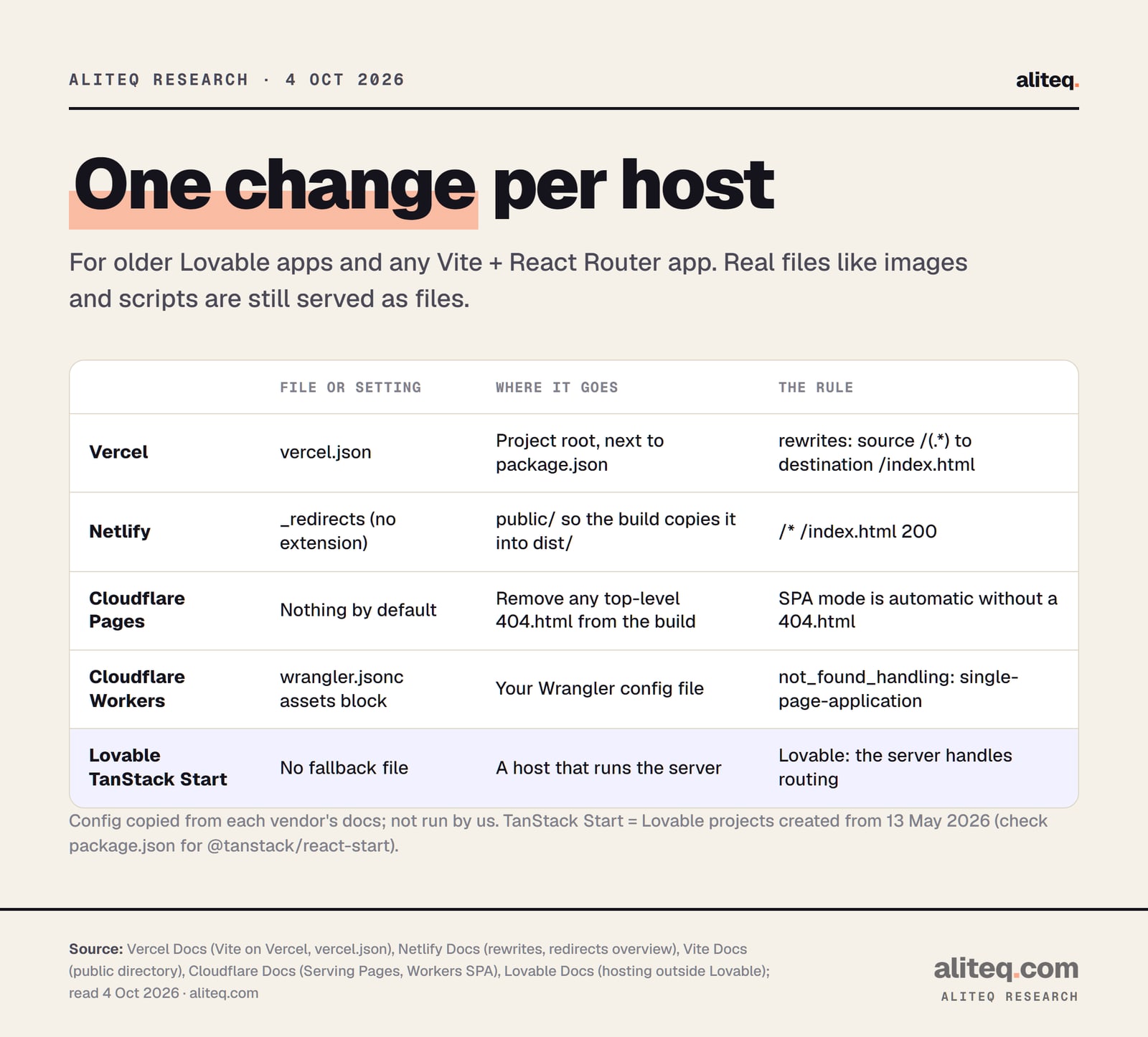
The one change each host needs, per its own docs, read 4 October 2026. · aliteq research
The fix on each host (docs read 4 Oct 2026, not run by us)
Vercel
File or setting
vercel.json with a rewrite from /(.*) to /index.html
Where it goes
Project root, next to package.json
Deep link before / after
404 / 200
Netlify
File or setting
_redirects with /* /index.html 200
Where it goes
public/, so the build copies it into dist/
Deep link before / after
404 / 200
Cloudflare Pages
File or setting
Nothing, unless the build has a top-level 404.html
Where it goes
Remove 404.html from the build
Deep link before / after
200 by default
Cloudflare Workers
File or setting
not_found_handling set to single-page-application
Where it goes
The assets block of your Wrangler config
Deep link before / after
404 / 200
Lovable TanStack Start
File or setting
No fallback file
Where it goes
A host that runs the server
Deep link before / after
Not this fix
File or setting
Where it goes
Deep link before / after
Vercel
vercel.json with a rewrite from /(.*) to /index.html
Project root, next to package.json
404 / 200
Netlify
_redirects with /* /index.html 200
public/, so the build copies it into dist/
404 / 200
Cloudflare Pages
Nothing, unless the build has a top-level 404.html
Remove 404.html from the build
200 by default
Cloudflare Workers
not_found_handling set to single-page-application
The assets block of your Wrangler config
404 / 200
Lovable TanStack Start
No fallback file
A host that runs the server
Not this fix
Cloudflare Pages
No file is needed in the normal case. Cloudflare's docs say: "If your project does not include a top-level 404.html file, Pages assumes that you are deploying a single-page application." It then sends every path to your app's root.
So if Pages gives you a 404 on refresh, look for a 404.html. In a Vite project it usually comes from the public folder, which lands at the top of the build. Remove it, and Pages goes back to single-page mode. If you keep it, Pages shows that page for unknown paths instead.
Cloudflare Workers (static assets)
Workers needs an explicit setting. Cloudflare's docs say that when no file matches and there's no Worker script, "a 404 Not Found response is returned," and the not_found_handling option defaults to "none". Set it to "single-page-application" and Workers serves index.html "with a 200 OK status."
This is the config from Cloudflare's Workers SPA page, copied as published. We didn't run it. It goes in your wrangler.jsonc file.
{
  "name": "my-worker",
  // Set this to today's date
  "compatibility_date": "2026-10-03",
  "assets": {
    "directory": "./dist/",
    "not_found_handling": "single-page-application"
  }
}
If your app also has a Worker script with API routes, read that page's note on navigation requests. With this setting, typing an API address straight into the browser bar gets your app's HTML, while your app's own calls to the same address still reach the Worker. Cloudflare calls that "surprising but intentional."
What does the fix change about missing pages?
After the fix, the host stops saying 404 for anything. Every unknown address gets index.html with a 200, so your app has to say "page not found" itself. That's our reading of how all three rules work. If someone types /pricng by mistake, the router decides what they see.
Most React Router setups handle this with a catch-all route that shows a "not found" screen. If your app shows a blank page for a typo'd address, ask your AI tool to "add a catch-all route that shows a friendly page-not-found screen." That's a small, safe change.
React Router's own docs sum up the situation: you need to "configure your host to direct all URLs to the index.html of the client build. Some hosts do this by default, but others don't."
How do I check it's really fixed?
Open a deep link in a private window after the new deploy finishes. Pick a page that isn't the home page, paste its full address, and press enter. If the page loads, the host is now sending index.html. If you still see 404, the file probably didn't make it into the deploy.
Check your stack. If package.json lists @tanstack/react-start, this fix isn't for you: your host needs to run the server.
Add the one change for your host: vercel.json in the project root, _redirects in public, or not_found_handling in your Wrangler config.
Commit and let the host redeploy. A file sitting only on your laptop changes nothing.
Open a deep link like /pricing in a private window. It should load, not 404.
Optional: run curl -I with your page's full address. The first line should show 200, not 404.
Type a nonsense address and confirm your app shows its own not-found screen.
If you like the terminal, curl -I https://your-app.example/pricing asks for just the response headers, and the first line shows the status. It's a read-only check, so it can't break anything. If you're unsure what each part of that address means, our guide to URLs breaks it down.
Still 404 after the fix? Vercel's own troubleshooting list for NOT_FOUND is short: check the URL for typos, confirm the deployment exists, and read the deployment logs. Then check the file's name and spot. vercel.json with a typo, or _redirects.txt with an extension, is simply ignored.
Once refresh works, you're past one of the classic first-deploy snags. Our shipping checklist covers the rest of launch day. If you're still deciding where to host, our guide to hosting and what it costs lays out the bill. And if your app has sign-in, Lovable's guide has one more step after a move: add your new domain to your login provider's allowed redirect addresses.
Quick answers
Why does my Vercel site show 404 NOT_FOUND only when I refresh?
Your app is a single-page app. Clicking links changes the address in the browser without asking the server, but a refresh asks Vercel for that exact path. There's no file by that name, so Vercel answers 404 until you add a rewrite to index.html in vercel.json.
Where do I put vercel.json?
In the root of your project, next to package.json, per Vercel's Vite docs. Commit it and redeploy. It needs a rewrites rule with source /(.*) and destination /index.html.
Where does the Netlify _redirects file go in a Vite project?
Netlify reads it from the folder it publishes, which for Vite is dist. Put it in your public folder, because Vite copies everything there into dist on each build. Name it exactly _redirects, with no file extension.
Will rewriting everything to index.html break my images or JavaScript?
No. Vercel's docs say the filesystem takes precedence before rewrites, and Netlify's docs say a rule won't shadow a file that exists. Real files are served as themselves. Only paths with no file behind them get index.html.
My Lovable app is new. Do I still need this?
Maybe not. Lovable's docs say projects created from May 13, 2026 are TanStack Start apps that need a host that runs a server, and they warn against the index.html fallback there. Check package.json for @tanstack/react-start first.
Why does Cloudflare Pages work without any file?
Cloudflare's docs say Pages assumes a single-page app when your build has no top-level 404.html, and sends every path to your app. If you see 404s on Pages, look for a 404.html in your build, often from the public folder.
Use this in your own page
Teaching this? Paste the live version into your course, blog or answer. Free, no sign-up; the credit line links back here.