Most of a surprise AWS bill is not the servers you picked. It is the NAT gateway, the traffic, the logs and the forgotten disks around them. Every price here comes from AWS's own price files, read on 3 October 2026, with the Cost Explorer view that finds each one.
If your AWS bill doubled and nobody changed anything, you are probably looking at a traffic line or a forgotten resource. This page walks through the line items that surprise small companies, with the published price, a worked month, why each one creeps up, and where to see it.
I should be clear about where I stand. From 2019 to 2024 I ran Aliteq, a PC hardware shop in Kathmandu. Today Aliteq is a US-based company and I build AI apps. aliteq.com itself runs on Cloudflare Workers and Supabase, not on AWS, and I have never run AWS infrastructure for clients. So nothing here is a war story. It is arithmetic on AWS's own published prices, and I show every formula so you can check it against your bill.
What does a typical surprise AWS bill look like?
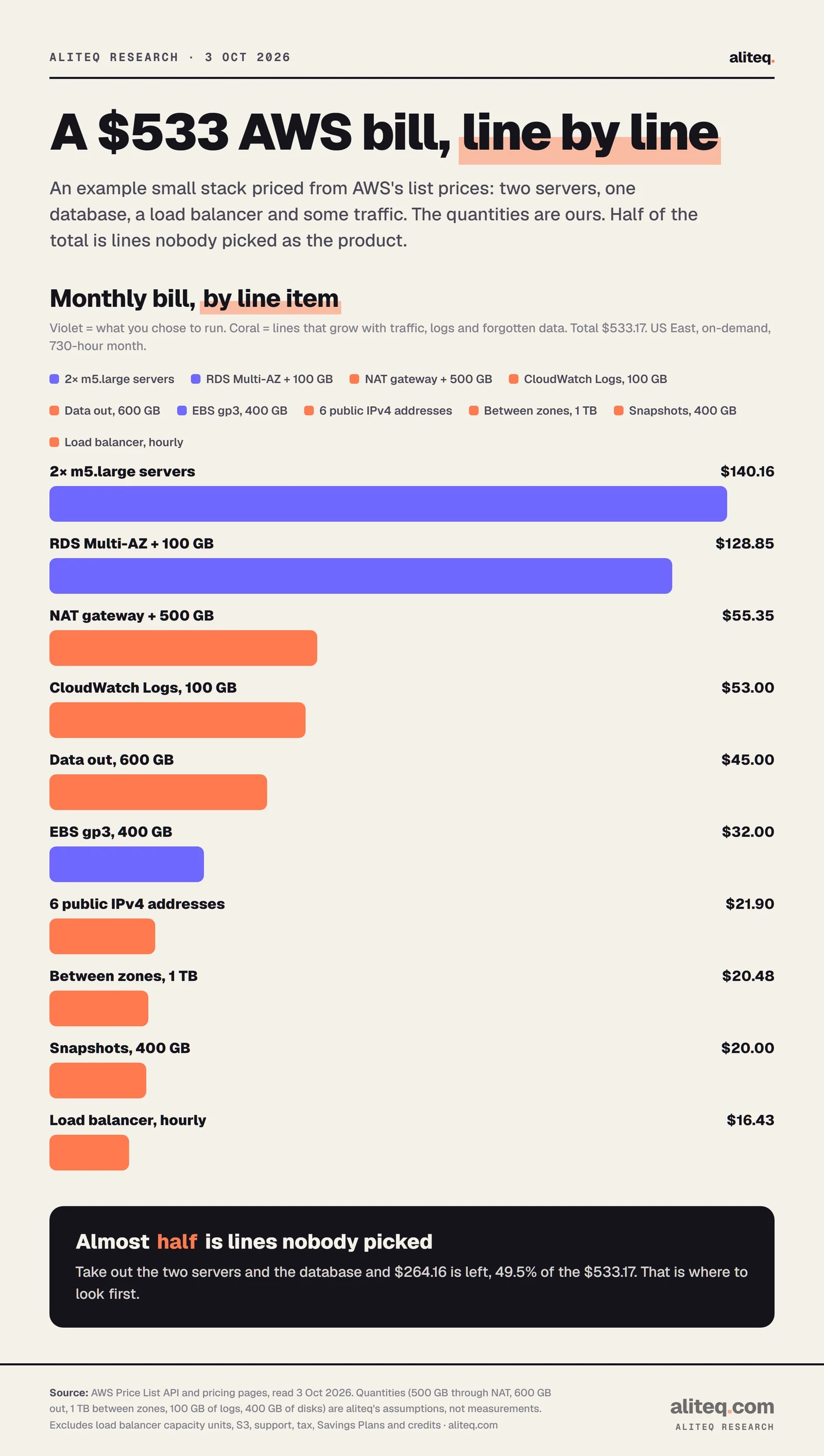
It looks like a modest set of servers plus a long tail of network, storage and logging lines. In the example below, the two servers and the database are $269.01 of a $533.17 month. Everything else, $264.16 or 49.5%, is lines most teams never chose on purpose.
The quantities are ours: two m5.large servers, one Multi-AZ PostgreSQL database with 100 GB, a NAT gateway carrying 500 GB, 600 GB out to the internet, 1 TB between zones, 100 GB of logs and 400 GB of disks. They are an assumption, not a measurement of any real company.
Example quantities are our assumptions. Prices are AWS US East list prices read on 3 October 2026. · aliteq research
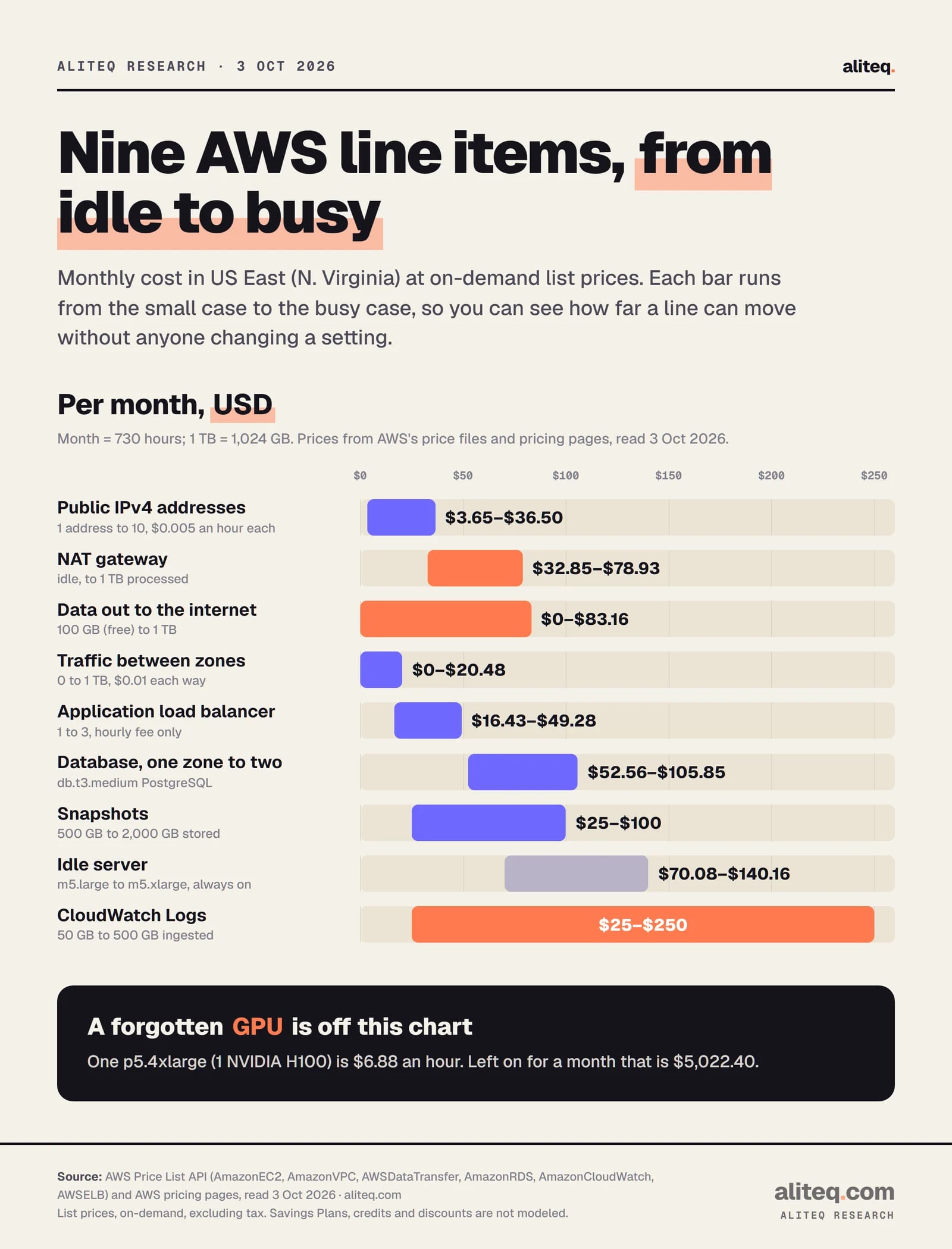
The next sections go through each line. The chart below shows how far each one can move between a quiet month and a busy one.
Each bar runs from the small case to the busy case. A 730-hour month, 1 TB = 1,024 GB. · aliteq research
How much does a NAT gateway cost?
A NAT gateway costs $0.045 for every hour it exists and $0.045 for every GB that passes through it. Idle, that is 0.045 x 730 = $32.85 a month. Push 1 TB through it and you add 1,024 x $0.045 = $46.08, for $78.93.
AWS's VPC pricing page says you pay for each "NAT Gateway-hour" that the gateway is "provisioned and available", that data processing charges apply "regardless of the traffic's source or destination", that a partial hour bills as a full hour, and that you "also incur standard AWS data transfer charges for all data transferred via the NAT gateway." Run one per Availability Zone for resilience and three idle gateways are $98.55 a month before any traffic.
Why it creeps: servers in a private subnet reach everything outside the VPC through the gateway. That includes S3, container image pulls, package installs and API calls to other AWS services. The data bill follows your traffic, not your headcount.
Where to see it: in Cost Explorer, group by Usage type and look for names such as NatGateway-Hours and NatGateway-Bytes. Some usage types carry a Region prefix. Filtering by Service first narrows the list.
Cheaper options:
A gateway VPC endpoint for S3 or DynamoDB. AWS's PrivateLink documentation says: "There is no additional charge for using gateway endpoints." If your NAT traffic is mostly S3, this can remove most of the per-GB line.
An interface endpoint for other AWS services costs $0.01 per endpoint hour ($7.30 a month) plus $0.01 per GB, which is less than $0.045 per GB when volume is high.
A NAT instance. A t3.micro Linux instance is $0.0104 an hour, $7.59 a month. It is a server you patch, size and fail over yourself, and it still pays for IPv4 and data going out. I did not read any throughput figures for it, so test it before you trust it.
What does a public IPv4 address cost on AWS?
Every public IPv4 address costs $0.005 an hour, which is 0.005 x 730 = $3.65 a month, and the price is the same whether it is in use or idle. AWS's VPC page says: "The price is the same whether the public IPv4 address is in-use public IPv4 addresses that is associated with an AWS resource you own, or an idle public IPv4 addresses in your AWS account not associated with any AWS resources."
Ten addresses are $36.50 a month. That is small per address, which is why it hides. AWS's VPC page also notes that Elastic IP addresses attach to resources "such as Elastic Load Balancer, NAT Gateway", and that EC2 instances launched in a default VPC come with a public IPv4 address.
What about unattached Elastic IPs?
An Elastic IP you allocated and never attached bills at the idle rate, $3.65 a month. AWS's EC2 pricing page says: "All In-use and Idle Elastic IP addresses are charged." Releasing it stops the charge.
Where to see it: Usage type values that start with PublicIPv4, for example PublicIPv4:InUseAddress and PublicIPv4:IdleAddress (the price file lists them with a USE1- Region prefix for US East).
Alternatives: put web servers behind one load balancer instead of giving each its own public address, and keep databases and workers on private addresses.
How much does data transfer out to the internet cost?
The first 100 GB a month is free, then US East is $0.09 per GB for the next 10 TB. One TB out is (1,024 - 100) x $0.09 = $83.16. Five TB is $451.80.
AWS says customers get "100GB of data transfer out to the internet free each month, aggregated across all AWS Services and Regions", and that the free tier is global, not per Region. The tiers drop to $0.085 per GB for the next 40 TB, $0.07 for the next 100 TB and $0.05 beyond 150 TB, but a small company rarely sees those.
Why it creeps: you only pay when someone downloads. A popular file, a model weight download, a public bucket, or a bot crawling your images turns a flat month into a variable one.
Where to see it: Usage type DataTransfer-Out-Bytes. Filter by Service to see whether it is EC2, S3 or something else sending the bytes.
Alternatives, with prices read today:
AWS S3 Standard
Storage
$0.023 per GB-month
Egress to the internet
$0.09 per GB after 100 GB free
Cloudflare R2 Standard
Storage
$0.015 per GB-month
Egress to the internet
"No charges for egress bandwidth"
Backblaze B2
Storage
$6.95 per TB-month on its pricing page
Egress to the internet
Free up to 3x the average stored; overage $0.01 per GB
Storage
Egress to the internet
AWS S3 Standard
$0.023 per GB-month
$0.09 per GB after 100 GB free
Cloudflare R2 Standard
$0.015 per GB-month
"No charges for egress bandwidth"
Backblaze B2
$6.95 per TB-month on its pricing page
Free up to 3x the average stored; overage $0.01 per GB
At 1 TB stored and served, R2 storage is 1,024 x $0.015 = $15.36 a month before operations ($4.50 per million writes, $0.36 per million reads). I use R2 for aliteq.com's media. Moving has its own cost, though: you pay AWS egress to pull the data out, unless you qualify for the free exit AWS describes on its pricing page for customers who leave AWS entirely. Check eligibility with AWS before you plan around it.
What does traffic between zones and Regions cost?
Traffic between Availability Zones in one Region costs $0.01 per GB in each direction, so 1 TB moved from one zone to another is 1,024 x ($0.01 + $0.01) = $20.48. Traffic from US East to another Region such as Oregon or Ireland is $0.02 per GB out, also $20.48 per TB.
AWS's EC2 pricing page says data transferred "in" to and "out" from EC2, RDS, Redshift, ElastiCache and network interfaces "across Availability Zones in the same AWS Region is charged at $0.01/GB in each direction." The same page says traffic to or from a public or Elastic IPv4 address is also $0.01 per GB each direction, and that traffic between EC2 and services like S3 or DynamoDB in the same Region is free when sent directly. Traffic inside one zone over private addresses is free.
Why it creeps: a Multi-AZ design is the right call for resilience, but a chatty app server in one zone talking to a database or cache in another pays on every query. Nothing in the console warns you.
Where to see it: Usage type DataTransfer-Regional-Bytes for in-Region traffic. In Cost Explorer you can also filter by Availability Zone.
Alternative: keep the busiest pair of services in the same zone where your uptime target allows it, and read the zone line before adding replicas.
Why do load balancers show up on the bill?
A load balancer bills by the hour even when idle. An Application Load Balancer is $0.0225 an hour, which is $16.43 a month, plus $0.008 per LCU-hour for the capacity it uses. A Network Load Balancer is $0.0225 an hour plus $0.006 per LCU-hour. A Classic Load Balancer is $0.025 an hour ($18.25 a month) plus $0.008 per GB processed.
Why it creeps: one per environment adds up. Three ALBs for dev, staging and production are $49.28 a month before traffic, and a public one also carries public IPv4 addresses, each billed at $0.005 an hour. The number depends on how many zones it spans.
Where to see it: the Elastic Load Balancing service in Cost Explorer. Usage type names include LoadBalancerUsage and LCUUsage.
Alternative: share one balancer across several services with host or path rules, and delete the ones behind retired environments.
What do idle and oversized servers and disks cost?
A server costs its hourly rate for every hour it is running, used or not. On-demand Linux in US East: t3.medium is $0.0416 an hour ($30.37 a month), m5.large $0.096 ($70.08), m5.xlarge $0.192 ($140.16). Disks are separate: gp3 is $0.08 per GB-month, gp2 is $0.10, so 1,000 GB is $80 on gp3 and $100 on gp2.
Snapshots are another line. Standard snapshot storage is $0.05 per GB-month, so 1,000 GB stored is $50. The snapshot archive tier is $0.0125 per GB-month. Snapshots are incremental, so what you pay for is the stored data, not the volume size times the number of snapshots.
Why it creeps: disks are priced as "provisioned storage" per GB-month, so a volume bills while it exists, in use or not. Old snapshots from retired servers keep billing until someone deletes them. Neither shows up as a spike. They show up as a floor that never goes down.
Where to see it: Cost Explorer, group by Usage type. EC2 hours show as BoxUsage:<instance type> style names, volumes as EBS:VolumeUsage... and snapshots as EBS:SnapshotUsage. Cost Explorer's Resources filter and its hourly granularity for EC2 resource-level data, available over the last 14 days at $0.01 per 1,000 usage records a month, help to find the exact instance.
Alternative: switch gp2 volumes to gp3 (20% cheaper per GB at the prices above), delete detached volumes, and move old snapshots you must keep to the archive tier.
Why is Multi-AZ RDS so expensive?
Multi-AZ roughly doubles both the instance and the storage line. For PostgreSQL in US East, a db.t3.medium is $0.072 an hour Single-AZ and $0.145 Multi-AZ, which is $52.56 versus $105.85 a month. A db.m5.large is $0.178 versus $0.356, which is $129.94 versus $259.88. Storage on gp3 is $0.115 per GB-month Single-AZ and $0.23 Multi-AZ, so 100 GB is $11.50 versus $23.00.
Why it creeps: Multi-AZ is a checkbox that gets ticked for production, then copied to staging and test databases that do not need it.
Where to see it: Cost Explorer, filter Service to Relational Database Service and group by Usage type. Multi-AZ shows in the usage type names.
Alternative: use Single-AZ for non-production, and decide on purpose whether production needs Multi-AZ.
What do CloudWatch Logs and S3 requests cost?
CloudWatch Logs charge $0.50 per GB ingested in the Standard log class and $0.03 per GB-month stored. Ingesting 100 GB and keeping 100 GB is $50 + $3 = $53. At 500 GB ingested it is $250 a month before storage.
Why it creeps: debug logging left on in production or a retry loop that logs every error multiplies ingest, and the ingest price is high compared with storage. Retention matters too: AWS's documentation shows a log group's Retention column with settings such as "Never Expire", which you change with "Expire events after", so check that every log group has a period set. Custom metrics are $0.30 per metric-month for the first 10,000, and standard alarms are $0.10 each a month.
Where to see it: Usage type DataProcessing-Bytes under CloudWatch for ingest and TimedStorage-ByteHrs for stored logs.
S3 request and retrieval costs are smaller but surprise people who treat S3 as free. S3 Standard is $0.023 per GB-month, $0.005 per 1,000 PUT, COPY, POST or LIST requests and $0.004 per 10,000 GET requests. One million writes is $5.00. A hundred million reads is $40.00. The infrequent-access classes charge to read back: Standard-IA is $0.01 per GB retrieved ($10.24 for 1 TB) and Glacier Instant Retrieval is $0.03 per GB ($30.72 for 1 TB). Moving data to a cold tier to save storage and then reading it often costs more than staying put.
Alternative: set a retention period on every log group, log at the level you need, and sample high-volume logs.
How can an idle GPU instance cost thousands of dollars?
Because GPU instances are priced per hour at a rate that makes any forgotten hour expensive. A g5.xlarge (1 GPU) is $1.006 an hour, $734.38 for a 730-hour month. A p5.4xlarge, with one NVIDIA H100, is $6.88 an hour, $5,022.40 left on for a month. A p5.48xlarge with eight H100s is $55.04 an hour, $40,179.20 a month.
A weekend is 64 hours: 64 x $6.88 = $440.32. One forgotten week is 168 x $6.88 = $1,155.84. A schedule of 8 hours on 22 workdays is 176 hours, $1,210.88, against $5,022.40 for 730 hours always on.
Why it creeps: a notebook or training job finishes and the instance keeps billing. Nothing in AWS stops it for you.
Where to see it: Cost Explorer, Service filter set to EC2, group by Usage type, and look for the instance type in the name. For a daily view of a single instance, the Resources filter and hourly granularity help for the last 14 days.
Alternatives: rent by the hour from a GPU marketplace and shut the machine down when the job ends, or compare owning against renting. Our cloud GPU price comparison shows live per-hour rentals, and the 3-year cost of an AI server versus cloud GPUs shows where the break-even sits at different hours of use.
How do you find the line item in Cost Explorer?
Group by Service first, then by Usage type, and match the name to the lines above. AWS's documentation describes Cost Explorer as a tool to "view and analyze your costs and usage", with data for up to the last 13 months and a forecast for the next 18. Its filters include Service, Region, Linked account, Usage type, Usage type group, Resources, Tag and Availability Zone, and the Group by button splits the chart by any of them.
Using the Cost Explorer interface is free of charge. The API is not: each paginated request is $0.01. Hourly granularity is priced at $0.00000033 per usage record per day, which AWS says is $0.01 per 1,000 usage records a month.
For line-by-line detail, Cost and Usage Reports (CUR) are "the most comprehensive set of cost and usage data available." They publish to an S3 bucket you own, by hour, day or month, by product, resource or your own tags, and update once a day. AWS's documentation now files that feature under "Legacy Cost and Usage Reports" and calls Data Exports "the new and recommended way" to receive detailed cost and usage data. Because the files land in your S3 bucket, they cost a little S3 storage.
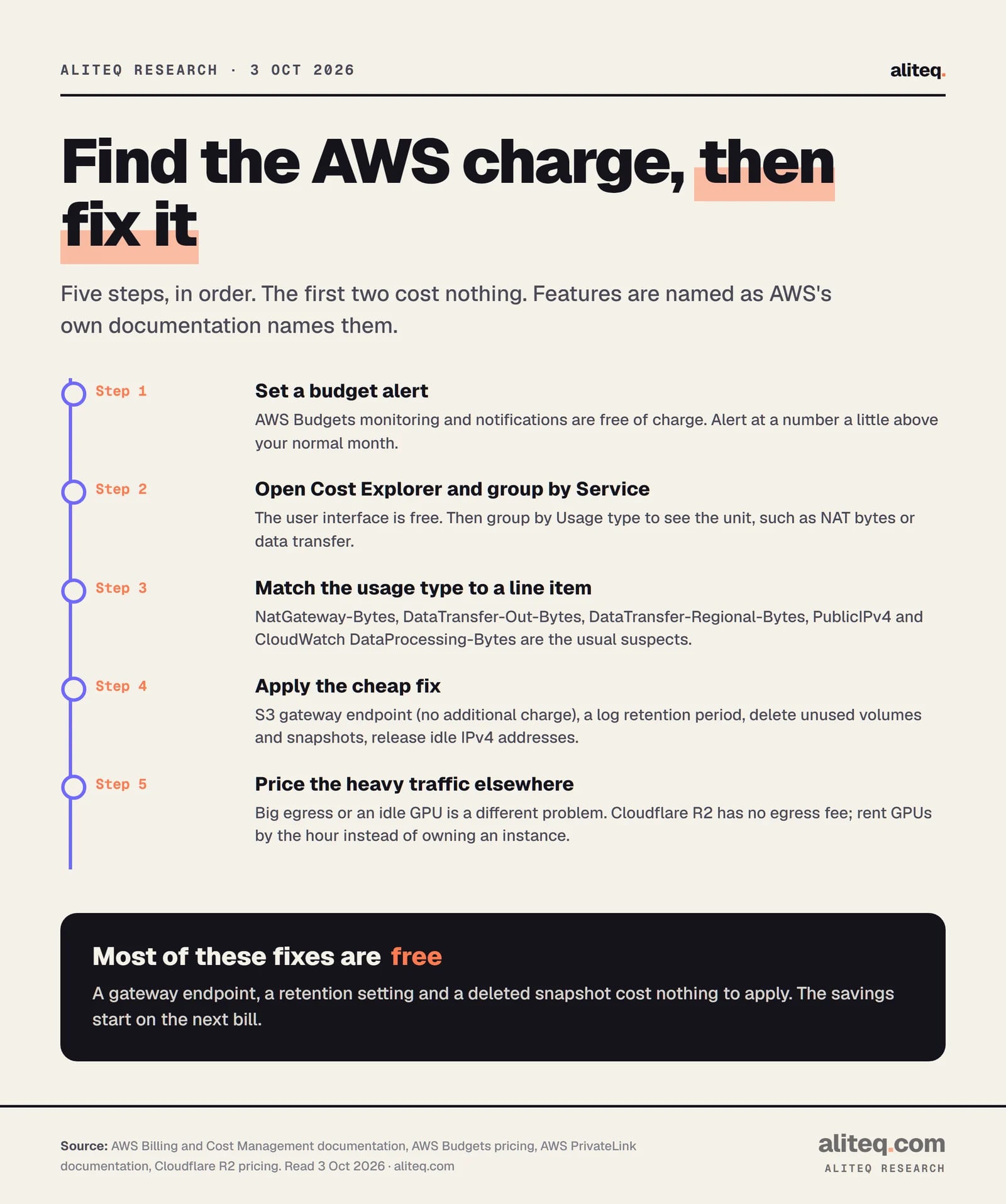
The first two steps cost nothing. · aliteq research
Which AWS tools warn you before the bill arrives?
AWS Budgets is the one with a published price, and monitoring is free. AWS's Budgets pricing page says: "You can monitor and receive notifications on your budgets free of charge." If you add actions to a budget, such as applying permissions or stopping resources, "Your first two action-enabled budgets are free", and each one after that is $0.10 a day. Budgets Reports are $0.01 each.
AWS Cost Anomaly Detection uses machine learning to "detect and alert on anomalous spend patterns". It sends alerts by email or an Amazon SNS topic, runs "approximately three times a day", and ranks root causes by dollar impact across service, account, Region and usage type. I could not find a published price for it on any AWS page I read, so I am not going to tell you it is free. Check the console before you rely on it.
My suggestion, from the arithmetic and not from running an AWS account: set one budget alert a little above your normal month, and look at Cost Explorer once a week for the first month. A line that jumps shows up in days, not at invoice time.
So what should you check first?
Start with the lines that grow without anyone deciding to grow them:
NAT gateway data. If it is large and mostly S3, a gateway endpoint is a free fix.
CloudWatch Logs ingest. Set a retention period and cut debug logging.
Idle resources. Unattached Elastic IPs ($3.65 each), unused volumes, old snapshots, forgotten test servers.
Data out. If you serve large files, price R2 or B2 for those files.
GPU instances. Set a reminder or an automatic shutdown, and compare renting.
Usually a traffic or storage line, not the servers. The common ones are NAT gateway data, data transfer out to the internet, CloudWatch Logs ingest, and a forgotten GPU or database. In Cost Explorer, compare this month with last month grouped by Service, then by Usage type, to find the line that moved.
How much does a NAT gateway cost per month?
In US East it is $0.045 an hour, $32.85 for a 730-hour month, plus $0.045 per GB it processes. One TB through it adds $46.08, for $78.93 in total. AWS also charges normal data transfer for traffic that goes out through it.
How much does a public IPv4 address cost on AWS?
$0.005 an hour, $3.65 a month, per address, and the price is the same whether the address is in use or idle. Ten addresses are $36.50 a month. An Elastic IP you allocated but never attached is billed as an idle address until you release it.
Is data transfer into AWS free, and how much does data out cost?
The 100 GB a month of free data transfer out to the internet is aggregated across all services and Regions. After that, US East is $0.09 per GB for the next 10 TB, so 1 TB out is $83.16. Traffic between zones is $0.01 per GB in each direction.
How do I find which service is driving my AWS costs?
Open Cost Explorer, group by Service, then group by Usage type, and read the usage type names such as NatGateway-Bytes, DataTransfer-Out-Bytes or PublicIPv4. The Cost Explorer interface is free. Cost and Usage Reports give resource-level detail in an S3 bucket you own.
Can I get an alert before the bill gets big?
Yes. AWS Budgets monitoring and notifications are free of charge, and you can alert when actual or forecast spend crosses a threshold. AWS Cost Anomaly Detection also alerts on unusual spend, but I did not find a published price for it, so confirm the charge in the console.