A locked copy that ransomware cannot delete is the cheap part of a modern backup plan, unless you pick the wrong storage. Monthly bills for Backblaze B2, Wasabi, AWS S3, Cloudflare R2 and Hetzner at three sizes, with the minimum-storage and restore charges that change the answer. Prices read from each vendor on 3 October 2026.
If you only remember one thing about ransomware and backups, make it this: attackers go after the backups first. A copy they cannot delete or overwrite is what turns a very bad week into a restore job. This page prices that copy at three sizes and shows where each storage service charges you in ways the headline price hides.
I should be clear about where I stand. From 2019 to 2024 I ran Aliteq, a PC hardware shop in Kathmandu, building, repairing and selling machines, and drives failing is simply part of that life. Today Aliteq is a US-based company and I build AI apps. aliteq.com's own data lives in Supabase and Cloudflare R2. I have never run backups for clients, so nothing here is a war story or a restore test. It is arithmetic on each vendor's published prices and documentation, with every formula shown so you can swap in your own numbers.
What does 3-2-1-1-0 actually mean?
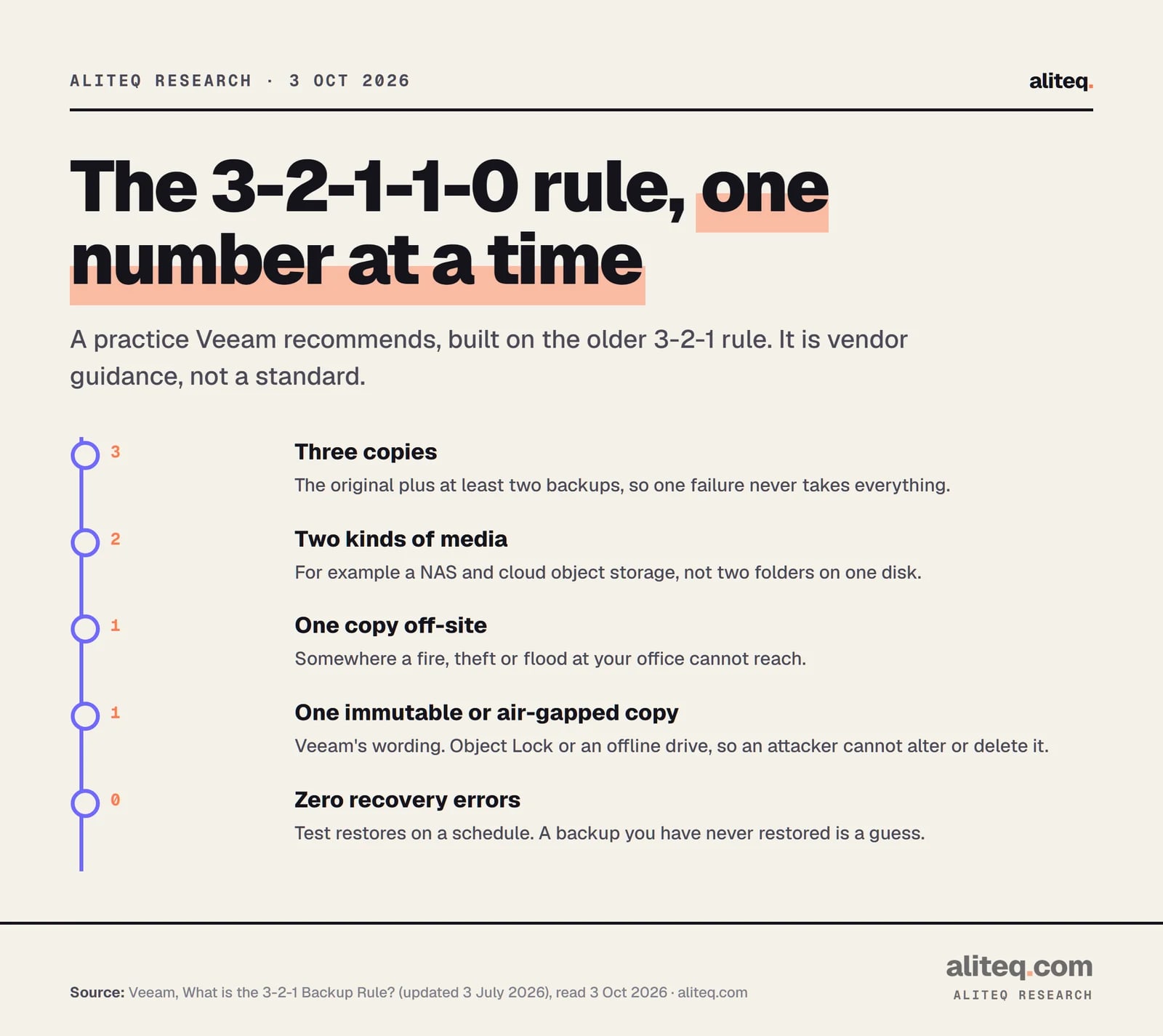
It means three copies of your data, on two kinds of media, with one copy off-site, one copy that is immutable or air-gapped, and zero errors when you test a restore. It is a practice popularized by backup vendors, not a standard. Veeam's own explainer, updated 3 July 2026, says: "Veeam recommends the 3-2-1-1-0 rule. You still keep three copies, on two media, with one off-site. But now you add one immutable or air-gapped copy so attackers can't alter or delete your backups. You aim for zero recovery errors."
Read the wording closely. The extra "1" is "immutable or air-gapped", so a drive that sits in a drawer, offline, also counts. The "0" is a testing habit: Veeam points to its own automated SureBackup testing, but the idea works with any tool if you restore on a schedule. The older 3-2-1 rule, as the same page describes it, is three copies, two media types and one off-site.
The rule as Veeam describes it. Vendor guidance, not a standard. · aliteq research
How does immutability work on cloud storage?
You tell the storage service to refuse deletes and overwrites on an object until a date you set, and the service enforces it even against your own admin account. On S3-compatible services this is called Object Lock. It usually has two modes: governance, where people with special permission can still override it, and compliance, where nobody can until the date passes.
Here is what each provider's own documentation says today.
Backblaze B2. Object Lock supports governance and compliance modes with retention "between one and 3,000 days", plus legal hold. Deleting or changing a locked file before the date fails. Compliance-mode retention "cannot be removed by any user", though the date can be extended. Backblaze states: "There is no extra cost to use Object Lock. However, you are responsible for the normal charges that are associated with storing the locked file."
Wasabi. It offers Object Lock with governance and compliance modes, and a separate bucket-level Compliance feature. Wasabi's docs say the two are mutually exclusive, that versioning must be enabled before locking, and that once Compliance is locked on it cannot be unlocked without Wasabi support. Its FAQ says: "Any storage (immutable or not) will be charged as active storage."
AWS S3. Object Lock uses a write-once-read-many model. In compliance mode a locked version "can't be overwritten or deleted by any user, including the root user in your AWS account." It needs bucket versioning. I did not find a separate Object Lock fee on the documentation page I read, so confirm in AWS's price list before you rely on that.
Cloudflare R2. R2 has bucket locks, which "prevent the deletion and overwriting of objects in an R2 bucket for a specified period, or indefinitely". Rules apply by prefix, and the longest rule wins. The docs also describe how to remove rules through the dashboard, Wrangler or the API, and I did not see a compliance mode described, so treat the token that can edit bucket configuration as a key to the vault.
Hetzner Object Storage. Hetzner's docs list how-to guides for Object Lock retention and legal hold.
Hetzner Storage Box. This is an SFTP, Borg, restic and rclone style box, not an S3 service, so S3 Object Lock does not apply. Hetzner's page describes snapshots as a way to restore the box. It does not describe them as locked, so I would not count them as your immutable copy.
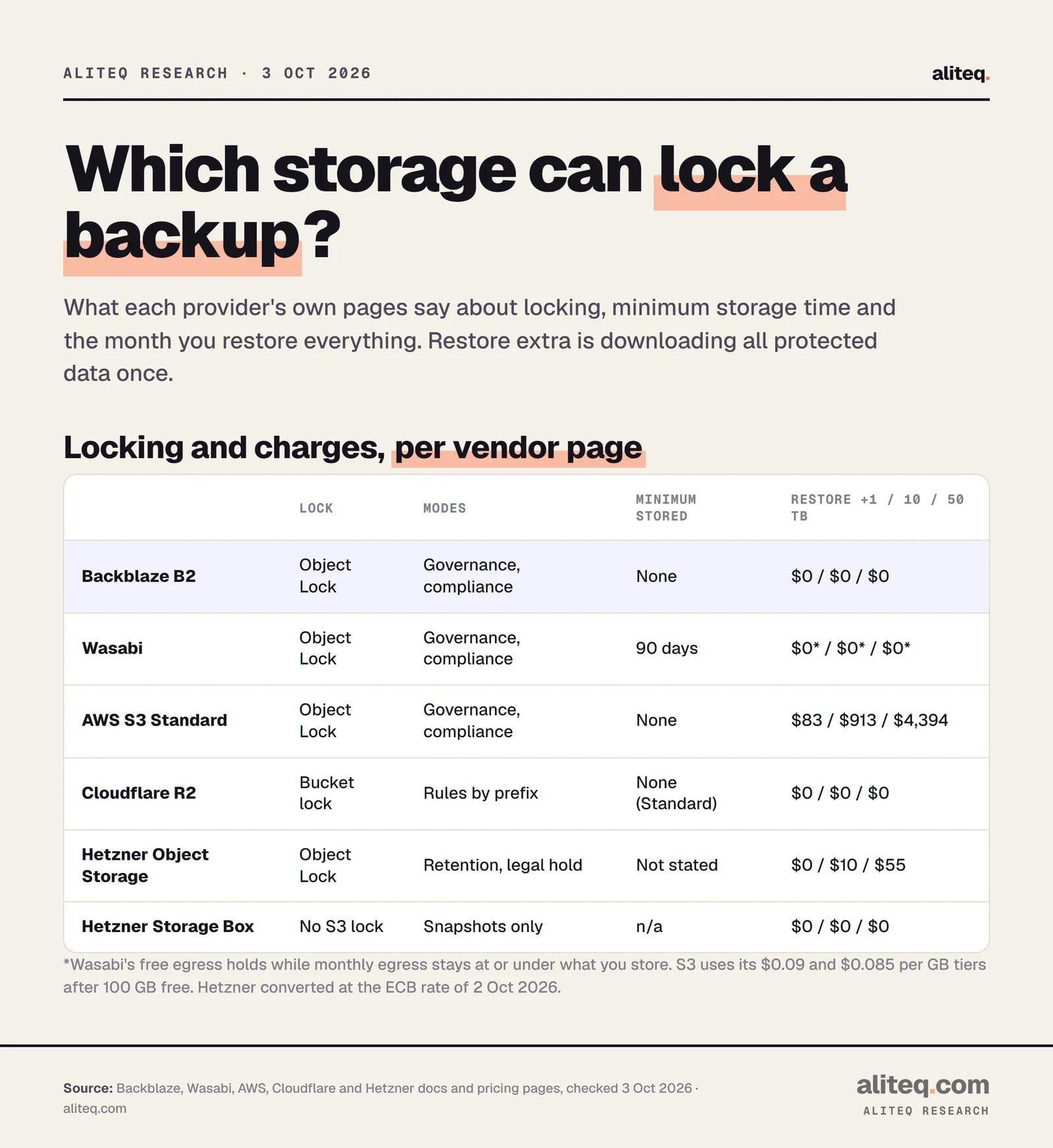
Locking, minimum storage time and restore extras at 1, 10 and 50 TB. Hetzner converted at the ECB rate of 2 Oct 2026. · aliteq research
One practical point before the money. The lock period has to cover how long your backup software needs each block. If it merges old restore points and tries to delete a locked object, the delete fails. Backblaze's docs note that integrations such as Veeam ask you how long to lock files, so read your tool's Object Lock page before you choose the number.
What are the assumptions behind the prices?
We model a protected data set of 1, 10 or 50 TB with no growth, 30 daily and 12 monthly restore points, and a 3% daily change rate. The 3% is our assumption. Yours will differ, and the formulas below let you replace it.
Stored data = protected data x 2.23. That is 1 for the full copy, plus 30 x 3% = 0.90 for the daily window, plus 11 older monthly points x 3% = 0.33, where we assume each older monthly point keeps one day's worth of changed data. So 1, 10 and 50 TB protected means 2.23, 22.3 and 111.5 TB stored.
Other rules we applied:
Units. B2, Wasabi and Hetzner price per TB as the vendor shows. S3 and R2 price per GB, and we use 1 TB = 1,024 GB, as in our AWS bill guide.
Wasabi's 90-day minimum. Wasabi bills deleted data until it has been stored 90 days. Daily-window data is deleted after 30 days, so it is billed three times over: 1 + 3 x 0.90 + 0.33 = 4.03x instead of 2.23x.
Not modeled. Request charges (S3 PUTs, R2 operations), tax, software, and versioning overhead beyond the model.
How much does it cost a month at 1 TB, 10 TB and 50 TB?
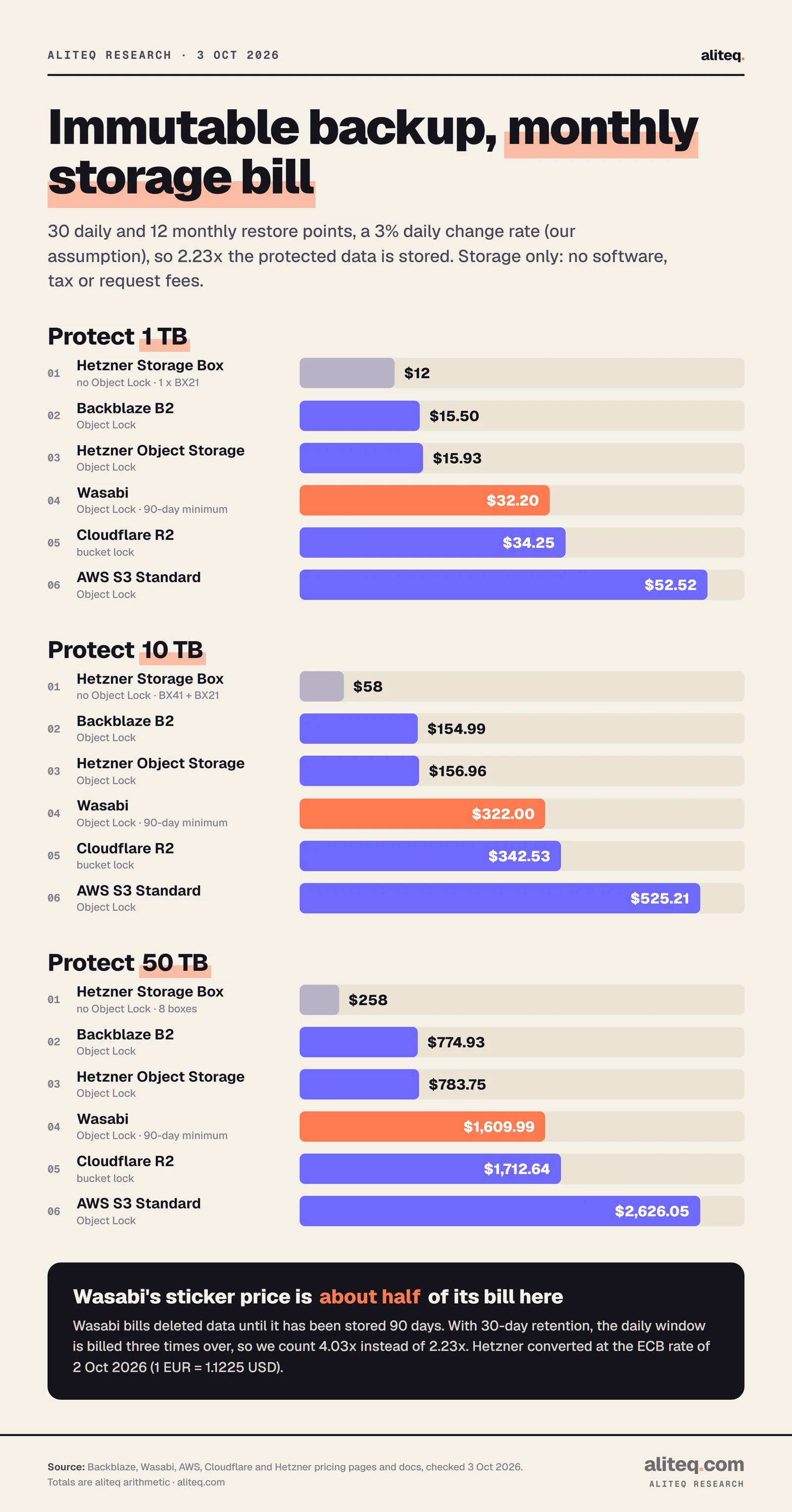
Backblaze B2 and Hetzner Object Storage are the cheapest storage with Object Lock, and AWS S3 Standard is the most expensive. For 10 TB protected, B2 is 22.3 x $6.95 = $154.99 a month and S3 is 22.3 x 1,024 x $0.023 = $525.21.
Backblaze B2
Formula
stored TB x $6.95
1 TB
$15.50
10 TB
$154.99
50 TB
$774.93
Hetzner Object Storage
Formula
EUR 6.49 + (stored TB - 1) x EUR 6.26, x 1.1225
1 TB
$15.93
10 TB
$156.96
50 TB
$783.75
Wasabi
Formula
4.03 x protected TB x $7.99
1 TB
$32.20
10 TB
$322.00
50 TB
$1,609.99
Cloudflare R2
Formula
stored TB x 1,024 x $0.015
1 TB
$34.25
10 TB
$342.53
50 TB
$1,712.64
AWS S3 Standard
Formula
stored TB x 1,024 x $0.023
1 TB
$52.52
10 TB
$525.21
50 TB
$2,626.05
Hetzner Storage Box (no Object Lock)
Formula
cheapest boxes covering stored TB, EUR x 1.1225
1 TB
$12.24
10 TB
$57.81
50 TB
$258.40
Formula
1 TB
10 TB
50 TB
Backblaze B2
stored TB x $6.95
$15.50
$154.99
$774.93
Hetzner Object Storage
EUR 6.49 + (stored TB - 1) x EUR 6.26, x 1.1225
$15.93
$156.96
$783.75
Wasabi
4.03 x protected TB x $7.99
$32.20
$322.00
$1,609.99
Cloudflare R2
stored TB x 1,024 x $0.015
$34.25
$342.53
$1,712.64
AWS S3 Standard
stored TB x 1,024 x $0.023
$52.52
$525.21
$2,626.05
Hetzner Storage Box (no Object Lock)
cheapest boxes covering stored TB, EUR x 1.1225
$12.24
$57.81
$258.40
The prices behind these formulas, read on 3 October 2026: B2 shows "Starts at $6.95 / TB / mo" and "No minimum file size or storage duration fees". Wasabi is $7.99 per TB a month. S3 Standard is $0.023 per GB-month. R2 Standard is $0.015 per GB-month. Hetzner Object Storage shows a EUR 6.49 base that includes 1 TB of storage and 1 TB of outgoing traffic, with extra storage at EUR 6.26 per TB.
For the Storage Box row, Hetzner's page shows BX11 at EUR 3.20 (1 TB), BX21 at EUR 10.90 (5 TB), BX31 at EUR 20.80 (10 TB) and BX41 at EUR 40.60 (20 TB), with unlimited traffic. At 1 TB protected we price one BX21, at 10 TB a BX41 plus a BX21, and at 50 TB five BX41, a BX31 and two BX11. A box also includes a fixed number of snapshots, 10 on a BX11 up to 40 on a BX41, which is a limit to check against your restore points if you rely on them rather than on your backup tool's own versioning.
Monthly storage only. 30 daily and 12 monthly points, 3% daily change (our assumption). · aliteq research
Why does Wasabi cost about double its sticker price here?
Because of the 90-day minimum. Wasabi's FAQ says that if objects are deleted before they have been stored for 90 days on pay-as-you-go, you are charged for the remaining days as Timed Deleted Storage. Its own example is a deleted file billed for "1 day of active storage and 29 or 89 days of deleted storage". With a 30-day daily window, our model counts the daily data three times, which gives 4.03x instead of 2.23x. If you kept your daily points for 90 days, the penalty would disappear, and the same data would cost 2.23 x $7.99 = $17.82 a month at 1 TB. Wasabi also has a 1 TB monthly minimum charge, which does not bind at these sizes, and a 4 KB minimum object size.
What do request fees and versioning add?
Not much on B2 and Wasabi, more on S3 and R2. B2 says its API calls are free for pay-as-you-go customers. S3 charges $0.005 per 1,000 PUT, COPY, POST or LIST requests, and R2 charges $4.50 per million Class A operations. A backup tool that uploads many small objects can make that visible, so check your tool's object size before you commit. We left requests out of the table.
What does it cost to restore everything?
Restore cost is the line that separates the providers. Downloading all 10 TB from S3 costs about $912.60 in egress, while B2, R2 and Wasabi add nothing under their published rules.
Backblaze B2
Extra at 1 TB
$0
Extra at 10 TB
$0
Extra at 50 TB
$0
Rule and formula
Free egress up to 3x average stored; we store 2.23x
Wasabi
Extra at 1 TB
$0
Extra at 10 TB
$0
Extra at 50 TB
$0
Rule and formula
Free while monthly egress is at or under active storage
Cloudflare R2
Extra at 1 TB
$0
Extra at 10 TB
$0
Extra at 50 TB
$0
Rule and formula
"No charges for egress bandwidth"
Hetzner Storage Box
Extra at 1 TB
$0
Extra at 10 TB
$0
Extra at 50 TB
$0
Rule and formula
Traffic listed as unlimited
Hetzner Object Storage
Extra at 1 TB
$0
Extra at 10 TB
$10.10
Extra at 50 TB
$55.00
Rule and formula
(TB - 1 included) x EUR 1.00 x 1.1225
AWS S3 Standard
Extra at 1 TB
$83.16
Extra at 10 TB
$912.60
Extra at 50 TB
$4,394.20
Rule and formula
100 GB free, then $0.09 per GB, $0.085 above 10 TB
Extra at 1 TB
Extra at 10 TB
Extra at 50 TB
Rule and formula
Backblaze B2
$0
$0
$0
Free egress up to 3x average stored; we store 2.23x
Wasabi
$0
$0
$0
Free while monthly egress is at or under active storage
Cloudflare R2
$0
$0
$0
"No charges for egress bandwidth"
Hetzner Storage Box
$0
$0
$0
Traffic listed as unlimited
Hetzner Object Storage
$0
$10.10
$55.00
(TB - 1 included) x EUR 1.00 x 1.1225
AWS S3 Standard
$83.16
$912.60
$4,394.20
100 GB free, then $0.09 per GB, $0.085 above 10 TB
The S3 formulas: 1 TB is (1,024 - 100) x $0.09 = $83.16. 10 TB is (10,240 - 100) x $0.09 = $912.60. For 50 TB we apply the next tier: 10,140 x $0.09 + 40,960 x $0.085 = $4,394.20. Where you place the free 100 GB inside the tier changes that by less than a dollar. AWS's price file lists the tiers at $0.09 for the first 10 TB and $0.085 for the next 40 TB. Our AWS bill guide has the full egress rules.
Two fine-print notes. B2's free egress above 3x stored goes to $0.01 per GB, so a restore of more than three times what you store is unusual but not free. Wasabi's FAQ says free egress fits when monthly egress is at or under active storage and that it reserves the right to limit or suspend, so a full restore of everything you store is inside the policy, and repeated large restores are not.
What does the software cost?
Software is often the smaller number. Veeam Data Platform Essentials is $475 per pack of five workloads per year on its store, which is $39.58 a month. It is licensed per workload and sold in packs of five up to 50 workloads. The store showed me $593.75 when its region setting added 25% VAT, and 593.75 / 1.25 = 475, so $475 is the pre-tax figure.
Veeam Backup & Replication Community Edition: free, and the page directs anyone who needs more than 10 workloads to the paid options.
restic: free and open source (BSD 2-Clause licence).
Kopia: free and open source (Apache 2.0).
Duplicati: free and open source (MIT licence). An optional Duplicati console is free for up to 2 machines, then $2 per machine a month on annual billing or $2.50 monthly.
Synology Hyper Backup: its page lists backups to local volumes, other Synology systems, rsync servers and S3 storage, with AES-256 encryption, deduplication and integrity checks. It runs on a Synology NAS, and I found no price on the page.
I did not verify which of these tools can set Object Lock on which backend, so check your tool's documentation before you buy storage for it. For Microsoft 365 data specifically, see our Microsoft 365 backup pricing comparison.
How should a small business put it together?
Keep a fast local copy, add one locked cloud copy, and test a restore. A reasonable shape is your live data, a local copy on a NAS or external drive (our NAS drive price guide covers the hardware), and an Object Lock copy in the cloud. That is three copies, two kinds of media, one off-site and one immutable.
Pick the cloud copy by your restore plan, not the storage price alone:
Mostly storing, rarely restoring, want the lowest bill: B2 or Hetzner Object Storage were within $9 of each other at 50 TB in our model.
Already on AWS and want one bill: S3 works, but at 50 TB it costs 3.4x B2 and a full restore adds about $4,394.
Want no restore surprise and already use Cloudflare: R2 charges nothing for egress. Protect the API token that can edit bucket locks.
Considering Wasabi: match your daily retention to 90 days or accept the minimum-storage charge.
Last, schedule the "0". Restore a folder and a full machine on a calendar date, write down how long it took, and fix what failed. Veeam's rule is about verified recovery, not about having files somewhere. If your wider IT spend is the worry, see what managed IT services cost per user, and for the other side of the infrastructure bill, the Cloud & IT Infrastructure guide. If a loss has already happened, backups and losing everything covers what that looks like.
Quick answers
What is the 3-2-1-1-0 backup rule?
Three copies of your data, on two kinds of media, with one copy off-site, one immutable or air-gapped, and zero errors when you test restores. Veeam recommends it as an upgrade of the older 3-2-1 rule. It is vendor-popularized guidance, not a formal standard.
How much does an immutable backup cost per month?
Under our model, 1 TB of protected data costs $15.50 a month on Backblaze B2 and $52.52 on AWS S3. At 10 TB it is $154.99 on B2 and $525.21 on S3, and at 50 TB it is $774.93 and $2,626.05. The model assumes 30 daily and 12 monthly restore points and a 3% daily change rate, both ours.
Does Object Lock cost extra?
Backblaze says there is no extra cost for Object Lock beyond the normal charges for storing the locked files. Wasabi says immutable storage is charged as active storage. For AWS I did not find a separate Object Lock fee on the documentation page, so confirm in AWS's price list.
What is Wasabi's 90-day minimum, and why does it matter?
If objects are deleted before they have been stored 90 days on pay-as-you-go, Wasabi bills the remaining days as deleted storage. With 30-day retention on daily restore points, that roughly doubles the bill versus the $7.99 per TB sticker price in our model.
Is a Hetzner Storage Box an immutable backup?
Not by what Hetzner's page says. A Storage Box is not an S3 service, so S3 Object Lock does not apply, and its snapshots are described as a restore feature rather than a locked copy. It is cheap, so it suits the local or second copy, with a locked copy elsewhere.
What does it cost to restore 10 TB from the cloud?
From AWS S3 Standard, about $912.60 in data transfer out. From Backblaze B2, Cloudflare R2 and Wasabi, nothing extra under their published rules, as long as you stay within B2's 3x-stored allowance and Wasabi's fair-use policy. Hetzner Object Storage adds about $10.10 beyond its included 1 TB.