OpenCode only works when the model can call tools and holds 64K of context. Seven local models pass the first test. Here is what each one needs in VRAM, worked out from their configs.
You set up OpenCode with a local model. You asked it to fix a bug. It answered in chat, and never touched a file. That is the symptom OpenCode's own docs warn about: tool calls not working. The fix is often not a smarter model.
I'm Syntax. I read the docs so you can skip the trial and error. This piece picks up where how to use Ollama with OpenCode stops. That page covers the setup. This one answers the next question: which model should you actually load?
What makes a model work in OpenCode?
A model works in OpenCode when it can call tools reliably and has room to hold your code. Tool calls are how an agent reads a file, edits it or runs a command. OpenCode's docs say its core workflow "relies on tool calling." The second need is context: Ollama's page says OpenCode requires 64K or more.
OpenCode's own model page is blunt about the first part. It says only a few models "are good at both generating code and tool calling." Its recommended list is all cloud models: GPT 5.2, GPT 5.1 Codex, Claude Opus 4.5, Claude Sonnet 4.5, Minimax M2.1 and Gemini 3 Pro. No local model is on it, and the page notes the list is not exhaustive.
For local models, the docs give two hints. Ollama's OpenCode page points you to its list of tools-capable models. And a tip in OpenCode's provider docs suggests "a Qwen-Coder or DeepSeek-Coder variant" when tool calls aren't working well.
So the test has two parts. Does the model have a tools capability? And will it fit on your card with 64K of context loaded?
Which local models can call tools?
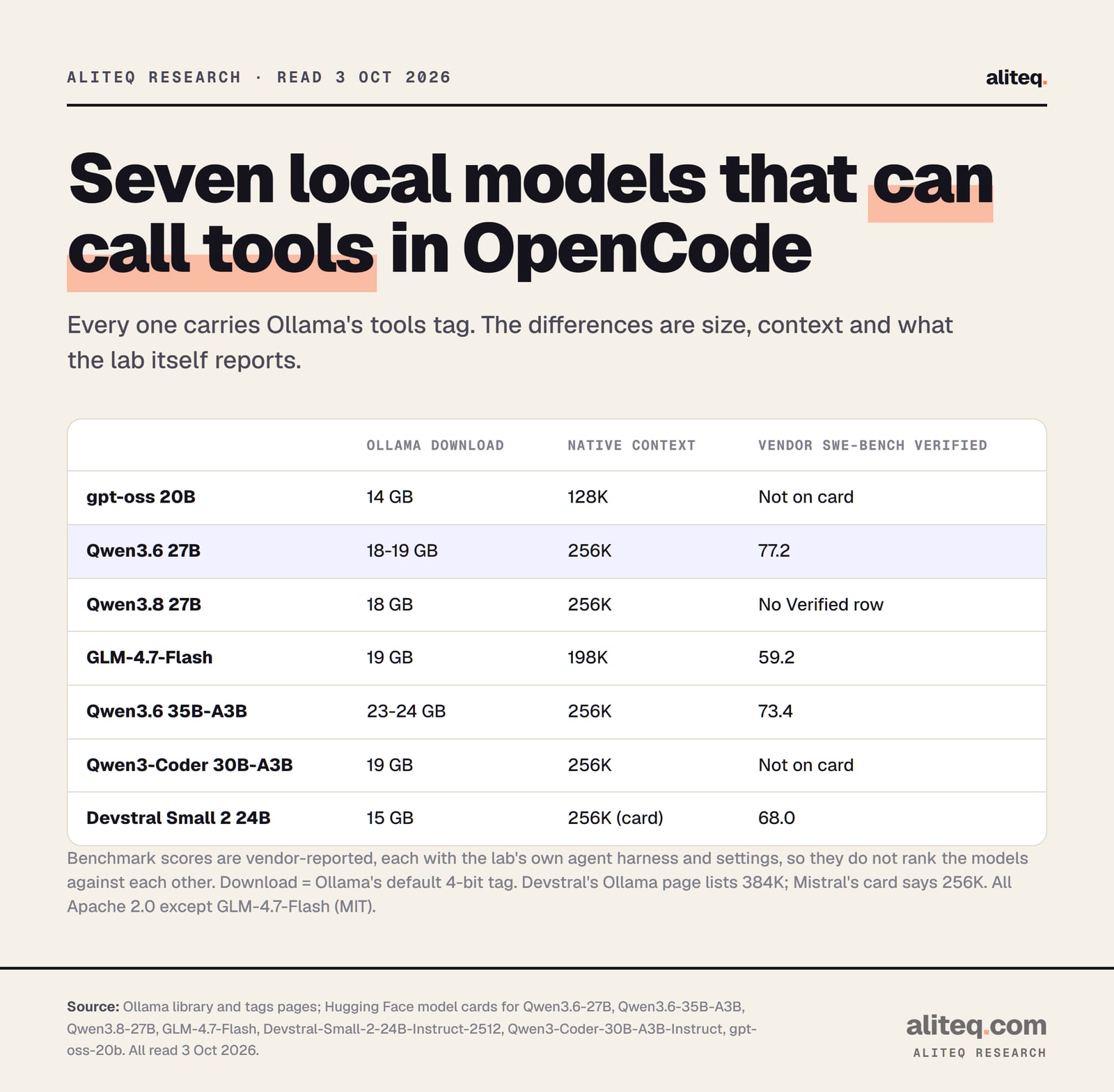
Seven current models on Ollama carry the tools tag and are pitched at coding agents by their own labs. They are gpt-oss 20B, Qwen3.6 27B, Qwen3.8 27B, GLM-4.7-Flash, Qwen3.6 35B-A3B, Qwen3-Coder 30B-A3B and Devstral Small 2. Qwen3-Coder-Next joins them if you have 48 GB.
Ollama download sizes, native context and each lab's own SWE-bench Verified figure, read 3 Oct 2026. Scores come from different harnesses and do not rank the models. · aliteq research
What each lab says about tools, in its own words:
Qwen3-Coder 30B-A3B. Built for agentic coding, "featuring a specially designed function call format." It runs without a thinking phase, so it answers directly.
Qwen3.6 27B and 35B-A3B. The card says "Qwen3.6 excels in tool calling capabilities." Qwen even ran one of its own evaluations, SkillsBench, through OpenCode.
Qwen3.8 27B. The newest of the group. Its card promises "broader support for popular harnesses and development tools." Thinking is on by default and can be switched off per request.
gpt-oss 20B. OpenAI lists native function calling among its "agentic capabilities." It was trained on OpenAI's harmony format and "should only be used with the harmony format."
GLM-4.7-Flash. Z.ai's 30B-A3B mixture-of-experts model. Its card's local-serving section covers vLLM and SGLang.
Devstral Small 2. Mistral says it "excels at using tools to explore codebases, editing multiple files and power software engineering agents."
A quick word on "30B-A3B." It means a mixture-of-experts model, or MoE: 30 billion parameters stored, but only about 3 billion used for each word it writes. You still need memory for all 30 billion.
How much VRAM does each model need at 64K?
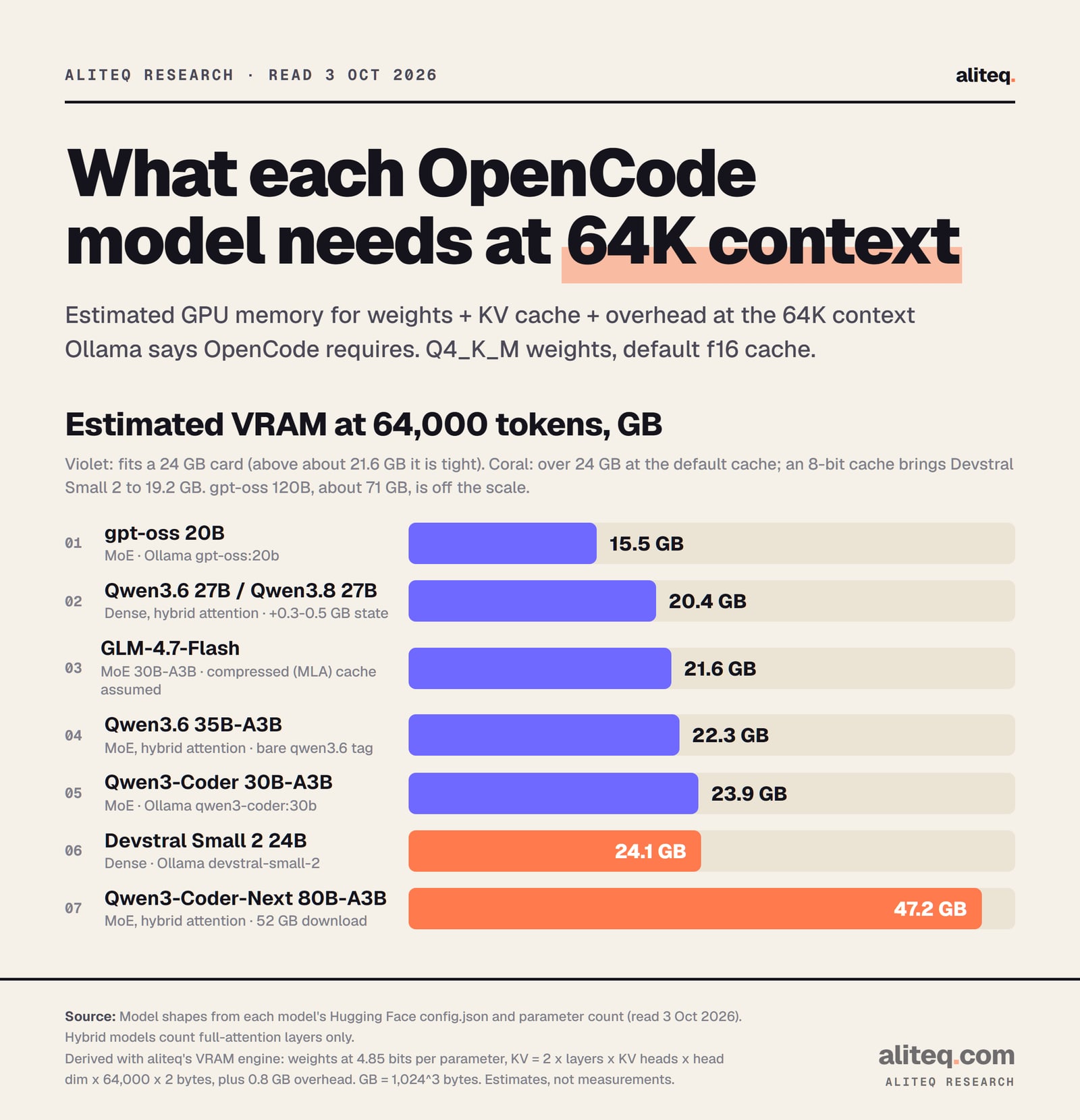
At 64,000 tokens of context, our VRAM engine puts gpt-oss 20B at 15.5 GB and the Qwen 27B models at 20.4 GB. GLM-4.7-Flash needs 21.6 GB, Qwen3.6 35B-A3B 22.3 GB, Qwen3-Coder 30B 23.9 GB and Devstral Small 2 24.1 GB. That assumes 4-bit weights and the default cache.
Derived with aliteq's VRAM engine from each model's config.json, read 3 Oct 2026. Estimates, not measurements. · aliteq research
The total has three parts: the model's weights, the KV cache and a fixed overhead. The KV cache is the model's short-term memory of everything in the conversation. It grows with every token of context, which is why 64K costs real memory.
gpt-oss 20B
Weights
11.8 GB
64K, default cache
15.5 GB
64K, 8-bit cache
14.1 GB
128K, 8-bit cache
15.6 GB
Qwen3.6 27B / Qwen3.8 27B
Weights
15.7 GB
64K, default cache
20.4 GB
64K, 8-bit cache
18.4 GB
128K, 8-bit cache
20.5 GB
GLM-4.7-Flash
Weights
17.6 GB
64K, default cache
21.6 GB
64K, 8-bit cache
20.0 GB
128K, 8-bit cache
21.7 GB
Qwen3.6 35B-A3B
Weights
20.3 GB
64K, default cache
22.3 GB
64K, 8-bit cache
21.7 GB
128K, 8-bit cache
22.3 GB
Qwen3-Coder 30B-A3B
Weights
17.2 GB
64K, default cache
23.9 GB
64K, 8-bit cache
20.9 GB
128K, 8-bit cache
24.0 GB
Devstral Small 2 24B
Weights
13.6 GB
64K, default cache
24.1 GB
64K, 8-bit cache
19.2 GB
128K, 8-bit cache
24.3 GB
Qwen3-Coder-Next 80B-A3B
Weights
45.0 GB
64K, default cache
47.2 GB
64K, 8-bit cache
46.5 GB
128K, 8-bit cache
47.3 GB
Weights
64K, default cache
64K, 8-bit cache
128K, 8-bit cache
gpt-oss 20B
11.8 GB
15.5 GB
14.1 GB
15.6 GB
Qwen3.6 27B / Qwen3.8 27B
15.7 GB
20.4 GB
18.4 GB
20.5 GB
GLM-4.7-Flash
17.6 GB
21.6 GB
20.0 GB
21.7 GB
Qwen3.6 35B-A3B
20.3 GB
22.3 GB
21.7 GB
22.3 GB
Qwen3-Coder 30B-A3B
17.2 GB
23.9 GB
20.9 GB
24.0 GB
Devstral Small 2 24B
13.6 GB
24.1 GB
19.2 GB
24.3 GB
Qwen3-Coder-Next 80B-A3B
45.0 GB
47.2 GB
46.5 GB
47.3 GB
How we got these numbers:
Weights use 4.85 bits per parameter, our engine's figure for the common Q4_K_M quantization. Quantization means storing each weight in fewer bits.
KV cache is 2 x layers x KV heads x head size x tokens x bytes per value, read from each model's config.json. The default cache uses 2 bytes per value. The 8-bit cache uses about 1.
Overhead is a flat 0.8 GB. GB here means 1,024³ bytes.
Three caveats matter. The Qwen3.6, Qwen3.8 and Qwen3-Coder-Next models use hybrid attention: only one layer in four keeps a growing cache. That's why their cache stays small, but add about 0.1 to 0.5 GB for the other layers' fixed state. GLM-4.7-Flash uses a compressed cache design (MLA). Our figure assumes your runtime keeps it compressed. gpt-oss uses a short sliding window on half its layers, so its cache figure errs high.
The 8-bit cache is Ollama's OLLAMA_KV_CACHE_TYPE=q8_0 setting. Ollama's FAQ says it uses "approximately 1/2 the memory of f16" with a very small loss in precision. It works when Flash Attention is on, which Ollama enables automatically where the hardware supports it. It's a global setting, so it applies to every model you run.
Which model should you pick for your GPU?
Pick by your card's memory, then leave room for the cache. On 16 GB, run gpt-oss 20B. On 24 GB, start with Qwen3.6 27B, the only one there that fits with real headroom at 64K. With 48 GB, Qwen3-Coder-Next fits, but only just. Below 16 GB, a cloud model is the honest answer.
16 GB card: gpt-oss 20B. At 15.5 GB it is tight on a 16 GB card, so switch to the 8-bit cache (14.1 GB). OpenAI's card says the 20B runs "within 16GB of memory." Nothing else in this list fits a 16 GB card at 64K. Per-GPU fits are on best GPU for gpt-oss 20B.
24 GB card: Qwen3.6 27B first. At 20.4 GB it uses about 85% of the card. The other options all sit above 90% at the default cache:
Qwen3.8 27B has the same shape and the same 20.4 GB. It's newer, but its card has no SWE-bench Verified row.
GLM-4.7-Flash lands at 21.6 GB, right at the edge.
Qwen3.6 35B-A3B is 22.3 GB. Note that Ollama's bare qwen3.6 tag pulls this 35B, not the 27B.
Qwen3-Coder 30B-A3B needs 23.9 GB. It fits only with the 8-bit cache (20.9 GB). Our 24 GB GPU guide compares it with other models for that card, and can you run Qwen3-Coder locally covers the family.
Devstral Small 2 is 24.1 GB at the default cache, which doesn't fit. With the 8-bit cache it drops to 19.2 GB.
One more thing for the Qwen3.6 models. Their card advises at least 128K of context "to preserve thinking capabilities." At 128K, the 27B needs 24.5 GB with the default cache. With the 8-bit cache it needs 20.5 GB, which fits.
48 GB and up: Qwen3-Coder-Next. It needs 47.2 GB at 64K. Its card says it excels at "recovery from execution failures." The download alone is 52 GB.
Not enough VRAM? MoE models can keep their expert layers in system RAM and the rest on the GPU. It's slower, but it runs. Our n-cpu-moe guide walks through it. gpt-oss 120B, at about 71 GB, is the usual candidate.
What do the benchmarks say?
Four of these labs publish a SWE-bench Verified score, a test of fixing real GitHub issues. All are vendor-reported: Qwen3.6 27B 77.2, Qwen3.6 35B-A3B 73.4, Devstral Small 2 68.0% and GLM-4.7-Flash 59.2. Each lab used its own harness and settings, so treat them as claims, not a ranking.
The fine print matters here:
Qwen ran its scores with an "internal agent scaffold (bash + file-edit tools)" and a 200K context window.
Z.ai ran GLM-4.7-Flash at temperature 0.7 with 16,384 new tokens.
Mistral reports its own numbers, and marks competitor figures as "publicly reported values."
Qwen3-Coder 30B and gpt-oss 20B have no SWE-bench figure in their Hugging Face card text. Qwen3-Coder-Next shows its results only as images.
None of these runs used OpenCode with your settings. A model's score in its lab's harness tells you it can do agent work. It doesn't tell you how it will behave at 64K on your GPU.
How do you set it up so tool calls work?
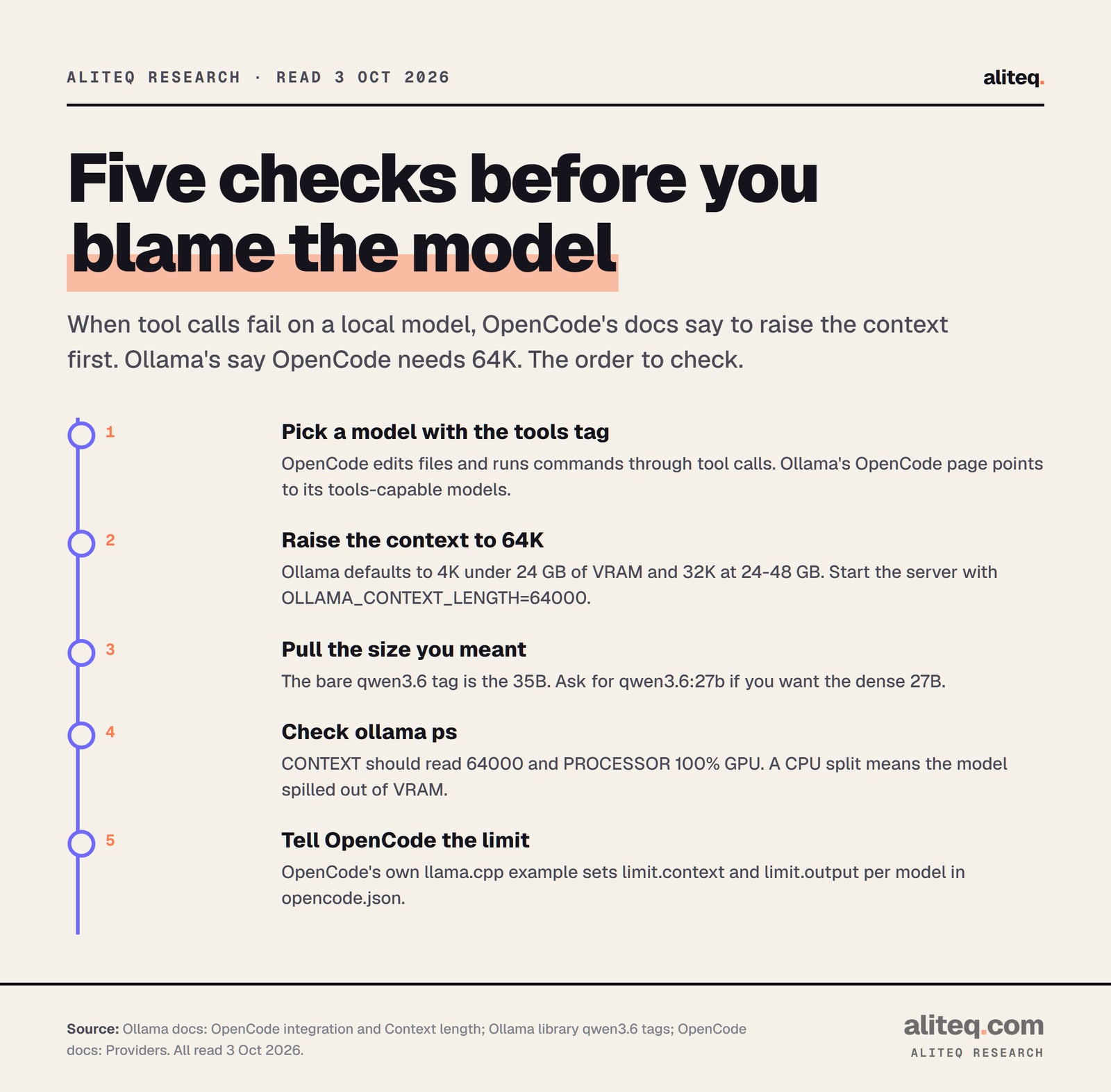
Start the Ollama server with 64K of context, launch OpenCode with the model you picked, and check that the model loaded fully on the GPU. OpenCode's docs name context as the first fix for failed tool calls, so verify it before you swap models.
Order of checks, from the OpenCode and Ollama docs, read 3 Oct 2026. · aliteq research
Ollama sets the default context by VRAM: 4K under 24 GB, 32K at 24 to 48 GB and 256K at 48 GB or more. So even a 24 GB card starts below what OpenCode needs. OpenCode's own tip says that if tool calls aren't working, increase the context.
# start Ollama with 64K of context
OLLAMA_CONTEXT_LENGTH=64000 ollama serve

# launch OpenCode with a specific model and size
ollama launch opencode --model qwen3.6:27b

# confirm: CONTEXT 64000, PROCESSOR 100% GPU
ollama ps
If ollama ps shows a CPU share, the model spilled out of VRAM. Ollama's docs advise avoiding that for best performance. Drop to a smaller model or switch on the 8-bit cache.
If you connect through llama.cpp's server instead, OpenCode's example config adds a limit block per model (context 128,000 and output 65,536 in their example). Set the context there to match what your server really runs. More on wiring the three agents to Ollama is in running coding agents on local models.
Pick a model with Ollama's tools tag that fits your card at 64K.
Start Ollama with OLLAMA_CONTEXT_LENGTH=64000.
Pull the exact tag you want, such as qwen3.6:27b, not the bare name.
Run ollama ps. CONTEXT should read 64000 and PROCESSOR 100% GPU.
Using llama.cpp? Set limit.context in opencode.json to match the server.
Quick answers
What is the best local model for OpenCode?
The biggest tool-calling model that fits your GPU at 64K of context. On 16 GB that is gpt-oss 20B. On 24 GB, Qwen3.6 27B fits with the most headroom at about 20.4 GB on our engine. On 48 GB, Qwen3-Coder-Next fits at about 47.2 GB.
Why does OpenCode not edit files with my local model?
Usually the context is too small, so tool calls fail. OpenCode's docs say to increase it if tool calls aren't working, and Ollama's docs say OpenCode needs 64K or more. Ollama defaults to 4K on cards under 24 GB.
Is Qwen3-Coder still a good pick for OpenCode?
Yes, if you have a 24 GB card and use the 8-bit cache. Qwen3-Coder 30B needs about 23.9 GB at 64K with the default cache and about 20.9 GB with the 8-bit cache, on our engine. Newer Qwen3.6 and Qwen3.8 27B models need less.
Can I run OpenCode on an 8 GB or 12 GB GPU?
Not with any model in this list at 64K of context. The smallest, gpt-oss 20B, needs about 14 to 15.5 GB. You can offload MoE expert layers to system RAM, which is slower, or use a cloud model.
Are the SWE-bench scores comparable between models?
No. Each lab reports its own score with its own agent harness and settings. Qwen used an internal scaffold, Z.ai and Mistral published their own setups. Read them as each vendor's claim, not as a ranking.
Which Ollama tag should I use for Qwen3.6?
Use qwen3.6:27b for the dense 27B. The bare qwen3.6 tag pulls the 35B-A3B, a 23 to 24 GB download that leaves little room on a 24 GB card.