NVIDIA16 GB VRAMDesktop
RTX 5060 Ti 16GB, what it runs and what it costs to rent
Specs checked · Rental prices from · By Ari Vale · How we compute this
This page has referral links: we earn a commission if you buy, at no cost to you.
The short answer
The NVIDIA GeForce RTX 5060 Ti 16GB has 16 GB of VRAM and 448 GB/s of memory bandwidth (2025). At Q4_K_M quality or better with an 8K context it runs 22 of the open models we track; the largest that fits with room to spare is Ternary Bonsai 2.5 27B. To rent one right now: from $0.107/hr (Vast.ai, on demand), typical $0.14/hr on demand (Vast.ai's median listing).
- VRAM
- 16 GB
- Bandwidth
- 448 GB/s
- Board power
- 180 W
- Launched
- 2025
for model weights
sets tokens per second
at full load
1 year on the market
Source: NVIDIA specification · bandwidth not yet confirmed by a second source, so we don't estimate speed from it
Rent or buy?
Rent the RTX 5060 Ti or buy one
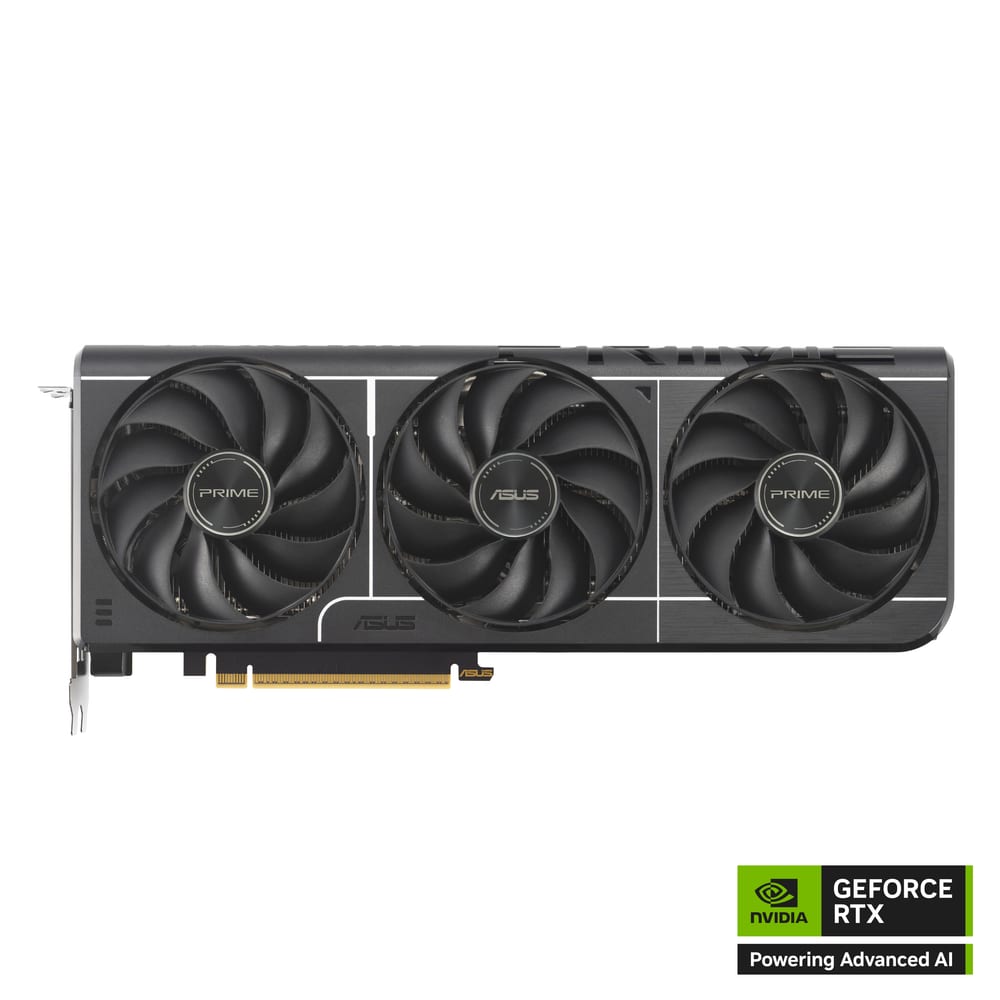
ASUS Prime GeForce RTX 5060 Ti 16GB
New, from Amazon. Check the exact model says 16 GB before you buy.
Best for The 1440p gaming sweet spot; local models up to about 14B at Q4, more with MoE offload.
| Provider | Type | From, per hour | Rent |
|---|---|---|---|
| Vast.aiCheapest | Spot (can be interrupted) | $0.067/hr | Vast.ai |
| Vast.ai | On demand | $0.107/hr | Vast.ai |
| Lium | On demand | $0.120/hr | Lium |
| Lium | Spot (can be interrupted) | $0.140/hr | Lium |
Lowest price per provider in our hourly snapshot (). Rent buttons are referral links. Every card side by side: cloud GPU prices. Every card on Vast: Vast.ai GPU prices today.
Our Vast referral code: 623346 (link: https://cloud.vast.ai/?ref_id=623346). New users get no bonus from it; we earn 3% of what referred users spend (Vast's referral program docs).
Before you rent the RTX 5060 Ti: Runpod vs Vast.ai vs Lambda · is Vast.ai safe · is Runpod worth it · rent or buy · what NVFP4 gives a Blackwell card · every AI GPU's buy and rent price.
Is now a good time to rent the RTX 5060 Ti?
A normal priceToday's typical on-demand price is about where it has been over the last 25 days.
cheapest daypriciest day
- Now vs usualThe typical on-demand price is $0.136/hr now, in line with its median since Nov 2 of $0.136/hr.
- Lowest since Nov 2Lowest typical on-demand price since Nov 2: $0.125/hr on Nov 6 (Vast.ai).
- Last 7 daysOver the last 7 days the typical on-demand price has been stable (within 5%).
- Cheapest right nowCheapest on-demand right now: Vast.ai at $0.107/hr, then Lium at $0.120/hr.
- InterruptibleInterruptible (spot) offers start at $0.067/hr, 38% less than on-demand, but can be stopped mid-job.
Computed from our live prices as of . Compared like for like: the typical on-demand price is the median listing at the cheapest provider, today and on each past day. Vast.ai, Runpod, Lium and Novita, updated every hour, nothing typed by hand.
RTX 5060 Ti rental price history
The cheapest RTX 5060 Ti offer we saw each day on the providers we track, since Aug 29. Hover or drag across the chart to read any day.
- On demand now
- $0.107/hr
- Cheapest offer now
- $0.067/hr
- Lowest since Aug 29
- $0.027/hr · Nov 17
- Highest since Aug 29
- $0.122/hr · Sep 24
Daily minimum of our hourly readings of Vast.ai, Runpod and Lium. Interruptible (spot) offers can be taken back mid-job. Before Nov 2 Vast mixed spot into on-demand and Runpod listed Community Cloud rates, so the on-demand line starts then. Every number is in our open daily price file.
Every day as a table
| Day | Cheapest offer | Cheapest on demand |
|---|---|---|
| Nov 27 (now) | $0.067/hr · Vast.ai | $0.107/hr · Vast.ai |
| Nov 26 | $0.041/hr · Vast.ai | $0.092/hr · Vast.ai |
| Nov 25 | $0.040/hr · Vast.ai | $0.087/hr · Vast.ai |
| Nov 24 | $0.040/hr · Vast.ai | $0.061/hr · Vast.ai |
| Nov 23 | $0.040/hr · Vast.ai | $0.088/hr · Vast.ai |
| Nov 22 | $0.040/hr · Vast.ai | $0.081/hr · Vast.ai |
| Nov 21 | $0.040/hr · Vast.ai | $0.077/hr · Vast.ai |
| Nov 20 | $0.040/hr · Vast.ai | $0.077/hr · Vast.ai |
| Nov 19 | $0.040/hr · Vast.ai | $0.050/hr · Vast.ai |
| Nov 18 | $0.040/hr · Vast.ai | $0.050/hr · Vast.ai |
| Nov 17 | $0.027/hr · Vast.ai | $0.037/hr · Vast.ai |
| Nov 16 | $0.053/hr · Vast.ai | $0.058/hr · Vast.ai |
| Nov 15 | $0.040/hr · Vast.ai | $0.044/hr · Vast.ai |
| Nov 14 | $0.053/hr · Vast.ai | $0.082/hr · Vast.ai |
| Nov 13 | $0.053/hr · Vast.ai | $0.071/hr · Vast.ai |
| Nov 12 | $0.054/hr · Vast.ai | $0.081/hr · Vast.ai |
| Nov 11 | $0.053/hr · Vast.ai | $0.071/hr · Vast.ai |
| Nov 10 | $0.053/hr · Vast.ai | $0.071/hr · Vast.ai |
| Nov 9 | $0.064/hr · Vast.ai | $0.092/hr · Vast.ai |
| Nov 8 | $0.064/hr · Vast.ai | $0.081/hr · Vast.ai |
| Nov 7 | $0.053/hr · Vast.ai | $0.084/hr · Vast.ai |
| Nov 6 | $0.054/hr · Vast.ai | $0.080/hr · Vast.ai |
| Nov 5 | $0.064/hr · Vast.ai | $0.096/hr · Vast.ai |
| Nov 4 | $0.065/hr · Vast.ai | $0.098/hr · Vast.ai |
| Nov 3 | $0.060/hr · Vast.ai | $0.098/hr · Vast.ai |
| Nov 2 | $0.057/hr · Vast.ai | $0.091/hr · Vast.ai |
| Nov 1 | $0.060/hr · Vast.ai | — |
| Oct 31 | $0.089/hr · Vast.ai | — |
| Oct 30 | $0.100/hr · Vast.ai | — |
| Oct 29 | $0.100/hr · Vast.ai | — |
| Oct 28 | $0.083/hr · Vast.ai | — |
| Oct 27 | $0.096/hr · Vast.ai | — |
| Oct 26 | $0.116/hr · Vast.ai | — |
| Oct 25 | $0.121/hr · Vast.ai | — |
| Oct 24 | $0.108/hr · Vast.ai | — |
| Oct 23 | $0.108/hr · Vast.ai | — |
| Oct 22 | $0.120/hr · Vast.ai | — |
| Oct 21 | $0.121/hr · Vast.ai | — |
| Oct 20 | $0.084/hr · Vast.ai | — |
| Oct 19 | $0.096/hr · Vast.ai | — |
| Oct 18 | $0.109/hr · Vast.ai | — |
| Oct 17 | $0.096/hr · Vast.ai | — |
| Oct 16 | $0.110/hr · Vast.ai | — |
| Oct 15 | $0.114/hr · Vast.ai | — |
| Oct 14 | $0.120/hr · Vast.ai | — |
| Oct 13 | $0.094/hr · Vast.ai | — |
| Oct 12 | $0.100/hr · Vast.ai | — |
| Oct 11 | $0.101/hr · Vast.ai | — |
| Oct 10 | $0.102/hr · Vast.ai | — |
| Oct 9 | $0.102/hr · Vast.ai | — |
| Oct 8 | $0.102/hr · Vast.ai | — |
| Oct 7 | $0.091/hr · Vast.ai | — |
| Oct 6 | $0.102/hr · Vast.ai | — |
| Oct 5 | $0.092/hr · Vast.ai | — |
| Oct 4 | $0.098/hr · Vast.ai | — |
| Oct 3 | $0.100/hr · Vast.ai | — |
| Oct 2 | $0.100/hr · Vast.ai | — |
| Oct 1 | $0.091/hr · Vast.ai | — |
| Sep 30 | $0.096/hr · Vast.ai | — |
| Sep 29 | $0.095/hr · Vast.ai | — |
| Sep 28 | $0.102/hr · Vast.ai | — |
| Sep 27 | $0.108/hr · Vast.ai | — |
| Sep 26 | $0.107/hr · Vast.ai | — |
| Sep 25 | $0.109/hr · Vast.ai | — |
| Sep 24 | $0.122/hr · Vast.ai | — |
| Sep 23 | $0.121/hr · Vast.ai | — |
| Sep 22 | $0.108/hr · Vast.ai | — |
| Sep 21 | $0.078/hr · Vast.ai | — |
| Sep 20 | $0.104/hr · Vast.ai | — |
| Sep 19 | $0.096/hr · Vast.ai | — |
| Sep 18 | $0.094/hr · Vast.ai | — |
| Sep 17 | $0.081/hr · Vast.ai | — |
| Sep 16 | $0.069/hr · Vast.ai | — |
| Sep 15 | $0.069/hr · Vast.ai | — |
| Sep 14 | $0.056/hr · Vast.ai | — |
| Sep 13 | $0.056/hr · Vast.ai | — |
| Sep 12 | $0.075/hr · Vast.ai | — |
| Sep 11 | $0.056/hr · Vast.ai | — |
| Sep 10 | $0.056/hr · Vast.ai | — |
| Sep 9 | $0.056/hr · Vast.ai | — |
| Sep 8 | $0.056/hr · Vast.ai | — |
| Sep 7 | $0.053/hr · Vast.ai | — |
| Sep 6 | $0.053/hr · Vast.ai | — |
| Sep 5 | $0.059/hr · Vast.ai | — |
| Sep 4 | $0.059/hr · Vast.ai | — |
| Sep 3 | $0.054/hr · Vast.ai | — |
| Sep 2 | $0.056/hr · Vast.ai | — |
| Sep 1 | $0.056/hr · Vast.ai | — |
| Aug 31 | $0.055/hr · Vast.ai | — |
| Aug 30 | $0.055/hr · Vast.ai | — |
| Aug 29 | $0.059/hr · Vast.ai | — |
Will it run your model?
Which AI models run on the RTX 5060 Ti
Computed by our VRAM engine for an 8K context: the best quality each model fits at in 16 GB. Speeds are upper-bound estimates from memory bandwidth, not benchmarks.
| Model | Best fit | VRAM used | ~tok/s |
|---|---|---|---|
| Ternary Bonsai 2.5 27B | Ternary PTQ1_0 (1.76 bits per weight) | 7 GB43% | — |
| Inkling 2 Mini (MoE) | Q4_K_M | 16 GB100% · tight | — |
| Gemma 4 26B-A4B (MoE) | Q4_K_M | 16 GB97% · tight | — |
| Devstral Small 2 24B | Q4_K_M | 16 GB97% · tight | — |
| Mistral Small 24B | Q4_K_M | 15 GB96% · tight | — |
| gpt-oss 20B (MoE) | MXFP4 | 14 GB87% | — |
| DeepSeek R1 Distill 14B | Q6_K | 14 GB85% | — |
| Qwen2.5-Coder 14B | Q6_K | 14 GB85% | — |
| Qwen3 14B | Q6_K | 13 GB83% | — |
| Phi-4 14B | Q6_K | 14 GB85% | — |
| Gemma 3 12B | Q8_0 | 13 GB83% | — |
| Gemma 4 12B | Q8_0 | 13 GB80% | — |
Fits only below Q4 quality: Ornith-1.5 35B-A3B (MoE) (Q2_K), Qwen3.5 35B-A3B (MoE) (Q2_K), Qwen3.6 35B-A3B (MoE) (Q2_K), Qwen2.5 32B Instruct (Q2_K), Qwen2.5 Coder 32B (Q2_K).
Too big for 16 GB (rent a bigger card instead): what it costs to run Mixtral 8x7B (MoE), what it costs to run DeepSeek R1 Distill 70B, what it costs to run Llama 3.3 70B Instruct, what it costs to run Qwen3-Coder-Next 80B-A3B (MoE).
See everything the RTX 5060 Ti runs, with 32K context, MoE offload, image and video models and the cheapest rental for anything bigger, or check one model in the VRAM calculator.
Make video with it
AI video on the RTX 5060 Ti
Alibaba's Wan 2.2 is an open video model you can run yourself in ComfyUI. With 16 GB the RTX 5060 Ti fits:
- Wan 2.2 5B, with ComfyUI's native offloading (8 GB and up, per ComfyUI's Wan 2.2 docs)
What each setup needs, the cheapest card to rent and what one clip costs: cloud GPUs for ComfyUI with Flux and Wan 2.2. Against an app or an API: AI video cost per clip, app vs API vs rented GPU. Which open model to run, and the licence catch for US users: the best open source AI video generator. Picking by job instead (YouTube, TikTok, ads, animation)? See the best AI video generator for each job. Rather not run a model yourself? Hosted video models such as Seedance, Veo and Hailuo are compared in Kling AI alternatives, priced per clip.
Go deeper
Our guides on the RTX 5060 Ti
- CompareRTX 5060 Ti 8GB or 16GB, is the 16GB worth the extra money?
- CompareRTX 5060 Ti 16GB vs 5070 Ti for AI, same models at about twice the speed
- CompareRTX 5060 Ti vs RX 9060 XT, the 16GB GPU fight that one feature decides
- CompareShould you buy a new RTX 5060 Ti 16GB or a used RTX 3090 for local AI?
- This $500-off gaming PC deal has a number nobody's pointing out
- Someone found an RTX 5080 for $702 at Walmart this week, and why you probably won't
- is dual RTX 5060 Ti 16GB worth it for local AI? 32GB for the price of one 4090
- what LLMs can the RTX 5060 Ti 16GB run? The full list (2026)
- Which GPU should you buy for Stable Diffusion and Flux on your budget?
- Got a 16GB GPU? Here are the local AI models that fit, from gpt-oss-20b to Qwen3.8 27B
Its rivals
Cards to compare it with
- RTX A4000 · 16 GB
- AMD Radeon RX 9060 XT · 16 GB
- RTX 4060 Ti · 16 GB
- AMD Radeon RX 9070 XT · 16 GB
- AMD Radeon RX 9070 · 16 GB
- RTX 4070 Ti SUPER · 16 GB
Every card by VRAM tier: all GPUs for gaming and local AI.
Common questions about the RTX 5060 Ti
How much VRAM does the RTX 5060 Ti have?
What is the biggest AI model the RTX 5060 Ti can run?
How much does it cost to rent an RTX 5060 Ti?
Is 16 GB enough?
Community
What people say about the RTX 5060 Ti
Real renters and owners, signed in and verified. Text only, no links, no ads. Every post is stamped with the price on the day it was written, so you can tell old advice from new.
See every community rating. By posting you agree to the community rules. Aliteq earns a commission from some of the companies discussed here and never removes a post for being negative. How we handle your account data.