Your app works on its preview link, but your own domain shows nothing, the old site, or a scary security warning. It's almost always one of six DNS mistakes. Here's how to spot yours, from Lovable, Vercel, Netlify and Cloudflare's own docs.
Your app works perfectly at its preview link. Then you connect your shiny new domain, and you get a blank page, your old website, or a browser warning that screams "Not secure." It's a deflating moment. It's also the most common launch-day snag there is, and it's nearly always one of six things.
I'm the friend who's already read every thread. For this one I went to the source: Lovable's, Vercel's, Netlify's and Cloudflare's own custom-domain docs, read on October 3, 2026. I didn't connect a domain on each host for this piece. Everything below is what their docs say, with links. If you want the basics first, start with our lessons on what DNS is and domains and HTTPS.
Here's where DNS sits in the trip from a tap to your app. Tap through it. If this step fails, your app never even gets asked.
Before the envelope can travel, the internet looks the name up in its phone book (DNS) to get an address.
Tap the button, then tap each stop
What the internet can see
A sealed envelope. With HTTPS, the carriers move it but cannot read it. Without HTTPS, every one of them could.
Why does my custom domain still not load after I connected it?
Because connecting a domain is two halves. Your host has to know the domain belongs to your project, and the internet's DNS has to point the domain at your host. If either half is missing, wrong or still cached somewhere, visitors land on nothing, an old site, or a certificate warning.
Start with the boring half, because it catches people constantly.
Is the project published? Lovable's docs say you need to publish your project before your domain can serve it. A domain that's set up but unpublished shows the status Ready, not Live.
Did you add the domain in the host's dashboard first? Cloudflare's Pages docs warn that adding the DNS record without first adding the domain to the project leaves it failing to resolve, with a 522 error.
Are you on the right plan? Lovable lists custom domains as a paid-plan feature.
If all three are fine, the problem is in your DNS records. The rest of this guide goes through them one at a time.
A record vs CNAME vs ALIAS: which one does my host want?
Use an A record or your host's ALIAS option for the bare domain (example.com), and a CNAME for subdomains like www. An A record points a name at an IP address. A CNAME points a name at another name. The bare domain, called the apex or root, can't take a normal CNAME.
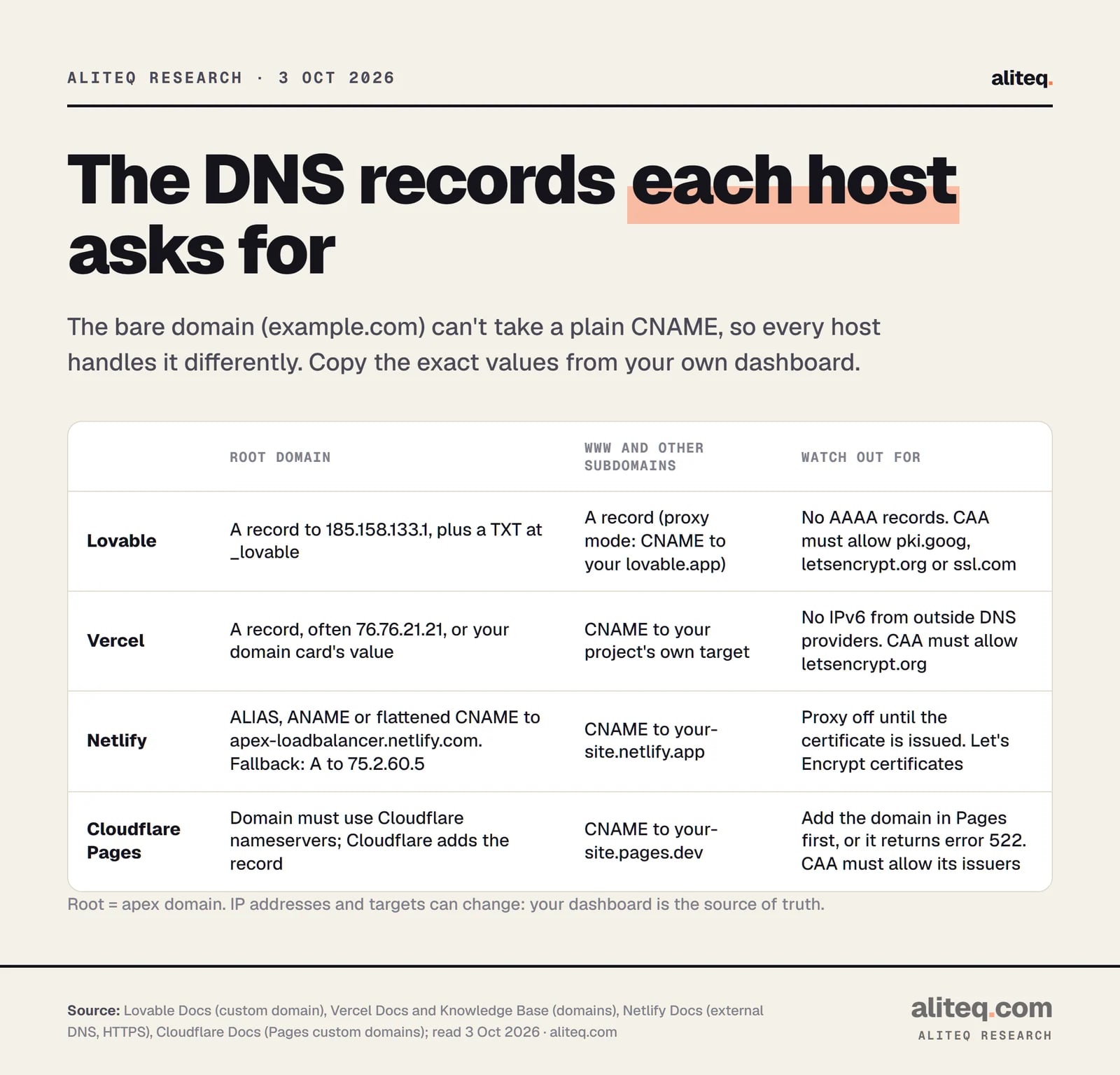
Here's what each host's docs asked for on October 3, 2026.
From each host's custom-domain docs, read October 3, 2026. Copy the values your own dashboard shows. · aliteq research
What each host asks for (docs read Oct 3, 2026)
Lovable
Root domain (example.com)
A record to 185.158.133.1
Subdomain (www, app)
A record (Lovable suggests the host name)
Extra records
TXT at _lovable with a lovable_verify= value; no AAAA records
Vercel
Root domain (example.com)
A record, often 76.76.21.21, or the value on your domain card
Subdomain (www, app)
CNAME to your project's own target
Extra records
TXT only if another Vercel account uses the domain; no AAAA
Netlify
Root domain (example.com)
ALIAS, ANAME or flattened CNAME to apex-loadbalancer.netlify.com; fallback A record to 75.2.60.5
Subdomain (www, app)
CNAME to your-site.netlify.app
Extra records
None for the basic setup
Cloudflare Pages
Root domain (example.com)
Domain must use Cloudflare's nameservers; Cloudflare then adds the record
Subdomain (www, app)
CNAME to your-site.pages.dev
Extra records
None for the basic setup
Root domain (example.com)
Subdomain (www, app)
Extra records
Lovable
A record to 185.158.133.1
A record (Lovable suggests the host name)
TXT at _lovable with a lovable_verify= value; no AAAA records
Vercel
A record, often 76.76.21.21, or the value on your domain card
CNAME to your project's own target
TXT only if another Vercel account uses the domain; no AAAA
Netlify
ALIAS, ANAME or flattened CNAME to apex-loadbalancer.netlify.com; fallback A record to 75.2.60.5
CNAME to your-site.netlify.app
None for the basic setup
Cloudflare Pages
Domain must use Cloudflare's nameservers; Cloudflare then adds the record
CNAME to your-site.pages.dev
None for the basic setup
Why can't the bare domain use a CNAME?
The DNS rules forbid it. RFC 1034, the standard that defines DNS, says: "If a CNAME RR is present at a node, no other data should be present." Your bare domain already holds other required records, so a CNAME can't sit there too. Vercel's troubleshooting page cites exactly that line.
That's why hosts invented workarounds. Netlify's docs list ALIAS, ANAME and flattened CNAME records, which act like a CNAME but answer with an IP address. Cloudflare calls its version CNAME flattening. Cloudflare "finds the IP address that a CNAME points to" and returns that IP instead, and it does this by default when you put a CNAME on your root domain.
Two easy slips also show up in Vercel's docs. In the Name field, type only the prefix (www), not the full www.example.com. And when a CNAME value ends in a period, copy the period too.
Why do I still see my old website?
Because an old record is still there, or an old answer is still cached. Lovable's docs put it plainly: leftover A, AAAA or CNAME records from your previous host keep sending people to the old site. Delete them so only your new host's records remain, then wait for caches to expire.
Watch out for AAAA records in particular. These point your domain at an IPv6 address, the newer, longer kind of internet address. Lovable asks for no AAAA records on the domain you connect. Vercel says it doesn't support IPv6 for domains managed at an outside DNS provider. A stray AAAA record pointing at your old host can split your visitors between two places.
Cloudflare's dashboard blocks one conflict for you. It won't let you add a CNAME on a name that already has an A, AAAA or CNAME record. If you see that error, delete the old record first.
Why does it work on my phone but not my laptop?
Because each device and network asks DNS at a different time. Every DNS answer carries a TTL (time to live), which says how long it may be kept. Until the old answer's TTL runs out, some devices still use it. That's DNS caching at work. Our caching lesson explains why stale copies happen.
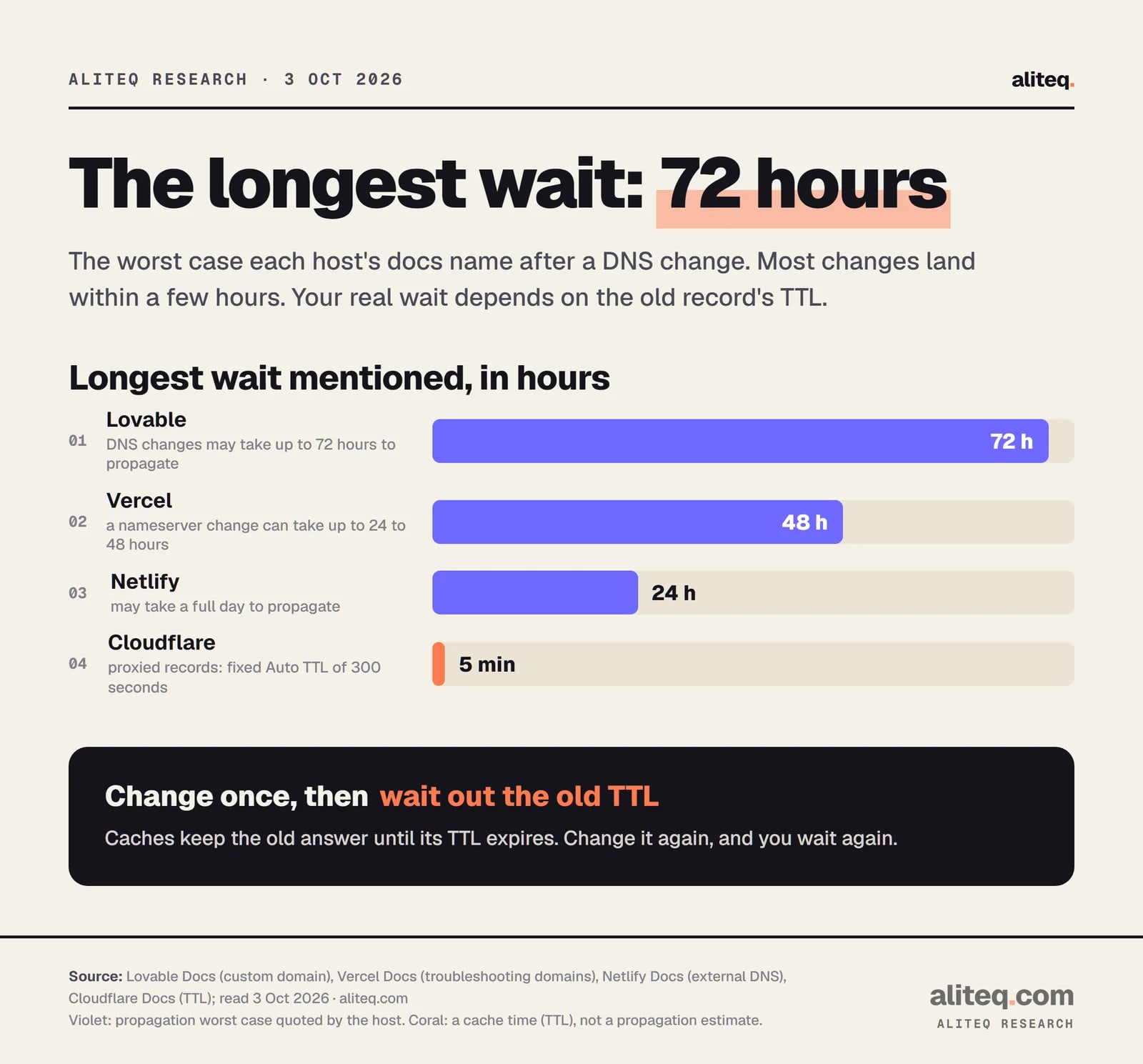
Worst cases quoted in each host's docs, read October 3, 2026. Most changes land much sooner. · aliteq research
Here's what the docs say about the wait.
Lovable: "DNS changes may take up to 72 hours to propagate, though most updates are live within a few hours."
Vercel: changing a domain's nameservers "can take up to 24–48 hours". Ordinary record changes are usually quicker, depending on the previous record's TTL.
Netlify: "It may take a full day for the settings to propagate across the global Domain Name System."
Cloudflare: proxied records have a fixed TTL of 300 seconds (five minutes). Your own device's cache can still take longer.
The useful rule: your worst-case wait is roughly the old record's TTL. That's our reading of how caches work, and Vercel's own tip follows it. Before a planned switch, lower the existing TTL (for example to 60 seconds), wait for the old TTL to pass, then change the record. Rollbacks get fast, too.
So if you just fixed a record, don't keep changing it every ten minutes. Each new change means a new wait. Test in a private window or on your phone's mobile data, and use a public lookup tool to see what the wider internet sees.
Why does www work but the bare domain doesn't (or the reverse)?
Because example.com and www.example.com are two separate names, and each needs its own record. Most hosts connect both and redirect one to the other. If only one has a correct record, only that one loads.
What each host does:
Lovable: connecting a root domain turns on "Redirect www.yourdomain.com → yourdomain.com" by default. Lovable then lists www as a separate domain. Each one needs its own Complete setup step.
Netlify: adding either one adds both, and redirects the other to whichever you chose as primary. With outside DNS, Netlify "strongly" recommends making www (or another subdomain) the primary.
Vercel: prompts you to add www when you add the bare domain. Its guide recommends www as the primary with the bare domain redirecting to it. The reason: a CNAME lets Vercel steer traffic, while an A record points at a fixed address.
One quirk to know on Lovable. Its primary-domain redirect is a 302 (temporary), and its docs say Lovable hosting doesn't support 301 redirects between connected domains.
Why does it say SSL pending, or show a security warning?
Because the host hasn't issued your HTTPS certificate yet. Hosts get a free certificate automatically, but only after your DNS points straight at them. Until then, browsers show a warning instead of your site. Lovable's status for this is Setting up. If it becomes Stalled or Failed, click Retry. You don't need to remove the domain.
When the certificate never arrives, the docs point to three usual blockers.
A proxy in front. Netlify says you must turn off routing through another service, such as Cloudflare, before it can issue the certificate. Lovable says not to proxy the A record while it's verifying.
Old DNS still cached. Netlify: "All previous DNS settings must have their cache timeouts expired." The host can't prove you own the domain while the internet still points elsewhere.
CAA records. These DNS records list which certificate authorities may issue certificates for your domain. If you have any, they must include your host's.
What are CAA records, and do I have one?
A CAA record is a short allow-list of certificate issuers. Having none is fine. Vercel's docs say no CAA records "doesn't itself block issuance." The trouble starts when one exists, maybe from an old host or an IT policy, and it leaves out the issuer your new host uses.
The values the docs give:
Lovable recommends allowing all three issuers it uses: 0 issue "pki.goog", 0 issue "letsencrypt.org" and 0 issue "ssl.com".
Vercel asks for 0 issue "letsencrypt.org" if you restrict issuers.
Cloudflare Pages lists Let's Encrypt, Google Trust Services (pki.goog) and SSL.com, for both issue and issuewild.
Netlify uses Let's Encrypt.
The sneaky part is inheritance. RFC 8659 says the CAA search "climbs the DNS name tree" until it finds a policy. So app.example.com with no CAA record of its own inherits whatever sits on example.com. Check the parent domain too.
Is Cloudflare's orange cloud breaking my domain?
Often, yes, if your DNS lives at Cloudflare but your app is hosted elsewhere. A Proxied record (the orange cloud) answers with Cloudflare's own addresses instead of your host's. That hides your host from its verification and certificate checks. Set the record to DNS only (the gray cloud) while you connect.
Here's what Lovable's and Vercel's docs say about it.
Lovable: Cloudflare errors 1001 or 1003 on your domain come from Cloudflare's proxy. Set the records to DNS only.
Vercel: the orange cloud can block verification and the certificate check. A redirect loop (ERR_TOO_MANY_REDIRECTS) appears when Cloudflare's SSL/TLS mode is Flexible. Set it to Full.
If you do want Cloudflare in front, Lovable has an advanced "Uses Cloudflare or similar proxy" option. It gives you a CNAME to your lovable.app address instead of the A record. Turn the proxy back on only after the host shows your domain as live.
How do I check what the internet actually sees?
Ask DNS directly, from outside your browser. Vercel's docs suggest dig in a terminal, or Google's public lookup page at dns.google if you'd rather not touch a command line. Compare the answer with the values in your host's dashboard. If they match, wait. If they don't, fix the record.
dig a example.com +short          # should match your host's A value
dig aaaa example.com +short       # should usually be empty
dig cname www.example.com +short  # should match your host's CNAME target
dig caa example.com +short        # empty is fine; if not, your host's issuer must be listed
These are read-only lookups, so they can't break anything. Netlify adds one more check: curl -s -v http://your-domain 2>&1 | grep -i server should show server: Netlify if traffic is reaching Netlify. Vercel says a server: Vercel header shows a request reached Vercel.
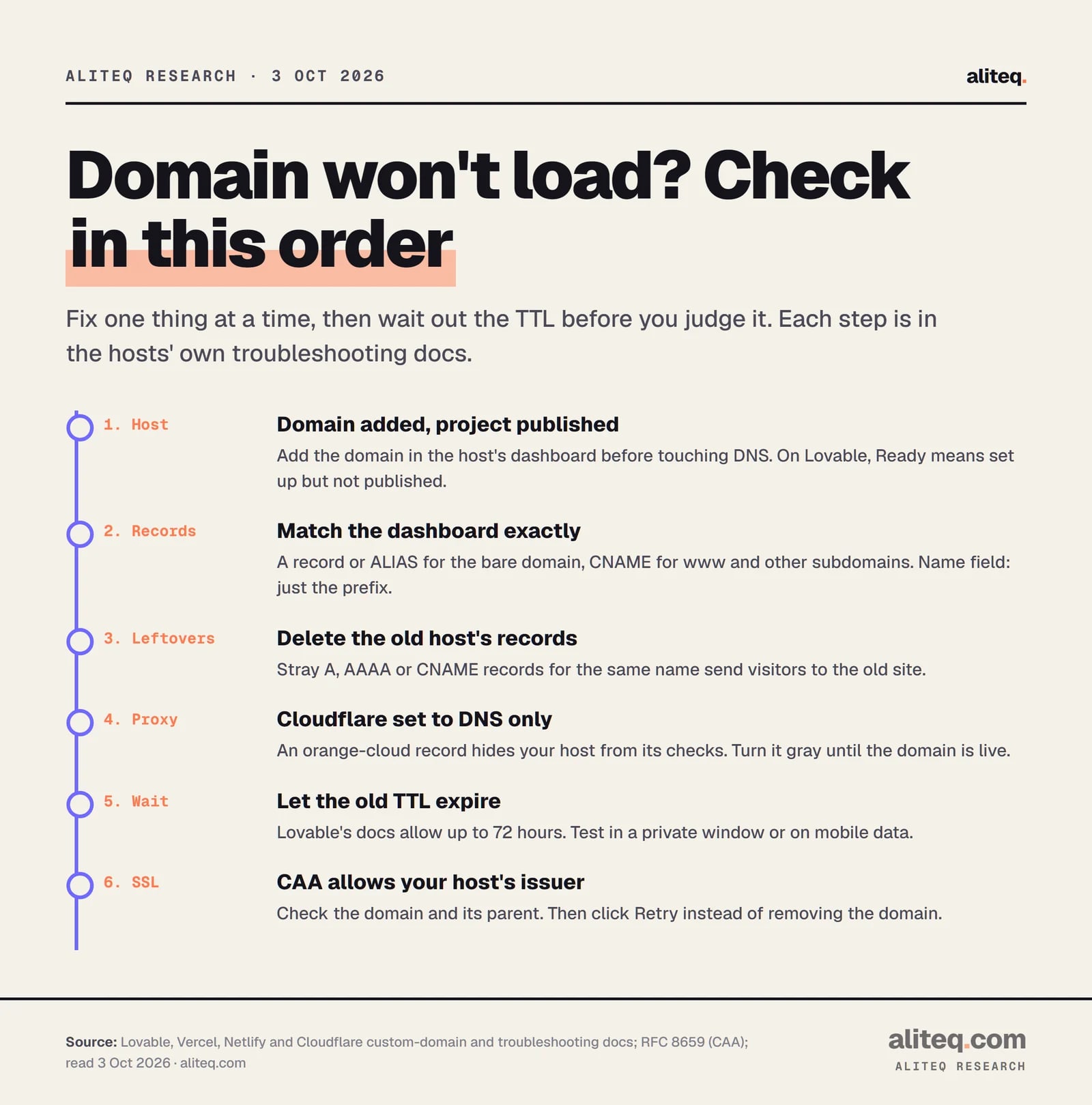
The fix order, start to finish
Work from the top, and fix one thing at a time. Then wait out the TTL before you judge the result. Changing three records at once makes it impossible to tell which one mattered.
Compiled from Lovable, Vercel, Netlify and Cloudflare docs, read October 3, 2026. · aliteq research
Confirm the domain is added in your host's dashboard, and the project is published. On Lovable, Ready means configured but not published.
Compare your DNS records with the dashboard: an A record or ALIAS for the bare domain, a CNAME for www and other subdomains.
Delete leftover A, AAAA and CNAME records for that name from your old host.
If your DNS is at Cloudflare and the app isn't, set the records to DNS only (gray cloud) until the domain is live.
Wait out the old record's TTL. Lovable's docs allow up to 72 hours; most changes land within a few hours.
If SSL stays pending, check CAA records on the domain and its parent, allow your host's issuer, then click Retry.
One last snag after it loads: sign-in can break on the new domain. Lovable's docs say your app's login redirect addresses must include the new domain. Its built-in backend adds it automatically when the domain goes live. If you use your own Supabase project, add it there yourself.
Once it's live, you're done with the scary part. If you're still weighing where to host, our guide to hosting and what it costs covers the bill. Our shipping checklist covers the rest of launch day.
Quick answers
How long does a custom domain take to work?
Usually minutes to a few hours. The docs give longer worst cases: Lovable says DNS changes may take up to 72 hours, Vercel says a nameserver change can take up to 48 hours, and Netlify says up to a full day. The real wait depends on the old record's TTL.
Should I use an A record or a CNAME?
For the bare domain (example.com), use an A record, or an ALIAS or flattened CNAME if your host recommends one. For subdomains like www or app, use a CNAME to the target your host shows. A plain CNAME isn't allowed on the bare domain.
Why does my domain show my old website?
An old A, AAAA or CNAME record from your previous host is still there, or an old answer is still cached. Delete the leftovers so only your new host's records remain, then wait for the old TTL to expire.
Why is my SSL certificate stuck on pending?
The host can't prove you control the domain yet. The usual causes are a proxy such as Cloudflare's orange cloud in front, old DNS still cached, or a CAA record that doesn't list the host's certificate issuer.
Do I need to buy an SSL certificate from my registrar?
No. All four hosts in this guide issue certificates automatically once your DNS points at them, and Lovable and Netlify describe theirs as free. Lovable's docs say a certificate from your registrar isn't used by its hosting.
What is a CAA record?
A DNS record that lists which certificate authorities may issue certificates for your domain. You don't need one. If you have one, it must include your host's issuer, such as letsencrypt.org, and subdomains inherit it from the parent domain.
Use this in your own page
Teaching this? Paste the live version into your course, blog or answer. Free, no sign-up; the credit line links back here.