Your RAG search lives or dies on one small model most people never pick on purpose. What an embedding is, why 3,072 dimensions costs eight times the storage of 384, how to read the MTEB leaderboard without getting fooled, and what switching models really costs.
Every "chat with your documents" setup has two models in it. Everyone obsesses over the chat model. The other one, the embedding model, decides which paragraphs the chat model ever gets to see. If it fetches the wrong chunk, the smartest LLM in the world answers the wrong question very confidently.
I did not benchmark or install anything for this piece. On October 3, 2026 I read the vendors' docs and price pages, the model cards and the MTEB papers, and did the arithmetic. If you only want a pick, our best local embedding model guide has one. This piece is about the numbers behind the pick.
What is an embedding, in plain terms?
An embedding is a list of numbers that stands for the meaning of a piece of text. Texts that mean similar things get lists that sit close together. Your RAG app embeds every chunk of your documents once, then embeds each question and fetches the chunks whose numbers sit nearest to it.
OpenAI's guide puts it plainly: "An embedding is a vector (list) of floating point numbers. The distance between two vectors measures their relatedness." Small distance, related. Large distance, unrelated. That is the whole trick behind semantic search, which means search by meaning rather than by matching words.
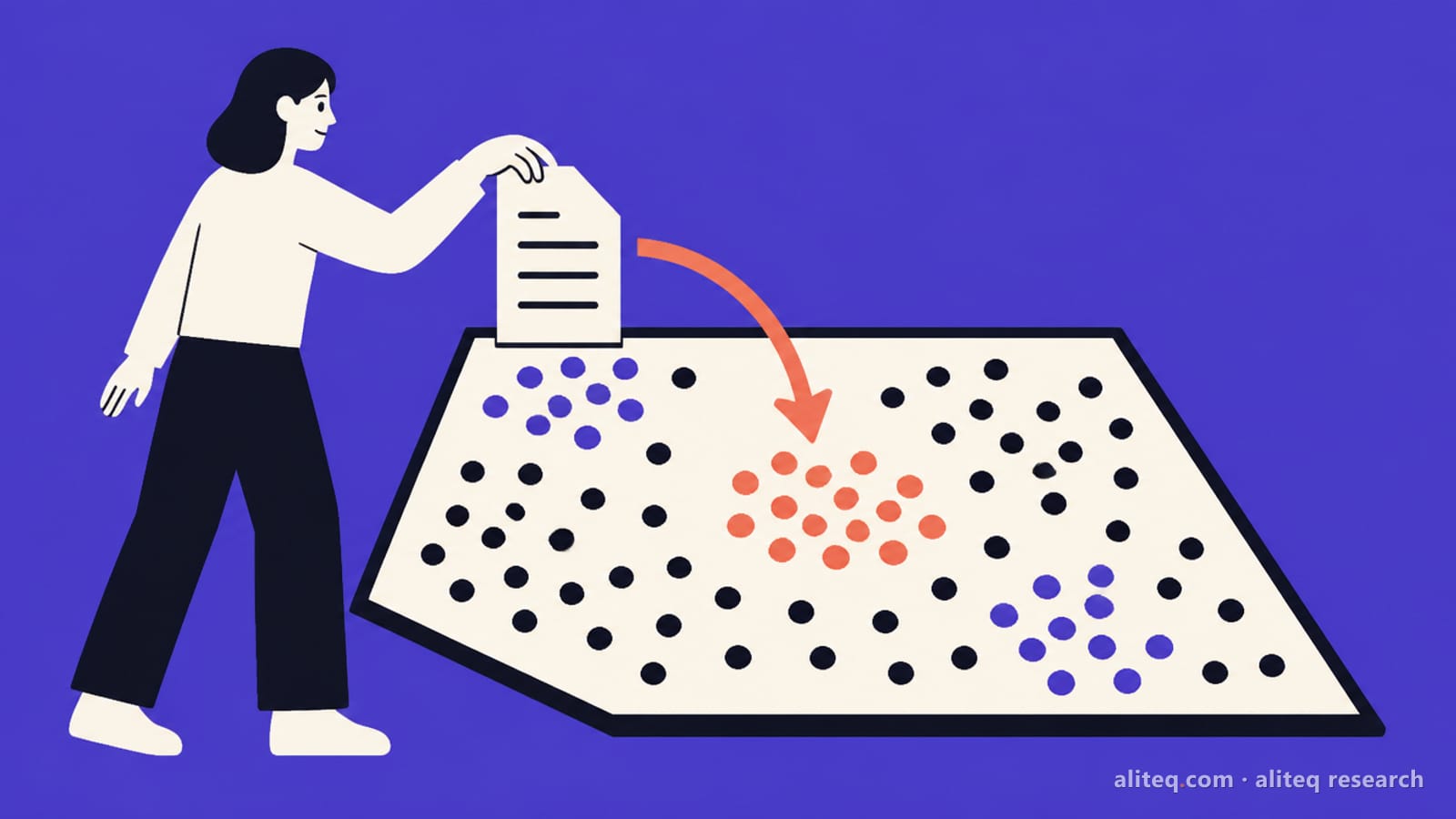
Think of a map where every paragraph you own is a pin. "Refund policy" and "how do I get my money back" land on the same street, even though they share no words. The embedding model is the cartographer. A bad one puts the refund policy in the wrong town.
Two practical rules follow. First, the question and the documents must be embedded by the same model, or the distances mean nothing. Second, many models want a label on each input. Nomic's model card says documents must start with search_document: and questions with search_query:. Mixedbread's mxbai-embed-large wants the prompt "Represent this sentence for searching relevant passages:" in front of queries. Skip those and retrieval quietly gets worse.
What does "dimensions" mean, and why does it cost money?
Dimensions is the length of that list of numbers. More dimensions can hold finer shades of meaning, but every one is stored for every chunk. At the usual 32-bit float, each dimension costs 4 bytes, so storage is dimensions x 4 bytes x number of vectors.
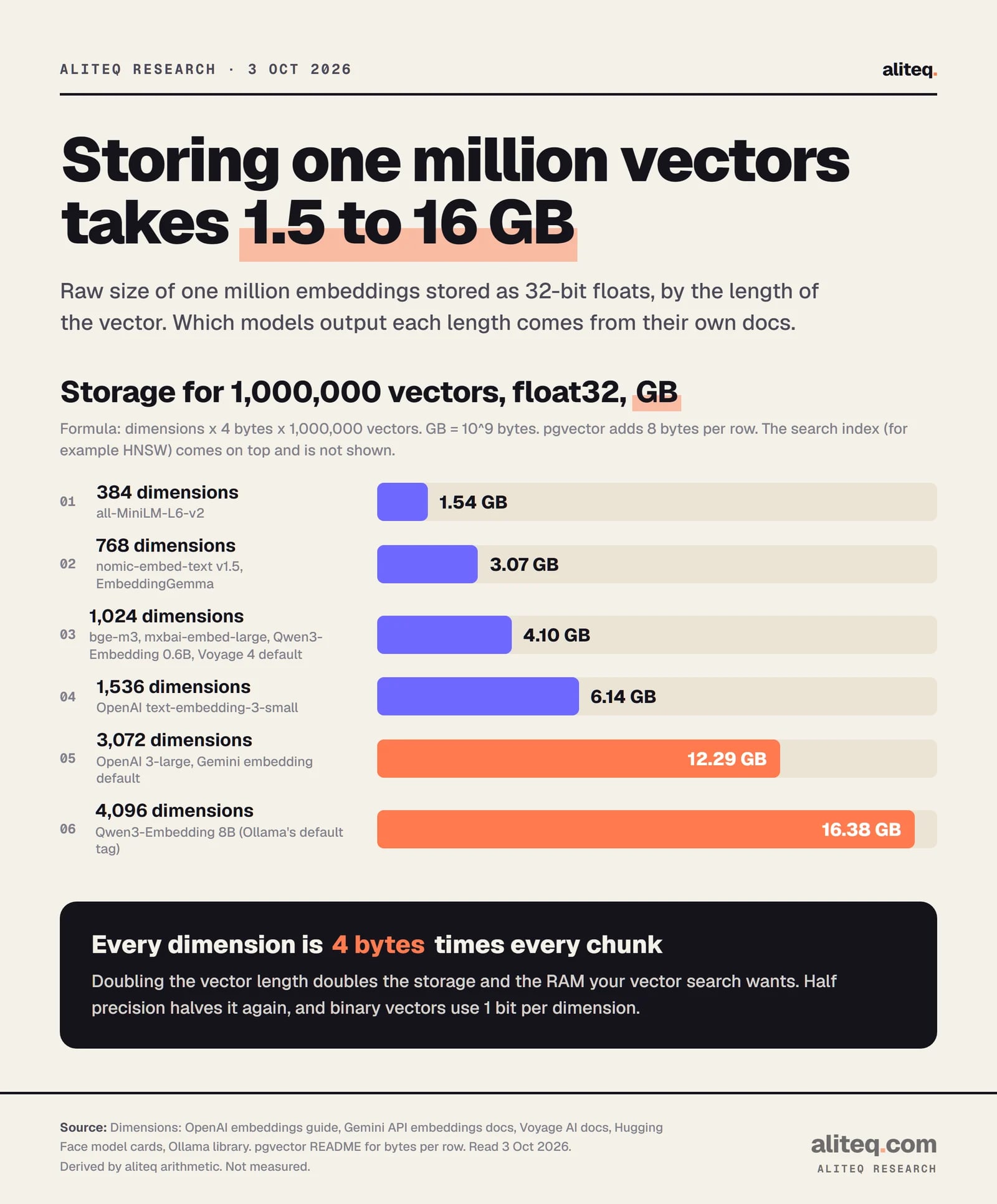
Here is what the common lengths mean for a million chunks, which is a big company wiki or a few years of support tickets:
Raw vector storage per 1,000,000 chunks (float32, derived)
Derived: dimensions x 4 bytes x 1,000,000. GB = 10^9 bytes. The search index comes on top. · aliteq research
These are floor numbers. The pgvector README says each vector row takes 4 * dimensions + 8 bytes, so add 8 bytes a row. The search index, usually an HNSW graph (a structure that finds near neighbors fast), sits on top, and its size depends on its settings. I am not printing a number for it.
Two cheaper storage types exist. Per pgvector's docs, halfvec stores 2 bytes per dimension, half the float32 size. A bit vector stores one bit per dimension, so 1,024 dimensions shrink to 128 bytes. Both trade some precision for space.
One limit matters for anyone on Postgres. pgvector's HNSW and IVFFlat indexes accept vector columns of up to 2,000 dimensions, halfvec up to 4,000 and bit up to 64,000. A 3,072-dimension OpenAI or Gemini vector cannot be indexed as a plain vector. You either store it as halfvec or ask the API for fewer dimensions. Our vector database guide covers where those vectors live.
How do I choose an embedding model without being fooled by MTEB?
Use the MTEB leaderboard to make a shortlist, then test the shortlist on your own documents. MTEB, the Massive Text Embedding Benchmark, averages many task types. RAG cares mostly about retrieval. Compare models on the same benchmark version, and check the zero-shot column before trusting a high score.
Four caveats, all from the benchmark's own papers and docs.
Versions are not comparable. The MMTEB paper says the English benchmark went from 56 tasks in v1 to 40 tasks in v2. OpenAI's guide lists text-embedding-3-large at 64.6% "on MTEB", Nomic lists 62.28 for its model, and Google's EmbeddingGemma card lists 69.67 on "MTEB (English, v2)". Those three numbers come from different tests, so ranking them against each other tells you nothing.
Training on the test. The paper says v2 is meant to be zero-shot, "excluding tasks like MS MARCO… and Natural Questions… which are frequently used in fine-tuning." Some small English models scored worse on v2, "likely because they were trained on MS MARCO and Natural questions." A model that trained on the test's cousins looks smarter than it is.
Who ran the numbers. MTEB's docs explain that results reach the leaderboard by a pull request to its results repository, including results "that you ran yourself." Model makers also declare their own training datasets. That is open and auditable, but it is not an independent lab run.
The average hides your task. The results tables carry a separate Retrieval score next to classification, clustering and the rest. For RAG, sort by retrieval, and by your language.
Then run your own check. Take 30 to 50 real questions your users ask, note which chunk should answer each, and see how often each model puts that chunk in its top five. That small test beats any leaderboard rank, because it is your data. Our chat with your documents guide shows the full pipeline the test plugs into.
What are the local options in Ollama and llama.cpp?
Ollama lists a dedicated embedding category, and you call any of them through its /api/embed endpoint. llama.cpp's server runs embedding models with the --embedding flag and an OpenAI-compatible /v1/embeddings route. Local embedding costs you no per-token fee, only your own hardware and time.
Local embedding models on Ollama (read Oct 3, 2026)
nomic-embed-text (v1.5)
Download
274 MB
Context in Ollama
2K
Dimensions
768, Matryoshka
Licence
Apache-2.0
embeddinggemma (300m)
Download
622 MB
Context in Ollama
2K
Dimensions
768, Matryoshka to 128
Licence
Gemma terms
mxbai-embed-large (335m)
Download
670 MB
Context in Ollama
512
Dimensions
1,024
Licence
Apache-2.0
qwen3-embedding:0.6b
Download
639 MB
Context in Ollama
32K
Dimensions
up to 1,024, Matryoshka
Licence
Apache-2.0
bge-m3 (567m)
Download
1.2 GB
Context in Ollama
8K
Dimensions
1,024
Licence
MIT
qwen3-embedding (bare tag = 8b)
Download
4.7 GB
Context in Ollama
40K
Dimensions
up to 4,096
Licence
Apache-2.0
Download
Context in Ollama
Dimensions
Licence
nomic-embed-text (v1.5)
274 MB
2K
768, Matryoshka
Apache-2.0
embeddinggemma (300m)
622 MB
2K
768, Matryoshka to 128
Gemma terms
mxbai-embed-large (335m)
670 MB
512
1,024
Apache-2.0
qwen3-embedding:0.6b
639 MB
32K
up to 1,024, Matryoshka
Apache-2.0
bge-m3 (567m)
1.2 GB
8K
1,024
MIT
qwen3-embedding (bare tag = 8b)
4.7 GB
40K
up to 4,096
Apache-2.0
Two traps hide in that table. First, the bare tag qwen3-embedding pulls the 8B model, a 4.7 GB download with 4,096-dimension vectors. If you wanted the small one, ask for qwen3-embedding:0.6b. Second, Ollama's /api/embed has a truncate option that "truncates the end of each input to fit within context length" and defaults to true. Feed a 1,000-token chunk to a model with a 512-token window and the end of that chunk is silently dropped. Size your chunks to the window, or set truncate to false so you get an error instead.
The Ollama API also takes a dimensions parameter. Its docs do not say whether it re-normalizes after cutting, so if you shorten vectors, normalize them yourself. In llama.cpp, --embd-normalize defaults to 2, which is the usual Euclidean normalization, and --pooling picks how token vectors are combined. Most embedding models ship with the right default.
# Ollama: embed two chunks with the small Qwen3 model
curl http://localhost:11434/api/embed -d '{
  "model": "qwen3-embedding:0.6b",
  "input": ["first chunk", "second chunk"]
}'

# llama.cpp: serve an embedding model on an OpenAI-style route
llama-server -m embedding-model.gguf --embedding --port 8080
Embedding APIs bill per input token and are cheap. On October 3, 2026, OpenAI listed text-embedding-3-small at $0.02 per million tokens and 3-large at $0.13. Google listed gemini-embedding-2 at $0.20 for text. Voyage AI listed voyage-4-lite at $0.02, voyage-4 at $0.06 and voyage-4-large at $0.12.
API embedding models, US list price (read Oct 3, 2026)
OpenAI text-embedding-3-small
Per 1M tokens
$0.02
Batch price
50% off via Batch API
Default dimensions
1,536
Max input
8,192 tokens
OpenAI text-embedding-3-large
Per 1M tokens
$0.13
Batch price
50% off via Batch API
Default dimensions
3,072
Max input
8,192 tokens
Google gemini-embedding-2 (text)
Per 1M tokens
$0.20
Batch price
$0.10
Default dimensions
3,072
Max input
8,192 tokens
Voyage voyage-4-lite
Per 1M tokens
$0.02
Batch price
33% off
Default dimensions
1,024
Max input
32,000 tokens
Voyage voyage-4
Per 1M tokens
$0.06
Batch price
33% off
Default dimensions
1,024
Max input
32,000 tokens
Voyage voyage-4-large
Per 1M tokens
$0.12
Batch price
33% off
Default dimensions
1,024
Max input
32,000 tokens
Per 1M tokens
Batch price
Default dimensions
Max input
OpenAI text-embedding-3-small
$0.02
50% off via Batch API
1,536
8,192 tokens
OpenAI text-embedding-3-large
$0.13
50% off via Batch API
3,072
8,192 tokens
Google gemini-embedding-2 (text)
$0.20
$0.10
3,072
8,192 tokens
Voyage voyage-4-lite
$0.02
33% off
1,024
32,000 tokens
Voyage voyage-4
$0.06
33% off
1,024
32,000 tokens
Voyage voyage-4-large
$0.12
33% off
1,024
32,000 tokens
Some fine print from the same pages. OpenAI's Batch API supports /v1/embeddings at a 50% discount, with up to 50,000 embedding inputs per batch and a 24-hour turnaround. Google's free tier for gemini-embedding-2 costs nothing, but its pricing table says free-tier data is used to improve Google's products, while paid-tier data is not. Voyage gives each account 200 million free tokens on the 4 series, and its docs say those free credits do not apply to batch jobs.
What is Matryoshka truncation?
Matryoshka truncation means cutting a vector short and still getting useful results. Models trained with Matryoshka Representation Learning pack the most important meaning into the first numbers, like nesting dolls. You keep the first 256 of 768 numbers and lose a little accuracy for a lot of storage.
The idea comes from a paper by Aditya Kusupati and colleagues. They describe a single embedding that can "adapt to the computational constraints of downstream tasks." Google says both of its Gemini embedding models are trained this way, and recommends 768, 1,536 or 3,072 output dimensions.
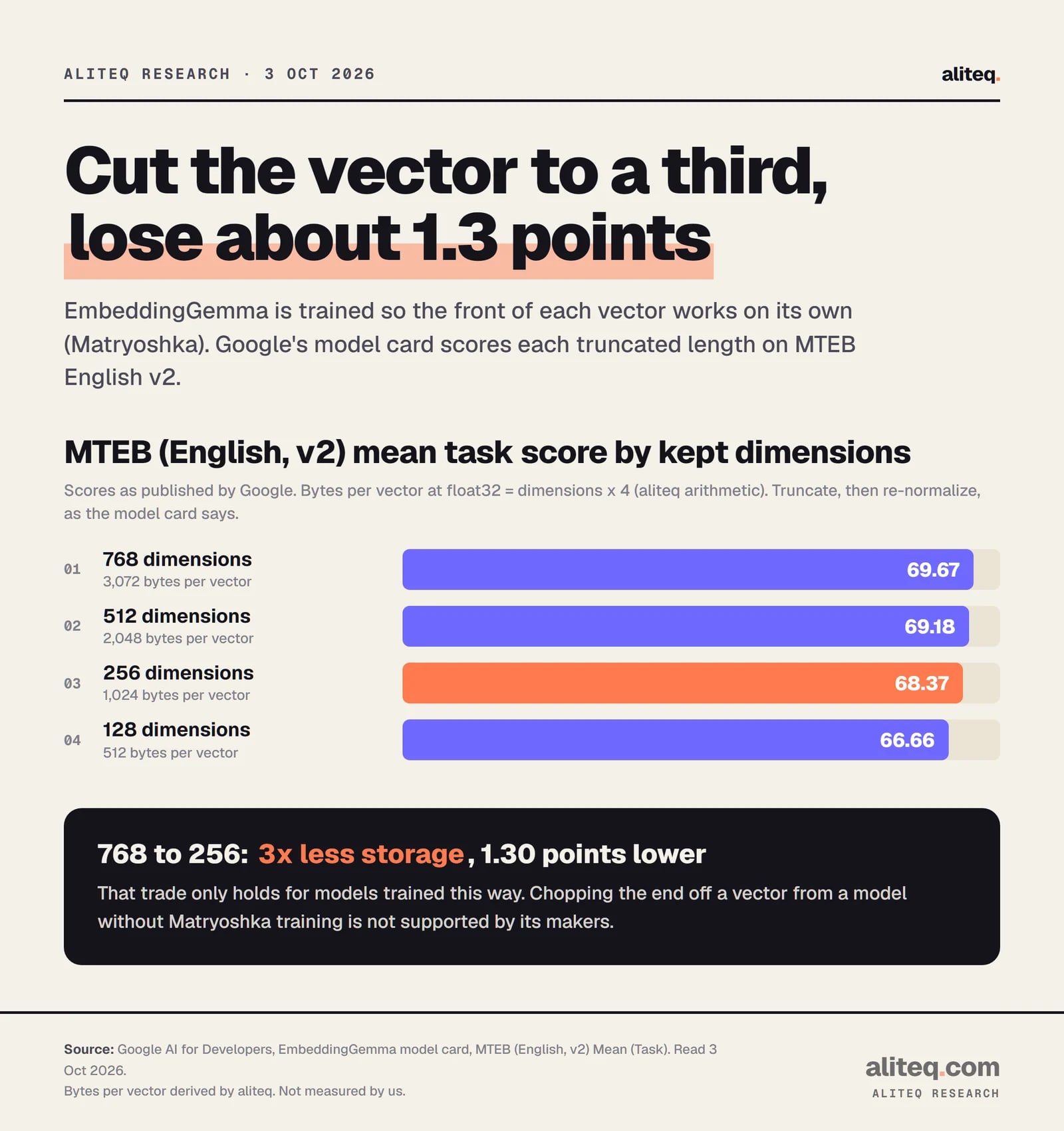
The model cards print what you give up. Google's EmbeddingGemma card scores each cut length on MTEB English v2:
Scores from Google's EmbeddingGemma model card. Bytes per vector are our arithmetic. · aliteq research
Going from 768 to 256 dimensions cuts storage to a third and the score by 1.30 points. Nomic's card shows a similar curve for nomic-embed-text v1.5: 62.28 at 768, 61.04 at 256 and 56.10 at 64. Google's own table for gemini-embedding-001 is flatter still: 68.17 at 1,536 and 67.99 at 768.
Three rules for doing it safely:
Only truncate models whose docs support it: Matryoshka (MRL) models such as nomic-embed-text v1.5, EmbeddingGemma, Qwen3-Embedding, mxbai-embed-large and Gemini, or APIs with a dimensions option such as OpenAI's 3 series and Voyage 4.
Ask the API for fewer dimensions (OpenAI dimensions, Gemini output_dimensionality) instead of cutting later. If you do cut later, re-normalize each vector, as OpenAI's and Google's docs both say.
Pick one length before you index. Vectors cut to 256 and vectors kept at 768 cannot be compared with each other.
Re-run your own 30 to 50 question test at the shorter length. The card's average is not your data.
OpenAI's guide gives the most striking example. It says a text-embedding-3-large embedding shortened to 256 dimensions still outperforms the older ada-002 at its full 1,536 on MTEB. That is a 6x smaller vector from a newer model.
What does it cost to switch embedding models?
The token bill is small. The work is not. Vectors from two different models live in different spaces, so you cannot search old vectors with a new model's query. Switching means re-embedding every chunk, rebuilding the index and swapping over, ideally while the old index keeps serving.
Google's docs are blunt about its own upgrade: the spaces of gemini-embedding-001 and gemini-embedding-2 "are incompatible," and if you upgrade, "you must re-embed all of your existing data." That applies to any switch between models. One documented exception: Voyage says "all embeddings created with the 4 series are compatible with each other," so moving between voyage-4-lite, voyage-4 and voyage-4-large does not force a rebuild, per Voyage.
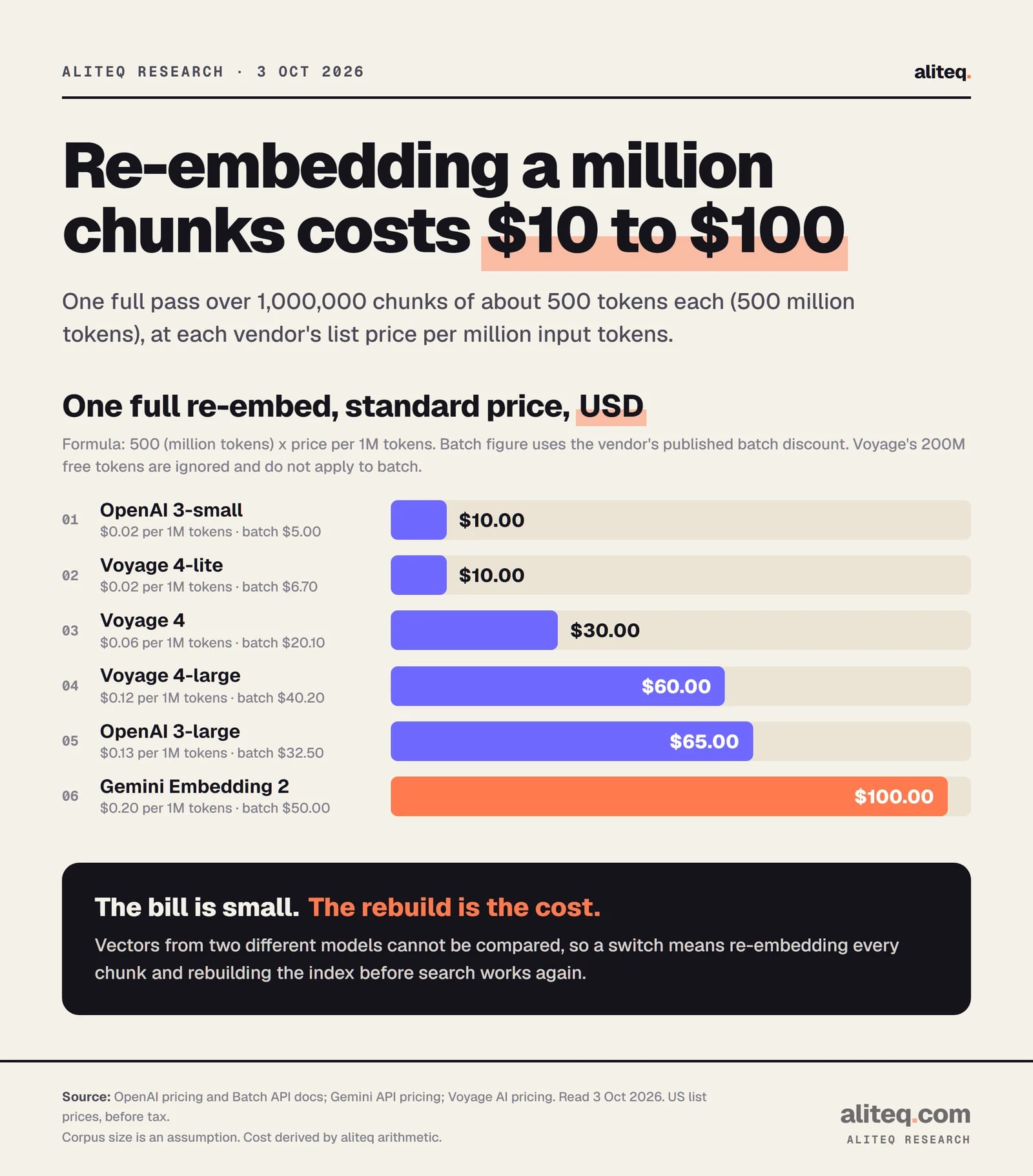
Here is the bill for a typical case. Assume 1,000,000 chunks of about 500 tokens each, which is 500 million tokens. The cost is 500 x the price per million tokens.
Derived from list prices read Oct 3, 2026. The corpus size is an assumption; scale it to yours. · aliteq research
So a full re-embed runs from $10 on text-embedding-3-small to $100 on gemini-embedding-2, or $5 to $50 through the batch APIs. A local model has no token bill, but it is not free. It costs machine hours, and I have no measured throughput to give you, so I won't guess one.
The hidden costs are the ones nobody prices. You store two indexes during the cutover. Every cached query vector is stale. Your chunking may need to change if the new model's context window is different. And your retrieval test has to run again. That is why the cheapest decision is choosing carefully the first time, and writing down the model name and version next to every vector you store.
So which one should you pick?
Start with your constraint, not the leaderboard. If data must stay on your machine, pick a local model sized to your chunks. If you want no hardware, a $0.02 API model costs about $10 per million chunks. Then test retrieval on your own questions and pick a length you will keep.
My rough order of operations: decide local or API first. Pick the shortest vector that passes your own test, because storage and memory scale with it. Prefer a Matryoshka model so you can shrink later without re-embedding. And record the model name, version, dimensions and input prefixes in your schema, because six months from now someone will ask why search got worse after "a small upgrade."
Quick answers
What is an embedding model?
A model that turns text into a fixed-length list of numbers so that texts with similar meaning get similar numbers. RAG apps use it to find the chunks of your documents closest in meaning to a question.
How much storage do embeddings need?
Dimensions x 4 bytes x number of vectors at 32-bit floats. One million 768-dimension vectors take about 3.07 GB, and one million 3,072-dimension vectors about 12.29 GB, before the search index.
Are more dimensions always better?
No. Longer vectors cost more storage and memory. The model cards we read show Matryoshka models losing only about 1 to 2 points on MTEB when cut from 768 to 256 dimensions. Test on your own data.
Can I compare MTEB scores between models?
Only on the same benchmark version and task set. MTEB English v1 had 56 tasks and v2 has 40, and v2 dropped tasks often used in training. Look at the retrieval score and the zero-shot column, not just the average.
Can I mix vectors from two embedding models?
No. Different models produce incompatible spaces, so switching means re-embedding everything. Google states this for its own two Gemini models. Voyage documents one exception: its 4-series models share a space.
How much does re-embedding a million chunks cost?
At about 500 tokens per chunk, 500 million tokens cost $10 on OpenAI text-embedding-3-small and $100 on Google gemini-embedding-2 at list prices read Oct 3, 2026, or half that through their batch APIs.