Seven mixture-of-experts models, from gpt-oss 20B to Qwen3 235B, split into what stays on your card and what moves to system RAM. The card barely changes. The RAM you need goes from 16 GB to 96 GB.
Our llama.cpp offloading guides answer "how do I use the flag". The question that keeps coming back is the one before it: which model, and how much RAM do I buy? That one is a spreadsheet question, and spreadsheets are my weekend.
I read the model configs and the llama.cpp docs on 3 October 2026. Then I opened each model's GGUF file on Hugging Face and summed its tensors: the ones --n-cpu-moe moves, and the ones it leaves on the card. I have not loaded these models on a 12 or 16 GB card. Every number below is arithmetic on published files. If you want the mechanics first, read what --n-cpu-moe actually does, then the step-by-step guide to running a big MoE model on a small GPU.
The short list, by how much RAM you have
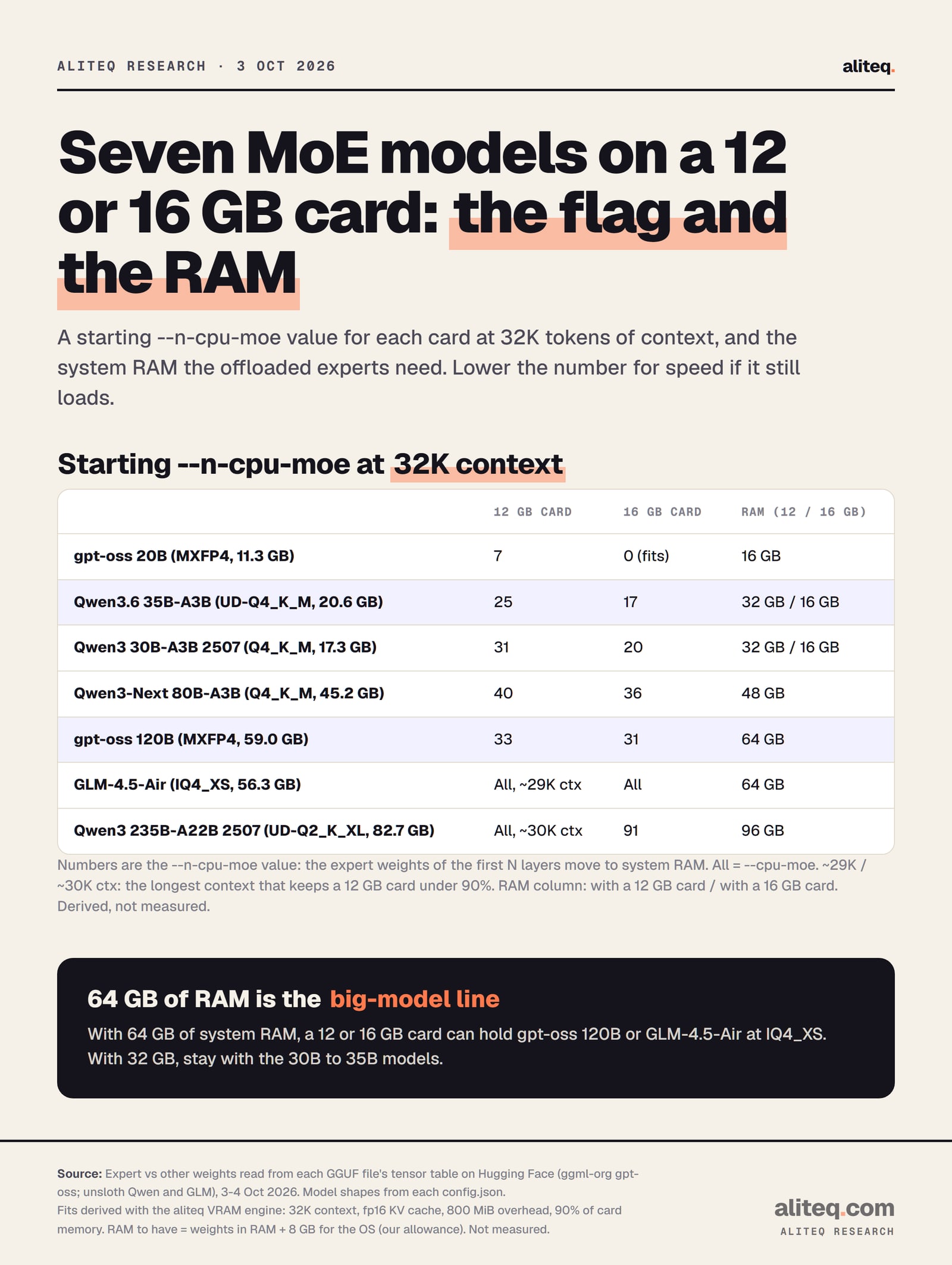
Pick the model by your system RAM first, then set the flag for your card. At 32K tokens of context, a 12 or 16 GB card holds the always-used parts of every model below. The experts that do not fit go to RAM, and that RAM bill ranges from zero to 76 GB.
Derived from the GGUF tensor tables and the aliteq VRAM engine at 32K context. Not measured. · aliteq research
Starting --n-cpu-moe at 32K context, and RAM to have
gpt-oss 20B (MXFP4)
File
11.3 GB
12 GB card
7
16 GB card
0 (fits)
RAM to have
16 GB
Qwen3.6 35B-A3B (UD-Q4_K_M)
File
20.6 GB
12 GB card
25
16 GB card
17
RAM to have
32 GB (12 GB card) / 16 GB
Qwen3 30B-A3B 2507 (Q4_K_M)
File
17.3 GB
12 GB card
31
16 GB card
20
RAM to have
32 GB (12 GB card) / 16 GB
Qwen3-Next 80B-A3B (Q4_K_M)
File
45.2 GB
12 GB card
40
16 GB card
36
RAM to have
48 GB
gpt-oss 120B (MXFP4)
File
59.0 GB
12 GB card
33
16 GB card
31
RAM to have
64 GB
GLM-4.5-Air (IQ4_XS)
File
56.3 GB
12 GB card
--cpu-moe, ~29K max
16 GB card
--cpu-moe
RAM to have
64 GB
GLM-4.5-Air (Q4_K_M)
File
68.0 GB
12 GB card
--cpu-moe, ~28K max
16 GB card
--cpu-moe
RAM to have
96 GB
Qwen3 235B-A22B 2507 (UD-Q2_K_XL)
File
82.7 GB
12 GB card
--cpu-moe, ~30K max
16 GB card
91
RAM to have
96 GB
Qwen3 235B-A22B 2507 (Q4_K_M)
File
132.4 GB
12 GB card
--cpu-moe, ~30K max
16 GB card
92
RAM to have
192 GB
File
12 GB card
16 GB card
RAM to have
gpt-oss 20B (MXFP4)
11.3 GB
7
0 (fits)
16 GB
Qwen3.6 35B-A3B (UD-Q4_K_M)
20.6 GB
25
17
32 GB (12 GB card) / 16 GB
Qwen3 30B-A3B 2507 (Q4_K_M)
17.3 GB
31
20
32 GB (12 GB card) / 16 GB
Qwen3-Next 80B-A3B (Q4_K_M)
45.2 GB
40
36
48 GB
gpt-oss 120B (MXFP4)
59.0 GB
33
31
64 GB
GLM-4.5-Air (IQ4_XS)
56.3 GB
--cpu-moe, ~29K max
--cpu-moe
64 GB
GLM-4.5-Air (Q4_K_M)
68.0 GB
--cpu-moe, ~28K max
--cpu-moe
96 GB
Qwen3 235B-A22B 2507 (UD-Q2_K_XL)
82.7 GB
--cpu-moe, ~30K max
91
96 GB
Qwen3 235B-A22B 2507 (Q4_K_M)
132.4 GB
--cpu-moe, ~30K max
92
192 GB
"RAM to have" is the expert weight sitting in RAM plus 8 GB for your operating system and apps. That 8 GB is my allowance, not a llama.cpp number. I rounded up to a common kit size. If you run a browser with 40 tabs next to the model, add more.
How we worked it out
Every model splits into two piles. Expert weights are the big feed-forward stacks that --n-cpu-moe moves. Everything else (attention, router, shared experts, embeddings) stays on the GPU. We read both piles straight from each GGUF file, then added the context cache and overhead with our VRAM engine.
The llama.cpp README describes the flag as keeping "the Mixture of Experts (MoE) weights of the first N layers in the CPU". Its sibling --cpu-moe keeps "all" of them there. So the math is: put the fixed part on the card, fill what is left with whole layers of experts, and send the rest to RAM.
GPU floor   = non-expert weights + KV cache + 0.78 GB overhead
KV cache    = 2 x attention layers x KV heads x head dim x tokens x 2 bytes
budget      = 0.9 x card memory            (12 GB -> 10.8, 16 GB -> 14.4)
layers kept = floor((budget - GPU floor) / expert GB per layer)
--n-cpu-moe = layers with experts - layers kept
RAM weights = --n-cpu-moe x expert GB per layer

gpt-oss 120B on 16 GB at 32K:
  floor  = 2.14 + 2.25 + 0.78 = 5.17 GB
  kept   = floor((14.4 - 5.17) / 1.58) = 5 of 36 layers
  N      = 36 - 5 = 31, RAM weights = 31 x 1.58 = 49.0 GB
All of this is DERIVED. The 90 percent budget is our engine's line between "comfortable" and "tight", because a desktop and a browser also use the card. For gpt-oss the cache figure counts every layer, though half of them use a 128-token sliding window. That overstates its cache, which errs toward "won't fit". For the hybrid Qwen3.6 and Qwen3-Next, only the full-attention layers (10 and 12) keep a cache, per their configs.
Model by model
The A3B models are the easy wins on these cards, and gpt-oss 120B is the big one most people should aim for. GLM-4.5-Air and Qwen3 235B fit on paper, but they lean hard on system RAM. Here is each one, with the file we sized it from.
gpt-oss 20B: no tricks needed on 16 GB
OpenAI's model card says gpt-oss 20B has 21B parameters with 3.6B active, and that it runs "within 16GB of memory". The ggml-org MXFP4 file is 11.3 GB. On a 16 GB card it fits whole with 32K of context. On a 12 GB card, --n-cpu-moe 7 moves about 2.8 GB of experts to RAM. See its cost to run page for the full ladder.
Qwen3.6 35B-A3B and Qwen3 30B-A3B: the 12 GB sweet spot
Both route a few small experts per token: 3B active of 35B for Qwen3.6, and 3.3B of 30.5B for Qwen3 2507, per their model cards. On a 12 GB card each needs about 11 GB of experts in RAM, so 32 GB of RAM is the comfortable buy. On a 16 GB card that drops to about 7 to 8 GB.
Qwen3.6 has a cheap cache: only 10 of its 40 layers keep one, so 32K tokens costs 0.6 GB. That matters because its model card advises keeping at least 128K tokens of context "to preserve thinking capabilities". At 128K our math gives --n-cpu-moe 29 on 12 GB and 21 on 16 GB, with 32 GB of RAM either way. Qwen3 30B-A3B cannot do that: its 128K cache alone is 12 GB.
Qwen3-Next 80B-A3B: the 48 GB step
Qwen3-Next has 80B parameters with 3B active and 512 small experts, 10 per token. The Q4_K_M file is 45.2 GB, and about 33 to 36 GB of it lands in RAM. That makes it the odd one out: a big file with a tiny per-token read. Budget 48 GB of RAM. Its tracker page is here.
gpt-oss 120B: the reason to buy 64 GB
The model card lists 117B parameters with 5.1B active. The MXFP4 file is 59.0 GB, of which 56.9 GB is experts. On a 16 GB card, five layers of experts stay on the GPU and 49 GB goes to RAM. On 12 GB it is three layers and 52 GB. Either way, 64 GB of RAM covers it. Our gpt-oss 120B hardware requirements page covers the other ways to run it.
GLM-4.5-Air: fits, but every layer of experts goes to RAM
GLM-4.5-Air has 106B parameters with 12B active, per Z.ai's card. Its cache is the heaviest here at 184 KB per token, so the always-on-GPU part is already 11.3 GB at 32K. On a 16 GB card only about two expert layers would fit beside it, so I would start at --cpu-moe. On a 12 GB card, --cpu-moe plus about 29K of context is the ceiling. The IQ4_XS file needs 64 GB of RAM; Q4_K_M needs 96 GB.
One counting quirk: GLM's layer 0 is dense, with no experts. The file also carries an extra next-token-prediction layer at the end. So --n-cpu-moe 1 frees nothing on this model.
Qwen3 235B-A22B: only with 96 GB, and only at 2 bits
Qwen3 235B has 22B active parameters. Even the unsloth UD-Q2_K_XL file is 82.7 GB, which needs 96 GB of RAM. Q4_K_M is 132.4 GB and needs 192 GB. Our engine's note on 2-bit quants is blunt: heavy degradation, usually worse than a smaller model at Q4. On these cards I would pick gpt-oss 120B instead.
Where the gigabytes sit on a 16 GB card
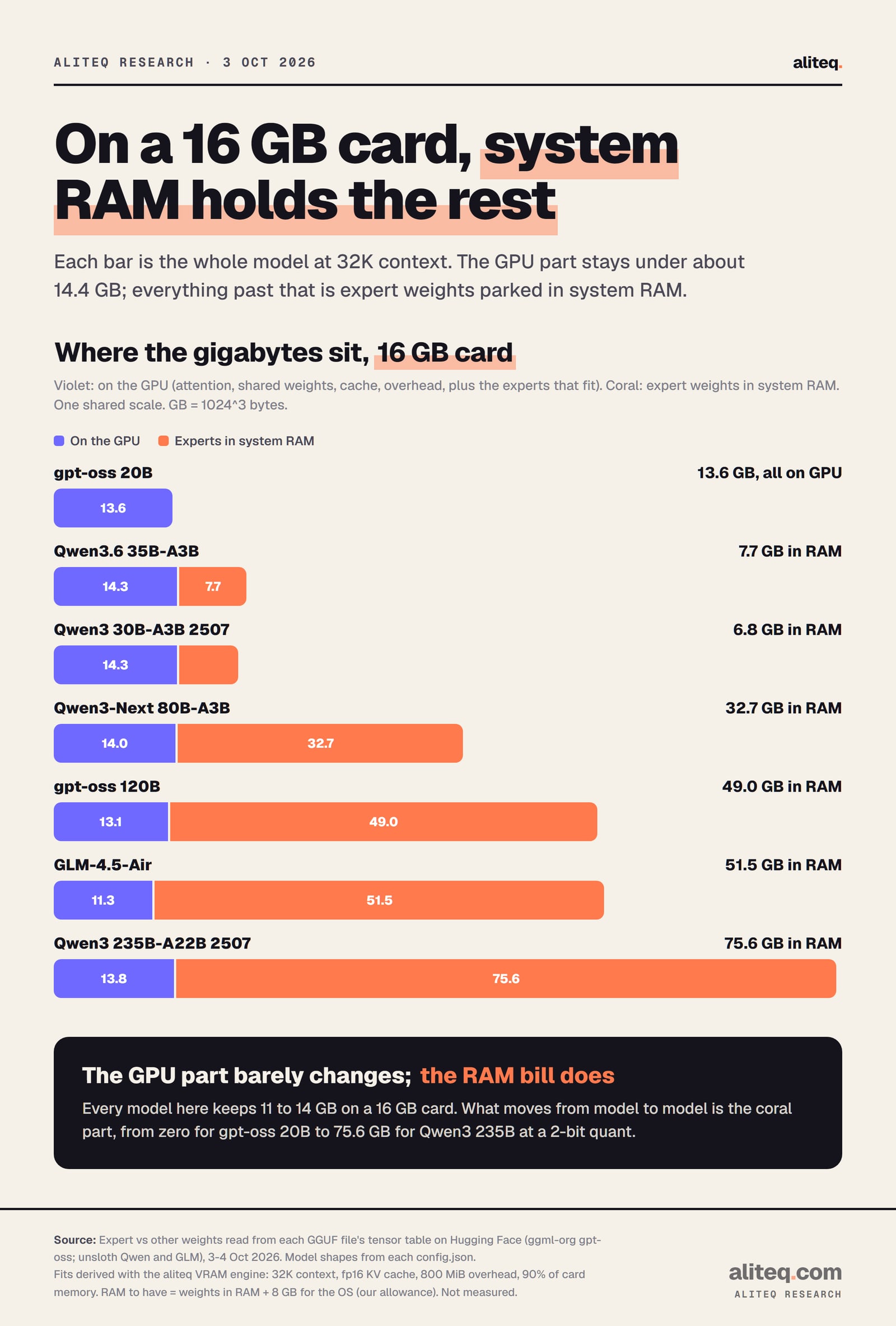
The GPU side is nearly constant: 11 to 14 GB for every model. What changes is the pile in system RAM. That is why "which MoE model fits 16 GB" is really "how much RAM is in the box".
Violet stays on the GPU. Coral is expert weight in system RAM. Derived, not measured. · aliteq research
Why the A3B models feel lighter
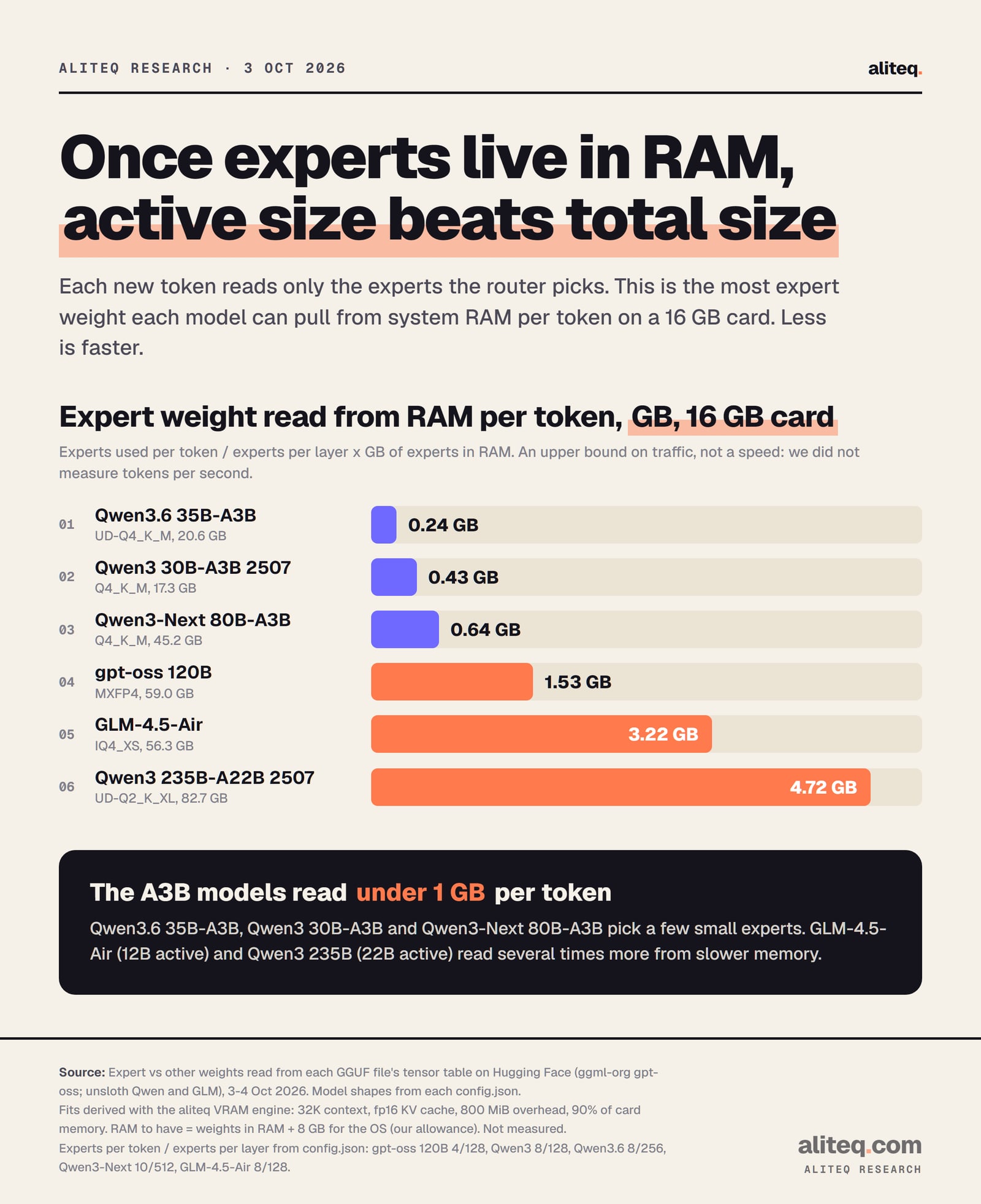
Each new token only reads the experts the router picks. So the RAM traffic per token is the expert weight in RAM times the share of experts used. The A3B models read under 1 GB per token on a 16 GB card. GLM-4.5-Air reads 3.2 GB, and Qwen3 235B reads 4.7 GB.
Upper bound on RAM traffic per token, not a speed. We did not measure tokens per second. · aliteq research
GB read per token = experts per token / experts per layer x GB of experts in RAM

gpt-oss 120B, 16 GB card:   4 / 128 x 48.98 = 1.53 GB
Qwen3.6 35B-A3B, 16 GB:     8 / 256 x 7.74  = 0.24 GB
GLM-4.5-Air IQ4_XS:         8 / 128 x 51.52 = 3.22 GB
Your RAM's bandwidth turns that number into speed, so I will not print a tokens-per-second figure for your machine. The ratio is the useful part. At the same RAM speed, GLM-4.5-Air moves about twice the expert data per token of gpt-oss 120B, and about 13 times that of Qwen3.6. For measured numbers on two real setups, see the llama-bench results in our --n-cpu-moe explainer.
The command, and why you may not need the number
Recent llama.cpp sizes this for you. The README lists --fit as "on" by default, and it adjusts "unset arguments to fit in device memory". So the table is your RAM shopping list and a sanity check. Set the flag by hand only when you want control.
# gpt-oss 120B on a 16 GB card, 32K context (starting point from the table)
llama-server -m gpt-oss-120b-MXFP4.gguf -c 32768 -ngl 99 --n-cpu-moe 31

# GLM-4.5-Air on a 12 GB card: every expert in RAM, shorter context
llama-server -m GLM-4.5-Air-IQ4_XS-00001-of-00002.gguf -c 24576 -ngl 99 --cpu-moe
The offloading guide shows the -ot regex route when whole layers are too coarse. Tune in this order:
Buy or confirm the RAM first. If the experts do not fit in system RAM, the model swaps to disk and no flag fixes that.
Start at the table's --n-cpu-moe value for your card and context, or leave the flag unset and let --fit choose.
If it runs out of memory at load, cut -c (context) first, then raise --n-cpu-moe by 2.
Once it loads, lower --n-cpu-moe one step at a time. The smallest value that still loads is the fastest.
What these numbers do not tell you
They do not tell you speed or quality. We ran no benchmarks and no evals, so there is no claim here about which model answers better. They also assume one user and an fp16 cache. An 8-bit cache (-ctk q8_0 -ctv q8_0) halves the cache term. That frees room for more expert layers on models with a big cache, such as Qwen3 30B-A3B and GLM-4.5-Air, and very little on Qwen3.6.
They come from one publisher's quants per model. Other GGUF builds mix tensor types differently and shift the split by a few percent. Qwen3.6's image input adds a separate 0.9 GB projector file. If your card is not 12 or 16 GB, run the same model in the VRAM calculator. If you are still choosing a dense model, our picks for 12 GB and 16 GB cards cover those.
Quick answers
What is the best MoE model for a 12 GB GPU?
With 32 GB of system RAM, Qwen3.6 35B-A3B or Qwen3 30B-A3B, at about --n-cpu-moe 25 and 31 for 32K context. With 64 GB of RAM, gpt-oss 120B at about --n-cpu-moe 33. All are derived starting points, not measured.
What is the best MoE model for a 16 GB GPU?
gpt-oss 20B fits whole. Qwen3.6 35B-A3B needs about 7.7 GB of experts in RAM. With 64 GB of RAM, gpt-oss 120B runs at about --n-cpu-moe 31 with 49 GB of experts in RAM.
How much system RAM do I need for gpt-oss 120B on a 16 GB card?
About 49 GB of its experts end up in RAM at 32K context, so 64 GB is the kit to have. 32 GB is not enough.
Can a 12 GB card run GLM-4.5-Air?
On paper, yes, with --cpu-moe and about 29K tokens of context at most. The IQ4_XS file needs 64 GB of RAM. It reads the most expert data per token of the models here, so expect it to be the slowest of the 64 GB group.
Does --n-cpu-moe work on Qwen3.6 and Qwen3-Next?
Yes. llama.cpp's source lists both architectures (qwen35moe and qwen3next), and the flag moves any routed-expert tensors. Shared experts stay on the GPU.
Do I still need to set --n-cpu-moe by hand?
Not always. In llama.cpp v0.5.0, --fit is on by default and sizes unset arguments to your memory. Use our table to buy the right RAM, and set the flag yourself when you want to tune.