A 125B model on a gaming card sounds wrong. Flash Next uses only 6B parameters per token, so the experts can live in system RAM and the n-gram table on your SSD. What each card size needs, which quants people run, and where the quality argument stands.
This post contains affiliate links. If you buy through them, Aliteq may earn a commission — at no extra cost to you. Prices change; check the retailer for today’s price.
Share
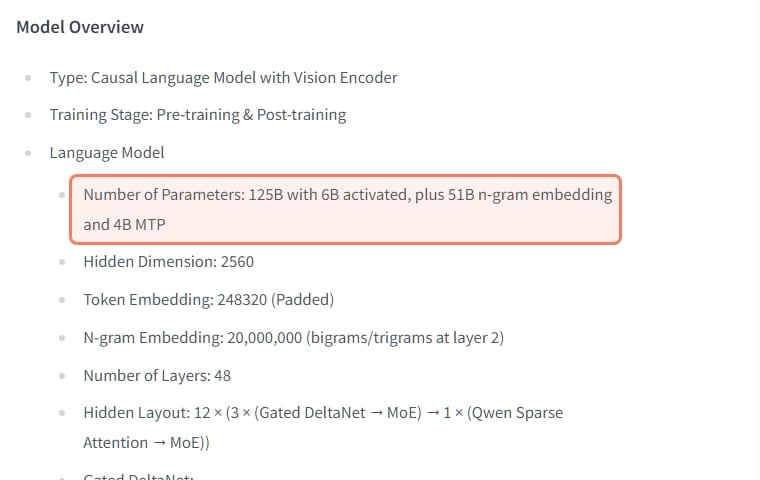
Qwen3.8 Flash Next runs on an 8GB to 16GB graphics card because only a small part of it works on each token. Per Qwen's model card, it has 125B parameters with 6B activated, plus a 51B n-gram embedding and 4B for multi-token prediction, about 180B parameters in the files. Engines keep the busy parts on the GPU, the experts in system RAM and the n-gram table on the SSD. So the hardware that decides whether it runs is your RAM, not your card: plan on 48 to 64GB for the 2-bit and 3-bit packs, about 72GB or more for 4-bit, and a fast NVMe drive. With 32GB it can still start, slower, at the smallest sizes.
What Flash Next is
Qwen's card calls Flash Next an experimental preview of the architecture behind its next generation, and says the hosted Qwen3.8-Flash is the production version built on it, with 1M context by default. The open weights are what you run at home.
Parameters
Qwen3.8 Flash Next (model card)
125B, 6B activated per token
Extra parameters
Qwen3.8 Flash Next (model card)
51B n-gram embedding, 4B MTP layer
Files on Hugging Face
Qwen3.8 Flash Next (model card)
179,999,981,459 parameters, BF16
Layers
Qwen3.8 Flash Next (model card)
48
Experts
Qwen3.8 Flash Next (model card)
512, with 10 routed + 1 shared active
Attention
Qwen3.8 Flash Next (model card)
Gated DeltaNet linear layers + Qwen Sparse Attention, 3:1
Context
Qwen3.8 Flash Next (model card)
262,144 native, up to 1,000,000 with YaRN
Input
Qwen3.8 Flash Next (model card)
Text, image, video
Licence
Qwen3.8 Flash Next (model card)
qwen-community-1.0 (custom, not Apache)
Qwen3.8 Flash Next (model card)
Parameters
125B, 6B activated per token
Extra parameters
51B n-gram embedding, 4B MTP layer
Files on Hugging Face
179,999,981,459 parameters, BF16
Layers
48
Experts
512, with 10 routed + 1 shared active
Attention
Gated DeltaNet linear layers + Qwen Sparse Attention, 3:1
Context
262,144 native, up to 1,000,000 with YaRN
Input
Text, image, video
Licence
qwen-community-1.0 (custom, not Apache)
That is why you see both "125B" and "180B" quoted: 125B is the model, 180B is everything in the files. At BF16 the files are about 355 to 360 GB. Even at 4-bit it is big: Ollama's smallest GGUF tag, Q4_K_M, is a 120 GB download (see what it costs to run Flash Next), more than any single consumer card holds.
Qwen's own model card, captured 1 Nov 2026. · Hugging Face / Qwen
Two design choices make it friendly to small cards. Only 10 routed experts and one shared expert fire per token, so most of the weights sit idle at any moment and can wait in RAM. And the card says the n-gram embedding, a 20-million-entry lookup table indexed by short word sequences, is "more amenable to offloading than MoE". A lookup table only needs the rows each token touches, which is why engines leave it on the SSD.
The card also says the model thinks by default, writing its reasoning before the answer. Thinking can be turned off per request.
Why the card matters less than your RAM
On a dense model like Qwen3.8 27B, the whole model has to fit on the GPU or it crawls. Flash Next flips that. The GPU holds attention, the shared parts and the KV cache. The 512 experts per layer live in system RAM, and the CPU or PCIe bus fetches the few each token needs. Strata's models guide puts it plainly: the model fits "when RAM is at least the experts plus about 10 GB" for the OS, and "a bigger graphics card makes it faster and does not lower the RAM needed".
So two machines compare like this: a 12GB card with 64GB of RAM can hold every Strata pack in memory, while a 24GB card with 32GB of RAM cannot, and has to read experts from the SSD. RAM speed matters too. In a 1 Nov r/LocalLLaMA thread about long tasks hanging with offloaded experts, a reply pointed out that once experts are offloaded, system-RAM bandwidth and the CPU become the bottleneck. So check your RAM speed and channel count as well as its size.
Memory by quant
Different publishers pack the model very differently, because some keep the n-gram table in the same files and some split it out.
ISTA-DASLab Q2_0
Memory the publisher states
37.6 GB RAM + VRAM (experts 34 GB)
Where it runs
Strata
ISTA-DASLab IQ2_XS
Memory the publisher states
39.2 GB (experts 35.5 GB)
Where it runs
Strata
ISTA-DASLab IQ3_XXS
Memory the publisher states
47.0 GB (experts 43 GB)
Where it runs
Strata
ISTA-DASLab IQ3_S
Memory the publisher states
54.8 GB (experts 50 GB)
Where it runs
Strata
ISTA-DASLab Coder IQ1_M
Memory the publisher states
experts 29.6 GB, coding only
Where it runs
Strata
Unsloth UD-IQ4_XS
Memory the publisher states
~72 GB RAM for all experts (94 GB download)
Where it runs
llama.cpp, Strata
Unsloth UD-Q4_K_XL
Memory the publisher states
~88 GB RAM for all experts (111 GB download)
Where it runs
llama.cpp, Strata
Memory the publisher states
Where it runs
ISTA-DASLab Q2_0
37.6 GB RAM + VRAM (experts 34 GB)
Strata
ISTA-DASLab IQ2_XS
39.2 GB (experts 35.5 GB)
Strata
ISTA-DASLab IQ3_XXS
47.0 GB (experts 43 GB)
Strata
ISTA-DASLab IQ3_S
54.8 GB (experts 50 GB)
Strata
ISTA-DASLab Coder IQ1_M
experts 29.6 GB, coding only
Strata
Unsloth UD-IQ4_XS
~72 GB RAM for all experts (94 GB download)
llama.cpp, Strata
Unsloth UD-Q4_K_XL
~88 GB RAM for all experts (111 GB download)
llama.cpp, Strata
The ISTA-DASLab figures and the Unsloth RAM figures are from Strata's models guide; in those packs the 29 GB n-gram table stays on the SSD. Unsloth's own GGUF folders run from 74.5 GB (UD-IQ1_M) to 188 GB (Q8_0), and Unsloth's guide says its smallest needs at least 75 GB of RAM or unified memory, adding that you can "offload the PLE / Ngram layer to SSD and use mmap" to use less. The context cache comes on top of all of these, and Strata says its figures are estimates.
Strata describes its four ISTA-DASLab sizes as "good", "better", "great" and "best", with IQ3_S matching the full model "on the published tests". The Coder pack keeps 256 of each layer's 512 experts, chosen on code, and Strata warns it is weaker outside code. Check the best GPU for Flash Next page for card-by-card numbers and the VRAM calculator for anything else.
Setups by card size
These are the combinations people are running, with what they reported. Each speed is one user's number on their own machine.
8GB card + 32GB RAM
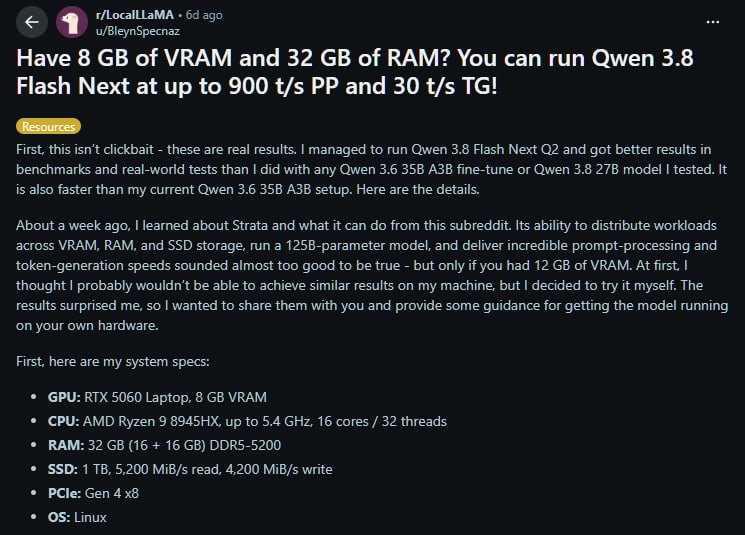
It runs, slowly to start and with most of the model coming off the SSD. The thread that started the craze, a 26 Oct r/LocalLLaMA post with about 900 upvotes, reported up to 900 tokens/s of prompt processing and 30 tokens/s of generation on 8GB of VRAM and 32GB of RAM, at a 2-bit quant in Strata spread across VRAM, RAM and SSD. The poster found it better than any Qwen3.6 35B-A3B fine-tune or Qwen3.8 27B they had tried. Commenters were surprised that a below-Q4 quant held up.
The post and the poster's hardware, captured 1 Nov 2026. One user's results, not our measurement. · Reddit
The llama.cpp route works too. A 24 Oct r/LocalLLaMA post ran a roughly 3.5-bit Flash Next Coder build with 262K context on an 8GB GPU and 24GB of RAM, with "most MOEs in RAM" and the n-gram table on disk. The author said CUDA struggled at 8GB and suggested the Vulkan build if it fails. One commenter got about 50% faster prompt processing with --load-mode none instead of the default mmap. A critic noted that prompt processing near 70 tokens/s means minutes before the first token in agent tools that send long prompts.
Below Strata's own rule (experts plus 10 GB), so expect SSD reads. Use an NVMe drive and close everything else.
12GB card
A 12GB card is a good fit with 48 to 64GB of RAM: every ISTA-DASLab pack fits with 64GB per Strata's guide, and the two 2-bit packs fit with 48GB. With less RAM, Strata's low-RAM mode maps experts from the model files; per the guide, a 32GB PC with a 12 to 16GB card runs the Coder pack that way, much slower.
The headline 12GB report is a 31 Oct r/LocalLLaMA project post claiming 22 tokens/s sustained on an RTX 3060 12GB with only 16GB of DDR4, using a 68 GB GSQ-RCO IQ2_XS build "without dropping a single expert". The author said an earlier version that pruned experts was scrapped because quality dropped. It is a custom build, so treat it as a demonstration.
16GB card
With 16GB, more of the shared weights and the context fit on the card, which helps prompt processing more than generation. The RAM rule is the same: 48GB for the 2-bit packs, 64GB for all of them. A 25 Oct r/LocalLLaMA post about a project called Lean-QwenFlash claimed about 20 tokens/s at 100K context on an RTX 4090 limited to 16GB of VRAM and 8GB of system RAM, by streaming experts from an NVMe SSD; a top commenter called its quality measurement "a joke" because it used a tiny test corpus. Read it as a sign of what SSD streaming can do, not as a quality result.
If you own a 16GB card and mostly want a model that lives entirely on it, Qwen3.8 27B at a 3-bit quant is the other option; see the 16GB guide.
24GB card + 64GB RAM
This is the comfortable setup. A 26 Oct r/ollama post from someone with 24GB of VRAM and 64GB of RAM said Qwen3.6 27B felt "so much slower than I imagined"; in an edit, they reported 80 to 100 tokens/s after switching to Flash Next. With 64GB you can run the IQ3_S pack, and with 96GB or more, Unsloth's 4-bit files keep every expert in RAM. Our 24GB guide compares Flash Next with the models that fit entirely on the card.
Which engine
llama.cpp is the stable route. Unsloth's model page says to run its GGUFs "with llama.cpp", and the current source has --cpu-moe (every expert to RAM), --n-cpu-moe N (the first N layers' experts to RAM) and --load-mode (auto, none, mmap, mlock and others). With 48 layers and a small card, start with all experts in RAM and the sampling from Qwen's card:
Point -m at the first file of a split GGUF and llama.cpp loads the rest. The file name above is a placeholder; use the shard name you downloaded. If you have VRAM to spare, swap --cpu-moe for --n-cpu-moe N and lower N until the card is nearly full. Our guide to --n-cpu-moe explains how to pick N, and why adding offload slows a model that already fits.
Strata is the engine built around this model. It is an MIT-licensed 0.x project with installers for Windows, Linux and Mac; its README lists the ISTA-DASLab packs first, then Unsloth and others. strata launch --plan prints what it would download and how it would split memory, without changing anything. It is fast and young. In October, users reported it defaulted to greedy decoding instead of Qwen's sampling settings, which a top reply called the main reason for bad experiences. Strata's current details page (read 1 Nov) says requests that leave sampling out now get the model card's settings, and greedy only applies if you ask for temperature 0. Check the version you have, and pin one that works.
Ollama lists six qwen3.8-flash-next tags: the smallest GGUF is 125b-a6b-q4_K_M at 120 GB, the MLX builds for Macs are 105 GB, and there is no 2-bit or 3-bit tag. That makes Ollama a route for 128GB machines, not for an 8 to 16GB card with 32 to 64GB of RAM. Use the full tag name you see on that page; the page does not list a short latest tag.
LM Studio has a qwen/qwen3.8-flash-next entry based on the lmstudio-community GGUF, with a stated minimum system memory of 96 GB and the card's thinking-mode sampling (temperature 1, top-k 20, top-p 0.95) preset. Check the quant list in the app before downloading.
The quality argument
This is the part to read before you spend a weekend on it. Flash Next on small hardware means a low quant, and people disagree about how much that costs.
For. In a 13 Oct r/LocalLLM thread called "the hype vs the truth", the poster preferred Qwen3.8 27B on a real task, but top replies disagreed hard: one said Flash Next at Q3_S beat 27B at FP8, another that mixed Q4 to Q8 builds were "utterly dominating".
Against. In a 16 Oct r/LocalLLaMA thread, Flash Next at UD-Q4_K_XL on four RTX 3090s lost to Qwen3.8 27B at Q8 on a coding task. Others in the same thread said Flash Next had been "leagues above 27B" for them.
The floor. In a 31 Oct r/LocalLLM thread, the poster called small-hardware Flash Next a "pipe dream", saying quants up to IQ3 were poor and IQ4 to Q6 better but slow. A reply: "No model is great below Q4."
Speed flags change answers.An engine developer on r/LocalLLaMA measured two speed options, one that biases routing toward experts already on the GPU and one that skips low-ranked experts not on the GPU. Both changed the output; a commenter's takeaway was that going from Q8 to Q3 hurt less than turning both on. Strata documents a related option, STRATA_ROUTE_TAIL_SKIP, on by default on CUDA, and says answers "differ slightly from a run without it". Know which of these are on.
A fair reading: at 3-bit and above, with the card's sampling settings and no expert-skipping, many users find Flash Next better than Qwen3.8 27B. At 2-bit, or with greedy decoding or skipping turned on, the reports get mixed. If 27B fits your card at a decent quant, run both on your own tasks.
Sampling settings
Qwen's card recommends two sets and notes that support varies by engine:
temperature
Thinking mode (default)
1.0
Non-thinking mode
0.7
top_p
Thinking mode (default)
0.95
Non-thinking mode
0.80
top_k
Thinking mode (default)
20
Non-thinking mode
20
min_p
Thinking mode (default)
0.0
Non-thinking mode
0.0
presence_penalty
Thinking mode (default)
0.0
Non-thinking mode
1.5
repetition_penalty
Thinking mode (default)
1.0
Non-thinking mode
1.0
Thinking mode (default)
Non-thinking mode
temperature
1.0
0.7
top_p
0.95
0.80
top_k
20
20
min_p
0.0
0.0
presence_penalty
0.0
1.5
repetition_penalty
1.0
1.0
The card adds that a presence penalty between 0 and 2 can reduce endless repetition, but higher values can cause language mixing. Do not run it greedy (temperature 0) by habit; that is the setting most often blamed when it disappoints.
Give it a network allow-list
If you connect Flash Next to web search or fetch tools, limit where it can go. In a 1 Nov r/LocalLLM thread, a user running Flash Next at Q4 with web tools saw it sometimes try to fetch Alibaba Cloud (aliyuncs.com) URLs; the top reply put it down to patterns in its training data. The thread is one user's observation, not evidence of anything malicious, and the lesson applies to any local model with tools: give the tool an allow-list of domains, log its requests, and keep it away from anything private.
Quick answers
Can I run Qwen3.8 Flash Next on an 8GB GPU?
Yes, with system RAM and an NVMe SSD doing most of the work. One r/LocalLLaMA user reported up to 30 tokens/s of generation on 8GB of VRAM and 32GB of RAM at a 2-bit quant in Strata. Expect slow prompt processing and a contested quality level at 2-bit.
How much RAM does Qwen3.8 Flash Next need?
Per Strata's guide, the 2-bit ISTA-DASLab packs need about 38 to 39GB of RAM plus VRAM and the IQ3_S pack about 55GB, so 64GB of RAM covers every size and 48GB covers the 2-bit ones. Unsloth's 4-bit files need about 72 to 88GB of RAM to hold every expert.
Is Qwen3.8 Flash Next better than Qwen3.8 27B?
It depends on the quant and settings. Reddit users report both results. At 3-bit and above with Qwen's recommended sampling, many prefer Flash Next; at 2-bit, or with greedy decoding, some find 27B better. Test both on your own work.
Can Ollama run Qwen3.8 Flash Next?
Ollama's library has qwen3.8-flash-next, but its smallest GGUF tag is Q4_K_M at 120 GB and the Mac MLX builds are 105 GB. That suits 128GB machines. For a small card with 32 to 64GB of RAM, use llama.cpp or Strata with a 2-bit or 3-bit pack.
What temperature should I use for Qwen3.8 Flash Next?
Qwen's model card recommends temperature 1.0, top_p 0.95 and top_k 20 in thinking mode, and 0.7, 0.80 and 20 with a presence penalty of 1.5 in non-thinking mode.