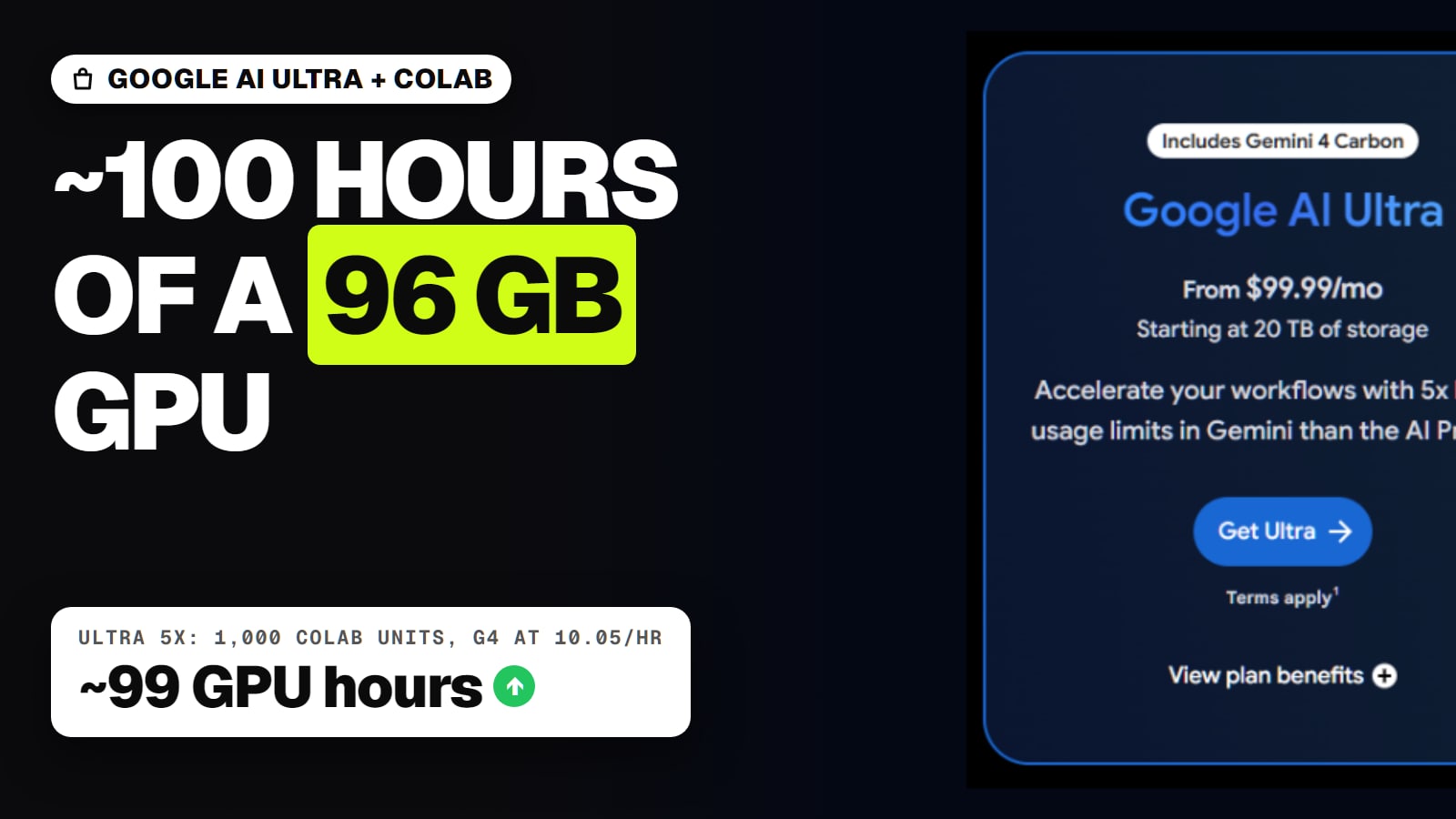
Google AI Ultra now comes with 1,000 or 2,000 Colab compute units a month, and people on X are calling it "too good to be true" GPU time. We turned the units into hours on Colab's 96 GB RTX PRO 6000 and compared them with renting the same card on Vast and Runpod. Checked Nov 25, 2026.
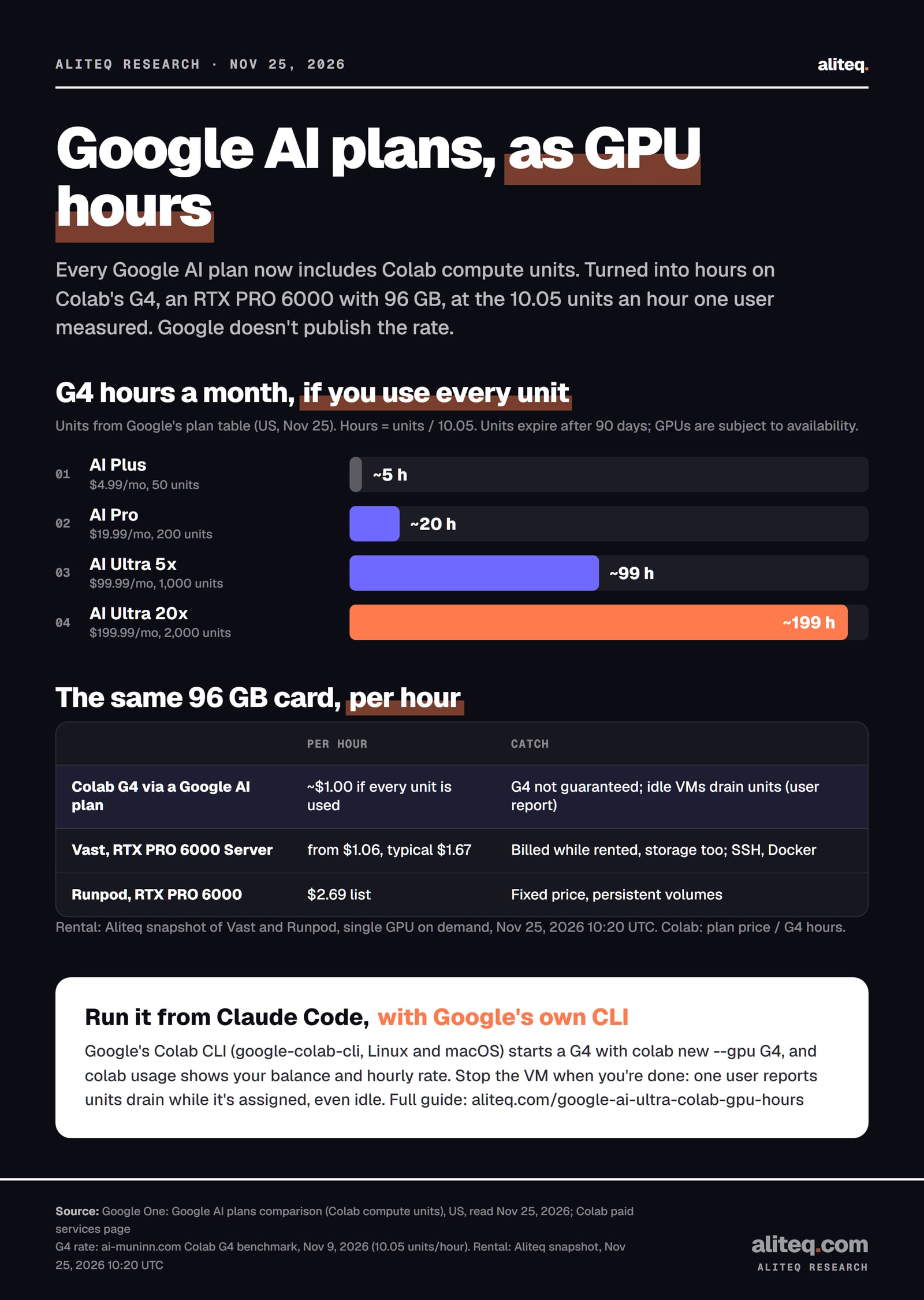
About 99 GPU hours a month on Ultra 5x and 199 on Ultra 20x, if you can get a G4 and use every unit. Google's plan table, read November 25, 2026, gives Google AI Ultra 5x ($99.99 a month) 1,000 Colab compute units and Ultra 20x ($199.99) 2,000. Google doesn't say what a GPU costs in units, but one user's benchmark measured 10.05 units an hour for Colab's G4, an NVIDIA RTX PRO 6000 with 96 GB. At that rate every Google AI plan works out to about $1.00 per G4 hour, cheaper than a typical rental of the same card. The catches are availability and expiring units, and one user reports idle VMs still drain units.
Google AI plans turned into GPU hours, free to share with a link back. Units from Google's plan table; the G4 rate is one user's measurement; rental prices from our snapshot, Nov 25, 2026. · aliteq research
How many Colab compute units does each Google AI plan include?
Colab compute units by Google AI plan (Google One, US, Nov 25, 2026)
Google AI Plus
Per month
$4.99
Colab units a month
50
G4 hours at 10.05 an hour
~5 hours
Google AI Pro
Per month
$19.99
Colab units a month
200
G4 hours at 10.05 an hour
~20 hours
Google AI Ultra 5x
Per month
$99.99
Colab units a month
1,000
G4 hours at 10.05 an hour
~99 hours
Google AI Ultra 20x
Per month
$199.99
Colab units a month
2,000
G4 hours at 10.05 an hour
~199 hours
Per month
Colab units a month
G4 hours at 10.05 an hour
Google AI Plus
$4.99
50
~5 hours
Google AI Pro
$19.99
200
~20 hours
Google AI Ultra 5x
$99.99
1,000
~99 hours
Google AI Ultra 20x
$199.99
2,000
~199 hours
The Ultra plans also include $40 (5x) or $100 (20x) of Google Cloud credits a month through the Google Developer Program, and AI Pro $10. Prices vary by country. A Black Friday banner on the page offered members "up to 50%" off select plans, with terms on Google's page.
What's a compute unit worth in GPU hours?
Google doesn't publish it. Colab's pricing page only says the amount of access a unit gives "depends on the configuration of your VM and use of specialized accelerators like TPUs or GPUs". You see the live rate with colab usage in Google's CLI, or in Colab's resource monitor.
The best public number we found is from ai-muninn's Colab G4 benchmark (November 9, 2026). On a Google AI Pro account the author got a G4, an NVIDIA RTX PRO 6000 Blackwell Server Edition with 97,887 MiB of memory, and it "cost 10.05 units an hour". We use that rate. The X post that made this go viral (50.6K views) assumed about 8.7 units an hour and got 115 to 230+ hours; at the measured 10.05 it's 99 to 199. Rates can change, and smaller GPUs like the L4 or T4 burn fewer units per hour, so the same balance lasts longer on them.
Is it cheaper than renting the same GPU?
On paper, yes. If you use every unit, each plan works out to about $1.00 per G4 hour ($99.99 for about 99.5 hours on Ultra 5x). Our price snapshot from November 25, 2026, 10:20 UTC, single GPU on demand:
One RTX PRO 6000 (96 GB) for an hour, Nov 25, 2026
Colab G4 through a Google AI plan
Per hour
~$1.00 if every unit is used
Catch
Not guaranteed to be free; 90-day unit expiry; idle VMs drain units, per one user's report
Vast, RTX PRO 6000 Server Edition
Per hour
from $1.06, typical $1.67
Catch
Billed while rented (storage too); SSH, Docker, your own image
Runpod, RTX PRO 6000
Per hour
$2.69 list
Catch
Fixed price; persistent volumes
Per hour
Catch
Colab G4 through a Google AI plan
~$1.00 if every unit is used
Not guaranteed to be free; 90-day unit expiry; idle VMs drain units, per one user's report
Vast, RTX PRO 6000 Server Edition
from $1.06, typical $1.67
Billed while rented (storage too); SSH, Docker, your own image
Runpod, RTX PRO 6000
$2.69 list
Fixed price; persistent volumes
Three things decide whether the Colab deal is real for you:
Do you want the rest of the plan? Ultra is a Gemini subscription with storage and other perks. If you'd pay for it anyway, the Colab units are close to free GPU time. If you only want a GPU, $99.99 buys about 60 hours of a typical Vast PRO 6000, no subscription.
Can you get a G4 when you need it? Colab's FAQ says resources aren't guaranteed. On a busy evening you may get a smaller card or none.
Will you use the units? They expire after 90 days. And per ai-muninn's benchmark, your balance "goes down while a VM is assigned to you, whether it's working or idle" (Colab's own pages don't spell this out). Its runner refuses to start under 5 units and caps every job with a watchdog for this reason.
Live price check
RTX PRO 6000 rental prices right now
Good time to rentToday's typical on-demand price is lower than on 100% of the last 23 days.
cheapest daypriciest day
Now vs usualThe typical on-demand price is $1.57/hr now, 6% below its median since Nov 2 of $1.67/hr.
Lowest since Nov 2Right now the typical on-demand price ($1.57/hr) is a new low, under the previous lowest since Nov 2 of $1.58/hr.
Last 7 daysOver the last 7 days the typical on-demand price is falling, down 9%.
Cheapest right nowCheapest on-demand right now: Vast.ai at $1.06/hr, then Lium at $1.49/hr.
Provider spreadThe same card costs 1.4× more on Lium ($1.49/hr) than on Vast.ai ($1.06/hr), so shop around.
InterruptibleInterruptible (spot) offers start at $0.467/hr, 56% less than on-demand, but can be stopped mid-job.
Computed from our live prices as of . Compared like for like: the typical on-demand price is the median listing at the cheapest provider, today and on each past day. Vast.ai, Runpod, Lium and Novita, updated every hour, nothing typed by hand.
Google released an official Colab CLI in June 2026 that runs from your own terminal, so an agent like Claude Code can drive it. Per its README it supports Linux and macOS only, not Windows, and offers T4, L4, G4, H100 and A100 GPUs plus TPUs.
Install it with uv tool install google-colab-cli and sign in.
Run colab usage to see your balance and the hourly rate.
Start a G4 with colab new -s work --gpu G4, then colab exec your script.
When you're done, colab stop -s work, then check colab usage shows no active assignments.
ai-muninn's post walks through a full ComfyUI video job this way, one step at a time you can hand to Claude Code. One trap it found: colab exec can exit 0 even when your script failed, so print your own success marker and check for it.
What can you run on a 96 GB G4?
96 GB fits models a gaming card can't: 70B-class models at 8-bit, big video models like MiniMax-H3 (ai-muninn's run peaked at 45 GB), and long-context runs of 27B to 32B models. See which models fit with our VRAM calculator, and our RTX PRO 6000 price page for buying it outright.
Google AI Ultra Colab questions
How many Colab compute units does Google AI Ultra include?
Google's plan table (US, Nov 25, 2026) lists 1,000 a month on AI Ultra 5x ($99.99) and 2,000 on AI Ultra 20x ($199.99). AI Pro includes 200 and AI Plus 50.
How many GPU hours is 1,000 Colab compute units?
About 99 hours on Colab's G4 (RTX PRO 6000, 96 GB) at the 10.05 units an hour one user measured on Nov 9, 2026. Google doesn't publish the rate, and smaller GPUs burn fewer units an hour.
Does Google AI Pro get Colab GPUs?
It includes 200 compute units a month, and one user ran a G4 on an AI Pro account in November 2026. Colab says GPUs are subject to availability.
Do Colab compute units expire?
Yes. Colab's pricing page says compute units expire after 90 days.
Is Google AI Ultra cheaper than renting a GPU?
Per hour of G4, about $1.00 if you use every unit, against Vast's RTX PRO 6000 from $1.06, typical $1.67, and Runpod's $2.69 on Nov 25, 2026. But Colab doesn't guarantee a GPU is free, and one user's benchmark reports units drain while a VM is assigned, even idle.
Can Claude Code use Colab GPUs?
Yes, through Google's official Colab CLI (google-colab-cli), on Linux and macOS. It starts a runtime with colab new --gpu G4 and runs your scripts with colab exec.