A 24 GB card runs Flux and Wan 2.2 14B video at 640x640, and on Nov 3, 2026 the cheapest one was an RTX 3090 on Vast from about $0.10 an hour. Which card each workflow needs, what one Wan clip costs in GPU time, when you really need 48 GB, and the setup that doesn't waste your first hour.
Some links on this page are referral links: we may earn a commission, at no cost to you.
Share
The cheapest cloud GPU for ComfyUI with Flux or Wan 2.2 is a 24 GB card, and the cheapest 24 GB card is an RTX 3090. On Nov 3, 2026 an RTX 3090 rented from about $0.10 an hour on Vast (on-demand) and $0.50 on Runpod's Secure Cloud. A 24 GB card runs Flux, and Runpod's own Wan 2.2 guide says it runs the 14B video models at 640x640 with fp8 weights. You need a 48 GB card only for fp16 video weights or 720p, and an 80 GB card such as an H100 only for 720p without offloading.
Which GPU does each ComfyUI workflow need?
A 24 GB card for almost everything; 48 GB for fp16 video weights or 720p. Here's each common workflow, the VRAM its own docs give, and the cheapest card that fits.
ComfyUI workflows and the cheapest card that fits (prices read Nov 3, 2026, 20:20 UTC)
Flux.1 Dev (fp8 checkpoint)
VRAM it needs
fp8 is for limited VRAM (ComfyUI docs)
Cheapest sensible card
RTX 3090 (24 GB)
Vast on-demand
from $0.10/hr
Runpod Secure Cloud
$0.50/hr
Wan 2.2 5B video
VRAM it needs
8 GB with offloading (ComfyUI docs)
Cheapest sensible card
RTX 3090 (24 GB)
Vast on-demand
from $0.10/hr
Runpod Secure Cloud
$0.50/hr
Wan 2.2 14B video, 640x640 fp8
VRAM it needs
24 GB (Runpod guide)
Cheapest sensible card
RTX 3090 or RTX 4090 (24 GB)
Vast on-demand
from $0.10 / $0.26/hr
Runpod Secure Cloud
$0.50 / $0.89/hr
Longer clips or LoRAs, more headroom
VRAM it needs
32 GB (Runpod guide)
Cheapest sensible card
RTX 5090 (32 GB)
Vast on-demand
from $0.40/hr
Runpod Secure Cloud
$1.19/hr
Wan 2.2 14B in fp16, or fp8 at 720p
VRAM it needs
48 GB (Runpod guide)
Cheapest sensible card
RTX A6000 or A40 (48 GB)
Vast on-demand
from $0.35/hr (A6000)
Runpod Secure Cloud
$0.59/hr (A40 or A6000)
Wan 2.2 14B at 720p, no offloading
VRAM it needs
80 GB (Runpod guide)
Cheapest sensible card
H100 (80 GB)
Vast on-demand
from $2.40/hr (SXM)
Runpod Secure Cloud
$2.89/hr (PCIe)
VRAM it needs
Cheapest sensible card
Vast on-demand
Runpod Secure Cloud
Flux.1 Dev (fp8 checkpoint)
fp8 is for limited VRAM (ComfyUI docs)
RTX 3090 (24 GB)
from $0.10/hr
$0.50/hr
Wan 2.2 5B video
8 GB with offloading (ComfyUI docs)
RTX 3090 (24 GB)
from $0.10/hr
$0.50/hr
Wan 2.2 14B video, 640x640 fp8
24 GB (Runpod guide)
RTX 3090 or RTX 4090 (24 GB)
from $0.10 / $0.26/hr
$0.50 / $0.89/hr
Longer clips or LoRAs, more headroom
32 GB (Runpod guide)
RTX 5090 (32 GB)
from $0.40/hr
$1.19/hr
Wan 2.2 14B in fp16, or fp8 at 720p
48 GB (Runpod guide)
RTX A6000 or A40 (48 GB)
from $0.35/hr (A6000)
$0.59/hr (A40 or A6000)
Wan 2.2 14B at 720p, no offloading
80 GB (Runpod guide)
H100 (80 GB)
from $2.40/hr (SXM)
$2.89/hr (PCIe)
How to read those prices. The Vast figures are the cheapest on-demand single-GPU listing in our hourly read at 20:20 UTC on Nov 3, 2026; the middle (median) listing was $0.16 for an RTX 3090 and $0.46 for an RTX 4090, and both move every hour because independent hosts set their own prices. The Runpod figures are its Secure Cloud list prices on runpod.io/pricing that day. Today's live numbers for every card are on our cloud GPU price table, and if you want to check a different model against your card, our VRAM calculator does the arithmetic.
Is a 24 GB card enough for Flux in ComfyUI?
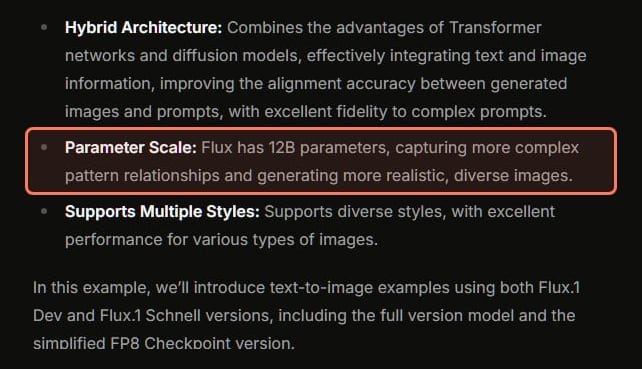
Yes. ComfyUI's own Flux page describes Flux as "one of the largest open-source text-to-image generation models, with 12B parameters and an original file size of approximately 23GB." It offers two ways to run it: the full version, which "requires larger VRAM resources", and an fp8 checkpoint that is "suitable for devices with limited VRAM", with slightly lower image quality. Its docs recommend the larger fp16 text encoder only "when your VRAM is greater than 32GB".
So a 24 GB card is the comfortable place for Flux with a ControlNet and a LoRA or two, and the fp8 checkpoint is the move on anything smaller. Image generation is the cheap end of ComfyUI: an hour on a rented 3090 costs dimes.
If you'd rather pay per image than rent a card, our Nano Banana Pro alternatives page prices the hosted image models next to the open ones, with the memory each open model needs.
ComfyUI's Flux docs, read Nov 1, 2026 (text unchanged on Nov 3). · Screenshot of docs.comfy.org by aliteq
How much VRAM does Wan 2.2 need in ComfyUI?
8 GB for the 5B model with offloading, 24 GB for the 14B models at 640x640 in fp8, and 48 GB for the 14B models in fp16. Video is where the card matters.
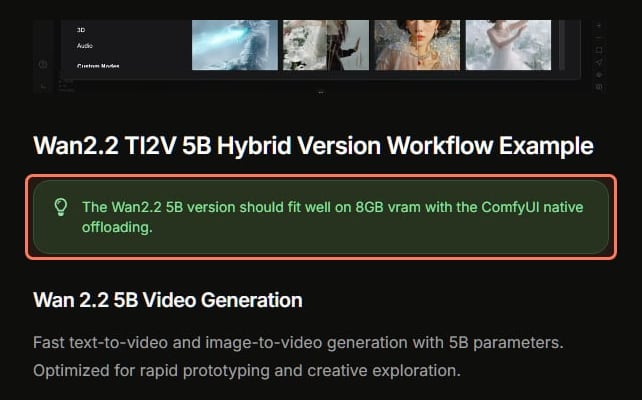
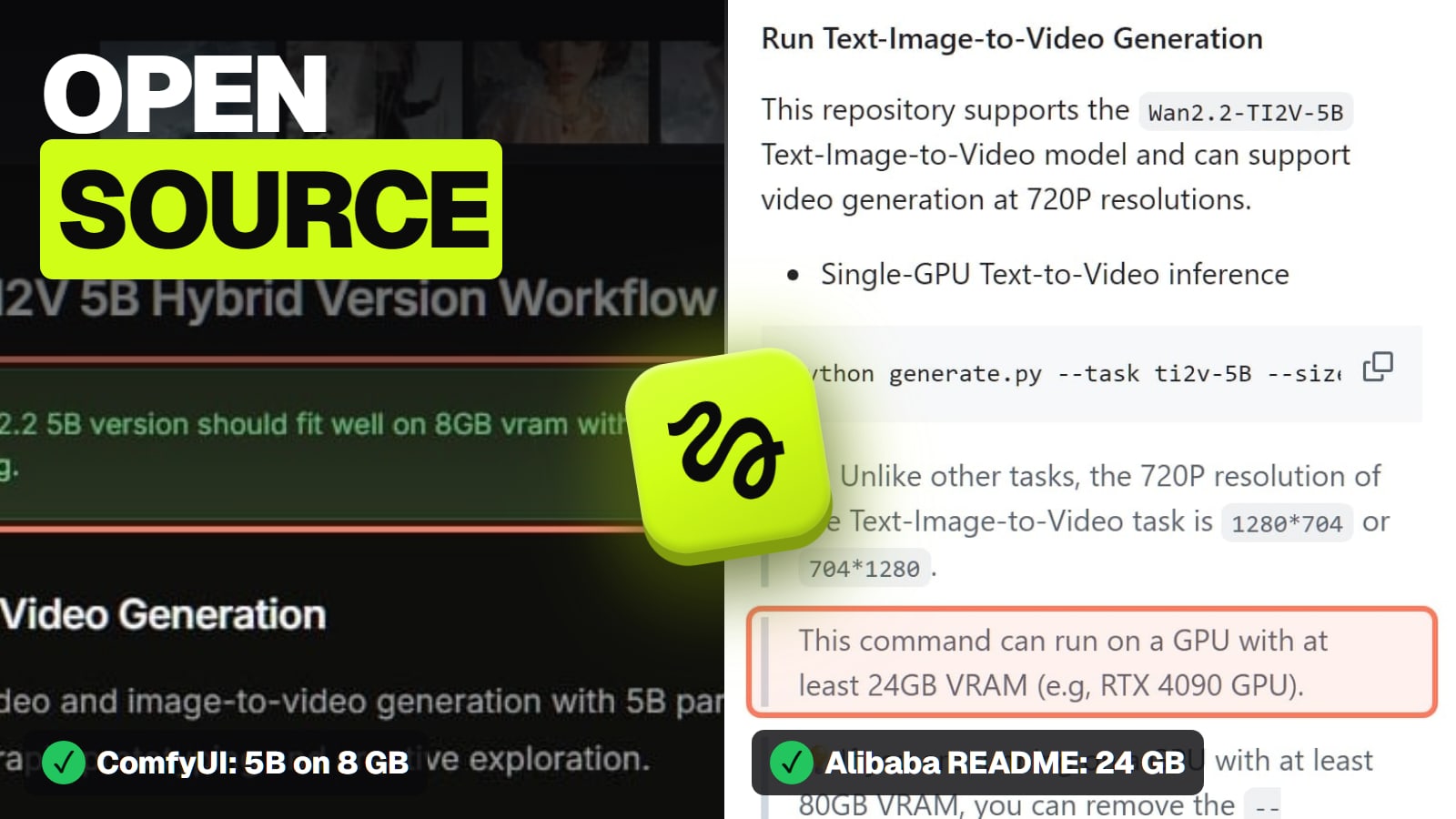
Wan 2.2 5B is the light one. ComfyUI's docs say it "should fit well on 8GB vram with the ComfyUI native offloading". It's the right model to learn on.
ComfyUI's Wan 2.2 docs, read Nov 1, 2026 (tip unchanged on Nov 3). · Screenshot of docs.comfy.org by aliteq
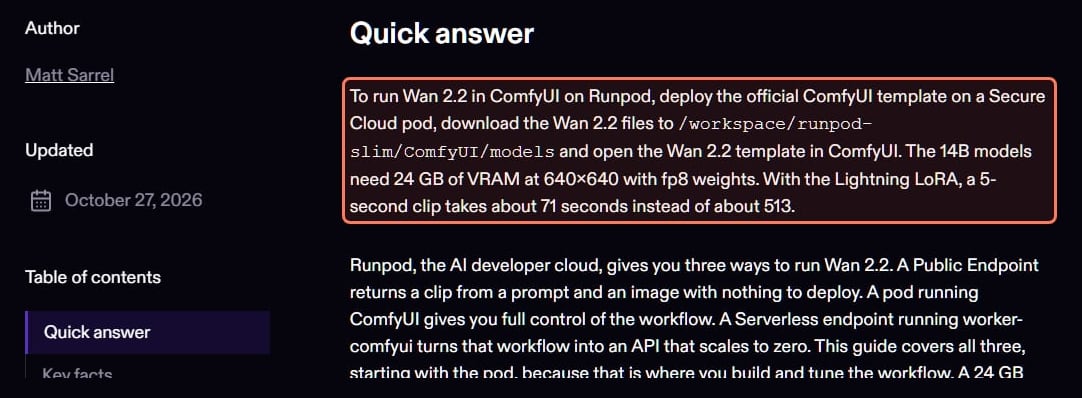
Wan 2.2 14B is the one people mean. Runpod's guide (updated Oct 27, 2026) says "The 14B models need 24 GB of VRAM at 640x640 with fp8 weights." Its arithmetic: one 14B expert is 14.3 GB in fp8, which leaves about 10 GB for activations on a 24 GB card, while the same expert in fp16 is 28.6 GB, "so fp16 weights need a 48 GB card at 640x640 or 480p." It also notes that the 14B models need "enough system RAM for the idle expert", because Wan 2.2 14B is two experts, not one network.
Runpod's Wan 2.2 guide (updated Oct 27, 2026), the source of the VRAM figures and render times. · Screenshot of runpod.io by aliteq
At 720p the numbers jump. Runpod's guide says a 1280x720 frame has 2.3 times the pixels of an 832x480 frame, that Alibaba's own script peaked at 59.8 GB on one GPU at 720p, and that "720p without offloading belongs on an 80 GB card." It suggests an L40S (48 GB) for the 14B models in fp8 at 720p. The guide is clear that these boundaries are "derived from those figures rather than measured on each card", so treat them as starting points.
What does one Wan 2.2 clip cost on a rented GPU?
About half a cent to two cents of GPU time per 5-second draft with the Lightning LoRA, by our arithmetic. Runpod's guide timed the 14B template on a 24 GB RTX 4090D at 640x640: about 71 seconds for a 5-second clip with the 4-step Lightning LoRA, and about 513 seconds at 20 steps, after the first run. It works that out as about 50 Lightning clips per GPU-hour on an RTX 4090, against about seven on the 20-step path. Multiply by the Nov 3 hourly prices:
GPU time for one 5-second Wan 2.2 14B clip on an RTX 4090, 640x640 (our arithmetic from Runpod's timings and prices read Nov 3, 2026)
Lightning LoRA, Vast fromabout $0.005
About 50 clips per GPU-hour at $0.26
Lightning LoRA, Runpod Secure Cloudabout $0.018
About 50 clips per GPU-hour at $0.89
20 steps, Vast fromabout $0.037
About 7 clips per GPU-hour at $0.26
20 steps, Runpod Secure Cloudabout $0.13
About 7 clips per GPU-hour at $0.89
That's GPU time only, and it's the floor, not the bill. The first render loads tens of gigabytes of models, you pay for every idle minute while you tweak the workflow, and few prompts give a usable clip on the first try. Runpod's guide also says its clip rates "are derived from the template timings, not measured on Runpod." An RTX 3090 is cheaper per hour but an older card, and I haven't found a published Wan 2.2 timing for it, so I don't price a 3090 clip here. If you'd rather pay per clip with no setup, Runpod lists a Wan 2.2 image-to-video 720p Public Endpoint at $0.30 per 5 seconds of output (October 2026, per its guide). I compare all three routes in AI video cost per clip: app, API or rented GPU.
When should you rent a 48 GB card instead?
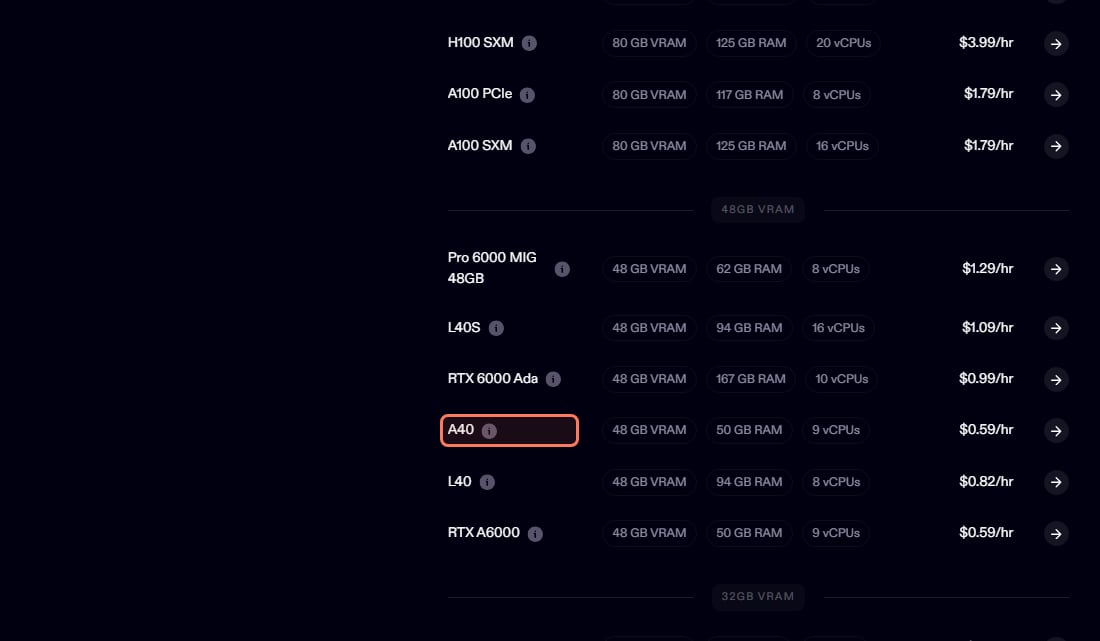
When you run the 14B models in fp16, or in fp8 at 720p. And on Runpod there's a price quirk worth knowing: on Nov 3, 2026 its two cheapest 48 GB cards, the A40 and the RTX A6000, were both $0.59 an hour on Secure Cloud, less than its RTX 4090 at $0.89. On Vast the cheapest 48 GB card that day was an RTX A6000 from $0.35 an hour. Both are older Ampere-generation cards; Runpod's guide names the newer L40S ($1.09 an hour on Runpod) for 48 GB work, and I haven't timed either card myself.
Runpod's 48 GB cards on runpod.io/pricing, read Nov 3, 2026. The A40 and RTX A6000 cost less per hour than its RTX 4090. · Screenshot of runpod.io by aliteq
Can I run MiniMax H3 on a rented GPU in the US?
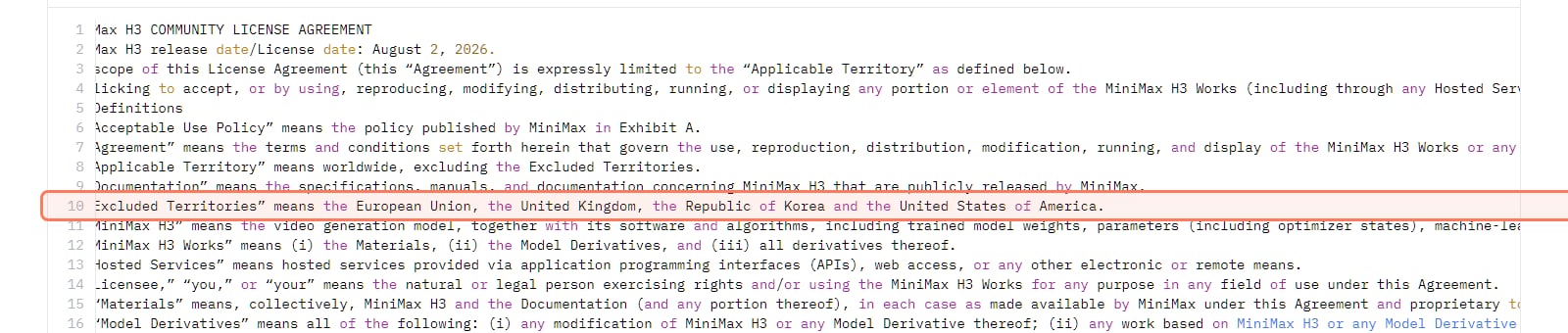
Not under its open licence. MiniMax H3 is the open video model many people asked about this autumn, and Reddit users report running it on cards from 12 GB (a laptop at 416p) to 24 GB, cutting resolution to fit. But the MiniMax H3 Community License Agreement (license date Aug 2, 2026) defines "Excluded Territories" as "the European Union, the United Kingdom, the Republic of Korea and the United States of America", and says you may not use the model or its outputs outside the territory it covers. Renting a GPU in another country doesn't change where you are. MiniMax says people in those places can contact it about a separate licence.
The MiniMax H3 licence file on Hugging Face, read Nov 3, 2026. · Screenshot of huggingface.co by aliteq
Outside those regions, H3 is VRAM-hungry at high resolution: a user in r/StableDiffusion with a 24 GB card asked how others managed a 1-megapixel pass into a 1080p second pass, because theirs kept running out of memory. MiniMax doesn't publish a VRAM figure.
How do I stop wasting my first hour on a rented GPU?
Start from a template, keep models on persistent storage, and shut down when you stop. The first hour usually goes to downloads, not renders: large video models are tens of gigabytes, so download them once to persistent storage instead of on every new pod.
Start from a ComfyUI template. Runpod's guide says to deploy its official ComfyUI template on a Secure Cloud pod; it ships with ComfyUI-Manager and installs to /workspace/runpod-slim/ComfyUI. Vast's docs describe a ComfyUI Wan 2.2 template that pre-installs the Wan 2.2 T2V A14B models on first boot (built for Vast Serverless, and Vast says you can test it as an interactive instance first).
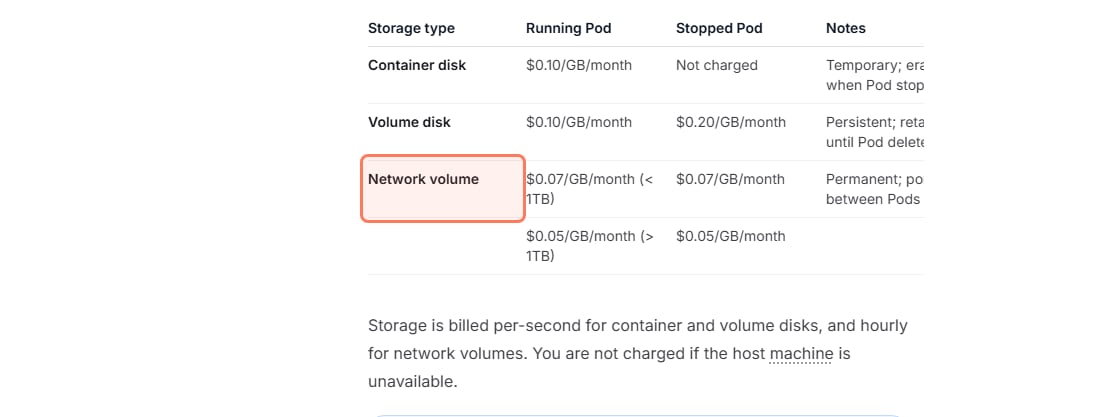
Keep your models on persistent storage. Runpod's docs list a network volume at $0.07 per GB a month (under 1 TB), billed whether a pod runs or not; 100 GB of models is $7 a month and saves the download every session.
Shut down, then delete, when you're done. Vast's docs say "Storage charges continue even when instances are stopped" and that stopped-instance storage is typically priced higher than running storage. On Runpod, a stopped pod's volume disk is $0.20 per GB a month, twice the running rate.
Runpod's storage prices (docs.runpod.io/pods/pricing), read Nov 3, 2026. · Screenshot of docs.runpod.io by aliteq
Vast or Runpod for ComfyUI?
Vast for the lowest hourly price, Runpod for a managed, repeatable workspace. On Nov 3, 2026 Vast's cheapest RTX 3090 was about a fifth of Runpod's Secure Cloud price and its cheapest RTX 4090 under a third, because independent hosts set their own rates. The trade-off is that you choose the host: Vast's docs say bandwidth "costs vary by host and include both upload and download traffic", and storage prices vary too, so read both on the offer before you rent. Runpod costs more per hour but gives you its own ComfyUI template, network volumes and per-second billing. Its weak spot this autumn has been availability; "It has become impossible to find an available GPU" was a r/RunPod post in October (read Nov 1, 2026), and the usual fix is another data center or Runpod's "Deploy when available".
My pick: big batches of drafts on Vast, where the cheap hour matters most; a persistent ComfyUI workspace with your models on a network volume on Runpod. Runpod's referral rules (read Nov 3, 2026) say a new user who signs up with Google through a referral link and loads $10 gets "a random weighted bonus between $5 and $500" outside Europe, and a fixed $5 in Europe; Runpod doesn't publish the odds, so plan on the low end. More on each: what to check before you rent on Vast.ai and how Runpod bills pods and storage.
Rather not run video models yourself? Kling AI alternatives, priced per clip compares the hosted ones, including Seedance 2.5, Veo 3.1 and Wan 3.0, and is Wan 3 free explains why the newest Wan has no download, so Wan 2.2 is the version you can run.
A 24 GB card, and the cheapest is usually an RTX 3090. On Nov 3, 2026 one rented from about $0.10 an hour on Vast (on-demand) and $0.50 on Runpod Secure Cloud; an RTX 4090 was from $0.26 on Vast and $0.89 on Runpod. A 24 GB card runs Flux and Wan 2.2 14B at 640x640 in fp8.
How much VRAM do I need for Wan 2.2 in ComfyUI?
ComfyUI's docs say the 5B model fits on 8 GB with native offloading. Runpod's guide (updated Oct 27, 2026) says the 14B models need 24 GB at 640x640 with fp8 weights, 48 GB in fp16 or at 720p in fp8, and an 80 GB card for 720p without offloading.
What GPU do I need for Flux in ComfyUI?
A 24 GB card is comfortable for Flux.1 Dev with a LoRA or ControlNet. ComfyUI's docs say Flux has 12B parameters and an original file of about 23 GB, and its fp8 checkpoint is meant for devices with limited VRAM.
How much does one Wan 2.2 clip cost on a rented GPU?
In GPU time, about half a cent to two cents for a 5-second 14B clip at 640x640 with the Lightning LoRA, by our arithmetic: Runpod's guide timed it at about 71 seconds on a 24 GB RTX 4090D, and an RTX 4090 rented from $0.26 an hour on Vast and $0.89 on Runpod on Nov 3, 2026. Setup time, idle minutes and retries add to the real bill.
What's the cheapest 48 GB GPU for Wan 2.2 in fp16?
On Nov 3, 2026, an RTX A6000 on Vast from $0.35 an hour, or an A40 or RTX A6000 on Runpod Secure Cloud at $0.59, which was less than Runpod's RTX 4090. Runpod's guide suggests the newer L40S ($1.09 on Runpod) for 48 GB work.
Can I run MiniMax H3 on a rented GPU in the US?
Not under its open licence. The MiniMax H3 Community License lists the United States, the EU, the UK and South Korea as Excluded Territories, and renting a GPU abroad doesn't change where you are. MiniMax says people there can ask it about a separate licence.
Why is my rented GPU so slow to start?
Usually it's downloading models; video models are tens of gigabytes. Keep them on a persistent volume, such as a Runpod network volume at $0.07 per GB a month (Runpod docs, Nov 3, 2026), so you download once.
Do I need an H100 for ComfyUI?
No. A 24 GB card handles Flux and Wan 2.2 14B at 640x640 in fp8, and a 48 GB card handles fp16 or 720p in fp8. Runpod's guide puts only 720p without offloading on an 80 GB card such as an H100.