You have an app running on a port and a domain pointing at the box. Two tools can put a padlock in front of it. Here is the minimal setup for each, from their own docs, who renews the certificate, the licences, and when nginx is still the better pick.
I'm the person who explains what is really running your app, and this is one of the first things that bites. Your app works at localhost:3000. Your domain points at the server. Now a browser says "Not secure" and you need a padlock.
The fix is a reverse proxy: a program that sits in front, takes the public traffic, and hands it to your app. I haven't installed or run either tool for this article. I read their documentation on October 3, 2026, and the configs below are built from documented examples. They are labeled untested, so adapt them with care.
What must be true before either tool can get a certificate?
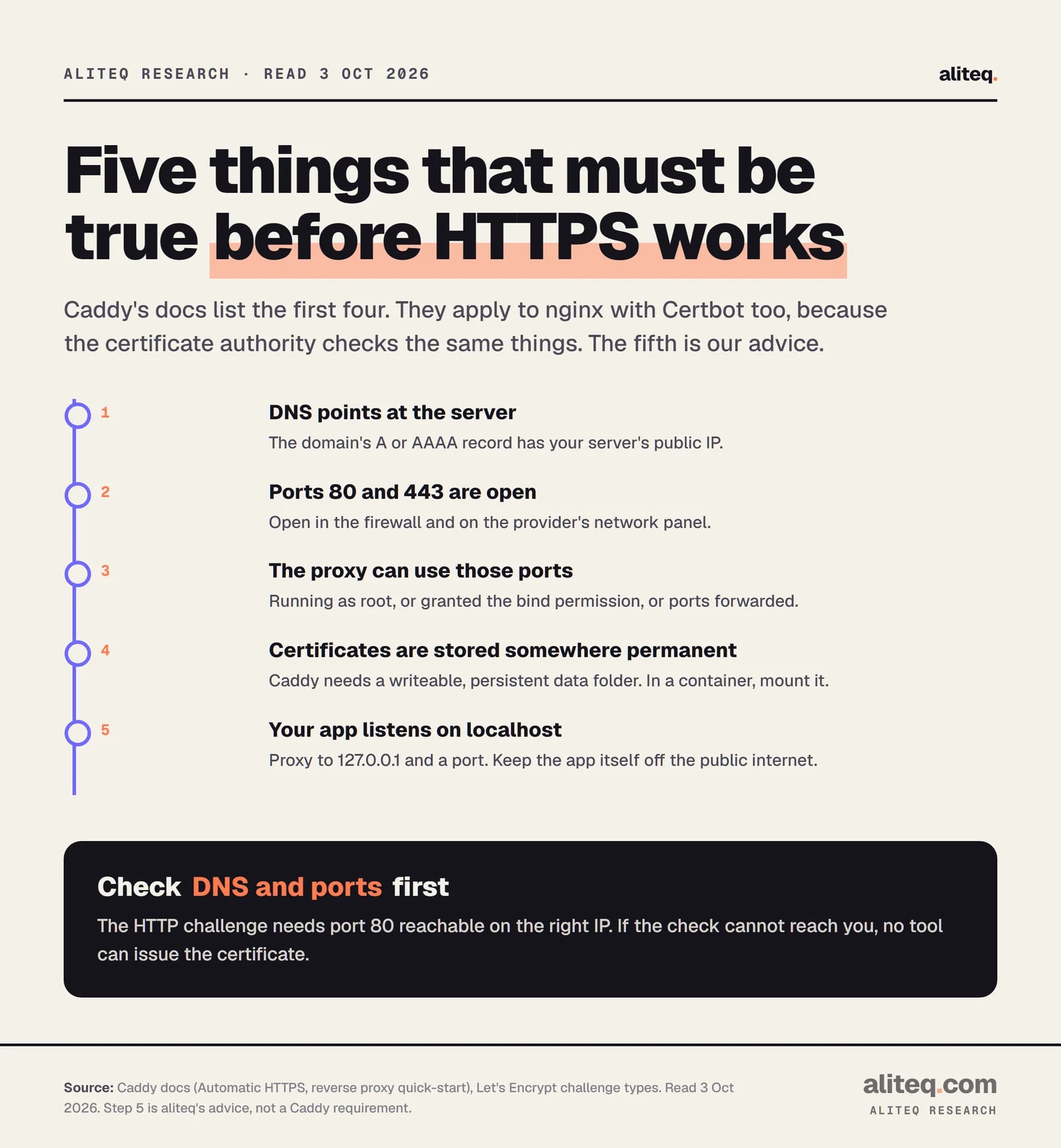
Five things. Your domain's DNS points at the server, ports 80 and 443 are open, the proxy can use those ports, certificates have a permanent place to live, and your app listens only on localhost. Caddy's docs list the first four, and they hold for nginx too.
The reason is how free certificates work. Let's Encrypt must prove you control the domain. The common check, called HTTP-01, has it fetch a file from http://your-domain/.well-known/acme-challenge/, and it only uses port 80. If it cannot reach you, nobody can issue the certificate.
Caddy Docs and Let's Encrypt Challenge Types, read October 3, 2026. Step 5 is aliteq's advice. · aliteq research
One more Caddy detail: its docs say that with default settings the $HOME folder "must be writeable and persistent". If you run Caddy in a container and the folder vanishes on restart, so do the certificates. If containers are new to you, our hosting basics guide covers where apps actually run.
What does the minimal Caddy setup look like?
Two lines in a file called Caddyfile. The first line is your domain. The second tells Caddy where your app listens. Caddy's quick-start says that if you use a Caddyfile, you "simply change the first line to your domain name."
Here is a sketch built from that quick-start. I haven't run it.
app.example.com {
	reverse_proxy 127.0.0.1:3000
}
That's the whole thing. Per the docs, when Caddy knows a public domain name it obtains and renews a certificate from a public ACME authority such as Let's Encrypt or ZeroSSL, and it redirects HTTP to HTTPS on its own. You don't run a separate certificate tool.
Two practical notes from the docs:
Low ports need permission. Port 443 is a low port. On Linux, run Caddy as root, or give the binary the specific capability with setcap cap_net_bind_service=+ep. The quick-start shows both.
Test with staging. The docs warn that experimenting against the live authority can hit rate limits that "block your access to HTTPS for up to a week." Let's Encrypt has a staging endpoint without those limits.
If you ever write http://app.example.com as the site address, you switch automatic HTTPS off for that site. The docs list it as one of the things that prevents activation.
What does the minimal nginx and Certbot setup look like?
Two steps. First a plain HTTP server block that proxies to your app. Then Certbot, which gets the certificate and edits nginx to use it. nginx on its own never fetches certificates. It only serves the files you point it at.
The first step comes from the proxy example in nginx's documentation, with a domain added. Untested:
Certbot's docs say its nginx plugin handles both authentication and installation, and that "the Nginx plugin should work for most configurations." They also recommend backing up your nginx configuration first, and you can undo changes with certbot --nginx rollback.
If you would rather keep Certbot out of your nginx files, it has a webroot mode. You run certbot certonly --webroot -w /var/www/example -d app.example.com and add the certificate lines to nginx yourself. That works, but nginx must serve /.well-known/acme-challenge from that folder.
The finished HTTPS block needs listen 443 ssl;, plus ssl_certificate and ssl_certificate_key lines. nginx's docs note that its default protocols are already TLS 1.2 and 1.3, and that setting them by hand "is generally not needed".
Side by side: who does what?
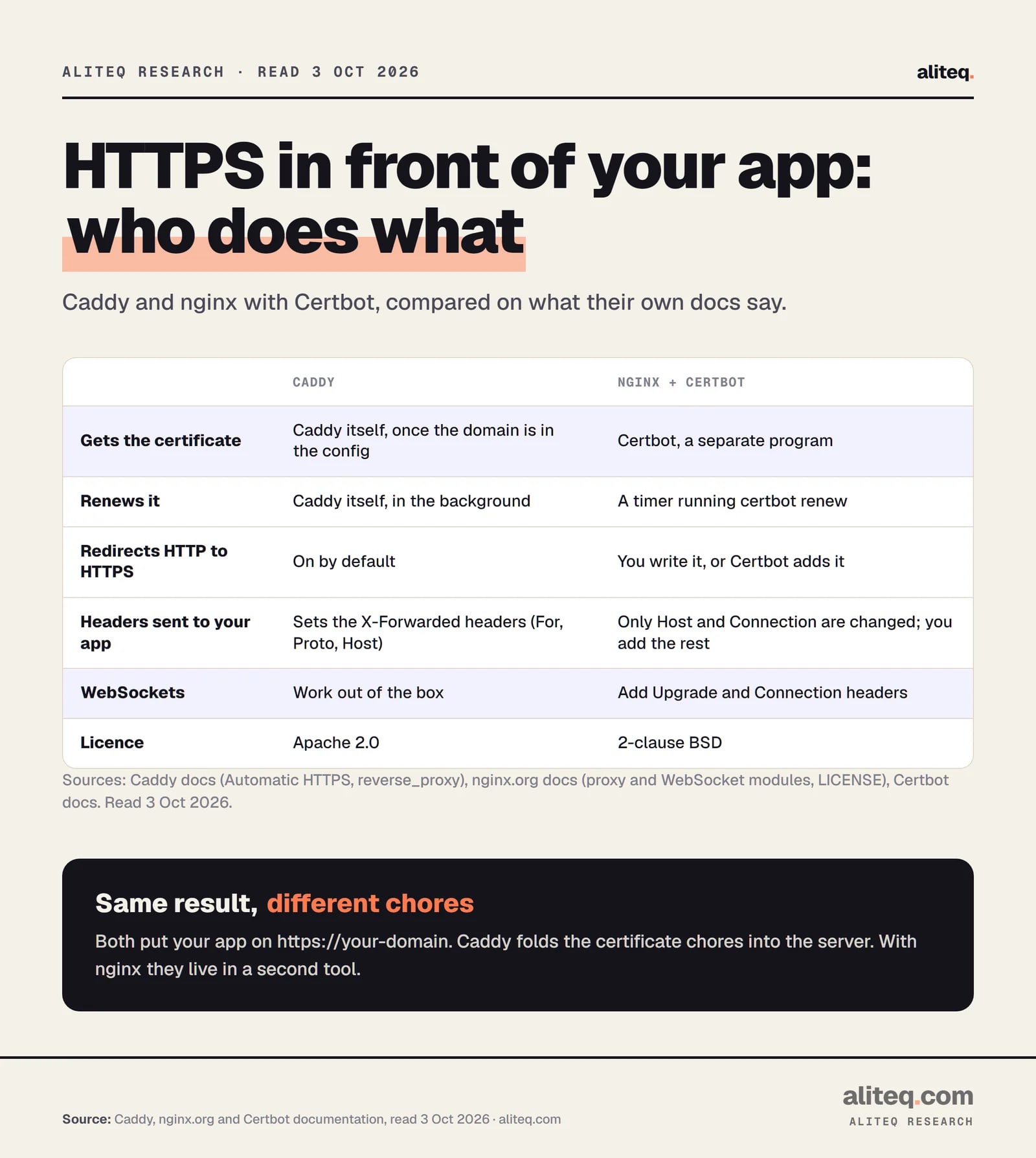
Caddy folds the certificate work into the server. With nginx, a second tool does it. Two other differences matter to app builders: which headers your app receives, and what you must add for WebSockets.
Caddy, nginx.org and Certbot documentation, read October 3, 2026. · aliteq research
The headers row matters more than it looks. Your app often asks "who is the visitor, and was this HTTPS?" Caddy sets X-Forwarded-For, X-Forwarded-Proto and X-Forwarded-Host for you, and ignores incoming copies of them to prevent spoofing. nginx's docs say that by default it redefines only Host and Connection, so you add the rest in your config.
For WebSockets, which chat apps and live dashboards use, nginx's docs say Upgrade and Connection are hop-by-hop headers that are not passed along. You pass them yourself:
Caddy's reverse proxy "supports WebSocket connections" without extra lines. One catch from its docs: by default it closes them when you reload the config, unless you set stream_close_delay.
How does renewal work, and what can go wrong?
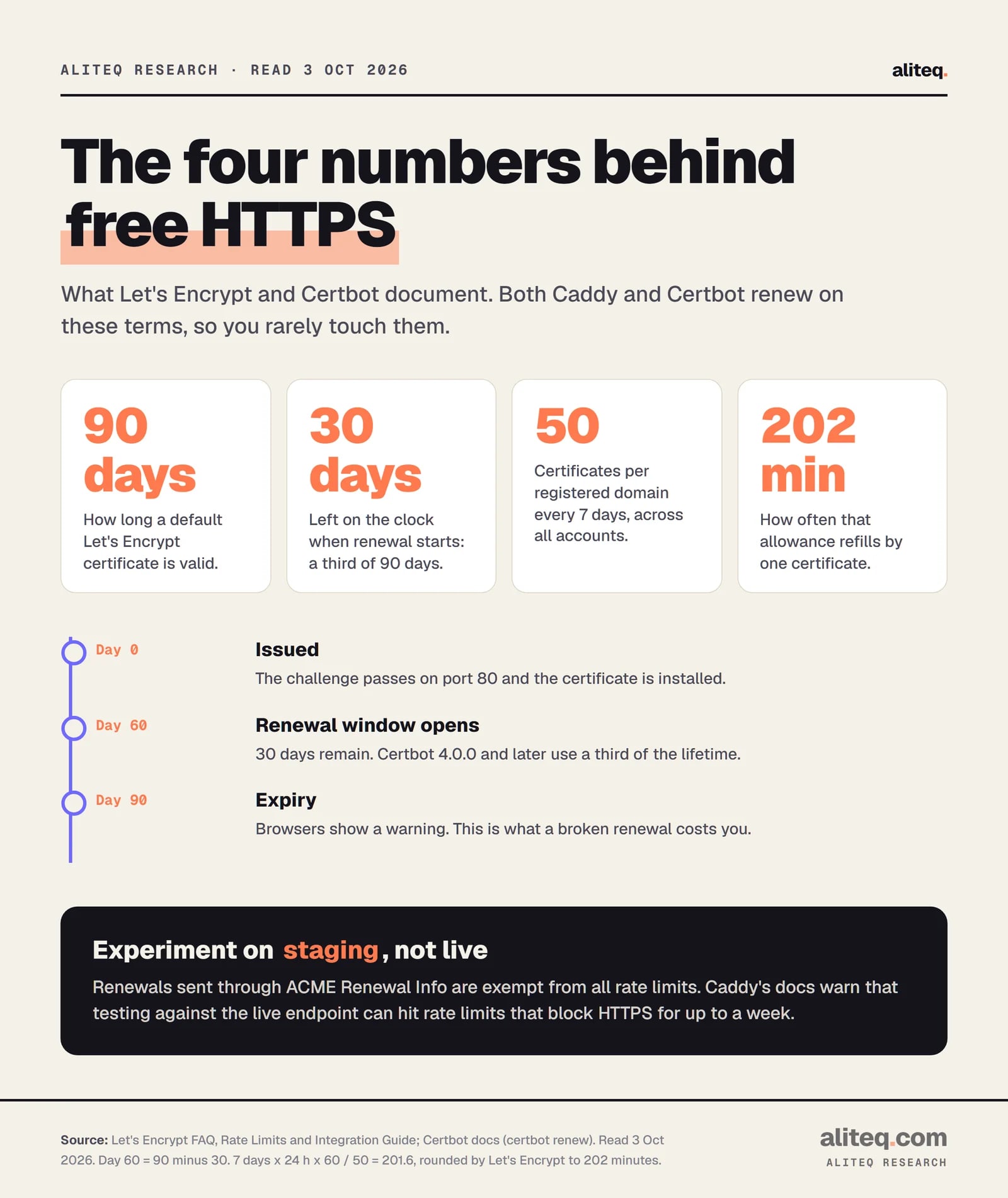
Free Let's Encrypt certificates last 90 days, and both tools renew well before that. Certbot 4.0.0 and later renews when a third of the lifetime is left, which is 30 days out. Caddy renews in the background. The risk is a renewal that quietly stops working.
Let's Encrypt FAQ, Rate Limits and Integration Guide, and Certbot docs, read October 3, 2026. · aliteq research
Let's Encrypt's rate limit is 50 certificates per registered domain every 7 days, refilling one every 202 minutes. A normal single-site setup never touches it. A loop of failed attempts or repeated reinstalls can.
For Certbot, the docs say most installations come with automatic renewal preconfigured, as a scheduled task that runs certbot renew. You can check by looking in your crontab or running systemctl list-timers. Then run certbot renew --dry-run, which the docs say uses the staging server, to prove renewal works before you need it.
Caddy has a different failure story. Its docs say that when a certificate attempt fails, it retries for up to 30 days, and during retries with Let's Encrypt it switches to their staging environment to avoid rate limits. If both of its default authorities fail, it backs off and tries again later.
Two closing cautions. Wildcard certificates (*.example.com) need the DNS challenge, which means giving your server credentials for your DNS provider. Let's Encrypt warns this "significantly increases the impact if that web server is hacked," and suggests narrowly scoped credentials. And if a CDN or another proxy sits in front of Caddy, Caddy's docs say to set trusted_proxies, or it ignores the forwarded headers.
Does the licence matter?
For most self-hosters, no. Caddy's LICENSE file is Apache License 2.0. nginx's LICENSE file is the 2-clause BSD licence, with copyright held by Nginx, Inc. Both are open source and free to use for your own sites.
The practical difference is commercial. nginx's documentation marks some directives as "available as part of our commercial subscription", and sells an NGINX Plus edition. If you need paid support, that option exists.
This isn't legal advice. If you redistribute either program inside a product, read the licence text itself.
When does nginx win?
nginx wins when you already run it, when you need its larger set of tuning directives, or when you want certificate handling kept in a separate tool. For a first-time setup with one app, Caddy is shorter. For an existing nginx server, switching has a cost.
Here's where I'd keep nginx, based only on what the docs show:
You already have nginx configs. Your team knows them and your other sites use them. Adding one more server block and Certbot is smaller than adding a second proxy.
You want built-in caching knobs. nginx's proxy module documents a long list of proxy_cache directives. I haven't compared them to Caddy's options, so check Caddy's docs for any feature you rely on.
You want certificates separate from the server. With Certbot's webroot mode, a failed renewal job doesn't touch the web server process.
You want a vendor-backed paid tier. NGINX Plus is sold as a commercial subscription.
There's also a change worth knowing. nginx now has an ACME module that fetches certificates inside nginx. Its documentation describes it as implementing automatic certificate management, and says it ships as a separate prebuilt package, nginx-module-acme, rather than in the core build. Its challenge setting defaults to http-01, and the docs example needs a port 80 listener. It's a younger project: its GitHub releases are at version 0.4.1. I haven't tried it, so treat it as something to watch, not a drop-in replacement for Certbot yet.
Which one should you pick?
Pick Caddy if this is your first reverse proxy, you have one or a few apps, and you want the shortest path to HTTPS. Pick nginx if you already run it or need its features. Either way, check the same five basics first.
Point your domain's A or AAAA record at the server, and open ports 80 and 443.
Keep your app on 127.0.0.1 and a port. Never expose the app's own port to the internet.
Caddy: write the domain and reverse_proxy lines. nginx: write the server block, then run certbot --nginx.
Test against Let's Encrypt staging first. For Certbot, run certbot renew --dry-run.
Put a reminder to check expiry in 60 days. Renewal that fails quietly is the real risk.
If you're taking a vibe-coded app live, our ship-it checklist covers the steps around this one. If the app is a local model server, see how to run local AI as an API server before you expose anything. And if you're putting a chat front end in front of Ollama, Open WebUI, LibreChat and AnythingLLM are the usual candidates to proxy. Our software hub collects more explainers like this. aliteq sells no proxy products and earns nothing from these links.
Quick answers
Do I need Certbot if I use Caddy?
No. Caddy gets and renews certificates itself, using public authorities such as Let's Encrypt or ZeroSSL. Its docs say no extra configuration or separate tooling is required once your domain is in the config and ports 80 and 443 are reachable.
Does Let's Encrypt cost money?
No. Its FAQ says it charges no fee for certificates, and it is a nonprofit. Some hosting providers that bundle it may charge for their own service, but the certificates themselves are free. They are domain-validated only, not organization or extended validation.
Why does my app see the wrong visitor IP behind nginx?
By default nginx changes only the Host and Connection headers sent to your app, so it passes no visitor details unless you add them. The nginx docs example sets X-Real-IP from $remote_addr. Caddy sets the X-Forwarded headers for you.
Can nginx get certificates without Certbot?
There is now an ACME module, documented on nginx.org. It is a separate package, not part of the core build, and its challenge defaults to http-01. It is newer than Certbot, and I haven't tested it, so check its docs before relying on it.
Do I need to open port 80 if I only want HTTPS?
Usually yes. The HTTP challenge works only on port 80, and both tools redirect HTTP to HTTPS from it. Caddy's docs also list a TLS-ALPN challenge on port 443, and a DNS challenge that needs no open ports but needs your DNS credentials.
What is a reverse proxy in plain English?
It is a program that stands in front of your app. Visitors talk to the proxy over HTTPS on your domain. The proxy then passes each request to your app on a private port and returns the answer.