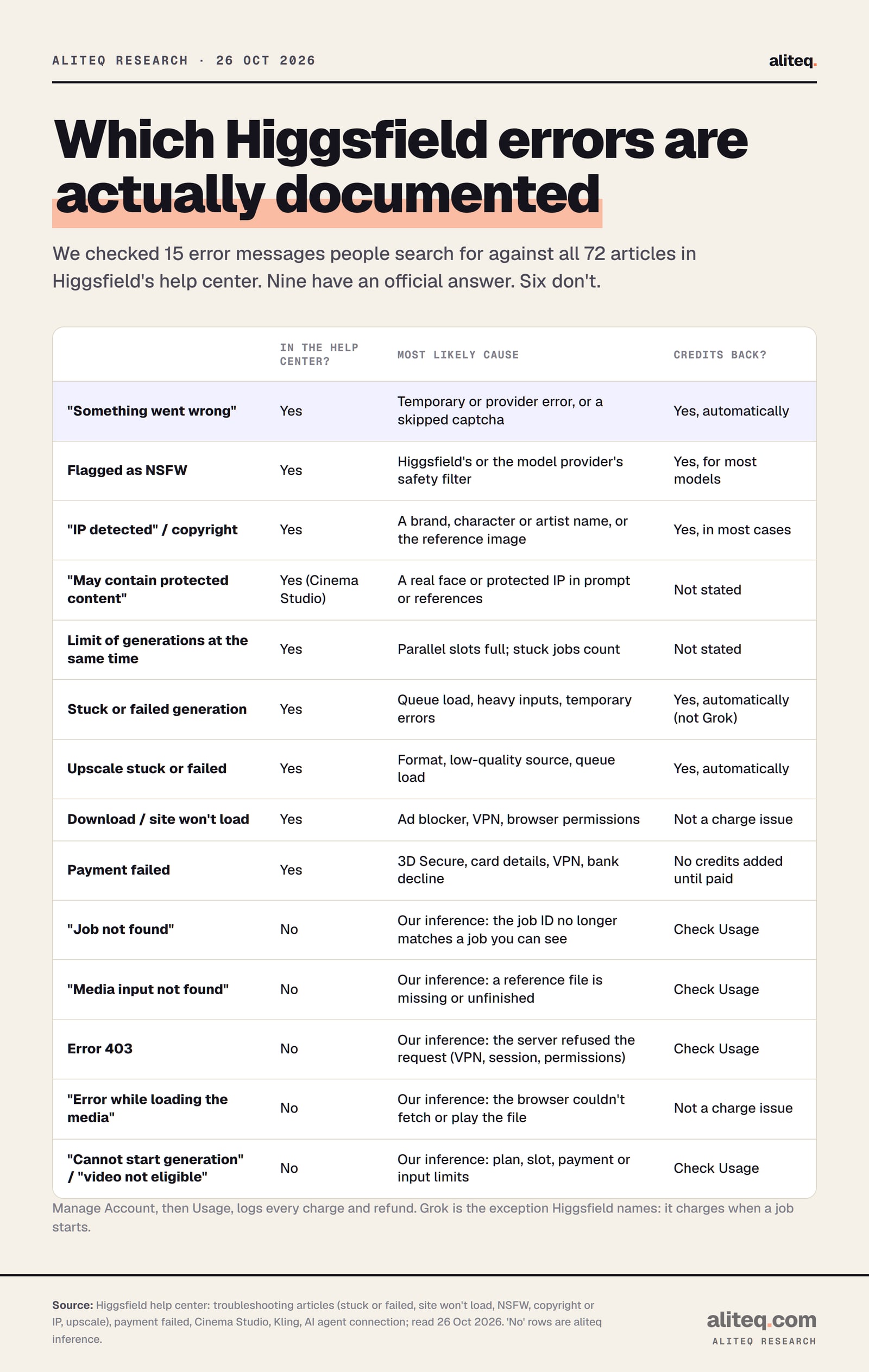
Paste the error you're looking at and find it below. For each one we say what it most likely means, what to try, and whether your credits come back, from Higgsfield's own help center. Six common messages aren't documented anywhere, and we say so.
You hit Generate and get a red line of text instead of a video. Maybe it's a filter, maybe it's your browser, maybe Higgsfield is having a bad day. And the question underneath all of them: are those credits gone?
The moment this page is for: a red error instead of a finished clip. Illustration made by us with Higgsfield, 26 October 2026; the person is fictional. · Generated with Higgsfield (GPT Image 2) by aliteq
This page is a lookup table. Find your message, read the cause and the fix, check the refund column. If your problem is a job that's just slow or sits on Queued, our guide to Higgsfield being stuck or slow covers the queues and parallel limits in depth, so we don't repeat it here.
What we checked, 26 Oct 2026
15
Error messages people search for
9
Explained in Higgsfield's help center
6
Not documented anywhere
Causes below are our inference
72
Help-center articles we searched
What does each Higgsfield error mean?
Each Higgsfield error points to one of a few causes: a content filter, your plan's parallel-job limit, a temporary platform or provider error, or something in your browser. The table below covers all 15 messages we checked. The last six rows aren't in Higgsfield's help center, so those causes are our inference.
"Something went wrong"
Likely cause
A temporary error, or a skipped captcha (Higgsfield)
What to do
Hard refresh, complete the captcha, retry
Credits refunded?
Yes, automatically, for failed generations
Flagged as NSFW
Likely cause
Higgsfield's filter or the model provider's own filter (Higgsfield)
What to do
Rephrase, change the reference image, try another model
Credits refunded?
Yes, for most models
"Rejected due to copyright restrictions" / "IP detected"
Likely cause
A brand, character, team or living artist named, or in the reference image (Higgsfield)
What to do
Describe the look instead of naming it; swap the reference
Credits refunded?
Yes, in most cases
"May contain protected content"
Likely cause
Cinema Studio found a real face or protected IP (Higgsfield)
What to do
Remove real faces and copyrighted material from prompt and references
Credits refunded?
Not stated
"You've hit your limit of generations at the same time"
Likely cause
Your parallel slots are full; a stuck job holds one (Higgsfield)
What to do
Cancel a Queued job or wait for one to finish
Credits refunded?
Not stated (nothing ran)
Stuck or failed generation
Likely cause
Queue load, heavy prompts or files, temporary errors (Higgsfield)
What to do
Cancel only while Queued; otherwise wait; retry
Credits refunded?
Yes, automatically, except Grok
Upscale stuck or failed
Likely cause
Unsupported format, low-quality source, queue load (Higgsfield)
What to do
Cancel after 5 minutes; use MP4 with H.264; retry
Credits refunded?
Yes, automatically
Cannot download video
Likely cause
Ad blocker, privacy extension or blocked downloads (Higgsfield)
What to do
Disable the extension, allow downloads, try Chrome or Safari
Credits refunded?
Not a charge issue
Site won't load / blank page
Likely cause
Cache, extensions, VPN or a platform incident (Higgsfield)
What to do
Hard refresh, private window, other browser, check Discord
Credits refunded?
Not a charge issue
Payment failed
Likely cause
3D Secure, card details, VPN, bank decline (Higgsfield)
What to do
Complete 3D Secure, check the card, turn off the VPN, call the bank
Credits refunded?
No new credits until a payment succeeds
"Job not found"
Likely cause
Not documented. Our inference: the page or tool asked for a job your account can't see
What to do
Hard refresh, check Assets and Usage
Credits refunded?
Check Usage
"Media input not found"
Likely cause
Not documented. Our inference: a reference file is missing or never finished uploading
What to do
Re-upload the reference, then retry
Credits refunded?
Check Usage
Error 403
Likely cause
Not documented. Generic HTTP: the server refused the request
What to do
Turn off VPN and extensions, sign out and in
Credits refunded?
Check Usage
"Error while loading the media"
Likely cause
Not documented. Our inference: the browser couldn't fetch or play the file
What to do
Hard refresh, other browser, no extensions
Credits refunded?
Not a charge issue
"Cannot start generation" / "video not eligible"
Likely cause
Not documented. Our inference: a plan, slot, payment or input limit
What to do
Check plan access, free a slot, check billing
Credits refunded?
Check Usage
Likely cause
What to do
Credits refunded?
"Something went wrong"
A temporary error, or a skipped captcha (Higgsfield)
Hard refresh, complete the captcha, retry
Yes, automatically, for failed generations
Flagged as NSFW
Higgsfield's filter or the model provider's own filter (Higgsfield)
Rephrase, change the reference image, try another model
Yes, for most models
"Rejected due to copyright restrictions" / "IP detected"
A brand, character, team or living artist named, or in the reference image (Higgsfield)
Describe the look instead of naming it; swap the reference
Yes, in most cases
"May contain protected content"
Cinema Studio found a real face or protected IP (Higgsfield)
Remove real faces and copyrighted material from prompt and references
Not stated
"You've hit your limit of generations at the same time"
Your parallel slots are full; a stuck job holds one (Higgsfield)
Cancel a Queued job or wait for one to finish
Not stated (nothing ran)
Stuck or failed generation
Queue load, heavy prompts or files, temporary errors (Higgsfield)
Cancel only while Queued; otherwise wait; retry
Yes, automatically, except Grok
Upscale stuck or failed
Unsupported format, low-quality source, queue load (Higgsfield)
Cancel after 5 minutes; use MP4 with H.264; retry
Yes, automatically
Cannot download video
Ad blocker, privacy extension or blocked downloads (Higgsfield)
Disable the extension, allow downloads, try Chrome or Safari
Not a charge issue
Site won't load / blank page
Cache, extensions, VPN or a platform incident (Higgsfield)
Hard refresh, private window, other browser, check Discord
Not a charge issue
Payment failed
3D Secure, card details, VPN, bank decline (Higgsfield)
Complete 3D Secure, check the card, turn off the VPN, call the bank
No new credits until a payment succeeds
"Job not found"
Not documented. Our inference: the page or tool asked for a job your account can't see
Hard refresh, check Assets and Usage
Check Usage
"Media input not found"
Not documented. Our inference: a reference file is missing or never finished uploading
Re-upload the reference, then retry
Check Usage
Error 403
Not documented. Generic HTTP: the server refused the request
Turn off VPN and extensions, sign out and in
Check Usage
"Error while loading the media"
Not documented. Our inference: the browser couldn't fetch or play the file
Hard refresh, other browser, no extensions
Not a charge issue
"Cannot start generation" / "video not eligible"
Not documented. Our inference: a plan, slot, payment or input limit
Check plan access, free a slot, check billing
Check Usage
Nine of the 15 messages have an official answer in Higgsfield's help center. Read 26 October 2026; the "No" rows are our inference. · aliteq research
Errors Higgsfield explains in its help center
These nine have an official answer. Each one below quotes the relevant help-center article, so you can match the wording on your screen.
"Something went wrong"
Higgsfield says "Something went wrong" means "a temporary error, or a captcha wasn't completed." Hard refresh (Ctrl+Shift+R on Windows, Cmd+Shift+R in Chrome on Mac, Cmd+Option+R in Safari), complete the captcha if one appears, and retry. Skipping a captcha fails the job with exactly this message.
If it happens on every generation, Higgsfield says that's "not necessarily" your account: temporary provider-side errors cause it too, and "credits for failed generations are returned automatically." Run the browser steps first, then try a different browser (site-won't-load article).
Flagged as NSFW
An NSFW flag means a safety filter fired, either Higgsfield's own or the model provider's. Higgsfield names Nano Banana, Seedream, Kling, Sora 2, MiniMax, Wan and Veo as running "their own independent safety systems." Both layers produce false positives, and Higgsfield lists swimwear, athletic content, medical imagery, borderline reference images and ambiguous wording as common triggers.
What Higgsfield suggests: rephrase in neutral, specific words, change or remove the reference image, add a text prompt if you only used an image, or try another model. Credits are "returned automatically" for most models. Higgsfield "can't override safety classifiers manually", and it is explicit that it won't help bypass filters: doing so "is prohibited under the Terms of Use." Neither will we. The fix is for false positives, not for getting blocked content through (NSFW article).
"Rejected due to copyright restrictions" or "IP detected"
This is the copyright check, not the NSFW filter. Higgsfield says it fires on named franchise characters (Disney, Marvel, DC, Pixar, Nintendo), sports teams and leagues, living artists named for their style, and brand names or logos. A reference image can trigger it even if your prompt names nothing. Seedance runs its own IP check that Higgsfield can't override.
Describe the look instead of the name. Higgsfield's own example swaps "Spider-Man" for "a hero in a red and blue suit with a web pattern." If the blocked input is yours, an "I own the rights for this image" button may appear in the lower-right corner and "can unblock the generation when the input is eligible." Credits come back "in most cases." Blocks "apply platform-wide and can't be overridden for individual accounts" (copyright article).
"May contain protected content"
This one is specific to Cinema Studio. Higgsfield says its content protection "detects real faces and protected IP." Remove anything that could be a real face or copyrighted material from the prompt and references, then retry. The Cinema Studio article doesn't say whether these credits come back. If the block looks wrong, Higgsfield's support address can review it with the time, model and prompt (Cinema Studio article).
"You've hit your limit of generations at the same time"
Your plan's parallel slots are full, and "a stuck job holds a slot too." Cancel a generation that's still Queued, or wait for one to finish. On 26 October 2026 the pricing page's compare table listed 1 video job at a time on Free, 2 on Starter, 6 on Plus and 8 on Ultra, and Higgsfield says the limit is lower for Unlimited generations. Concurrency Boost packs add slots. Our slow or stuck guide has the full per-plan table.
Video jobs you can run at once, by plan (pricing page, 26 Oct 2026)
Free1 at a time
Starter2 at a time
Plus6 at a time
Ultra8 at a time
Generation stuck or failed
What you can do depends on the tile. Queued jobs can be canceled from the tile in Assets and "the credits are returned." Processing and Generating jobs have already started, so you wait for them to finish or fail. Higgsfield says most stuck jobs "resolve on their own within a few minutes", and failed ones refund "automatically, usually within a few minutes." Grok is "the one exception: its generations are charged the moment they start."
For long Kling queues, Higgsfield's Kling article says to use a Turbo variant for drafts and to contact support "if a generation is stuck for more than 10 hours." For the queue itself, see why Higgsfield is slow.
Upscale stuck or failed
A video upscale "normally finishes within 1 to 5 minutes." Past 5 minutes, cancel from the tile in Assets and retry. Higgsfield names three common causes: an unsupported format (use "MP4 with H.264 encoding"), a source too low in quality or too compressed, and queue overload. Failed upscales refund automatically. If they don't, contact support with the generation ID from the page URL in Assets (upscale article).
Errors Higgsfield doesn't document
We searched the full help center for these six messages and found nothing. Higgsfield publishes no explanation of them. Everything under these headings is our inference from general web behavior and from related help-center pages, labelled as such. If your message doesn't clear with these steps, send it to Higgsfield support word for word.
"Job not found"
Higgsfield doesn't document this message. Our inference: the page, or the tool you're using, asked for a generation job that your signed-in account can't find. "Not found" is the generic wording for a missing resource; MDN describes HTTP 404 as "the server cannot find the requested resource." Likely triggers are an old tab after the job failed or was canceled, or being signed in to a different account than the one that ran it.
What to try: hard refresh, confirm you're on the right account, and look for the job in Assets. Then check Manage Account, then Usage. If the job failed, Higgsfield says its credits come back automatically, and Usage shows the refund line. If a charge has no refund, contact support with the time and the model.
"Media input not found"
Not documented by Higgsfield. Our inference: a reference file the generation points to isn't available, for example an upload that never finished, or a file removed after you picked it. Re-upload the reference from your device and generate again.
One documented case is close. If you use Higgsfield through an AI agent (MCP), the agent "can't read images attached to the chat itself": files reach Higgsfield "through a separate upload step that the agent opens for you." If an agent asks you to attach the file to the chat instead, Higgsfield's suggested reply is "Open the Higgsfield upload window for my file." Our Higgsfield MCP guide covers that setup.
Error 403
Higgsfield doesn't document a 403. It's a standard HTTP code, and MDN defines it as the server having "understood the request but refused to process it," adding that repeating the same request "will fail with the same error." So retrying alone won't help; something about the request has to change.
Our inference about what that is on Higgsfield: a VPN or proxy, a privacy extension, or an expired session. Higgsfield does say "some VPN configurations block certain platform resources," and that ad blockers and VPN extensions "can interfere with loading." Turn off the VPN and extensions, sign out and back in, and try a private window. If you use the MCP connector, Higgsfield's own fix for "Authorization with the MCP server failed" is to disconnect and reconnect it, since the token has expired.
"Error while loading the media"
Not in Higgsfield's help center. Our inference: this is the browser failing to fetch or play a video or image file, not the generation failing. Browsers report media failures in a few kinds; MDN lists a network error "which prevented the media from being successfully fetched" and a file "found to be unsuitable" to play.
What to try: the same order Higgsfield gives for loading problems. Hard refresh, private window, a different browser, cleared cookies for higgsfield.ai, no ad blocker or VPN. If the file plays nowhere, check whether the generation itself shows as failed in Assets.
"Cannot start generation"
Higgsfield doesn't document this exact wording. Our inference: something blocks the job before it begins. The documented blockers that fit are a full parallel limit, a captcha you didn't complete, a model your plan doesn't include, and a failed renewal. On that last one Higgsfield says "generations are limited and Unlimited model access is restricted until the payment goes through." On model access, its Seedance article says Seedance 2.5 "isn't included in Starter and Basic." And the free plan is "limited to a small set of models and doesn't include credits."
What to try: check that your plan includes the model, cancel a Queued job, hard refresh, and look at Manage Account, then Subscription, for a past-due payment.
"Video not eligible"
Not documented. The only place the help center uses "eligible" for an input is the copyright check: the "I own the rights for this image" button unblocks a generation "when the input is eligible. If the input isn't eligible, the block stays in place." Our inference: this message most likely means a video you uploaded or picked doesn't meet a tool's input rules or rights check.
Documented input limits worth checking: Cinema Studio 2.5 "doesn't accept video uploads", 3.0 and 3.5 accept videos up to 15 seconds, and 4.0 up to 30 seconds. For upscales, use MP4 with H.264. If the rights check is the cause, there's no way around it for that input; use footage you own or a different clip.
Why won't Higgsfield upload, download or load?
Higgsfield says most loading problems, "Something went wrong" errors and dead Download buttons "are fixed by a hard refresh." After that, its fix order is a private window, a different browser, cleared cookies, then disabling ad blockers, VPN extensions and privacy tools. If the site fails on every browser and device, it's "likely a platform-wide incident": check the #announcements channel in the Higgsfield Discord.
Higgsfield's fix order for loading problems
Hard refresh
Fixes most loading problems and dead Download buttons
Private window
A different browser
Clear cookies, disable ad blockers, VPN and privacy tools
Fails everywhere?
Likely a platform-wide incident; check Discord
Hard refresh
Fixes most loading problems and dead Download buttons
Private window
A different browser
Clear cookies, disable ad blockers, VPN and privacy tools
Fails everywhere?
Likely a platform-wide incident; check Discord
The order Higgsfield's help center gives, read 26 October 2026. Stop at the first step that works.
Upload not working
Higgsfield has no article on uploads as such. The documented limits we found: Cinema Studio video lengths by version (above), keyframes as PNG or JPG for DoP, voice samples as MP3 or WAV, and upscales as MP4 with H.264. A reference image can also pass the upload but trip the upload-stage NSFW filter, which Higgsfield says can happen "even with a safe prompt." Beyond that, our inference is the usual browser causes, so run the loading steps above.
Cannot download video
Higgsfield says an ad blocker or privacy extension is "the most common cause." The other is your browser blocking downloads from higgsfield.ai. In Chrome that's Settings, Privacy and Security, Site Settings, Automatic Downloads, Allow. If it still fails, Higgsfield says switching to Chrome or Safari "usually resolves it."
Site won't load or shows a blank page
Hard refresh, then incognito. If it's blank on other browsers and devices too, Higgsfield calls it "likely a platform-wide incident," and its help center points to Discord #announcements. There is now also a status page at status.higgsfield.ai. When we checked it on 26 October 2026 it had a "Platform — higgsfield.ai" section with Web App, Image Generation, Video Generation, Audio Generation, Billing & Credits, MCP and Supercomputer, all "operational", next to its API section. Earlier this month it covered only the API. When you contact support, Higgsfield asks for your browser and version, your operating system, the exact URL and what you see.
What does "payment failed" mean on Higgsfield?
A failed Higgsfield payment usually means your bank declined it or a check wasn't finished. Higgsfield lists "insufficient funds, a bank decline, an expired card, incorrect card details, or an incomplete 3D Secure verification." Its fix order: complete 3D Secure, check the card, try another card or Apple Pay, try a private window, turn off the VPN, then ask your bank to allow online or international payments.
If a renewal fails, generations are limited and Unlimited is restricted until you pay. Pay the open invoice under Manage Account, then Subscription, then Upcoming Invoice, or add a card and select "Try to charge now." You "typically" have 14 days before the subscription may be canceled. Higgsfield says it "will never ask for your card details by email", and payments run through Stripe Checkout only (payment-failed article). If you were charged but your plan isn't active, contact support with the date and amount, and don't buy again until it's sorted. Our cancel and refund guide covers money back on a plan.
Do you get Higgsfield credits back after an error?
Usually, yes, and without asking. Higgsfield says failed generations return credits "automatically, usually within a few minutes," and filter blocks are refunded "for most models" (NSFW) or "in most cases" (copyright). The named exception is Grok, which charges when a job starts. Errors that stop a job before it runs, like a full parallel limit, shouldn't charge anything, though Higgsfield doesn't say so outright.
Check Manage Account, then Usage, before you write to support. It logs "each generation with the model used and credits deducted" and "credit returns from failed generations." If a refund is missing, send support the generation ID (the last part of the generation's URL in Assets). A blocked generation has no page in Assets, so send the approximate time, the model and your prompt instead. Our credits explainer shows what each model costs, so you can tell what a missing refund is worth.
What we couldn't verify
Six messages have no official explanation: job not found, media input not found, error 403, error while loading the media, cannot start generation and video not eligible. We searched all 72 help-center articles on 26 October 2026 and found none of these strings. Our causes for them are inference.
Where each message appears. We didn't reproduce any of these errors, so we can't say which screen, tool or integration shows each one.
Refunds for "May contain protected content" and the parallel limit. Higgsfield's pages don't say.
Which models are the "most" in "refunded for most models". Higgsfield doesn't list the exceptions for filter blocks, only Grok for failed jobs.
Official X and Discord posts about current incidents weren't checked; the changelog lists past incidents, all marked resolved.
Our verdict
Most Higgsfield errors are fixable in a minute, and most cost you nothing because failed jobs refund on their own. Read the message, match it above, and check Usage before assuming your credits are gone. Filter blocks are the one place to stop pushing: rephrase for a false positive, but don't try to get around the filter.
If the undocumented messages keep coming back, or a refund doesn't land, send support the exact wording, the time and the model. If you're still choosing a plan, compare parallel-job limits and model access, since those cause the "cannot start" and "limit" messages. Our is Higgsfield worth it breakdown covers that, and signing up directly on higgsfield.ai, not through a downloaded "app", is the safe route: Higgsfield says it has no mobile or desktop app.
HiggsfieldSponsored
Check which models and job limits each plan includes
Many "cannot start" problems come down to plan access or parallel slots. The pricing page lists both for every plan.
What does "Something went wrong" mean on Higgsfield?
Higgsfield says it's a temporary error or a captcha that wasn't completed. Hard refresh, complete the captcha if one appears, and retry. Failed generations return their credits automatically, usually within a few minutes.
What does "job not found" mean on Higgsfield?
Higgsfield doesn't document it. Our inference is that the page or tool asked for a job your signed-in account can't see, such as an old tab after a failure or a different account. Refresh, check Assets, and check Manage Account, then Usage, for a refund line.
Why does Higgsfield say error 403?
Higgsfield doesn't explain it. HTTP 403 means the server refused the request, and retrying the same request won't help. Turn off any VPN or privacy extension, sign out and back in, or reconnect the MCP connector if you use one.
Do I get credits back when Higgsfield flags my content as NSFW?
For most models, yes, automatically. Check Manage Account, then Usage. Higgsfield can return credits for a confirmed false positive but can't reverse the classifier's decision, and it won't help bypass filters.
Why can't I download my Higgsfield video?
Higgsfield says an ad blocker or privacy extension is the most common cause. Disable it, refresh, allow downloads from higgsfield.ai in your browser settings, or switch to Chrome or Safari.
What happens if my Higgsfield payment fails?
On a renewal, generations are limited and Unlimited is restricted until a payment succeeds. Pay the open invoice or add a new card under Manage Account, then Subscription. Higgsfield says you typically have 14 days before the subscription may be canceled.