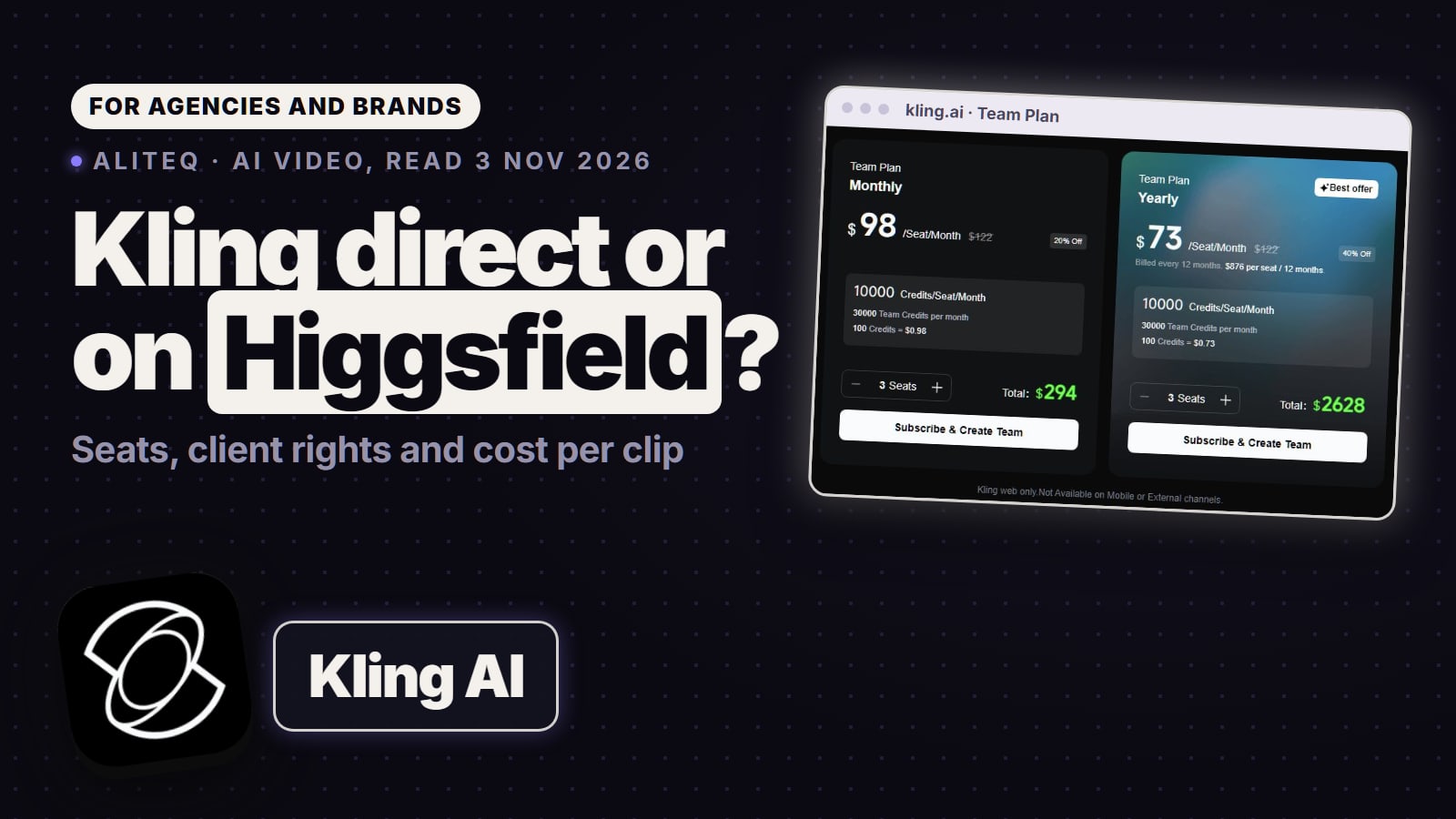
If Kling is most of your work, Kling's own plans usually cost less per clip, and its Team plan says it doesn't train on your data. Higgsfield earns its place when you switch between Kling, Seedance and Veo, or want its tools. Seats, commercial-use terms and cost per clip, read on each vendor's own pages on Nov 3, 2026.
Some links on this page are referral links: we may earn a commission, at no cost to you.
Share
Higgsfield vs Kling: should you buy Kling direct or on Higgsfield? If Kling is most of what you make, buy it from Kling: on the clip we priced, Kling's own plans cost less per clip than Higgsfield's, Kling's Team plan says it doesn't train on your data, and paying members get unrestricted commercial use. Higgsfield is the better buy when you switch between Kling, Seedance and Veo, want its camera, character and ad tools, or need seats from two people up. Every price and clause below was read on the vendor's own page on November 3, 2026. Only after the price of one Kling clip? See what Kling 4.0 costs on Higgsfield and is Kling AI free.
Kling on kling.ai vs Kling on Higgsfield (vendors' own pages, Nov 3, 2026)
kling.ai
Kling's own site
vs
Higgsfield
Kling plus other models
Standard, $8.80 a month after a $6.99 first month (660 credits)
Cheapest paid plan
Starter, $19 a month (270 credits)
$98 monthly, $73 yearly, 10,000 credits
Team plan, per seat
$79 monthly, $65 yearly, 1,000 credits
3 members
Smallest team
2 seats
Team FAQ: "We do not misuse or train on your data"
Training on team content
Excluded on Enterprise only
Paid members only
Commercial use
Every plan
Kling only
Other models in the same plan
Kling, Seedance, Veo and more
Personal plans yes; Team is web only
Mobile app
Web, no store app
kling.ai wins 3wins 3 Higgsfield
Is Kling cheaper on kling.ai or on Higgsfield?
Per credit, Kling's own site is far cheaper. Per clip, the gap is smaller, because a Kling clip costs fewer Higgsfield credits than Kling credits. The fair test is one clip priced at both. Kling's credit guide prices native 4K in the Kling 3.0 series at "30 credits per second", so a 5-second 4K clip is 150 Kling credits. Higgsfield's Generate button priced the same clip at 30 Higgsfield credits on 3 November.
One 5-second Kling 3.0 clip in 4K, by plan (our arithmetic from each vendor's prices, Nov 3, 2026)
kling.ai Team, yearly$1.10
150 credits at $73 for 10,000
Higgsfield Ultra, monthly$1.29
30 credits at $129 for 3,000
kling.ai Team, monthly$1.47
150 credits at $98 for 10,000
Higgsfield Plus, monthly$1.48
30 credits at $59 for 1,200
kling.ai Pro, monthly$1.63
150 credits at $32.56 for 3,000
kling.ai Standard, monthly$2.00
150 credits at $8.80 for 660
Higgsfield Team, monthly$2.37
30 credits at $79 for 1,000
Renewal prices, assuming every credit gets used before it expires. Two readings matter. For a solo creator, Higgsfield Ultra and Kling's Pro land close, so the choice is about the other models you want. For a team, Kling's Team plan is the cheaper way to make Kling clips: about $1.47 a clip against $2.37 on Higgsfield Team, monthly.
At lower settings the picture is similar: Higgsfield priced a 5-second Kling 3.0 clip at 720p at 7.5 credits (10 with sound), and Kling's own plan table counts Standard's 660 credits as "33 720p videos" without naming the model or length. For Kling 4.0, the pages we read on kling.ai didn't list a credit price; Higgsfield priced a 10-second 1080p clip at 32.5 credits (a temporary discount), and Runway, which also sells Kling 4.0, lists it at 118 credits per 5 seconds. The per-clip detail for Higgsfield is on Kling 4.0 on Higgsfield; the free plan and every Kling plan price are on is Kling AI free.
What does a Kling team plan cost compared with Higgsfield Team and Scale?
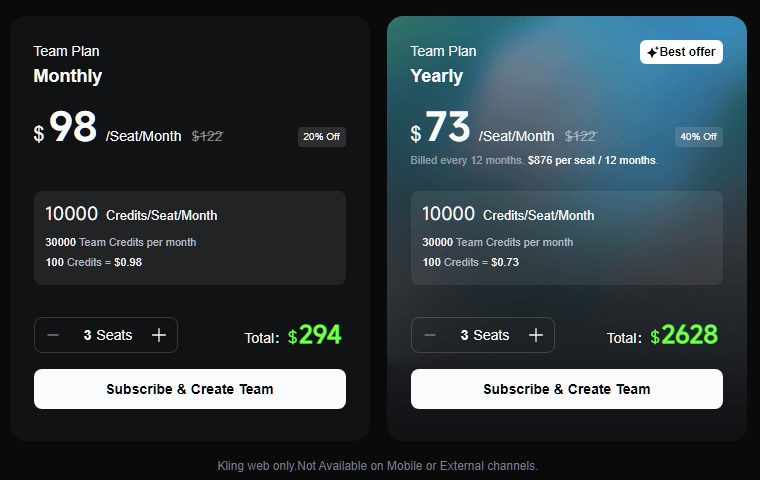
Kling's Team Plan is $98 a seat a month, or $73 billed yearly ($876 per seat a year), with 10,000 credits per seat; Higgsfield Team is $79 or $65 with 1,000 credits per seat. Kling's page defaults to 3 seats, a monthly total of $294, and its FAQ says each workspace takes a minimum of 3 and a maximum of 15 members, "The Owner automatically occupies one seat."
Kling's own Team Plan prices (kling.ai membership page, Team Plan tab, read November 3, 2026, signed out). Kling notes the plan is web only. · Screenshot of kling.ai by aliteq
Kling Team vs Higgsfield's seat plans (vendors' own pages, Nov 3, 2026)
Price per seat a month
Kling Team
$98 monthly, $73 yearly
Higgsfield Team
$79 monthly, $65 yearly
Higgsfield Scale
$169 monthly, $150 yearly
Higgsfield Enterprise
Custom
Credits per seat a month
Kling Team
10,000
Higgsfield Team
1,000
Higgsfield Scale
2,500
Higgsfield Enterprise
Custom
5-second 4K Kling 3.0 clips per seat
Kling Team
About 66
Higgsfield Team
About 33
Higgsfield Scale
About 83
Higgsfield Enterprise
Custom
Seats
Kling Team
3 to 15
Higgsfield Team
2 to 9
Higgsfield Scale
5 to 15
Higgsfield Enterprise
Custom
Credits move between members
Kling Team
No, per seat; extra team credits can be bought and allocated
Higgsfield Team
Pooled
Higgsfield Scale
Pooled
Higgsfield Enterprise
Pooled
SSO
Kling Team
Not listed
Higgsfield Team
No
Higgsfield Scale
Yes
Higgsfield Enterprise
Yes
No training on your content
Kling Team
Yes, per the Team FAQ
Higgsfield Team
No
Higgsfield Scale
No
Higgsfield Enterprise
Yes
SOC 2 and legal indemnification
Kling Team
Not listed
Higgsfield Team
No
Higgsfield Scale
No
Higgsfield Enterprise
Yes
Kling Team
Higgsfield Team
Higgsfield Scale
Higgsfield Enterprise
Price per seat a month
$98 monthly, $73 yearly
$79 monthly, $65 yearly
$169 monthly, $150 yearly
Custom
Credits per seat a month
10,000
1,000
2,500
Custom
5-second 4K Kling 3.0 clips per seat
About 66
About 33
About 83
Custom
Seats
3 to 15
2 to 9
5 to 15
Custom
Credits move between members
No, per seat; extra team credits can be bought and allocated
Pooled
Pooled
Pooled
SSO
Not listed
No
Yes
Yes
No training on your content
Yes, per the Team FAQ
No
No
Yes
SOC 2 and legal indemnification
Not listed
No
No
Yes
A Kling Team seat's 10,000 credits make about 66 five-second 4K Kling 3.0 clips; a Higgsfield Team seat's 1,000 make about 33, and a Scale seat about 83. So for Kling volume, Kling Team gives about twice the clips per seat for $19 more a month. Higgsfield's case rests elsewhere: credits pool across the workspace instead of sitting on each seat ("Credits are not transferable between seats", Kling's FAQ says), the team can be two people, and the same credits run Seedance, Veo and Higgsfield's own tools. Monthly Kling seat credits are "Valid for 1 month"; bought team credits last two years. More on Higgsfield's seats: Higgsfield Team plan explained.
Can you use Kling videos commercially for clients?
Yes on a paid Kling membership, no on the free plan, and read the branding clause before a client job. Kling has two documents that matter, and they read differently:
Terms of Service (updated April 21, 2026), s.4.6: "without our written permission, you may not use, reproduce, distribute, and create derivative works of, and make modifications to, the Output for any commercial purposes." Section 4.4 says Kling does not claim ownership: "We do not claim ownership of the Content."
Terms of Paid Service (effective October 10, 2026): "KLING AI members' use of the Output for commercial purposes is not restricted." Members may use output "for any commercial purpose(except for the purposes of developing or offering competitive products or services of KLING AI)". The paid terms also say that where they conflict with the Terms of Service, the paid terms "shall prevail to the extent of such inconsistency."
Kling's Terms of Paid Service (kling.ai/docs/payment-policy, effective October 10, 2026), read November 3, 2026. The outline is ours. · Screenshot of kling.ai by aliteq
Kling's plan table agrees: Standard and up say "generated content is for commercial use", and the free Basic plan says "generated content is not for commercial use".
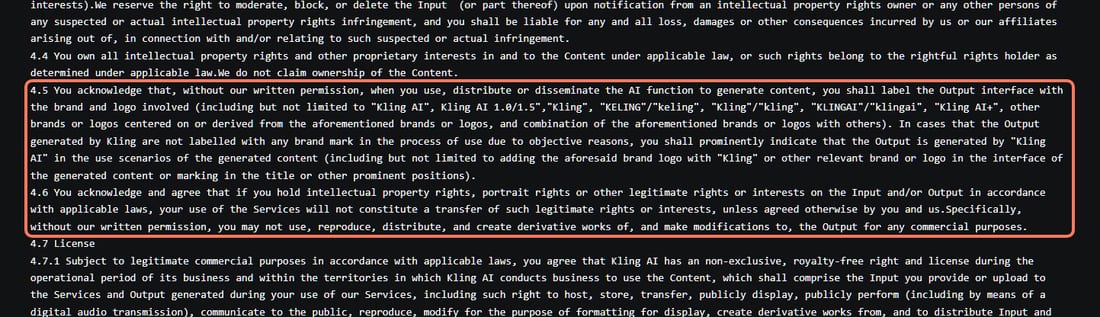
The branding clause. Section 4.5 of Kling's Terms of Service says that, without Kling's written permission, "you shall label the Output interface with the brand and logo involved", naming "Kling AI" and its variants, or otherwise "prominently indicate that the Output is generated by "Kling AI"". The paid terms grant unrestricted commercial use but don't mention this clause. We can't tell you from the documents alone whether a paying member's ad must carry a Kling label. If a client deliverable can't carry third-party branding, ask Kling in writing before the job.
Sections 4.5 and 4.6 of Kling's Terms of Service (kling.ai/docs/user-policy, last updated April 21, 2026), read November 3, 2026. The outline is ours. · Screenshot of kling.ai by aliteq
On Higgsfield, you accept Higgsfield's Terms of Use (updated October 23, 2026). Section 4.4: "Company does not claim ownership of any of your Inputs or Outputs, nor does it restrict your commercial use of Outputs", on every plan, and "you may transfer or sublicense your rights in Outputs to your clients or other third parties." We found no Kling-labeling clause in Higgsfield's terms. Its s.5.5 asks you to disclose AI output where the law requires. The clause-by-clause read is in Higgsfield commercial use.
Legal risk sits with you on both. Kling's s.8.2 says "You agree to defend, indemnify, and hold harmless us"; Higgsfield's s.12 makes you indemnify Higgsfield, and legal indemnification from Higgsfield comes only with Enterprise.
Does Kling or Higgsfield train on your client's footage?
On Kling's Team plan, Kling says no; on Higgsfield, only Enterprise says no. Kling's Team FAQ: "We do not misuse or train on your data", pointing to a separate Team Plan Data Security Agreement (we didn't read that agreement). Outside Team, Kling's Terms of Service s.4.7 license your inputs and outputs to Kling, s.4.7.3 lets Kling process your input to "create, test, improve, train, or otherwise develop" the models it uses, and s.4.7.4 says you can revoke the license by emailing support@kling.ai.
Higgsfield's s.4.4 allows training on "Your Content, Inputs, and Outputs" except for customers under an Enterprise Agreement, where "Company does not use the customer's content to train or improve its AI models". Higgsfield's own plan table lists "No data training" as No for Team and Scale. For an agency with client product shots or unreleased footage, that's a real point for Kling's Team plan over Higgsfield's self-serve seats.
If Kling is 80% of your work, should you go direct?
Usually, yes. The clearest version of the rule comes from a commenter in an r/generativeAI thread titled "Kling standalone or Higgsfield with Kling": "If Kling is going to be 80% of your workflow, I'd probably just use Kling directly. Higgsfield makes more sense if you actually want to jump between Kling, Seedance, WAN etc."
Our arithmetic backs the first half for teams (Kling Team about $1.47 a 4K clip against $2.37 on Higgsfield Team) and softens it for solo creators (Higgsfield Ultra at $1.29 against Kling Pro at $1.63). A brand-team operator who reviewed a "~$5k/mo on Higgsfield" bill wrote "I paid roughly double the published rate for identical output if i had went direct to providers" (r/MarketingandAI). That poster says in the same post that they are building a competing product, and their bill mixed several models, so treat "double" as one account's result, not a rule. Price your own top model, at your own settings, on both.
Which fits a Shopify brand, an agency, a real-estate media team or a video production team?
A Shopify or DTC brand
If your ads are mostly Kling clips, a Kling Standard or Pro membership is the cheapest way in and covers commercial use. If you also make product photos, try Seedance or Veo, or want ready-made ad tools, Higgsfield's personal plans put those in one account. Either way, count the cost per usable clip, not per plan: our cost per usable clip guide and Shopify UGC video ads with AI walk through it.
An agency making ads for clients
Clients are already asking. One small agency owner wrote that "a client looked at a quote and asked if we couldn’t just “do it with AI” and charge them less" (r/VideoEditors), and listed Kling and Seedance among the tools they use. For a Kling-heavy agency, Kling's Team plan wins on clips per seat and on its no-training statement, but it needs at least 3 members and keeps credits on each seat. Higgsfield wins if you're two people, need pooled credits, or need Scale's SSO and member spend pauses. Both let you hand finished files to clients; on Kling, settle the branding clause first.
A real-estate media company
Day-to-dusk and walk-through listing videos are a monthly, every-listing job, often made with Kling. A real-estate videographer wrote: "I've done about 50 of these videos now, Kling 2.6 or 3.0 on higgsfield are the winners. But the only reliable method is feeding it two frames and letting it run wild, with a prompt to give it some guidance." (r/RealEstatePhotography, March 2026). That's a Kling-at-80% workload, so price it on kling.ai too. Higgsfield's help center lists Kling 3.0, 3.0 Turbo, 3.0 Omni, 2.6, 2.5 Turbo and older versions, which helps if you match an old look. Background for agents: AI listing photos for solo real estate agents.
A video production team
If Kling is one of several models in a pipeline, a multi-model plan saves juggling subscriptions; Higgsfield is one option, and Runway now sells Kling too (see Higgsfield vs Runway). If the team only uses Kling for shots that drop into an edit, Kling's Team plan gives more Kling per seat.
7/ 10
Verdict
Kling-heavy? Go direct. Mixing models? Higgsfield.
For a team that mostly makes Kling clips, Kling's own Team plan gives about twice the Kling clips per seat, says it doesn't train on your data, and grants members unrestricted commercial use; settle the branding clause in writing before client work. Higgsfield is the better fit for two-person teams, pooled credits, SSO and spend controls on Scale, and for anyone who switches between Kling, Seedance and Veo or wants Higgsfield's own tools. For one-clip price questions, see our Kling 4.0 on Higgsfield and is Kling AI free pages.
Best for: Agencies, brands and video teams deciding where to buy Kling
Frequently asked
Is Kling cheaper on Higgsfield or on kling.ai?
Per credit, kling.ai is much cheaper; per clip, the gap is smaller. For a 5-second 4K Kling 3.0 clip on Nov 3, 2026, our arithmetic gave $1.47 on Kling's Team plan (monthly), $1.63 on Kling Pro, $1.29 on Higgsfield Ultra and $2.37 on Higgsfield Team. For single-clip prices see our Kling 4.0 on Higgsfield and is Kling AI free pages.
How much is Kling's Team plan?
Kling's Team Plan page (read Nov 3, 2026, signed out) lists $98 a seat a month billed monthly, or $73 billed yearly ($876 per seat a year), with 10,000 credits per seat a month. A workspace has 3 to 15 members and the page defaults to 3 seats (a monthly total of $294). It's web only.
Can I use Kling videos commercially?
On a paid membership, yes: Kling's Terms of Paid Service say members' commercial use of output is not restricted, except for building competing products. The free Basic plan is not for commercial use. Kling's Terms of Service also ask users to label output with the Kling brand unless Kling gives written permission, so ask Kling in writing if a client deliverable can't carry its branding.
Can I use Kling videos made on Higgsfield commercially?
On Higgsfield you accept Higgsfield's Terms of Use, which say it does not restrict commercial use of outputs on any plan and lets you transfer or sublicense output rights to clients (s.4.4, updated Oct 23, 2026).
Does Kling train on my uploads?
Kling's Team FAQ says "We do not misuse or train on your data". Outside Team, Kling's Terms of Service license your inputs and outputs to Kling and let it use your input to train its models; you can revoke the license by emailing support@kling.ai. Higgsfield excludes content from training only under an Enterprise Agreement.
Which Kling models are on Higgsfield?
Higgsfield's help center (read Nov 3, 2026) lists Kling 3.0, 3.0 Turbo, 3.0 Motion Control, 3.0 Omni and Omni Edit, 2.6, O1 Video, 2.5 Turbo and 2.1, and its video page offers Kling 4.0.
Should I go direct to Kling?
If Kling is most of your work, yes, especially for a team. If you switch between Kling, Seedance and Veo, a multi-model plan like Higgsfield's saves running several subscriptions.