Cancelling stops the next charge, but it doesn't return what you already paid. The three-click path, the email fallback when you can't find the button, the free-trial trap, and exactly when Higgsfield refunds, from its own help center and terms.
Some links on this page are referral links: we may earn a commission, at no cost to you.
Share
To cancel Higgsfield, click your avatar, open Manage Account, then Subscription, scroll to Plan Settings, open Manage Subscription, select Show, then Cancel Subscription. If you can't find it, Higgsfield's Terms of Use say you can also cancel "by contacting support@higgsfield.ai" from the email address on your account. Cancelling stops the next charge, but "Cancellation does not include a refund." Refunds cover only an initial purchase, within 7 days, with zero credits used. Checked on Higgsfield's help center and Terms of Use on November 3, 2026.
Higgsfield's refund rules in four numbers
7 days
Window to ask for a refund
Longer where local law requires
0
Credits you can have used
Free and Unlimited generations don't count
up to 6%
Service fee taken from refunds
Confirmed by Support
5–10 days
Business days for the money to return
Depends on your bank
How to cancel your Higgsfield subscription
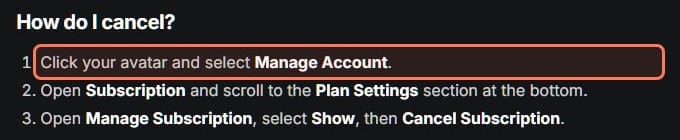
Higgsfield's help center gives the path. We read it again on November 3, 2026:
Cancelling Higgsfield, click by click
Click your avatar
Then choose Manage Account
Open Subscription
Scroll to Plan Settings at the bottom
Manage Subscription
Select Show
Cancel Subscription
Screenshot the confirmation screen
Click your avatar
Then choose Manage Account
Open Subscription
Scroll to Plan Settings at the bottom
Manage Subscription
Select Show
Cancel Subscription
Screenshot the confirmation screen
From Higgsfield's "How do I cancel my subscription?" article (dated August 1, 2026), read November 3, 2026.
Higgsfield's own cancel steps (help center, read November 3, 2026). · Screenshot of higgsfield.ai by aliteq
Team, Scale and Enterprise plans work differently: the workspace Owner cancels them from the Organization settings.
Cancelling "turns off auto-renewal". Your plan stays active until the end of the period you paid for, then the account switches to the free tier. It doesn't delete your account or your generations, and you can resubscribe at any time. Deleting the account is a separate step, covered with email changes and sign-in problems in our Higgsfield account guide. "Auto-Refill stops triggering once the subscription is canceled," so you won't be topped up, or charged, again after you cancel. If you only want to spend less, Higgsfield's help center suggests downgrading instead.
Can't find the cancel button? Use email
Many users struggle with this step, and the button has moved during 2026. In a long r/generativeAI thread titled "Impossible to cancel this subscription", replies gave different paths at different times: "under the 'ORGANIZATION' tab > 'Manage Account'" in July, "It's in Manage Account>Subscription and scroll down to the bottom" a day later, and on 30 October, "at the very bottom of the page in the Plan Settings section … I had to go through like 6 or 7 different cancellation windows" (r/generativeAI).
If the screens have changed again, there's a route in Higgsfield's Terms of Use. Section 10.3 says you may cancel "by logging into and visiting the “Payment Setting” page of your Account, or by contacting support@higgsfield.ai." It adds that email requests "must be sent from the subscriber's email address on the Account." So:
Write from the email address you signed up with. Requests from any other address aren't accepted.
Say clearly that you want to cancel, and include the date of your last charge.
Keep the sent email. It's your proof of when you asked.
Free trials turn into paid plans
This is where most "I was charged" stories start. Section 10.7 of Higgsfield's Terms of Use says that "at the end of the trial or promotional period your Subscription will automatically convert to a paid Subscription and renew at Company's then-current standard price for that plan." It also says: "You may cancel before the trial or promotional period ends to avoid being charged."
Read that together with the refund rule, and the trap is clear. One user on a $0 three-day Plus trial was charged "$49 and the Plus Monthly plan activated" when it ended. Support refused a refund and cited "Section 9.3 of their Terms of Use, which limits refunds to the initial purchase" (r/generativeAI). The user also said Higgsfield had sent a reminder email beforehand.
How a free trial becomes a charge you can't refund
Start a $0 trial
Your card is saved
Trial ends
The plan converts to paid automatically (section 10.7)
First charge
Support may treat it as a renewal, not an initial purchase
Cancel before the trial ends
The only sure way not to pay
Start a $0 trial
Your card is saved
Trial ends
The plan converts to paid automatically (section 10.7)
First charge
Support may treat it as a renewal, not an initial purchase
Cancel before the trial ends
The only sure way not to pay
From Higgsfield's Terms of Use (sections 9.3 and 10.7, updated October 23, 2026) and one user's account on Reddit, read November 3, 2026.
The safe habit: if you start a trial only to test, cancel it the same day. Higgsfield's cancel page says cancelling doesn't end access early on a paid period, but whether a trial keeps running after you cancel isn't stated, so check the screen after you click.
What happens to your credits when you cancel
Subscription credits stay usable until the end of the paid period, then expire permanently. Credit Pack, Auto-Refill, promo and Boost credits aren't lost: Higgsfield's cancel page says they stay available on the free plan, on the models the free plan includes, until their own validity ends (90 days for packs, Auto-Refill and Boost credits). The Higgsfield credits guide has the full expiry rules.
Can you get a refund?
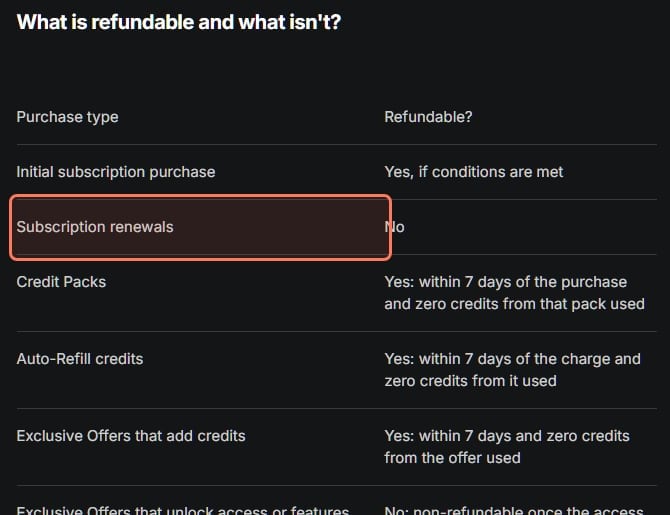
Higgsfield's refund page sets a narrow default: "Refunds are available for initial purchases, within 7 days or as permitted by the law in your jurisdiction, and only if no credits have been used." It adds: "Renewals, automatic or manual charges after the first billing cycle, aren't eligible." Using free generations or Unlimited-model generations doesn't count as credit usage.
Higgsfield's refund table (help center, read November 3, 2026). Subscription renewals are outlined. · Screenshot of higgsfield.ai by aliteq
Higgsfield refunds at a glance (Nov 3, 2026)
Initial subscription purchase
Refundable?
Yes, with limits
The rule
Within 7 days (longer where local law requires), zero credits used, up to a 6% fee
Subscription renewal
Refundable?
No
The rule
Includes charges after the first billing cycle
First charge after a free trial
Refundable?
Possibly not
The rule
One user was refused as a renewal; cancel before the trial ends
Current period after cancelling
Refundable?
No
The rule
"Cancellation does not include a refund"
Credit Pack or Auto-Refill charge
Refundable?
Yes, with limits
The rule
Within 7 days and zero credits from that purchase used
Offers that unlock Unlimited or upgrades
Refundable?
No
The rule
Non-refundable once the access is granted
Account terminated by Higgsfield, no fault of yours
Refundable?
Yes
The rule
Unused subscription fees and unused purchased credits, except promo credits
Paid feature shut down or significantly degraded
Refundable?
Yes
The rule
You can cancel and get back the unused part
Refundable?
The rule
Initial subscription purchase
Yes, with limits
Within 7 days (longer where local law requires), zero credits used, up to a 6% fee
Subscription renewal
No
Includes charges after the first billing cycle
First charge after a free trial
Possibly not
One user was refused as a renewal; cancel before the trial ends
Current period after cancelling
No
"Cancellation does not include a refund"
Credit Pack or Auto-Refill charge
Yes, with limits
Within 7 days and zero credits from that purchase used
Offers that unlock Unlimited or upgrades
No
Non-refundable once the access is granted
Account terminated by Higgsfield, no fault of yours
Yes
Unused subscription fees and unused purchased credits, except promo credits
Paid feature shut down or significantly degraded
Yes
You can cancel and get back the unused part
How to request a Higgsfield refund
There's no refund button. Higgsfield's refund page says to contact Support and include four things: the email address on your account, the date of the purchase, the amount charged, and a brief reason. Once a refund is processed, the money returns to your original payment method "within 5–10 business days, depending on your bank," and you get an email confirmation.
Know the trade-off first: "A refund results in immediate cancellation". Your account drops to the free tier the moment it's processed, not at the end of the billing period.
If you're in the EU or UK, Higgsfield's page describes a 14-day right of withdrawal after a purchase. It ends early once you start using digital content from that purchase, such as spending credits or generating, and you email support@higgsfield.ai to use it.
Paying from India or another country? Two extra steps
Cancel the bank mandate too. Indian cards often set up an e-mandate for recurring charges. One user who started a Higgsfield 1-day trial wrote that "the e-Mandate has been created" before the trial had even started, and found no way to cancel it in Higgsfield or on their bank's website (r/developersIndia). If that happens, call your bank or block the card before the charge date.
Expect a smaller refund than you paid. A user in India who paid $265 said Higgsfield offered $254, then said "6% can be further debited" (r/Seedance_v2). That matches Higgsfield's own fee of up to 6%, and your bank converts the currency both ways, so the rupee amount you get back is lower again.
Two cases where Higgsfield refunds you automatically
Higgsfield's refund page names only two exceptions to its rules. On termination: "if Higgsfield ever terminates your account through no fault of yours, unused subscription fees and unused purchased credits (except promo credits) are refunded." On the service changing: "If Higgsfield significantly degrades a paid plan or shuts down a paid feature entirely, you can cancel and get back the unused part of what you paid." Neither applies to a change-of-mind cancellation.
7/ 10
Verdict
Easy to cancel once you know where, strict on refunds
Cancelling Higgsfield takes a minute, and email works if the button moves again. Refunds are the hard part. Ask within 7 days of your first purchase, before you spend a single credit, and cancel any free trial before it ends.
Best for: Anyone stopping a Higgsfield plan or asking for money back
Quick answers
How do I cancel my Higgsfield subscription?
Click your avatar and select Manage Account, open Subscription and scroll to Plan Settings, then open Manage Subscription, select Show and click Cancel Subscription. Team, Scale and Enterprise plans are cancelled by the workspace Owner from the Organization settings.
Should I subscribe to Higgsfield for one month first?
That's the low-risk way in. On November 12, 2026 Higgsfield's monthly prices in the 11.11 sale were Plus $47 and Ultra $79 for the first month, renewing at $59 and $129; Starter was $19. Cancel from Manage Account before the renewal date and you keep the plan to the end of the month you paid for. Yearly is cheaper per month ($35 or $65 in the sale) but is one payment for the year, refundable only within 7 days with no credits used.
Can I cancel Higgsfield by email?
Yes. Section 10.3 of Higgsfield's Terms of Use says you can cancel by contacting support@higgsfield.ai, and the request must come from the email address on your account.
Does cancelling Higgsfield give me a refund?
No. In Higgsfield's words, "Cancellation does not include a refund." You keep access until your paid period ends, but the current charge isn't returned.
I was charged after a free trial. Can I get a refund?
Probably not. Higgsfield's terms say trials convert to a paid plan unless you cancel before they end, and refunds cover only initial purchases, not renewals. One user said Support treated the first charge after a trial as a renewal and refused. Cancel trials before they end.
Can I get a refund if I already used some credits?
No. Higgsfield's refund page says that if any credits from the purchase have been used, the refund is not available. Free generations and Unlimited-model generations don't count as credit usage.
How long does a Higgsfield refund take?
Higgsfield says the money returns to your original payment method within 5–10 business days after the refund is processed, depending on your bank, minus a service fee of up to 6%. An approved refund also cancels the subscription immediately.
Do my leftover credits disappear when I cancel?
Subscription credits last until the paid period ends, then expire. Credit Pack, Auto-Refill, promo and Boost credits stay available on the free plan's models until their own expiry dates. Auto-Refill stops triggering, so you won't be topped up, or charged, again.