Yes, if you have a GTX 1660 or better: that's the official minimum for 1080p at 30 FPS. An RTX 3060 Ti is recommended for 1440p at 60 FPS. Every tier assumes upscaling, ray tracing has its own tier, and the install is 145 GB on an SSD.
Some links on this page are referral links: we may earn a commission, at no cost to you.
Share
Can your PC run Phantom Blade Zero? Yes, if your graphics card is a GTX 1660 6GB, an RX 5500 XT 8GB or anything faster. That's S-GAME's official minimum, for 1080p at 30 FPS with upscaling on. For 1440p at 60 FPS, the recommended card is an RTX 3060 Ti 8GB or RX 6700 XT 12GB. Both tiers ask for 16 GB of RAM and 145 GB on an SSD. Ray tracing is optional and has its own, higher tier. Checked on the game's Steam page and S-GAME's own posts on November 3, 2026.
What GPU do I need for Phantom Blade Zero?
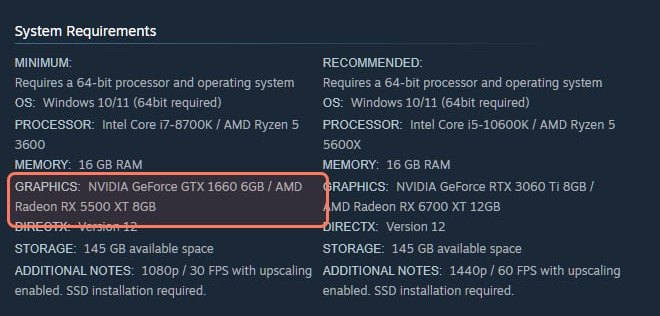
Steam lists two tiers. Here they are as the store page showed them on November 3, 2026.
Phantom Blade Zero's Steam page, read November 3, 2026. The minimum GPU line is outlined. · Screenshot of store.steampowered.com by aliteq
Phantom Blade Zero PC requirements (Steam, read Nov 3, 2026)
Target
Minimum
1080p / 30 FPS, upscaling on
Recommended
1440p / 60 FPS, upscaling on
GPU
Minimum
GTX 1660 6GB / RX 5500 XT 8GB
Recommended
RTX 3060 Ti 8GB / RX 6700 XT 12GB
CPU
Minimum
Core i7-8700K / Ryzen 5 3600
Recommended
Core i5-10600K / Ryzen 5 5600X
RAM
Minimum
16 GB
Recommended
16 GB
OS
Minimum
Windows 10/11 64-bit
Recommended
Windows 10/11 64-bit
DirectX
Minimum
12
Recommended
12
Storage
Minimum
145 GB, SSD required
Recommended
145 GB, SSD required
Minimum
Recommended
Target
1080p / 30 FPS, upscaling on
1440p / 60 FPS, upscaling on
GPU
GTX 1660 6GB / RX 5500 XT 8GB
RTX 3060 Ti 8GB / RX 6700 XT 12GB
CPU
Core i7-8700K / Ryzen 5 3600
Core i5-10600K / Ryzen 5 5600X
RAM
16 GB
16 GB
OS
Windows 10/11 64-bit
Windows 10/11 64-bit
DirectX
12
12
Storage
145 GB, SSD required
145 GB, SSD required
Steam gives no separate VRAM line, so the VRAM you need comes from the named cards. That's 6 GB on the smallest minimum-tier card and 8 GB on the smallest recommended one.
Can I play Phantom Blade Zero with ray tracing?
Only with an RTX-class card, and it's optional. When S-GAME published its PC specs on August 12, 2026 (date per PC Games Hardware), its chart had four tiers. Steam only carries the first two. The chart, as DSOGaming reproduced it on August 14, 2026, adds:
S-GAME's ray tracing tiers (official spec chart, Aug 2026)
GPU
Ray tracing recommended
GeForce RTX 5060 8GB
Path tracing recommended
GeForce RTX 5080 16GB
Target
Ray tracing recommended
1080p / 60 FPS, upscaling on
Path tracing recommended
2160p (4K) / 60 FPS, upscaling on
Ray tracing recommended
Path tracing recommended
GPU
GeForce RTX 5060 8GB
GeForce RTX 5080 16GB
Target
1080p / 60 FPS, upscaling on
2160p (4K) / 60 FPS, upscaling on
PC Games Hardware's write-up of the chart lists the same two cards and targets. The chart gives only a GPU for these two tiers, so S-GAME hasn't said which CPU or how much RAM goes with them. Ray tracing is not required to play, and the GTX 1660 on the minimum line has no RT cores (NVIDIA says GTX cards run ray tracing on their regular shader cores, which is far slower). S-GAME's launch-day letter says the team "spent a great deal of time refining the game's rasterized visuals" so the game holds its look "even with ray tracing turned off".
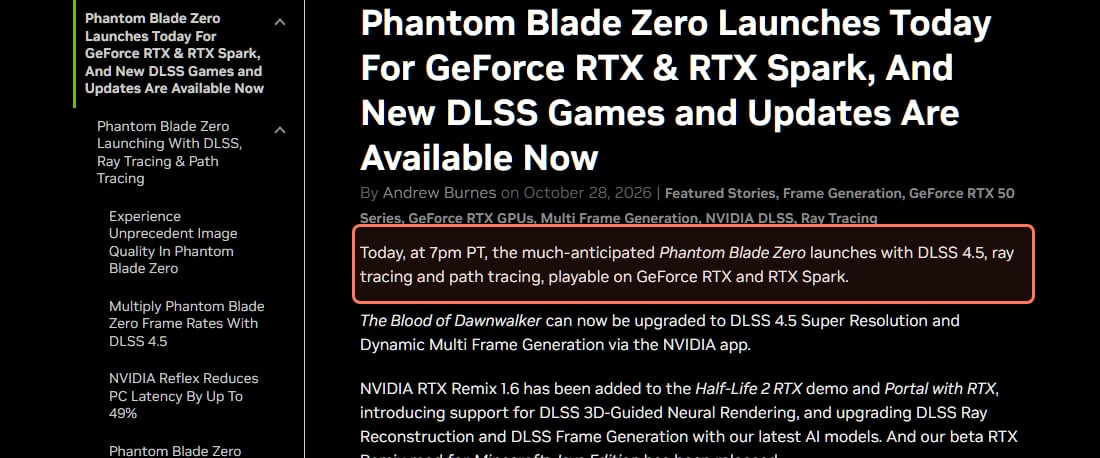
NVIDIA's launch article, dated October 28, 2026, read November 3, 2026. · Screenshot of nvidia.com by aliteq
NVIDIA's launch article says the game ships with DLSS 4.5, ray tracing and path tracing, and that turning path tracing on "automatically activates DLSS Ray Reconstruction on GeForce RTX GPUs". NVIDIA also publishes frame-rate figures, but they use Multi Frame Generation at up to 6X, so they aren't comparable to S-GAME's 60 FPS targets.
Independent testing suggests ray tracing is expensive. PC Games Hardware (October 26, 2026) found the frame rate nearly halves (our translation of its German) when you switch from raster to ray tracing. It also saw repeated traversal stutter with ray tracing on, which it hoped the developer would fix. That test ran before the 5 GB day-one patch, which S-GAME says "significantly improves ray tracing and path tracing performance". S-GAME's November 4, 2026 patch (version 1.0302256) adds "Improved performance in certain areas" and stops compiling ray tracing shaders at startup unless ray tracing is on, which shortens the first launch.
What does "with upscaling enabled" mean for my PC?
Every official target, all four tiers, assumes upscaling is on. Upscaling (DLSS, FSR or XeSS) renders a lower resolution and rebuilds a sharper image. PC Games Hardware's test compares all three in the game's menu, so AMD and Intel cards get an upscaler too. In practice, 1440p60 on an RTX 3060 Ti means 1440p output, not native 1440p, and S-GAME hasn't said which quality mode or preset its targets use. If you play without upscaling, plan for more card than the tier says. More on that trade-off in how to increase FPS in PC games.
Find your card
GTX 1660 / 1660 Super / 1660 Ti, RX 5500 XT 8GB: the official minimum, 1080p at 30 FPS with upscaling. No ray tracing.
Slower than that (GTX 1060, GTX 1650, 4 GB cards): below the official minimum. S-GAME says it tested "mid-range and lower-end PCs, as well as handhelds", but it hasn't published anything below the GTX 1660 line, so treat these cards as unsupported.
RTX 3060 Ti, RX 6700 XT, or faster: the recommended tier, 1440p at 60 FPS with upscaling.
RTX 5060 8GB or faster RTX cards: S-GAME's ray tracing tier, 1080p at 60 FPS with upscaling.
RTX 5080 16GB and up: the path tracing tier, 4K at 60 FPS with upscaling.
Steam Deck: Valve rates it Playable (checked November 6, 2026). Its test notes say the default graphics settings run below Valve's recommended standard on Deck, so expect to lower them.
145 GB on an SSD, per Steam. In its October 26, 2026 pre-load post, S-GAME told players to "reserve at least 300 GB of free disk space for the pre-load process" and to install on an SSD. Steam marks the SSD as required on both tiers.
Which NVIDIA driver should I use?
The developer and NVIDIA disagreed at launch. NVIDIA released its Game Ready driver for the game, version 621.01, on October 20, 2026 and recommends installing it. S-GAME's launch-day letter (October 28) says it saw "performance instability" with that same 621.01 driver. It recommends rolling back to 617.42 with a clean install until NVIDIA's next driver. If you get stutter or crashes on 621.01, try 617.42, and check whether a newer NVIDIA driver has come out since.
Should I upgrade my GPU for Phantom Blade Zero?
Only if you're below the minimum or you want ray tracing. The base game is built to run on a GTX 1660, so the recommended-tier RTX 3060 Ti already targets 1440p60 with upscaling. If you're on a 4 GB card or want the ray tracing tier, a 16 GB card covers both tiers with room to spare. Read should you upgrade your GPU or just your settings? before you buy.
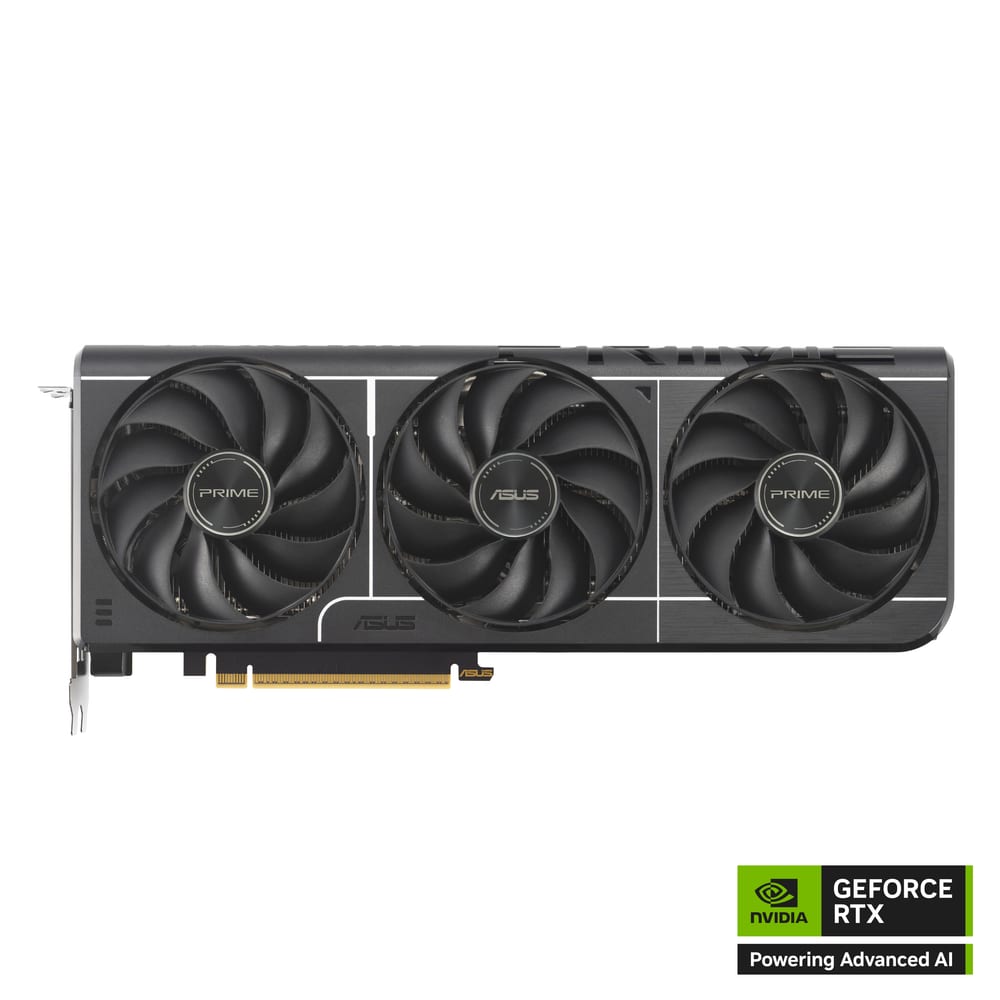
ASUS Prime GeForce RTX 5060 Ti 16GB
Above S-GAME's RTX 5060 8GB ray tracing tier, with twice the VRAM. Make sure the listing says 16GB.
Best for: 1440p gaming, and local AI that needs 16GB of VRAM on a budget.
The upscaling mode behind each target. S-GAME says "with upscaling enabled" but not Quality, Balanced or Performance.
The CPU and RAM for the ray tracing tiers. The official chart names only a GPU for them.
How it runs below the minimum. S-GAME says it tested lower-end PCs and handhelds but hasn't published a spec for them.
Quick answers
Can a GTX 1660 run Phantom Blade Zero?
Yes, it's the official minimum. Steam lists a GTX 1660 6GB for 1080p at 30 FPS with upscaling enabled, with an i7-8700K or Ryzen 5 3600 and 16 GB of RAM (read Nov 3, 2026). It can't use the ray tracing tier.
What are the Phantom Blade Zero recommended specs?
An RTX 3060 Ti 8GB or RX 6700 XT 12GB, a Core i5-10600K or Ryzen 5 5600X and 16 GB of RAM, for 1440p at 60 FPS with upscaling enabled (Steam, read Nov 3, 2026).
What GPU do I need for ray tracing in Phantom Blade Zero?
S-GAME's chart lists an RTX 5060 8GB for ray tracing at 1080p 60 FPS and an RTX 5080 16GB for path tracing at 4K 60 FPS, both with upscaling. Ray tracing is optional.
How big is Phantom Blade Zero on PC?
145 GB, and it must go on an SSD (Steam, read Nov 3, 2026). S-GAME asked players to keep at least 300 GB free during the pre-load.
Does Phantom Blade Zero support FSR and XeSS?
Yes. PC Games Hardware's October 26, 2026 test compares DLSS, FSR and XeSS in the game, so Radeon and Arc owners get an upscaler too.
Is Phantom Blade Zero out on PC?
Yes, since October 28, 2026 at 7 PM PT on Steam and the Epic Games Store. Steam lists it at $59.99 and the Digital Deluxe Edition at $69.99 (read Nov 3, 2026).
Checked November 3, 2026 against the Steam store page, S-GAME's Steam posts and NVIDIA's articles; the November 4 patch and the Steam Deck rating were checked November 6, 2026. Requirements and driver advice can change with patches; we'll update this page when they do.