128GB does not mean 128GB for the model. Plan on 96GB, and the box becomes a home for 100B-plus Mixture-of-Experts models. Five picks by job, with the math shown.
I like a spreadsheet more than a spec sheet, and the spec sheet for these machines says "128GB" in big letters. That number is the total memory. The graphics chip never gets all of it, because the operating system, your browser and the model runner live in the same pool. Plan on 96 GB.
This guide picks the local models that fit that 96 GB and shows the arithmetic. I read every model's card and config on Hugging Face on October 4, 2026 and ran the numbers through our VRAM engine. I have not loaded these models on a Strix Halo, a Mac Studio or a DGX Spark. Every figure below is math on published specs, checked against real file sizes. If you are still deciding how to split the memory, start with our Strix Halo VRAM guide.
Why a 128GB machine is a 96GB machine for AI
A 128GB unified-memory machine gives its graphics chip about 96 GB in practice. AMD's own setting tops out at 96 GB on the Ryzen AI Max+ 395. On a 128GB Mac, our planning rule gives the same 96 GB. The other 32 GB keeps the operating system alive.
Unified memory means the processor and the graphics chip share one pool of RAM instead of each having their own. That is why these boxes can hold models no single gaming card can. It also means every gigabyte you give the model is a gigabyte the system loses.
Ryzen AI Max+ 395 (Strix Halo): AMD's Variable Graphics Memory FAQ describes the 128GB chip "with 96GB of Variable Graphics Memory." You set it in AMD's Adrenalin software, and it needs a restart. AMD adds that the graphics chip "can technically access a total graphics memory size of 112GB," but says the highest performance comes from "limiting workloads to 96GB."
Mac Studio with 128GB: Apple sells 128GB only with the M5 Max, 40-core GPU chip. macOS does not publish a fixed split. Our Mac buying guide plans on three-quarters of memory above 32GB, which is 96 GB here.
DGX Spark: NVIDIA lists "128 GB LPDDR5x, coherent unified system memory" and no fixed split. Its user guide says the graphics chip shares system memory dynamically. I plan it on 96 GB too, so all three compare fairly.
The five picks for 128GB
The best local LLM for 128GB of unified memory depends on the job. Qwen3.5 122B-A10B is the all-rounder and reads images. gpt-oss-120b is the reasoning pick in its native format. Qwen3-Coder-Next is the coding agent. Llama 4 Scout covers images with a huge window, and Llama 3.3 70B is the dense classic.
Best local LLMs for a 96GB GPU budget (computed, Oct 4, 2026)
Qwen3.5 122B-A10B
Best for
All-round, images, agents
Quant
Q4_K_M
Context
128K (up to 256K)
Total memory
74.4 GB
gpt-oss-120b
Best for
Reasoning
Quant
MXFP4 (native)
Context
128K
Total memory
70.5 GB
Qwen3-Coder-Next
Best for
Coding agents
Quant
Q6_K
Context
256K
Total memory
67.6 GB
Llama 4 Scout
Best for
Images, long documents
Quant
Q4_K_M
Context
128K
Total memory
69.2 GB
Llama 3.3 70B
Best for
Dense, near-lossless
Quant
Q8_0
Context
32K (up to 50K)
Total memory
80.6 GB
Best for
Quant
Context
Total memory
Qwen3.5 122B-A10B
All-round, images, agents
Q4_K_M
128K (up to 256K)
74.4 GB
gpt-oss-120b
Reasoning
MXFP4 (native)
128K
70.5 GB
Qwen3-Coder-Next
Coding agents
Q6_K
256K
67.6 GB
Llama 4 Scout
Images, long documents
Q4_K_M
128K
69.2 GB
Llama 3.3 70B
Dense, near-lossless
Q8_0
32K (up to 50K)
80.6 GB
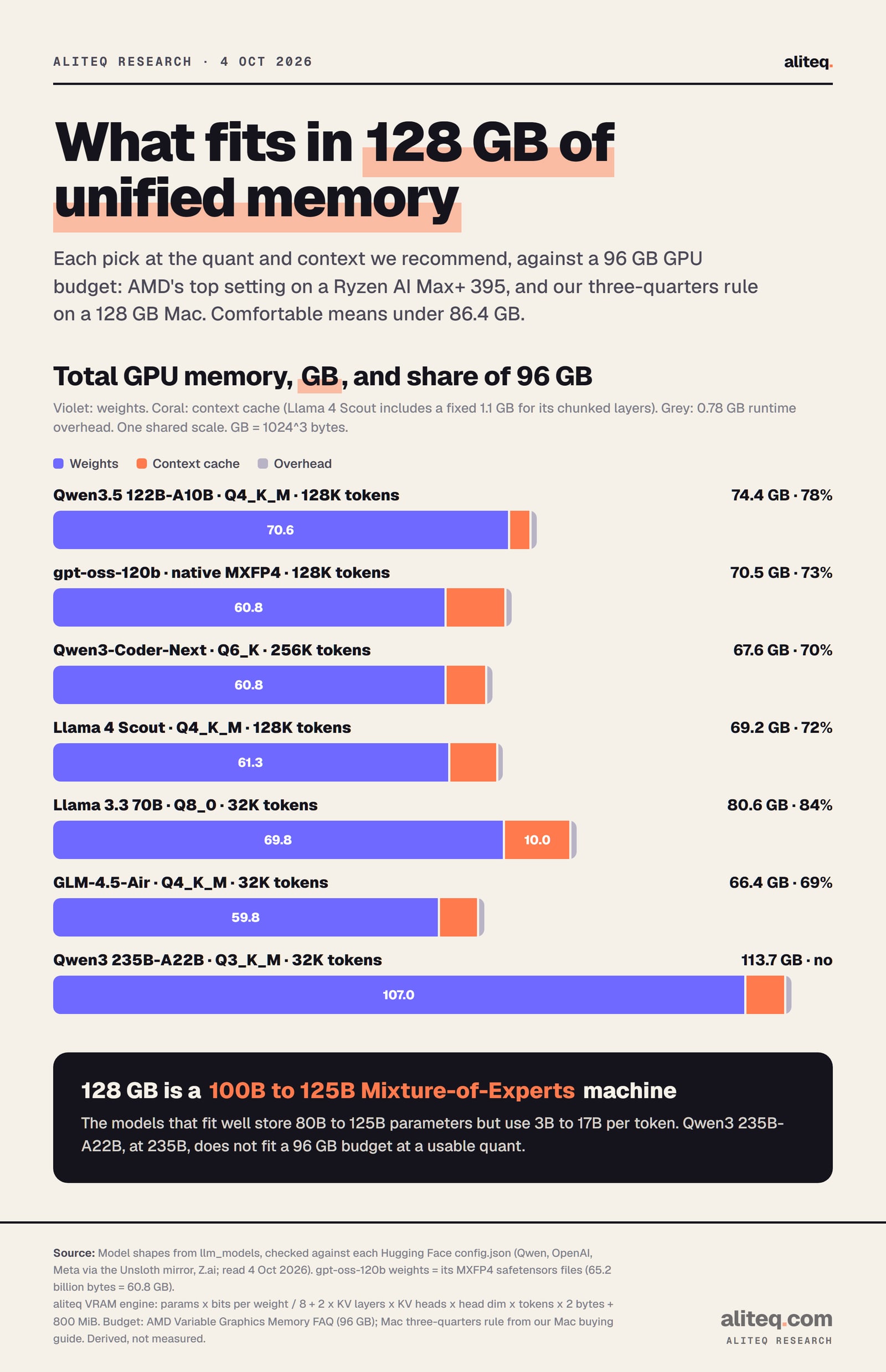
Each pick at the quant and context we recommend, against a 96 GB budget. Derived with the aliteq VRAM engine, not measured. · aliteq research
How we work out what fits
Memory use is three things added up: the model's weights, the context cache and a runtime overhead. Weights depend on the quant, which is how many bits each number is squeezed into. The cache grows with every token of conversation. The overhead is a flat 0.78 GB in our engine.
weights  = parameters x bits_per_weight / 8
cache    = 2 x cache layers x KV heads x head dimension x tokens x 2 bytes
total    = weights + cache + 0.78 GB overhead

Qwen3.5 122B-A10B, Q4_K_M, 128K tokens:
70.6 + 3.0 + 0.78 = 74.4 GB  (78% of a 96 GB budget)
Mixture-of-Experts, or MoE, models store many small expert networks and use only a few per token. All the weights still sit in memory, so a 122B MoE model costs 122B worth of memory. Several of these models also keep a growing cache in only some layers, so we count those layers alone. You can run the same math on any model with our VRAM calculator.
Pick 1: Qwen3.5 122B-A10B, the all-rounder
Qwen3.5 122B-A10B is the model a 96 GB budget was made for. It stores 122B parameters and uses 10B per token, according to its model card. At Q4_K_M with 128K tokens it needs about 74.4 GB, 78 percent of the budget. It reads images too.
The model card calls it a "Causal Language Model with Vision Encoder," with "262,144 natively" as its context window. Our engine says the full 256K window still fits at Q4_K_M, at about 77.4 GB. That works because only 12 of its 48 layers keep a growing cache. The other 36 use linear attention, which holds a small fixed state.
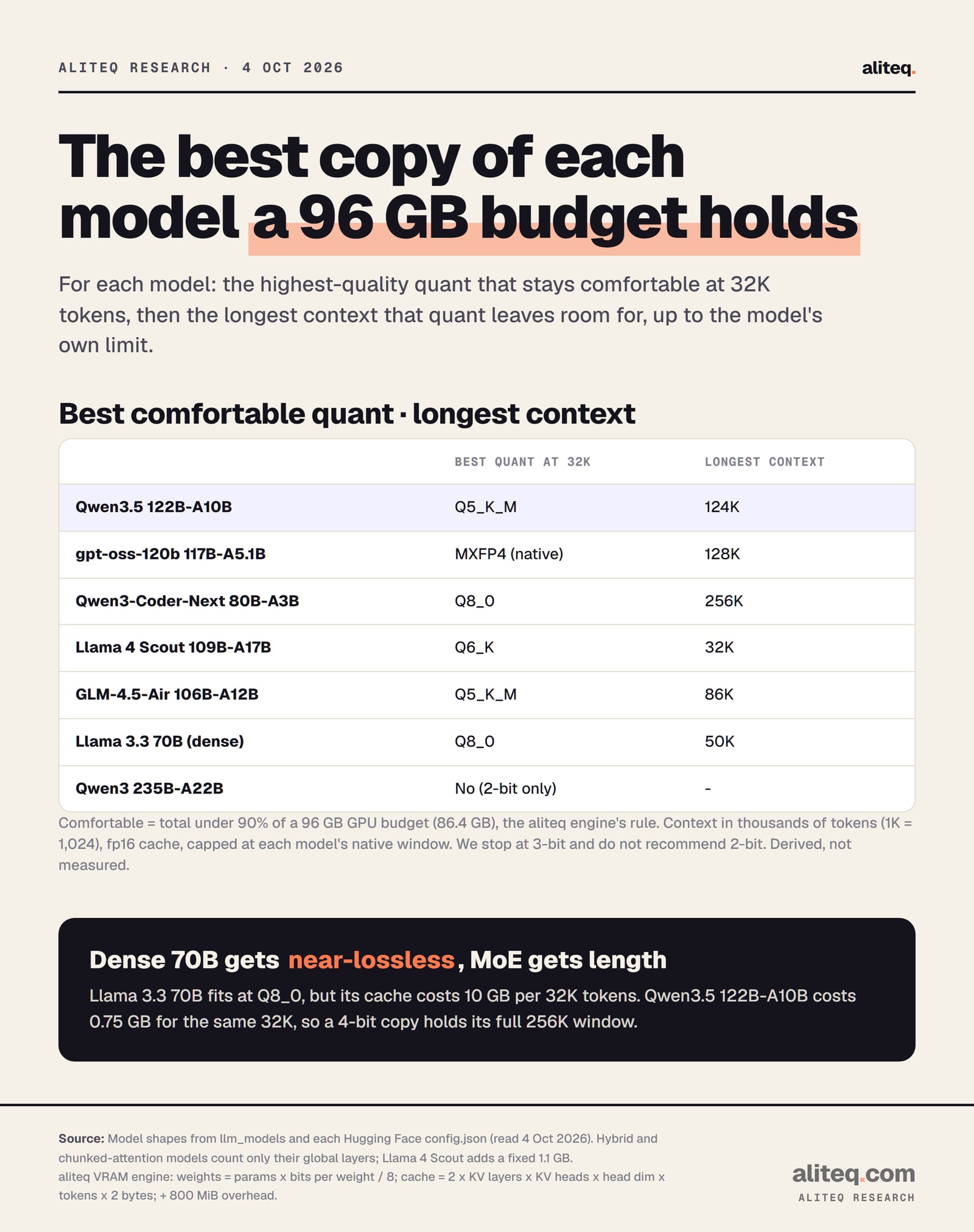
Want a better copy? Q5_K_M fits with 32K tokens at about 84.2 GB, 88 percent of the budget, and leaves room for about 124K tokens. Q6_K does not fit. One community Q4_K_M file is 71.28 GB against our 70.6 GB estimate, so the math is close. The image file adds about 0.85 GB.
Qwen's card scores it 72.0 on SWE-bench Verified, against 62.0 for gpt-oss-120b, in Qwen's own table. That is the vendor's number, not ours. Its cost-to-run page has every quant.
Pick 2: gpt-oss-120b, for reasoning in its native format
gpt-oss-120b is the light giant. OpenAI ships it in one format, MXFP4, and its weight files total 65.2 billion bytes, or 60.8 GB. With its full 128K tokens of context it needs about 70.5 GB by our engine. That is 73 percent of the budget.
OpenAI's card says it has "117B parameters with 5.1B active parameters" and fits "a single 80GB GPU." On a 128GB box it fits with room left over. Do not bother requantizing it: the community GGUF files we checked range from 58.3 to 59.0 GB, because the expert weights are already 4-bit.
Our cache figure is cautious. Our engine counts all 36 layers, but the config marks 18 of them as 128-token sliding windows. Real use should be lower. The gpt-oss-120b hardware guide covers the setup, and its cost-to-run page has the details.
Pick 3: Qwen3-Coder-Next, for coding agents with the whole repo loaded
Qwen3-Coder-Next is the coding pick. It stores 80B parameters and uses 3B per token, says its model card. At Q6_K, a high-quality quant, it holds its full 256K-token window in about 67.6 GB. That leaves 19 GB of the budget spare.
The card says its "256k context length" suits tools like Claude Code, Qwen Code and Cline. Like Qwen3.5, it keeps a growing cache in only 12 of its 48 layers, so 256K tokens costs just 6 GB. If you want the near-lossless Q8_0, it fits too: about 82.6 GB at 128K tokens, or 85.6 GB at 256K.
Q8_0 at 256K is 89 percent of the budget. That is inside our line, barely. I would run Q6_K and keep the spare memory for the editor and a browser. Its cost-to-run page has every quant.
Pick 4: Llama 4 Scout, for images and long documents
Llama 4 Scout is the multimodal pick with the biggest window on paper. Meta's card lists "17B (Activated) 109B (Total)," text and image input, and a 10M-token context. At Q4_K_M with 128K tokens it needs about 69.2 GB, 72 percent of the budget.
Scout is also the model AMD itself names for the Ryzen AI Max+ 395 in its memory FAQ. Its cache is cheap: only 12 of 48 layers keep a growing cache. The other 36 hold a fixed 8,192-token chunk, about 1.1 GB, which we add. Q5_K_M fits too, at about 79.7 GB with 128K tokens.
The honest catch is age. Scout's card lists an August 2024 knowledge cutoff, and Qwen3.5 122B-A10B also reads images. I would pick Scout when you need its long window or Meta's license terms suit you. Our Llama 4 Scout on unified memory guide covers the setup.
Pick 5: Llama 3.3 70B at Q8_0, the dense classic
Llama 3.3 70B is the dense pick, and 96 GB finally lets it run near-lossless. At Q8_0 with 32K tokens it needs about 80.6 GB, 84 percent of the budget. Dense means every parameter works on every token, which makes it the slowest model on this list.
That speed point matters on these machines. Generating each token reads the active weights from memory once. AMD lists 256 GB/s for Strix Halo, NVIDIA 273 GB/s for the Spark and Apple 614 GB/s for the M5 Max. A dense 70B reads all 70B parameters per token. Qwen3.5 122B-A10B reads about 10B.
The 70B also eats context. Its cache costs 10 GB per 32K tokens, so Q8_0 tops out near 50K. Drop to Q6_K and it reaches about 100K. Its cost-to-run page has every quant.
The best quant that stays under 90 percent of 96 GB at 32K tokens, then the longest context it allows. Derived, not measured. · aliteq research
Why the newest big models hold more conversation
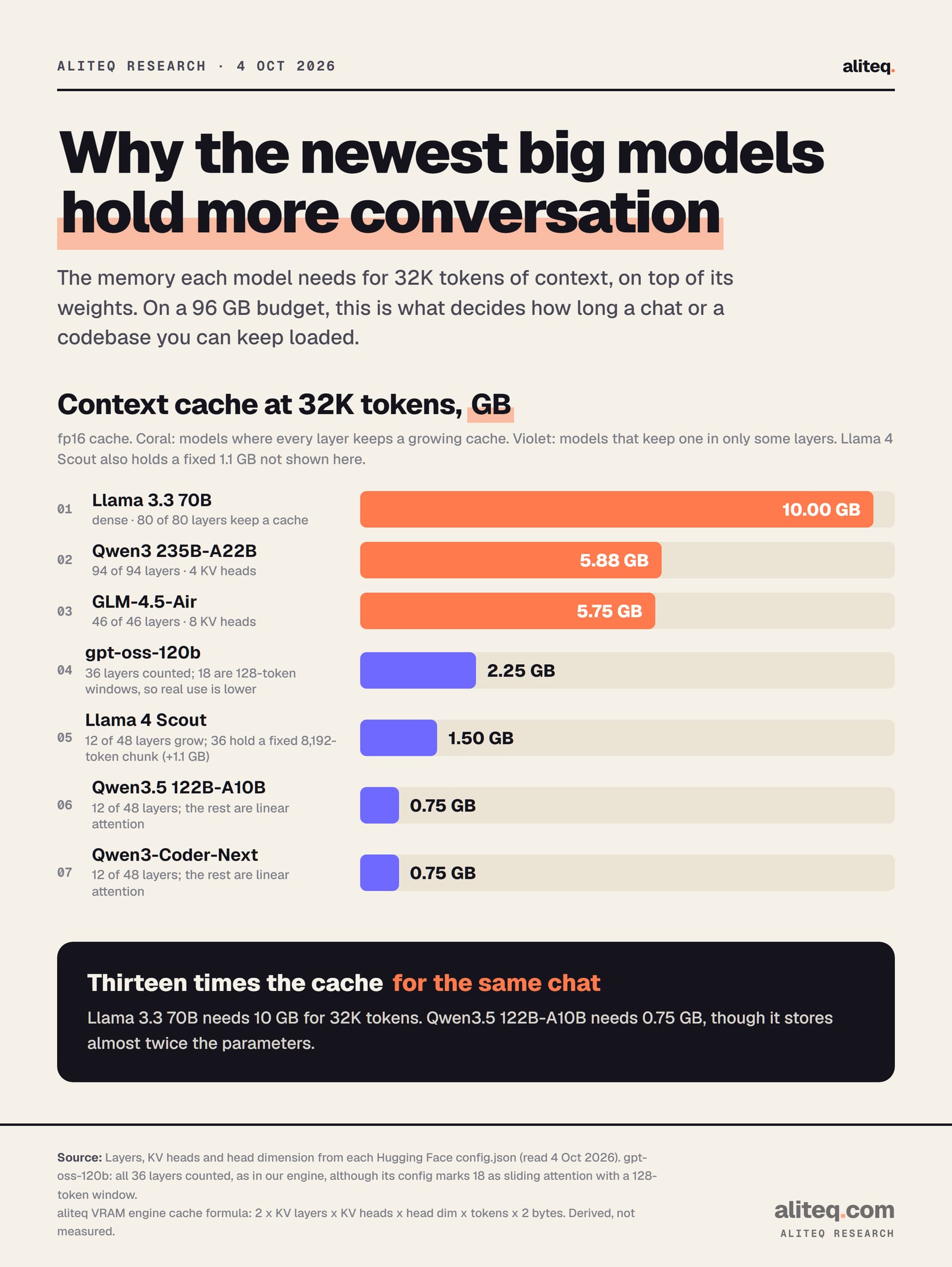
The context cache decides how long a chat or codebase you can keep loaded. Older designs keep a cache in every layer. Newer ones keep it in a quarter of them. On the same 96 GB, that is the gap between 50K tokens and the full 256K.
Context cache for 32K tokens, fp16, from each model's config.json. Derived, not measured. · aliteq research
GLM-4.5-Air shows the trade. Z.ai's card lists "106 billion total parameters and 12 billion active." It fits at Q4_K_M with 32K tokens in about 66.4 GB by our engine. But real Q4_K_M files run about 68 GB of weights alone, 8 GB above our estimate, and its cache costs 5.75 GB per 32K tokens. Its cost-to-run page has the ladder. A context window explainer covers why the cache grows at all.
What does not fit in 128GB
Qwen3 235B-A22B is the line. Its card lists "235B in total and 22B activated." At Q3_K_M the weights alone are about 107 GB, more than the whole 96 GB budget. Even Q2_K lands at about 98.3 GB with 32K tokens, 102 percent of the budget.
You could chase AMD's 112 GB ceiling or raise a Mac's limit to squeeze a 2-bit copy in. Our engine's note on 2-bit is blunt: "Almost always better to run a smaller model at Q4_K_M instead." I agree, and Qwen3.5 122B-A10B is that smaller model. NVIDIA says the Spark handles inference "with AI models up to 200 billion parameters." By our math, 235B is past that line at any sane quant.
If you want the 235B class, you need 256GB. Our Mac buying guide covers the 256GB Mac Studio. For splitting a model across cards, see two cards versus one.
One model for everything, images included? Qwen3.5 122B-A10B at Q4_K_M with 128K tokens.
Hard reasoning, simple setup? gpt-oss-120b in its native MXFP4 format, full 128K tokens.
Coding agent on a big repo? Qwen3-Coder-Next at Q6_K with the full 256K tokens.
Scans, screenshots and very long documents? Llama 4 Scout at Q4_K_M or Q5_K_M.
Want Qwen3 235B? A 128GB machine is the wrong tool. Look at 256GB or rent.
Strix Halo, Mac Studio or DGX Spark: does the pick change?
The picks do not change, because all three get the same 96 GB plan. What changes is speed, set mostly by memory bandwidth, and the software each box runs. That is why MoE models with few active parameters are the right fit for all three.
The Mac Studio's M5 Max has the most bandwidth of the three by Apple's figure, 614 GB/s. Strix Halo and the Spark sit near 256 to 273 GB/s by their makers' figures. On the slower two, the 3B-to-10B-active models matter even more. If you are still choosing a box, read is the DGX Spark worth it and our Strix Halo mini PC verdict.
If your machine is a gaming PC with a 12GB or 16GB card, the same MoE trick works in a smaller form. Our MoE guide for 12GB and 16GB GPUs shows how.
What these numbers do not tell you
They do not tell you speed. Tokens per second depends on your runtime, your machine and the quant, and we did not measure it. They do not rank model quality either. The benchmark figures above are each vendor's own, and we did not run any.
They also assume an fp16 cache and one user. An 8-bit cache roughly halves the cache figures. Each extra live conversation adds its own cache. Image models add a separate vision file, about 0.85 GB for Qwen3.5 and 1.6 GB for Scout in the community sets we checked. Qwen's linear-attention layers add a small fixed state we did not count. If you want the quant ladder explained, read which quantization should you use.
Quick answers
What is the best local LLM for 128GB of unified memory?
For one model that does everything, including images, Qwen3.5 122B-A10B at Q4_K_M with 128K tokens, about 74.4 GB by our formula. For reasoning, gpt-oss-120b. For coding agents, Qwen3-Coder-Next.
How much of 128GB can a local LLM use?
Plan on 96 GB. That is AMD's top Variable Graphics Memory setting on the Ryzen AI Max+ 395 and our three-quarters planning rule on a 128GB Mac. AMD says 112 GB is technically reachable, with lower performance.
Can a 128GB Strix Halo or Mac run gpt-oss-120b?
Yes, comfortably. Its native weight files are 60.8 GB, and with its full 128K context it needs about 70.5 GB by our engine, 73 percent of a 96 GB budget.
Can 128GB run Qwen3 235B-A22B?
Not at a usable quant. Q3_K_M weights alone are about 107 GB. Only 2-bit squeezes near the budget, and we advise a smaller model at 4-bit instead.
Should I run Llama 3.3 70B on a 128GB machine?
It fits at near-lossless Q8_0 with 32K tokens, about 80.6 GB. But it is dense, so it reads all 70B parameters for every token. MoE models with 3B to 10B active parameters suit these machines better.
Does the best model differ between Strix Halo, Mac Studio and DGX Spark?
Not on memory, since we plan all three on 96 GB. They differ in speed: Apple lists 614 GB/s for the M5 Max, AMD 256 GB/s for Strix Halo and NVIDIA 273 GB/s for the Spark.