The model fits. Then you paste in a long document and the GPU runs out of memory. The culprit is the KV cache, it has a formula you can do on a napkin, and two settings cut it by roughly half or three quarters.
Retro hardware teaches you to count every byte before you write a line of code, because 64 KB is the whole world. Local LLMs bring that discipline back. The weights are the big, obvious cost. The KV cache is the one that sneaks up on you at 3 a.m. when your long prompt crashes the run.
I did not run any of this on a card. I read the llama.cpp and Ollama documentation and source on October 3, 2026, read the model configs on Hugging Face, and did the arithmetic. For the memory math across models, see our cost to run tool and the best GPU for local AI guide.
Why does a model that fits run out of memory at long context?
Because the model's weights are a fixed cost and the KV cache is not. The cache holds the model's working notes for every token already in the conversation. Reserve a longer context and the cache gets bigger, so a card that loaded the model happily can fail the moment the context window is allocated.
Here is what you may see. In llama.cpp, the context setup logs a line for the "KV buffer size" in MiB, and when memory runs out the CUDA backend reports that cudaMalloc failed, or the context creation fails with "failed to allocate buffer for kv cache". Those strings come straight from the llama.cpp source I read. Your exact message depends on your build and backend.
One more trap: the cache is reserved for the context size you ask for, used or not. In llama.cpp, -c sets the context, and the default of 0 means the value stored in the model. Ollama's FAQ says it defaults to 4096 tokens unless you change it with OLLAMA_CONTEXT_LENGTH, and it multiplies the context by the number of parallel requests. A small default can hide the problem until you raise it.
What is the KV cache, in plain terms?
The KV cache is stored work. For each token and each layer, the model keeps a "key" and a "value" so it does not recompute the whole conversation for every new word. That is why the cache grows in a straight line with context length. Double the tokens, double the cache.
Think of a Commodore 64 programmer keeping a lookup table in RAM so the CPU does not recalculate sine on every frame. You trade memory for speed. The table is worth having, and it also eats your 64 KB.
How big is the KV cache? The formula
The cache is 2 x layers x KV heads x head dimension x tokens x bytes per value. The 2 is one key plus one value. You can read layers, KV heads and head dimension from the model's config.json on Hugging Face. The default storage type is f16, which is 2 bytes per value.
KV cache = 2 x layers x kv_heads x head_dim x tokens x bytes_per_value

Qwen3 32B: 2 x 64 x 8 x 128 = 131,072 values per token
           x 2 bytes (f16)  = 256 KiB per token
           x 32,768 tokens  = 8.0 GiB
Note "KV heads", not "attention heads". Qwen3 32B has 64 attention heads but only 8 KV heads, so it shares each cached head among several query heads. Using the wrong number overstates the cache by a factor of eight here. The numbers below use the values printed in each model's own config.
KV cache size by model and cache type (GiB, derived)
Qwen3 8B, f16 (36 layers, 8 KV heads, 128)
Per token
144 KiB
8K tokens
1.12
32K tokens
4.50
Qwen3 8B, q8_0
Per token
76.5 KiB
8K tokens
0.60
32K tokens
2.39
Qwen3 8B, q4_0
Per token
40.5 KiB
8K tokens
0.32
32K tokens
1.27
Qwen3 32B, f16 (64 layers, 8 KV heads, 128)
Per token
256 KiB
8K tokens
2.00
32K tokens
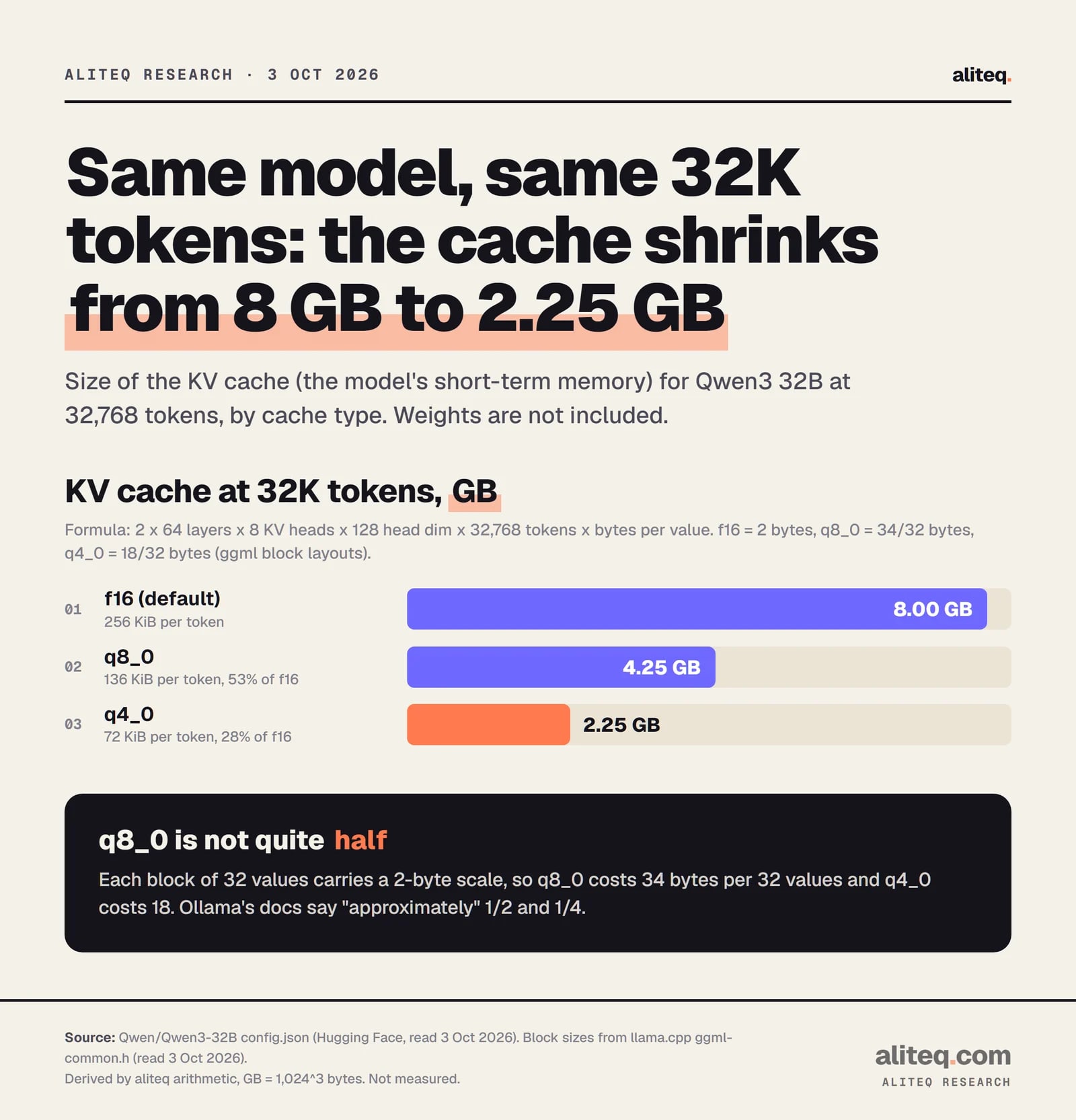
8.00
Qwen3 32B, q8_0
Per token
136 KiB
8K tokens
1.06
32K tokens
4.25
Qwen3 32B, q4_0
Per token
72 KiB
8K tokens
0.56
32K tokens
2.25
Per token
8K tokens
32K tokens
Qwen3 8B, f16 (36 layers, 8 KV heads, 128)
144 KiB
1.12
4.50
Qwen3 8B, q8_0
76.5 KiB
0.60
2.39
Qwen3 8B, q4_0
40.5 KiB
0.32
1.27
Qwen3 32B, f16 (64 layers, 8 KV heads, 128)
256 KiB
2.00
8.00
Qwen3 32B, q8_0
136 KiB
1.06
4.25
Qwen3 32B, q4_0
72 KiB
0.56
2.25
Our own Qwen3 8B and Qwen3 32B pages use the same formula and show the cache next to the weights for each quant. Both models list a maximum of 40,960 positions in their config, so 32K is a sensible ceiling to plan around.
How do I turn on a quantized KV cache?
Set the cache type to q8_0, and turn flash attention on. In llama.cpp the flags are -ctk and -ctv (long names --cache-type-k and --cache-type-v). In Ollama it is one environment variable, OLLAMA_KV_CACHE_TYPE. Both default to f16.
# llama.cpp (llama-server or llama-cli)
llama-server -m model.gguf -c 32768 -fa on -ctk q8_0 -ctv q8_0

# Ollama (set before starting the server)
OLLAMA_FLASH_ATTENTION=1 OLLAMA_KV_CACHE_TYPE=q8_0 ollama serve
Per the llama.cpp server README, the allowed cache types are f32, f16, bf16, q8_0, q4_0, q4_1, iq4_nl, q5_0 and q5_1. Ollama documents three: f16, q8_0 and q4_0. Ollama also notes the setting is global, so every model you run uses the same type.
K is the key half of the cache and V is the value half. llama.cpp lets you set them separately. I found no primary-source guidance on whether one half tolerates compression better, so I would not guess. If you split them, test it.
Does a quantized KV cache need flash attention?
Yes, in practice. Ollama's FAQ says the K/V cache can be quantized "when Flash Attention is enabled." In llama.cpp, the source throws an error, "quantized V cache was requested, but this requires Flash Attention", if flash attention is off and the V type is quantized.
Flash attention is a way of computing attention that avoids building a huge intermediate table in memory. In llama.cpp the -fa option takes on, off or auto, and auto is the default. Ollama says it turns flash attention on by itself when your backend and devices support it, and you can force it with OLLAMA_FLASH_ATTENTION=1.
If you see that error, or if the cache stays at f16 after you set the variable, check that flash attention is really running on your hardware. The startup log in llama.cpp prints a flash_attn line for the context.
How much memory does it save? A worked example
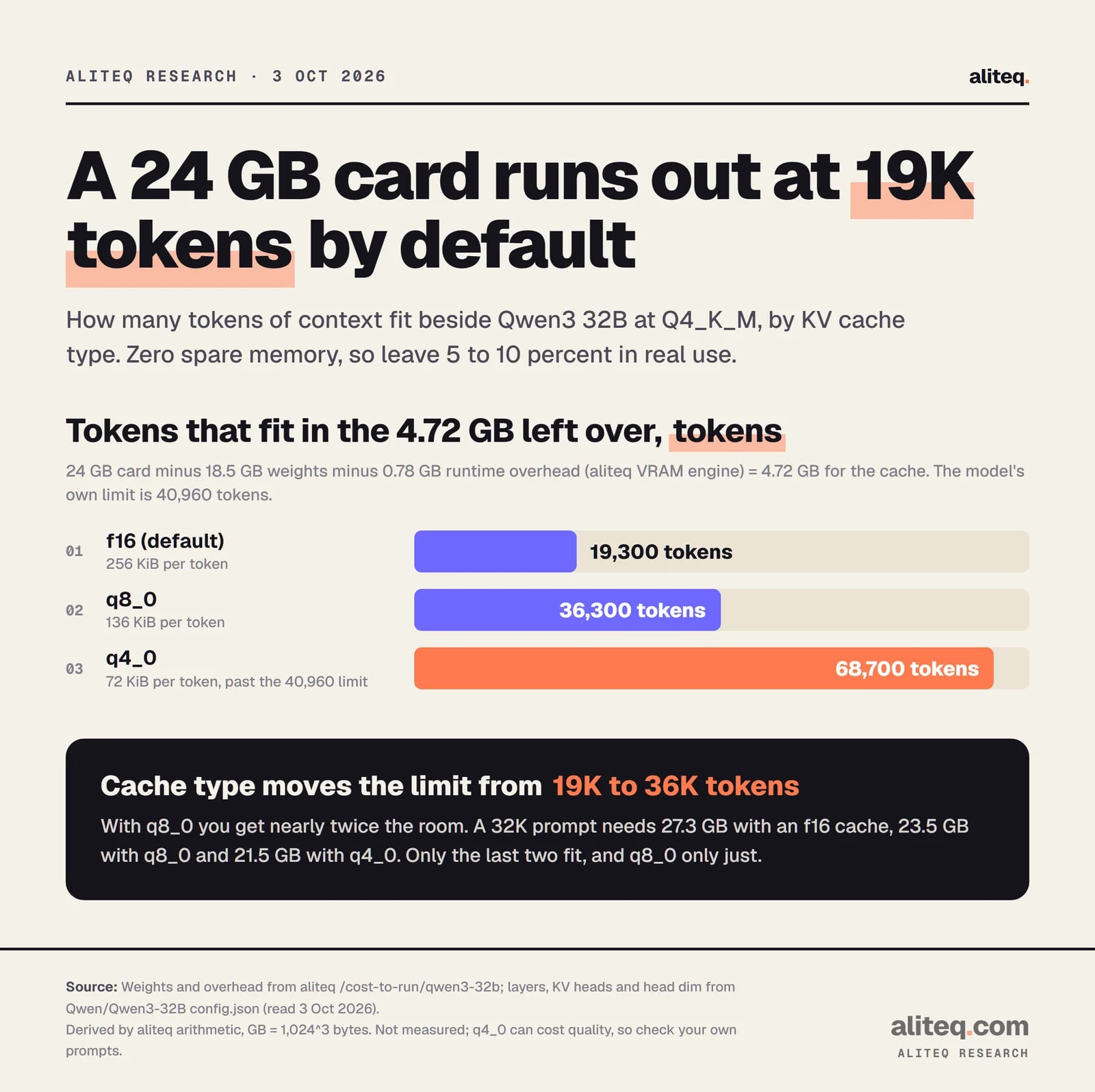
On a 24 GB card, Qwen3 32B at Q4_K_M leaves about 4.7 GB for the cache. The default f16 cache fills that at about 19,300 tokens. With q8_0 it fits about 36,300 tokens, and with q4_0 about 68,700, which is past the model's own 40,960-token limit.
The weights figure (18.5 GB) and the 0.78 GB runtime overhead come from our VRAM engine. This is zero spare memory, so leave 5 to 10 percent in real use.
Derived with the aliteq VRAM engine and the model's config.json. Not measured. · aliteq research
A 32K prompt makes the point sharper. With an f16 cache the total is 18.5 + 0.78 + 8.0 = 27.3 GB, which does not fit. With q8_0 it is 23.5 GB, which barely fits. With q4_0 it is 21.5 GB.
Derived from Qwen3 32B's config.json and ggml's block layouts. GB means 1,024^3 bytes. · aliteq research
You may notice q8_0 saves 47 percent, not 50. The ggml block layout in the llama.cpp source stores 32 values plus a 2-byte scale in 34 bytes for q8_0, and 18 bytes for q4_0. That makes q8_0 about 53 percent of f16 and q4_0 about 28 percent. Ollama's docs say "approximately" 1/2 and 1/4, which is fair rounding.
Will it hurt quality?
Sometimes, and nobody can tell you in advance for your model. Ollama's FAQ says q8_0 has "a very small loss in precision" that usually has no noticeable impact, and recommends it if you are not using f16. For q4_0 it describes a "small-medium loss in precision that may be more noticeable at higher context sizes."
The FAQ adds that models with a high GQA count, with Qwen2 as its example, "may see a larger impact." GQA is the sharing of KV heads I mentioned above. I could not tell from the docs whether Qwen3 counts as high, so I will not claim either way. Ollama's own advice is to experiment.
I read no primary-source benchmark that puts numbers on this for specific models, so I am printing none. Test on your own prompts, with long documents, since the damage, if any, shows up late in a long context. If you need the headroom, step down in order: q8_0 first, q4_0 only when you must.
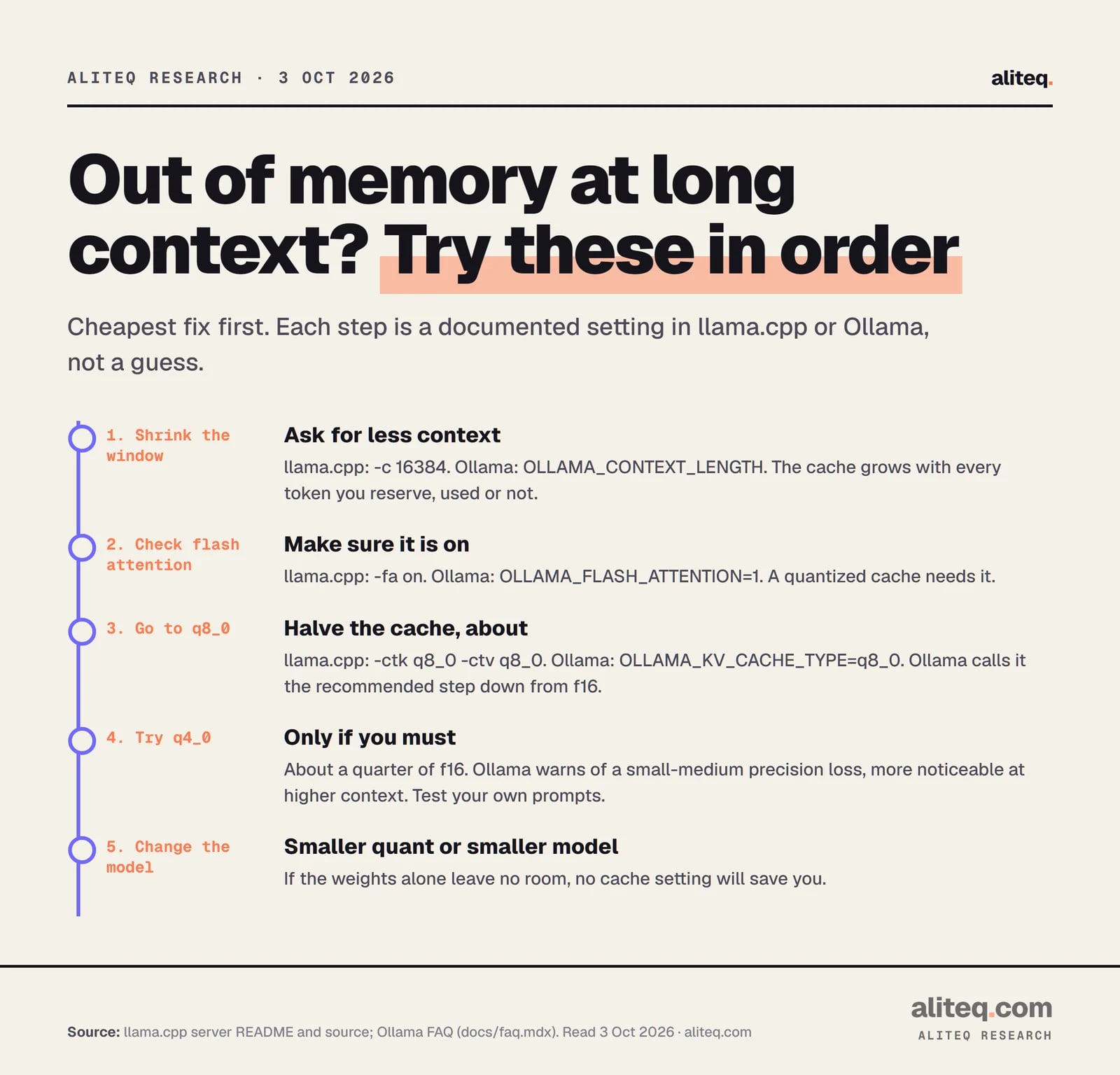
Cheapest fix first. Each step is a documented llama.cpp or Ollama setting. · aliteq research
Why do some new models barely grow with context?
Because not every layer keeps a growing cache. Some recent designs mix full-attention layers with layers that keep a small fixed state or only look back a short window. Only the full-attention layers pay the per-token cost, so the formula needs "full-attention layers" in place of "layers".
Two examples from the configs I read on October 3, 2026. Qwen3.8 27B has 64 layers, of which 16 are full attention and 48 are linear attention. Its cache works out to 64 KiB per token at f16, about a quarter of Qwen3 32B's 256 KiB, so 32K tokens cost 2.0 GiB. Gemma 4 12B has 48 layers: 40 use a 1,024-token sliding window and 8 use full attention. Its attention shapes differ between the two kinds, so I am not printing a single size for it. Our Gemma 4 12B guide covers it.
For those models, a bigger context costs less than the plain formula says, and a quantized cache saves proportionally less in absolute terms. I did not find documentation on how the cache-type flags treat the fixed-state layers, so check your build's startup log for the buffer sizes it prints.
What if the cache fix is not enough?
Then the weights are the problem, and no cache setting will save you. Drop to a smaller quant, pick a smaller model, shorten the context, or rent a bigger card by the hour. Our rent vs buy comparison and live cloud GPU prices show where the line sits.
The order I would try is the one in the graphic. Ask for less context first, since it costs nothing. Make sure flash attention is on. Go to q8_0. Treat q4_0 as a last resort. It is the old retro rule of trimming the data before you trim the features, and it still holds.
Quick answers
What does the KV cache do?
It stores the keys and values the model computed for every token already in the conversation, so it does not recompute them for each new token. The cost is memory that grows with context length.
How do I size the KV cache?
Multiply 2 x layers x KV heads x head dimension x tokens x bytes per value. Read the first three from the model's config.json. The default type, f16, is 2 bytes per value. For Qwen3 32B at 32K tokens that is 8.0 GiB.
What are the llama.cpp flags for a quantized KV cache?
Use -ctk (--cache-type-k) and -ctv (--cache-type-v), for example -ctk q8_0 -ctv q8_0, together with -fa on. The default for both is f16. Quantizing V requires flash attention, per the llama.cpp source.
What is the Ollama setting?
Set OLLAMA_KV_CACHE_TYPE to f16, q8_0 or q4_0, and enable flash attention with OLLAMA_FLASH_ATTENTION=1 if it is not on automatically. Ollama says the setting is global, so it applies to every model.
Is q8_0 safe to use?
Ollama's docs say it has a very small loss in precision, usually with no noticeable effect on quality, and recommend it if you are not using f16. They also say the impact depends on the model and task, so test your own.
Does a smaller cache make the model faster?
I read no primary source on speed, so I will not claim it. The documented benefit is lower memory use, which lets a longer context fit on the same card.