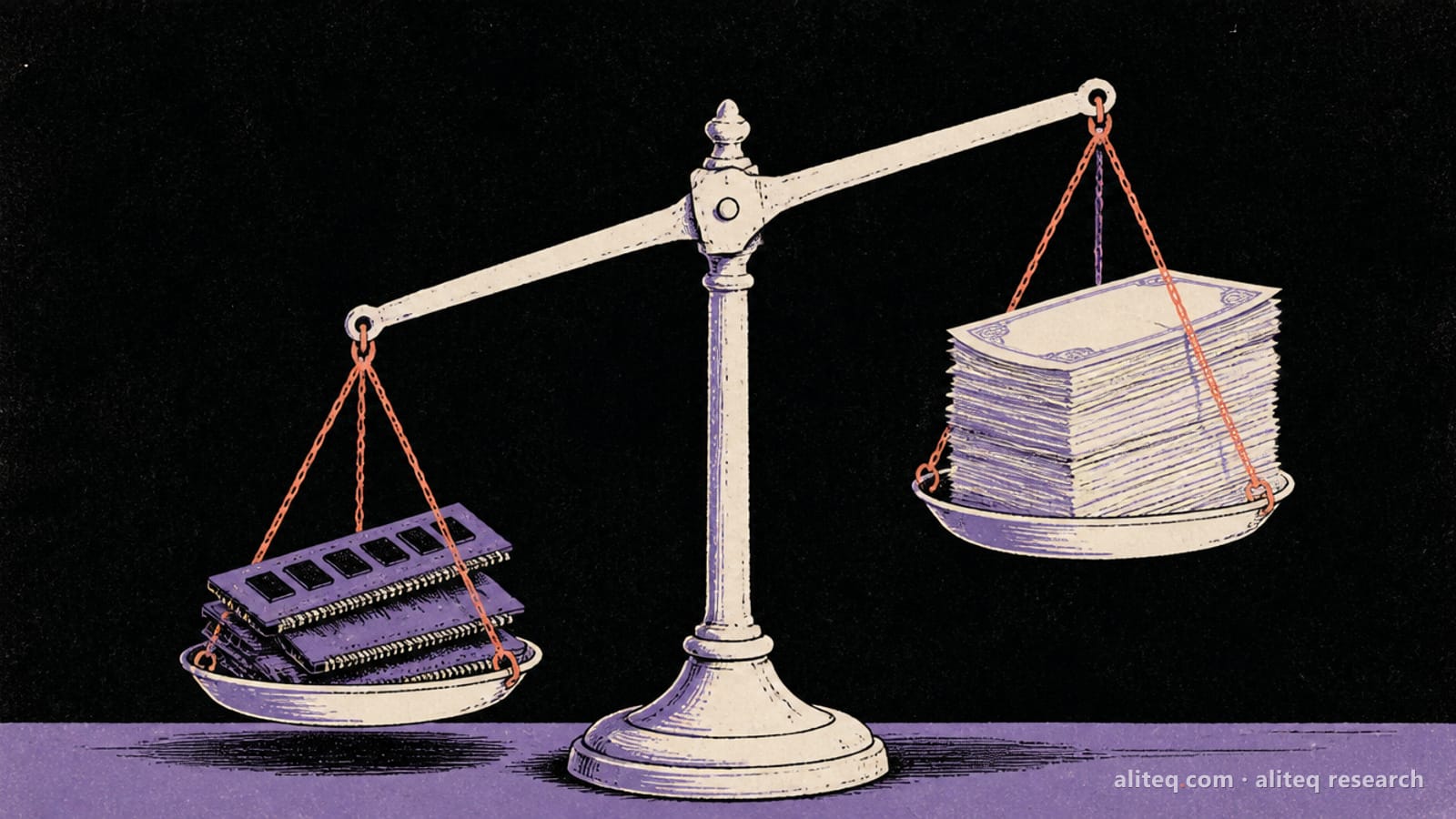
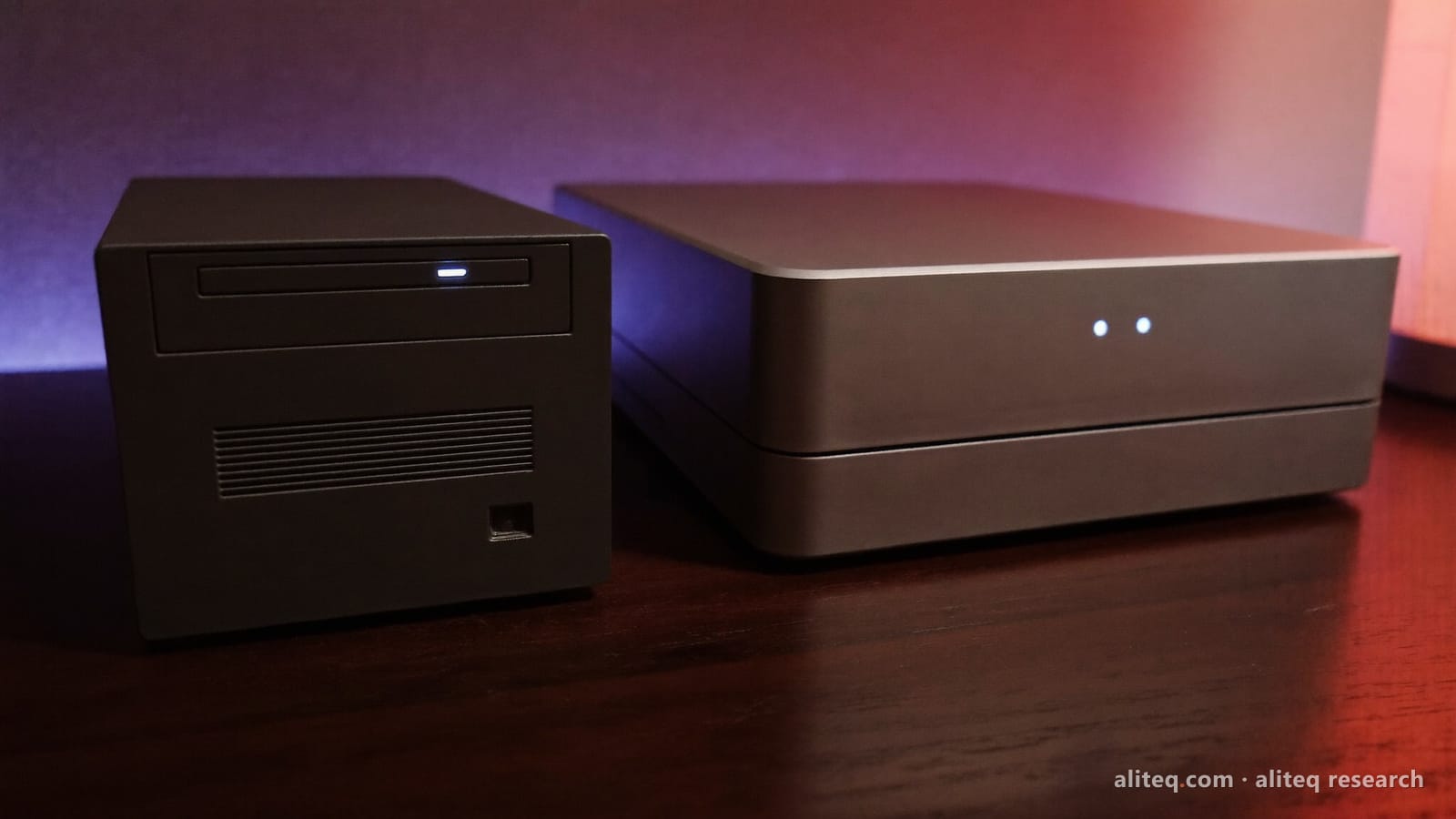
I mapped every Mac mini and Mac Studio Apple sells today, all 17 configs, against 13 popular local AI models. If your biggest model is 27B-class, the math says a $1,299 Mac mini holds what a $3,099 Mac Studio holds.
This post contains affiliate links. If you buy through them, Aliteq may earn a commission — at no extra cost to you. Prices verified at publish time.
Share
Here's the thing I keep seeing in local AI threads. Someone wants to run a model at home, they hear Macs are good at it, and they open Apple's store. Then the store does what stores do. It nudges them up a chip, then up a memory tier, then over to the Mac Studio "because AI". By the time they check out, they've spent twice what the job needed.
I like spreadsheets more than store pages, so I built one. On 4 October 2026 I read every chip and memory combination Apple's US store sells for the Mac mini and the Mac Studio: 17 configs in all. I read Apple's spec pages for memory bandwidth. Then I ran 13 popular open models through the same memory formula behind our cost to run tool, against the share of memory macOS actually gives the GPU.
I have not run a model on any of these Macs. The fits below are arithmetic on published model configs. The prices are Apple's, and they will change.
Which Mac mini should you buy for local AI?
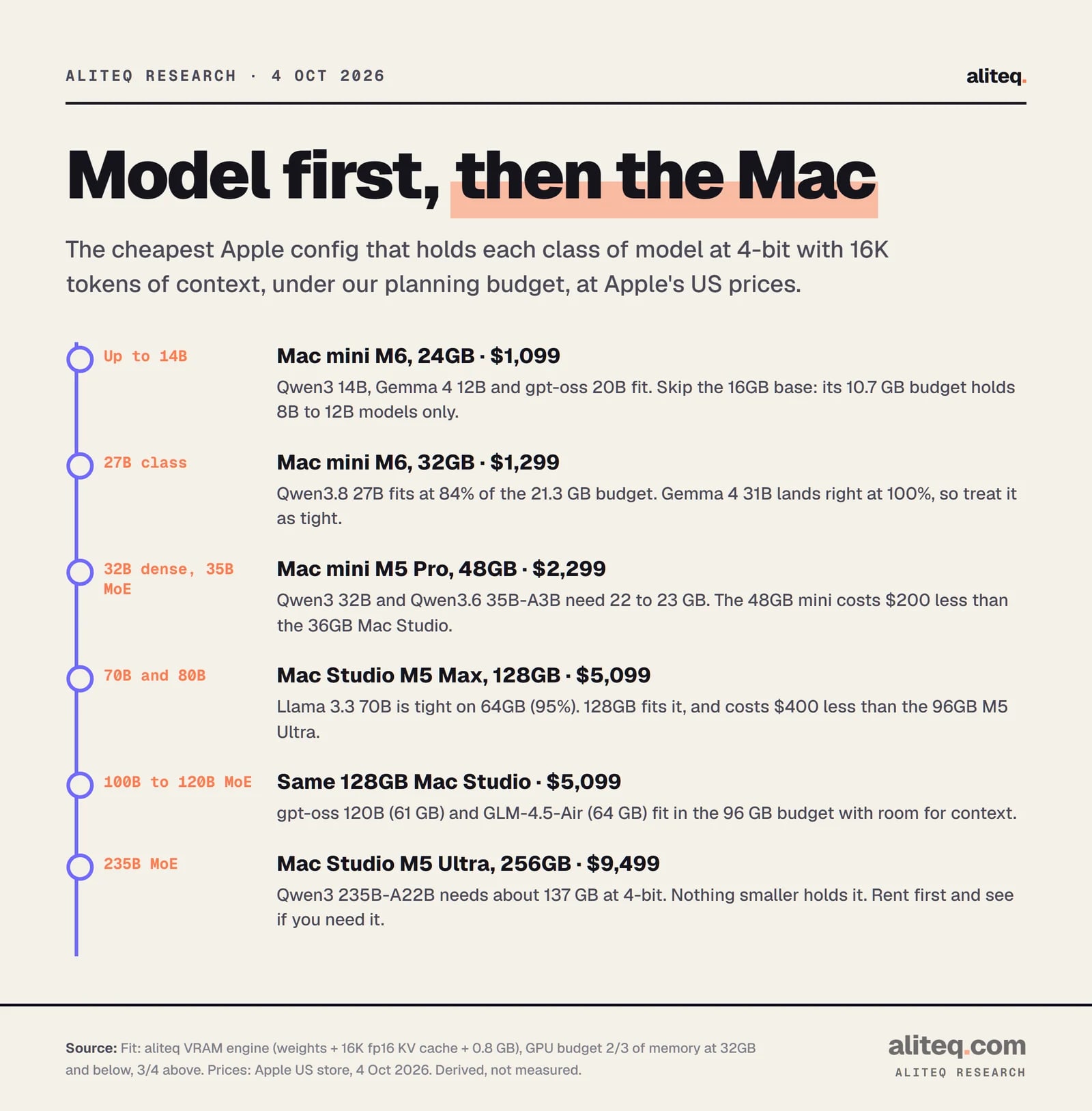
Buy the cheapest Mac whose GPU budget holds your biggest model with room to spare. For models up to 14B, that's the 24GB Mac mini at $1,099. For 27B-class models, the 32GB Mac mini at $1,299. For 32B dense models, the 48GB Mac mini M5 Pro at $2,299. For 70B, skip the mini entirely and look at the 128GB Mac Studio.
That's the whole decision in one paragraph. The rest of this piece shows the work, because "trust me" is not a buying strategy.
The order matters. Pick the model first, then the Mac. Most people do it backwards: they pick a Mac they can afford, then ask what it runs. That's how you end up with a machine that's one tier short of the model you actually wanted.
The cheapest Apple config that holds each class of model at 4-bit with 16K tokens of context. Derived from our VRAM engine; Apple US prices on 4 Oct 2026. · aliteq research
Two things on that chart surprise people. First, the $899 base Mac mini is the wrong starting point for most local AI. Its 16GB leaves the GPU about 10.7 GB, which holds 8B to 12B models and not much else. Second, the cheapest 48GB Mac on sale is a Mac mini, not a Mac Studio. The 48GB Mac mini M5 Pro costs $2,299. The 36GB Mac Studio costs $2,499. You pay $200 more for 12GB less memory.
Where does the $1,800 come from?
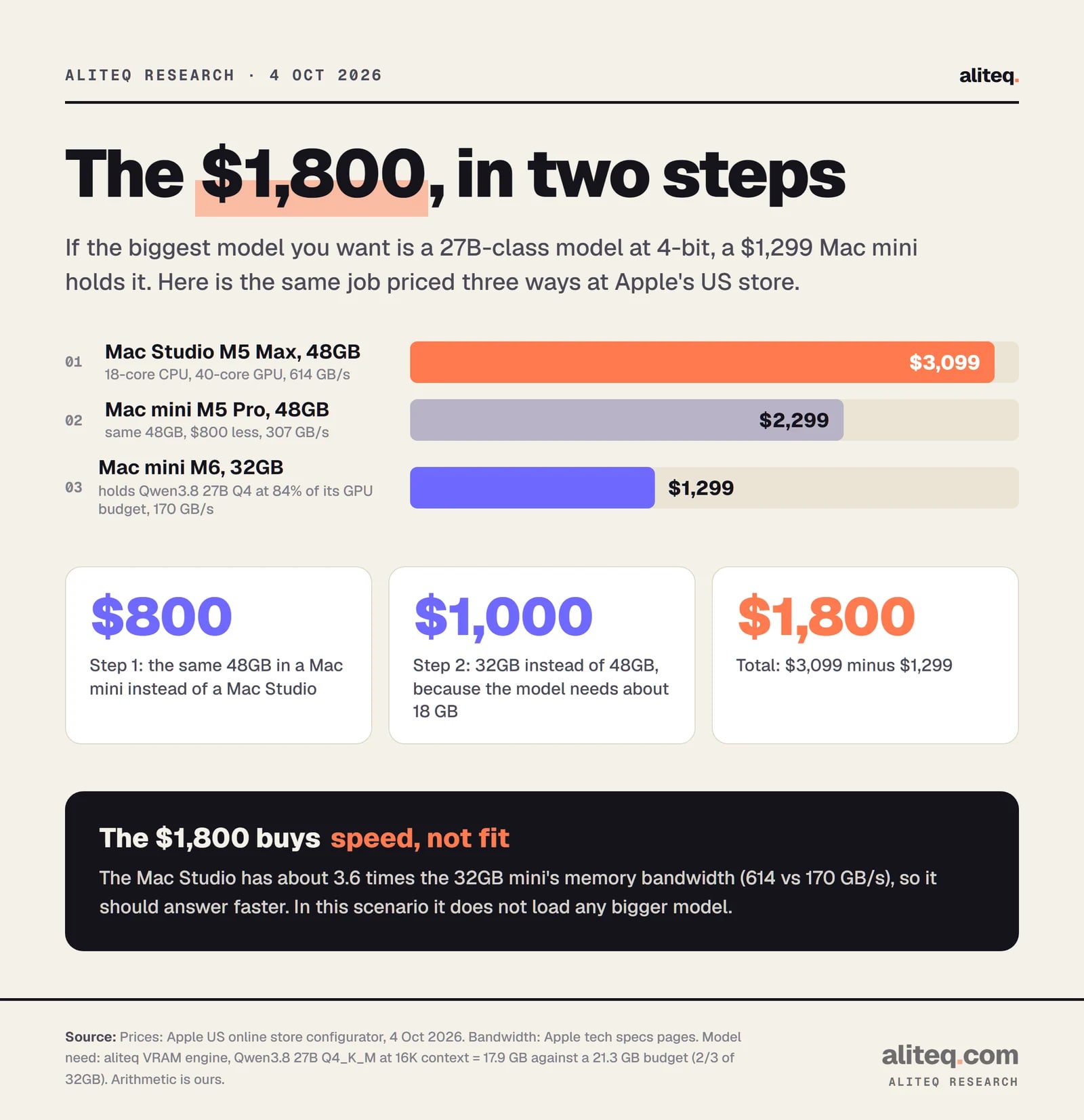
It's the gap between a Mac Studio M5 Max with 48GB at $3,099 and a Mac mini M6 with 32GB at $1,299, for someone whose biggest model is 27B-class at 4-bit. Both hold that model on our math. The Studio answers faster because it has more memory bandwidth. It does not load a bigger model in this scenario.
Here's the arithmetic, in two steps.
Step 1: same memory, smaller box. The Mac Studio M5 Max with 48GB is $3,099. The Mac mini M5 Pro with the same 48GB is $2,299. That's $800 for the Studio's chip and chassis, not for memory.
Step 2: right-size the memory. Qwen3.8 27B at 4-bit (Q4_K_M) needs about 17.9 GB with 16K tokens of context, by our formula. A 32GB Mac gives the GPU about 21.3 GB under our planning rule. So the model uses 84% of the budget, inside our "fits" line of 90%. The 32GB Mac mini M6 costs $1,299, which is $1,000 less than the 48GB mini.
$800 plus $1,000 is $1,800. Or directly: $3,099 minus $1,299 equals $1,800.
Prices: Apple US store, 4 Oct 2026. Model need: aliteq VRAM engine. The Studio's extra money buys bandwidth, not a bigger model. · aliteq research
Now the honest part, because a savings number without its catch is just an ad. The $1,800 is not free money. The Mac Studio has 614 GB/s of memory bandwidth. The 32GB Mac mini has 170 GB/s. That's about 3.6 times more, and bandwidth is what decides how fast a model writes. So the Studio should feel noticeably quicker on the same model. If speed is worth $1,800 to you, buy the Studio and enjoy it.
What the $1,800 does not buy, in this scenario, is a bigger model. And that's the mistake I see most: people pay Studio money believing it's the ticket to bigger models, when the ticket is memory, and the cheaper box has the same memory or enough of it.
The scenario also has an edge. Gemma 4 31B at 4-bit needs about 21.3 GB on our math, which is 100% of the 32GB budget. That's "tight": it may load, then fall over when anything else wants memory. Qwen3 32B needs 23.3 GB and does not fit. If those are your models, the 32GB mini is the wrong buy, and the 48GB Mac mini at $2,299 is the right one. That still saves $800 against the 48GB Studio.
If you qualify for Apple's education pricing, the same comparison is $2,839 against $1,179, a $1,660 gap.
What does every Mac mini and Mac Studio cost right now?
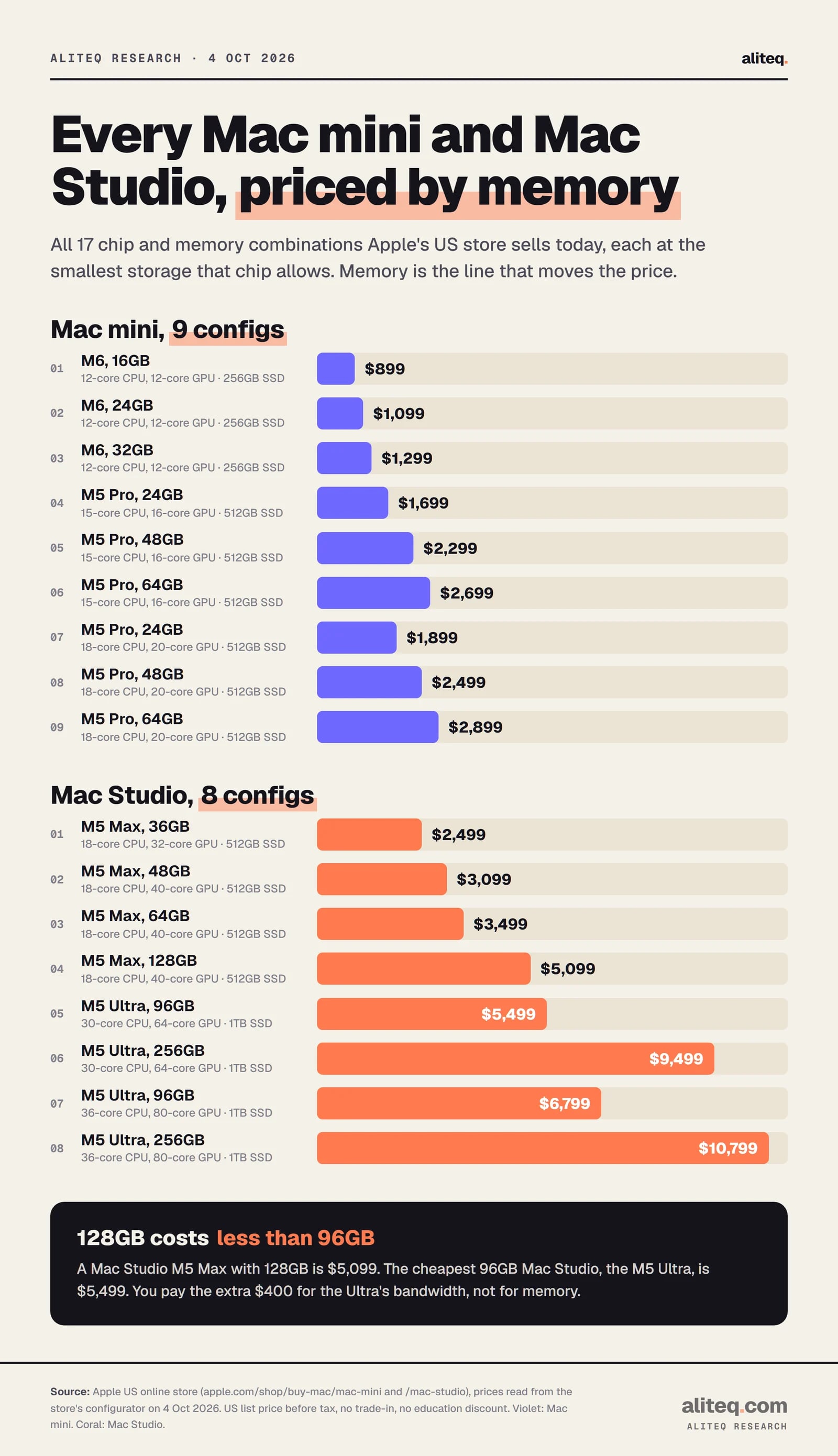
Apple's US store sells 17 chip and memory combinations across the two desktops, from $899 to $10,799. Memory is what moves the price: $200 per step on the M6 Mac mini, and $4,000 to go from 96GB to 256GB on the M5 Ultra. Here is every one, with the GPU budget and the biggest model on our list that fits it comfortably.
Every config at the smallest storage its chip allows. Apple US list prices read from the store's configurator, 4 Oct 2026. · aliteq research
Every Mac mini and Mac Studio config, priced and matched (4 Oct 2026)
Mac mini M6, 16GB
US price
$899
Education
$799
Base storage
256GB
Bandwidth
153 GB/s
GPU budget (ours)
10.7 GB
Largest model that fits (4-bit)
Gemma 4 12B
Mac mini M6, 24GB
US price
$1,099
Education
$999
Base storage
256GB
Bandwidth
170 GB/s
GPU budget (ours)
16.0 GB
Largest model that fits (4-bit)
gpt-oss 20B
Mac mini M6, 32GB
US price
$1,299
Education
$1,179
Base storage
256GB
Bandwidth
170 GB/s
GPU budget (ours)
21.3 GB
Largest model that fits (4-bit)
Qwen3.8 27B
Mac mini M5 Pro (16-core GPU), 24GB
US price
$1,699
Education
$1,599
Base storage
512GB
Bandwidth
307 GB/s
GPU budget (ours)
16.0 GB
Largest model that fits (4-bit)
gpt-oss 20B
Mac mini M5 Pro (16-core GPU), 48GB
US price
$2,299
Education
$2,139
Base storage
512GB
Bandwidth
307 GB/s
GPU budget (ours)
36.0 GB
Largest model that fits (4-bit)
Qwen3 32B
Mac mini M5 Pro (16-core GPU), 64GB
US price
$2,699
Education
$2,499
Base storage
512GB
Bandwidth
307 GB/s
GPU budget (ours)
48.0 GB
Largest model that fits (4-bit)
Qwen3 32B (Llama 3.3 70B tight)
Mac mini M5 Pro (20-core GPU), 24GB
US price
$1,899
Education
$1,779
Base storage
512GB
Bandwidth
307 GB/s
GPU budget (ours)
16.0 GB
Largest model that fits (4-bit)
gpt-oss 20B
Mac mini M5 Pro (20-core GPU), 48GB
US price
$2,499
Education
$2,319
Base storage
512GB
Bandwidth
307 GB/s
GPU budget (ours)
36.0 GB
Largest model that fits (4-bit)
Qwen3 32B
Mac mini M5 Pro (20-core GPU), 64GB
US price
$2,899
Education
$2,679
Base storage
512GB
Bandwidth
307 GB/s
GPU budget (ours)
48.0 GB
Largest model that fits (4-bit)
Qwen3 32B (Llama 3.3 70B tight)
Mac Studio M5 Max (32-core GPU), 36GB
US price
$2,499
Education
$2,299
Base storage
512GB
Bandwidth
460 GB/s
GPU budget (ours)
27.0 GB
Largest model that fits (4-bit)
Qwen3 32B
Mac Studio M5 Max (40-core GPU), 48GB
US price
$3,099
Education
$2,839
Base storage
512GB
Bandwidth
614 GB/s
GPU budget (ours)
36.0 GB
Largest model that fits (4-bit)
Qwen3 32B
Mac Studio M5 Max (40-core GPU), 64GB
US price
$3,499
Education
$3,199
Base storage
512GB
Bandwidth
614 GB/s
GPU budget (ours)
48.0 GB
Largest model that fits (4-bit)
Qwen3 32B (Llama 3.3 70B tight)
Mac Studio M5 Max (40-core GPU), 128GB
US price
$5,099
Education
$4,639
Base storage
512GB
Bandwidth
614 GB/s
GPU budget (ours)
96.0 GB
Largest model that fits (4-bit)
GLM-4.5-Air, gpt-oss 120B
Mac Studio M5 Ultra (64-core GPU), 96GB
US price
$5,499
Education
$5,099
Base storage
1TB
Bandwidth
1.2 TB/s
GPU budget (ours)
72.0 GB
Largest model that fits (4-bit)
GLM-4.5-Air, gpt-oss 120B
Mac Studio M5 Ultra (64-core GPU), 256GB
US price
$9,499
Education
$8,699
Base storage
1TB
Bandwidth
1.2 TB/s
GPU budget (ours)
192.0 GB
Largest model that fits (4-bit)
Qwen3 235B-A22B
Mac Studio M5 Ultra (80-core GPU), 96GB
US price
$6,799
Education
$6,269
Base storage
1TB
Bandwidth
1.2 TB/s
GPU budget (ours)
72.0 GB
Largest model that fits (4-bit)
GLM-4.5-Air, gpt-oss 120B
Mac Studio M5 Ultra (80-core GPU), 256GB
US price
$10,799
Education
$9,869
Base storage
1TB
Bandwidth
1.2 TB/s
GPU budget (ours)
192.0 GB
Largest model that fits (4-bit)
Qwen3 235B-A22B
US price
Education
Base storage
Bandwidth
GPU budget (ours)
Largest model that fits (4-bit)
Mac mini M6, 16GB
$899
$799
256GB
153 GB/s
10.7 GB
Gemma 4 12B
Mac mini M6, 24GB
$1,099
$999
256GB
170 GB/s
16.0 GB
gpt-oss 20B
Mac mini M6, 32GB
$1,299
$1,179
256GB
170 GB/s
21.3 GB
Qwen3.8 27B
Mac mini M5 Pro (16-core GPU), 24GB
$1,699
$1,599
512GB
307 GB/s
16.0 GB
gpt-oss 20B
Mac mini M5 Pro (16-core GPU), 48GB
$2,299
$2,139
512GB
307 GB/s
36.0 GB
Qwen3 32B
Mac mini M5 Pro (16-core GPU), 64GB
$2,699
$2,499
512GB
307 GB/s
48.0 GB
Qwen3 32B (Llama 3.3 70B tight)
Mac mini M5 Pro (20-core GPU), 24GB
$1,899
$1,779
512GB
307 GB/s
16.0 GB
gpt-oss 20B
Mac mini M5 Pro (20-core GPU), 48GB
$2,499
$2,319
512GB
307 GB/s
36.0 GB
Qwen3 32B
Mac mini M5 Pro (20-core GPU), 64GB
$2,899
$2,679
512GB
307 GB/s
48.0 GB
Qwen3 32B (Llama 3.3 70B tight)
Mac Studio M5 Max (32-core GPU), 36GB
$2,499
$2,299
512GB
460 GB/s
27.0 GB
Qwen3 32B
Mac Studio M5 Max (40-core GPU), 48GB
$3,099
$2,839
512GB
614 GB/s
36.0 GB
Qwen3 32B
Mac Studio M5 Max (40-core GPU), 64GB
$3,499
$3,199
512GB
614 GB/s
48.0 GB
Qwen3 32B (Llama 3.3 70B tight)
Mac Studio M5 Max (40-core GPU), 128GB
$5,099
$4,639
512GB
614 GB/s
96.0 GB
GLM-4.5-Air, gpt-oss 120B
Mac Studio M5 Ultra (64-core GPU), 96GB
$5,499
$5,099
1TB
1.2 TB/s
72.0 GB
GLM-4.5-Air, gpt-oss 120B
Mac Studio M5 Ultra (64-core GPU), 256GB
$9,499
$8,699
1TB
1.2 TB/s
192.0 GB
Qwen3 235B-A22B
Mac Studio M5 Ultra (80-core GPU), 96GB
$6,799
$6,269
1TB
1.2 TB/s
72.0 GB
GLM-4.5-Air, gpt-oss 120B
Mac Studio M5 Ultra (80-core GPU), 256GB
$10,799
$9,869
1TB
1.2 TB/s
192.0 GB
Qwen3 235B-A22B
A few things jump out of that table once you stare at it long enough.
The M5 Pro Mac mini doesn't sell 32GB. Its memory options are 24GB, 48GB and 64GB. So the 24GB M5 Pro at $1,699 is the oddest config for local AI on the list. It costs $400 more than the 32GB M6 and gives the model less room. You'd buy it for the faster chip, not for AI memory.
The 20-core M5 Pro is $200 more than the 16-core version at every memory size, with the same bandwidth figure on Apple's spec page. Apple's store blurb says the faster chip helps with "running large language models". But the extra cores don't change what fits, and Apple lists one 307 GB/s bandwidth figure for both M5 Pro versions.
And the Mac Studio's spec page lists a 512GB option for the 80-core M5 Ultra, but on 4 October the US store's memory menu stopped at 256GB. If you were saving up for 512GB, check the store before you plan around it.
How much of a Mac's memory can the AI model actually use?
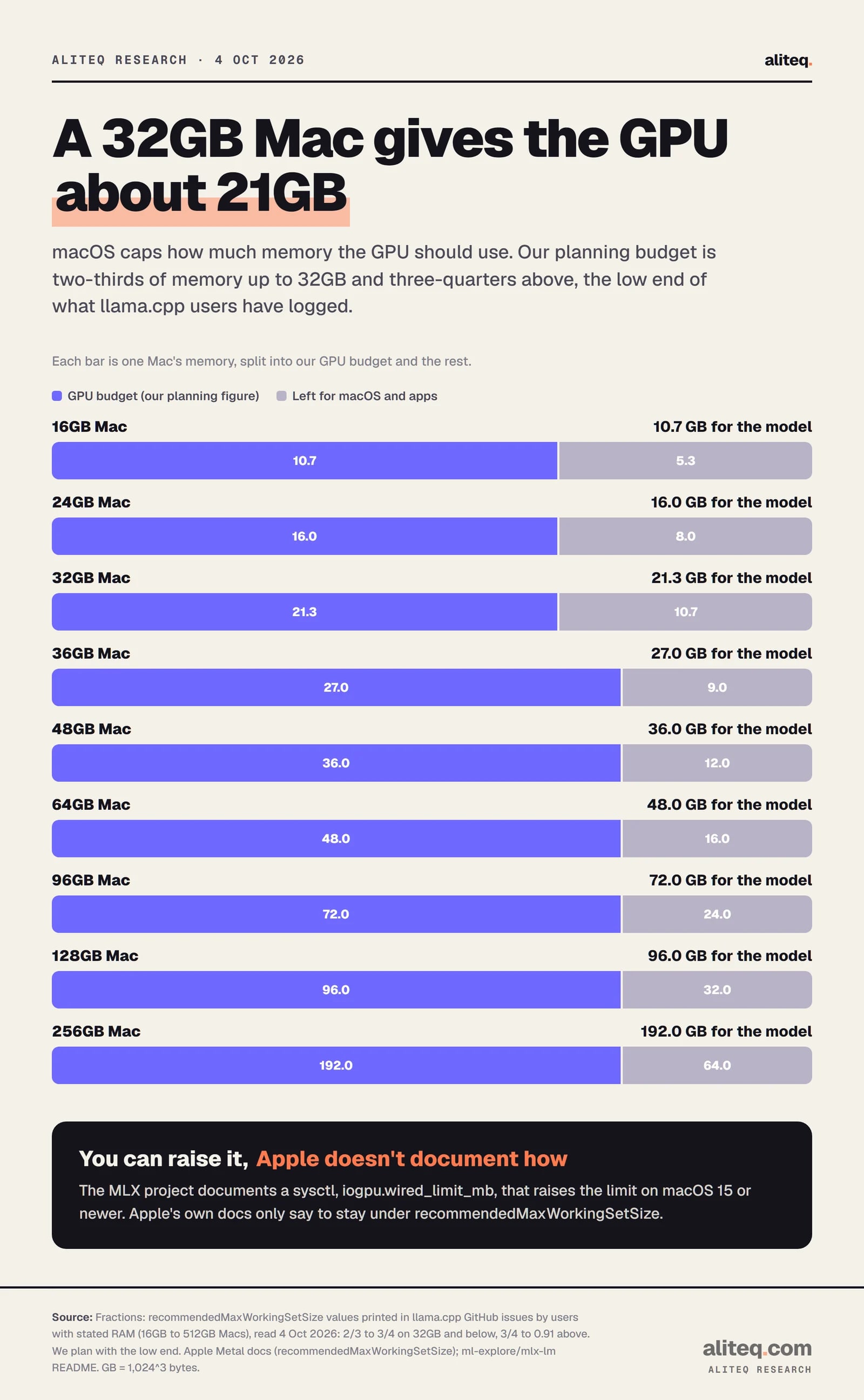
Not all of it. macOS gives the GPU a recommended memory ceiling, and going over it hurts performance. Apple doesn't publish the number, but llama.cpp prints it at startup, and users have posted it. Those logs show about two-thirds of memory on 16GB to 32GB Macs and three-quarters or more on bigger ones. We plan on the low end.
This is the part almost every "Mac for AI" article skips. A 32GB Mac is not a 32GB graphics card. The CPU, the GPU and macOS all share one pool of memory. That's the magic of unified memory, and also the catch.
Apple's Metal documentation calls the ceiling recommendedMaxWorkingSetSize. Apple describes it as "An approximation of how much memory, in bytes, this GPU device can allocate without affecting its runtime performance." The same page says you can help the GPU keep its performance "by keeping the total memory footprint of its resources and heaps less than this threshold value." It does not give a formula or a percentage.
So I went to the logs. When llama.cpp starts on a Mac, it prints the value. I read the posts in the llama.cpp GitHub issues where the user also stated their Mac's memory. On 24GB and 32GB Macs the logged value was two-thirds of memory. On 16GB Macs it was 70% and 74%. On a 36GB Mac, 75%. On 48GB, 78%. On 64GB, 75% in an older log and 81% in a newer one. On 128GB, 84%. On a 512GB Mac Studio, about 91%. The share varies by machine and macOS version.
Our planning budget: two-thirds of memory at 32GB and below, three-quarters above. The low end of values logged by llama.cpp users, not an Apple figure. · aliteq research
My planning rule, then: two-thirds of memory at 32GB and below, three-quarters above. It's deliberately cautious. If our table says a model fits, it should fit on a stock Mac without tweaks. Your Mac may give you more. Treat that as a bonus, not a plan.
You can raise the ceiling. The MLX project's README documents a setting, sudo sysctl iogpu.wired_limit_mb=N, for macOS 15 or newer. It says N "should be larger than the size of the model in megabytes but smaller than the memory size of the machine." Note who documents it: the MLX project, not Apple. I'd use it to rescue a "tight" result, not to justify buying less memory. macOS and your browser still need room to breathe.
Can you add more memory to a Mac mini later?
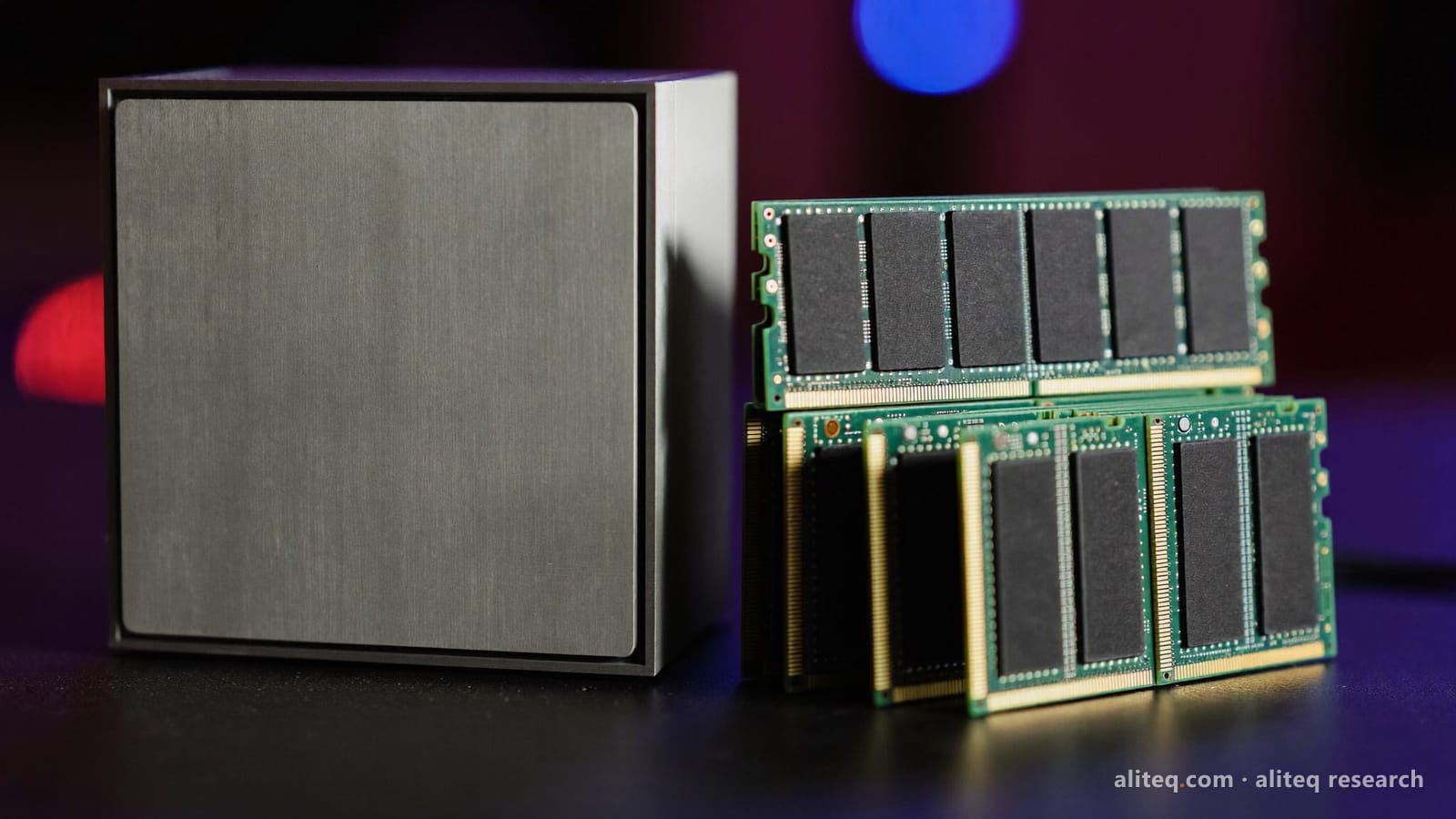
No. Apple's store states it plainly: "Unified memory can’t be upgraded later. If you think you’ll need additional memory in the future, choose a higher capacity." The memory you pick at checkout is the biggest model that Mac will ever run. Buy for the model you'll want next year, not just this week.
Photo illustration: aliteq. On a Mac, there are no memory slots to fill later. · aliteq research
This cuts both ways, and it's where the other expensive mistake lives. Overbuying wastes money once. Underbuying can make you buy twice.
Say you buy the 32GB Mac mini for $1,299 because a friend said it runs "30B models". Then you try Qwen3 32B at 4-bit, which needs about 23.3 GB on our math against a 21.3 GB budget. It doesn't fit. Your fix is a new Mac: the 48GB Mac mini at $2,299. You've now spent $3,598 to get where $2,299 would have taken you. That's $1,299 gone, minus whatever the first Mac resells for.
Same story one tier up. A 64GB Mac mini ($2,699) runs Llama 3.3 70B at 4-bit, but only "tight", at 95% of its 48 GB budget. If you need it to run well, with context and other apps open, the next stop is the 128GB Mac Studio at $5,099.
So my rule is simple. Find the biggest model you're sure you'll run. Then check whether the next size up is something you'll want within a year. If it is, buy for that one.
Which local AI models fit which Mac?
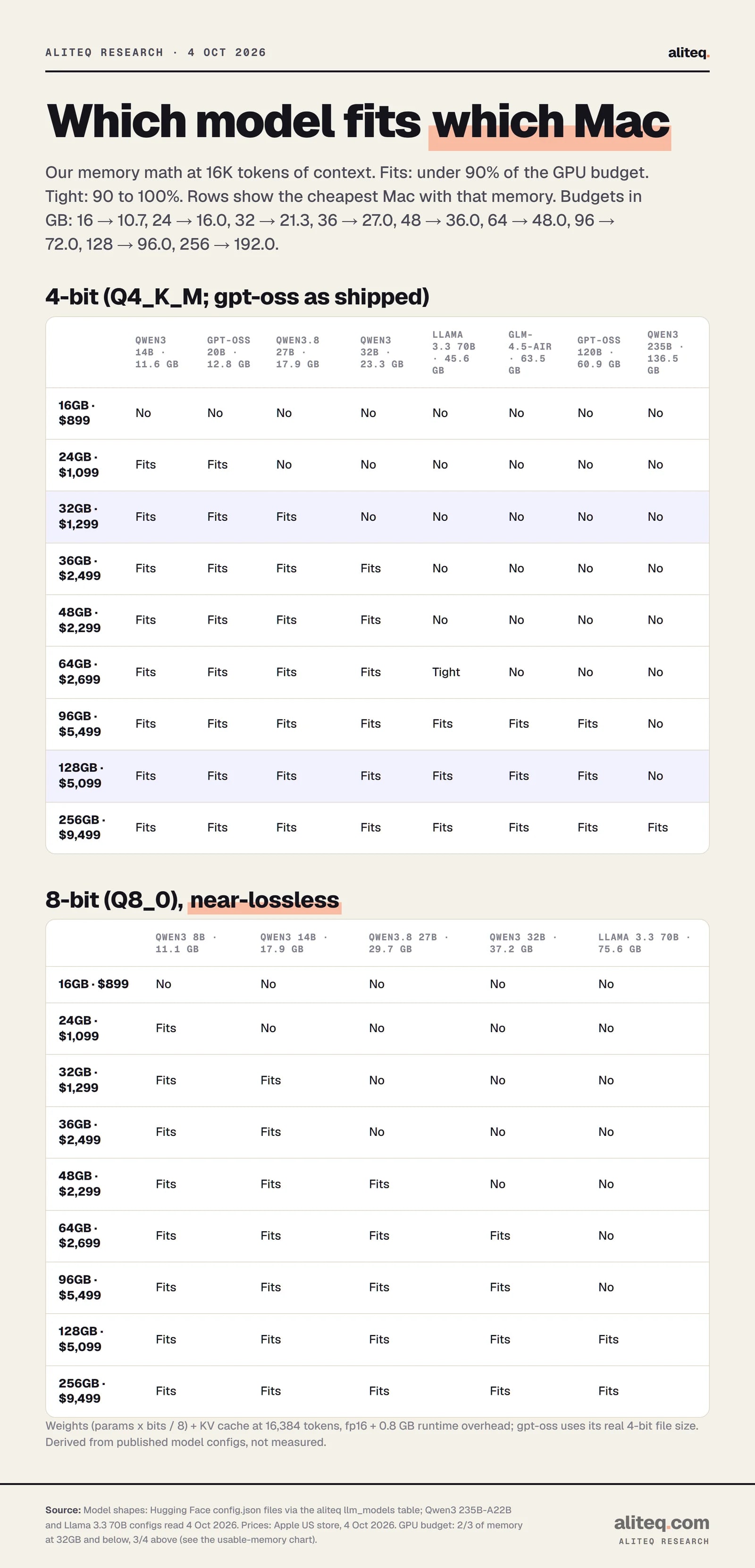
At 4-bit, 24GB holds 14B models and gpt-oss 20B. 32GB holds 27B-class models. 36GB to 48GB holds 32B dense models. 64GB runs a 70B only tight. 96GB and 128GB hold 70B to 120B models comfortably. Only the 256GB Mac Studio holds a 235B model. Here's the full grid.
Fits: under 90% of the GPU budget. Tight: 90 to 100%. 16K tokens of context, fp16 cache. Derived from model configs, not measured. · aliteq research
How I got each number. A model's memory need has three parts. The weights are the parameter count times bits per weight, divided by 8. The KV cache, the model's short-term memory of your conversation, is 2 x layers x KV heads x head size x tokens x 2 bytes. Then add 0.8 GB for the runtime. That's the same engine behind our how much VRAM do you need guide.
Some details matter. For Q4_K_M, the most common 4-bit format, the engine uses 4.85 bits per weight, not 4. That's what real files measure. For gpt-oss I used the real 4-bit file sizes instead: 11.28 GiB for the 20B and 59.03 GiB for the 120B. And for hybrid models like Qwen3.8 and Gemma 4, only the full-attention layers keep a growing cache, so I counted only those, plus a small fixed state for the rest.
The key totals at 4-bit and 16K context:
Qwen3 8B 7.7 GB, Gemma 4 12B 8.1 GB: fine on 16GB.
Qwen3 14B 11.6 GB, gpt-oss 20B 12.8 GB: need 24GB. See our gpt-oss 20B on a Mac mini piece for the 16GB workaround.
Qwen3.8 27B 17.9 GB: the 32GB line. Gemma 4 31B 21.3 GB is tight there.
Qwen3 32B 23.3 GB and Qwen3.6 35B-A3B 21.6 GB: need 36GB or 48GB.
Llama 3.3 70B 45.6 GB and Qwen3-Next 80B 47.5 GB: tight on 64GB, comfortable on 96GB and up.
gpt-oss 120B 60.9 GB and GLM-4.5-Air 63.5 GB: 96GB or 128GB.
Qwen3 235B-A22B 136.5 GB: 256GB only.
At 8-bit (Q8_0), which is close to lossless, everything roughly doubles. Qwen3.8 27B goes to 29.7 GB and needs 48GB. Llama 3.3 70B goes to 75.6 GB and needs 128GB. If you want the difference between the two explained with numbers, read which quantization should you use. For most people, 4-bit on a bigger model beats 8-bit on a smaller one.
You can check any single model against any memory size on its own page, for example Llama 3.3 70B or gpt-oss 120B. Those pages use a graphics card's full memory, so on a Mac, apply the two-thirds or three-quarters budget first.
Does a faster chip matter if the model already fits?
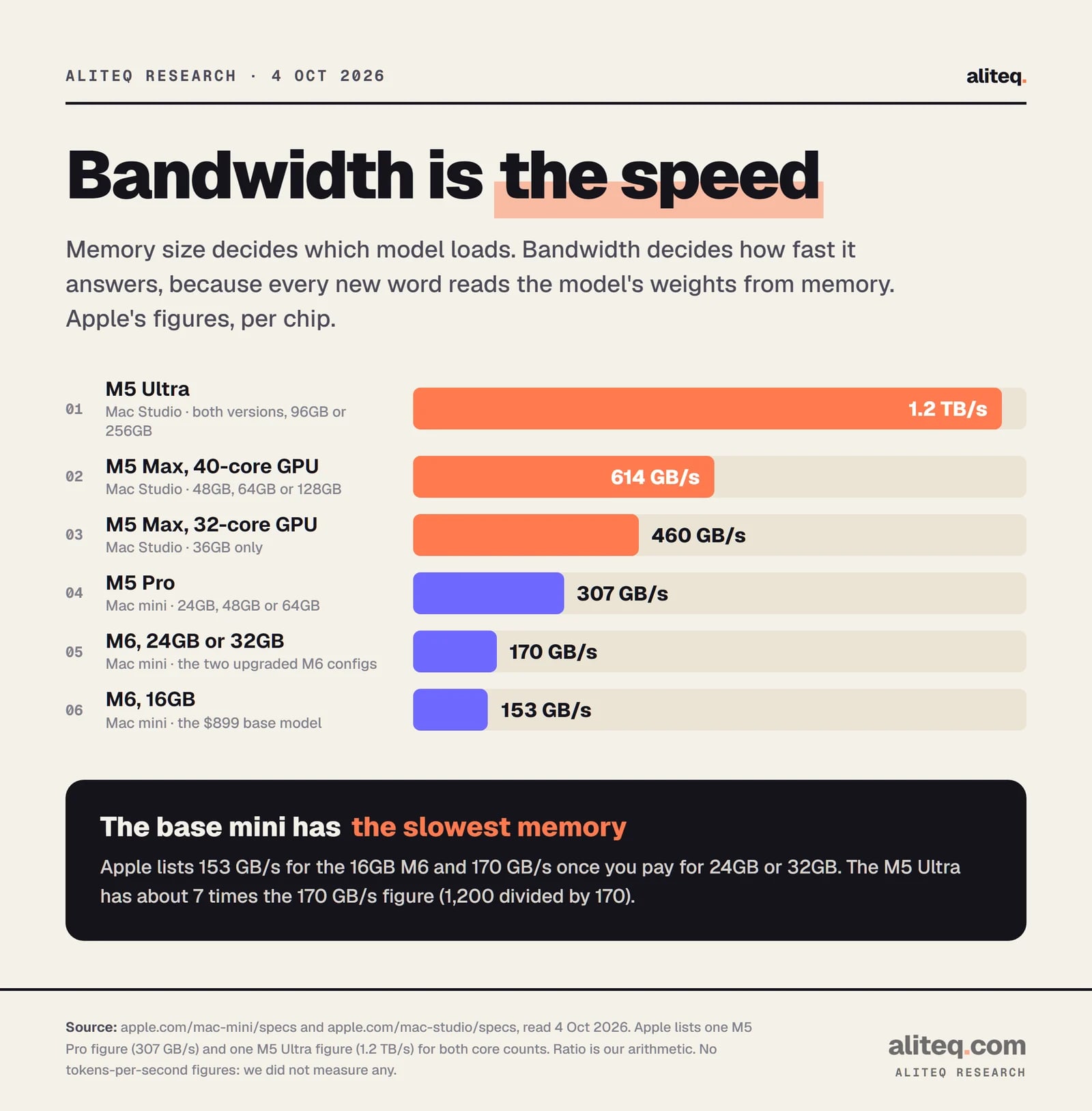
Yes, for speed, but not for fit. Memory size decides which model loads. Memory bandwidth decides how fast it answers, because each new word reads the model's weights out of memory. Apple lists 153 GB/s for the 16GB M6, 170 GB/s for the 24GB and 32GB M6, 307 GB/s for the M5 Pro, up to 614 GB/s for the M5 Max and 1.2 TB/s for the M5 Ultra.
Apple tech specs pages, read 4 Oct 2026. We print no tokens-per-second figures because we have not measured any. · aliteq research
I'm not going to print a tokens-per-second number. I haven't measured one on these chips, and I couldn't find one from a primary source with the model, quant and chip stated. What I can tell you is the ratio. The M5 Ultra has about 7 times the bandwidth of the 32GB Mac mini. The 40-core M5 Max has about 3.6 times. The M5 Pro has about 1.8 times.
One quiet detail on Apple's spec page: the $899 16GB Mac mini lists 153 GB/s, and the 24GB and 32GB versions list 170 GB/s. So the $200 step to 24GB buys you more room for the model and a bit more bandwidth.
When does bandwidth matter enough to pay for? When you'll read long answers all day, run a big model where every word is slow, or serve a few people at once. Bigger mixture-of-experts models soften this. A model like Qwen3.6 35B-A3B stores 35B parameters but only uses about 3B per word. It needs the memory of a big model, but each word only reads about 3B parameters' worth of weights. Our MoE vs dense explainer covers why.
Is the Mac Studio ever the right call?
Yes, in three cases: you need more than 64GB, you need the bandwidth, or both. For 70B to 120B models, the 128GB Mac Studio M5 Max at $5,099 is the value pick on Apple's own price list. For 235B-class models, only the 256GB M5 Ultra at $9,499 holds them. Under 64GB, a Mac mini covers the same memory for less.
The odd one on the price list is the 96GB M5 Ultra. At $5,499 it costs $400 more than the 128GB M5 Max ($5,099) and has 32GB less memory. What you're buying is the Ultra's 1.2 TB/s, about twice the M5 Max's 614 GB/s. If you'll mostly run 70B models and care about speed, that's a defensible trade. If you want the most model for the money, the 128GB M5 Max wins.
The 256GB Ultra is the only Mac on sale that holds Qwen3 235B-A22B at 4-bit, at about 136.5 GB on our math against a 192 GB budget. It's also $9,499. Before spending that, rent a big GPU for a week and see if that model actually changes your work. We compared this machine with a workstation card in Mac Studio M5 Ultra vs RTX PRO 6000. And if you're cross-shopping non-Apple boxes with lots of shared memory, our Strix Halo mini-PC piece runs the same kind of math.
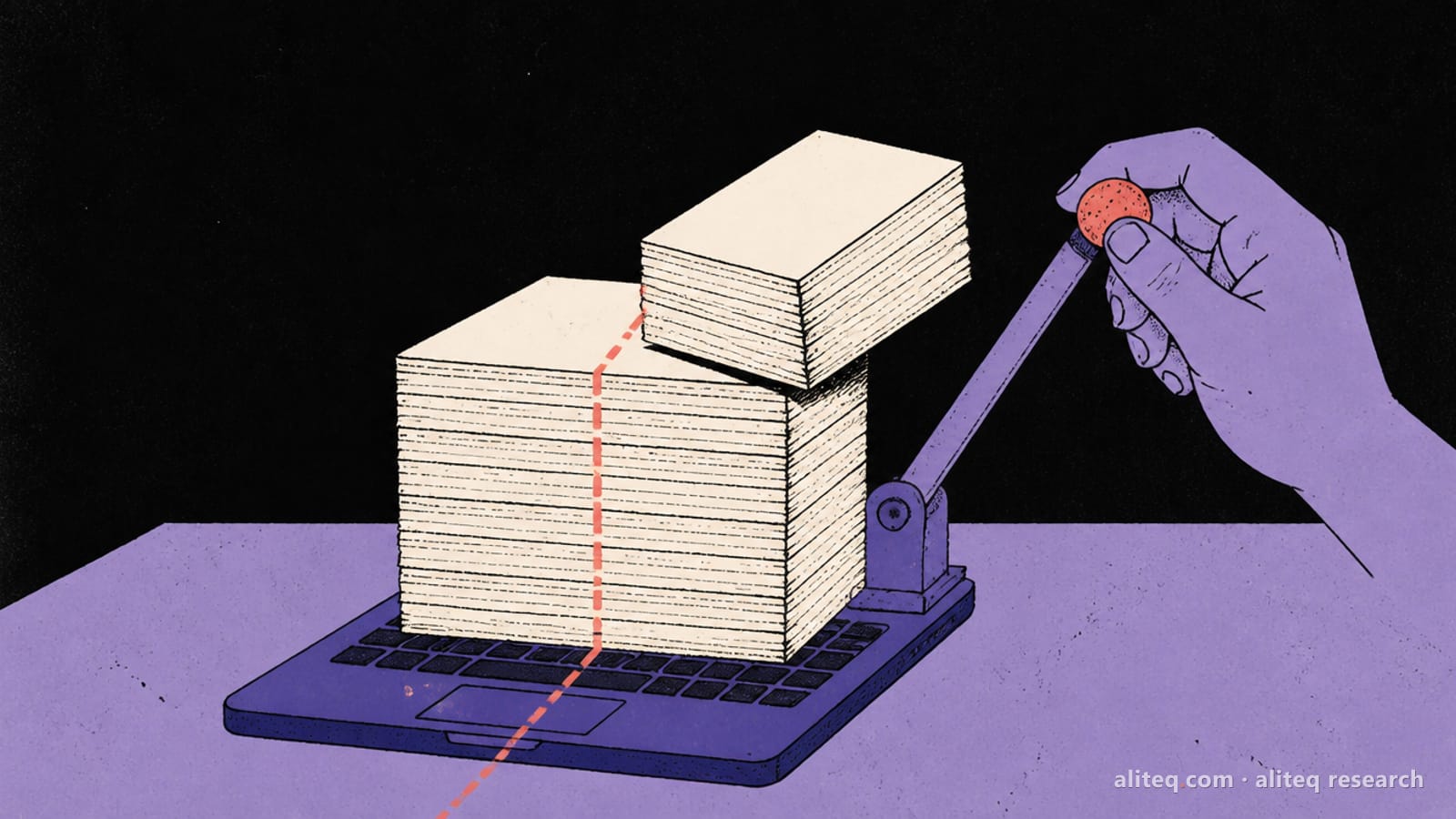
Illustration: aliteq. Memory decides what you can run. Everything else decides how fast. · aliteq research
When is renting a GPU cheaper than buying a Mac?
When you'd use the big model for hours, not every day. On 3 October our tracker showed a 48 GB RTX A6000 at $0.33 an hour and a 96 GB RTX PRO 6000 at $1.69 an hour on Runpod, on demand. At those rates, $1,800 is about 5,454 hours on the 48 GB card. The $5,099 Mac Studio is about 3,017 hours on the 96 GB one.
That's the uncomfortable math for anyone buying a Mac "to try big models". If you want to know whether a 70B model is worth it to you, a weekend of rented time costs a few dollars. A Mac that runs it costs $5,099. Find out first.
Buying wins when you run models daily, want them private on your desk, or hate managing cloud machines. Our rent vs buy guide walks through the break-even, and the cloud GPU price board shows today's rates.
Referral link
Try a 70B model before you buy a $5,099 Mac
A 48 GB RTX A6000 listed at $0.33 an hour and a 96 GB RTX PRO 6000 at $1.69 an hour on Runpod on demand (our tracker, 3 Oct 2026). Prices move, so check the live figure before you rent.
Referral link — we may earn a commission at no cost to you. Prices on our compare page are the provider's live figures, cheapest first; this never changes the ranking.
Can you save with education or refurbished pricing?
Education pricing, yes, if you qualify: Apple's US Education Store lists every config $100 to $930 lower, for example $1,179 for the 32GB Mac mini and $4,639 for the 128GB Mac Studio. Refurbished, not right now. On 4 October, Apple's US refurbished store listed no Mac mini or Mac Studio at all.
The education discount grows with the price. It's $100 on the base Mac mini, $120 on the 32GB one, $460 on the 128GB Mac Studio and $930 on the top 256GB M5 Ultra. Eligibility rules are Apple's, so check them on the Education Store before counting on it.
The refurbished store is worth watching, but don't plan around it. Apple's Mac mini and Mac Studio refurbished pages currently redirect to the general Mac page, which listed only iMac, MacBook Pro and MacBook Neo models on the day I checked. If you're also weighing an older chip, our M4 vs M6 Mac mini piece has the third-party prices. For the launch details on these machines, see Apple's quiet M6 and M5 Ultra launch.
What should you check before you click buy?
Five checks, in order. Name your biggest model. Look up its 4-bit size. Compare it with the Mac's GPU budget, not its memory. Decide whether you need speed or just fit. Then price renting for a week. If the cheapest Mac that passes still feels right, buy it.
Name the biggest model you will actually run, and the next size up you might want within a year. Write both down before you open the store.
Look up its 4-bit size at your context length. Our scorecard above, or the model's page in the cost to run tool, gives you the number.
Compare it with the GPU budget, not the memory: about two-thirds of memory at 32GB and below, three-quarters above. Stay under 90% of that.
Decide if you are paying for fit or for speed. Bandwidth (170, 307, 614 GB/s or 1.2 TB/s) is the speed lever. Memory is the fit lever.
Price a week of rented GPU time for the same model. If it costs a few dollars, try the model first.
Buy the cheapest config that passes. Remember Apple's line: unified memory can't be upgraded later.
What do these numbers not tell you?
They don't tell you speed, quality or how a model feels to use. They're memory arithmetic on published specs, checked against a cautious budget. Real use varies with the app you run, the context length, and what else is open. Apple's prices change too, so recheck before you buy.
The model sizes assume 16K tokens of context and an fp16 cache. Longer context grows the cache, and some apps reserve memory for several chats at once. Run a 70B with 64K tokens of context and you need more room than our table shows. Several of the runners can shrink the cache, which helps.
The GPU budget is our planning rule, built from user logs, not an Apple specification. Your Mac may report more. I'd still plan with the cautious number. A model that only fits with every app closed is a model you'll fight with.
And none of this is a hands-on review. I haven't run these models on these Macs. If you want the broader buying picture across every Mac line, our best Mac for local AI guide covers laptops too. If you want the same question answered for mini-PCs, see the best mini-PC for local AI.
Mac mini for local AI: quick answers
How much memory do I need in a Mac mini for local AI?
24GB for models up to 14B and gpt-oss 20B, 32GB for 27B-class models, and 48GB for 32B dense models, all at 4-bit. The 16GB base model only holds 8B to 12B models comfortably on our math.
Is the Mac Studio better than the Mac mini for AI?
It's faster, because it has more memory bandwidth, and it's the only way to get more than 64GB. At the same memory size, it doesn't run bigger models. The 48GB Mac mini costs $800 less than the 48GB Mac Studio.
Can a Mac mini run a 70B model?
Only tight. Llama 3.3 70B at 4-bit needs about 45.6 GB on our math, 95% of a 64GB Mac's budget. It may load, but leaves little room for context or other apps. 128GB holds it comfortably.
Can I upgrade a Mac mini's memory later?
No. Apple's store says unified memory can't be upgraded later and advises choosing a higher capacity if you think you'll need more. Buy for the biggest model you expect to run.
How much of a Mac's memory can the GPU use?
Apple doesn't publish a fixed share. Values logged by llama.cpp users range from about two-thirds on 16GB to 32GB Macs to about 91% on a 512GB Mac Studio. We plan on two-thirds at 32GB and below and three-quarters above.
Is renting a GPU cheaper than buying a Mac?
For occasional use, yes. On 3 October a 48 GB RTX A6000 rented for $0.33 an hour on Runpod, so $1,800 buys about 5,454 hours. Buying wins if you run models every day or need them private on your desk.