A 128GB Strix Halo mini PC and a 128GB Mac Studio give an AI model about the same 96GB to work with. One costs $3,449 at Framework's US store, the other $5,099 at Apple's. Here is what the extra $1,650 buys, and what it doesn't.
My desk has room for exactly one small box. So when people ask me which small box to put there for local AI, I don't want a vibe. I want a receipt.
On 4 October 2026 I read the US prices for four 128GB Ryzen AI Max+ 395 mini PCs on their makers' own stores: Framework, GMKtec, Minisforum and Beelink. I read Apple's US store for the Mac mini and Mac Studio. Then I checked how much of each machine's memory the GPU can actually use, what the memory bandwidth is, and what software you'd be running. The fit math comes from our VRAM calculator engine.
I have not run a model on any of these machines. Every fit below is arithmetic. Every price is the maker's, and prices move.
Which is cheaper for local AI, a Ryzen AI Max+ 395 or a Mac?
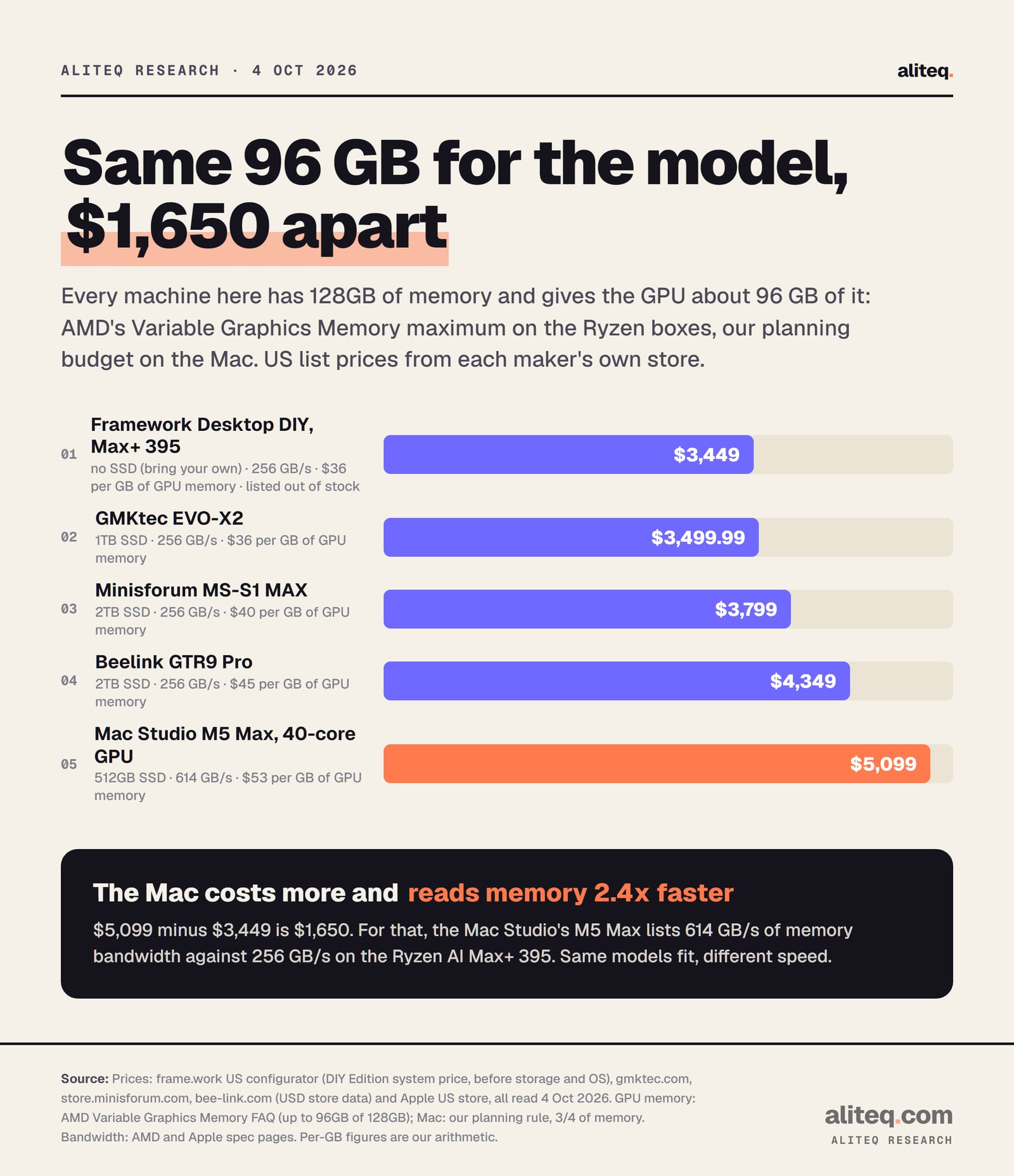
The Ryzen box, by a lot. A 128GB Framework Desktop with the Ryzen AI Max+ 395 lists at $3,449 before storage. A 128GB Mac Studio M5 Max lists at $5,099. Both give a model about 96GB to work with. That's $1,650 for the Mac's faster memory, macOS and Apple's build, not for room.
US list prices from each maker's own store, 4 Oct 2026. Per-GB figures divide the price by a 96 GB GPU budget. · aliteq research
The four Ryzen boxes use the same chip and the same memory, so the price gap between them is mostly storage, case and brand. Framework's $3,449 has no SSD at all: the DIY Edition lets you pick "None (bring your own)". It's also listed out of stock right now. GMKtec's EVO-X2 at $3,499.99 includes a 1TB SSD and was in stock when I checked. Minisforum's MS-S1 MAX is $3,799 with 2TB. Beelink's GTR9 Pro is $4,349 with 2TB.
So the honest gap depends on which box you compare. Against the GMKtec, which ships ready with storage, the Mac Studio costs $1,599.01 more. Against Framework's bare system, $1,650.
128GB machines for local AI, priced on 4 Oct 2026
Framework Desktop DIY, Ryzen AI Max+ 395
US price
$3,449
Storage included
None (bring your own)
GPU memory (planning)
96 GB
Bandwidth
256 GB/s
Price per GB of GPU memory
$35.93
GMKtec EVO-X2, Ryzen AI Max+ 395
US price
$3,499.99
Storage included
1TB
GPU memory (planning)
96 GB
Bandwidth
256 GB/s
Price per GB of GPU memory
$36.46
Minisforum MS-S1 MAX, Ryzen AI Max+ 395
US price
$3,799
Storage included
2TB
GPU memory (planning)
96 GB
Bandwidth
256 GB/s
Price per GB of GPU memory
$39.57
Beelink GTR9 Pro, Ryzen AI Max+ 395
US price
$4,349
Storage included
2TB
GPU memory (planning)
96 GB
Bandwidth
256 GB/s
Price per GB of GPU memory
$45.30
Apple Mac Studio, M5 Max 40-core GPU
US price
$5,099
Storage included
512GB
GPU memory (planning)
96 GB
Bandwidth
614 GB/s
Price per GB of GPU memory
$53.11
US price
Storage included
GPU memory (planning)
Bandwidth
Price per GB of GPU memory
Framework Desktop DIY, Ryzen AI Max+ 395
$3,449
None (bring your own)
96 GB
256 GB/s
$35.93
GMKtec EVO-X2, Ryzen AI Max+ 395
$3,499.99
1TB
96 GB
256 GB/s
$36.46
Minisforum MS-S1 MAX, Ryzen AI Max+ 395
$3,799
2TB
96 GB
256 GB/s
$39.57
Beelink GTR9 Pro, Ryzen AI Max+ 395
$4,349
2TB
96 GB
256 GB/s
$45.30
Apple Mac Studio, M5 Max 40-core GPU
$5,099
512GB
96 GB
614 GB/s
$53.11
One more thing these boxes share: you can't add memory later. Framework's configurator calls it "non-upgradeable LPDDR5x". Beelink's listing says "soldered". Apple's store says "Unified memory can’t be upgraded later." Whatever you buy, the memory you pick is the biggest model that box will ever hold.
How much of the 128GB can the AI model actually use?
On the Ryzen box, up to 96GB, by AMD's own documentation. AMD's Variable Graphics Memory setting hands that much to the GPU as dedicated memory on a 128GB system, and 48GB on a 64GB one. On a Mac, Apple publishes no fixed share. We plan on three-quarters, which is also 96GB on 128GB.
AMD describes Variable Graphics Memory as "a BIOS-level feature" that reallocates part of system RAM to the integrated graphics. You set it in AMD Software: Adrenalin Edition, under Performance and then Tuning. It needs a restart. AMD also warns that it "will subtract from the system RAM that the CPU has access to". So a 96GB setting leaves Windows about 32GB. Our Strix Halo VRAM guide walks through the setting itself.
There's a stretch figure too. AMD writes: "The highest performance can be unlocked by limiting workloads to 96GB – but if needed – the iGPU (set to 96GB VGM) can technically access a total graphics memory size of 112GB". I plan on 96, and treat 112 as a bonus.
Linux works differently. AMD's ROCm docs say ROCm "utilizes a shared system memory pool, and is configured by default to half the system memory." AMD recommends the minimum dedicated memory in the BIOS and a larger shared limit set with its amd-ttm tool. Framework's own local AI guide leans the same way: let the GPU grow into memory the system isn't using, instead of a fixed split.
On the Mac side, macOS gives the GPU a recommended ceiling that Apple doesn't publish. Our Mac mini buying guide collected the values llama.cpp users have logged and settled on a cautious rule: two-thirds of memory at 32GB and below, three-quarters above. On a 128GB Mac that's 96GB. One logged 128GB M5 Max showed about 84%, so your Mac may give you more.
That's the surprise in this comparison. At 128GB, AMD's documented maximum and our cautious Mac budget land on the same number.
Which local AI models fit on each one?
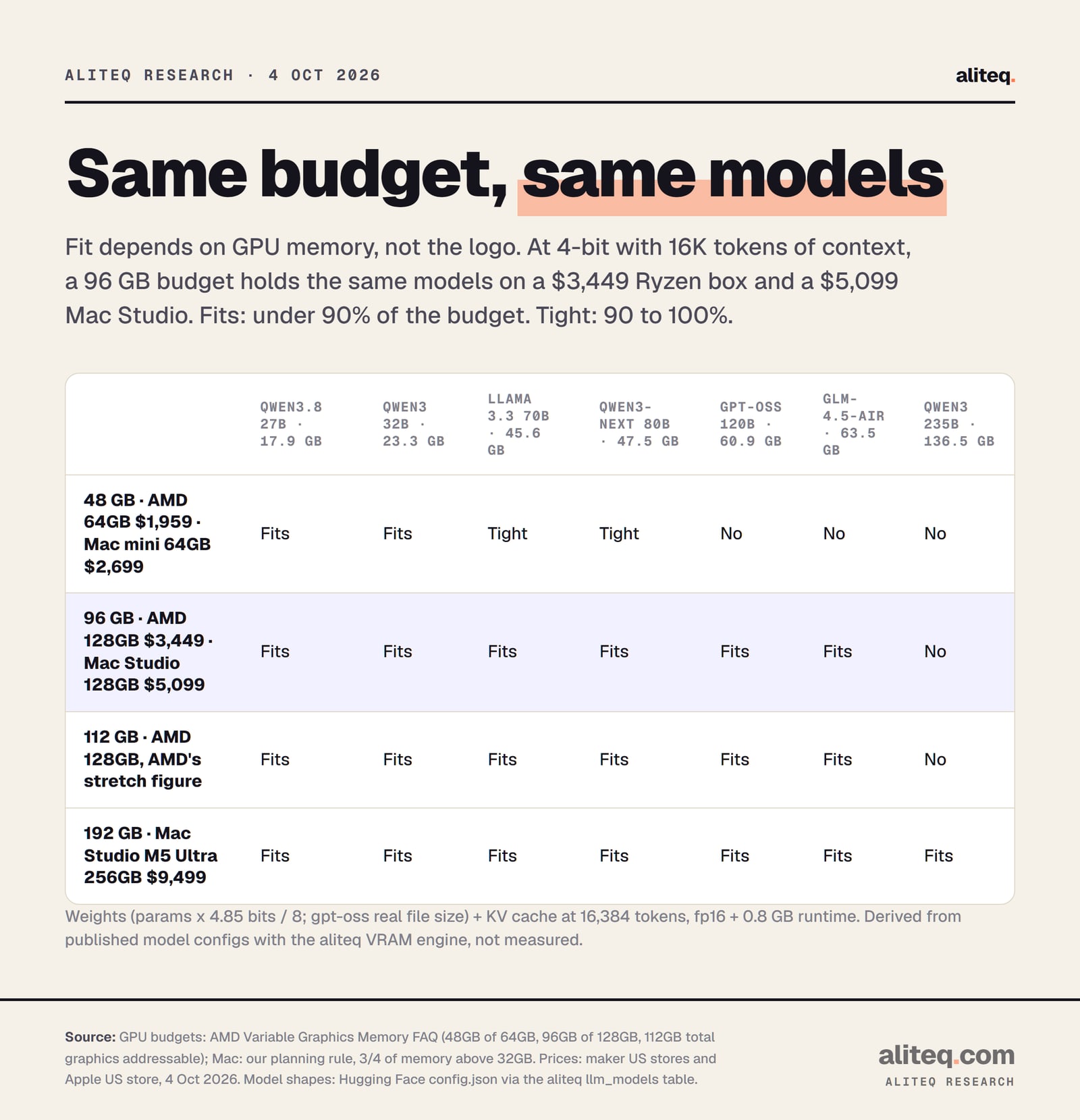
The same ones, because fit follows the GPU budget, not the brand. At 96GB and 4-bit, both hold Llama 3.3 70B, Qwen3-Next 80B, gpt-oss 120B and GLM-4.5-Air with room for 16K tokens of context. Neither holds Qwen3 235B. At 48GB, a 70B model is only tight on either.
Fits: under 90% of the GPU budget. Tight: 90 to 100%. Derived from published model configs with our VRAM engine, not measured. · aliteq research
How I got each number. A model's memory need is the weights, plus its cache, plus a little overhead. The weights are the parameter count times bits per weight, divided by 8. For the common 4-bit format (Q4_K_M) the engine uses 4.85 bits, which is what real files measure. The KV cache, the model's short-term memory of your conversation, is 2 x layers x KV heads x head size x tokens x 2 bytes. Then add 0.8 GB for the runtime.
The totals at 4-bit and 16K context:
Qwen3.8 27B 17.9 GB and Qwen3 32B 23.3 GB: comfortable on a 48GB budget.
Llama 3.3 70B 45.6 GB and Qwen3-Next 80B 47.5 GB: tight at 48GB (95% and 99%), comfortable at 96GB.
gpt-oss 120B 60.9 GB and GLM-4.5-Air 63.5 GB: need the 96GB budget.
Qwen3 235B-A22B 136.5 GB: doesn't fit 96 or even 112. Only the 256GB Mac Studio holds it on this list.
A quick sanity check from the other side: Framework's own guide lists a 17.6GB 4-bit file for Qwen3.8 27B on its 32GB machine. Our 17.9 GB includes the cache, so the two agree.
At 8-bit, which is close to lossless, Llama 3.3 70B needs about 75.6 GB. That fits a 96GB budget at 79%. gpt-oss 120B at 8-bit doesn't. To check a single model, see its page, like Llama 3.3 70B or gpt-oss 120B, and compare the result with 96GB rather than 128.
Why does the Mac cost more if the same models fit?
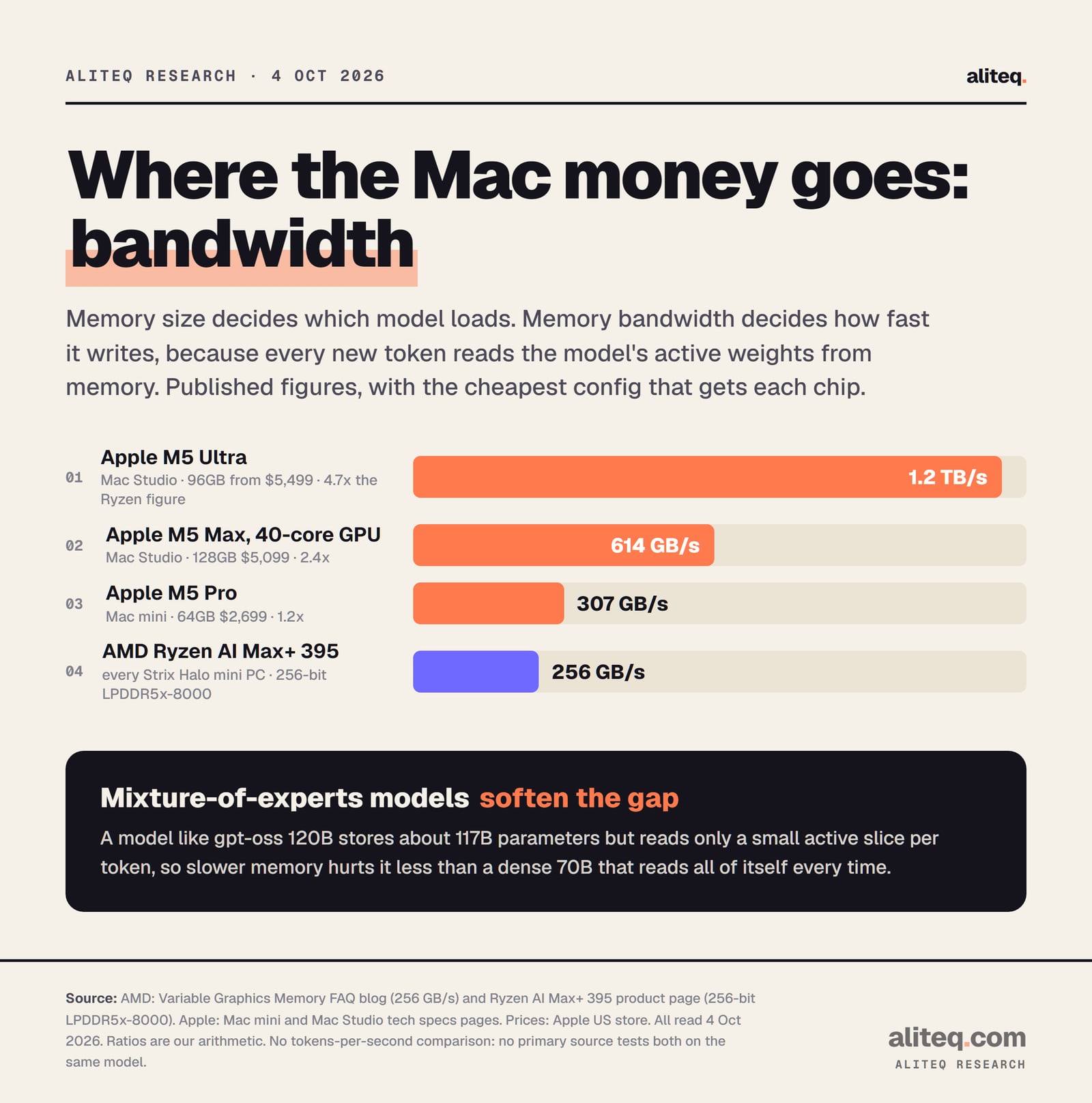
Bandwidth, mostly. Memory size decides which model loads. Memory bandwidth decides how fast it writes, because each new token reads the model's active weights from memory. AMD lists 256 GB/s for the Ryzen AI Max+ 395. Apple lists 614 GB/s for the M5 Max in the 128GB Mac Studio, about 2.4 times more.
AMD and Apple spec pages, read 4 Oct 2026. Ratios are our arithmetic. No head-to-head speed test exists from a primary source. · aliteq research
AMD's spec page backs its figure: a 256-bit memory bus running LPDDR5x-8000. That's 8,000 transfers a second times 32 bytes, which is 256 GB/s. Every Ryzen AI Max+ 395 box shares it, whatever the case looks like.
I'm not going to print a Mac-versus-Ryzen speed race. Nobody publishes one from a primary source with the same model, the same quant and both machines. What I can point to is AMD's own number for its own chip. AMD says its preliminary test ran Qwen3.8 27B at "up to 24.5 tokens per second" on a Ryzen AI Max+ 395 box, in llama.cpp with the Vulkan backend and speculative decoding (MTP set to 4). That's a vendor figure with a speed trick switched on. Our Ryzen AI Max and Qwen3.8 27B piece covers that test.
Mixture-of-experts models soften the bandwidth gap. A model like gpt-oss 120B stores about 117 billion parameters but reads only a small active slice for each token. A dense 70B reads all of itself every time. Framework's guide makes the same point for its machines: on this chip, prefer mixture-of-experts models when speed matters. Our MoE vs dense explainer shows why.
What software would you run on each?
On the Ryzen box, llama.cpp with AMD's ROCm or the Vulkan backend, usually through LM Studio, Ollama or AMD's Lemonade. On a Mac, llama.cpp with Apple's Metal or Apple's own MLX framework. Both paths are free and mature enough for daily chat. They're not interchangeable, and that matters more than any spec sheet.
On the Mac, the stack is simple. The llama.cpp README calls Apple silicon "a first-class citizen", optimized through Metal. MLX is Apple's machine learning framework, described in its README as "an array framework for machine learning on Apple silicon". MLX doesn't run on AMD hardware, so it's a Mac-only option.
On the Ryzen box, you choose a backend. AMD's ROCm 7.2.1 support matrix lists the Ryzen AI Max+ 395 on Linux, with Ubuntu 24.04.4 as the supported OS. Vulkan is the other route, and it's what AMD used for its own Windows test above. Framework's guide notes that ROCm and Vulkan "both run the model on the GPU, but their performance can differ by model and quantization". In plain English: sometimes you'll try both.
There's a third difference, and it's the desk-level one. A Ryzen mini PC is a normal x86 PC. It runs Windows or Linux, and Framework sells it bare so you can install your own. A Mac runs macOS only. If your other tools live on Linux, that alone can settle it.
What about the Mac mini specifically?
The Mac mini tops out at 64GB, so it competes with the 64GB Ryzen boxes, not the 128GB ones. At 64GB, Framework's Max+ 395 is $1,959 and the Mac mini M5 Pro is $2,699. Both give a model about 48GB, so both run 32B models comfortably and 70B models only tight.
That's a $740 gap. The Mac mini's M5 Pro lists 307 GB/s against 256 GB/s, so the speed gap here is small, about 1.2 times. If you're choosing at 64GB, the Ryzen box is the value pick and the Mac mini is the pick for macOS. GMKtec's 64GB EVO-X2 is $2,199.99 with a 1TB SSD, if you'd rather not source storage.
For everything below 64GB, the Ryzen line doesn't compete with the cheap Mac minis at all. The smallest Ryzen AI Max box Framework sells has 32GB and starts at $1,269, while the 32GB Mac mini M6 is $1,299. Our Mac mini buying guide covers those smaller configs model by model.
When is the Mac the better buy?
When speed matters more than price, when you need more than 128GB, or when you want macOS. The 128GB Mac Studio's 614 GB/s is the clear speed upgrade. The 256GB Mac Studio M5 Ultra at $9,499 is the only machine here that holds Qwen3 235B. No Ryzen AI Max+ 395 box sells with more than 128GB.
The ceiling is moving on the AMD side, though. Framework now takes pre-orders for a Framework Desktop with the Ryzen AI Max+ PRO 495 and 192GB of LPDDR5x-8533, at $6,799, shipping in November. I haven't found AMD documentation for how much of that 192GB the GPU can claim, so I'm not putting it on the fit chart. Watch that one.
If you're weighing a Mac Studio against a big workstation card instead, our Mac Studio M5 Ultra vs RTX PRO 6000 piece runs that comparison. And if you only want to try a 70B model before spending thousands on any box, renting is cheap: see rent vs buy.
What should you check before you buy either one?
Five checks. Name the biggest model you'll run. Look up its 4-bit size. Compare it with the GPU budget, not the installed memory. Decide whether you're paying for fit or for speed. Then check the operating system you want to live in. The cheapest box that passes all five is your box.
Name your biggest model, and the next size up you might want within a year. The memory in all of these is soldered, so buy for next year.
Look up its 4-bit size at your context length in our VRAM calculator. A 70B model needs about 46 GB at 16K tokens.
Compare it with the GPU budget: up to 96GB on a 128GB Ryzen box with AMD's setting, about three-quarters of memory on a Mac. Stay under 90%.
Decide whether you are paying for fit or speed. Bandwidth is 256 GB/s on every Ryzen AI Max+ 395, 307 to 614 GB/s or 1.2 TB/s on the Macs.
Compare like for like: Framework's price has no SSD, GMKtec's includes 1TB, the others 2TB, the Mac Studio 512GB.
Pick the operating system you will actually use every day. Windows or Linux means the Ryzen box. macOS means the Mac.
What do these numbers not tell you?
They don't tell you speed, noise, power draw or how each box feels on a desk. They're memory arithmetic on published specs and store prices read on one day. Real fit depends on your app, your context length and what else is open. And prices change. Framework's 128GB is out of stock today, so recheck before you buy.
The Ryzen budget is AMD's documented maximum for its dedicated setting. The Mac budget is our cautious planning rule, not an Apple figure. Both may give you a little more in practice.
None of this is a hands-on review. I haven't run these models on these machines. For the wider category, including Nvidia's unified-memory box, see our best mini PC for local AI hub. For an older take on whether a Strix Halo box is worth it at all, see our Strix Halo mini PC piece.
Quick answers
Is a Ryzen AI Max+ 395 mini PC cheaper than a Mac for local AI?
Yes, at the same GPU memory. A 128GB Framework Desktop with the Ryzen AI Max+ 395 was $3,449 without storage on 4 Oct 2026, against $5,099 for a 128GB Mac Studio M5 Max. Both give a model about 96GB.
How much memory can the GPU use on a 128GB Ryzen AI Max+ 395?
Up to 96GB with AMD's Variable Graphics Memory setting, which needs a restart and takes that memory away from the CPU. AMD says the GPU can technically reach 112GB in total. On Linux, ROCm defaults to half of system memory, and AMD documents how to raise it.
Is the Mac faster than a Strix Halo mini PC for AI?
On paper, yes. Apple lists 614 GB/s of memory bandwidth for the M5 Max and AMD lists 256 GB/s for the Ryzen AI Max+ 395. We haven't found a primary-source test of both on the same model, so we don't print a speed ratio.
Can a Mac mini run the same models as a 128GB Strix Halo box?
No. The Mac mini tops out at 64GB, which gives a model about 48GB. That runs 32B models comfortably and 70B models only tight. For 70B to 120B models on Apple, you need the 128GB Mac Studio.
Can a Ryzen AI Max+ 395 run MLX?
No. MLX is Apple's framework for Apple silicon. On the Ryzen box you'd use llama.cpp with the ROCm or Vulkan backend, usually through LM Studio, Ollama or Lemonade.
Can I add memory later to either one?
No. Framework's configurator calls the memory non-upgradeable, Beelink's listing says soldered, and Apple's store says unified memory can't be upgraded later. Buy for the biggest model you expect to run.