Upgrades and the switch to annual billing happen right away, with a prorated charge and a new billing date. Downgrades wait for your next billing cycle, and you keep your current plan and credits until then. Here is where each button is, what happens to your credits and renewal date, and how the Black Friday sale fits in (help center, read Nov 22, 2026).
You picked a Higgsfield plan, used it for a bit, and now you want more credits, fewer credits, or a cheaper yearly price. Each of those works differently, and the timing matters for your credits. Here is what happens in each case.
Higgsfield plan changes at a glance
Every row comes from Higgsfield's help center, read November 22, 2026.
Upgrade (e.g. Plus to Ultra)
When it applies
Immediately
Billing date
Resets to the moment you upgrade
What happens to your credits
Unused value counts toward the new plan price; credits are recalculated with the proration formula
Downgrade (e.g. Ultra to Plus)
When it applies
At the start of your next billing cycle
Billing date
Unchanged
What happens to your credits
Current plan and credits stay until the paid period ends; then credits reset to the new plan's allowance
Monthly to annual
When it applies
Immediately
Billing date
Resets to the day you switch
What happens to your credits
Unused monthly value is deducted from the annual price; credits reset to the annual allowance, then every 30 days
Annual to monthly, within refund conditions
When it applies
Immediately, via support
Billing date
Not stated
What happens to your credits
You keep your access and credits; the 11 unused months are refunded minus a fee of up to 6%
Annual to monthly, outside refund conditions
When it applies
After the paid year ends
Billing date
Not stated
What happens to your credits
Cancel auto-renewal, keep full access to the end of the year, then subscribe monthly
Any change
When it applies
Any time
Billing date
Not applicable
What happens to your credits
Credit Packs, promo credits and Auto-Refill credits aren't affected
When it applies
Billing date
What happens to your credits
Upgrade (e.g. Plus to Ultra)
Immediately
Resets to the moment you upgrade
Unused value counts toward the new plan price; credits are recalculated with the proration formula
Downgrade (e.g. Ultra to Plus)
At the start of your next billing cycle
Unchanged
Current plan and credits stay until the paid period ends; then credits reset to the new plan's allowance
Monthly to annual
Immediately
Resets to the day you switch
Unused monthly value is deducted from the annual price; credits reset to the annual allowance, then every 30 days
Annual to monthly, within refund conditions
Immediately, via support
Not stated
You keep your access and credits; the 11 unused months are refunded minus a fee of up to 6%
Annual to monthly, outside refund conditions
After the paid year ends
Not stated
Cancel auto-renewal, keep full access to the end of the year, then subscribe monthly
Any change
Any time
Not applicable
Credit Packs, promo credits and Auto-Refill credits aren't affected
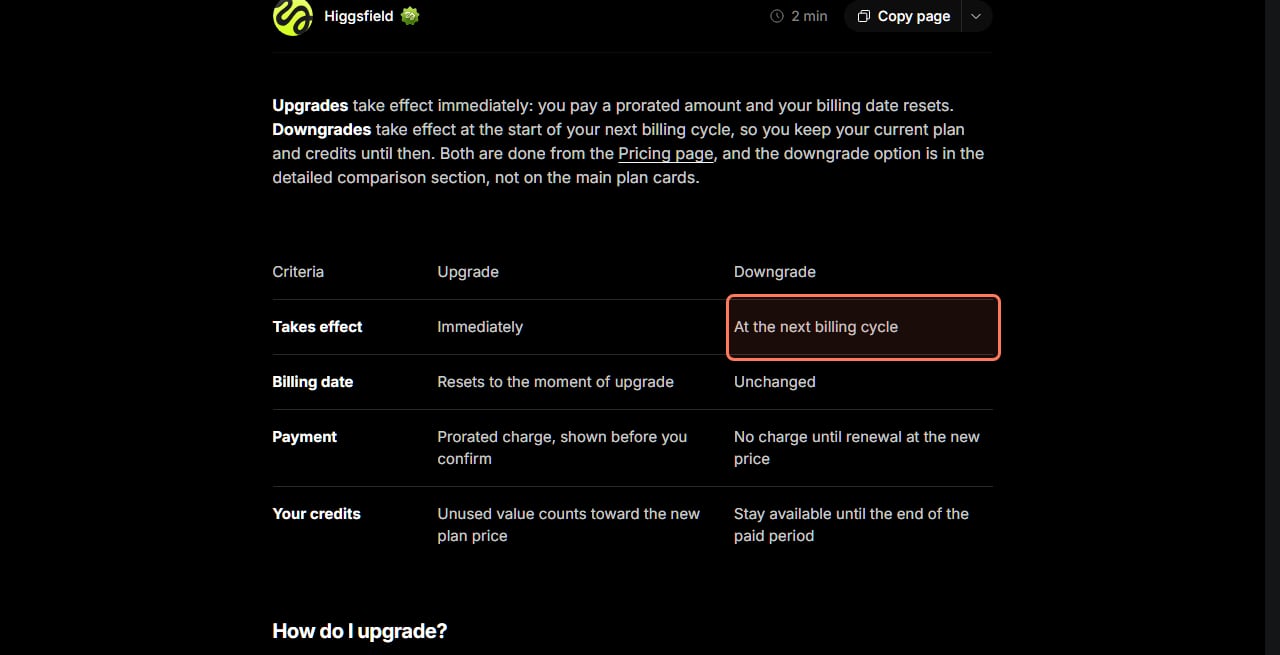
Higgsfield's own upgrade versus downgrade table. Screenshot taken November 22, 2026; the outline is ours. · Higgsfield Help Center, screenshot by aliteq
How do you upgrade your Higgsfield plan?
Go to the Pricing page, select the plan you want, and confirm the payment. Higgsfield's upgrade article says the payment window "shows the exact prorated charge before you pay" and that "the upgrade activates instantly and your billing date resets to that moment."
You don't lose the credits you already paid for. "Higgsfield subtracts the unused value of your current plan from the price of the new one, so you pay only the difference. This includes your unused credits, plus any unused months on annual plans." Its FAQ says the same: "Your unused credits are calculated at their prorated value and deducted from the new plan price."
Changed your mind? "If you upgrade mid-term and haven't used any credits from the new plan, you can request a refund of the upgrade cost within 7 days of upgrading." That covers only the extra you paid to upgrade, not your original subscription. Not sure which tier you need? Our plan picker matches plans to what you'll make, and our Unlimited explainer shows which models each plan lets you use without credits.
How do you downgrade?
The Downgrade button isn't on the plan cards. Higgsfield's article says to go to the Pricing page, "scroll past the main plan cards to the detailed comparison section," and select Downgrade.
Nothing changes right away. "The downgrade takes effect at the start of your next billing cycle. Until then you keep full access to your current plan and its credits. At the next billing date, credits reset to the new plan's allowance." There's "no charge until renewal at the new price." So spend the credits you have before the renewal date, because unused subscription credits don't roll over (see renewal below).
If you want to stop paying altogether, that's a cancellation, not a downgrade. Our cancel and refund guide has the exact steps.
How do you switch from monthly to annual billing?
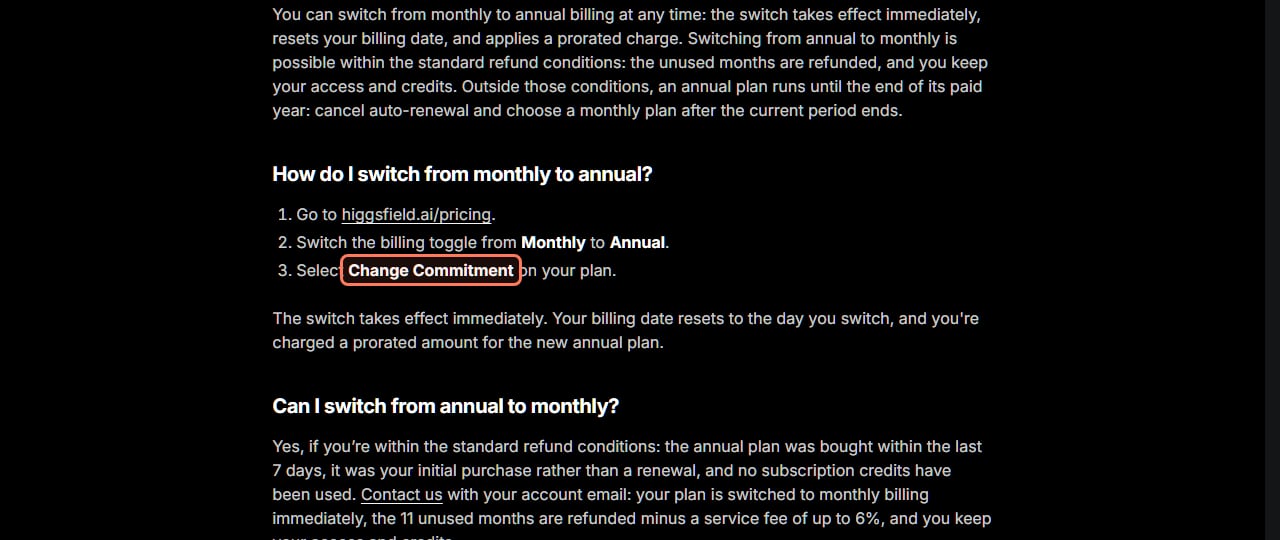
Higgsfield's billing article gives three steps: go to higgsfield.ai/pricing, "switch the billing toggle from Monthly to Annual," and "select Change Commitment on your plan."
The three steps to annual billing, from Higgsfield's help center. Screenshot taken November 22, 2026; the outline is ours. · Higgsfield Help Center, screenshot by aliteq
"The switch takes effect immediately. Your billing date resets to the day you switch, and you're charged a prorated amount for the new annual plan." There's "no fee": the unused value of your monthly plan is deducted, and "the exact amount is shown before you confirm."
Your credits change on the same day. "Subscription credits reset at that moment to the annual plan's allowance. From then on, credits reset every 30 days." You don't lose what you'd paid for, because the unused monthly value is already subtracted from the annual price.
Can you switch from annual back to monthly?
Only in a narrow window. The billing article lists the standard refund conditions: "the annual plan was bought within the last 7 days, it was your initial purchase rather than a renewal, and no subscription credits have been used." If all three are true, contact Higgsfield with your account email and "your plan is switched to monthly billing immediately, the 11 unused months are refunded minus a service fee of up to 6%, and you keep your access and credits."
Outside that window, "the annual plan stays active until the end of the paid year." If you don't want another year, cancel auto-renewal: "you keep full access until the end of the current period, and after that you can subscribe to a monthly plan." That makes annual a real commitment. Before you take it, check the numbers in our is Higgsfield worth it breakdown.
When does your plan renew, and when do credits reset?
On the same calendar date as your purchase. Higgsfield's renewal article says monthly plans renew "every month" on that date and annual plans "once a year". Upgrading or switching billing resets that date: "your next renewal is one month or one year from that new date." You can't pick a billing date yourself.
Payment and credits run on different clocks on annual plans. "The payment is charged once a year, but the credit allowance resets every 30 days rather than on the same calendar date," so the reset day drifts. Higgsfield's example: subscribe on May 11, and "your next credit reset lands on June 10."
Credits that came with the plan expire; credits you bought separately don't follow the plan:
Subscription credits
Resets on renewal?
Yes. Unused credits expire and the new allowance is added
Credit Packs
Resets on renewal?
No. Valid 90 days from purchase
Promo credits
Resets on renewal?
No. Valid until the expiry date shown when issued
Auto-Refill credits
Resets on renewal?
No. Valid 90 days from purchase
Resets on renewal?
Subscription credits
Yes. Unused credits expire and the new allowance is added
Credit Packs
No. Valid 90 days from purchase
Promo credits
No. Valid until the expiry date shown when issued
Auto-Refill credits
No. Valid 90 days from purchase
To see your date: avatar, Manage Account, Subscription, where the page reads "Your plan renews [date]". If a renewal payment fails, "you typically have 14 days from the failed payment to update your payment method before the subscription may be canceled."
What happens to Auto-Refill when you change plans?
Nothing. The upgrade article says Credit Packs and Auto-Refill credits are "not affected. Their 90-day validity continues unchanged, and your Auto-Refill settings carry over to the new plan." Higgsfield's Auto-Refill article says it's off by default, tops up at "$1 = 18 credits" in amounts of $20, $40, $90, $150 or $300 when your balance drops below your plan's threshold, and is "not available on entry-level plans." Subscription credits are always spent first.
One thing to check after a downgrade: the threshold "depends on your plan," so look at Manage Account, then Subscription, then Credits auto-refill, to see what it is on the new plan.
Does the Black Friday sale change any of this?
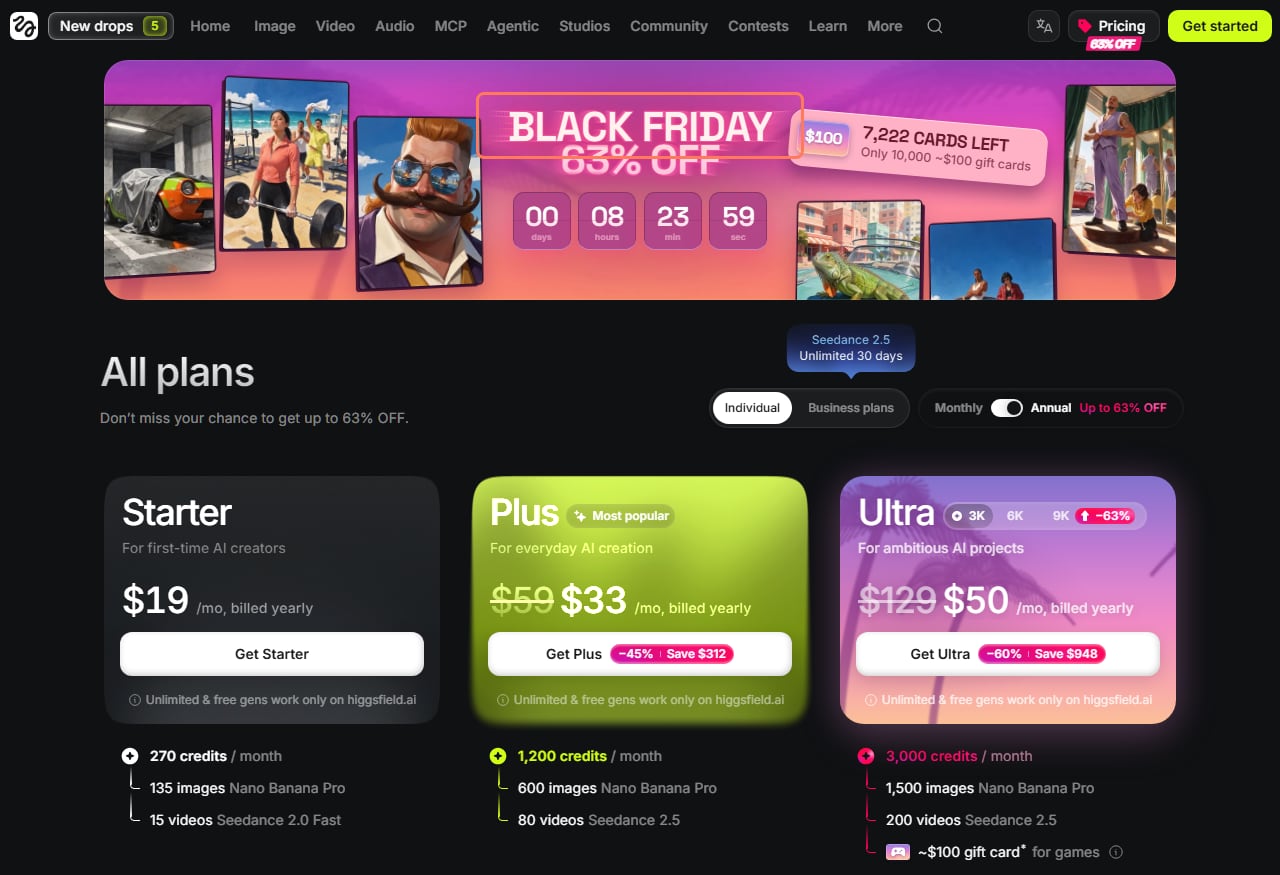
The rules above don't change, but the prices do, and only until the sale ends. Read signed out on Higgsfield's pricing page at 15:35 UTC on November 22, 2026, the banner said "Black Friday 63% off", the Annual toggle said "Up to 63% off", and the countdown showed 0 days, 8 hours and 23 minutes left, which puts the end at midnight UTC on November 23, 2026 (7 pm ET on November 22).
The annual plan cards read: Starter $19 a month billed yearly (270 credits a month), Plus $33 instead of $59 (1,200 credits, Save $312) and Ultra $50 instead of $129 (3,000 credits, Save $948). Our Higgsfield deals page tracks every offer with screenshots.
Higgsfield's pricing page read signed out at 15:35 UTC on November 22, 2026. The countdown pointed at midnight UTC on November 23 (7 pm ET on November 22); prices are US dollars before tax. · Higgsfield pricing page, screenshot by aliteq
Know what a sale price renews at. Higgsfield's promo price article says a promo price "applies to the first payment or the period stated in the offer, and from the next billing cycle your subscription renews at the standard plan price." On an annual plan, that next cycle is a year away, but it will come at the list price. Bonuses in an offer, such as Unlimited access, "are only valid for the duration stated." The article also notes that prices on the Pricing page "don't include taxes."
What we couldn't verify
Whether an upgrade or annual switch during the sale gets the sale price. The help articles explain proration but don't say how a sale price applies to an existing subscriber's change. The payment window shows the exact amount before you confirm.
Monthly sale prices on November 22. We read the annual cards only.
The billing date after an annual-to-monthly refund switch. The article doesn't say.
The Auto-Refill threshold for each plan. Higgsfield shows it only in the set-up window.
Whether the sale is extended again. It was extended twice before; on November 22 the countdown pointed at midnight UTC on November 23.
Our verdict
Upgrading is low risk: it applies at once, you only pay the difference, and the credits you already paid for count toward it. Downgrading is the opposite, as nothing happens until your next billing date, so use up your current credits first. Annual billing is where to slow down. The switch is instant, but getting out of it only works within 7 days of a first purchase with no credits used, so check that you'll really use a year of the plan before you lock in a sale price that renews at the list price.
Go to the Pricing page, select the new plan and confirm. The upgrade applies instantly, you pay a prorated difference shown before you confirm, and your billing date resets to that moment.
Where is the downgrade button on Higgsfield?
Not on the plan cards. Scroll past them to the detailed comparison section on the Pricing page and select Downgrade. It takes effect at your next billing cycle.
Do I lose credits when I upgrade?
No. Higgsfield's upgrade article says your unused credits are calculated at their prorated value and deducted from the new plan price. Credit Packs and promo credits aren't affected.
How do I switch Higgsfield to annual billing?
On the Pricing page, switch the toggle from Monthly to Annual and select Change Commitment. It applies immediately, with a prorated charge, and your billing date resets to that day.
Can I go back from annual to monthly?
Only if you bought the annual plan in the last 7 days, it was your first purchase and you haven't used subscription credits. Then the 11 unused months are refunded minus a fee of up to 6%. Otherwise the plan runs to the end of the paid year.
Why did my renewal cost more than I paid?
A promo price applies only to the first payment or the period stated in the offer. From the next billing cycle, Higgsfield renews at the standard plan price.
Higgsfield sales like 11.11 and Black Friday change prices for a few days at a time. When one starts, we read the real prices on Higgsfield's own page and email you what changed.
Written and sent by hand. One-click unsubscribe in every email. Emails may contain referral links.