DOS games need DOSBox, old adventure games need ScummVM, Windows 95 to XP games need compatibility mode or a graphics wrapper, and some original CDs hit a DRM wall Microsoft built on purpose. Which fix fits your game, what each tool is, and when buying the GOG version is simply less work.
How do you get old PC games to run on Windows 11? Match the fix to the game's era. Buy the GOG or Steam re-release if one exists, because it usually ships already fixed. Run DOS games in DOSBox Staging, classic adventure games in ScummVM, and Windows 95 to XP games with compatibility mode plus a graphics wrapper like dgVoodoo2. If a game needs real Windows 98, use a full PC emulator such as 86Box or DOSBox-X. Two walls no setting removes: Windows 11 is 64-bit only, so 16-bit programs never run on it, and SafeDisc copy protection on original CDs is blocked unless you add a shim. Every version number and quote below was checked on the projects' and Microsoft's own pages on Nov 3, 2026.
0.83.0
DOSBox Staging
Latest release, Aug 27, 2026
325+
Adventure games in ScummVM
ScummVM home page, Nov 3, 2026
336
Games GOG keeps working
GOG Preservation Program, Nov 3, 2026
0
16-bit programs on Windows 11
Windows 11 runs 64-bit and 32-bit apps only
Which fix do I need for my old game?
Find your game's era, then use the matching tool. Most "it won't start" problems come from using the wrong one, like running a DOS game's .exe straight in Windows or forcing compatibility mode on a game that needs an emulator.
Pick the fix by the game's era
Check for a re-release
GOG or Steam builds usually come pre-fixed, with the disc DRM removed
Emulate a whole Windows 98 PC in 86Box or DOSBox-X
Our summary of the tools' own documentation, read Nov 3, 2026.
Old PC game fixes on Windows 11 (checked Nov 3, 2026)
DOS games
Tool and latest version
DOSBox Staging 0.83.0 (Aug 27, 2026)
Cost and catch
Free, open source
Windows 3.x and 9x games, DOS edge cases
Tool and latest version
DOSBox-X 2026.10.01 (Oct 1, 2026)
Cost and catch
Free, open source
LucasArts, Sierra and other adventure games
Tool and latest version
ScummVM 2026.4.0 (Oct 11, 2026)
Cost and catch
Free; needs your game's data files
Old Glide and DirectX 1 to 9 graphics
Tool and latest version
dgVoodoo2 2.87.6 (Oct 25, 2026)
Cost and catch
Free
Original SafeDisc CDs
Tool and latest version
SafeDiscShim 0.9.0 (Sep 29, 2025)
Cost and catch
Free; still needs the original disc
Full Windows 95 or 98 PC
Tool and latest version
86Box 6.0 (May 31, 2026)
Cost and catch
Free; you supply the Windows install
Tool and latest version
Cost and catch
DOS games
DOSBox Staging 0.83.0 (Aug 27, 2026)
Free, open source
Windows 3.x and 9x games, DOS edge cases
DOSBox-X 2026.10.01 (Oct 1, 2026)
Free, open source
LucasArts, Sierra and other adventure games
ScummVM 2026.4.0 (Oct 11, 2026)
Free; needs your game's data files
Old Glide and DirectX 1 to 9 graphics
dgVoodoo2 2.87.6 (Oct 25, 2026)
Free
Original SafeDisc CDs
SafeDiscShim 0.9.0 (Sep 29, 2025)
Free; still needs the original disc
Full Windows 95 or 98 PC
86Box 6.0 (May 31, 2026)
Free; you supply the Windows install
Version dates are each project's latest release on GitHub as read on Nov 3, 2026.
Why won't my old game start on Windows 11?
Usually for one of three reasons: the program is 16-bit, it's a DOS program, or it depends on something Windows no longer ships.
It's 16-bit. Windows 11 needs "a compatible 64-bit processor", per Microsoft's requirements page, and Microsoft's developer documentation says plainly that "64-bit Windows does not support running 16-bit Windows-based applications." Many Windows 3.1 games and a surprising number of Windows 95 era installers are 16-bit. No compatibility setting changes that; you need DOSBox-X or a full PC emulator.
It's a DOS game. Windows hasn't run DOS programs natively for a long time, and a 64-bit Windows can't. DOSBox is the fix.
It needs a removed or disabled component. The common ones are the secdrv.sys driver for SafeDisc discs (see below), DirectPlay for older multiplayer and some single-player games, and graphics APIs like 3dfx Glide that modern cards never supported.
Microsoft's own advice for older apps is to check for an update from the publisher first, then run the Program Compatibility Troubleshooter: "Select Start > Settings > System > Troubleshoot > Other troubleshooters", find Program Compatibility Troubleshooter and select Run. For games, the publisher update is often a GOG or Steam re-release.
Does Windows 11 compatibility mode fix old games?
Sometimes, for 32-bit Windows games from roughly 1998 to 2008. It does nothing for DOS or 16-bit games. Try it in this order:
Right-click the game's .exe, open Properties, then the Compatibility tab.
Tick Run this program in compatibility mode for and pick the Windows version the game came out for, such as Windows XP (Service Pack 3).
Tick Run this program as an administrator. Many older games write save files into their own install folder, which a normal account can't do under Program Files.
If the game is multiplayer-era (late 1990s to early 2000s) and asks for DirectPlay, open Control Panel > Programs > Turn Windows features on or off, expand Legacy Components and tick DirectPlay. Users on Microsoft Q&A report the box can look unticked after a restart, so check it again.
If the game starts but shows a black screen, wrong colors or crashes when it draws 3D, the problem is usually its graphics API. That's what dgVoodoo2 is for.
Install old games outside Program Files, for example in C:\Games, so they can write their own files without admin rights.
How do I fix old Direct3D and Glide games on Windows 11?
Use dgVoodoo2, a free wrapper that runs old graphics calls on modern Direct3D 11 and 12. Its README says it lets you "Play your old Glide and DirectX games even on the latest, modern version of Windows", covering Glide 2 and 3 and "DirectDraw, D3D3/5/6/7, D3D8 and D3D9". It can also force higher resolutions and anti-aliasing on games that were hard-wired to 640 by 480. You copy its DLL files next to the game's .exe, and its control panel sets the options. Its latest release was 2.87.6 on Oct 25, 2026.
Before you install any wrapper, check the game's page on PCGamingWiki, the community wiki that lists known fixes per game. Many classics have one specific patch that solves everything.
How do I play DOS games on Windows 11?
Install DOSBox Staging, mount the game's folder as a drive, and run its .exe inside DOSBox. DOSBox Staging describes itself as "a modern continuation of DOSBox" in which "your existing configurations will continue to work", with CRT emulation, Roland MT-32 and SC-55 music emulation and "sensible defaults" so little manual setup is needed. Version 0.83.0 came out on Aug 27, 2026.
DOSBox-X is the other maintained fork. It aims for broader and more accurate PC emulation, and its site says "DOS-based Windows such as Windows 3.x and Windows 9x are officially supported." Start with Staging for games; switch to DOSBox-X if a title needs Windows 3.1 or 95 inside the emulator, or Staging can't run it. DOSBox-X's latest build was 2026.10.01.
Most GOG releases of DOS games already contain a configured DOSBox, so you just press Play.
How do I play old LucasArts and Sierra adventure games?
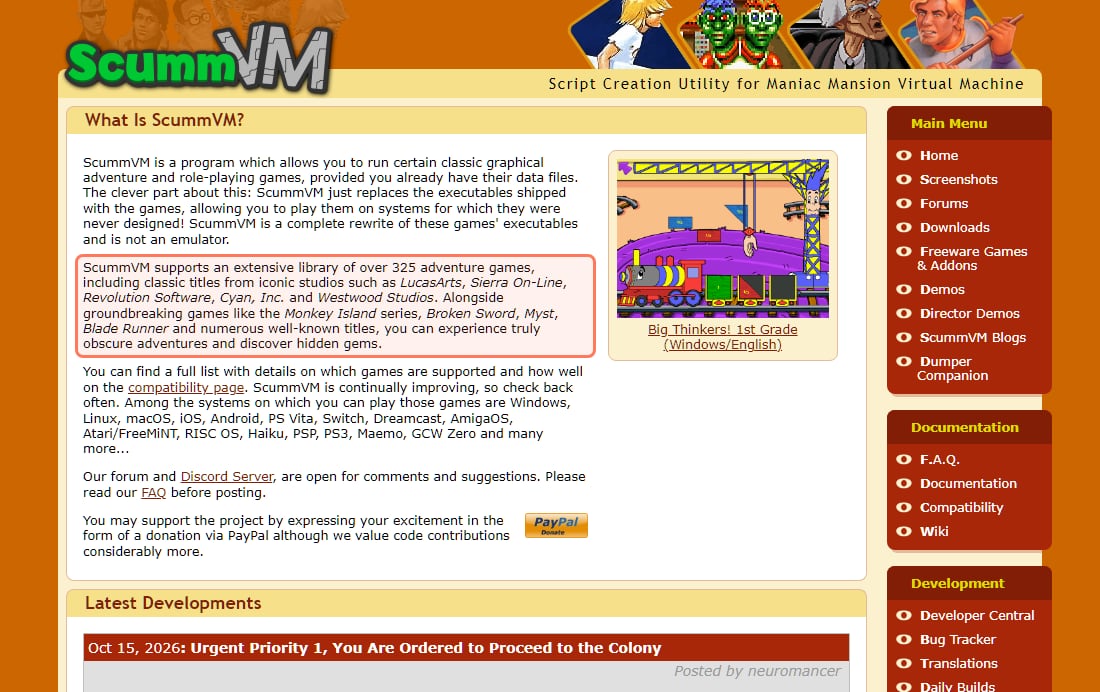
Use ScummVM. It isn't an emulator: it replaces the game's original program and reads the original data files. Its home page says it "supports an extensive library of over 325 adventure games", from LucasArts, Sierra On-Line, Revolution Software, Cyan and Westwood, and that it works "provided you already have their data files". That's why games like Monkey Island, Broken Sword, Myst and Blade Runner often run better in ScummVM than they did on the original DOS release. ScummVM 2026.4.0 came out on Oct 11, 2026, and its compatibility page lists how well each game works.
ScummVM's own description, scummvm.org, read Nov 3, 2026: over 325 adventure games, using the data files you already own. · Screenshot of scummvm.org by aliteq
Point ScummVM at the folder with your game files (from the CD, a GOG download or an old install), click Add Game, and it detects the game.
Why won't my original game CD work on Windows 11?
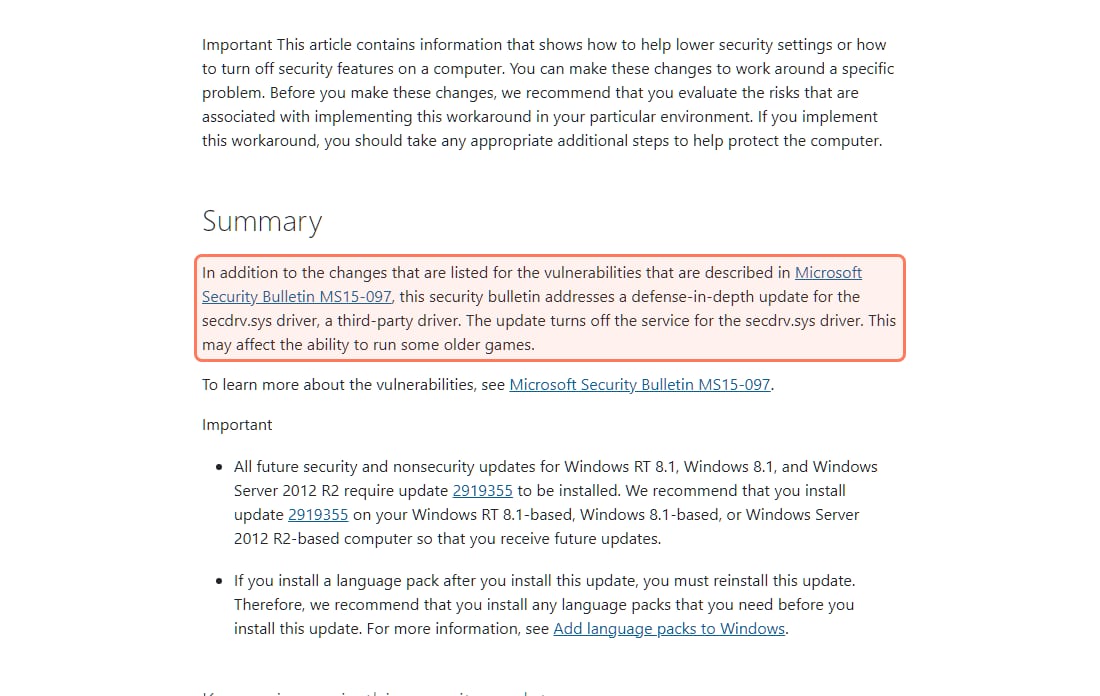
Because many CDs from about 1999 to 2008 used SafeDisc copy protection, which relied on a Windows driver called secdrv.sys (other disc schemes, such as SecuROM, cause their own problems on modern Windows). In 2015 Microsoft shipped an update that, in its own words, "turns off the service for the secdrv.sys driver. This may affect the ability to run some older games." Microsoft called it a "defense-in-depth" security fix for "a third-party driver".
Microsoft's own note on the secdrv.sys change, KB3086255, read Nov 3, 2026. · Screenshot of support.microsoft.com by aliteq
The re-enable commands in that article were for Windows Vista to 8.1. On Windows 10 and 11 the driver is blocked, and forcing an old, insecure kernel driver back onto your PC is a bad trade for a game. The better options:
SafeDiscShim, for SafeDisc discs. This free, open-source tool "allows for SafeDisc protected games which utilize the insecure Macrovision Security Driver ("secdrv.sys") to run on modern versions of Windows which have said driver blacklisted", per its README. It works without installing any driver, and it doesn't break the protection: "SafeDisc protected games still require their original discs in order to function." The README also warns that "certain anti-malware programs may wrongly detect this software as being malicious." Its latest release was 0.9.0 on Sep 29, 2025.
Buy the re-release, for SecuROM and everything else. SafeDiscShim covers SafeDisc only. GOG and Steam versions of these games generally shipped without the old disc protection.
Keep the disc in the drive. Many games still check for the CD even when they install. If your PC has no optical drive, an external USB drive does the job.
We don't recommend "No-CD" cracks: they come from unvetted download sites, and bypassing copy protection raises legal questions covered in our emulation and copyright explainer.
Is buying the GOG version easier than fixing my old copy?
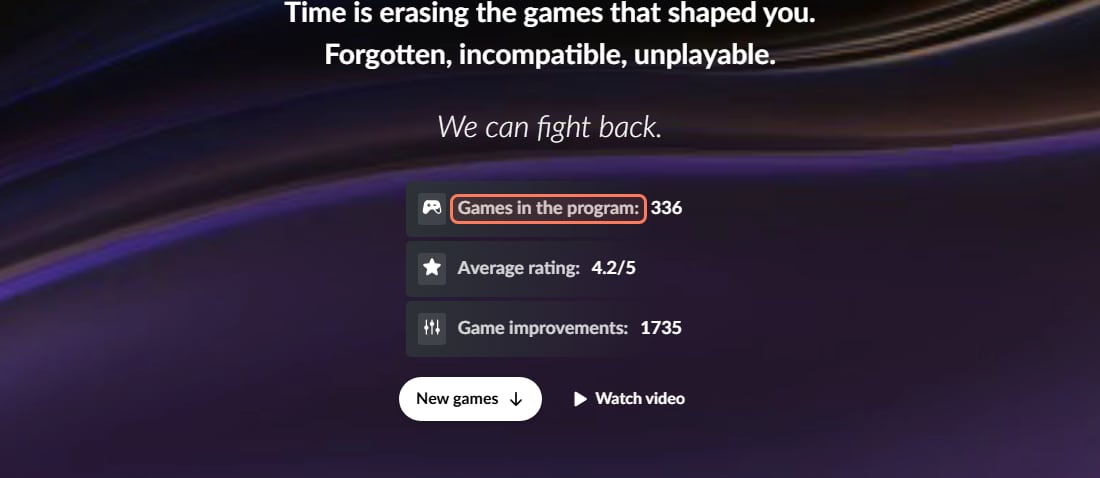
Usually, yes, and it's often cheap. GOG's classic releases are DRM-free and typically ship with DOSBox, ScummVM or modern fixes already set up. Its Preservation Program goes further: GOG says it "ensures classic games remain playable on modern systems, even after their developers stopped supporting them", with "dedicated tech support". On Nov 3, 2026 the program page listed 336 games and 1,735 game improvements.
GOG Preservation Program, gog.com, read Nov 3, 2026. The counters update as games are added. · Screenshot of gog.com by aliteq
If your game is in that program, buying it is the least work. If it isn't, check whether GOG or Steam sells it at all; if neither does, the tools above are your route. And a delisting doesn't end the work: GOG says Preservation Program games "remain part of the initiative even if they are no longer available for sale" and that it will "continue ensuring their compatibility with modern systems."
What if a Windows 95 or 98 game still won't run?
Emulate the whole old PC. 86Box is a free emulator of "retro x86-based machines" that runs "MS-DOS, older Windows versions, OS/2" and more, with period sound and 3D cards. Version 6.0 came out on May 31, 2026. You install Windows 95 or 98 inside it from your own install media, then the game, exactly as on a 1998 PC. DOSBox-X can also run Windows 9x and is simpler to set up for a single game.
This is the slowest route and needs some patience, but it's the one that works for games nothing else runs.
Do I need a gaming PC to play old PC games on Windows 11?
No. DOS games, ScummVM games and most pre-2005 Windows games run on any Windows 11 laptop, including ones without a separate graphics card. The exception is full-PC emulation: 86Box lists a minimum of a "64-bit Intel Core 2, AMD Athlon 64 or ARMv8 processor or newer" and 4 GB of RAM, but notes "Most emulation logic is executed in a single thread", so emulating a fast late-1990s PC needs a modern CPU with strong single-core speed.
Almost every old PC game can run on Windows 11, but not through one trick. Buy the GOG or Steam version when it exists; otherwise use DOSBox Staging for DOS, ScummVM for adventure games, compatibility mode plus dgVoodoo2 for Windows 95 to XP games, and 86Box when nothing else works. The real walls are 16-bit programs and old disc DRM, and SafeDiscShim now gets many SafeDisc discs past the second one.
Best for: Anyone with an old game, a CD or a GOG wishlist and a Windows 11 PC
Frequently asked
How do I get old PC games to run on Windows 11?
Match the fix to the game's era. Buy a GOG or Steam re-release if one exists; run DOS games in DOSBox Staging, classic adventure games in ScummVM, and Windows 95 to XP games with compatibility mode, admin rights or the dgVoodoo2 graphics wrapper. If a game needs real Windows 98, run it inside 86Box or DOSBox-X.
Can Windows 11 run 16-bit programs?
No. Windows 11 requires a 64-bit processor, and Microsoft's documentation says 64-bit Windows does not support running 16-bit Windows-based applications. Use DOSBox-X or a full PC emulator such as 86Box for 16-bit games and installers.
Does compatibility mode work for DOS games?
No. Compatibility mode only helps 32-bit Windows programs. DOS games need DOSBox Staging or DOSBox-X, and many GOG releases already include a configured DOSBox.
Why doesn't my SafeDisc game CD work anymore?
SafeDisc used the secdrv.sys driver, and a 2015 Microsoft update turned that driver's service off; Microsoft noted it "may affect the ability to run some older games." On Windows 10 and 11 the driver is blocked. The free SafeDiscShim tool lets many SafeDisc games run without the driver, but you still need the original disc.
How do I enable DirectPlay on Windows 11?
Open Control Panel > Programs > Turn Windows features on or off, expand Legacy Components and tick DirectPlay, then restart. Check the box again after the restart, since some users report it can appear unticked.
Is ScummVM an emulator?
No. ScummVM replaces the game's original program and reads its data files, which is why many classic adventure games run better in it. It supports over 325 adventure games, per its home page on Nov 3, 2026, and you need your own copy of the game files.
Is DOSBox free?
Yes. DOSBox Staging and DOSBox-X are both free and open source. DOSBox Staging's latest release was 0.83.0 on Aug 27, 2026.
Do I need a gaming PC to play old PC games?
No. DOS, ScummVM and most pre-2005 Windows games run on any Windows 11 laptop. Emulating a whole late-1990s PC in 86Box is the exception: it leans on one CPU core, so a modern CPU helps.