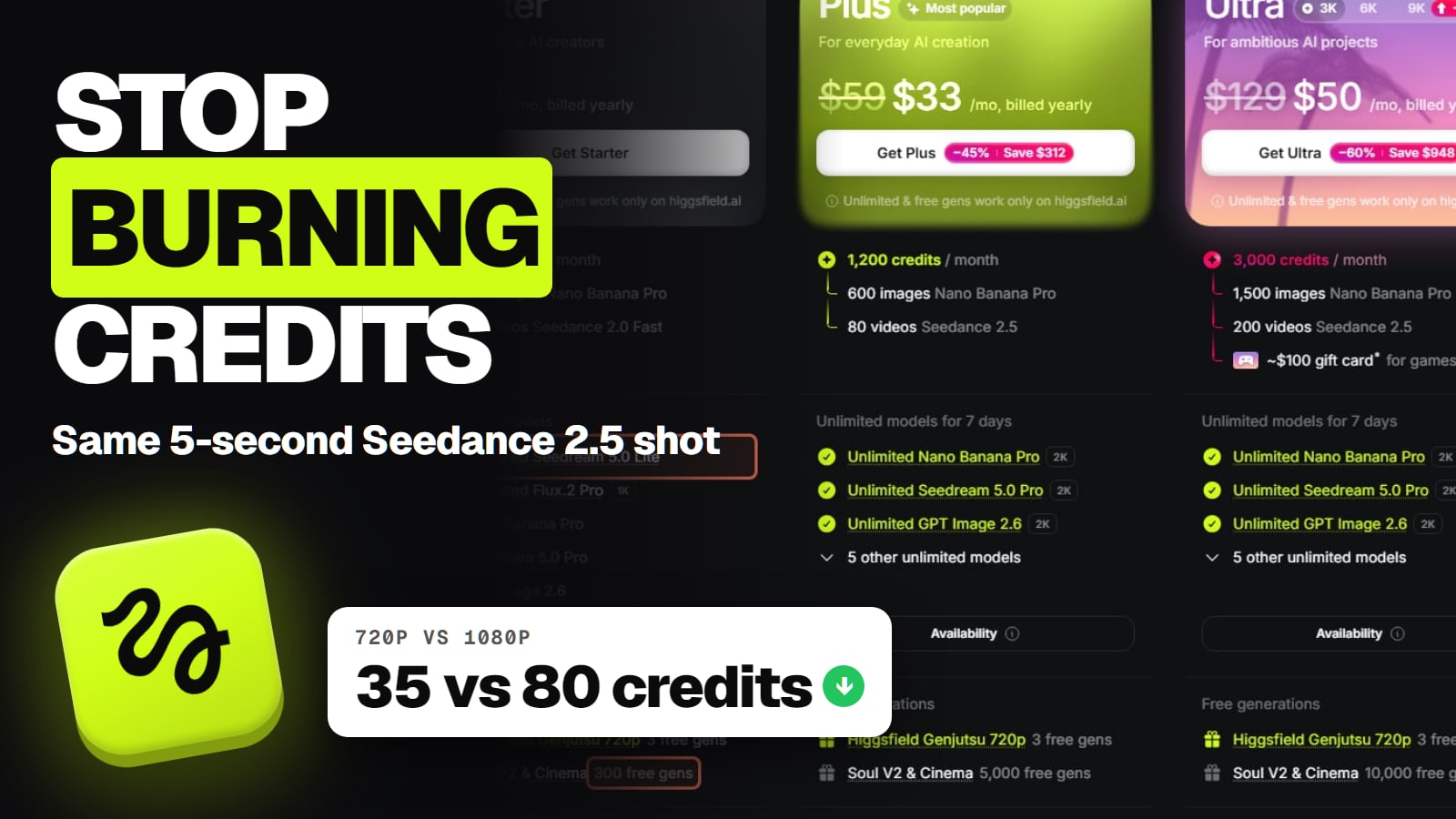
The same 5-second Seedance 2.5 shot costs 35 credits at 720p and 80 at 1080p on Higgsfield's pricing page. Draft cheap, finish once, use the Unlimited models and free generations your plan already includes, and stop the leaks Higgsfield's own help center lists. Read November 22, 2026.
Higgsfield credits go fast because the expensive settings are one click away. A 1080p clip, a batch of four, a re-roll through an agent: each one quietly multiplies what you pay. The fixes below come from Higgsfield's own help center and pricing page, and most of them cost you nothing but a habit.
1. Draft at 720p, then render the keeper once at 1080p
Resolution is the biggest lever you control. Higgsfield's credits article says every generation "costs a certain number of credits depending on the model, resolution, and duration", and its pricing page prices each video model per 5 seconds. For Seedance 2.5, 720p is 35 credits and 1080p is 80, so a 720p take costs 44% of a 1080p one.
Most first takes are thrown away anyway. Test the prompt, the camera move and the timing at 720p, and only send the version you like to 1080p.
Five tries, all at 1080p (5 × 80)
Credits
400
Four tries at 720p, one final at 1080p (4 × 35 + 80)
Credits
220
Saved
Credits
180, or 45%
Credits
Five tries, all at 1080p (5 × 80)
400
Four tries at 720p, one final at 1080p (4 × 35 + 80)
220
Saved
180, or 45%
Keep drafts short too. Duration is one of the three things Higgsfield names as setting the cost, so a 5-second test tells you whether the motion works without paying for a long clip. Our how much does a Higgsfield video cost page turns these credit numbers into dollars per plan.
2. Use the Lite, Fast and Flash versions for tests
Several Higgsfield models come in a cheaper variant, and the price gap is bigger than the resolution gap. The table is the same 5-second shot at different settings, read from the Compare features table on Higgsfield's pricing page on November 22, 2026.
Higgsfield Genjutsu 1080p
Credits
100
Share of the family's priciest setting
100%
Higgsfield Genjutsu 720p
Credits
35
Share of the family's priciest setting
35%
Higgsfield Genjutsu Lite 1080p
Credits
20
Share of the family's priciest setting
20%
Higgsfield Genjutsu Lite 720p
Credits
10
Share of the family's priciest setting
10%
Seedance 2.5 1080p
Credits
80
Share of the family's priciest setting
100%
Seedance 2.5 720p
Credits
35
Share of the family's priciest setting
44%
Seedance 2.0 1080p
Credits
~60
Share of the family's priciest setting
100%
Seedance 2.0 720p
Credits
~22
Share of the family's priciest setting
about 37%
Seedance 2.0 Fast 720p
Credits
~12
Share of the family's priciest setting
about 20%
Kling 4.0 1080p
Credits
18.75
Share of the family's priciest setting
100%
Kling 4.0 720p
Credits
12.5
Share of the family's priciest setting
67%
Kling 4.0 Flash 720p
Credits
7.5
Share of the family's priciest setting
40%
Wan 3.0 1080p
Credits
15
Share of the family's priciest setting
100%
Wan 3.0 720p
Credits
7.5
Share of the family's priciest setting
50%
Wan 3.0 480p
Credits
3.75
Share of the family's priciest setting
25%
Credits
Share of the family's priciest setting
Higgsfield Genjutsu 1080p
100
100%
Higgsfield Genjutsu 720p
35
35%
Higgsfield Genjutsu Lite 1080p
20
20%
Higgsfield Genjutsu Lite 720p
10
10%
Seedance 2.5 1080p
80
100%
Seedance 2.5 720p
35
44%
Seedance 2.0 1080p
~60
100%
Seedance 2.0 720p
~22
about 37%
Seedance 2.0 Fast 720p
~12
about 20%
Kling 4.0 1080p
18.75
100%
Kling 4.0 720p
12.5
67%
Kling 4.0 Flash 720p
7.5
40%
Wan 3.0 1080p
15
100%
Wan 3.0 720p
7.5
50%
Wan 3.0 480p
3.75
25%
A Lite or Fast model is a different model, not the same one at lower resolution, so the look and the motion can change. Use it to test framing and the idea; switch to the full model for the keeper. Our which Higgsfield model to use guide covers what each family is good at, so you pick the right one before spending.
Images follow the same pattern. On the same table, Seedream 5.0 Pro is 2.5 credits an image, Seedream 5.0 Lite 1 and Seedream 5.0 Flash 0.5. Nano Banana Pro is 2 credits, or 4 at 4K. Higgsfield Soul 2.0 is 0.12.
3. Use the Unlimited models your plan already includes
Unlimited models cost no credits at all on higgsfield.ai. Higgsfield's Unlimited article (read Nov 22, 2026) says generations on those models "don't deduct credits while the access is active". If the model you picked is covered, the generation panel shows an Unlimited toggle; switch it on.
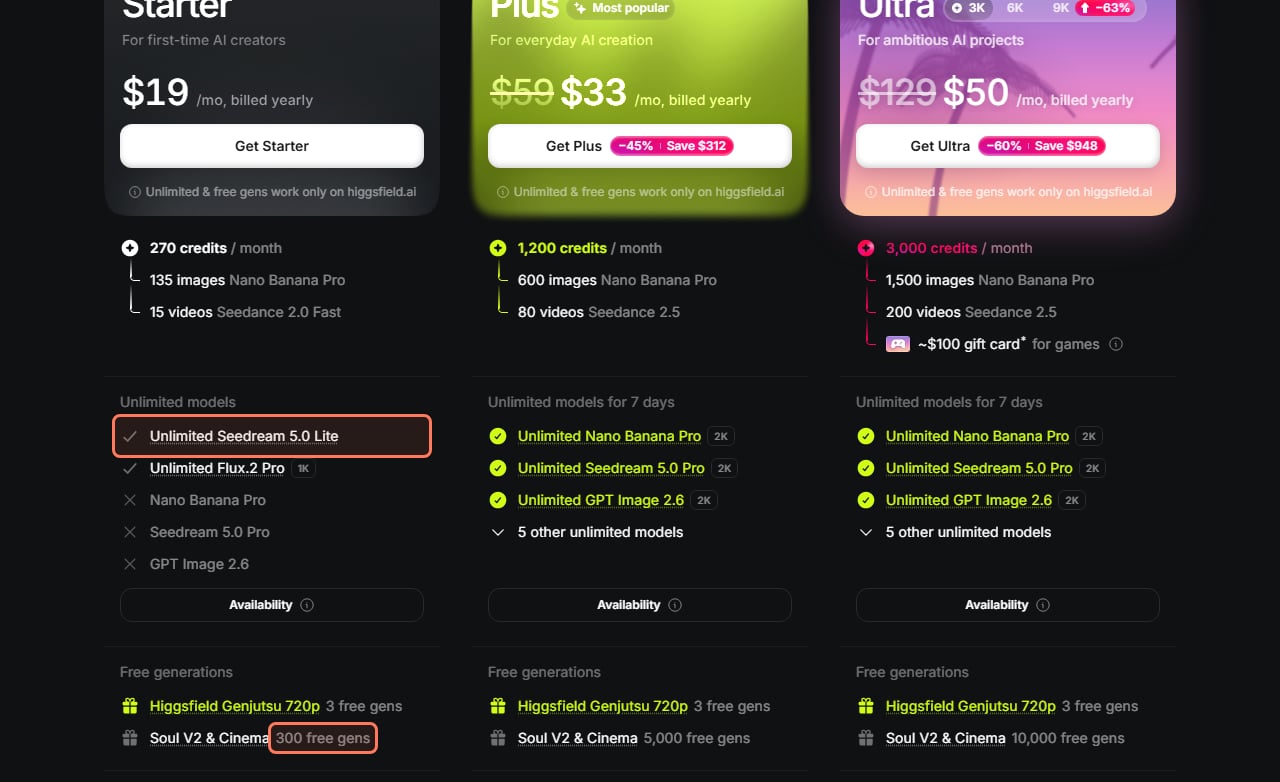
On the pricing page's plan cards that day, Starter listed Unlimited Seedream 5.0 Lite and Unlimited Flux.2 Pro. Plus and Ultra listed 7 days of Unlimited Nano Banana Pro, Seedream 5.0 Pro and GPT Image 2.6 at 2K, plus "5 other unlimited models". So if you make images, try the Unlimited model first and save credits for video.
There's a trade-off. Unlimited generations "run in the standard queue", while credit generations run in the priority queue, and Higgsfield says Unlimited speed "may temporarily vary" at peak hours. Switching the toggle off is Credit Mode: faster, but it costs credits. Our Higgsfield Unlimited explained page covers what each plan's Unlimited list includes.
Unlimited models and free generations on each plan card. higgsfield.ai/pricing, signed out, read November 22, 2026, during the Black Friday sale. The outlines are ours. · Higgsfield pricing page, screenshot by aliteq
4. Spend your free generations
Paid plans also come with free generations on specific models. On the November 22 plan cards, every paid plan had 3 free Higgsfield Genjutsu 720p generations, and Soul V2 and Cinema had 300 free gens on Starter, 5,000 on Plus and 10,000 on Ultra.
Three Genjutsu 720p drafts would otherwise cost 105 credits at 35 each. Use them to test a Genjutsu idea before you pay for a final take.
Two rules come with them. Higgsfield's credits article says free generations are "a one-time pool granted when you purchase the plan" and "do not renew upon your subscription renewal". And like Unlimited, they work on higgsfield.ai only. If you're on the free plan, our free Higgsfield credits page covers what you can get there.
5. Generate on higgsfield.ai, not through MCP, CLI or Canvas
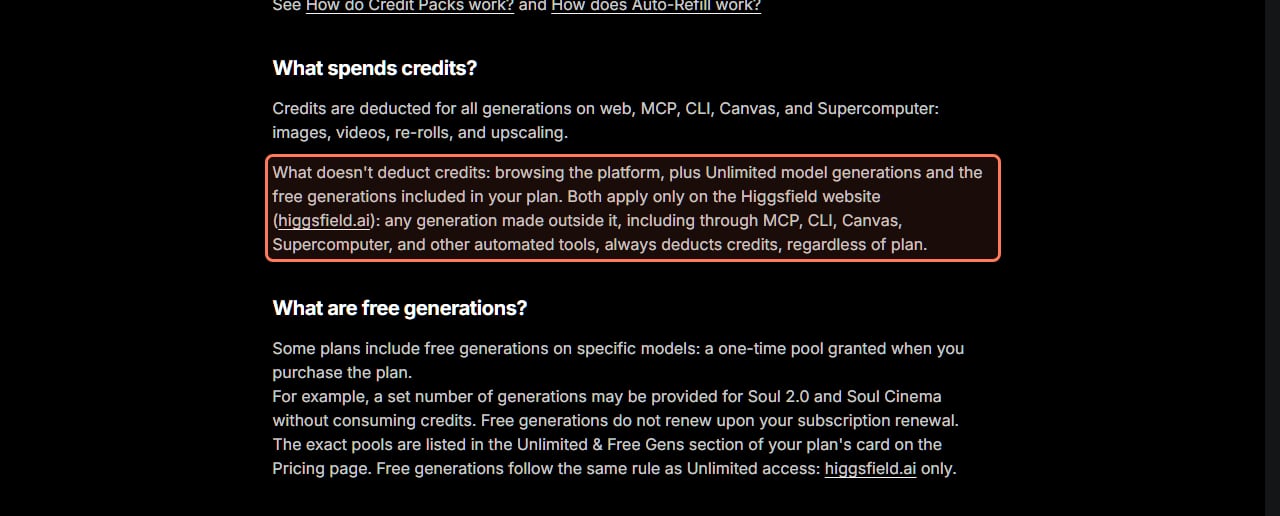
This is the leak people don't see coming. Higgsfield's What uses my credits article lists "Credits spent outside the website" as a top reason balances drop: "Generations through MCP, CLI, Canvas, Supercomputer, and other automated tools always deduct credits, even for models with Unlimited access on the web."
So a model that's free for you on the website costs full price when an AI agent runs it for you. If you use Higgsfield through Claude, ChatGPT or another agent, check Manage Account, then Usage: Higgsfield says those generations appear "tagged with the source".
Unlimited and free generations only skip credits on the website. From Higgsfield's How do credits work article, read November 22, 2026. The outline is ours. · Higgsfield help center, screenshot by aliteq
6. Keep batch size at 1
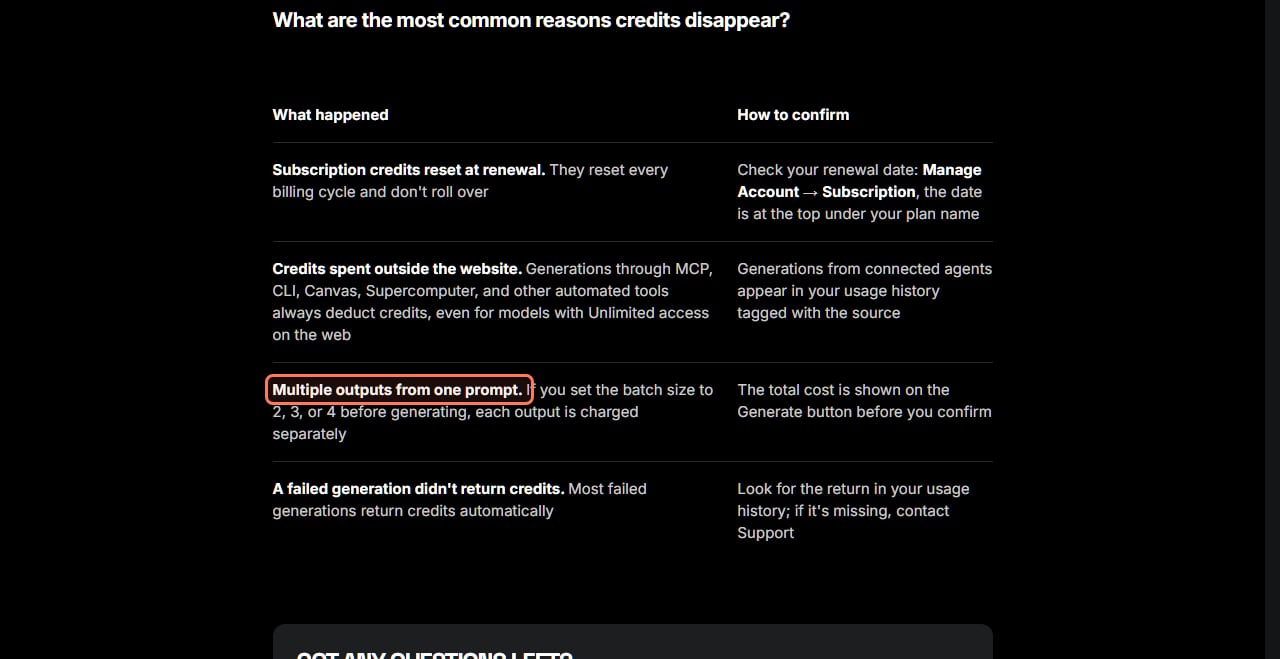
One prompt can cost four times what you expect. Higgsfield's What uses my credits article says: "If you set the batch size to 2, 3, or 4 before generating, each output is charged separately." Four 4K Nano Banana Pro images in one batch are 16 credits, not 4.
Batches are useful when you really want options, but set it back to 1 afterwards. The total for the whole batch is on the Generate button before you confirm. Re-rolls and upscales cost credits too: the credits article lists "images, videos, re-rolls, and upscaling" as what spends them.
Higgsfield's own list of where credits go. From its What uses my credits article, read November 22, 2026. The outline is ours. · Higgsfield help center, screenshot by aliteq
7. Cancel mistakes while they're queued, and check refunds
Spotted a typo after clicking Generate? Cancel fast. Higgsfield's stuck-or-failed article (updated Nov 20, 2026, read Nov 22) says that while a generation is In queue you can hover over its tile in Assets and click Cancel, "and any credits spent on it are returned." Once it reaches Processing or Generating, cancel no longer applies.
Failed generations mostly refund themselves. The same article says: "For most models, yes: the credits come back automatically, usually within a few minutes." The exception it names is Grok: "credits are deducted the moment a generation starts." Check Manage Account, then Usage, which logs every deduction and refund. If a refund is missing, contact support with the approximate time, the model and your prompt.
The article also lists what makes jobs fail: content filters, temporary errors, and "very long or complex prompts and heavy input files". Simplifying a heavy prompt saves you the wait even when the refund comes through. Our Higgsfield credits explained page covers the refund rules in more detail.
8. Spend plan credits before renewal; top-ups last 90 days
Subscription credits don't roll over. Higgsfield's credits article says they reset "on monthly plans with each paid renewal, on annual plans every 30 days", and unused ones expire. Check your renewal date in Manage Account, then Subscription, and plan bigger jobs for the days before it.
Top-ups work differently. Higgsfield's top-up expiry article (read Nov 22, 2026) says Credit Pack and Auto-Refill credits expire "90 days from purchase" and aren't tied to the billing cycle. Subscription credits are always spent first, then the rest by expiry date, soonest first. So a Credit Pack bought just before renewal sits untouched while the new monthly credits get used. Buy a pack when your plan credits are actually gone, not ahead of time.
Thinking of quitting with pack credits left? Higgsfield suggests downgrading to the lowest plan instead of canceling, "this keeps your credits accessible while reducing your monthly cost." Our Higgsfield plans compared page shows what each plan costs.
The numbers that decide your credit spend (Nov 22, 2026)
35
Credits per 5 s draft
Seedance 2.5 at 720p, pricing page
80
Credits per 5 s final
Seedance 2.5 at 1080p
90
Days a top-up lasts
Credit Pack and Auto-Refill credits
18
Credits per dollar
Auto-Refill rate, $1 buys
9. Leave Auto-Refill off unless a deadline needs it
Auto-Refill is off by default, and for saving credits that's the right setting. Higgsfield's Auto-Refill article (read Nov 22, 2026) says that once on, whenever your balance drops below your plan's threshold, it charges your saved card $20, $40, $90, $150 or $300 "at a rate of $1 = 18 credits". It isn't available on entry-level plans.
Compare that with plan credits. Plus lists 1,200 credits a month at a $59 list price, about 20 credits per dollar, and $33 a month billed yearly in the current sale, about 36. Auto-Refill's 18 per dollar is fewer than either. It's insurance against running dry mid-project, not a cheap way to buy credits. If you'd rather approve each purchase, Higgsfield says to "keep it off and buy Credit Packs manually".
What about parallel generations? On the plan cards, Starter runs 2 videos and 4 images at once, and Plus and Ultra list unlimited paid parallel generations. Running jobs side by side doesn't change the price of each one; it just lets you burn credits faster. Higgsfield says the parallel limit for Unlimited generations is lower than for credit ones.
How the savings add up on one project
Say you want one finished 5-second Seedance 2.5 clip at 1080p and a few product stills on Plus. Here is the arithmetic from the pricing page's numbers.
Make the stills on an Unlimited image model on higgsfield.ai (Plus listed Nano Banana Pro, Seedream 5.0 Pro and GPT Image 2.6 at 2K for 7 days): 0 credits.
Test the motion with four 5-second Seedance 2.5 drafts at 720p: 4 × 35 = 140 credits.
Render the keeper once at 1080p: 80 credits. Total 220, against 400 for five 1080p tries.
Batch size 1 the whole time; cancel any queued mistake for a refund.
Check Manage Account, then Usage, for refunds on anything that failed.
Plus's 1,200 monthly credits cover about five such clips at 220 each, against three at 400. If you only make a few clips a month, our cheaper way to use Higgsfield page compares plans and top-ups for light use, and your first Higgsfield video walks through the Generate screen where these settings live.
If you're about to pay, Higgsfield's affiliate page (read Nov 22, 2026) says everyone who arrives through a partner link "gets up to 50% off for three hours". It applies automatically, with no code. The Higgsfield buttons on this page are that kind of link. Higgsfield's Black Friday sale was also live on November 22, 2026, at up to 63% off billed yearly, with the countdown pointing at midnight UTC on November 23.
What we couldn't verify
Exact cost for longer clips. The pricing page lists credits per 5 seconds; Higgsfield says duration changes the cost but doesn't publish whether it scales exactly. The Generate button is the final number.
How close a Lite, Fast or Flash draft looks to the full model. They're separate models; we didn't run side-by-side tests, so check one draft before relying on it.
Which models besides Grok don't refund failed generations. Higgsfield says "for most models" and names only Grok.
The "80 videos Seedance 2.5" on the Plus card. At 35 or 80 credits per 5 seconds, 1,200 credits don't stretch to 80 clips, and the card doesn't say which length or resolution it assumes.
Credit Pack prices and the "credit top-ups with discount" on paid plans. The pricing page lists the discount but not the pack prices signed out, so we can't compare packs with plan credits per dollar.
Pack credits after canceling. One answer in Higgsfield's top-up article says they stay usable on the free plan; another in the same article says they're "unavailable until you reactivate".
Your plan's Auto-Refill threshold. Higgsfield shows it only in the set-up window.
Our verdict
The cheapest credit is the one you don't spend on a throwaway take. Draft at 720p or on a Lite model, render once at 1080p, and keep batch size at 1. Use the Unlimited models and free generations your plan includes, on the website, not through an agent. Spend plan credits before renewal, buy packs only when you've run out, and leave Auto-Refill off unless a deadline needs it. None of this needs a bigger plan, and on Higgsfield's own numbers it can cut the cost of a finished clip nearly in half.
Draft at 720p and render once at 1080p, use Lite or Fast models for tests, keep batch size at 1, and use your plan's Unlimited models and free generations on higgsfield.ai. Higgsfield's What uses my credits article (read Nov 22, 2026) lists the common leaks: renewal resets, MCP or CLI use, and batch sizes above 1.
Why are my Higgsfield credits disappearing so fast?
The usual reasons, per Higgsfield, are a subscription reset at renewal, generations through MCP, CLI, Canvas or Supercomputer, which always cost credits, and a batch size of 2 to 4, where each output is charged. Manage Account, then Usage, logs every deduction.
Do Higgsfield credits roll over?
Subscription credits don't: they reset at each paid renewal on monthly plans and every 30 days on annual plans. Credit Pack and Auto-Refill credits last 90 days from purchase, across billing cycles.
Do Unlimited models use credits on Higgsfield?
Not on higgsfield.ai. The same models used through MCP, CLI, Canvas or Supercomputer always deduct credits. Unlimited generations also run in the standard queue, so they can be slower at peak times.
Do I get credits back for a failed Higgsfield generation?
For most models, yes, automatically and usually within a few minutes. Grok is the exception Higgsfield names: credits are deducted the moment a generation starts. Canceling a generation while it's still in queue also returns its credits.
How much does 720p save over 1080p on Higgsfield?
On the pricing page on November 22, 2026, a 5-second Seedance 2.5 clip was 35 credits at 720p and 80 at 1080p, and Genjutsu was 35 and 100. Genjutsu Lite at 720p was 10.
Higgsfield sales like 11.11 and Black Friday change prices for a few days at a time. When one starts, we read the real prices on Higgsfield's own page and email you what changed.
Written and sent by hand. One-click unsubscribe in every email. Emails may contain referral links.