Your 12 GB card can run more than you think, and less than the forums promise. We added up the real file sizes of FLUX.1, FLUX.2, SD 3.5 and SDXL, full and shrunk, and matched each to 8, 12, 16, 24 and 32 GB cards.
This post contains affiliate links. If you buy through them, Aliteq may earn a commission — at no extra cost to you. Prices change; check the seller’s own page for today’s price.
Share
Here is the 2am question I see most: I have this graphics card, can it make AI images? Forum answers range from "8 GB is plenty" to "buy a 4090". Both can be true, depending on which file you load. So I skipped the opinions and read the file sizes.
On October 3, 2026 we pulled the official file listings from Hugging Face for FLUX.1, FLUX.2, Stable Diffusion 3.5 and SDXL, plus the shrunk versions ComfyUI points to. Then we did the arithmetic. We have not run any of these models on any card. Every number below is a file size or a sum of file sizes, and the method is printed. For setup steps, see our guides to running Flux locally and running Stable Diffusion locally.
Why a model needs three files, not one
Every model here is really three models: a text encoder, a diffusion model and a VAE. The text encoder turns your prompt into numbers. The diffusion model builds the image. The VAE (variational autoencoder) turns the result into pixels. Each file has its own size.
That matters because ComfyUI doesn't keep them all on the card at once. Its own help text for the --highvram switch says: "By default models will be unloaded to CPU memory after being used." The text encoder runs, steps aside, then the diffusion model runs. So the card needs to hold the biggest single piece, while your system RAM holds the rest. Even an all-in-one checkpoint gets split: ComfyUI's docs say its checkpoint loader "splits it into three core components".
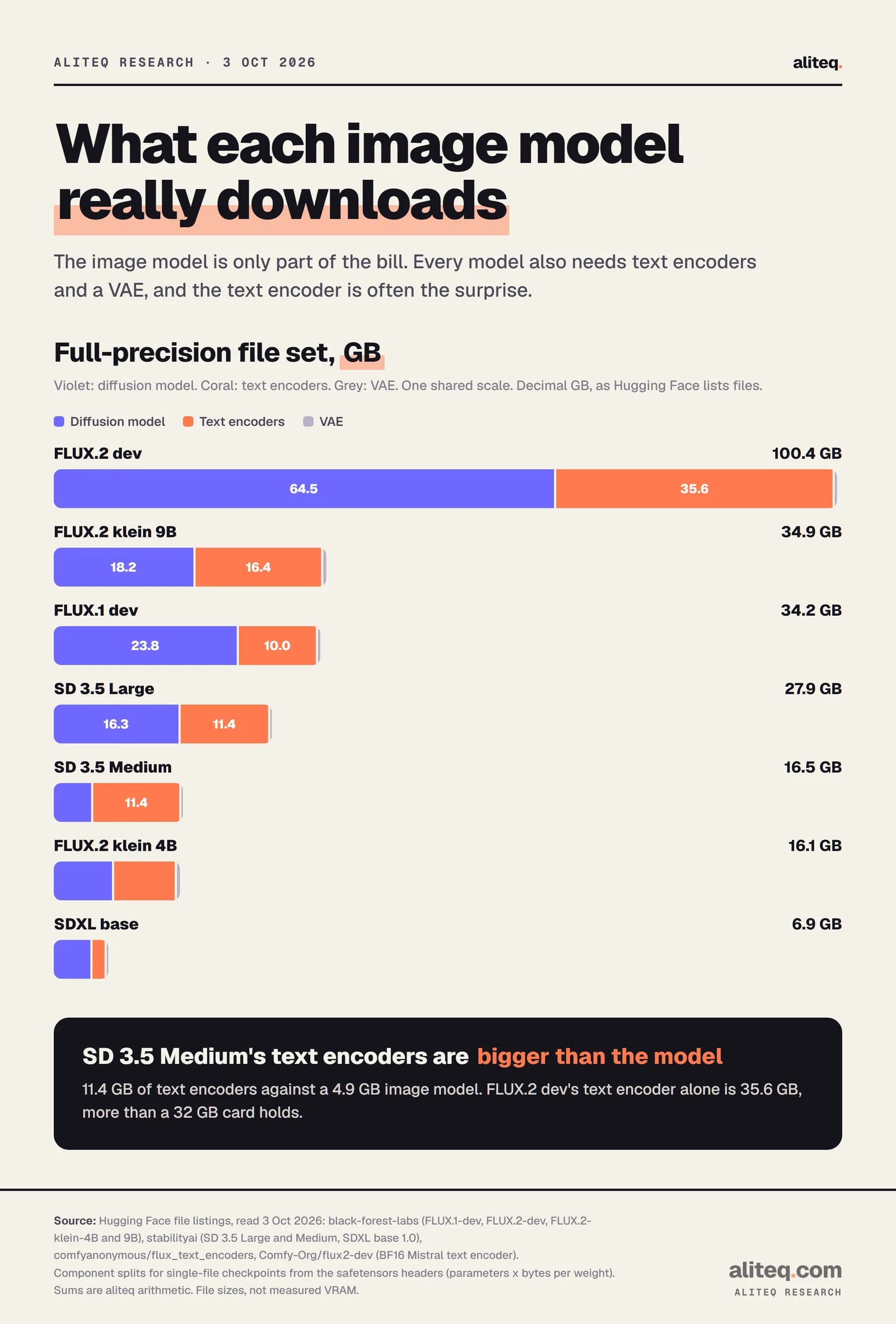
Full-precision file sets, from Hugging Face listings and safetensors headers. Read October 3, 2026. · aliteq research
ComfyUI's own numbers back this up for one model. Its FLUX.2 klein tutorial lists 8.4 GB of VRAM for the distilled 4B model. That workflow's files add up to 12.45 GB, and its biggest file, the text encoder, is 8.04 GB. The peak tracks the biggest piece, not the total.
Full-precision file sizes, model by model
At full precision the sets run from 6.9 GB for SDXL to 100.4 GB for FLUX.2 dev. The image model alone is 23.8 GB for FLUX.1 dev and 64.5 GB for FLUX.2 dev. Text encoders add from 1.6 GB for SDXL to 35.6 GB for FLUX.2 dev.
Full-precision file sizes (GB, read Oct 3, 2026)
FLUX.1 dev (12B)
Diffusion model
23.80
Text encoders
10.04 (T5-XXL 9.79 + CLIP-L 0.25)
Total set
34.18
Licence
FLUX.1 dev non-commercial
FLUX.1 schnell (12B)
Diffusion model
23.78
Text encoders
10.04
Total set
34.16
Licence
Apache 2.0
FLUX.2 dev (32B)
Diffusion model
64.45
Text encoders
35.58 (Mistral 3 Small, ComfyUI file)
Total set
100.37
Licence
FLUX non-commercial
FLUX.2 klein 9B
Diffusion model
18.16
Text encoders
16.38 (Qwen3 8B)
Total set
34.88
Licence
FLUX non-commercial
FLUX.2 klein 4B
Diffusion model
7.75
Text encoders
8.04 (Qwen3 4B)
Total set
16.13
Licence
Apache 2.0
SD 3.5 Large (8.1B)
Diffusion model
16.46 (incl. VAE)
Text encoders
11.43 (T5-XXL, CLIP-G, CLIP-L)
Total set
27.89
Licence
Stability Community
SD 3.5 Medium (2.5B)
Diffusion model
5.11 (incl. VAE)
Text encoders
11.43
Total set
16.54
Licence
Stability Community
SDXL base 1.0
Diffusion model
6.94 (one file, all parts)
Text encoders
1.64 of the 6.94
Total set
6.94
Licence
OpenRAIL++
Diffusion model
Text encoders
Total set
Licence
FLUX.1 dev (12B)
23.80
10.04 (T5-XXL 9.79 + CLIP-L 0.25)
34.18
FLUX.1 dev non-commercial
FLUX.1 schnell (12B)
23.78
10.04
34.16
Apache 2.0
FLUX.2 dev (32B)
64.45
35.58 (Mistral 3 Small, ComfyUI file)
100.37
FLUX non-commercial
FLUX.2 klein 9B
18.16
16.38 (Qwen3 8B)
34.88
FLUX non-commercial
FLUX.2 klein 4B
7.75
8.04 (Qwen3 4B)
16.13
Apache 2.0
SD 3.5 Large (8.1B)
16.46 (incl. VAE)
11.43 (T5-XXL, CLIP-G, CLIP-L)
27.89
Stability Community
SD 3.5 Medium (2.5B)
5.11 (incl. VAE)
11.43
16.54
Stability Community
SDXL base 1.0
6.94 (one file, all parts)
1.64 of the 6.94
6.94
OpenRAIL++
How we read each row:
FLUX sets add the VAE file, 0.34 GB. FLUX.2 dev's official repo stores its text encoder as ten files totaling 48.02 GB. We used ComfyUI's single 35.58 GB copy of the same encoder, which is the one you'd load in ComfyUI.
SD 3.5 files carry the VAE but not the text encoders. ComfyUI's SD3 page says they "do not contain text encoder/CLIP weights so you must load them separately".
SDXL ships as one 6.94 GB file. Its header splits it into a 5.13 GB UNet, 1.64 GB of text encoders and a 0.17 GB VAE.
Licences are from each repo. The FLUX.2 klein cards say the 4B model is Apache 2.0 and the 9B model is under "a non-commercial license". Stability's Community License is free for organizations or individuals "with less than $1M in total annual revenue".
FLUX.1 dev's image model at 23.80 GB is the one that catches people. A 24 GB card holds 25.77 GB, which leaves 1.97 GB for everything else. That is why full-precision FLUX.1 sits on the edge of a 24 GB card.
fp8 and GGUF: what shrinking buys you
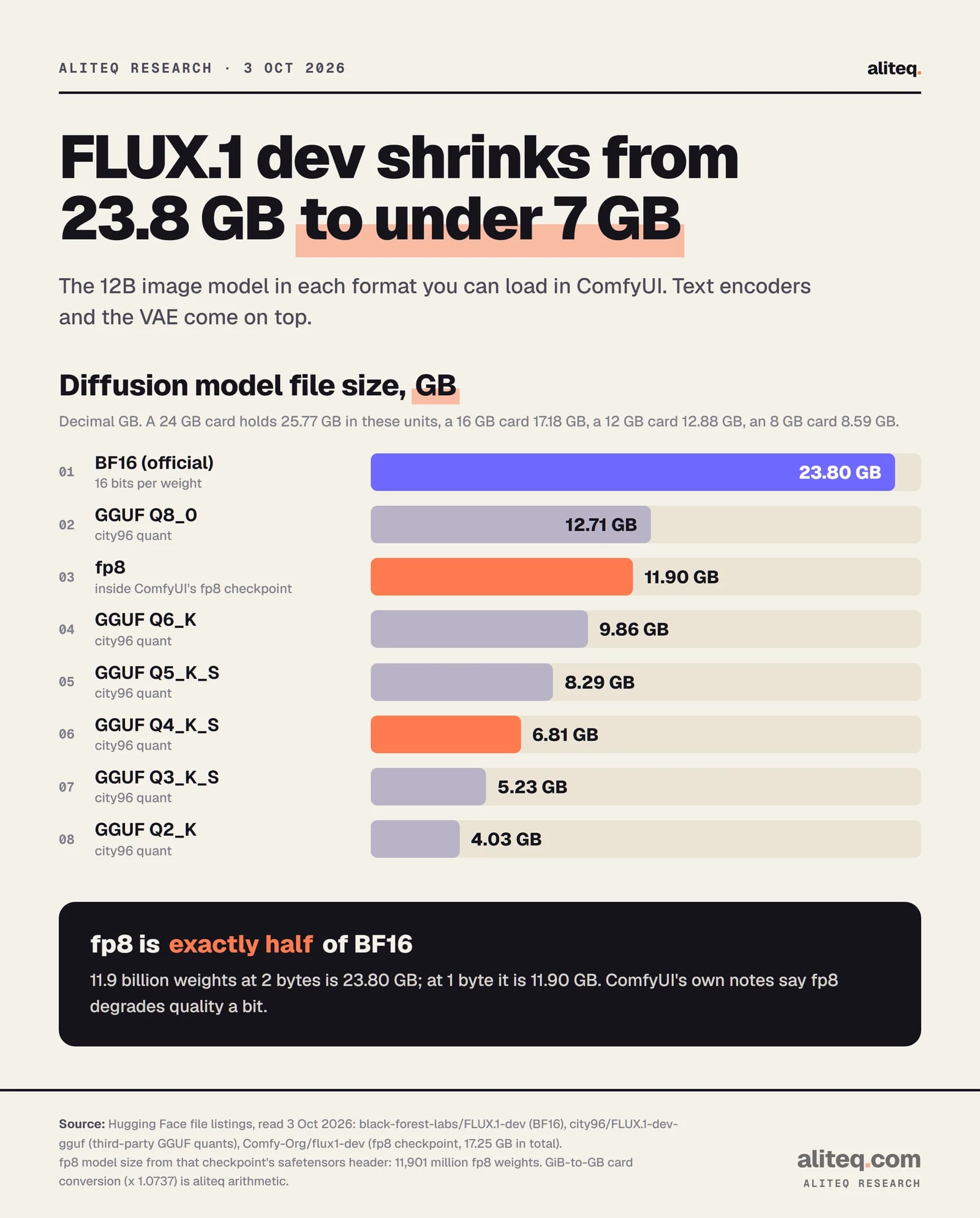
Shrinking the weights is how a smaller card gets in. fp8 stores each weight in 1 byte instead of 2, so it halves the file. GGUF quants go further: FLUX.1 dev's Q4_K_S is 6.81 GB, under a third of the original.
FLUX.1 dev image model only. Text encoders and the VAE come on top. Read October 3, 2026. · aliteq research
The arithmetic is simple. FLUX.1 dev holds 11,901 million weights. At 2 bytes each that's 23.80 GB, and at 1 byte it's 11.90 GB. The header of ComfyUI's fp8 checkpoint confirms it: 11.90 GB of fp8 image model, 5.01 GB of text encoders and a 0.34 GB VAE, 17.25 GB in one file.
Shrunk setups, file sizes (GB)
FLUX.1 dev, fp8 checkpoint
Diffusion model
11.90
Text encoders
5.01
Total set
17.25
FLUX.1 dev, GGUF Q4_K_S + T5 Q4_K_M
Diffusion model
6.81
Text encoders
3.15
Total set
10.30
FLUX.2 dev, ComfyUI fp8 template
Diffusion model
35.46
Text encoders
18.03
Total set
53.83
FLUX.2 dev, 4-bit (diffusers)
Diffusion model
18.12
Text encoders
15.44
Total set
33.90
FLUX.2 klein 9B, ComfyUI fp8 template
Diffusion model
9.43
Text encoders
8.66
Total set
18.43
FLUX.2 klein 4B, ComfyUI template
Diffusion model
4.07 (fp8)
Text encoders
8.04
Total set
12.45
FLUX.2 klein 4B, fp8 + fp4 text encoder
Diffusion model
4.07
Text encoders
3.85
Total set
8.26
SD 3.5 Large, fp8 all-in-one
Diffusion model
8.24
Text encoders
6.53
Total set
14.93
SD 3.5 Large, GGUF Q4_0 + T5 Q4_K_M
Diffusion model
4.77
Text encoders
4.54
Total set
9.48
SD 3.5 Medium, fp8 T5 all-in-one
Diffusion model
4.94
Text encoders
6.53
Total set
11.64
Diffusion model
Text encoders
Total set
FLUX.1 dev, fp8 checkpoint
11.90
5.01
17.25
FLUX.1 dev, GGUF Q4_K_S + T5 Q4_K_M
6.81
3.15
10.30
FLUX.2 dev, ComfyUI fp8 template
35.46
18.03
53.83
FLUX.2 dev, 4-bit (diffusers)
18.12
15.44
33.90
FLUX.2 klein 9B, ComfyUI fp8 template
9.43
8.66
18.43
FLUX.2 klein 4B, ComfyUI template
4.07 (fp8)
8.04
12.45
FLUX.2 klein 4B, fp8 + fp4 text encoder
4.07
3.85
8.26
SD 3.5 Large, fp8 all-in-one
8.24
6.53
14.93
SD 3.5 Large, GGUF Q4_0 + T5 Q4_K_M
4.77
4.54
9.48
SD 3.5 Medium, fp8 T5 all-in-one
4.94
6.53
11.64
Where each file comes from:
fp8 files are Black Forest Labs' own (klein 4B and 9B) or ComfyUI's repackaged copies on its Comfy-Org Hugging Face account. FLUX.2 dev's "fp8mixed" file keeps some layers in BF16, which is why it's 35.46 GB and not half of 64.45.
GGUF files are third-party quants by city96, loaded through the ComfyUI-GGUF custom node. Its README says the format allows "much lower bits per weight variable bitrate quants on low-end GPUs".
The 4-bit FLUX.2 dev is the diffusers repo that Black Forest Labs' model card uses in an example that loads "a 4-bit quantized model with a remote text-encoder on an RTX 4090".
There is a cost. ComfyUI's Flux examples page says "fp8 degrades the quality a bit". We haven't compared image quality across formats, so we can't rank them for you. We'd start one step above the smallest file that fits.
Which card runs which model
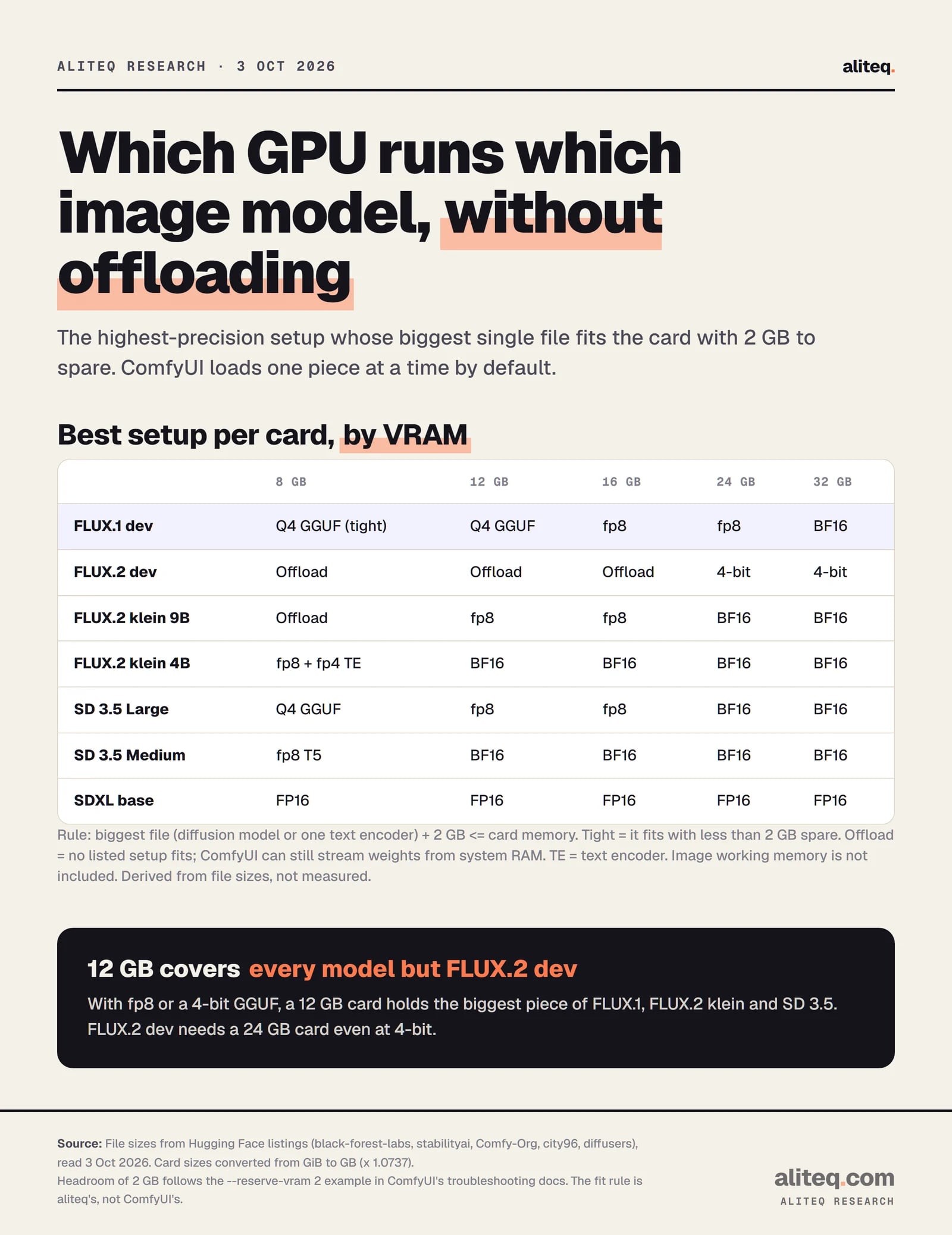
A 12 GB card covers every model in this piece except FLUX.2 dev, once you pick a shrunk format. FLUX.2 dev needs a 24 GB card even at 4-bit. SDXL runs at full precision on all of them.
Our rule: the biggest single file plus 2 GB must fit the card. Derived from file sizes, not measured. · aliteq research
The rule is ours, so here it is in full. A setup "runs" when its biggest file plus 2 GB fits the card's memory. The 2 GB mirrors the --reserve-vram 2 example in ComfyUI's troubleshooting docs. "Tight" means the file fits with less than 2 GB spare. "Offload" means no listed setup fits, so ComfyUI has to stream weights from system RAM.
Two vendor figures sit higher than our rule, and you should know why. The FLUX.2 klein 4B card says it "fits in ~13GB VRAM", and the 9B card says "~29GB VRAM" and "RTX 4090 and above". The cards don't say how those were measured. Our rule assumes ComfyUI's default of loading one piece at a time, while the cards' own example code uses the diffusers library. If your tool keeps more than one piece on the card, plan for the vendor figure.
ComfyUI already manages memory for you on Nvidia cards. Its own README claims it "can run even the biggest open source models on as low as 4GB vram + 8GB ram relatively quickly". That's the project's claim, not something we checked. The launch switches below change where each piece lives.
ComfyUI memory switches (v0.38.0, read Oct 3, 2026)
--lowvram
What ComfyUI's help text says it does
Makes the text encoders run on the CPU, but only if dynamic VRAM isn't in use
--novram
What ComfyUI's help text says it does
"When lowvram isn't enough."
--reserve-vram 2
What ComfyUI's help text says it does
Keeps that many GB free for your OS and other apps; some is reserved by default
--disable-smart-memory
What ComfyUI's help text says it does
Offloads to regular RAM aggressively instead of keeping models on the card
--cpu-vae
What ComfyUI's help text says it does
Runs the VAE on the CPU
--preview-method none
What ComfyUI's help text says it does
Turns off previews, which the docs say saves VRAM
--cpu
What ComfyUI's help text says it does
Everything on the CPU; the docs call it a last resort
What ComfyUI's help text says it does
--lowvram
Makes the text encoders run on the CPU, but only if dynamic VRAM isn't in use
--novram
"When lowvram isn't enough."
--reserve-vram 2
Keeps that many GB free for your OS and other apps; some is reserved by default
--disable-smart-memory
Offloads to regular RAM aggressively instead of keeping models on the card
--cpu-vae
Runs the VAE on the CPU
--preview-method none
Turns off previews, which the docs say saves VRAM
--cpu
Everything on the CPU; the docs call it a last resort
One detail most guides miss. In current ComfyUI, --lowvram "Doesn't do anything if dynamic vram is enabled". The startup code turns dynamic VRAM on by default for Nvidia cards on PyTorch 2.8 or newer, and for AMD on ROCm 7.14 or newer. So on a recent Nvidia setup, the old --lowvram advice is a no-op. The bigger lever is the file you load.
What the docs suggest when memory runs short:
Find your card's memory in GB and subtract 2. That's the biggest single file you should load.
Pick the image model file under that number: full precision, then fp8, then a GGUF quant.
Shrink the text encoder too. ComfyUI's examples suggest the fp8 T5 unless you have more than 32 GB of system RAM.
Close other GPU apps, and try --reserve-vram if your desktop stutters.
Still out of memory? Drop one quant step, or rent a bigger card for the session.
On the T5 text encoder, ComfyUI's two pages disagree. The examples page recommends the fp16 version "if you have more than 32GB ram". The docs site says "VRAM". We'd follow the examples page, since ComfyUI unloads the encoder to system RAM after use.
When renting beats upgrading
If your card can't hold FLUX.2 dev, renting one for an evening costs less than a new card. On October 3, 2026 our tracker showed an RTX 3090 (24 GB) at $0.22 an hour, an RTX 4090 (24 GB) at $0.34 and an RTX 5090 (32 GB) at $0.69 on Runpod, on demand.
That's enough for FLUX.2 dev at 4-bit, or FLUX.1 dev at fp8 with room to spare. Our cheapest cloud GPU for ComfyUI and Flux guide walks through renting one, and cost to run does the same math for chat models.
What these numbers don't tell you
They don't tell you speed. Seconds per image depend on the card, the step count and the resolution, and none of that was measured here. They don't tell you quality either. We didn't compare images across formats.
They also leave out working memory. Larger images, ControlNets and LoRAs (small add-on files that change a model's style) all need room on top of the weights. That's what the 2 GB margin is for, and a big batch can use more. Treat the scorecard as the starting point, then step down one format if you hit an out-of-memory error. For the full set of GPU tools, see /tools.
Quick answers
How much VRAM does FLUX.1 dev need?
The image model file is 23.80 GB at full precision, 11.90 GB at fp8 and 6.81 GB as a Q4_K_S GGUF. ComfyUI loads one piece at a time by default, so by our rule a 16 GB card runs fp8 and a 12 GB card runs the Q4 GGUF. Full precision fits a 24 GB card with under 2 GB to spare.
Can I run FLUX.2 dev on a 24 GB card?
Only in a 4-bit format. The full image model is 64.45 GB and ComfyUI's fp8 file is 35.46 GB. The 4-bit diffusers version is 18.12 GB, and Black Forest Labs' model card shows it on an RTX 4090 with the text encoder run remotely.
Will SD 3.5 Large run on 12 GB?
By file size, yes, at fp8. The image model part of ComfyUI's fp8 file is 8.24 GB and the biggest text encoder is 4.63 GB. At full precision the image model is 16.46 GB, so that needs a 24 GB card.
What can I run on an 8 GB card?
SDXL at full precision (5.13 GB UNet), SD 3.5 Medium with the fp8 T5, SD 3.5 Large as a Q4 GGUF and FLUX.2 klein 4B at fp8 with a 3.85 GB fp4 text encoder. FLUX.1 dev's Q4_K_S at 6.81 GB fits with less than 2 GB spare.
Does --lowvram still help in ComfyUI?
On a recent Nvidia setup, usually not. ComfyUI's help text says it "Doesn't do anything if dynamic vram is enabled", which is the default on Nvidia with PyTorch 2.8 or newer. Loading a smaller file does more.
Why is the text encoder so big?
Modern image models read prompts with a full language model. SD 3.5 uses T5-XXL, 9.79 GB at fp16, and FLUX.2 dev uses Mistral 3 Small, 35.58 GB at BF16. An fp8 or fp4 copy of the encoder is often the cheapest memory to save.