A 24 GB card runs Qwen3.8 27B at Q4 or Q5. Q8 needs 32 GB. The surprise is the context cache: 128K tokens costs about 8 GB, a quarter of what an older 32B model charges.
This post contains affiliate links. If you buy through them, Aliteq may earn a commission — at no extra cost to you. Prices verified at publish time.
Share
Qwen3.8 27B is a dense model with 27.78 billion parameters, and it is built to be run at home. The question I get is always the same: will it fit my card? I like questions I can answer with a spreadsheet, so here is the spreadsheet.
I read the model's config on Hugging Face on 3 October 2026 and ran the numbers through our VRAM engine. I have not loaded this model on any card. Everything below is arithmetic on published specs, checked against real file sizes. For the same math on other models, see our cost to run tool and the best GPU for local AI guide.
What the model is
Qwen3.8 27B is a dense, 64-layer model with a vision encoder, so it reads images and video as well as text. The weights file holds 27,781,427,952 parameters. Its model card lists a native context of 262,144 tokens.
One detail drives every number below. The model card describes the layout as 16 blocks of three linear-attention layers followed by one full-attention layer. Only those 16 full-attention layers keep a key-value cache, the memory of what you already said. The other 48 keep a small fixed state instead.
Qwen3.8 27B, from config.json (read 3 Oct 2026)
Parameters (all BF16 weights)
Value
27,781,427,952
Layers
Value
64 (16 full attention, 48 linear)
KV heads x head dimension
Value
4 x 256
Native context
Value
262,144 tokens
Input
Value
Text, image, video
Licence
Value
Apache-2.0
Value
Parameters (all BF16 weights)
27,781,427,952
Layers
64 (16 full attention, 48 linear)
KV heads x head dimension
4 x 256
Native context
262,144 tokens
Input
Text, image, video
Licence
Apache-2.0
How we work out the VRAM
The answer is three terms added together: weights, cache and overhead. Weights are parameters times bits per weight, divided by 8. The cache is 2 x full-attention layers x KV heads x head dimension x tokens x 2 bytes. Overhead is a flat 800 MiB for the runtime.
For Qwen3.8 27B the cache works out to 64 KiB per token: 2 x 16 x 4 x 256 x 2 bytes. That is 2 GB at 32K tokens and 8 GB at 128K. An 8-bit cache halves both.
weights  = 27.78e9 x bits_per_weight / 8
KV cache = 2 x 16 x 4 x 256 x tokens x 2 bytes   (= 64 KiB per token)
total    = weights + KV cache + 0.78 GB overhead

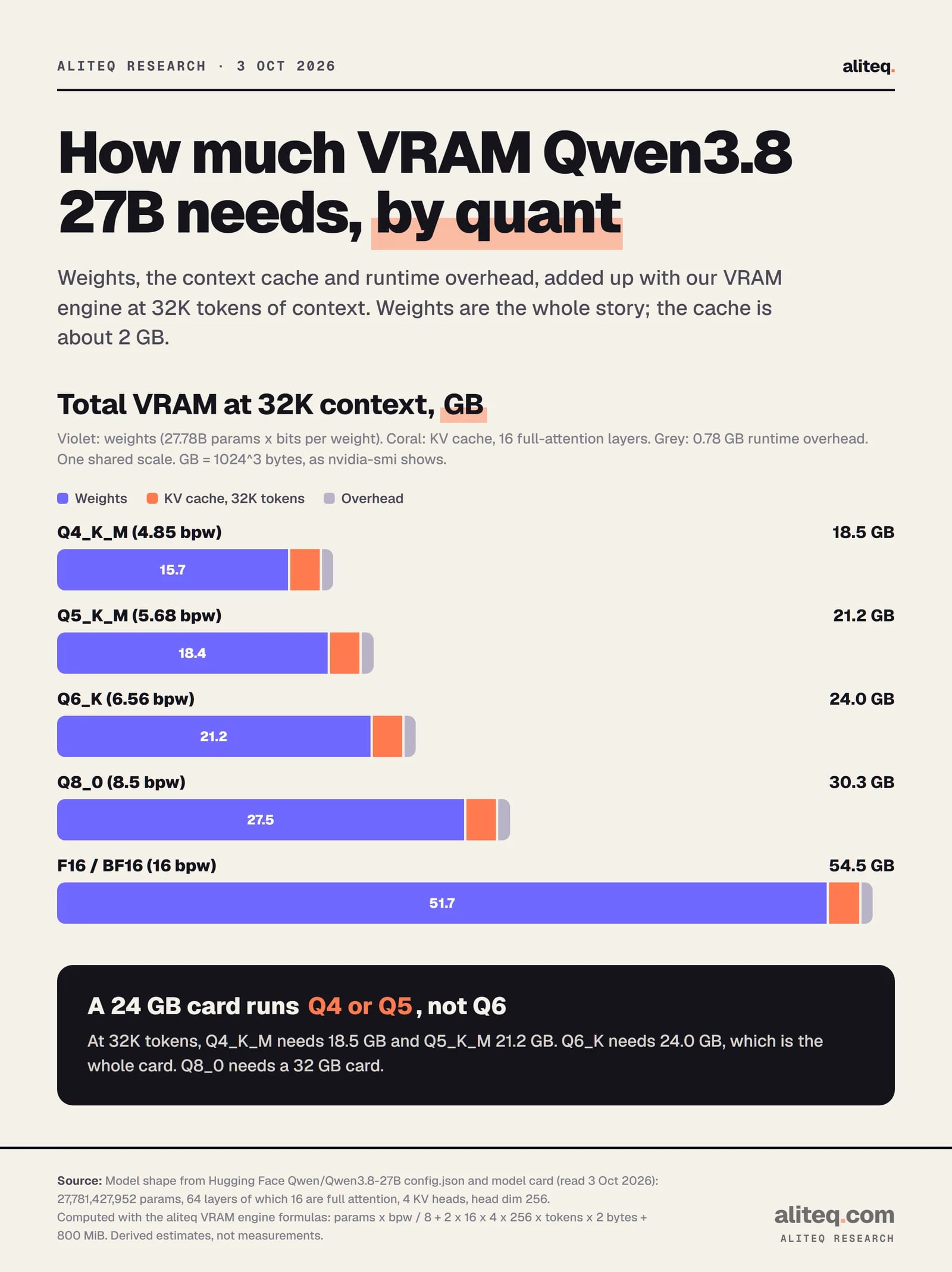
Q4_K_M at 32K: 15.69 + 2.00 + 0.78 = 18.5 GB
The linear-attention layers add a fixed state we leave out. By our estimate it is about 0.14 GB, and a safe allowance is under 0.5 GB. The bits-per-weight figures are the engine's effective values for llama.cpp quants, which run higher than the names suggest: Q4_K_M is 4.85, Q5_K_M 5.68, Q6_K 6.56, Q8_0 8.5.
VRAM by quant
Weights are most of the bill at every quant. At 32K tokens the cache is a flat 2 GB, so the quant you pick is the decision.
Derived with the aliteq VRAM engine, 32K context, fp16 cache. Not measured. · aliteq research
Total VRAM by quant and context (GB, computed)
Q4_K_M
Weights
15.7
8K tokens
17.0
32K tokens
18.5
128K tokens
24.5
256K tokens
32.5
Q5_K_M
Weights
18.4
8K tokens
19.7
32K tokens
21.2
128K tokens
27.2
256K tokens
35.2
Q6_K
Weights
21.2
8K tokens
22.5
32K tokens
24.0
128K tokens
30.0
256K tokens
38.0
Q8_0
Weights
27.5
8K tokens
28.8
32K tokens
30.3
128K tokens
36.3
256K tokens
44.3
BF16 (full)
Weights
51.7
8K tokens
53.0
32K tokens
54.5
128K tokens
60.5
256K tokens
68.5
Weights
8K tokens
32K tokens
128K tokens
256K tokens
Q4_K_M
15.7
17.0
18.5
24.5
32.5
Q5_K_M
18.4
19.7
21.2
27.2
35.2
Q6_K
21.2
22.5
24.0
30.0
38.0
Q8_0
27.5
28.8
30.3
36.3
44.3
BF16 (full)
51.7
53.0
54.5
60.5
68.5
Q4_K_M is the usual starting point. Our engine's note on it is that it gives the best quality per gigabyte for most people, and Q8_0 is effectively lossless when memory is not the limit. I would drop below Q4 only to make a bigger model fit, never to squeeze this one onto a smaller card.
Does the math match real files?
Close, and on the safe side. I compared the engine's weight figures with file sizes on Hugging Face from one community GGUF set (Unsloth, read 3 October 2026). Other publishers' quants will differ by a few percent.
Engine estimate vs real file size (GB, weights only)
Q4_K_M
Real file
15.33
Engine
15.69
Gap
+2.3%
Q5_K_M
Real file
18.41
Engine
18.37
Gap
-0.2%
Q6_K
Real file
20.47
Engine
21.22
Gap
+3.7%
Q8_0
Real file
27.05
Engine
27.49
Gap
+1.6%
BF16 (official safetensors)
Real file
51.75
Engine
51.75
Gap
0%
Real file
Engine
Gap
Q4_K_M
15.33
15.69
+2.3%
Q5_K_M
18.41
18.37
-0.2%
Q6_K
20.47
21.22
+3.7%
Q8_0
27.05
27.49
+1.6%
BF16 (official safetensors)
51.75
51.75
0%
Two caveats. The image input uses a separate file: the vision projector is 0.87 GB in that GGUF set, so budget about a gigabyte more if you send pictures. And Ollama's own qwen3.8 listing is 18 GB, which is bigger than the 16.8 GB (15.69 GiB) we compute for Q4 weights. Its page does not say why, so size your card from Ollama's number if you pull it there.
Which GPU holds it
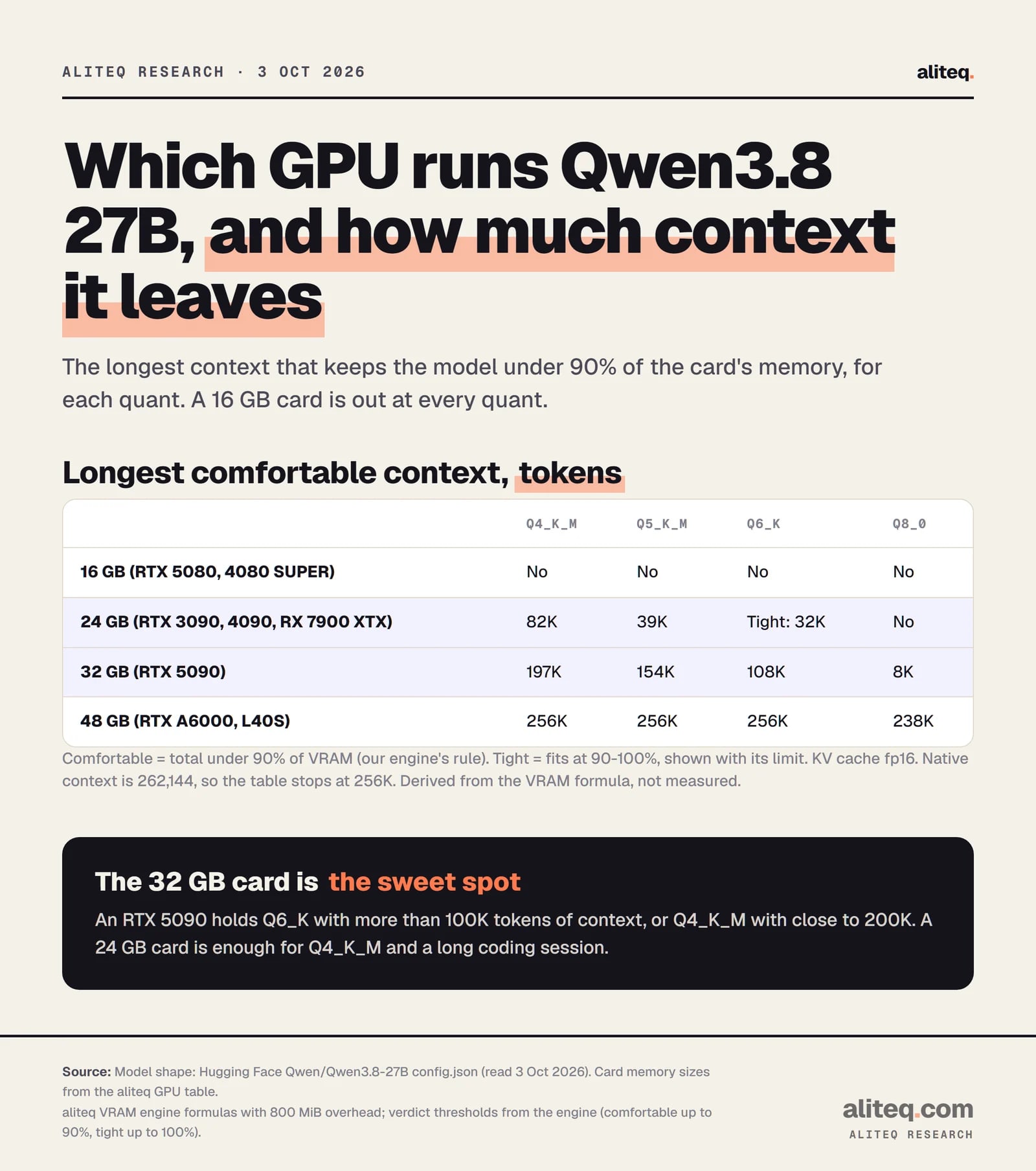
Pick the card by memory, then by how much context you need. The table below shows the longest context that keeps the model under 90 percent of the card, the point where a desktop or browser stops causing out-of-memory errors.
Comfortable means under 90 percent of VRAM. Derived from the formula, not measured. · aliteq research
16 GB. No. The Q4_K_M weights alone are 15.7 GB, and the runtime needs more on top. A 16 GB card such as the RTX 5080 or 4080 SUPER fits a smaller model, not this one.
24 GB. Yes, with limits. The RTX 3090, RTX 4090 and RX 7900 XTX all have 24 GB. Q4_K_M leaves room for about 82K tokens, enough for a long chat or a mid-size codebase. Q5_K_M gets about 39K. Q6_K only fits tight, at about 32K.
32 GB. The comfortable fit. The RTX 5090 holds Q6_K with about 108K tokens, or Q4_K_M with about 197K. Q8_0 fits, but with only about 8K tokens of room, so it is a weights-only quant here.
48 GB. Everything, including the model's full native context. An RTX A6000 or L40S runs Q8_0 with about 238K tokens.
Why long context costs so little here
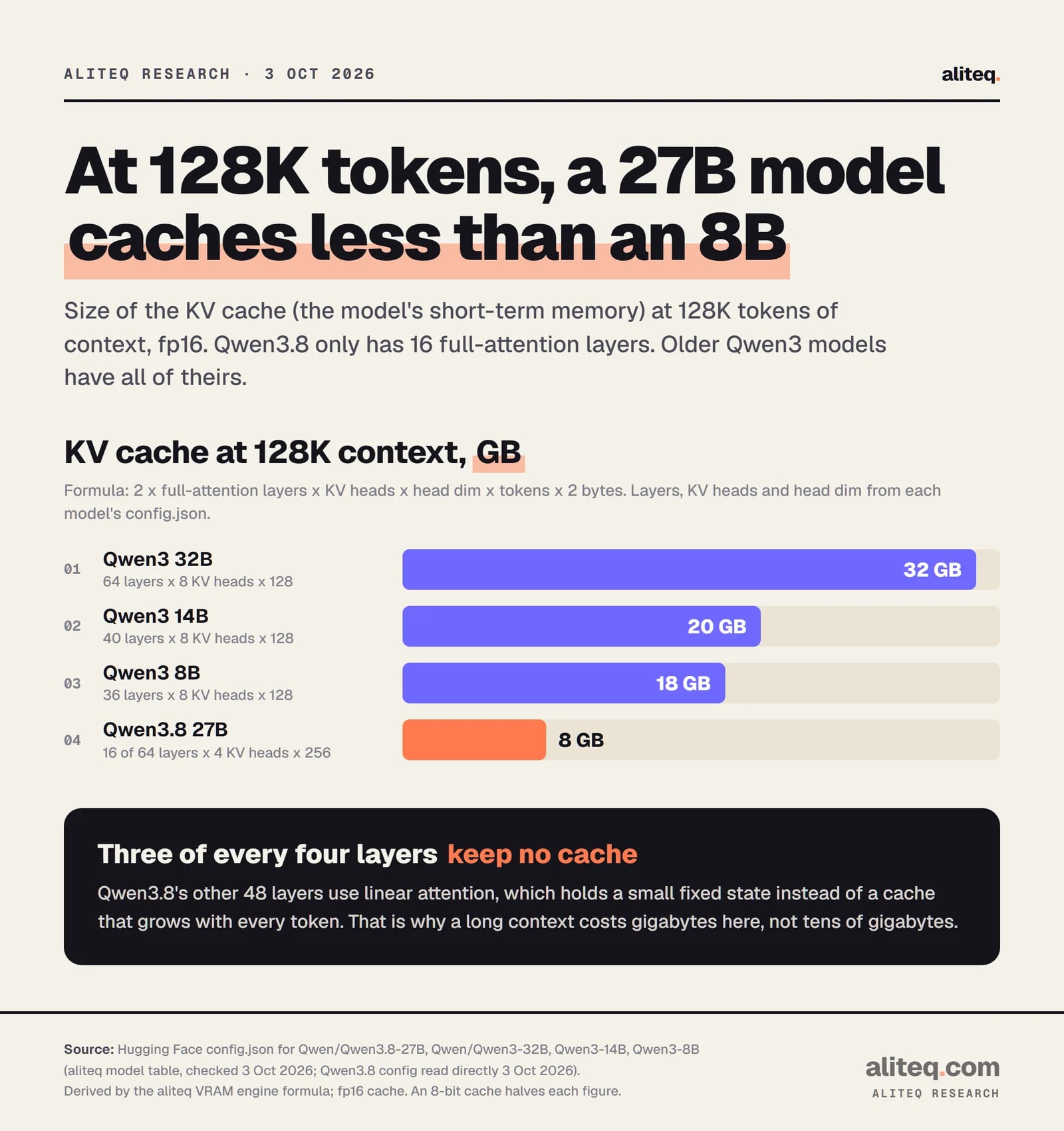
Most dense models are far hungrier. The cache grows with every token, and each full-attention layer adds to it. Qwen3 32B has 64 such layers with 8 KV heads each, so 128K tokens costs it 32 GB. Qwen3.8 27B costs 8.
Layers, KV heads and head dimension from each model's config.json. fp16 cache. · aliteq research
That is a quarter of Qwen3 32B's cache, and less than the 8B's. The reason is the layout in the config: three of every four layers use linear attention, which keeps a small fixed state instead of a growing cache. If a tool treats all 64 layers as full attention, it will report 32 GB at 128K and tell you the model does not fit when it does. We count only the 16 layers that keep a cache.
The same shape applies to the older Qwen3.6 27B: the config has the same layers, KV heads and exact parameter count, so its cost-to-run page and best GPU page give the same VRAM math today. We have not added Qwen3.8 itself to the tracker yet.
How to run it, and when to rent
The model card says Qwen3.8 works with Transformers, vLLM, SGLang and TokenSpeed, and recommends the last three for production and high throughput. For a desk-side setup, Ollama lists it as ollama run qwen3.8, which is the 27B at 18 GB with a 256K window. Unlike some other families, the bare tag here is the big model, not a small default. If you want to serve it to your apps, see how to run local AI as an API server.
If you do not own a 24 or 32 GB card, renting one costs less than you might think. On 3 October 2026 our tracker showed an RTX 4090 (24 GB) at $0.34 an hour and an RTX 5090 (32 GB) at $0.69 an hour on Runpod, on demand. Whether renting beats buying depends on your hours, which we cover in rent vs buy.
Referral link
No 32 GB card? Rent one
An RTX 5090 with 32 GB listed at $0.69 an hour on Runpod on demand, and an RTX 4090 with 24 GB at $0.34 an hour (our tracker, 3 Oct 2026). Prices move, so check the live figure before you rent.
Tip: sign up with Google. Runpod only applies its new-user referral bonus to Google sign-ups.
Referral link — we may earn a commission at no cost to you. Prices on our compare page are the provider's live figures, cheapest first; this never changes the ranking.
What these numbers do not tell you
They do not tell you speed. Tokens per second depends on your engine, your card's memory bandwidth and the quant, and we did not measure any of it. They do not tell you quality either. We did not run benchmarks, so we make no claim about how Qwen3.8 27B compares with other models.
They also assume an fp16 cache and a single user. An 8-bit cache halves the cache column. Several users at once multiply it by the number of live conversations. And the engine's overhead is a middle estimate, so leave headroom rather than aiming for 100 percent.
Qwen3.8 27B VRAM: quick answers
How much VRAM does Qwen3.8 27B need?
About 18.5 GB at Q4_K_M and 30.3 GB at Q8_0 with 32K tokens of context, and 54.5 GB at full BF16. Those are our formula's results, within 2 to 4 percent of real GGUF file sizes.
Can I run Qwen3.8 27B on a 24 GB GPU?
Yes at Q4_K_M or Q5_K_M. Q4_K_M leaves room for about 82K tokens of context and Q5_K_M for about 39K. Q6_K only fits tight, and Q8_0 does not fit.
Can a 16 GB card run it?
No. The Q4_K_M weights alone are about 15.7 GB, and the runtime and cache need more. Pick a smaller model for a 16 GB card.
Why is the context cache so small?
Only 16 of the model's 64 layers use full attention and keep a cache. The other 48 use linear attention with a small fixed state. That gives 64 KiB per token, about 8 GB at 128K tokens.
Which quant should I pick?
Start with Q4_K_M on 24 GB and Q6_K on 32 GB. Move up to Q8_0 only when you have 32 GB and need little context, or 48 GB and want both.
Does Qwen3.8 27B take images?
Yes. The model card describes it as a native vision-language model. The image input adds a separate vision file of about 0.9 GB in the GGUF set we checked.