32GB does not unlock 70B models. It buys better quants and a much longer memory for the 27B to 35B class. Five picks that fit a 5090, with the math shown.
This post contains affiliate links. If you buy through them, Aliteq may earn a commission — at no extra cost to you. Prices verified at publish time.
Share
The Commodore 64 had 64 kilobytes of memory. An RTX 5090 has 32 gigabytes, which is 524,288 times as much. I have spent my life watching people run out of whatever memory they have, and the 5090 will be no different. The trick is knowing where it goes.
This guide picks the local models that fit a 32GB card and shows the arithmetic. I read every model's config and card on Hugging Face on 4 October 2026 and ran the numbers through our VRAM engine. I have not loaded these models on a 5090. Every figure below is math on published specs, checked against real file sizes. If your card is smaller, start with our 24GB guide, 16GB guide, 12GB guide or 8GB guide.
The five picks for 32GB
The best local LLM for 32GB of VRAM is a short list, not one model. Qwen3.6 35B-A3B leads for coding agents because it holds 128K tokens at a good quant. Qwen3.8 27B is the dense all-rounder. Gemma 4 handles images. gpt-oss-20b is the fast, light option.
Best local LLMs for a 32GB GPU (computed, 4 Oct 2026)
Qwen3.6 35B-A3B
Best for
Coding agents, long tasks
Quant
Q5_K_M
Context
128K
Total VRAM
27.1 GB
Qwen3.8 27B
Best for
All-round, dense
Quant
Q6_K
Context
64K (up to 108K)
Total VRAM
26.0 GB
Gemma 4 31B
Best for
Images, documents
Quant
Q5_K_M
Context
32K (up to 72K)
Total VRAM
25.7 GB
Gemma 4 26B-A4B
Best for
Near-lossless, images
Quant
Q8_0
Context
32K (up to 79K)
Total VRAM
27.9 GB
gpt-oss-20b
Best for
Speed, full context
Quant
MXFP4 (native)
Context
128K
Total VRAM
19.6 GB
Best for
Quant
Context
Total VRAM
Qwen3.6 35B-A3B
Coding agents, long tasks
Q5_K_M
128K
27.1 GB
Qwen3.8 27B
All-round, dense
Q6_K
64K (up to 108K)
26.0 GB
Gemma 4 31B
Images, documents
Q5_K_M
32K (up to 72K)
25.7 GB
Gemma 4 26B-A4B
Near-lossless, images
Q8_0
32K (up to 79K)
27.9 GB
gpt-oss-20b
Speed, full context
MXFP4 (native)
128K
19.6 GB
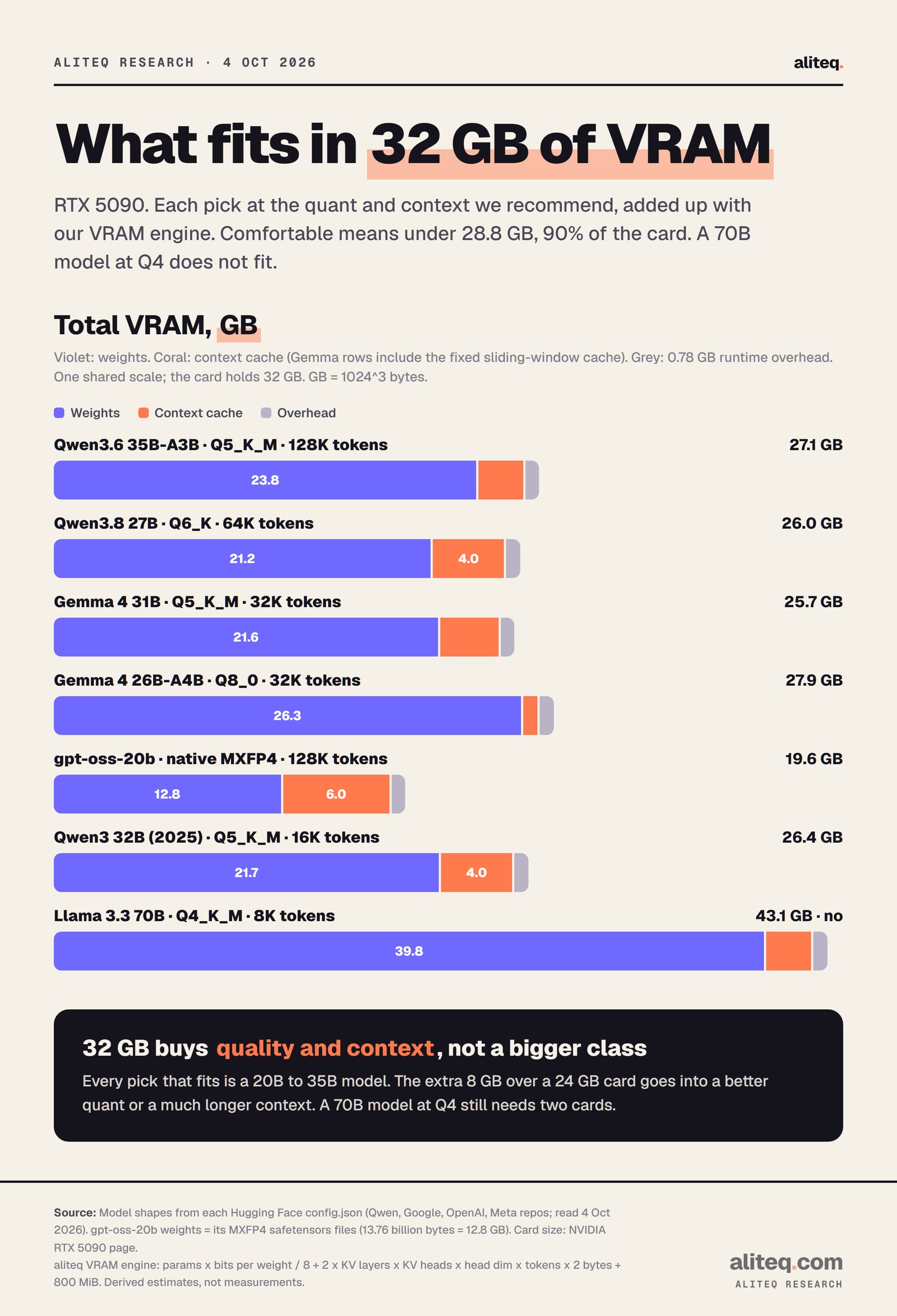
Each pick at the quant and context we recommend. Derived with the aliteq VRAM engine, not measured. · aliteq research
How we work out what fits
VRAM is three things added up: the model's weights, the context cache and a runtime overhead. Weights depend on the quant, which is how many bits each number is squeezed into. The cache grows with every token of conversation. The overhead is a flat 0.78 GB in our engine.
weights  = parameters x bits_per_weight / 8
cache    = 2 x cache layers x KV heads x head dimension x tokens x 2 bytes
total    = weights + cache + 0.78 GB overhead

Qwen3.6 35B-A3B, Q5_K_M, 128K tokens:
23.8 + 2.5 + 0.78 = 27.1 GB  (85% of a 32GB card)
Many 2026 models only keep a growing cache in some layers, so we count those layers alone. Gemma 4 also keeps a small fixed cache in its other layers: about 0.8 GB for the 31B and 0.2 GB for the 26B-A4B. We add it. You can run the same math on any model with our VRAM calculator.
Pick 1: Qwen3.6 35B-A3B, for coding agents with long context
Qwen3.6 35B-A3B is the model a 32GB card was made for. It is a Mixture-of-Experts model: 35B parameters stored, about 3B used per token. At Q5_K_M with 128K tokens of context it needs about 27.1 GB, which sits comfortably on a 5090 and does not fit on a 24GB card.
The 128K figure is not my idea. The model card says Qwen "advise maintaining a context length of at least 128K tokens to preserve thinking capabilities." On a 24GB card that means dropping to IQ4_XS, a slimmer 4-bit quant, to stay comfortable. Ollama's own qwen3.6:35b-a3b download is listed at 23 to 24 GB, which leaves a 24GB card almost nothing for context.
Qwen's card reports 73.4 on SWE-bench Verified for this model, run on Qwen's own agent setup. That is the vendor's number, not ours. Only about 0.6 GB of cache per 32K tokens is needed, because just 10 of its 40 layers keep one. See the full numbers on its cost-to-run page.
If you want a coding specialist instead, Qwen3-Coder 30B-A3B fits at Q6_K with about 50K tokens. Its cache costs about five times as much per token, so it runs out of room sooner.
Pick 2: Qwen3.8 27B, the dense all-rounder
Qwen3.8 27B is the best dense pick for 32GB. At Q6_K, a high-quality quant, it needs 24.0 GB with 32K tokens and leaves room for about 108K. That is the big step up from 24GB, where the same model is comfortable only at Q5_K_M with about 39K tokens.
Dense means every parameter works on every token. You trade speed for steady quality compared with a Mixture-of-Experts model. It also reads images and video, according to its model card. Qwen's card reports 61.7 on SWE-bench Pro, up from 53.5 for Qwen3.6 27B, using Qwen's own harness. Again, the vendor's figures.
The real files agree with our math. One community Q6_K file is 20.47 GB of weights against our 21.2 GB estimate, so the engine errs on the safe side. Its cost-to-run page has every quant.
Pick 3: Gemma 4 31B, or the 26B-A4B at Q8_0, for images
Gemma 4 is the pick when you feed the model pictures, scans or screenshots. On 32GB the dense Gemma 4 31B runs at Q5_K_M with 32K tokens in about 25.7 GB, with room for about 72K. On a 24GB card it drops to IQ4_XS.
Q6_K is a step too far for the 31B. It lands at about 29.0 GB with 32K tokens, which is 91 percent of the card. It may load, then run out of memory the moment another app touches the GPU. Google's card scores the 31B above the 26B-A4B on its image and long-context tests, such as 76.9 versus 73.8 percent on MMMU Pro.
The Gemma 4 26B-A4B is the other route. It is a Mixture-of-Experts model with 3.8B active parameters, and on 32GB it fits at Q8_0, which our engine calls effectively lossless. That needs about 27.9 GB at 32K tokens. Ollama sells this exact build as gemma4:26b-a4b-it-q8_0 at 28 GB. If you want help setting either one up, read how to run Gemma 4 31B locally.
Pick 4: gpt-oss-20b, when speed matters more than size
gpt-oss-20b is the light pick. OpenAI ships it in one format, MXFP4, and its weight files total 13.76 billion bytes, or 12.8 GB. With its full 128K tokens of context it needs about 19.6 GB by our engine, and the real figure is lower.
Here is the honest catch: you do not need a 5090 for this one. The same 19.6 GB is only 82 percent of a 24GB card. OpenAI's model card says it runs "within 16GB of memory." Buy 32GB for the first three picks. Run gpt-oss-20b on it as the quick model you keep loaded beside them. Its cost-to-run page has the details.
What 8GB more than a 24GB card buys
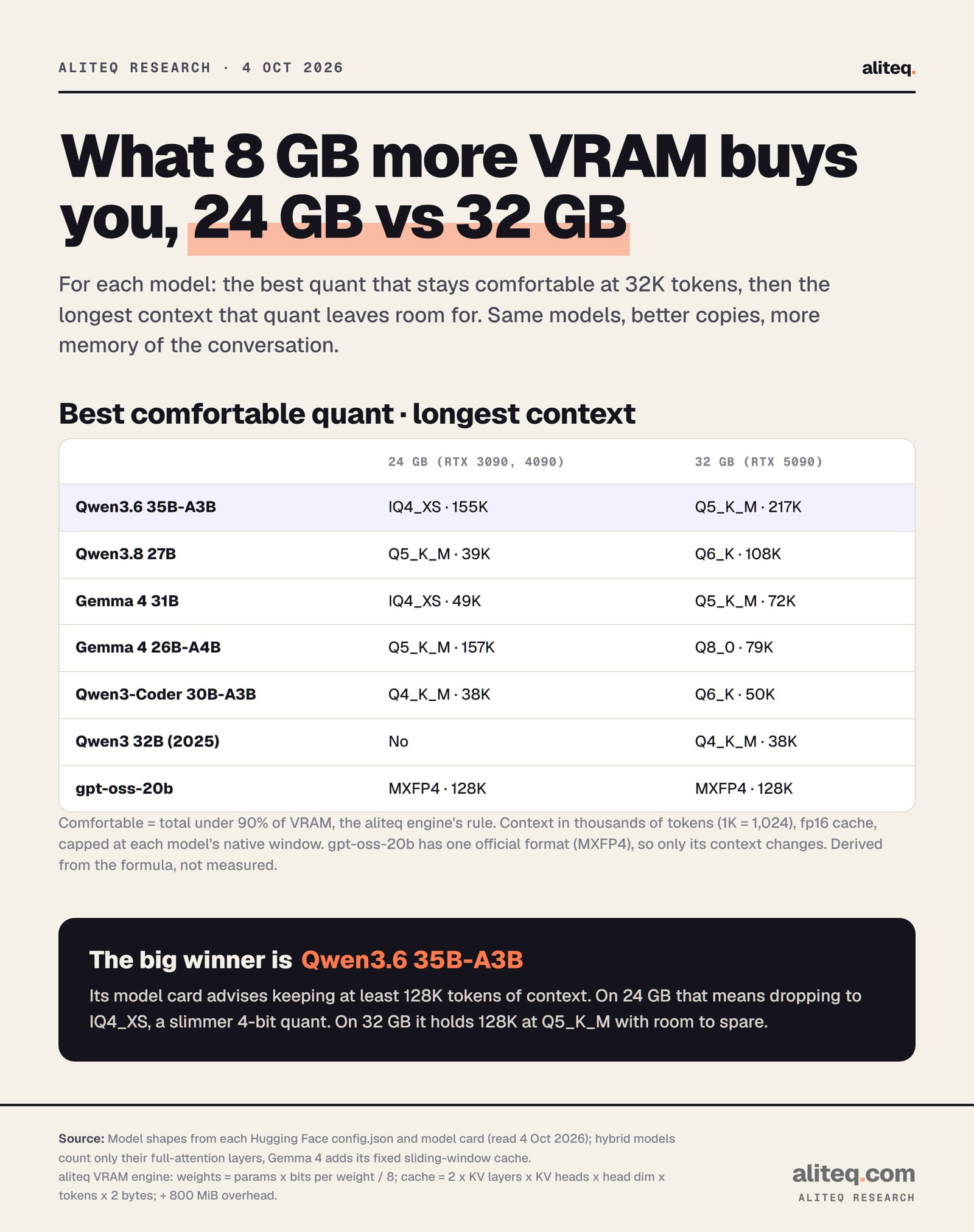
The extra 8GB buys quality and memory, not a bigger model class. The same models run on a 24GB card, but at slimmer quants and with less context. The gain is largest for the newer hybrid models, which spend so little memory per token that the spare gigabytes turn into 100K tokens or more.
Best quant that stays under 90 percent of the card at 32K tokens, then the longest context it allows. Derived, not measured. · aliteq research
Read the table as a choice, not a rule. The Gemma 4 26B-A4B shows the trade best: on 32GB you can take Q8_0 with about 79K tokens, or stay at Q5_K_M and keep far more context. If you are unsure which quant to trust, our quantization guide explains the ladder.
Why the old 32B models feel cramped
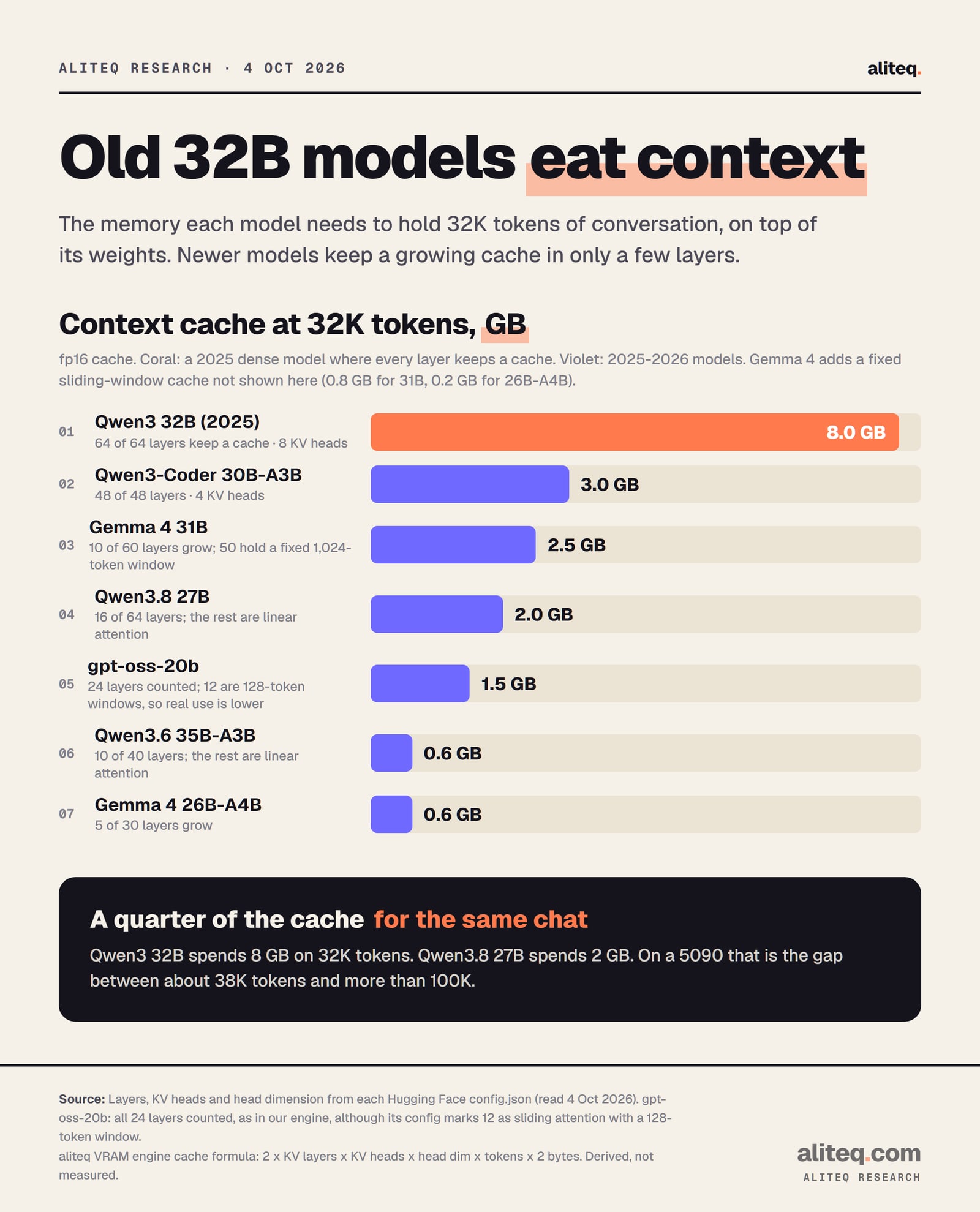
A 32GB card sounds made for "32B" models, but the 2025 dense ones are a poor fit. Qwen3 32B keeps a cache in all 64 layers, so 32K tokens costs it 8 GB. On a 5090 it is comfortable only at Q4_K_M, and only up to about 38K tokens.
Context cache for 32K tokens, fp16, from each model's config.json. Derived, not measured. · aliteq research
Compare Qwen3.8 27B: 2 GB for the same 32K tokens, a quarter of the older model's bill. That is why I would not buy a 5090 to run a 2025-era 32B model. The newer models are the ones that make the extra memory pay. A context window explainer covers why the cache grows at all.
What still does not fit in 32GB
The 70B class still does not fit a single 32GB card at a sensible quant. Llama 3.3 70B needs 39.8 GB for weights alone at Q4_K_M, and 43.1 GB with a short 8K context. Even Q3_K_M weights, at 32.1 GB, fill the whole card before any context.
You can squeeze a 70B in at 2-bit quants. One community Q2_K file is 24.56 GB. Our engine's note on Q2_K is blunt: "Almost always better to run a smaller model at Q4_K_M instead." I agree. Bigger Mixture-of-Experts models are further out: Qwen3-Next 80B needs about 45 GB of weights at Q4_K_M, and OpenAI says gpt-oss-120b fits "a single 80GB GPU." For those, see two cards versus one or rent.
Writing code with an agent? Start with Qwen3.6 35B-A3B at Q5_K_M and set at least 128K tokens of context.
Want one steady model for everything? Qwen3.8 27B at Q6_K, with 64K tokens or more.
Sending screenshots or scans? Gemma 4 31B at Q5_K_M, or the 26B-A4B at Q8_0.
Need instant answers? Keep gpt-oss-20b loaded. It does not need the full 32GB.
Want a 70B model? A single 32GB card is the wrong tool. Use two cards or rent one.
Do you need a 5090 for this, or should you rent?
You need 32GB of VRAM only if the first three picks are your daily work. For a weekend trial, renting is cheaper than buying. Whether a 5090 is worth its price for you is a separate question, which we answer in is the RTX 5090 worth it for local AI and the broader best GPU for local AI guide.
On 4 October 2026 our tracker showed RTX 5090 rentals from $0.38 an hour on Vast's spot market (median $0.58 across 55 offers) and $0.69 an hour on demand at Runpod. Prices move. Our rent vs buy breakdown shows where owning wins.
Referral link
No 32GB card? Rent an RTX 5090
An RTX 5090 with 32GB listed from about $0.38 an hour on Vast.ai's spot market (our tracker, 4 Oct 2026). Spot prices move, so check the live figure before you rent.
Referral link — we may earn a commission at no cost to you. Prices on our compare page are the provider's live figures, cheapest first; this never changes the ranking.
What these numbers do not tell you
They do not tell you speed. Tokens per second depends on your engine, your card and the quant, and we did not measure it. They do not rank model quality either. The benchmark figures above are each vendor's own, and we did not run any.
They also assume an fp16 cache and one user. An 8-bit cache roughly halves the cache figures. Each extra live conversation adds its own cache. Images add a separate vision file, about 0.8 to 1.1 GB in the community sets we checked. Leave headroom rather than aiming for 100 percent.
Quick answers
What is the best local LLM for 32GB of VRAM?
For coding and agent work, Qwen3.6 35B-A3B at Q5_K_M with 128K tokens, about 27.1 GB by our formula. For one dense all-rounder, Qwen3.8 27B at Q6_K. For images, Gemma 4 31B at Q5_K_M.
Can an RTX 5090 run a 70B model?
Not at a sensible quant. Llama 3.3 70B needs about 39.8 GB for weights at Q4_K_M. Only 2-bit quants squeeze in, and our engine advises a smaller model at Q4_K_M instead.
Is 32GB much better than 24GB for local AI?
Same models, better copies. Qwen3.8 27B goes from Q5_K_M with about 39K tokens to Q6_K with about 108K. Qwen3.6 35B-A3B goes from IQ4_XS to Q5_K_M at 128K tokens.
Why does Qwen3 32B fit so poorly on a 32GB card?
Its cache is large. All 64 layers keep one, so 32K tokens costs about 8 GB. Newer hybrid models like Qwen3.8 27B spend about 2 GB on the same context.
Do I need a 5090 for gpt-oss-20b?
No. With its full 128K context it needs about 19.6 GB by our engine, which fits a 24GB card comfortably. OpenAI's model card says it runs within 16GB of memory.
Which quant should I use on 32GB?
Q5_K_M or Q6_K for the 27B to 35B models, and Q8_0 for Gemma 4 26B-A4B. Keep the total under about 28.8 GB, 90 percent of the card, so other apps do not push it out of memory.