Your Radeon or Arc card can make AI images. The trick is picking the right backend, because three of the seven options are dead ends. We read ComfyUI's code, AMD's ROCm docs and Intel's PyTorch guide to sort them, then matched FLUX, SD 3.5 and SDXL to each card size.
I bought my first graphics card on price, not brand. Then every Stable Diffusion guide I opened started with "install CUDA". If you own a Radeon or an Arc card, you know that sinking feeling. The good news: the main tools now support your card directly, and the forum workarounds from 2023 are mostly obsolete.
On 4 October 2026 we read the install docs and source code of ComfyUI, AMD's ROCm documentation, PyTorch's Intel GPU guide and Intel's own projects. We have not installed or run any of this on any card. Everything below is what each project says about itself, plus file-size arithmetic. For the Nvidia-first setup, see our guide to running Stable Diffusion locally for free. For chat models on these cards, we have separate guides for AMD Radeon and Intel Arc.
The seven backends, and which three to use
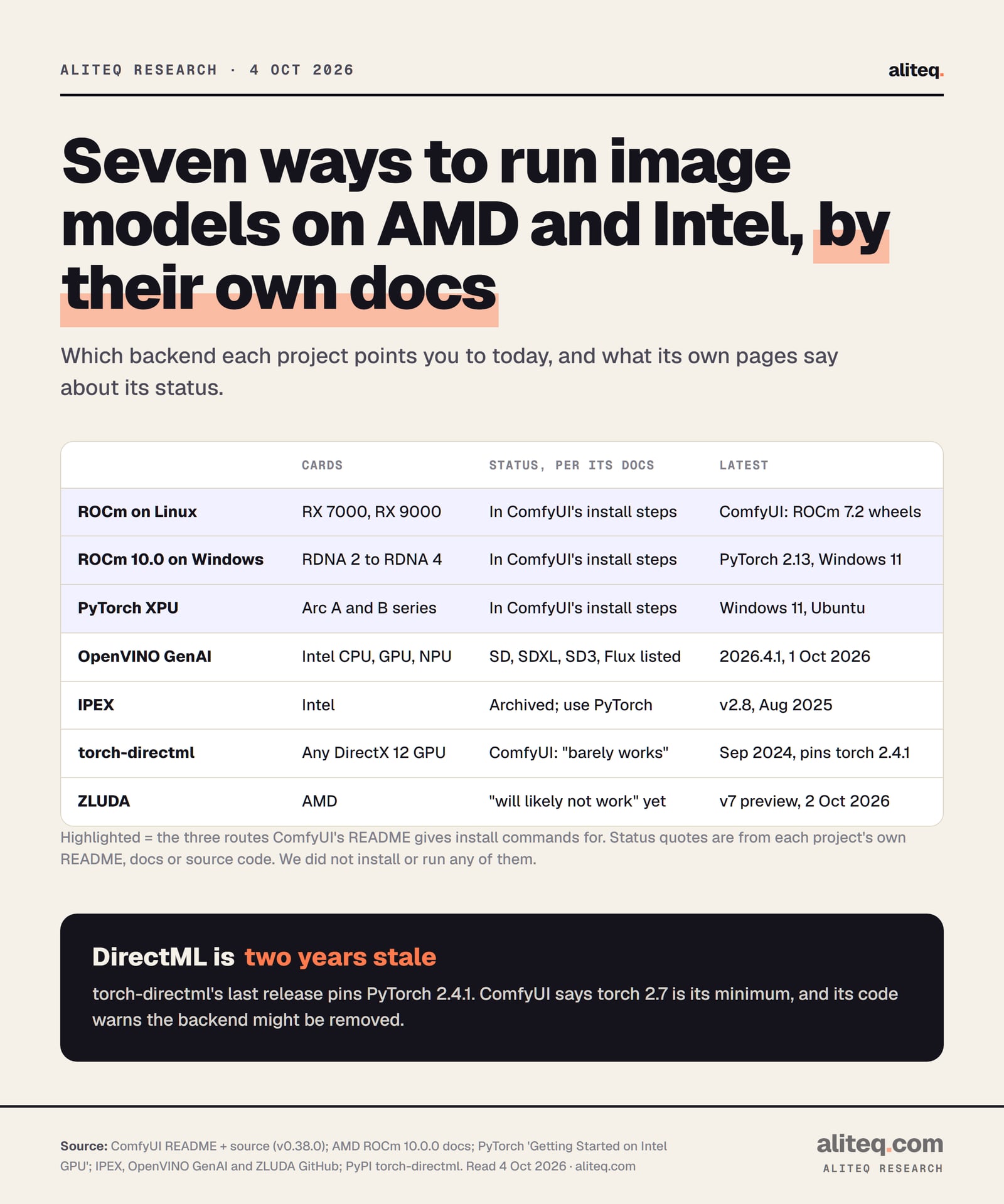
Three backends are in ComfyUI's own install steps for AMD and Intel: ROCm on Linux, ROCm 10.0 on Windows and PyTorch XPU. Those are the ones to use. OpenVINO is a solid Intel side road. DirectML, ZLUDA and IPEX are dead ends by their own docs or ComfyUI's.
A backend is the layer that lets PyTorch, the math library under ComfyUI, talk to your card. Nvidia's is CUDA. AMD's is ROCm. Intel's is called XPU inside PyTorch. Most old AMD and Intel guides used workarounds because these didn't exist yet for consumer cards on Windows.
Status in each project's own words. Read 4 October 2026. · aliteq research
ComfyUI's README now says its manual install "Supports all operating systems and GPU types (NVIDIA, AMD, Intel, Apple Silicon, Ascend)." Its latest release ships separate Windows portable builds for AMD (1.61 GB) and Intel (1.43 GB). The README still calls the portable build "not recommended for regular users", and its docs site lists the desktop app as "NVIDIA or AMD GPU recommended". So Arc owners should plan on the manual install or Intel's own app.
AMD Radeon on Linux: ROCm
On Linux, install ROCm-enabled PyTorch from PyTorch's own index, then run ComfyUI as normal. AMD's ROCm 10.0 compatibility matrix lists the Radeon RX 9000 and RX 7000 series. Consumer RX 6000 cards aren't on it, though ComfyUI offers an override for some of them.
ComfyUI's README gives one command for the stable build:
AMD's matrix names these Radeon cards: RX 9070 XT, 9070 GRE, 9070, 9060 XT, 9060 and 9050 (RDNA 4), and RX 7900 XTX, 7900 XT, 7900 GRE, 7800 XT, 7700 XT, 7700 and 7600 (RDNA 3). RDNA 2 appears only as two workstation cards, the Radeon PRO W6800 and PRO V620. Supported distributions include Ubuntu 26.04, 24.04.4 and 22.04.5.
For cards outside the list, ComfyUI's README offers a setting called HSA_OVERRIDE_GFX_VERSION. It tells ROCm to treat your card as a supported sibling. The README suggests 10.3.0 "For 6700, 6600 and maybe other RDNA2 or older" cards. Note the "maybe". That's the project hedging, and so are we.
Two more details from ComfyUI's source code. It turns off a library called MIOpen by default on newer AMD cards, with the comment "Seems to improve things a lot on AMD". And it only enables fp8 math (a compact number format) on RDNA 4 cards, the gfx1200 and gfx1201 chips, with ROCm 6.4 or newer. AMD also has its own ComfyUI on ROCm page that walks through the same clone, install and run steps.
AMD Radeon on Windows 11: ROCm 10.0 wheels
On Windows, AMD now ships PyTorch packages with ROCm built in. ComfyUI's README tells you to use them on Windows 11 with a current AMD driver and 64-bit Python 3.13, and says "a separate HIP SDK installation is not needed." That replaces the DirectML and ZLUDA workarounds.
The install is one pip command from AMD's package server. You pick a "device extra" that matches your chip, or device-all to cover every supported card. ComfyUI's README lists the common ones:
AMD device extras for Windows (ComfyUI README, read 4 Oct 2026)
RX 9070 / XT, Radeon AI PRO R9700
Device extra
device-gfx1201
RX 9060 / XT
Device extra
device-gfx1200
RX 7900 XT / XTX
Device extra
device-gfx1100
RX 7700 XT / 7800 XT
Device extra
device-gfx1101
RX 7600 / XT
Device extra
device-gfx1102
Ryzen AI Max / Max+ (Strix Halo)
Device extra
device-gfx1151
Device extra
RX 9070 / XT, Radeon AI PRO R9700
device-gfx1201
RX 9060 / XT
device-gfx1200
RX 7900 XT / XTX
device-gfx1100
RX 7700 XT / 7800 XT
device-gfx1101
RX 7600 / XT
device-gfx1102
Ryzen AI Max / Max+ (Strix Halo)
device-gfx1151
The README pins PyTorch 2.13.0 with ROCm 10.0.0. It adds that "supported architectures include RDNA 2, RDNA 3, RDNA 3.5, and RDNA 4", and AMD's install page does offer a package for the RDNA 2 chip (gfx1030). AMD's matrix lists Windows 11 25H2 and Adrenalin driver 26.8.1 for Radeon cards.
One Windows gotcha from AMD's own ComfyUI page: "On Windows, ComfyUI might not start if Smart App Control is enabled in your Windows security settings." If ComfyUI silently refuses to launch, check that first.
Intel Arc: PyTorch XPU, or AI Playground
Intel Arc cards run ComfyUI through PyTorch's built-in XPU support, on Windows 11 or Ubuntu. ComfyUI's README gives a single pip command. If you'd rather not touch a terminal, Intel's free AI Playground app installs ComfyUI and OpenVINO for you. Skip IPEX, the old add-on: Intel archived it.
PyTorch's Intel GPU guide lists the Arc A-Series and B-Series as validated, plus Core Ultra laptop chips with Arc graphics. It covers Windows 11, Ubuntu 24.04 and 26.04, and WSL2. To check the card is seen, the guide uses torch.xpu.is_available(). If that prints False, it says to "double check driver installation". The same guide still labels Intel GPU support a "Prototype" that arrived in PyTorch 2.5.
Older Arc guides tell you to install Intel Extension for PyTorch (IPEX). Don't. Its GitHub page now opens with "THIS PROJECT IS ARCHIVED" and says it "has been identified as having known security issues." Intel's own advice there: "We strongly recommend using PyTorch* directly going forward."
AI Playground is Intel's open-source app for Arc. Its README lists SDXL, Flux.1 Schnell, Flux.1 Kontext and FLUX.2 klein among its image models. It needs an Arc A or B card "with 8GB+ of vRAM" or a supported Core Ultra chip, and recommends "82GB+ of disk space". It calls itself "open-source beta software", and its Linux build is "experimental". The latest release was v3.2.1-beta on 1 October 2026.
OpenVINO is Intel's other route, outside ComfyUI. Its GenAI library has a Text2ImagePipeline that runs on an Intel "GPU" by name. Its supported-models table lists Stable Diffusion, SDXL, SD 3.5 Medium and Large, Flux (FLUX.1 schnell as the example) and FLUX.2 klein 4B. You convert a model first. The docs' SDXL example shrinks it to 4-bit weights with --weight-format int4. It's a Python library, not a point-and-click app.
Which image model fits your card
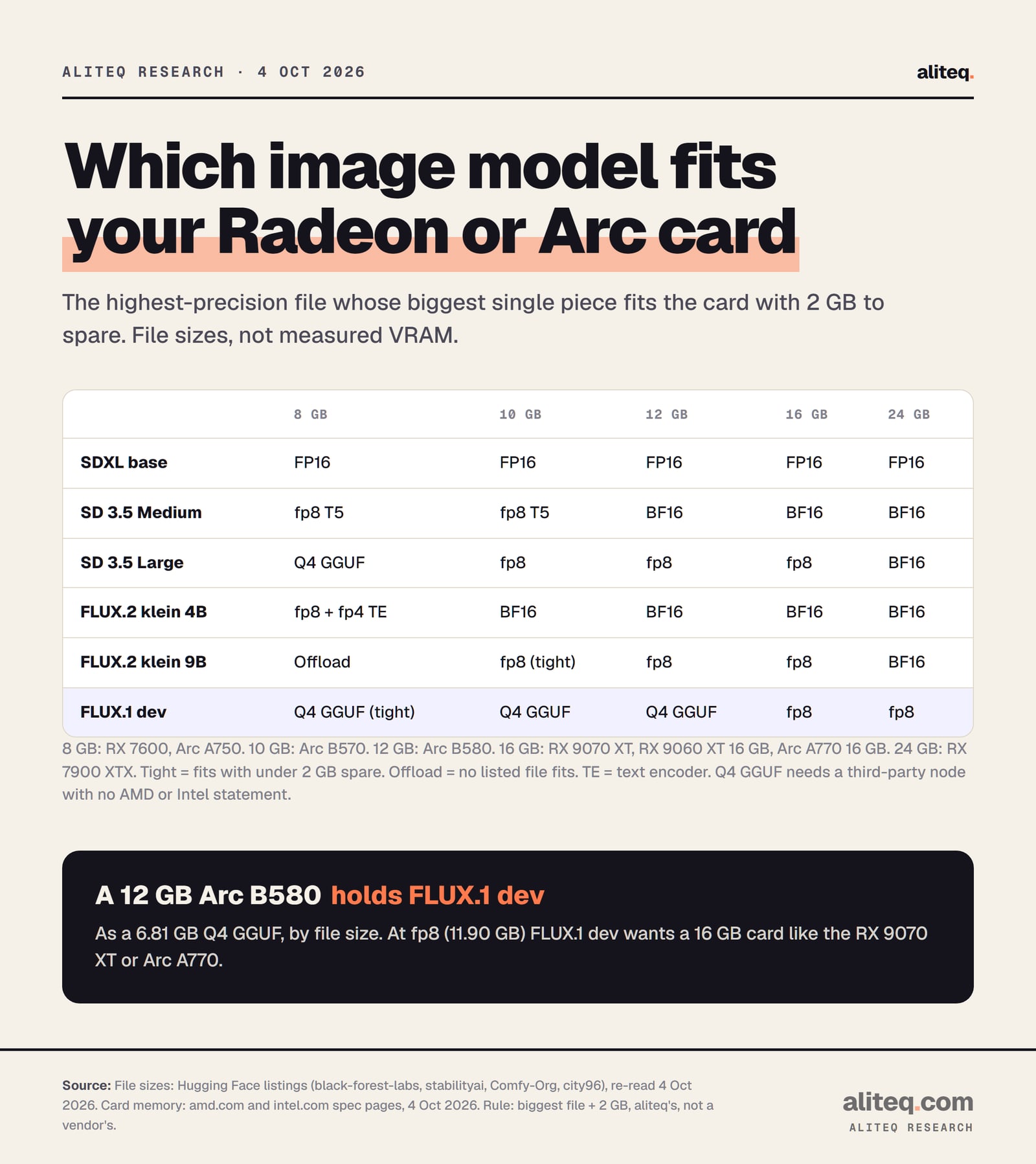
By file size, an 8 GB card runs SDXL, SD 3.5 Medium and FLUX.2 klein 4B. A 12 GB Arc B580 adds FLUX.1 dev as a 4-bit GGUF and SD 3.5 Large at fp8. A 16 GB RX 9070 XT or Arc A770 runs FLUX.1 dev at fp8. These are file sizes, not measured VRAM.
Our rule: the biggest single file plus 2 GB must fit the card. Derived from Hugging Face file sizes and vendor spec pages, not measured. · aliteq research
The rule is the same one we use across our image guides. ComfyUI loads one piece at a time by default: the text encoder that reads your prompt, the diffusion model that builds the image, the VAE that turns it into pixels. So the card needs to hold the biggest single file, with 2 GB spare for the image itself. Card memory comes from AMD's and Intel's spec pages: RX 7600 8 GB, Arc A750 8 GB, Arc B570 10 GB, Arc B580 12 GB, RX 9070 XT 16 GB, Arc A770 16 GB, RX 7900 XTX 24 GB.
Three caveats that are specific to AMD and Intel:
GGUF files need a third-party node. The 4-bit GGUF route uses the ComfyUI-GGUF custom node. Its README says nothing about AMD or Intel, so treat it as unconfirmed on your card.
fp8 saves memory, not always time. ComfyUI's examples say fp8 "will lower the memory usage by half". But its code only runs fp8 math on AMD's RDNA 4 chips. On other Radeon cards, and on every Arc card, the math runs in 16-bit.
Intel cards don't get ComfyUI's newest memory manager. Its "dynamic VRAM" feature switches on for Nvidia, and for AMD only with ROCm 7.14 or newer. Intel cards use the older loader, where the --lowvram switch still applies.
We left FLUX.2 dev off the chart. Its only setup under 24 GB is a 4-bit file built with a library called bitsandbytes, and we found no AMD or Intel statement for that path. Our file-size guide to running Flux locally covers the model itself, and the best GPU for local AI compares cards across vendors.
Why DirectML, ZLUDA and IPEX are dead ends
All three were popular workarounds before AMD and Intel shipped native PyTorch support. Each project's own page now argues against using it: DirectML is two years stale, ZLUDA says it will likely not work, and IPEX is archived. If a guide tells you to install one of them, it's out of date.
DirectML. ComfyUI still has a --directml switch, but its code prints this warning when you use it: "torch-directml barely works, is very slow, has not been updated in over 1 year and might be removed soon, please don't use it, there are better options." On PyPI, torch-directml's last release went up on 15 September 2024. It requires PyTorch 2.4.1. ComfyUI's README says "torch 2.7 is minimally supported".
ZLUDA. It describes itself as "a drop-in replacement for CUDA on non-NVIDIA GPUs." Its quick-start page also warns: "This version of ZLUDA is under heavy development and will likely not work with your application yet." Its docs don't mention PyTorch or ComfyUI. Its latest build was a preview released 2 October 2026.
IPEX. Archived by Intel, with a security warning, as quoted above.
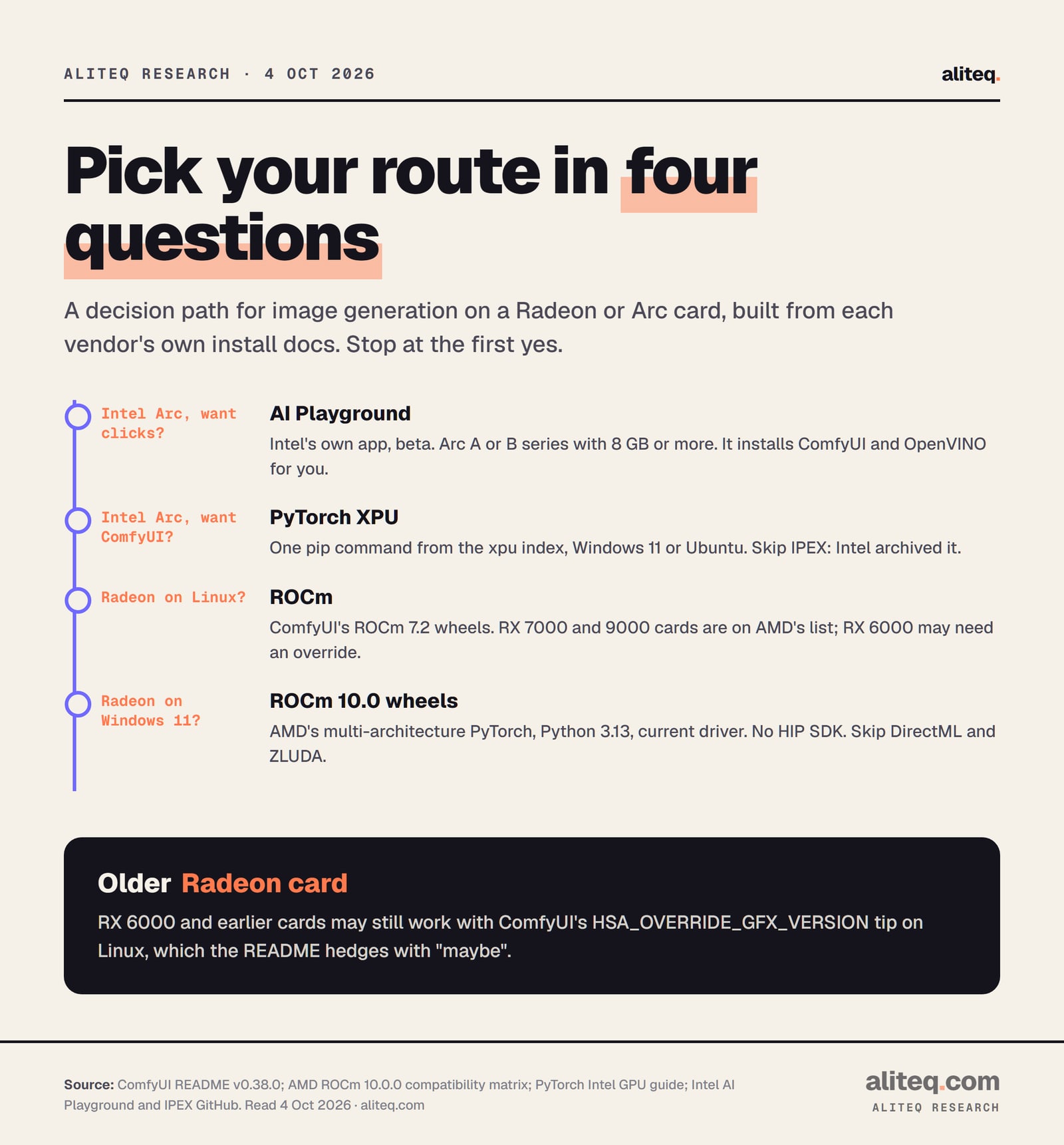
Here's the whole decision in four questions:
Stop at the first yes. Built from ComfyUI's, AMD's and Intel's install docs, read 4 October 2026. · aliteq research
Your first image, step by step
Install the backend, then ComfyUI, then one small model. Start with SDXL or FLUX.2 klein 4B, because both fit an 8 GB card at the sizes above. Once an image comes out, step up to FLUX.1 dev or SD 3.5 Large if your card's row allows it.
Find your card's chip and memory. On AMD, match it to the device extra table. On Arc, check you have an A or B series card.
Install Python 3.13 and run the one pip command for your route: ROCm 7.2 (Linux), AMD's ROCm 10.0 wheels (Windows 11) or the xpu index (Arc).
Clone ComfyUI, install its requirements, and start it with python main.py. Open http://127.0.0.1:8188 in your browser.
Load a template and let ComfyUI download the files. AMD's own page suggests the SD3.5 Simple template.
Out of memory? Pick a smaller file from the chart, close other GPU apps, or try --reserve-vram 2.
If your card can't hold the model you want, renting a bigger card for an evening often beats buying one. Our cheapest cloud GPU for ComfyUI guide walks through that.
What we couldn't tell you
We can't tell you speed. No project page we read gives seconds per image for a Radeon or Arc card, and we didn't measure any. We also can't confirm that GGUF files or 4-bit FLUX.2 dev work on these cards. Those routes depend on third-party code with no AMD or Intel statement.
What the docs do show is direction. Older guides sent Radeon owners on Windows to DirectML or ZLUDA, and Arc owners to IPEX. Today ComfyUI, AMD and Intel all point you to plain PyTorch with the vendor's backend built in. That's the bet I'd make with my own money: follow ComfyUI's install steps for your card, and ignore any guide that starts with a workaround. For card picks by budget, see the best GPU for Stable Diffusion.
Quick answers
Can I run Stable Diffusion on an AMD GPU on Windows?
Yes. ComfyUI's README points Windows 11 users to AMD's ROCm 10.0 PyTorch packages, with a current AMD driver and Python 3.13. It says a separate HIP SDK isn't needed. Cards on AMD's list include the RX 7000 and RX 9000 series.
Does Stable Diffusion work on Intel Arc?
Yes. ComfyUI supports Arc through PyTorch's built-in XPU backend, installed with one pip command on Windows 11 or Ubuntu. Intel's AI Playground app is the no-terminal option, though it calls itself beta software.
Should I use DirectML or ZLUDA for my Radeon?
Not for new setups. ComfyUI's code warns that torch-directml "barely works", and its last release was in September 2024. ZLUDA's own docs say it "will likely not work with your application yet". AMD's native ROCm packages replace both.
Can a 12 GB Arc B580 run FLUX?
By file size, yes. FLUX.1 dev's 4-bit GGUF file is 6.81 GB, and FLUX.2 klein 9B fits at fp8. The GGUF route needs a third-party ComfyUI node with no Intel statement, so treat it as unconfirmed. At fp8, FLUX.1 dev's 11.90 GB file wants a 16 GB card.
Is my RX 6700 or RX 6600 supported?
Not officially. AMD's ROCm 10.0 list names only two workstation RDNA 2 cards. On Linux, ComfyUI's README suggests HSA_OVERRIDE_GFX_VERSION=10.3.0 "for 6700, 6600 and maybe other RDNA2 or older" cards, so it may work.
Do I still need IPEX for Intel Arc?
No. Intel archived Intel Extension for PyTorch and recommends "using PyTorch* directly going forward." Intel says most of its features were upstreamed into PyTorch itself, and ComfyUI uses PyTorch's built-in XPU support.