Year 1 of paid Windows 10 security updates ends on October 13, 2026. Year 2 doubles the price, a PC that skipped Year 1 pays for both, and Year 3 doubles again. Here is the bill for 10, 25 and 50 PCs, how to buy and activate it, and when a Windows 11 upgrade or new PC is the cheaper move.
Year 1 of paid Windows 10 security updates runs out on October 13, 2026. For a business, that date is a renewal. Microsoft sells Extended Security Updates (ESU) one year at a time, and the second year costs twice the first.
I cover security and compliance, and I read pricing the way I read a threat model: follow the incentives. Microsoft's incentive here is plain. It wants you on Windows 11, and it has priced Windows 10 so each year hurts more than the last. Nothing below comes from buying or activating ESU ourselves. We read Microsoft's ESU, lifecycle, licensing and pricing pages on 4 October 2026 and did the multiplication.
What Windows 10 ESU Year 2 costs a business
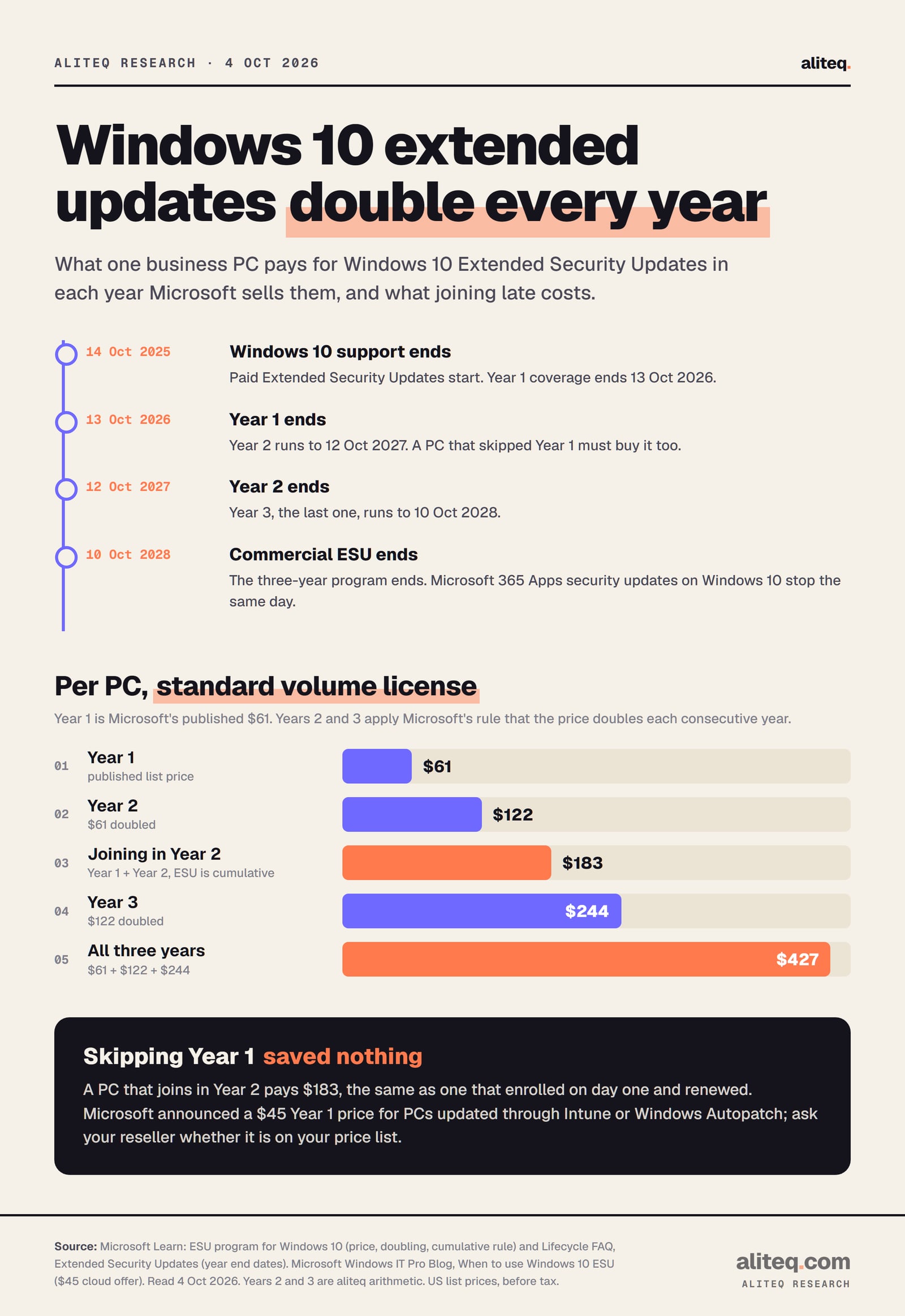
Year 2 costs $122 a PC. Microsoft lists the business price as "$61 USD per device for Year One" and says "The price doubles every consecutive year, for a maximum of three years." Year 2 covers October 2026 to October 12, 2027. Year 3, the final year, would cost $244 a PC and runs to October 10, 2028.
Microsoft's lifecycle FAQ gives the end date of each ESU year:
Year 1
Coverage ends
October 13, 2026
Price per PC
$61 (published)
Year 2
Coverage ends
October 12, 2027
Price per PC
$122 (doubled)
Year 3
Coverage ends
October 10, 2028
Price per PC
$244 (doubled again)
Coverage ends
Price per PC
Year 1
October 13, 2026
$61 (published)
Year 2
October 12, 2027
$122 (doubled)
Year 3
October 10, 2028
$244 (doubled again)
Dates from Microsoft's ESU lifecycle FAQ. Year 1 price from Microsoft Learn; Years 2 and 3 apply Microsoft's doubling rule. · aliteq research
The business program covers Windows 10 Enterprise, Education and "Pro in Commercial use", per the same FAQ. Microsoft's minimum order is one license, so a five-person office can buy five.
Look at how the money is weighted. Of the $427 that all three years cost per PC, Year 3 alone is $244, or 57%. The program is built so the last year is the expensive one.
Why skipping Year 1 didn't save you anything
If a PC wasn't enrolled in Year 1, it can still join in Year 2, but it pays for Year 1 as well. Microsoft says: "If you decide to purchase the program in Year Two, you have to pay for Year One too, as ESUs are cumulative." So a late PC costs $183, the same total as a PC that enrolled on day one and renews.
There are two more rules on the same Microsoft Learn page:
No partial years. "Customers can't buy partial periods, for instance, only six months." Buying Year 2 in March 2027 costs the same $122 as buying it in October.
Updates only. ESU doesn't include new features, non-security fixes or design changes. Microsoft's support covers only activating, installing and regressions of ESU itself.
A PC that sat out Year 1 also has a security question, not just a billing one. It has gone a year without Microsoft's security fixes. Treat it as a machine to check and patch before you trust it again.
The bill for 10, 25 and 50 PCs
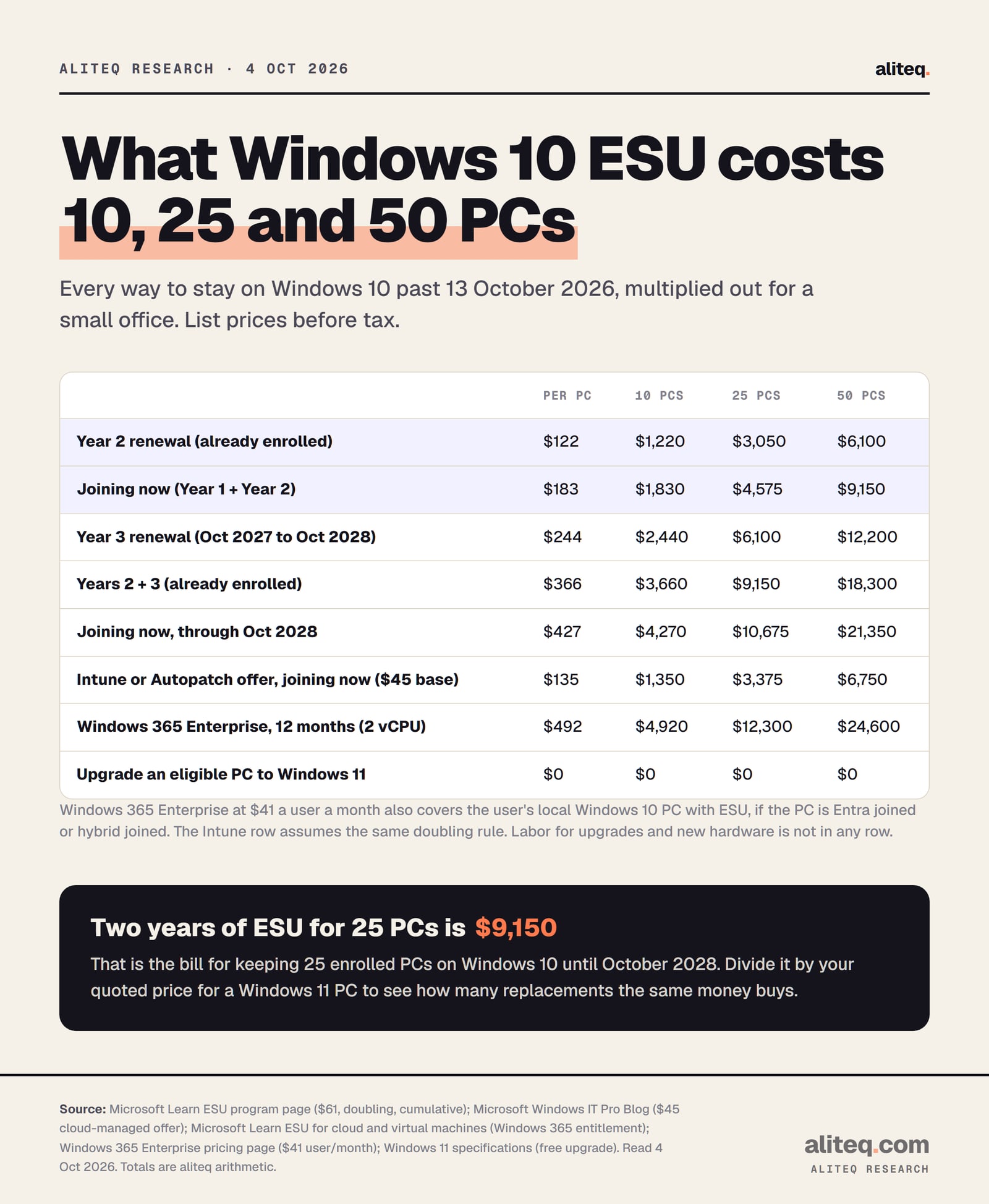
For an office that's already enrolled, Year 2 costs $1,220 for 10 PCs, $3,050 for 25 and $6,100 for 50. Joining now costs half as much again, because Year 1 comes along: $1,830, $4,575 and $9,150. Keeping 25 enrolled PCs on Windows 10 until October 2028 costs $9,150.
Year 2 renewal (already enrolled)
Per PC
$122
10 PCs
$1,220
25 PCs
$3,050
50 PCs
$6,100
Joining now (Year 1 + Year 2)
Per PC
$183
10 PCs
$1,830
25 PCs
$4,575
50 PCs
$9,150
Year 3 renewal
Per PC
$244
10 PCs
$2,440
25 PCs
$6,100
50 PCs
$12,200
Years 2 + 3 (already enrolled)
Per PC
$366
10 PCs
$3,660
25 PCs
$9,150
50 PCs
$18,300
Joining now, through October 2028
Per PC
$427
10 PCs
$4,270
25 PCs
$10,675
50 PCs
$21,350
Intune or Autopatch offer, joining now
Per PC
$135
10 PCs
$1,350
25 PCs
$3,375
50 PCs
$6,750
Windows 365 Enterprise, 12 months
Per PC
$492
10 PCs
$4,920
25 PCs
$12,300
50 PCs
$24,600
Upgrade an eligible PC to Windows 11
Per PC
$0
10 PCs
$0
25 PCs
$0
50 PCs
$0
Per PC
10 PCs
25 PCs
50 PCs
Year 2 renewal (already enrolled)
$122
$1,220
$3,050
$6,100
Joining now (Year 1 + Year 2)
$183
$1,830
$4,575
$9,150
Year 3 renewal
$244
$2,440
$6,100
$12,200
Years 2 + 3 (already enrolled)
$366
$3,660
$9,150
$18,300
Joining now, through October 2028
$427
$4,270
$10,675
$21,350
Intune or Autopatch offer, joining now
$135
$1,350
$3,375
$6,750
Windows 365 Enterprise, 12 months
$492
$4,920
$12,300
$24,600
Upgrade an eligible PC to Windows 11
$0
$0
$0
$0
Per-PC prices multiplied out. ESU rows from Microsoft's $61 Year 1 price and doubling rule; Windows 365 Enterprise at $41 a user a month. · aliteq research
How each row is built, so you can redo it with your own count:
ESU rows. $61 for Year 1, $122 for Year 2, $244 for Year 3, added up for the years each row covers, times the number of PCs.
Intune or Autopatch offer. Microsoft announced a cheaper license for PCs whose updates are managed through Intune or Windows Autopatch. Its blog says it "will cost $45 USD per device for Year 1". We applied the same doubling, so $45 plus $90. Microsoft later wrote that it would share more on this offer's availability on its price list, and we found no confirmation that it's orderable today. Ask your reseller.
Windows 365 Enterprise. The cheapest plan, 2 vCPU with 8 GB of memory, lists at $41 a user a month, times 12. It's a full Windows 11 Cloud PC, not just an ESU license, which is why it costs four times a Year 2 renewal.
Not included. Labor, new hardware, reseller margins and tax.
How to buy and activate Year 2
You buy business ESU through Microsoft volume licensing or a Microsoft Cloud Solution Provider (CSP) partner, then activate each PC with a key from the Microsoft 365 admin center. Each ESU year has its own activation ID, so plan to install and activate the Year 2 license on every PC you keep.
Microsoft's Learn article on enabling ESU sets out the steps:
Check each PC runs Windows 10 version 22H2 with update KB5066791 or later, plus the ESU Licensing Preparation Package KB5072653. LTSC editions aren't covered by this program.
Buy the Year 2 licenses from your volume licensing reseller or a CSP partner. If a PC skipped Year 1, buy Year 1 for it as well.
In the Microsoft 365 admin center, open Billing, Your products, the Volume licensing tab, then View contracts and View product keys. You need the Product Key Reader or VL Administrator role.
On each PC, from an elevated Command Prompt, install the key with slmgr.vbs /ipk and activate it with slmgr.vbs /ato plus the Year 2 activation ID.
Confirm with slmgr.vbs /dlv. The output should name the Year 2 ESU program with License Status: Licensed.
The Year 2 activation ID on Microsoft's page is 1043add5-23b1-4afb-9a0f-64343c8f3f8d. It's the same for every eligible edition and device. PCs without internet access can activate by phone, and Microsoft points larger offline fleets to the Volume Activation Management Tool. If reimaging eats your activations, Microsoft lets you request a higher activation limit on the key.
If activation fails, Microsoft says that to get its help with ESU issues, organizations "must have an active support plan in place". If you don't have anyone to run the steps above, a managed IT provider can. Our managed IT services pricing guide shows what that costs.
Free ESU through Windows 365 and Azure Virtual Desktop
Windows 10 running in Microsoft's cloud gets ESU at no extra cost. Microsoft lists Windows 365 Cloud PCs, Azure Virtual Desktop, Azure virtual machines and several Azure hosting options. There's also a less obvious route: a physical Windows 10 PC used to reach a Windows 365 Enterprise Cloud PC can be entitled to ESU too.
The physical-PC route has conditions, all from Microsoft's Learn article on cloud and virtual machines:
Plan. The user needs a Windows 365 Enterprise license, or a Windows 365 Flex Cloud PC in dedicated mode. Windows 365 Business isn't on that list.
Join type. The local PC must be Microsoft Entra joined or Entra hybrid joined. Entra registered only, or on-premises Active Directory only, doesn't qualify.
Sign-in. The user must sign in to the physical PC with the same Entra ID account "at least once every 22 days".
Policy. An admin deploys the EnableESUSubscriptionCheck setting through Intune or another device-management tool.
This route makes sense when you were going to buy Cloud PCs anyway. At $41 a user a month, it isn't a cheap way to buy ESU alone. It can be a sensible way to give people Windows 11 while their old hardware ages out.
When upgrading or replacing is cheaper
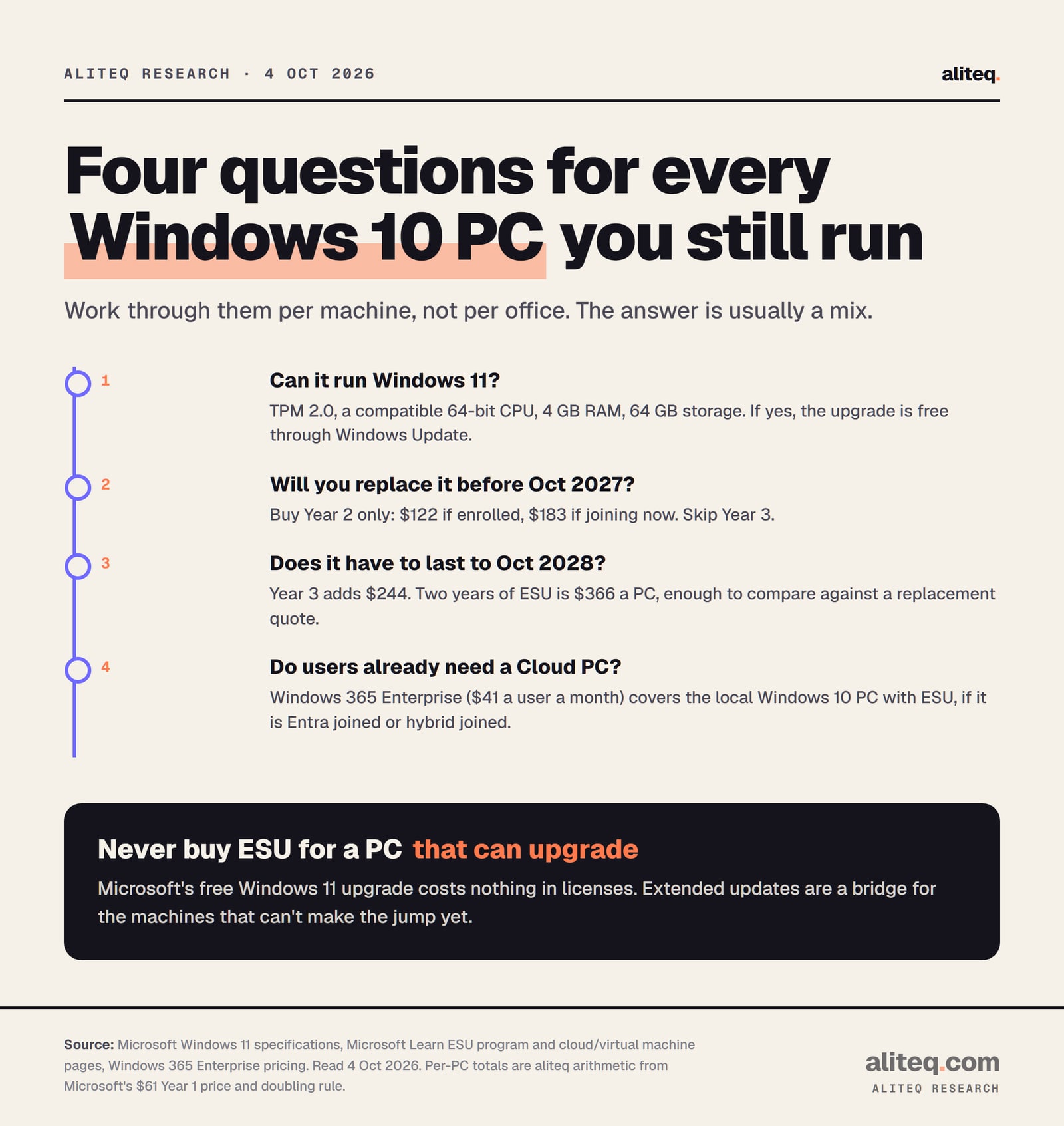
Any PC that meets the Windows 11 requirements should upgrade, because the upgrade is free and ESU is not. For PCs that can't upgrade, compare two years of ESU, $366 a PC, with your quote for a replacement. If the PC will be replaced before October 2027 anyway, buy Year 2 only and skip Year 3.
Microsoft's Windows 11 minimums are a compatible 64-bit processor with at least two cores at 1 GHz, 4 GB of memory, 64 GB of storage and TPM 2.0, a security chip on the motherboard. Its specifications page says a PC on Windows 10 version 2004 or later can upgrade, and "Free updates are available through Windows Update". Microsoft's own advice on its ESU page is to upgrade eligible PCs with Windows Autopatch or Intune.
One decision per machine. Requirements from Microsoft's Windows 11 specifications; prices from Microsoft's ESU and Windows 365 pages. · aliteq research
For PCs that can't run Windows 11, the arithmetic is a break-even you can do in one line:
Keeping it to October 2028 costs $366 a PC if it's enrolled, or $427 if it's joining now.
Replacing it costs your quoted price for a Windows 11 PC, which you'd spend eventually anyway.
The test: divide your two-year ESU total by that quote. For 25 enrolled PCs, $9,150 divided by your per-PC quote is how many replacements the ESU money would buy instead.
ESU money buys nothing you keep. After October 10, 2028 the PC is unsupported, and you replace it then. So the useful question is not "ESU or a new PC" but "how many years of ESU before the new PC". For most machines that answer is one year, at most.
Office apps follow the same calendar. Microsoft says Microsoft 365 Apps on Windows 10 keep getting security updates until October 10, 2028, but feature updates stop at version 2608. Support will ask you to move to Windows 11 for problems that only happen on Windows 10.
Business ESU vs consumer ESU
The consumer program is a different product, and a business can't use it. Microsoft's consumer page says it "can't be used in commercial scenarios" and won't enroll PCs joined to Active Directory or Entra, or managed by device-management software. Consumer ESU is free with settings sync, or $30, and runs to October 12, 2027.
If a headline told you Windows 10 updates are free until 2027, it was about home PCs. We covered that in our consumer ESU explainer. For a company's managed PCs, the business price above applies.
If Windows 10 desktops are only part of your Microsoft deadline list, Windows Server 2016 reaches end of support on January 12, 2027. Our Windows Server 2016 end of support guide prices its ESU, upgrade and Azure paths the same way. The rest of the Cloud & IT Infrastructure section covers the other bills on a small company's IT list.
Quick answers
How much does Windows 10 ESU Year 2 cost for a business?
$122 per PC. Microsoft's published business price is $61 per device for Year 1 and it "doubles every consecutive year", so Year 2 is $122 and Year 3 is $244. Prices are US list, before tax; your reseller's quote is what you pay.
Can I buy Year 2 without paying for Year 1?
No. Microsoft says that if you join in Year 2, "you have to pay for Year One too, as ESUs are cumulative." A PC joining now costs $61 plus $122, or $183.
When does Windows 10 ESU Year 2 end?
October 12, 2027, according to Microsoft's ESU lifecycle FAQ. Year 1 ends October 13, 2026, and Year 3, the last year for business PCs, ends October 10, 2028.
Can a small business use the free consumer ESU?
No. Microsoft's consumer page says consumer ESU can't be used in commercial scenarios. It won't enroll PCs joined to Active Directory or Microsoft Entra, or managed by a device-management tool. Businesses buy ESU through volume licensing or a CSP partner, with a minimum of one license.
How do I activate Windows 10 ESU Year 2?
Get the ESU key from the Microsoft 365 admin center under Billing, Your products, Volume licensing. On each PC, run slmgr.vbs /ipk with the key, then slmgr.vbs /ato with the Year 2 activation ID 1043add5-23b1-4afb-9a0f-64343c8f3f8d, and check with slmgr.vbs /dlv.
Is Windows 10 ESU free with Windows 365?
Windows 10 Cloud PCs in Windows 365, and Windows 10 in Azure Virtual Desktop, get ESU at no extra cost. A physical Windows 10 PC used to reach a Windows 365 Enterprise Cloud PC is also entitled, if it's Entra joined or hybrid joined, the user signs in every 22 days, and an admin turns on the ESU subscription check.