Connect Higgsfield to Claude with one URL, or to ChatGPT as a plugin, and make images and video from the chat. The setup steps from the vendors' docs, what it can do in each app, which plan it needs (a paid Higgsfield plan) and why every generation uses credits.
This post contains affiliate links. If you buy through them, Aliteq may earn a commission — at no extra cost to you. Prices change; check the seller’s own page for today’s price.
Share
I make visuals with AI all day, and for a while that meant a tab for the chat and a tab for the image tool. The Higgsfield MCP closes that gap. You ask Claude or ChatGPT for a picture, and it calls Higgsfield for you.
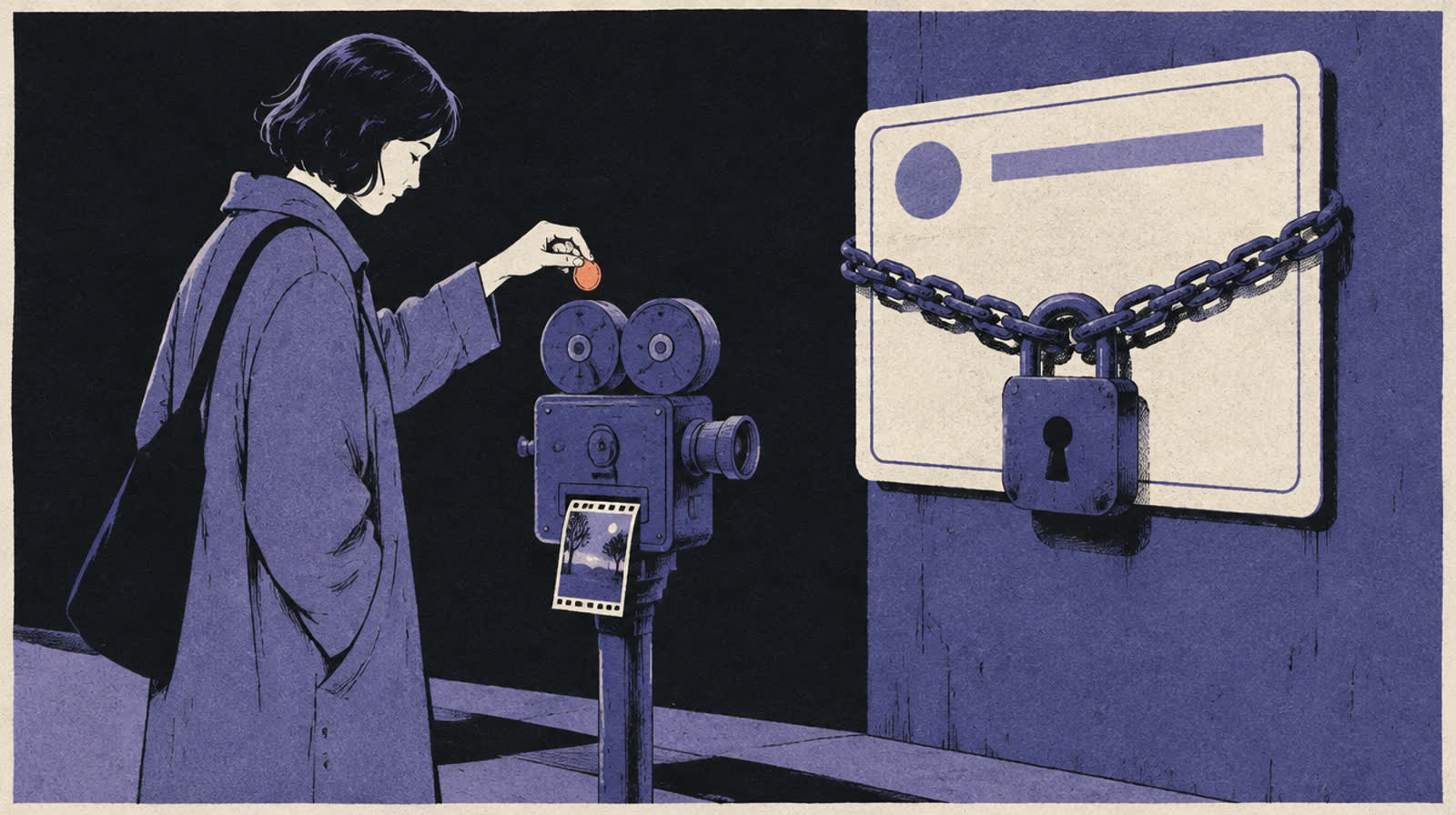
This one is first-hand. Every hero image on aliteq is made through the Higgsfield connector inside Claude Code, including the one at the top of this page. So below you get the official setup steps, read from Higgsfield's, Anthropic's and OpenAI's own docs on October 4, 2026, plus what our real workflow looks like.
Higgsfield's own walkthrough is its help article How do I connect Higgsfield to an AI agent?, which covers Claude, ChatGPT and other agents; we re-checked it on October 29, 2026. If a menu name below doesn't match what you see, follow that page.
What the Higgsfield MCP is
It's a bridge between your chat app and your Higgsfield account. MCP (Model Context Protocol) is an open standard that lets AI apps call outside tools. Higgsfield runs an MCP server. Once it's connected, the AI can generate, upscale or check your balance for you.
Three things to know before you start:
It's not the Higgsfield API. Higgsfield says MCP signs in with your normal account through OAuth (a "log in with" approval screen), so there's no API key to copy.
You need a paid plan. Higgsfield's connection guide says "An active paid subscription is required."
It uses your existing credits. Generations come out of the same credit balance you use on the website.
Higgsfield also says MCP use falls under its Developer Terms, which make you responsible for anything an agent generates through your account. That matters later, in the credits section.
How to add Higgsfield to Claude
In Claude you add Higgsfield as a custom connector with one URL. It works on claude.ai and in Claude Desktop. Anthropic's help center says custom connectors are on Free, Pro, Max, Team and Enterprise plans, and "Free users are limited to one custom connector."
Open claude.ai or Claude Desktop and go to Customize > Connectors. (Higgsfield's page says Settings > Connectors; Anthropic's current page says Customize.)
Click Add, then Add custom connector. Name it Higgsfield and paste the server URL: https://mcp.higgsfield.ai/mcp
Click Connect. A Higgsfield sign-in window opens. Sign in and approve. If you're already logged in on the Higgsfield site, this step happens on its own.
Back in Claude, Higgsfield shows in your connectors list. In a chat, the + button > Connectors lets you switch it on or off for that conversation.
Test it. Higgsfield suggests asking "What is my Higgsfield credit balance?" If Claude answers without calling a tool, reconnect.
On a Team plan there's one extra step. Anthropic's help center says only Owners and Primary Owners can add a custom connector to the organization. After that, each member connects with their own Higgsfield login.
How to connect Higgsfield to ChatGPT
ChatGPT doesn't take the URL. Higgsfield's guide says ChatGPT uses the official Higgsfield plugin from the plugin directory instead. You find it, add it, and sign in to Higgsfield. It uses the same account and the same credits as Claude.
In ChatGPT, open Plugins in the sidebar. OpenAI's help center says the directory works on web, desktop and mobile.
Find Higgsfield and add it. OpenAI says installing a plugin may start a sign-in flow for the service.
Sign in to your Higgsfield account and approve.
Ask for an image or a video. OpenAI says ChatGPT uses installed plugins on its own when they fit, or you can @ mention one.
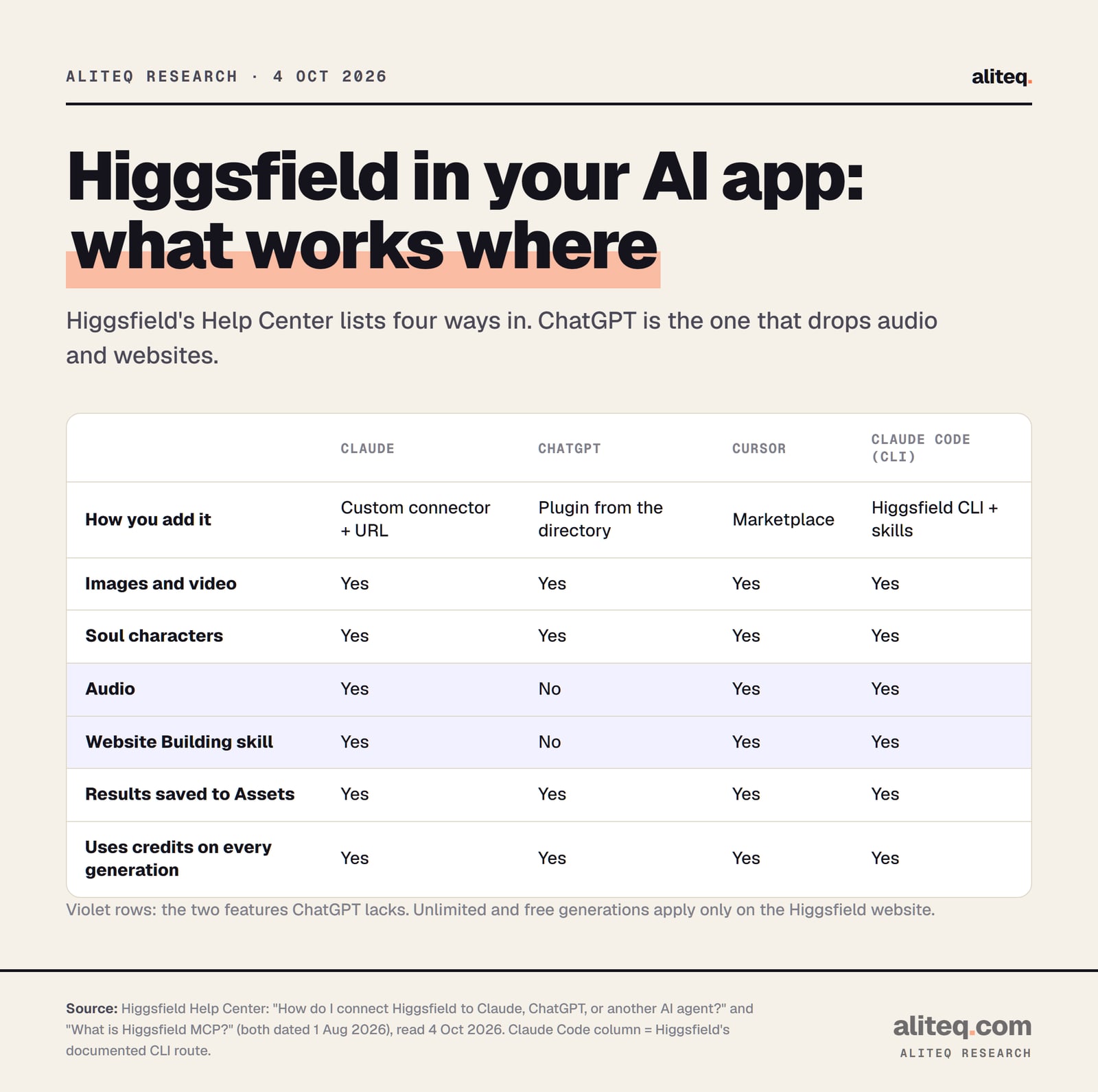
The catch is a shorter menu. Higgsfield says "Audio generation and the Website Building skill aren't available in ChatGPT." For those, it points you to Claude or the Higgsfield website. OpenAI also notes that a plugin's availability depends on your plan, workspace and region, so a work account may need an admin to allow it.
We haven't installed the ChatGPT plugin ourselves. These steps are from Higgsfield's and OpenAI's pages only.
What works where, from Higgsfield's connection guide (dated August 1, 2026), read October 4, 2026. · aliteq research
Claude Code and Cursor: two ways in
Coding agents get their own route. Higgsfield's documented path for Claude Code is its command-line tool plus "skills", which the agent installs for you. Cursor adds Higgsfield from its marketplace. There's also a shortcut Higgsfield doesn't mention, and it's the one we use.
Higgsfield's way (the CLI). Higgsfield gives you a message to paste into Claude Code. It tells the agent to run npm i -g @higgsfield/cli, then higgsfield auth login, then npx skills add higgsfield-ai/skills. Higgsfield says the CLI is built for coding agents, with less token overhead than MCP's full tool list on every call.
Our way (the claude.ai connector). Anthropic's Claude Code docs say that if you log in to Claude Code with a claude.ai account, connectors you added on claude.ai "are automatically available in Claude Code." We added Higgsfield on claude.ai, and it simply showed up in our Claude Code. We never installed the CLI. Run /mcp in Claude Code to see it in the claude.ai section.
One limit from Anthropic's docs: this only works when you're signed in with a claude.ai subscription. If Claude Code runs on an API key or a cloud provider, claude.ai connectors aren't loaded.
Cursor. Higgsfield says to open Customize > Marketplace, find Higgsfield, click Add and sign in.
What the connector can do
It can do far more than make a picture. Higgsfield's list covers image and video generation on all its models, upscaling, background removal, outpainting and reframing, Kling 3.0 Motion Control, Soul characters, voiceovers, voice cloning and dubbing. It can also check your balance and list past generations.
Higgsfield's list also has two "no" rows. MCP gets no Unlimited model access and no free generations.
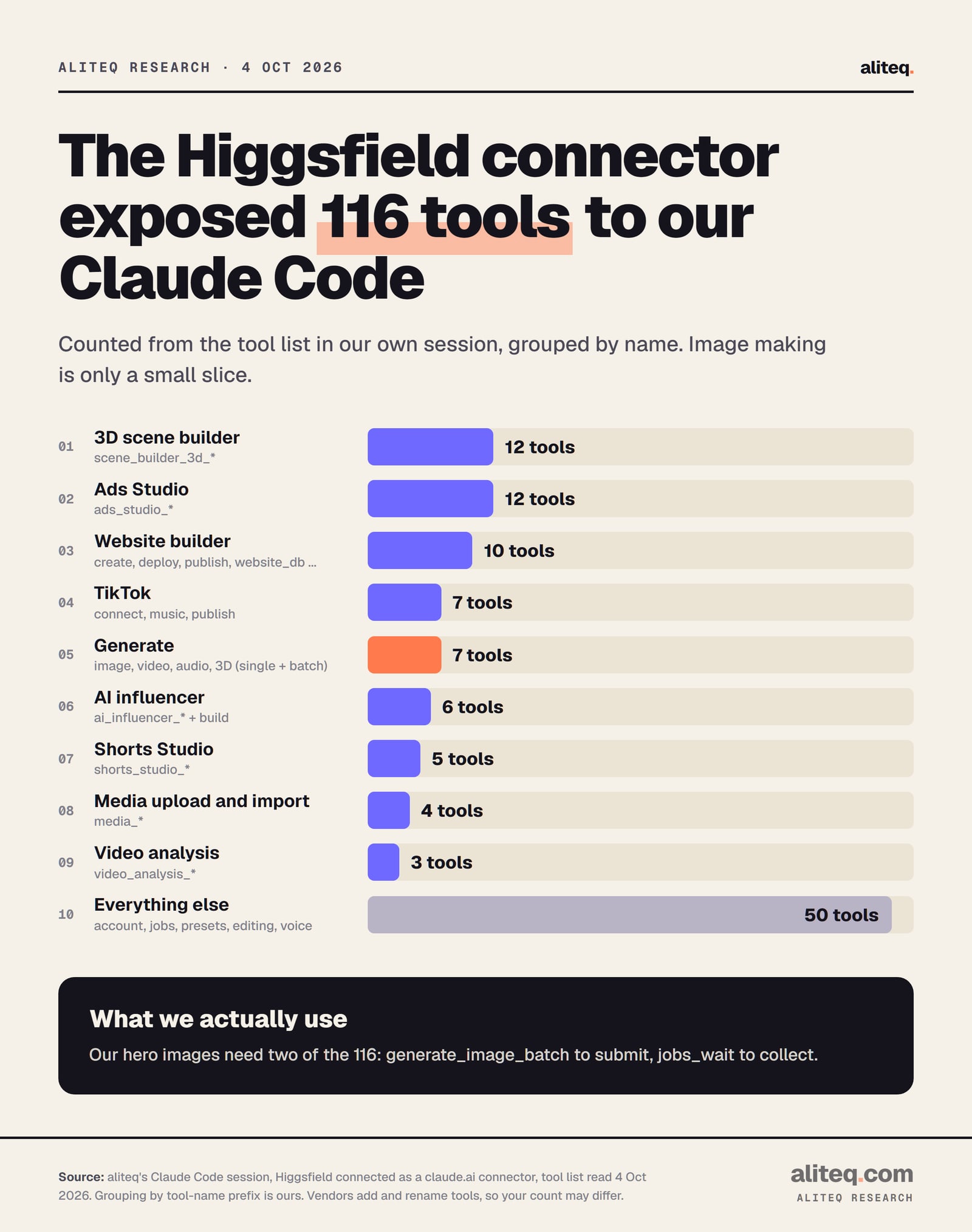
In our own Claude Code session on October 4, 2026, the Higgsfield connector showed 116 separate tools. We counted them from the tool list and grouped them by name. Only seven are the core generate tools. The rest cover Ads Studio, a 3D scene builder, a website builder, TikTok publishing, Shorts Studio, AI influencers, uploads and account housekeeping.
Counted from our own Claude Code tool list on October 4, 2026. Grouping is ours, and vendors add and rename tools, so your count may differ. · aliteq research
Some tutorials still describe a server with a handful of tools. That was not what we saw. Count yours by asking the agent to list its Higgsfield tools.
Two practical notes from Higgsfield's guide. If you don't name a model, the agent picks one, so name it when the look matters. And the agent can't read an image you drop into the chat. It opens a Higgsfield upload window instead, or imports an image from a web link you paste.
How we use it to make aliteq's hero images
Our whole hero pipeline uses two of those tools. Claude Code sends the prompts with generate_image_batch, then collects the finished files with jobs_wait. We use the gpt_image_2 model for illustrations and soul_2 for photoreal scenes. Then a script resizes, stamps and compresses the image.
Here's how it runs, step by step:
Claude Code calls generate_image_batch with a few prompts in our house style, 16:9. The tool's own description says it takes 1 to 12 generations in parallel.
It calls jobs_wait with the job IDs. Each call waits at most 15 seconds, then reports which jobs finished and their file links.
We look at every candidate and reject any with garbled text, stray logos or the wrong subject.
A script crops the keeper to 1600 by 900, adds the aliteq mark and compresses it under 200 KB for the page.
One lesson from making this page's hero: set the quality yourself. We sent two gpt_image_2 prompts with no resolution or quality set. Higgsfield's reply said it used "1k" resolution and "low" quality as the model's defaults. That was fine for a flat illustration. For a detailed photo, ask for higher settings in your prompt.
The batch tool also notes that "Cost preflight is not supported inside a batch submission." In plain terms, it won't quote the credit cost before a batch runs. If you want a price first, ask for one image at a time and ask the agent for the cost.
The credit catch: MCP always costs
Every image or clip you make through the connector uses credits, whatever plan you're on. Higgsfield's guide puts it plainly: "Every generation through a connected agent deducts credits, regardless of your plan." Unlimited models and free generations only work on the Higgsfield website.
That surprises people who pay for an Unlimited plan. Higgsfield's MCP page answers it directly: being charged credits through MCP on an Unlimited model is expected, not a bug. If you want to use your Unlimited allowance, generate on the website. Our Higgsfield pricing breakdown covers what each plan includes, and is Higgsfield free covers the free tier.
You may also find a July blog post about an "Unlimited MCP" trial. Higgsfield said it ran until July 31, and the August help pages say MCP never gets Unlimited. Treat that offer as over.
Then there's spending control. Higgsfield says "There's no native credit cap." Its tip is to tell the agent at the start: "Before generating anything, tell me the credit cost and wait for my confirmation." It calls that "a prompt-level instruction, not a hard limit." So the agent should follow it, but nothing enforces it.
Claude adds one more switch. When a tool asks for permission, Anthropic's help center advises choosing "Allow always" only for a server and tool you trust to run unsupervised. For a tool that spends money, I'd keep approving each call. It's one extra click, and it keeps a loose prompt from turning into a pile of renders.
When the connection breaks
Most problems are an expired login or a connector that's switched off in that chat. Higgsfield's fixes are simple. Reconnect, start a new chat, and name Higgsfield in your request.
"Authorization with the MCP server failed." Higgsfield says the login token expired. In Claude, disconnect Higgsfield in Connectors and connect again. In ChatGPT, reconnect it under Settings > Plugins > Higgsfield.
Connected, but Claude never calls it. Start a new conversation, mention Higgsfield by name, and check its toggle under + > Connectors.
A generation doesn't show up. Higgsfield says results usually reach your Assets within 60 seconds, tagged as MCP. If credits left but nothing appeared, contact support with the generation ID.
Once it works, the prompting is the same as on the website. Our Higgsfield prompts that work guide applies to the chat too.
It's https://mcp.higgsfield.ai/mcp. You paste it into Claude as a custom connector. ChatGPT doesn't use the URL; you add the Higgsfield plugin from its plugin directory instead.
Is the Higgsfield MCP free?
The connector costs nothing to add, but Higgsfield says you need an active paid subscription, and every generation through it uses credits. Unlimited and free generations only apply on the Higgsfield website.
Can I use Higgsfield in ChatGPT?
Yes, through the official Higgsfield plugin in ChatGPT's plugin directory. Higgsfield says audio generation and the Website Building skill aren't available there, so use Claude or the website for those.
Does Higgsfield work in Claude Code?
Yes. Higgsfield documents a CLI route for Claude Code. If you log in to Claude Code with a claude.ai account, a Higgsfield connector added on claude.ai also appears automatically, which is how we use it.
Can I stop the agent from spending all my credits?
Not with a hard cap. Higgsfield says there's no native credit cap. Tell the agent to quote the cost and wait for your approval, and avoid "Allow always" on tools that spend credits.
Do I need to be on Claude Pro to add it?
No. Anthropic says custom connectors work on Free, Pro, Max, Team and Enterprise plans. Free accounts are limited to one custom connector, and on Team plans an owner has to add it first.
If you're new to the wider Higgsfield toolbox, our AI video generator comparison shows where it fits next to Runway, Kling and Veo. And if you want the same plug-in idea for business software, see how CRM MCP servers compare.