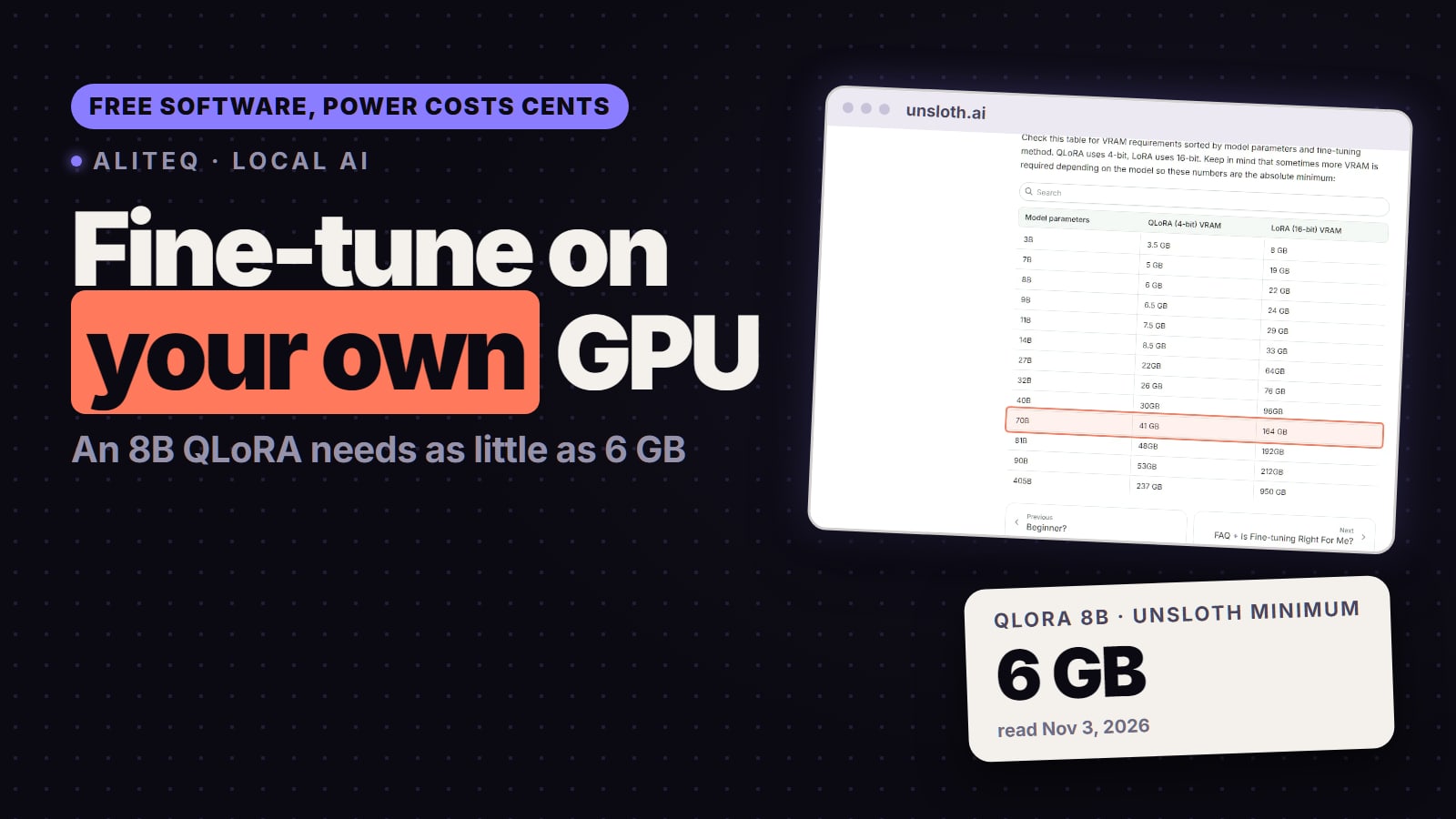
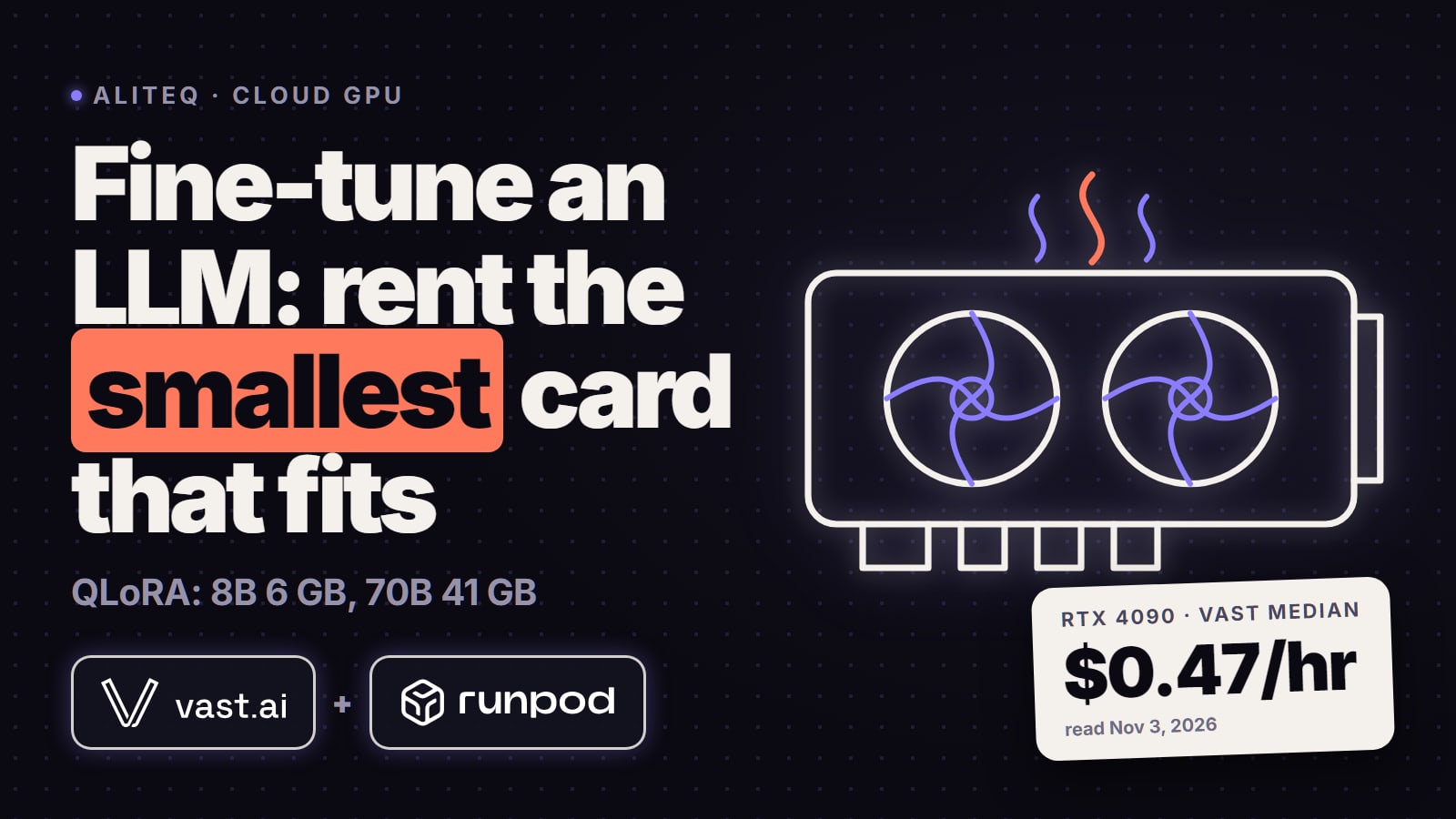
Yes. With QLoRA, an 8B model needs as little as 6 GB of VRAM and a 14B model 8.5 GB (Unsloth's minimums, read Nov 3, 2026), so a 12GB RTX 3060 or a 24GB RTX 4090 can do it. The software is free; the cost is electricity, about 6 to 13 cents an hour for a whole PC at the US average rate. Here is what fits on which card, and when renting is cheaper.
Some links on this page are referral links: we may earn a commission, at no cost to you.
Share
Yes, you can fine-tune an LLM on your own GPU, and the software costs nothing. With QLoRA, Unsloth's own minimums are 6 GB of VRAM for an 8B model and 8.5 GB for a 14B model, so a 12GB RTX 3060 handles small fine-tunes and a 24GB RTX 4090 handles up to about 27B. What you pay is electricity: at the US average home rate of 18.16 cents per kWh (EIA, August 2026), a PC built around an RTX 4090 costs about $0.11 an hour to run flat out. Renting the same card cost a $0.47/hour median on Vast.ai on Nov 3, 2026. The VRAM figures were read on Unsloth's pages on November 3, 2026.
Local fine-tuning in four numbers (read Nov 3, 2026)
6 GB
VRAM for an 8B model
Unsloth minimum, QLoRA 4-bit
8.5 GB
VRAM for a 14B model
Unsloth minimum, QLoRA 4-bit
18.16
Cents per kWh at home
US average, EIA, Aug 2026
$0
Price of the software
Open source (Apache 2.0 core)
Can my GPU fine-tune an LLM?
If it's an NVIDIA card from 2018 or later with 8 GB or more, almost certainly, for models up to 8B. Unsloth's requirements page says it "Supports NVIDIA GPUs since 2018+" with a "Minimum CUDA Capability 7.0", that is RTX 20-series and newer; it adds that the older "GTX 1070, 1080 works, but is slow." The same page says training works on AMD and Intel GPUs and on Macs, and that "Unsloth Studio works directly on Windows without WSL."
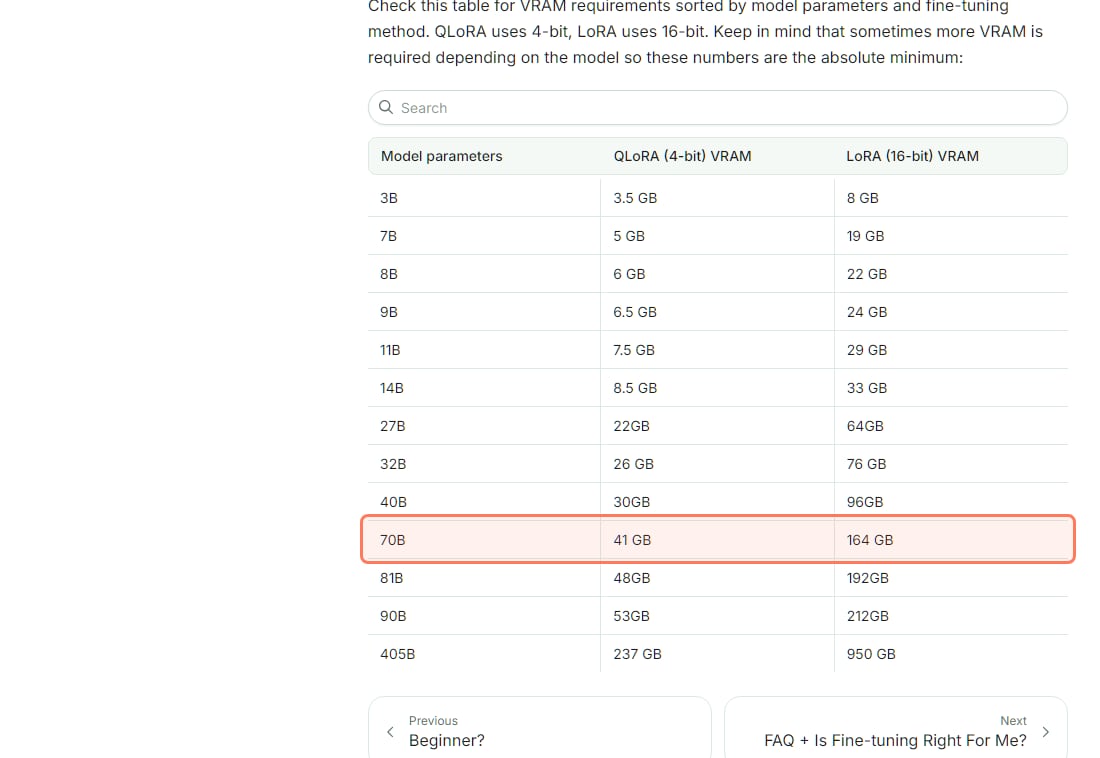
The real limit is VRAM. Here is Unsloth's own table, with its own warning: "these numbers are the absolute minimum".
Unsloth's fine-tuning VRAM minimums, unsloth.ai, read Nov 3, 2026. QLoRA is the 4-bit column. · Screenshot of unsloth.ai by aliteq
Matched to common cards (VRAM and power from NVIDIA's spec pages, read Nov 3, 2026):
What each GPU can fine-tune with QLoRA (Unsloth minimums)
Any 8GB card
VRAM
8 GB
Largest model, QLoRA
Up to 11B (7.5 GB), short examples only
16-bit LoRA
3B (8 GB), at the edge
RTX 3060 12GB
VRAM
12 GB
Largest model, QLoRA
14B (8.5 GB)
16-bit LoRA
3B
Any 16GB card
VRAM
16 GB
Largest model, QLoRA
14B, with room for longer examples
16-bit LoRA
3B
RTX 3090 / RTX 4090
VRAM
24 GB
Largest model, QLoRA
27B (22 GB), at the edge
16-bit LoRA
8B (22 GB) or 9B (24 GB)
RTX 5090
VRAM
32 GB
Largest model, QLoRA
32B (26 GB); 40B (30 GB) at the edge
16-bit LoRA
11B (29 GB)
70B model
VRAM
41 GB minimum
Largest model, QLoRA
No single gaming card; rent an 80GB GPU
16-bit LoRA
164 GB, several GPUs
VRAM
Largest model, QLoRA
16-bit LoRA
Any 8GB card
8 GB
Up to 11B (7.5 GB), short examples only
3B (8 GB), at the edge
RTX 3060 12GB
12 GB
14B (8.5 GB)
3B
Any 16GB card
16 GB
14B, with room for longer examples
3B
RTX 3090 / RTX 4090
24 GB
27B (22 GB), at the edge
8B (22 GB) or 9B (24 GB)
RTX 5090
32 GB
32B (26 GB); 40B (30 GB) at the edge
11B (29 GB)
70B model
41 GB minimum
No single gaming card; rent an 80GB GPU
164 GB, several GPUs
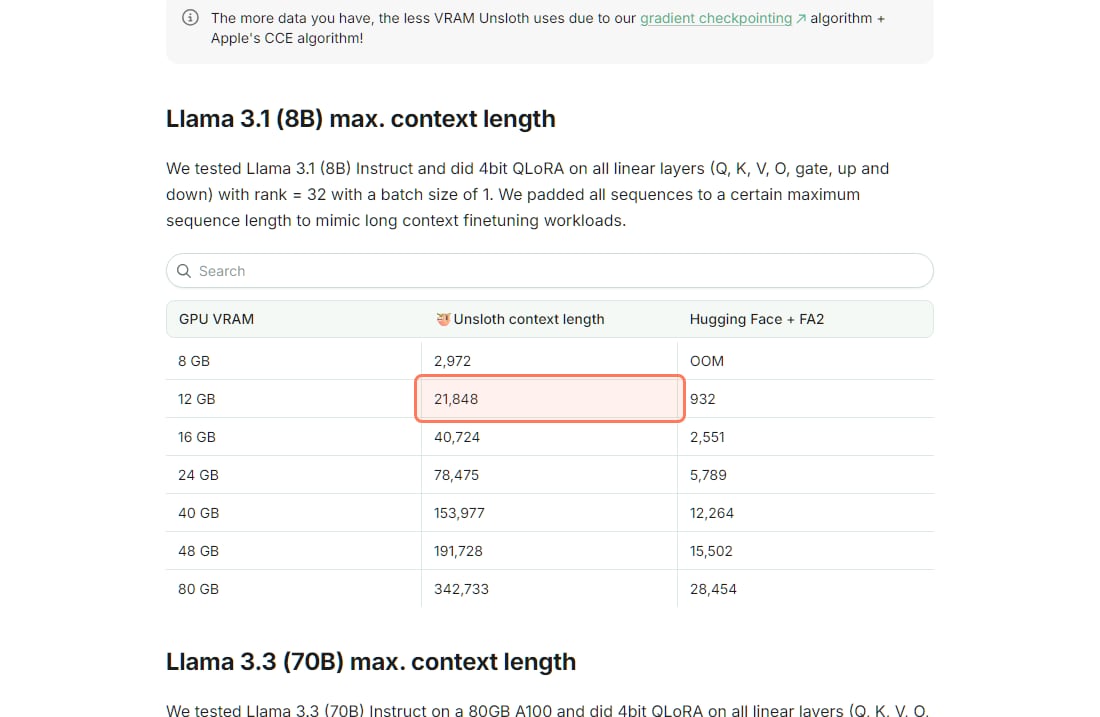
"At the edge" means the minimum fits but leaves little room. That room matters, because it sets how long each training example can be. Unsloth's benchmarks for an 8B QLoRA show the longest context it could train at each memory size:
Max training context for an 8B QLoRA by GPU memory, Unsloth benchmarks, read Nov 3, 2026. Unsloth's test used rank 32 and a batch size of 1. · Screenshot of unsloth.ai by aliteq
So an 8GB card can fine-tune an 8B model, but only on examples under about 3,000 tokens. A 12GB card stretches that to about 21,800, and a 24GB card to about 78,500, plenty for nearly any chat or instruction dataset. To check whether a model fits your card for running it afterward, use our VRAM calculator.
What does it cost to fine-tune on your own GPU?
The software is free. Unsloth's core library is open source under Apache 2.0 (its Studio app is AGPL-3.0), and its guide says you can fine-tune "for free on Colab, Kaggle, or locally with just 3GB VRAM by using our notebooks." The only running cost on your own PC is electricity.
Here is the math at the US average residential price of 18.16 cents per kWh, EIA's preliminary figure for August 2026. The GPU numbers are NVIDIA's rated board power. The whole-PC column is our own rough assumption of the card's rating plus 150 W for the rest of the computer; a training run can draw less than the rating, and your own rate may be far from the average (EIA lists California at 29.75 cents and Idaho at 13.37 for the same month).
Electricity per hour of training at 18.16 cents/kWh (EIA, Aug 2026)
RTX 3060 12GB
GPU rated power (NVIDIA)
170 W
GPU alone, per hour
$0.03
Whole PC, per hour (our estimate)
$0.06 (about 320 W)
RTX 4090 24GB
GPU rated power (NVIDIA)
450 W
GPU alone, per hour
$0.08
Whole PC, per hour (our estimate)
$0.11 (about 600 W)
RTX 5090 32GB
GPU rated power (NVIDIA)
575 W
GPU alone, per hour
$0.10
Whole PC, per hour (our estimate)
$0.13 (about 725 W)
GPU rated power (NVIDIA)
GPU alone, per hour
Whole PC, per hour (our estimate)
RTX 3060 12GB
170 W
$0.03
$0.06 (about 320 W)
RTX 4090 24GB
450 W
$0.08
$0.11 (about 600 W)
RTX 5090 32GB
575 W
$0.10
$0.13 (about 725 W)
How many hours? That depends on your dataset size, example length and settings, and Unsloth doesn't publish a single training-time figure, so we won't invent one. Unsloth's hyperparameters guide recommends "1-3 epochs" (passes over your data), and its benchmarks page warns that the first ~5 minutes can look slow while the code compiles. The practical way to know: run a short test, read the time-per-step the trainer prints, and multiply. Even a 10-hour run on a 4090 PC is about $1.10 of power at the average rate.
Is it cheaper to rent a GPU for fine-tuning?
Only when your card is too small. If you already own the GPU, local power is far cheaper per hour than renting. On Nov 3, 2026, a single RTX 4090 rented for a $0.47/hour median on Vast.ai (42 on-demand offers, our 15:20 UTC read) and on Runpod $0.34/hour on Community Cloud or $0.89/hour on Secure Cloud (Runpod's pricing page), against about $0.11 an hour to run your own. Rent when the model doesn't fit: a 70B QLoRA needs 41 GB, which no single gaming card has. Our cloud GPU guide for fine-tuning picks the card for each model size, and today's prices update every hour.
How do you fine-tune locally, step by step?
A local QLoRA fine-tune with Unsloth
Collect examples
Unsloth: at least 100 rows; over 1,000 is better
Pick a model that fits
8B on 8-12 GB; up to 27B on 24 GB
Install Unsloth
Windows or Linux; NVIDIA, AMD or Intel GPU
Train 1-3 epochs with QLoRA
Watch for out-of-memory; lower the batch size
Test, then export
Unsloth exports to GGUF for local apps
Collect examples
Unsloth: at least 100 rows; over 1,000 is better
Pick a model that fits
8B on 8-12 GB; up to 27B on 24 GB
Install Unsloth
Windows or Linux; NVIDIA, AMD or Intel GPU
Train 1-3 epochs with QLoRA
Watch for out-of-memory; lower the batch size
Test, then export
Unsloth exports to GGUF for local apps
From Unsloth's fine-tuning, datasets, hyperparameters and requirements pages, read Nov 3, 2026.
Prepare your data. This is the part that decides the result. Unsloth's datasets guide says: "We generally recommend using a bare minimum of at least 100 rows of data for fine-tuning to achieve reasonable results." It adds that "a dataset with over 1,000 rows is preferable." Each row is an example of the input and the answer you want, usually as a conversation.
Pick a base model that fits your card from the table above, such as an 8B Qwen3 or Llama 3.1 model. Unsloth's guide says "We recommend starting with QLoRA, as it is one of the most accessible and effective methods for training models."
Install Unsloth and open one of its notebooks. They are fill-in-the-blanks: model name, dataset, a few settings.
Train. If you run out of memory, Unsloth's fix is direct: "A common issue when you OOM or run out of memory is because you set your batch size too high. Set it to 1, 2, or 3 to use less VRAM."
Test and export. Try the result on prompts it hasn't seen, then export it (Unsloth supports GGUF) to run in a local app.
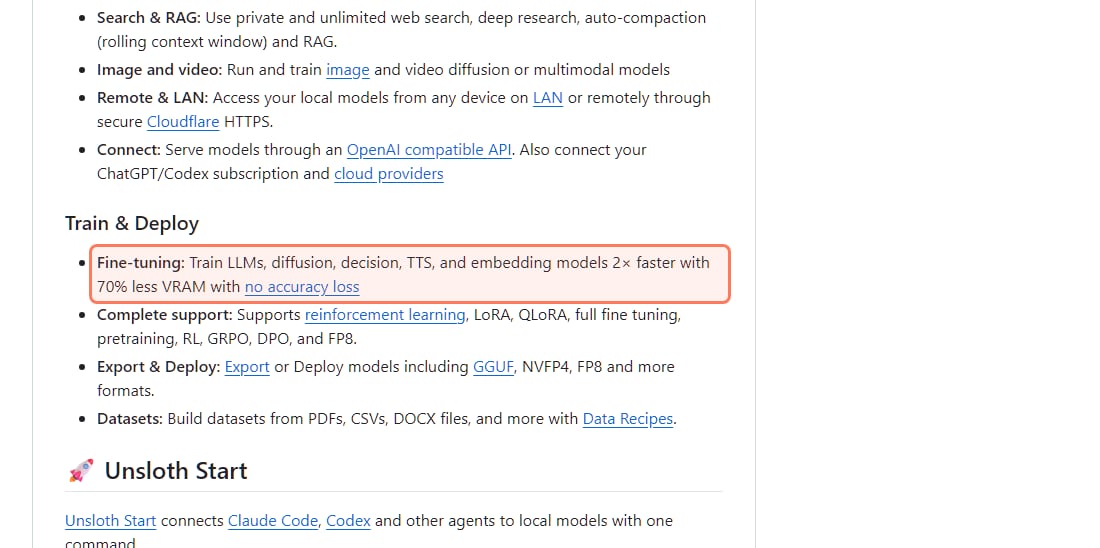
Unsloth's own claim on GitHub, read Nov 3, 2026. The speed and memory figures are the vendor's, measured against standard Hugging Face training. · Screenshot of github.com/unslothai/unsloth by aliteq
Should you fine-tune, or use RAG instead?
It depends on what you want the model to learn. Fine-tuning changes the model itself, so it's the tool for a style, a format, a tone or a narrow task done the same way every time. If you mainly want the model to answer from your documents, and those documents change, chatting with your documents through local RAG is usually quicker to set up and easy to update: you just swap the files.
Unsloth takes a stronger line for fine-tuning. Its guide says "Fine-tuning can replicate all of RAG's capabilities, but not vice versa" and that fine-tuning can learn from documents, but warns that "just dumping data alone won't work as well." In practice, many setups use both: fine-tune for behavior, RAG for facts that change.
The honest limits
The VRAM figures are minimums. Unsloth says more is sometimes needed depending on the model.
No training-time promise. Hours depend on your data and settings; time a short test run first.
The power math is an estimate. It uses rated power and a national average price; check your own bill's rate.
The speed claim is Unsloth's. "2× faster with 70% less VRAM" is the vendor's own figure, not our test.
A 70B fine-tune doesn't fit one gaming card. QLoRA needs 41 GB at minimum, so plan to rent.
Quick answers
Can I fine-tune an LLM on my own GPU?
Yes. With QLoRA and a free tool like Unsloth, an 8B model needs as little as 6 GB of VRAM and a 14B model 8.5 GB, per Unsloth's requirements page (read Nov 3, 2026). Unsloth supports NVIDIA GPUs from 2018 on (CUDA capability 7.0 and up) and also lists AMD, Intel and Mac support. It runs on Windows and Linux.
How much does it cost to fine-tune an LLM locally?
The software is free, so the cost is electricity. At the US average residential price of 18.16 cents per kWh (EIA, August 2026), a PC with an RTX 4090 drawing about 600 W costs about $0.11 per hour, and one with an RTX 3060 about $0.06. A 10-hour run on the 4090 PC is about $1.10 of power at that rate.
How much VRAM do I need to fine-tune a 7B or 8B model?
Unsloth's minimums are 5 GB for 7B and 6 GB for 8B with QLoRA (4-bit), and 19 GB and 22 GB with 16-bit LoRA. More VRAM lets you train on longer examples: Unsloth measured a maximum of 2,972 tokens on 8 GB, 21,848 on 12 GB and 78,475 on 24 GB for an 8B QLoRA.
Can I fine-tune a 70B model at home?
Not on a single gaming card. Unsloth's minimum for a 70B QLoRA is 41 GB, more than the 32 GB of an RTX 5090. Rent an 80GB GPU for the run, or fine-tune a smaller model.
How many training examples do I need?
Unsloth's datasets guide recommends "a bare minimum of at least 100 rows of data" and says a dataset with over 1,000 rows is preferable. Clean, consistent examples matter more than sheer volume.
Is fine-tuning better than RAG for my own documents?
For documents that change, RAG is usually simpler: it reads your files at question time and updates when you swap them. Fine-tuning is the better tool for teaching a style, format or task. Unsloth argues fine-tuning can also learn knowledge, but warns that just dumping data in won't work as well.
You can fine-tune on the GPU you already own: QLoRA fits an 8B model in 6 GB and the power costs cents an hour. Size your card in the VRAM calculator, and if the model is too big for it, compare live cloud GPU prices before you rent.