One person on one machine, or a team hitting one server? That single question decides it. Then licence, GPU and Mac support, and the API your app talks to, all read from each project's own docs.
I get asked this about once a week: "Which one should I run?" The honest answer is another question. How many people will use it at the same time? Everything else is detail.
So I read each project's own README, docs and licence on 3 October 2026 and lined them up. I didn't install or benchmark any of them for this piece, and I'm not printing speed numbers I can't source. What you get is who each tool is for, what it costs, where it runs and what your app connects to. If you only need the first step, start with how to run a local model as an API server. For a speed-focused view of three of these, see our vLLM vs Ollama vs llama.cpp comparison, and for the two desktop-friendly ones see Ollama vs LM Studio.
Who should pick which?
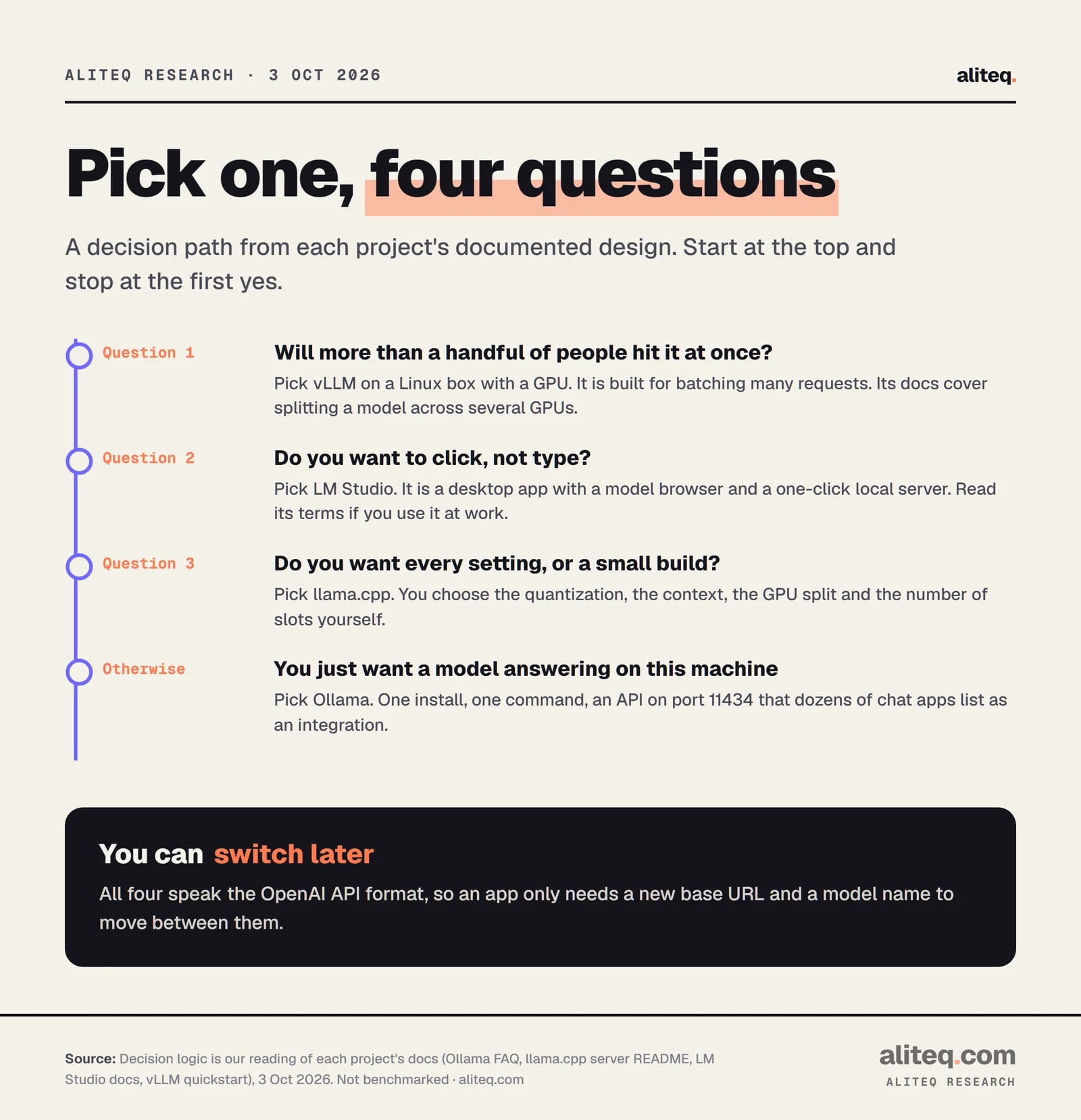
Pick Ollama for the quickest start on one machine, LM Studio if you prefer a desktop app, llama.cpp for full control, and vLLM when many people share one server. The decision comes from how each project describes itself, not from a speed test.
A decision path from each project's documented design. Read 3 October 2026. · aliteq research
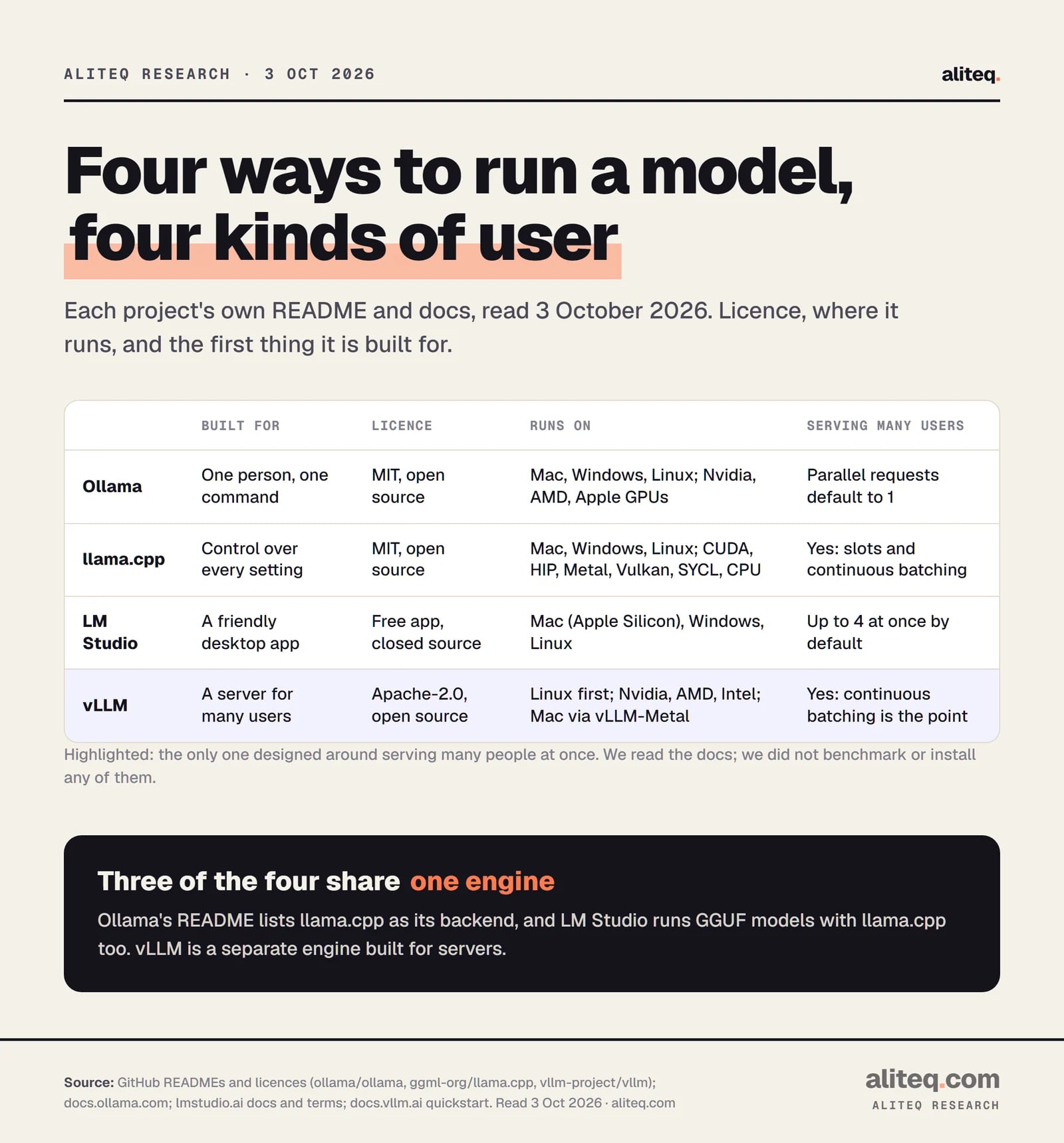
The four at a glance
Ollama
Built for
One person, one command
Licence
MIT, open source
Serving many users
Parallel requests default to 1
llama.cpp
Built for
Control over every setting
Licence
MIT, open source
Serving many users
Slots and continuous batching
LM Studio
Built for
A friendly desktop app
Licence
Free app, closed source
Serving many users
4 concurrent predictions by default
vLLM
Built for
A server for many users
Licence
Apache-2.0, open source
Serving many users
Continuous batching is the design
Built for
Licence
Serving many users
Ollama
One person, one command
MIT, open source
Parallel requests default to 1
llama.cpp
Control over every setting
MIT, open source
Slots and continuous batching
LM Studio
A friendly desktop app
Free app, closed source
4 concurrent predictions by default
vLLM
A server for many users
Apache-2.0, open source
Continuous batching is the design
Do they share an engine?
Mostly yes. Ollama's README lists llama.cpp as its supported backend. LM Studio's docs say it runs models with llama.cpp, and on Apple Silicon Macs also with Apple's MLX. Only vLLM is a separate engine, written in Python and built for servers.
That matters for one reason. When people say Ollama is "slower" or "faster" than llama.cpp, they are mostly comparing wrappers, defaults and settings around the same core. I'd treat any speed claim without a stated model, quantization and hardware as noise. We didn't benchmark any of them, so we don't rank them on speed.
One user: Ollama or LM Studio?
Choose Ollama if you're comfortable in a terminal and want a service that just runs. Choose LM Studio if you'd rather browse models and click Start Server. Both give you an OpenAI-style local API, so your apps won't care which you picked.
Ollama. Install with one command on macOS and Linux (curl -fsSL https://ollama.com/install.sh | sh) or a PowerShell line on Windows. The README says ollama run gemma4 starts a chat. The REST API sits at localhost:11434, and ollama launch claude wires it into coding tools such as Claude Code, Codex and OpenCode. If you want help with models once it's running, see how to manage local models in Ollama. One catch from our own notes: bare tags can pull a small default size, so name the size you want, as in our Gemma 4 12B guide.
LM Studio. A desktop app for macOS, Windows and Linux with a built-in model browser and a local server. Its docs list Apple Silicon Macs (macOS 14 or newer), Windows on x64 or ARM with AVX2, and Ubuntu 20.04 or newer. Intel Macs aren't supported. For servers with no screen it offers llmster, a standalone daemon started with lms daemon up.
The licence is the thing to read. LM Studio is free to download, but it isn't open source. Its app terms (version of 23 August 2026) grant a licence "solely for Your personal and / or internal business purposes". The same terms restrict selling it on as a service. We're not lawyers, so read the terms before you build a product on it. Its homepage now leads with a newer agent app called Bionic, with paid cloud plans at $20 and $100 a month. Local models stay on the free plan, per its pricing page.
You want every dial: llama.cpp
llama.cpp is the engine itself. You get the most hardware options, the most settings and the smallest footprint, in exchange for doing more yourself. Its README calls it "LLM inference in C/C++" with "no dependencies", under an MIT licence.
Its README lists the longest backend table of the four: CUDA for Nvidia, HIP for AMD, Metal for Apple Silicon, plus Vulkan, SYCL for Intel GPUs and plain CPU. It can also split a model between GPU and CPU when the model is larger than your VRAM. It says Apple silicon is "a first-class citizen". You pick the quantization (1.5-bit up to 8-bit), the context length and the GPU split.
Its built-in server, llama-server, is more than a toy. The server README lists OpenAI-compatible chat completions, responses and embeddings routes, an Anthropic Messages API route, parallel decoding with multi-user support, and continuous batching. It listens on 127.0.0.1:8080 by default, takes an --api-key, and has a router mode that can hold up to 4 models by default. One honest note from its own docs: "no strong claims of compatibility with OpenAI API spec is being made", though it says it works for many apps.
A team or an app hitting one model: vLLM
vLLM is the one built for serving many requests at once. It's an Apache-2.0 library from UC Berkeley's Sky Computing Lab. Its README lists continuous batching, PagedAttention (a way of managing the model's memory so more requests fit), prefix caching and several kinds of multi-GPU parallelism.
The trade-offs are real. The quickstart lists Linux as the OS, with Python 3.10 to 3.13. It says vLLM also works on macOS through a separate project, vLLM-Metal, but there's no native Windows listed. The server "currently hosts one model at a time", so a second model means a second server. It supports Nvidia, AMD and Intel GPUs and several accelerators. Its parallelism guide says that if the model fits on one GPU, you probably don't need distributed inference. If it doesn't, you split it across the GPUs in one node.
Rule of thumb from reading the docs: if one person is the only user, vLLM's strengths sit idle and its setup cost is real. If ten people or a busy app share the model, Ollama's default of one parallel request per model is the setting you'd outgrow first. To size the GPU for that, use our GPU guide for local AI and the cost to run calculator.
What your app connects to
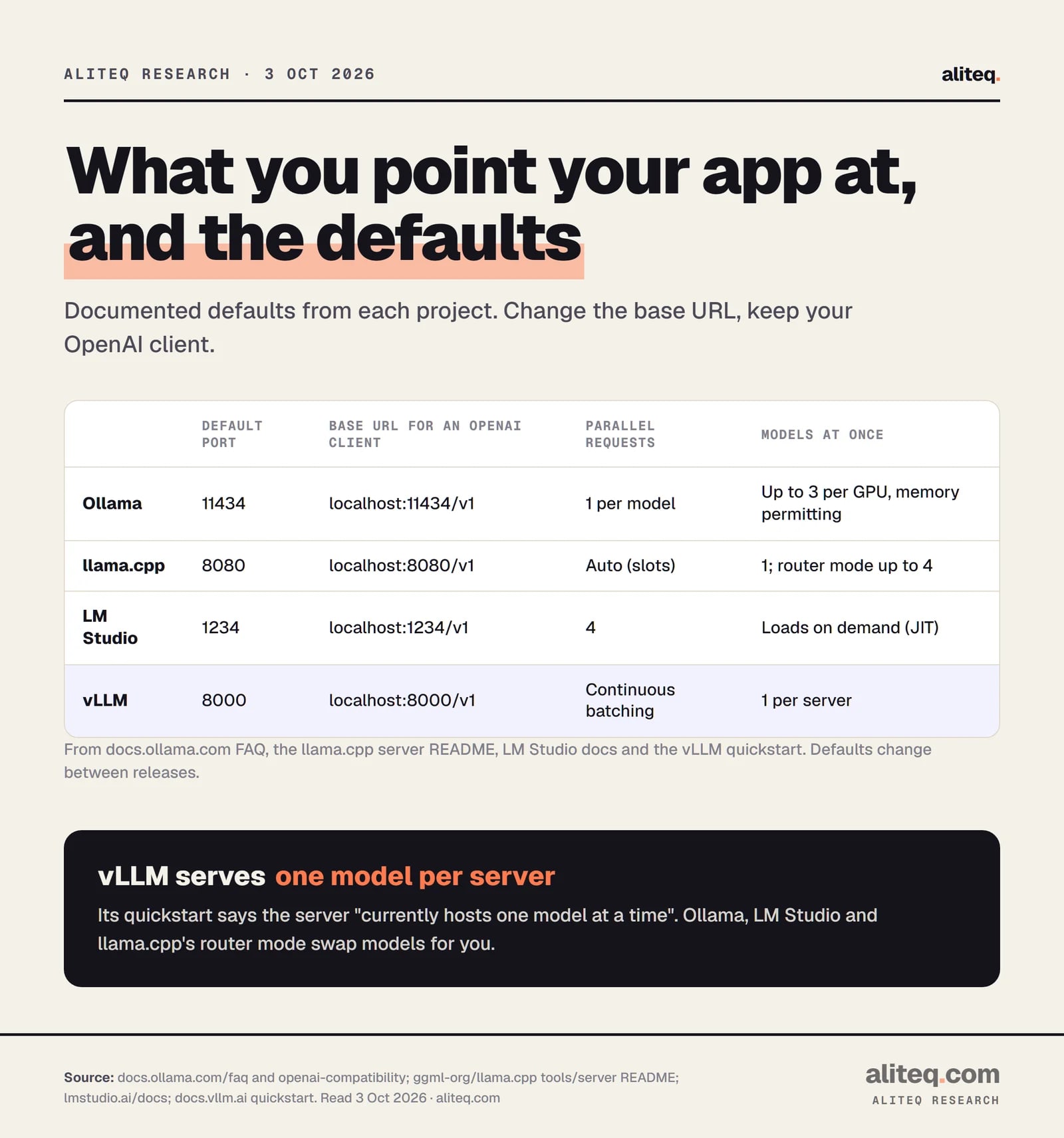
All four expose an OpenAI-style API on your own machine. You change the base URL and the model name, and keep the rest of your client code. The ports differ, so pin the right one.
Documented defaults from each project. Read 3 October 2026; they change between releases. · aliteq research
Two details trip people up. Ollama and LM Studio say the OpenAI-compatible endpoint is a subset or a set of listed routes, so check that the route you need, such as embeddings or responses, is on the list. And all of them listen on localhost by default. Ollama binds 127.0.0.1:11434 unless you set OLLAMA_HOST, and llama.cpp binds 127.0.0.1 unless you pass --host. Putting any of them on a network without a proxy or an API key is on you.
What can you run it on?
Mac, Windows and Linux are covered by the first three. vLLM is Linux first. For GPUs, llama.cpp lists the widest set, and Ollama and vLLM cover Nvidia and AMD. Apple Silicon is supported by all four, though vLLM needs its separate Metal project.
Licence, hardware and multi-user design for each tool. Read 3 October 2026. · aliteq research
Ollama's hardware page says it needs an Nvidia GPU with compute capability 5.0 or higher, AMD cards through ROCm on Linux plus Vulkan, and Metal on Apple devices. LM Studio recommends 16 GB of RAM and at least 4 GB of dedicated VRAM on Windows. No matter which you pick, the model has to fit your memory first. Our cost to run pages show the VRAM a given model needs at each quantization.
Is running it yourself even cheaper?
Not automatically. All four tools are free to download, but the hardware isn't. If you're weighing a GPU of your own against an API, read self-hosted LLM vs API: the break-even first. The tool you pick changes convenience and licence terms, not the cost of the card.
Quick answers
Which is best for a beginner?
Ollama if you're fine typing one command, LM Studio if you'd rather click. Both run on a normal Mac, Windows or Linux machine and expose a local OpenAI-style API. Pick LM Studio's app if a terminal puts you off, and read its terms if you plan to use it at work.
Is llama.cpp faster than Ollama?
We can't say, because we didn't benchmark them. Ollama's README lists llama.cpp as its backend, so the difference is mostly settings and defaults around the same engine. Be wary of any speed claim that doesn't name the model, quantization and hardware.
Can I serve a team with Ollama?
You can, but read its defaults. Its FAQ says OLLAMA_NUM_PARALLEL, the parallel requests per model, defaults to 1, and memory use scales with it times the context length. For many simultaneous users, vLLM or llama.cpp's server with several slots is built for that.
Is LM Studio open source, and can I use it at work?
The app is free but not open source. Its terms (version of 23 August 2026) grant a licence for personal and internal business purposes and restrict reselling it as a service. Read the current terms, or ask a lawyer, before depending on it commercially.
Does vLLM run on a Mac or on Windows?
Its quickstart lists Linux as the supported OS. It says vLLM also works on macOS through a separate project, vLLM-Metal, for Apple Silicon. We found no native Windows support listed.
Can I swap one for another later?
Usually. All four expose OpenAI-style endpoints, so you change the base URL (ports 11434, 8080, 1234 or 8000 by default) and the model name. Check that the specific routes you use, such as embeddings, are supported by the one you move to.