LM Studio is a desktop app that finds, downloads and runs models for you. Open WebUI is a web platform you host for yourself, your family or a team. Here's when each one wins, what changed this week, and the five-minute setup that uses both.
Some links on this page are referral links: we may earn a commission, at no cost to you.
Share
Should you use Open WebUI or LM Studio? Use LM Studio if you're one person on one computer and want a single app that finds, downloads and runs models with no terminal. Use Open WebUI if more than one person or device should reach your local models from a browser, with their own logins and permissions. And if you like both, run both: Open WebUI's own docs show how to plug it into LM Studio's server. Checked on both projects' own pages on Nov 3, 2026.
Open WebUI vs LM Studio, from their own pages (Nov 3, 2026)
Open WebUI
v0.13.0 · self-hosted web platform
vs
LM Studio
v0.4.28 · desktop app
A web platform you host (pip, Docker, Kubernetes, or the new Desktop app)
What it is
A desktop app that downloads and runs models
Connects to runners (Ollama, LM Studio, llama.cpp, vLLM, cloud APIs)
Runs models itself?
Yes: llama.cpp, plus MLX on Apple Silicon Macs
Through the runner you connect
Finding and downloading models
Built-in Hugging Face browser with search and filters
Its API can be served on the network; the chat window stays on that computer
Local and cloud models side by side
Local plus cloud models
Focused on local models
Free community edition (Open WebUI License, branding clause)
Price and license
Free for personal and work use (proprietary)
WebUI wins 3wins 2 Studio
When does LM Studio win?
When it's just you, on the computer that has the GPU, and you want to be chatting with a model in a few minutes. LM Studio's docs list what it does: "Download and run local LLMs like gpt-oss or Llama, Qwen", "Search & download functionality (via Hugging Face 🤗)" and "Serve local models on OpenAI-like endpoints, locally and on the network." It runs models "using llama.cpp" on Mac, Windows and Linux, and on Apple Silicon Macs "also supports running LLMs using Apple's MLX."
Open WebUI's own comparison page is generous about its rival: "LM Studio has nailed the desktop experience for local AI. The built-in model browser makes discovering and downloading models from Hugging Face effortless", it says, before praising its performance and its clean interface. Its verdict: "Choose LM Studio if you want the best desktop experience for discovering and running local models."
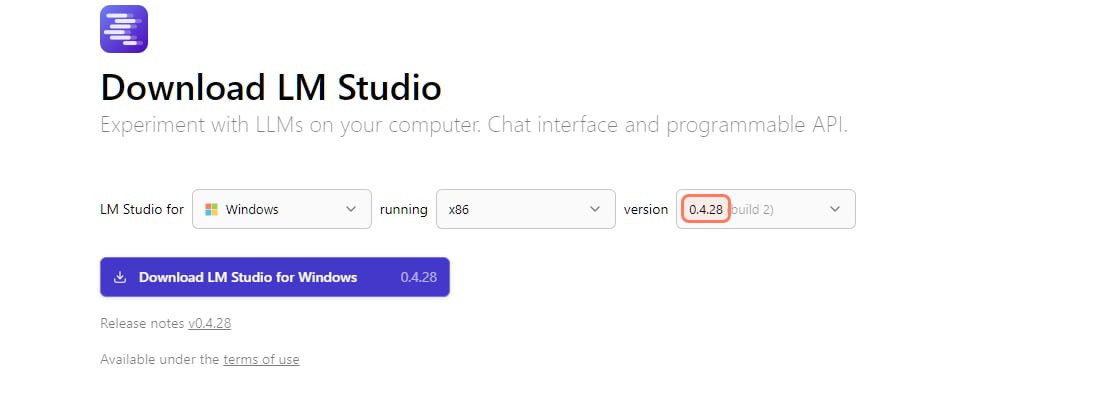
LM Studio's download page, lmstudio.ai/download, read Nov 3, 2026. The current version is 0.4.28. · Screenshot of lmstudio.ai by aliteq
No server to set up. One installer, one window. There's also llmster, which LM Studio's docs call "the headless version of LM Studio, no desktop app required", for servers and CI.
Hardware floor. LM Studio's system requirements say Macs need Apple Silicon and macOS 14.0 or newer ("Intel-based Macs are currently not supported"), Windows x64 needs a CPU with AVX2, and "At least 16GB of RAM is recommended."
Your other devices, the LM Studio way. LM Link, in preview, connects machines running LM Studio or llmster so you can "load models on remote devices and use them as if they were local". It still means LM Studio on each device, not a browser login for a family member.
When does Open WebUI win?
When more than one person, or more than one device, should use your local models. Open WebUI's README calls it "an extensible, easy-to-use, self-hosted platform built to run entirely offline" that can "Connect local models through Ollama or use OpenAI-compatible APIs for local and cloud models." Its comparison page lists "Team features including RBAC, SSO/OIDC/LDAP, SCIM 2.0, analytics, and evaluation arena" and says to choose it "if you want a web-based platform with team access, persistent knowledge bases, or the ability to use local models alongside cloud providers like OpenAI, Anthropic, and Google."
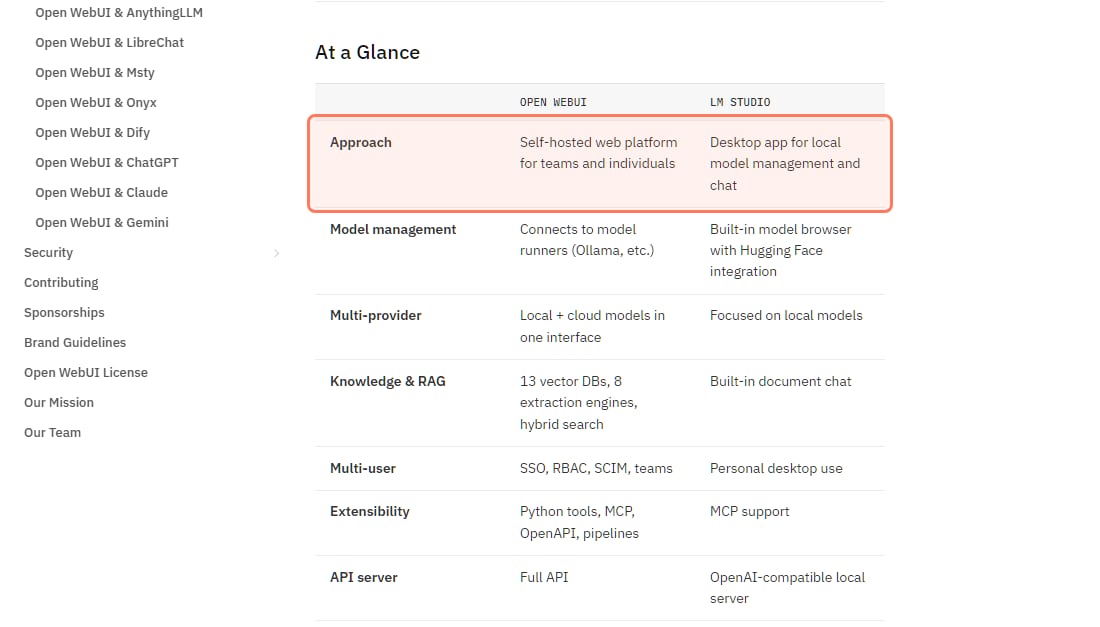
Open WebUI's own comparison table, docs.openwebui.com/alternatives/lm-studio (marked last updated August 2026), read Nov 3, 2026. · Screenshot of docs.openwebui.com by aliteq
It doesn't run models on its own (mostly). The table above says Open WebUI "Connects to model runners (Ollama, etc.)". The usual pairing is Ollama; the README offers a Docker image tag :ollama, "Open WebUI bundled with Ollama".
New this week: a desktop app. The v0.13.0 release notes, published Nov 3, 2026, say Open WebUI Desktop "now focuses on setting up and running Open WebUI on your own computer, with optional llama.cpp local models." Its README asks for 5 GB+ of disk and macOS 12+, Windows 10+ or modern Linux. It's version 0.1.4 (Nov 2, 2026), so treat it as early.
Updates need care on a shared server. The same release notes warn it "includes database schema changes" and recommend backing up first, and say it contains security fixes, so keep a team install updated.
Can you use Open WebUI and LM Studio together?
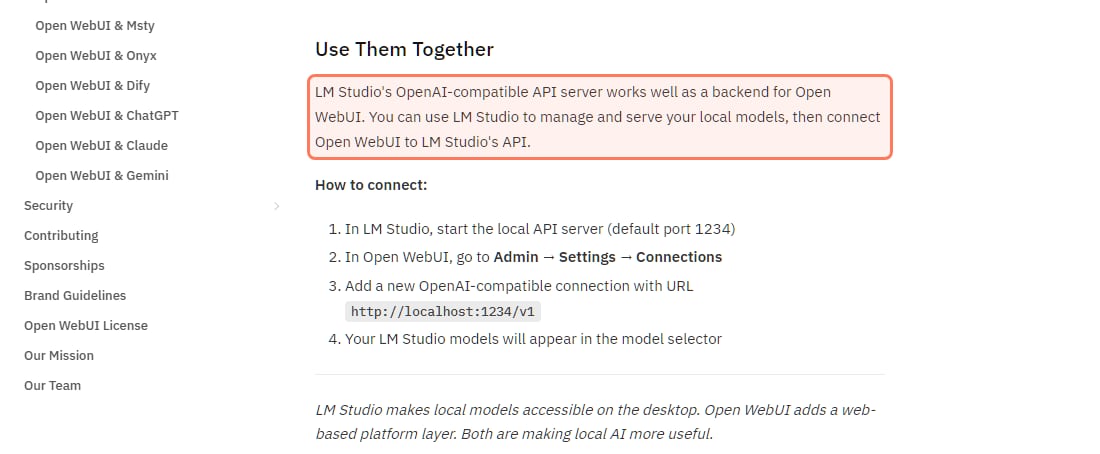
Yes, and it's a good setup: LM Studio picks and runs the models, Open WebUI gives everyone a browser chat with logins. Open WebUI's docs say "LM Studio's OpenAI-compatible API server works well as a backend for Open WebUI."
Open WebUI's own steps for connecting LM Studio, docs.openwebui.com/alternatives/lm-studio, read Nov 3, 2026. · Screenshot of docs.openwebui.com by aliteq
Connect Open WebUI to LM Studio in four steps
Start LM Studio's server
Developer tab, Start server, or lms server start (default port 1234)
Open Admin, Settings, Connections
In Open WebUI, signed in as the admin
Add an OpenAI-compatible connection
URL http://localhost:1234/v1, API key blank or lm-studio
Pick an LM Studio model
Optional: set Provider to LM Studio to load and unload models from Open WebUI
Start LM Studio's server
Developer tab, Start server, or lms server start (default port 1234)
Open Admin, Settings, Connections
In Open WebUI, signed in as the admin
Add an OpenAI-compatible connection
URL http://localhost:1234/v1, API key blank or lm-studio
Pick an LM Studio model
Optional: set Provider to LM Studio to load and unload models from Open WebUI
From Open WebUI's LM Studio and OpenAI-compatible connection docs and LM Studio's server docs, read Nov 3, 2026.
Two details from the docs that save a support thread. If Open WebUI runs on a different machine, or in Docker, localhost points at the wrong place: turn on LM Studio's "Serve on Local Network" option, which "allows the LM Studio API server running on your machine to be accessible by other devices connected to the same local network", and use that machine's address. And Open WebUI's connection docs say setting the Provider to LM Studio under Advanced "lets admins download, load and unload models without leaving Open WebUI."
Is either one free, and what do the licenses mean?
Both cost nothing to use, and neither is MIT-style open source.
LM Studio is proprietary. Its app terms (version Aug 23, 2026) grant "a non-exclusive, non-transferable license to use the Software solely for Your personal and / or internal business purposes". Since July 8, 2025 its blog says "LM Studio is free to use both at home and at work", with no form to fill. LM Studio's paid plans ($20 and $100 a month on its pricing page, Nov 3, 2026) are for its Bionic agent's cloud models, not for running local models.
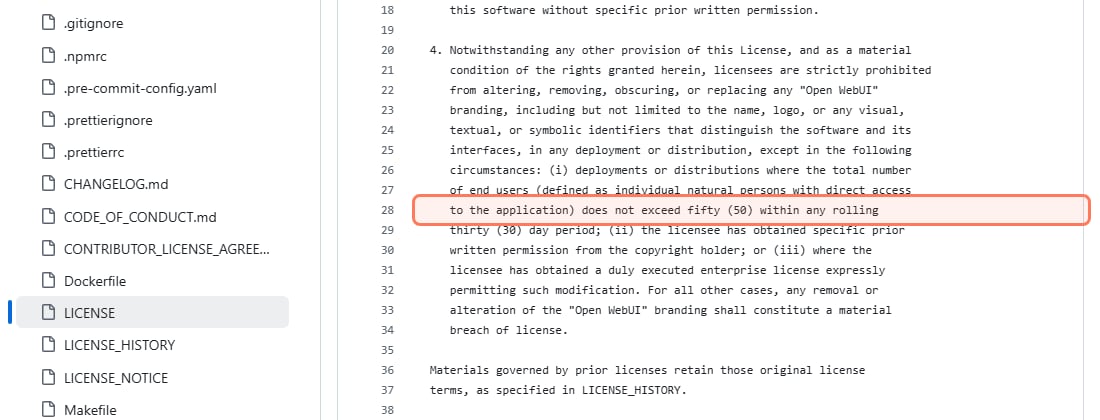
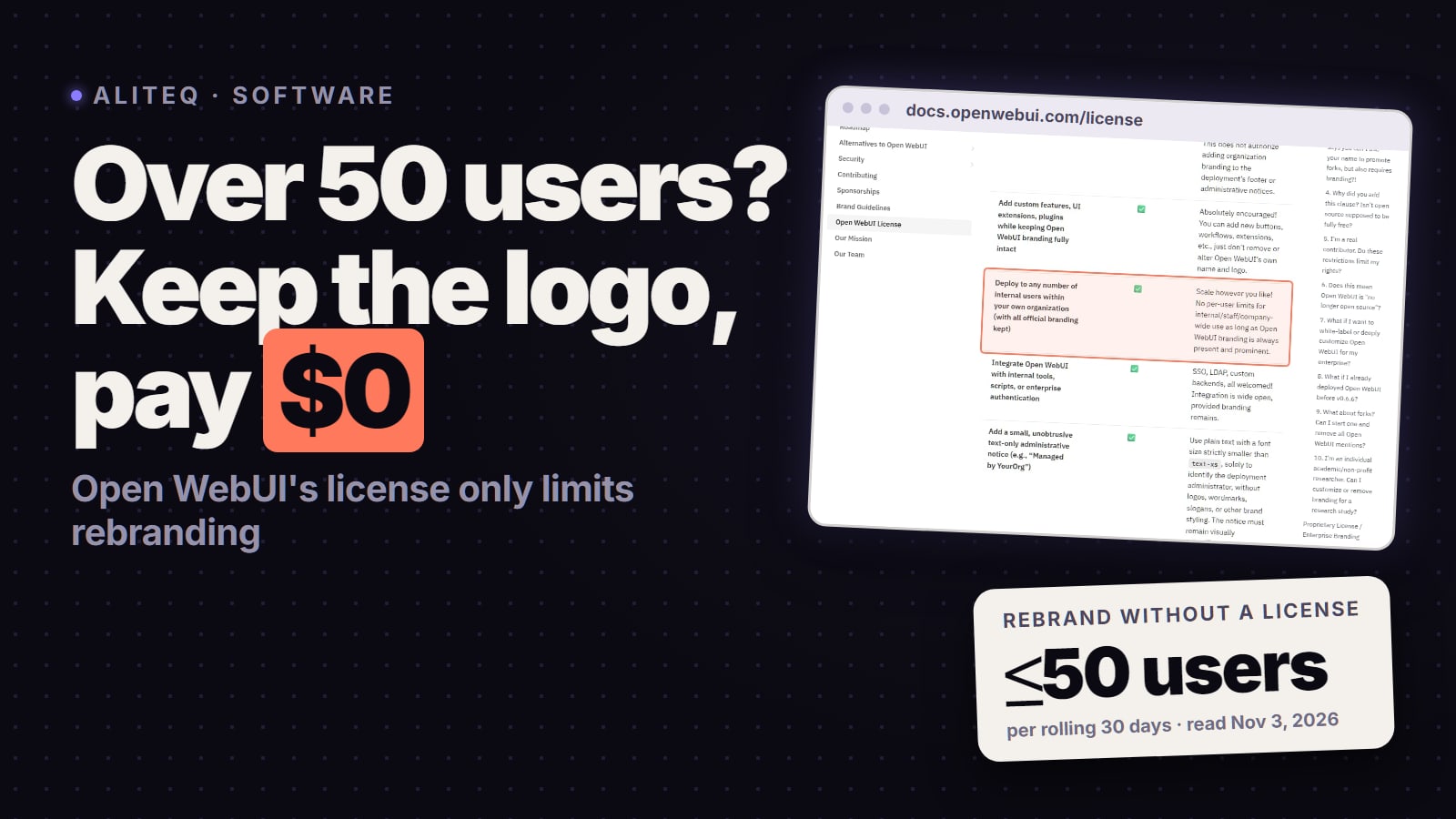
Open WebUI uses the Open WebUI License: BSD-style terms plus a clause that bans removing or changing the "Open WebUI" branding unless your deployment has no more than "fifty (50)" end users in a rolling 30 days, you have written permission, or you have an enterprise license. Using it as is, with the branding, is fine at any size. Details in the Open WebUI license, explained.
Clause 4 of the Open WebUI License, github.com/open-webui/open-webui, read Nov 3, 2026. · Screenshot of github.com/open-webui by aliteq
Does either one need a better GPU?
No. Neither app changes how much memory a model needs: the model, its quantization and its context length do. Since Open WebUI hands the work to a runner (Ollama, LM Studio or llama.cpp), a model that fits in LM Studio fits behind Open WebUI too. Check your card against the model in our VRAM calculator before you download 20 GB of weights. If it doesn't fit, you can run Ollama and Open WebUI with Docker on a rented GPU instead; today's rental prices are on /cloud-gpu.
Which one should you pick?
You, one computer, want it simple: LM Studio.
A household or team sharing one GPU box: Open WebUI in front of Ollama or LM Studio, with a login for each person.
You want to chat from your phone while the model runs on your desktop: Open WebUI, opened in the phone's browser.
You like LM Studio's model browser but need a shared web UI: both, connected as above.
You want local and cloud models in one place: Open WebUI.
You plan to rebrand it for a large group: read the Open WebUI license first; LM Studio's terms limit use to personal or internal business purposes.
They do different jobs. LM Studio is a desktop app that downloads and runs models for one person on one computer. Open WebUI is a self-hosted web platform, usually over Ollama, for several users and devices. Open WebUI's own docs recommend LM Studio for the best desktop experience and Open WebUI for team access, knowledge bases and mixing local with cloud models.
Can Open WebUI use LM Studio?
Yes. Start LM Studio's server (default port 1234), then in Open WebUI go to Admin, Settings, Connections and add an OpenAI-compatible connection with the URL http://localhost:1234/v1. Your LM Studio models then appear in Open WebUI's model selector, per Open WebUI's docs read Nov 3, 2026.
Is LM Studio free?
Yes, for personal and work use. LM Studio's blog says it has been free at work since July 8, 2025, and its app terms license it for personal and internal business purposes. It is proprietary, not open source. Its paid plans cover cloud models in its Bionic agent, not local use.
Is Open WebUI free?
Yes. Open WebUI has a free community edition under the Open WebUI License, with enterprise plans available. The license bars removing its branding for deployments above 50 end users in a rolling 30 days unless you have permission or an enterprise license.
Do I need Ollama for Open WebUI?
No. Open WebUI connects to Ollama or any OpenAI-compatible server, including LM Studio, llama.cpp and vLLM, plus cloud providers. Ollama is the most common local pairing, and Open WebUI offers a Docker image with Ollama bundled.
Does Open WebUI have a desktop app now?
Yes. Open WebUI Desktop (v0.1.4, Nov 2, 2026) installs and runs Open WebUI on your own Mac, Windows or Linux computer, with optional llama.cpp local models, per the v0.13.0 release notes. It is an early version.