The 5090 is the fastest consumer card for running models at home and the only one with 32GB. But it was out of stock on NVIDIA's own store, it still can't hold a dense 70B, and renting one cost from $0.45 an hour on Nov 3, 2026. Who should buy, who should rent, who should buy 24GB.
This post contains affiliate links. If you buy through them, Aliteq may earn a commission — at no extra cost to you. Prices change; check the seller’s own page for today’s price.
Share
Short answer: yes, but only for a narrow buyer. If you need 32GB on one card and you find a 5090 near the $1,999 list price, it is the best consumer card for running models at home. If you'd pay several times that from a reseller, or your models already fit in 24GB, rent one by the hour or buy a 24GB card instead. Everything below is dated, and every number links to where we read it.
Is the RTX 5090 worth it over a 4090 or a 3090 for local AI?
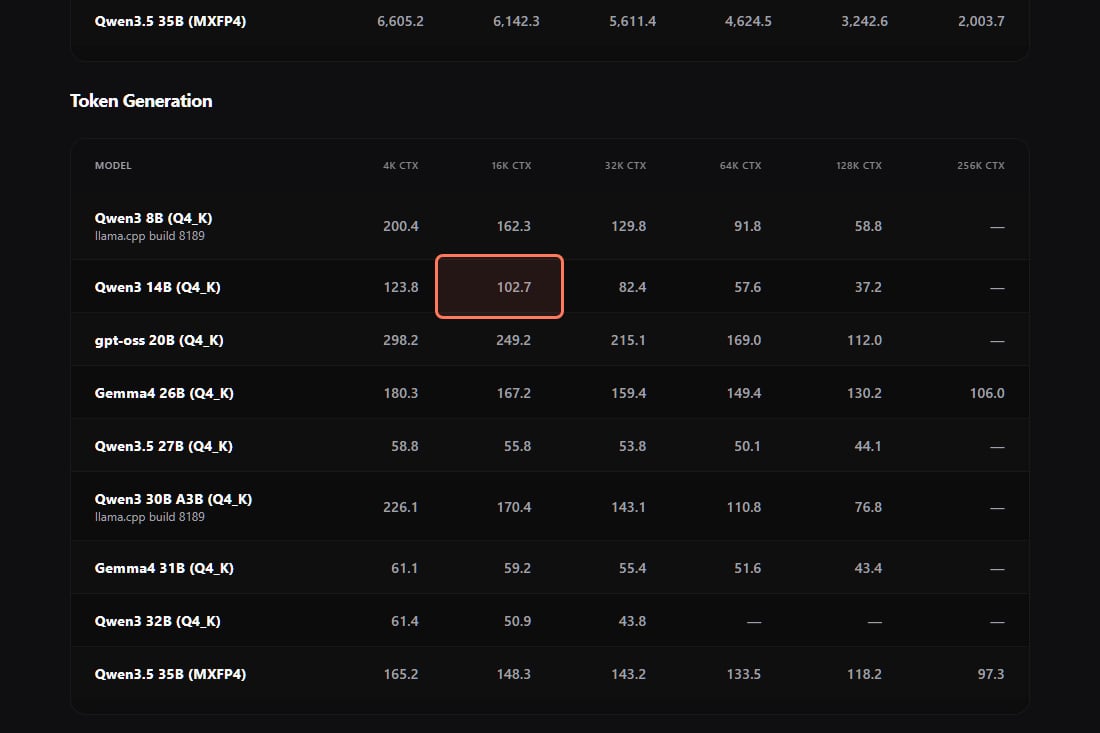
On speed, clearly. Token generation is mostly a memory-bandwidth job, and the 5090's 32GB of GDDR7 sits on a 512-bit bus (NVIDIA's spec page, read Nov 3, 2026). hardware-corner.net's llama.cpp tables show what that means for the same model at the same context:
Measured generation, Qwen3-14B Q4_K at 16k context, llama.cpp (hardware-corner.net, read Nov 3, 2026)
RTX 3090 (24GB)52.1 t/s
RTX 4090 (24GB)69.8 t/s
RTX 5090 (32GB)102.7 t/s
That is about 47% faster than a 4090 and about twice a 3090. The RTX 5090 table, the 4090 table and the 3090 table are the sources; these are their measurements, not ours.
hardware-corner.net's RTX 5090 token generation table (hardware-corner.net/gpu-llm-benchmarks/rtx-5090, read Nov 3, 2026). Our outline marks the 14B result used above. · hardware-corner.net
Whether that speed is worth the money depends on what you do with it. At 50 tokens a second a chat reply already arrives faster than you read it, so for one person chatting, a 3090 is not slow. The speed pays off for coding agents, batch jobs and long documents, where you wait on thousands of tokens at a time.
What does the extra 8GB of VRAM actually get you?
Longer context, mostly. The KV cache grows with every token in the conversation, and that is where 24GB cards run out first. The same tables show it:
Qwen3-32B at Q4_K: the 3090 and 4090 tables stop at 16k context; the 5090 table goes to 32k (43.8 tokens/sec there).
Qwen3.5-35B (MXFP4): the 3090 table stops at 128k; the 5090 runs it at 256k context at 97.3 tokens/sec.
So the 5090 doesn't unlock a new size of model. It lets the 30–35B models you could already run on 24GB keep a much longer conversation or codebase in memory. Put your own model and context length into the VRAM calculator to see where your setup lands.
Can the RTX 5090 run a 70B model?
Not a dense 70B in VRAM. At Q4 that is about 40GB before you've typed a word, against 32GB on the card. If 70B-class is the goal, the realistic routes are MoE offloading, two 24GB cards, a unified-memory machine, or renting the hours.
Can you still buy an RTX 5090, and at what price?
Barely, and not reliably at list price. Here's what we can confirm, and what is only reported:
What NVIDIA's store showed (Nov 1, 2026). Filtering NVIDIA's US marketplace to the RTX 5090 returned two products: the Founders Edition at $1,999, "Out of Stock", and a Gigabyte AORUS RTX 5090 at $6,599.99 with a "Check Availability" link to a retailer. We tried to reload it on Nov 3 and the store did not load for us, so check it yourself before you buy.
What NVIDIA has said.PC Gamer reported on Oct 19, 2026 that Jeff Fisher, senior vice president of NVIDIA's GeForce business, said at an event in Taipei (via 4Gamers): "Although there are other variants of the RTX 5090 (chip), production has not been discontinued, and Nvidia will continue to ship, which is very important." He also said "the supply chain (capacity) is indeed somewhat constrained". The same article said the card had disappeared from NVIDIA's US marketplace at the time, which is what a widely shared r/LocalLLaMA thread on Oct 15 was about.
What is rumor. A leaker's claim of January end-of-production dates for the RTX 5090 and the 16GB RTX 5080 circulated on r/gpu on Oct 21, and a 24GB RTX 5080 is reported for January 2027. NVIDIA has confirmed neither. Treat both as rumors until NVIDIA's own pages say otherwise.
Should you rent an RTX 5090 instead of buying one?
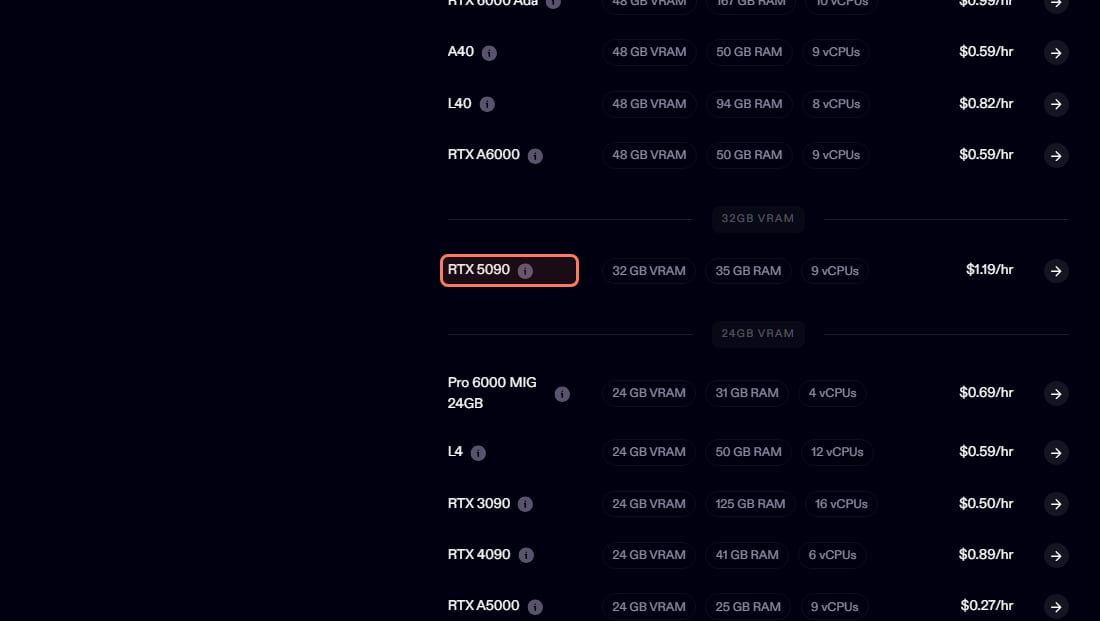
For most people, yes, at least first. At 15:20 UTC on Nov 3, 2026, our tracker read a single RTX 5090 on Vast.ai from $0.45 an hour on-demand (median $0.67 across 59 offers; interruptible spot from $0.27), and Runpod at $1.19 an hour on-demand, the same figure on Runpod's own pricing page that day. That $1.19 is Runpod's Secure Cloud rate; the same page's product data also listed a Community Cloud rate of $0.69 an hour for the 5090.
The division is simple: $1,999 divided by the $0.67 median is about 3,000 rented hours, or about 4,500 hours at the cheapest offer. That's before you count the power, the PSU, and the reseller premium if you can't get one at list. If you'd run it a few evenings a week, renting stays cheaper for years. If it would run eight hours a day, every day, owning at list price pays back in about a year. We worked through the full version in rent vs buy: the break-even math.
Live prices for every card, refreshed hourly, are on the cloud GPU page.
What else does a 5090 build cost?
Two costs the price tag leaves out.
Budget the platform too: NVIDIA lists 575W for the card and 1,000W required system power. · Pexels
The power supply. NVIDIA's spec page lists 575W total graphics power and 1,000W required system power (read Nov 3, 2026). An older 750W build needs a new PSU; see what PSU you need.
Heat. 575W leaves the case as heat in your room during long jobs. Chat inference is bursty and idles between replies, but batch work draws close to the rated power for hours.
Who should buy an RTX 5090, and who shouldn't?
The 5090 earns its price for three kinds of buyer:
You run 32B-class models at long context every day. This is the only single consumer card where that's comfortable. See which GPU Qwen3-32B wants.
You also generate images or video. Diffusion and video models are compute-bound, and 32GB allows resolutions and clip lengths 24GB can't.
You find one near $1,999. At list price it is a fair buy for the two groups above.
And it is the wrong card for most other people, in particular if:
Your models are 8–14B, or 27–32B at Q4 with normal context. A 24GB card runs them. Read the RTX 4090 vs RTX 3090 comparison and the used 3090 checklist first. Used 3090 prices have climbed too, so compare them on the day.
Your goal is a dense 70B. 32GB is not enough; see the routes above.
The only cards you can find cost several times list. At that price, rented hours win for almost everyone.
7/ 10
Verdict
Worth it at list price. Hard to justify above it.
The measured speed is real and 32GB on one consumer card is unique. But on Nov 1, 2026 NVIDIA's own store had it out of stock at $1,999, partner cards were listed far above that, and the end-of-production dates going around are unconfirmed leaks. Rent a 5090 for the jobs that need 32GB, buy 24GB for everything else, and buy a 5090 only if one turns up near list price.
Best for: Yes: 32B and long-context daily users, image and video work alongside LLMs, anyone who finds one near $1,999. No: 8–32B at Q4 with normal context (24GB does it), 70B goals, anyone paying several times list price.
The questions people actually ask
Is the RTX 5090 worth it for local AI?
Only if you need 32GB on one card and can buy it near the $1,999 list price. It is about 47% faster than a 4090 and about twice a 3090 in hardware-corner.net's llama.cpp tests, but most models people run at home fit in 24GB. If yours do, a 24GB card or a rented 5090 is the better deal.
Has NVIDIA discontinued the RTX 5090?
Not according to NVIDIA. In October, NVIDIA's GeForce senior vice president Jeff Fisher said production has not been discontinued and NVIDIA will continue to ship, while saying supply is constrained (PC Gamer, Oct 19, 2026). Dated end-of-production claims online come from leakers, not NVIDIA. On Nov 1, 2026 NVIDIA's US store listed the Founders Edition at $1,999, out of stock.
Can the RTX 5090 run a 70B model?
Not a dense 70B in VRAM. That's about 40GB at Q4 before context, against 32GB on the card. You can run 70B with CPU or MoE offloading at lower speed, but that works on cheaper cards too. What the 5090 runs well is the 30–35B class at very long context.
Is the 5090 worth it over a 4090 for local AI?
The measured gap is about 47% on generation (102.7 vs 69.8 tokens/sec on Qwen3-14B at 16k context, hardware-corner.net) plus 8GB more VRAM, which lets 32B models run at 32k context where the 4090 table stops at 16k. If your models fit in 24GB, the 4090 or a used 3090 does the job.
How much does it cost to rent an RTX 5090?
At 15:20 UTC on Nov 3, 2026, Vast.ai listed a single RTX 5090 from $0.45 an hour on-demand (median $0.67) and Runpod at $1.19 an hour on Secure Cloud ($0.69 on its Community Cloud, per Runpod's pricing page that day). Prices change hourly; our cloud GPU page shows the live list.
How many hours of renting equal buying a 5090?
At the $0.67 median Vast.ai price on Nov 3, 2026, the $1,999 list price buys about 3,000 hours of a rented 5090, before you count power or a new power supply. Light users stay ahead by renting for years.
Should I wait for a 24GB RTX 5080?
It's a rumor with no NVIDIA announcement behind it. If you need a card now, rent by the hour while you wait, so you're not betting on an unannounced product in a memory shortage.
Decide at the price in front of you, not the one in the launch reviews. The cost-to-run pages keep the rental side of the math live, so the comparison stays honest after this page ages.