No. Higgsfield has no iPhone, Android, Mac or Windows app; it runs in the browser at higgsfield.ai, phones included. Any store app using the name is not Higgsfield's. Here is how to use it on a phone, and the official ways to use it outside the browser.
This post contains affiliate links. If you buy through them, Aliteq may earn a commission — at no extra cost to you. Prices verified at publish time.
Share
Is there a Higgsfield app for iPhone or Android?
No. Higgsfield doesn't publish an app on the Apple App Store or Google Play. Its official-platforms help article answers the question directly: "Higgsfield has no mobile apps and no desktop app: the platform works in your browser at higgsfield.ai on any device, including your phone."
The same article is blunt about store listings: "Any downloadable app that presents itself as Higgsfield is a copy, no matter where it's listed or what it promises." So a listing's position in a store, its rating or its screenshots don't make it official.
Higgsfield's list of official surfaces on 26 October 2026 was:
higgsfield.ai, "the only place to sign in, generate, manage your subscription, and pay"
open.higgsfield.ai, the API console, and docs.higgsfield.ai, the API docs
the Higgsfield MCP, set up at higgsfield.ai/mcp, with mcp.higgsfield.ai/mcp as "the only official connector URL"
the Discord server and Higgsfield's accounts on X, Instagram, YouTube, LinkedIn and TikTok
Plugins count too, but only when installed from Higgsfield's own plugin pages. Higgsfield's rule of thumb: "If you can't find what you found on this list or anywhere on the Higgsfield website, treat it as unofficial."
Is there a Higgsfield desktop app for Mac or Windows?
No. The same help article says there is "no desktop app" either. On a Mac or a Windows PC you use Higgsfield in a browser, at higgsfield.ai. Everything Higgsfield makes, "from Cinema Studio and Soul ID to Supercomputer, works here", in its words.
What does run inside desktop software are Higgsfield's official plugins. They live in apps you already own, such as Photoshop, Premiere Pro, After Effects, DaVinci Resolve, Figma and Blender (5.1 or later, on Windows or macOS). Those are add-ons that call your Higgsfield account, not a standalone Higgsfield app. More on what they cost below.
Why do I see Higgsfield apps in the App Store or Google Play?
Because other developers use the name. Searches we ran on 26 October 2026 turned up APK download pages and app listings using "Higgsfield" or a near-miss spelling, and none of them is linked from higgsfield.ai. Higgsfield says it "has no control over such copies and can't guarantee what happens to the prompts, personal data, or payment details you enter there."
There is also some history behind the confusion. In April 2024, before the current website, Higgsfield's first product was a phone app called Diffuse. Decrypt reported on 4 April 2024 that "Diffuse is available on Android and iOS platforms", launched first in South Africa, Canada, India and the Philippines. Higgsfield's help center today lists no mobile app of any kind, and it doesn't mention Diffuse. Old articles and videos about "the Higgsfield app" may describe that era.
Higgsfield and apps, by date
Apr 4, 2024
Decrypt reports Higgsfield's first product, Diffuse, as a phone app on Android and iOS.
Sep 24, 2026
A "Mobile interface redesign" makes higgsfield.ai on phones open on the prompt bar.
Sep 24, 2026
Higgsfield's official-platforms help article last updated, per the page's own data.
Oct 26, 2026
Our check. The help center says Higgsfield has no mobile apps and no desktop app.
How to check any listing you find:
Look at the developer line under the app name in the App Store or Google Play. It shows who published the app.
Compare it with higgsfield.ai. Higgsfield says every official surface "is either part of higgsfield.ai or linked from it". The website links to no store app.
Check where it wants you to sign in and pay. Higgsfield: "Your Higgsfield password belongs only there, and no other site or app ever needs it." Subscriptions, credits and Unlimited "are purchased only on higgsfield.ai".
Be wary of "free Higgsfield" offers. Higgsfield calls them "a common way to collect passwords and payment details."
If any one of those doesn't match, Higgsfield's verdict is simple: "what you found is not Higgsfield." You can report the listing through Higgsfield's contact page with a link and a screenshot. Our is Higgsfield legit page covers the company itself and what real users report.
If you already paid inside a copy, Higgsfield can't help with that purchase: "Purchases exist only on higgsfield.ai, so Support can't activate, transfer, or refund anything bought elsewhere." Contact the store you paid through. If you typed your Higgsfield password into a copy, reset it on higgsfield.ai (Sign in, then Forgot password) and tell Support. If you sign in with Google, Apple or Microsoft, secure that account instead.
What happens to money paid inside a copy app
A store app using the Higgsfield name
Higgsfield says any such app "is a copy"
You pay inside it
Real purchases exist only on higgsfield.ai
Higgsfield Support can't help
It can't activate, transfer or refund it
Ask the store you paid through
A store app using the Higgsfield name
Higgsfield says any such app "is a copy"
You pay inside it
Real purchases exist only on higgsfield.ai
Higgsfield Support can't help
It can't activate, transfer or refund it
Ask the store you paid through
From Higgsfield's official-platforms help article, read 26 October 2026.
How do I use Higgsfield on my phone?
Open higgsfield.ai in your phone's browser and sign in with Google, Apple, Microsoft or email. It's the same account, the same credits and the same Unlimited access as on a computer. Higgsfield's changelog shows the phone layout is actively maintained: on 24 September 2026, a "Mobile interface redesign" made "Higgsfield on mobile now opens on the prompt bar, with navigation moved to a sidebar."
To make it feel like an app, pin it to your home screen. The site is built for that. The web app manifest higgsfield.ai serves to browsers, which we read on 26 October 2026, sets the display to "standalone" (full screen, without the browser bar) and adds three long-press shortcuts: Create, Canvas and Supercomputer. Its only "related application" is the website itself.
iPhone or iPad (Safari): open higgsfield.ai, tap Share, then Add to Home Screen.
Android (Chrome): open higgsfield.ai, tap the three-dot menu, then Add to Home screen or Install app, whichever your phone shows.
The icon that appears is a shortcut to the real website, so sign-in and payment still happen on higgsfield.ai. It's the safe way to get an "app" without downloading anything.
On a phone, Higgsfield is the website in your browser, not a store app. Illustration made by us with Higgsfield, 26 October 2026; the person is fictional. · Generated with Higgsfield (GPT Image 2) by aliteq
What works on mobile versus desktop?
Higgsfield doesn't publish a mobile-versus-desktop feature list. The help center says the platform works "on any device, including your phone", and the changelog describes the phone layout, not a reduced feature set. We couldn't find any feature Higgsfield marks as desktop-only on the website.
The practical differences come from the work, not from Higgsfield's rules:
On a phone: quick image and video generations, checking your Assets library, downloading results to post. The 24 September redesign put the prompt bar first for exactly this.
Better on a computer: Canvas boards with many connected nodes, long Supercomputer sessions, Cinema Studio projects with many references, and anything you'll edit afterwards in Premiere, Resolve or Photoshop.
Computer only: the plugins, because they run inside desktop software, and the CLI.
Plans, credits and Unlimited are tied to your account, not to the device. A generation costs the same credits on your phone as on your laptop.
Can I use Higgsfield outside the browser?
Yes, through four official routes: MCP, the CLI, plugins and the API. None of them is an app store download, and none of them gets Unlimited. Higgsfield's pricing page footnote says: "Unlimited models and Free Generations on plans are accessible only via higgsfield.ai and are not accessible on MCP/CLI, Canvas or Supercomputer."
Higgsfield outside the browser (26 Oct 2026)
4
Official routes
MCP, CLI, plugins, API
$5
Minimum API top-up
Prepaid, no plan needed
$19
Cheapest plan that unlocks MCP
Starter, 270 credits a month
MCP in Claude, ChatGPT or Cursor. Connect once and generate from the chat. In Claude you add a custom connector with the URL mcp.higgsfield.ai/mcp; in ChatGPT you add the Higgsfield Plugin from the Plugins Directory; in Cursor, from the marketplace. Higgsfield's connection guide says: "An active paid subscription is required." Our Higgsfield MCP guide walks through the setup.
The CLI. For coding agents such as Claude Code, Codex and Cursor. It uses your account and plan credits with no API key, and per the CLI article Unlimited models and free generations don't apply.
Plugins. Figma and FigJam, Photoshop, Premiere Pro and After Effects, DaVinci Resolve, Blender and Minecraft. The plugin article says they "use your plan balance at the same rates as the web platform" and that Unlimited "apply only on higgsfield.ai".
The API. A separate developer product with its own billing. Per the API article, "No plan or subscription is involved": you fund a US dollar balance (minimum top-up $5) and pay per generation. Your plan, credits and Unlimited "exist only on the website".
The MCP article states the reason plainly: Unlimited and free generations are "intended for manual use, not for automated or programmatic generation." If you hold Unlimited on a model and MCP charges credits for it, Higgsfield says "that's expected." Our Higgsfield Unlimited explainer lists which models are Unlimited on which plan.
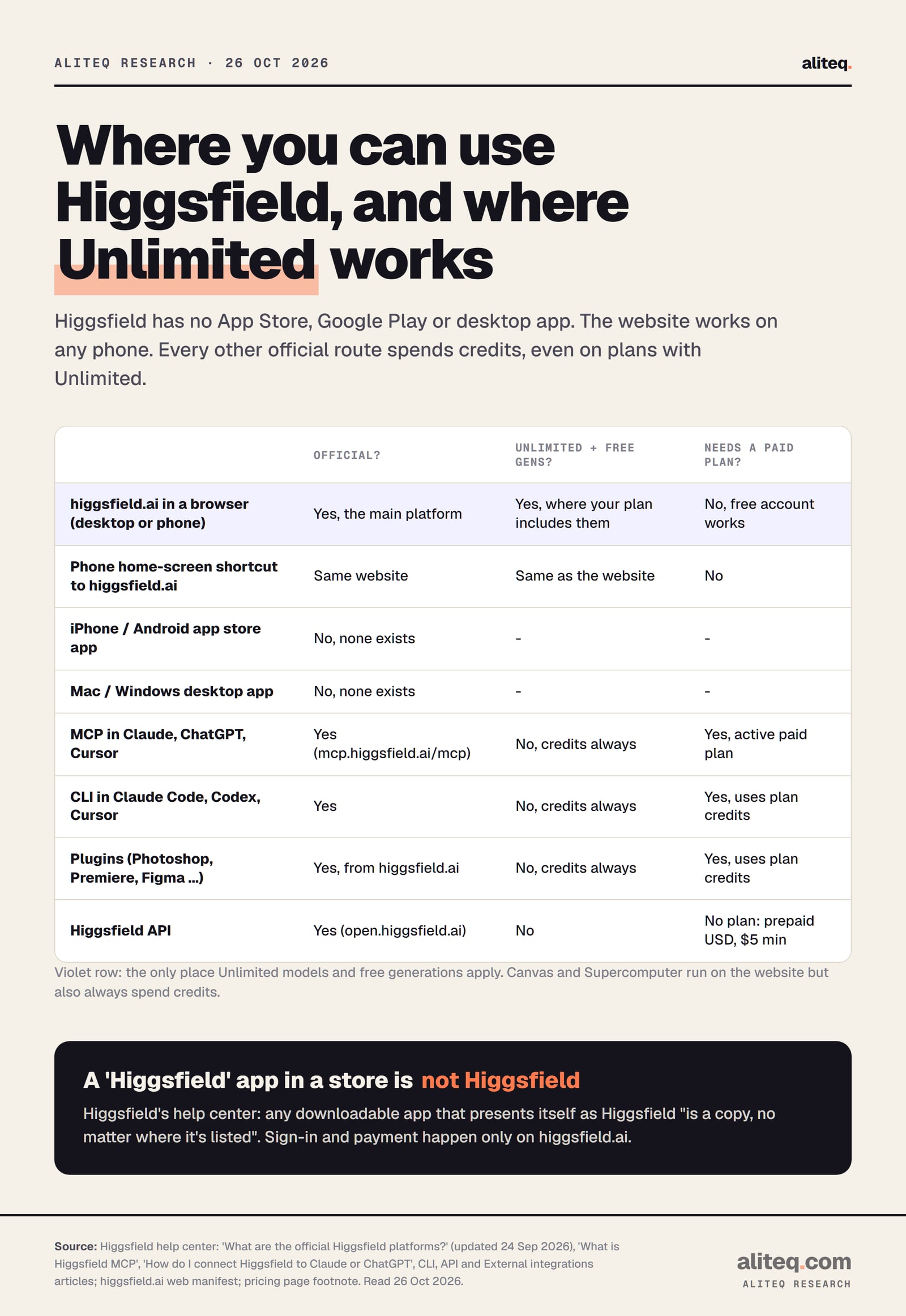
Where Higgsfield works: our table
We built this table from Higgsfield's official-platforms, MCP, CLI, plugin and API articles, the pricing page footnote and the site's web manifest, all read on 26 October 2026. Higgsfield doesn't publish it in one place.
Where you can use Higgsfield, whether it's official, and whether Unlimited applies. Higgsfield help center, pricing page and web manifest, read 26 October 2026. · aliteq research
higgsfield.ai in a desktop browser
Official?
Yes, the main platform
Unlimited and free gens work?
Yes, where your plan includes them
Needs a paid plan?
No, a free account can sign in
higgsfield.ai in a phone browser
Official?
Yes, same website
Unlimited and free gens work?
Yes, same as desktop
Needs a paid plan?
No
Home-screen shortcut to higgsfield.ai
Official?
Yes, it opens the website
Unlimited and free gens work?
Yes, same as the website
Needs a paid plan?
No
iPhone or Android app from a store
Official?
No, Higgsfield has none
Unlimited and free gens work?
Not applicable
Needs a paid plan?
Not applicable
Mac or Windows desktop app
Official?
No, Higgsfield has none
Unlimited and free gens work?
Not applicable
Needs a paid plan?
Not applicable
MCP in Claude, ChatGPT, Cursor
Official?
Yes, only via mcp.higgsfield.ai/mcp
Unlimited and free gens work?
No, always credits
Needs a paid plan?
Yes, "active paid subscription"
CLI in coding agents
Official?
Yes
Unlimited and free gens work?
No, always credits
Needs a paid plan?
In practice yes: it spends plan credits, and Free has none
Plugins (Photoshop, Premiere, Figma and more)
Official?
Yes, from Higgsfield's plugin pages
Unlimited and free gens work?
No, always credits
Needs a paid plan?
In practice yes: it spends plan credits, and Free has none
Higgsfield API
Official?
Yes, open.higgsfield.ai
Unlimited and free gens work?
No, no Unlimited at all
Needs a paid plan?
No plan; prepaid USD balance, $5 minimum top-up
Official?
Unlimited and free gens work?
Needs a paid plan?
higgsfield.ai in a desktop browser
Yes, the main platform
Yes, where your plan includes them
No, a free account can sign in
higgsfield.ai in a phone browser
Yes, same website
Yes, same as desktop
No
Home-screen shortcut to higgsfield.ai
Yes, it opens the website
Yes, same as the website
No
iPhone or Android app from a store
No, Higgsfield has none
Not applicable
Not applicable
Mac or Windows desktop app
No, Higgsfield has none
Not applicable
Not applicable
MCP in Claude, ChatGPT, Cursor
Yes, only via mcp.higgsfield.ai/mcp
No, always credits
Yes, "active paid subscription"
CLI in coding agents
Yes
No, always credits
In practice yes: it spends plan credits, and Free has none
Plugins (Photoshop, Premiere, Figma and more)
Yes, from Higgsfield's plugin pages
No, always credits
In practice yes: it spends plan credits, and Free has none
Higgsfield API
Yes, open.higgsfield.ai
No, no Unlimited at all
No plan; prepaid USD balance, $5 minimum top-up
Two notes. "In practice yes" is our inference: Higgsfield's pricing page lists the Free plan with 0 credits, and the CLI and plugins run on plan credits, so on Free there is nothing to spend. And Canvas and Supercomputer sit on the website but also always spend credits, per the same pricing footnote.
What the cheapest paid route costs: on 26 October 2026, Starter was $19 a month for 270 credits, as served to us from Europe. That is the lowest price that unlocks MCP. Our is Higgsfield free page covers what the free account can do before you pay.
What we couldn't verify
Whether a home-screen install behaves exactly as the manifest says on every phone. We read the manifest; we didn't install it on an iPhone or Android device.
Whether Higgsfield's MCP connector works inside the Claude or ChatGPT phone apps. Higgsfield's guide covers claude.ai, Claude Desktop, ChatGPT and Cursor, and doesn't say anything about their mobile apps.
What happened to Diffuse. We confirmed it existed on iOS and Android in April 2024 through Decrypt's report, but found no Higgsfield page about it, and we didn't check whether any Diffuse listing is still live.
Every store listing. App stores differ by country, and we searched from outside the stores. We didn't install or test any third-party app, and we make no claim about any specific one beyond Higgsfield's own rule that none is official.
A full mobile feature list. Higgsfield doesn't publish one, so the "better on a computer" list above is our practical judgment, not Higgsfield's rule.
US prices. Our pricing data came back with a Danish country code; a US visitor may see different prices.
Our verdict
There is no Higgsfield app to download, and you don't need one. On a phone, open higgsfield.ai in Safari or Chrome and add it to your home screen: you get a full-screen icon that is the real site. On a computer, use the browser, plus the official plugins if you work in Photoshop, Premiere, Resolve, Figma or Blender.
Skip every "Higgsfield" app in the App Store or Google Play, and every APK download page. Higgsfield says they are copies, and anything you pay there can't be refunded by Higgsfield. If you want Higgsfield inside Claude or ChatGPT, use the official MCP, and know that it needs a paid plan and always spends credits, even on models where you have Unlimited on the web.
To sign up safely, go to higgsfield.ai directly. Know the refund rule before you pay: first purchase only, within 7 days, with zero credits used, minus a fee of up to 6%.
Quick answers
Does Higgsfield have an iPhone app?
No. Higgsfield's help center says it has no mobile apps. Use higgsfield.ai in Safari, then tap Share and Add to Home Screen for an app-like icon.
Is there a Higgsfield app on Google Play?
No official one. Higgsfield says any downloadable app presenting itself as Higgsfield is a copy, no matter where it's listed. On Android, open higgsfield.ai in Chrome and add it to your home screen.
Is there a Higgsfield desktop app for Mac or Windows?
No. Higgsfield runs in your browser at higgsfield.ai. Its official plugins work inside Photoshop, Premiere Pro, After Effects, DaVinci Resolve, Figma and Blender, but there is no standalone desktop app.
Can I use Higgsfield in ChatGPT or Claude?
Yes, through the official Higgsfield MCP at mcp.higgsfield.ai/mcp. It needs an active paid subscription and always spends credits; Unlimited models don't apply there.
I paid for a Higgsfield app in the App Store. Can Higgsfield refund me?
No. Higgsfield says purchases exist only on higgsfield.ai, so its Support can't activate, transfer or refund anything bought elsewhere. Ask the store you paid through.
Does Unlimited work on my phone?
Yes, if you use higgsfield.ai in your phone's browser. Unlimited and free generations apply on the website on any device, but not through MCP, the CLI, plugins or the API.