Thinking Machines' Inkling 2 Mini is a 26.4B looped MoE that fits a 12 GB card at 2-bit and a 24 GB card at 4-bit. What each GPU needs, the speeds people posted from an 8 GB RTX 4060 to an RTX 5090, and why its memory climbs faster at long context than a 26B model should. Checked Nov 21, 2026.
Some links on this page are referral links: we may earn a commission, at no cost to you.
Share
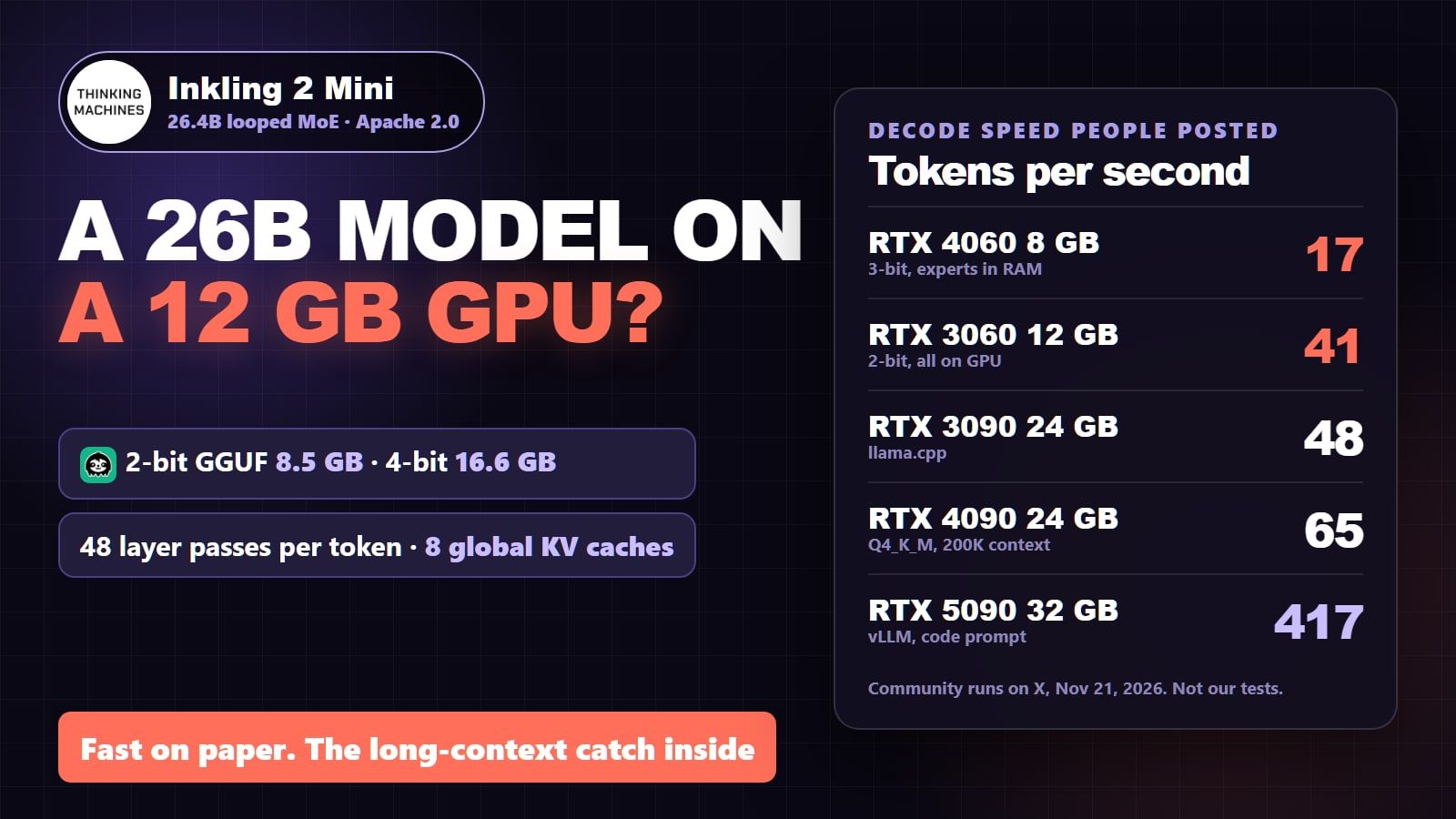
Yes, you can run Inkling 2 Mini locally, and you need less GPU than the 26B size suggests. Unsloth's 2-bit GGUF is 8.5 GB, small enough that one owner runs it fully on a 12 GB RTX 3060. The 4-bit Q4_K_M file is 16.6 GB, which wants a 24 GB card like an RTX 3090 or 4090. An 8 GB card still runs the 3-bit file with part of the model in system RAM. The catch is long context: the model runs its middle layers three times, so its memory grows faster with long prompts than a normal 26B model, and today's llama.cpp builds add more on top. Checked November 21, 2026, the day after release, on the model card, the config file, Unsloth's files and the first community runs.
Inkling 2 Mini in four numbers
26.4B
total parameters
model card
3.4B
active per token
5.4B effective with the loop
48
layer passes per token
24 stored layers
8.5 GB
smallest practical GGUF
Unsloth UD-IQ2_XXS
What is Inkling 2 Mini?
Inkling 2 Mini is an open-weights model from Thinking Machines Lab, released on November 20, 2026 under the Apache 2.0 licence. It reads text and images and writes text, with a context window of up to 1M tokens. The model card lists 26.4B parameters with 3.4B active per token, 128 experts with 8 picked for each token, and a single checkpoint of about 20 GB in mixed NVFP4 and MXFP8 precision (NVFP4 is NVIDIA's 4-bit format, explained here).
The unusual part is the loop. The model stores 24 layers of weights, but the middle 12 run three times for every token, which the card counts as "48 layer applications per token". That is why it's small on disk but does more work per token than its 3.4B active size suggests: the card puts the effective active count at 5.4B.
One token through Inkling 2 Mini
Layers 0 to 5, once
6 passes, one of them global attention
Layers 6 to 17, three times
same weights, 36 passes, 6 of them global
Layers 18 to 23, once
6 passes, one of them global
Next token
48 passes in total
Layers 0 to 5, once
6 passes, one of them global attention
Layers 6 to 17, three times
same weights, 36 passes, 6 of them global
Layers 18 to 23, once
6 passes, one of them global
Next token
48 passes in total
Layer numbers from the model's config.json (loop_config core_start 6, core_end 18, num_passes 3), read Nov 21, 2026.
How much VRAM does Inkling 2 Mini need?
About 9 GB at 2-bit, 14 GB at 3-bit and 17 to 18 GB at 4-bit, before context. These are Unsloth's GGUF file sizes, which is what you download and load. Unsloth's guide gives the same ranges for RAM plus VRAM: 9 GB at 1-bit, 10 to 11 GB at 2-bit, 13 to 15 GB at 3-bit, 17 to 18 GB at 4-bit and 24 GB at 8-bit. The vision projector adds 0.64 GB if you want image input.
Inkling 2 Mini GGUF size by quant (Unsloth, GB)
UD-IQ2_XXS (2-bit)8.5 GB
fits a 12 GB card with room for context
UD-Q2_K_XL9.1 GB
UD-Q3_K_XL (3-bit)13.6 GB
8 GB card plus system RAM
UD-Q4_K_M (4-bit)16.6 GB
24 GB card, or 16 GB with offload
UD-Q4_K_XL (Unsloth's pick)17.6 GB
Official NVFP4 + MXFP820.2 GB
vLLM, SGLang; card recommends 32 GB
UD-Q8_K_XL22.9 GB
Unsloth calls it full precision
Our Inkling 2 Mini cost-to-run page runs the same model through our VRAM engine for every GPU we track. It puts Q4_K_M at 14.9 GB of weights (binary gigabytes, so about 16 GB in the decimal units Hugging Face uses), close to Unsloth's 16.6 GB file; Unsloth's dynamic quants keep some layers at higher precision, so the real files run a little larger. For any other card or context, use the VRAM calculator.
Which GPU runs which Inkling 2 Mini file (Nov 21, 2026)
8 GB (RTX 4060, 3060 Ti, 3070)
Best file
UD-Q3_K_XL, 13.6 GB
What to expect
Runs with 12 expert layers in system RAM; one owner reports 17 tok/s with 16 GB DDR4
12 GB (RTX 3060 12GB, 4070)
Best file
UD-IQ2_XXS, 8.5 GB
What to expect
Fully on the GPU; ~41 tok/s reported. 4-bit needs offload (~18 tok/s)
16 GB (RTX 5060 Ti, 4060 Ti 16GB, 5080)
Best file
IQ4 or Q3 class
What to expect
4-bit slightly overflows; a few experts go to the CPU, ~43 tok/s reported
24 GB (RTX 3090, 4090)
Best file
UD-Q4_K_XL, 17.6 GB
What to expect
Fully on the GPU with room for long context; 48 to 65 tok/s reported
32 GB (RTX 5090)
Best file
Official checkpoint or Q8
What to expect
The card's own recommendation for the 20 GB release; 417 tok/s reported with vLLM
Mac, 32 GB or more
Best file
MLX or GGUF
What to expect
Thinking Machines lists Apple silicon with 32 GB or more
Best file
What to expect
8 GB (RTX 4060, 3060 Ti, 3070)
UD-Q3_K_XL, 13.6 GB
Runs with 12 expert layers in system RAM; one owner reports 17 tok/s with 16 GB DDR4
12 GB (RTX 3060 12GB, 4070)
UD-IQ2_XXS, 8.5 GB
Fully on the GPU; ~41 tok/s reported. 4-bit needs offload (~18 tok/s)
16 GB (RTX 5060 Ti, 4060 Ti 16GB, 5080)
IQ4 or Q3 class
4-bit slightly overflows; a few experts go to the CPU, ~43 tok/s reported
24 GB (RTX 3090, 4090)
UD-Q4_K_XL, 17.6 GB
Fully on the GPU with room for long context; 48 to 65 tok/s reported
32 GB (RTX 5090)
Official checkpoint or Q8
The card's own recommendation for the 20 GB release; 417 tok/s reported with vLLM
Mac, 32 GB or more
MLX or GGUF
Thinking Machines lists Apple silicon with 32 GB or more
Does Inkling 2 Mini 4-bit fit your card?
Inkling 2 Mini Q4_K_M at 32K context needs ≈17.5 GB
RTX 3060 12GB12 GBover 5.5 GB
RTX 5060 Ti 16GB16 GBover 1.5 GB
RTX 3090 / 4090 24GB24 GBfits
RTX 5090 32GB32 GBfits
Doesn't fit your card?
Rent a 24 GB+ GPU for the hours Inkling 2 Mini Q4_K_M at 32K context needs, then stop it.
No 24 GB card? Rent one by the hour and run the 4-bit file fully on the GPU.
New to Runpod? Sign up with Google through this link and load $10: Runpod adds a one-time bonus credit, $5 in Europe and a random $5 to $500 elsewhere (most people get $5), valid 90 days.
We earn a commission if you buy through this link.
16.6 GB file + about 1 GB of KV cache at 32K (fp16, our engine) + runtime overhead. The 16 GB cards fall just short, so llama.cpp moves a few experts to the CPU; the 12 GB card needs the 2-bit file instead.
Why does Inkling 2 Mini use more memory at long context?
Because each pass through the loop keeps its own KV cache, so the model holds 8 full-context caches where a normal 24-layer model of this design would hold 4. The KV cache is the memory that stores your conversation (our context window explainer shows how it grows). In the config, 20 of the 24 layers use a 1,024-token sliding window, which caps their cache at a small fixed size. Only layers 5, 11, 17 and 23 look at the whole context. Layers 11 and 17 sit inside the loop, so they run three times and each pass computes its own keys and values. Count the passes and you get 8 global caches instead of 4.
Our engine works that out at 32 KB per token at full fp16 precision: 1 GB at 32K, 4 GB at 131K, 8 GB at 262K and 32 GB at the full 1M. The 40 sliding-window passes add a fixed 0.16 GB on top whatever the length. Quantizing the cache to q8_0 halves it and q4_0 cuts it to about a quarter (how KV cache quantization works).
Inkling 2 Mini KV cache by context (our VRAM engine, Nov 21, 2026)
32K tokens
fp16 cache
1.0 GB
q8_0 cache
0.5 GB
q4_0 cache
0.3 GB
131K tokens
fp16 cache
4.0 GB
q8_0 cache
2.1 GB
q4_0 cache
1.1 GB
262K tokens
fp16 cache
8.0 GB
q8_0 cache
4.3 GB
q4_0 cache
2.3 GB
1M tokens (the maximum)
fp16 cache
32 GB
q8_0 cache
17 GB
q4_0 cache
9 GB
fp16 cache
q8_0 cache
q4_0 cache
32K tokens
1.0 GB
0.5 GB
0.3 GB
131K tokens
4.0 GB
2.1 GB
1.1 GB
262K tokens
8.0 GB
4.3 GB
2.3 GB
1M tokens (the maximum)
32 GB
17 GB
9 GB
That math is why the 12 GB RTX 3060 run works at all. The 8.5 GB 2-bit file plus a q4_0 cache at 262K comes to roughly 11 GB, and Dogukan Urker, who posted that run, set the cache to q4_0 for exactly that reason, writing that it "halves the cache so 262K fits" (he also notes he has only tested down to 64K of real prompt so far).
How fast is Inkling 2 Mini on my GPU?
These are decode speeds that owners posted on X on November 21, 2026, the day after release. They are their runs, not ours, on different engines and settings, so read them as a rough ranking. Loktar, who measured 47 to 48 tokens a second on a single RTX 3090, put it plainly: "Speed is the engine not the model".
Inkling 2 Mini decode speed people posted (tokens per second)
RTX 4060 8 GB, 3-bit, experts in RAM17
@analogalok, llama.cpp, 16 GB DDR4
RTX 3060 12 GB, 4-bit, experts in RAM18
@DogukanUrker, llama.cpp
RTX 3060 12 GB, 2-bit, all on GPU~41
@DogukanUrker, llama.cpp
RTX 5060 Ti 16 GB, IQ4_NL43
@niklaslenz_ai, llama.cpp, some experts on CPU
DGX Spark, official checkpoint47-56
@majewskizby, SGLang
RTX 3090, llama.cpp47-48
@loktar00
RTX 4090, Q4_K_M at 200K context~65
@CrtMods17622
M5 Max 48 GB MacBook Pro125
@exolabs, EXO
RTX 3090, custom engine129.5
@superalesha, UD-Q4_K_XL, FP8 KV
M5 Ultra 96 GB Mac Studio210
@exolabs, EXO
RTX 5090, vLLM, code prompt417
@niklaslenz_ai, official image with speculative drafts
A few details behind those numbers:
8 GB RTX 4060: Alok ran Unsloth's UD-Q3_K_XL with --n-cpu-moe 12, which keeps 12 expert layers in system RAM (what that flag does), and a q8_0 cache. Cutting the context setting from 24,000 to 18,000 tokens took decode from 7.43 to 17.11 tokens a second on the same prompt, so leave headroom rather than maxing the context.
12 GB RTX 3060: the 2-bit file sits fully on the GPU at about 41 tokens a second. The 4-bit file, Dogukan Urker replied, "needs cpu offload, and offload is slow on this model", about 18 tokens a second with all experts in RAM.
24 GB RTX 3090: llama.cpp gives 47 to 48 tokens a second. Alexey Fateev wrote a custom engine that reaches 129.5 on the same card (against 57 in his llama.cpp run), and Loktar reports 147 to 179 tokens a second on two 3090s with vLLM. Engines are moving fast, so these numbers will climb.
RTX 5090: 416.6 tokens a second on code with vLLM in the official image, using speculative decoding, per Niklas Lenz. His 16 GB RTX 5060 Ti managed 43.1 with llama.cpp, because the 4-bit file doesn't fully fit.
If you'd rather compare against what you already run, the closest rival is Qwen3.8-27B (what that one needs, and its cost-to-run page). Lasse measured Inkling decoding about 1.75 times faster than Qwen3.8-27B at nearly the same file size on his 32 GB card, because only 3.4B parameters work per token (why MoE models are fast).
Is Inkling 2 Mini good enough to switch from Qwen3.8-27B?
For instruction following, maybe; for agent work with tools, not yet. Lasse's paired tests are the most careful early numbers we found. On IFBench, Inkling scored 7.3 points higher than Qwen3.8-27B over 300 prompts. In a follow-up on multi-turn tool calling (BFCL), he found Inkling clearly behind his comparison model: 48 of 100 tasks against 70 in his 3-bit llama.cpp pair, 49 against 59 at 4-bit, and 46.7% against 58.7% with the official checkpoint. His own verdict: "Not a reason to replace an optimised Qwen setup yet."
Inkling 2 Mini vs Qwen3.8-27B in one owner's paired tests
Inkling 2 Mini
26.4B MoE, 3.4B active
vs
Qwen3.8-27B
27.8B dense
about 1.75x faster
Decode speed, same GPU and file size
baseline
+7.3 points
IFBench, 300 prompts
baseline
31.2 GiB
Memory at 131K context, day-0 llama.cpp
20.9 GiB
Mini wins 2wins 1 Qwen3.8-27B
Thinking Machines' own card is frank about the rough edges too. It says the model can get stuck in "long reasoning loops", is less reliable with tools than larger models and may take destructive actions without confirmation, so cap output tokens and agent turns. The card's benchmark table puts it ahead of Qwen3.8-27B on several coding tests; treat those as the vendor's numbers.
How do I run Inkling 2 Mini?
Update your runtime. llama.cpp added Inkling 2 Mini on November 20, 2026 (pull request 32694) and merged a fix for Unsloth's quants on November 21 (pull request 32704), so use a build from after that. vLLM, SGLang, Unsloth, Ollama on Apple silicon and EXO are listed on the model card.
Pick the file for your VRAM from the table above: UD-IQ2_XXS for 12 GB, UD-Q3_K_XL for 8 GB with offload, UD-Q4_K_XL for 24 GB.
Use the recommended sampling from Unsloth's guide: temperature 1.0, top-p 1.0, top-k 0, min-p 0.0, with --jinja for the chat template.
Start with 32K context, quantize the cache with --cache-type-k q8_0 --cache-type-v q8_0 (or q4_0 to go long), and raise the context only after it loads.
Yes, slowly. An owner ran Unsloth's 13.6 GB UD-Q3_K_XL file on an 8 GB RTX 4060 with 16 GB of DDR4, keeping 12 expert layers in system RAM, and got 17.11 tokens a second (posted Nov 21, 2026).
How much VRAM does Inkling 2 Mini need at 4-bit?
Unsloth's Q4_K_M file is 16.6 GB and its recommended UD-Q4_K_XL is 17.6 GB, plus about 1 GB of KV cache at 32K context. A 24 GB card runs it fully on the GPU; a 16 GB card needs a few experts on the CPU.
Why does Inkling 2 Mini need more memory at long context than other 26B models?
Its middle 12 layers run three times per token, and two of the four full-attention layers sit inside that loop, so it keeps 8 full-context KV caches instead of 4. Day-0 llama.cpp builds also lack flash attention for this design, which adds working memory that grows with context.
Is Inkling 2 Mini free to use commercially?
Yes. It is released under Apache 2.0, per the model card on Hugging Face.
What is the maximum context length of Inkling 2 Mini?
Up to 1M tokens per the model card. Community runs so far go to 262K on a 12 GB card with a q4_0 cache and about 344K on a 24 GB RTX 3090 with a custom engine.
 Rent on Vast.aiTesla V100 cheapest listing $0.040/hr, typical $0.093/hr · read 21 Nov, 16:20 UTC
 Rent on RunpodRTX A5000 from $0.270/hr · read 21 Nov, 16:20 UTC