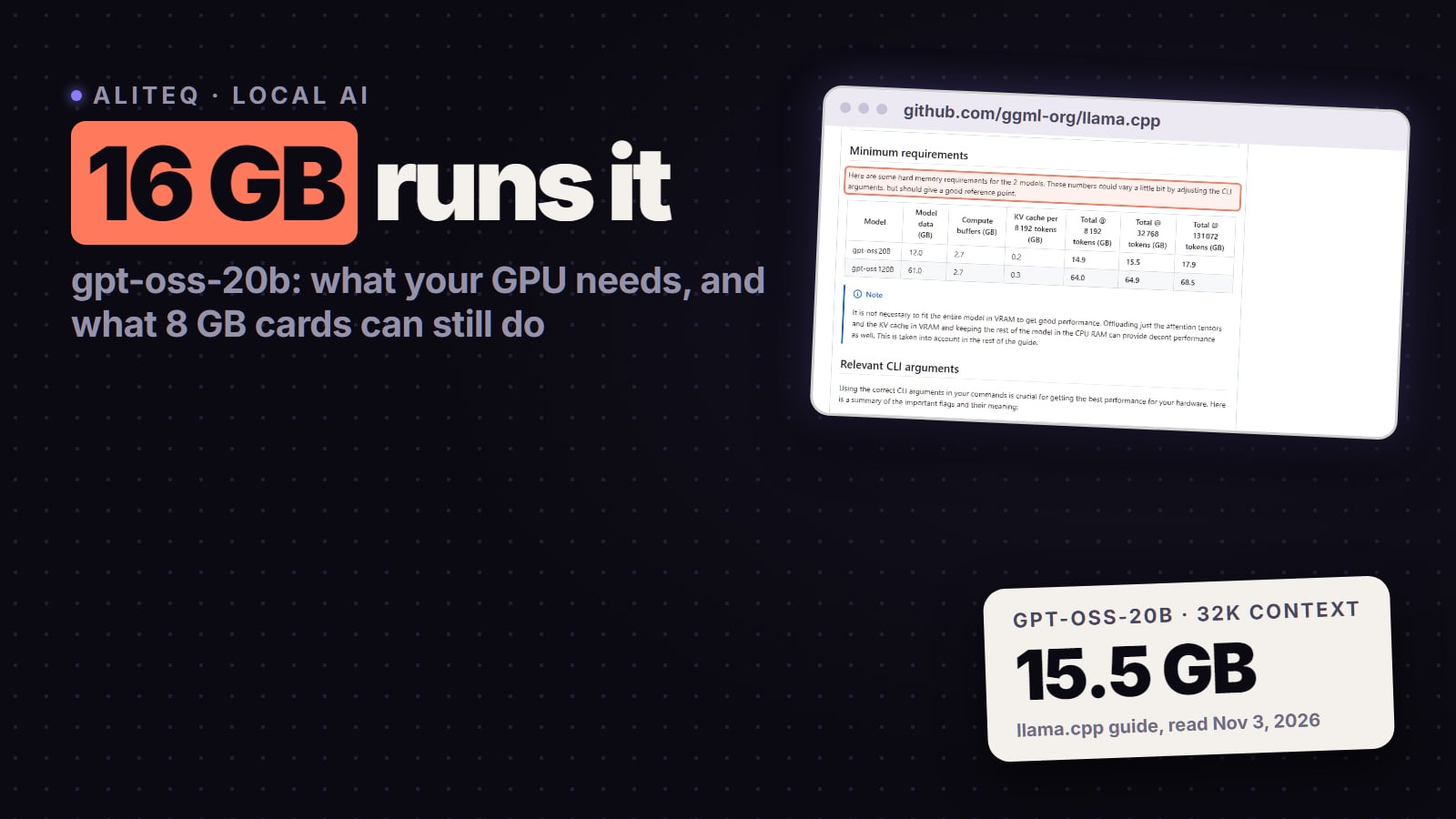
gpt-oss-20b fits fully on any 16 GB graphics card: 14.9 GB at 8K context and 15.5 GB at 32K, per the llama.cpp guide. An 8 GB or 12 GB card still runs it with some layers in system RAM. What your GPU, RAM and Mac need, how fast each card is, and the Ollama setting that quietly cuts your context. Checked Nov 3, 2026.
Some links on this page are referral links: we may earn a commission, at no cost to you.
Share
Yes, you can run gpt-oss-20b on your GPU if it has 16 GB of VRAM. OpenAI says the model runs "within 16GB of memory", and the llama.cpp guide measures 14.9 GB at an 8K-token context and 15.5 GB at 32K, so any 16 GB card holds the whole model. With an 8 GB or 12 GB card it still runs, more slowly, by keeping some expert layers in system RAM. On a Mac you need at least 16 GB of unified memory. Checked November 3, 2026 on OpenAI's model card, the llama.cpp guide, Ollama and LM Studio.
14.9 GB
VRAM needed
llama.cpp guide, 8K context
17.9 GB
At 128K tokens
llama.cpp guide, full context
14 GB
Download size
Ollama, gpt-oss:20b
3.6B of 21B
Active parameters
OpenAI model card
Can my GPU run gpt-oss-20b?
Find your VRAM in the table. You can see it in Windows Task Manager under Performance, GPU, "Dedicated GPU memory", or in nvidia-smi on an NVIDIA card. Memory figures are from the llama.cpp guide's minimum-requirements table; the guide's maintainer notes they "could vary a little bit" with settings.
gpt-oss-20b by VRAM (llama.cpp guide, read Nov 3, 2026)
24 GB or more (RTX 3090, 4090, 5090)
Runs it?
Yes, fully on the GPU
What to expect
Room for the full 128K context (17.9 GB)
16 GB (RTX 5060 Ti 16 GB, 4060 Ti 16 GB, 4080, 5070 Ti, 5080)
Runs it?
Yes, fully on the GPU
What to expect
Comfortable up to about 32K context (15.5 GB)
12 GB (RTX 3060 12 GB, 4070)
Runs it?
Yes, with some layers on the CPU
What to expect
Slower; needs spare system RAM
8 GB (RTX 2060 SUPER, 3070, 4060)
Runs it?
Yes, with more layers on the CPU
What to expect
Slower again; the guide gives exact settings
Mac, 16 GB unified memory
Runs it?
Yes, with some layers on the CPU
What to expect
macOS doesn't give the GPU all 16 GB
Mac, 8 GB
Runs it?
No
What to expect
Not enough memory, per the guide
Runs it?
What to expect
24 GB or more (RTX 3090, 4090, 5090)
Yes, fully on the GPU
Room for the full 128K context (17.9 GB)
16 GB (RTX 5060 Ti 16 GB, 4060 Ti 16 GB, 4080, 5070 Ti, 5080)
Yes, fully on the GPU
Comfortable up to about 32K context (15.5 GB)
12 GB (RTX 3060 12 GB, 4070)
Yes, with some layers on the CPU
Slower; needs spare system RAM
8 GB (RTX 2060 SUPER, 3070, 4060)
Yes, with more layers on the CPU
Slower again; the guide gives exact settings
Mac, 16 GB unified memory
Yes, with some layers on the CPU
macOS doesn't give the GPU all 16 GB
Mac, 8 GB
No
Not enough memory, per the guide
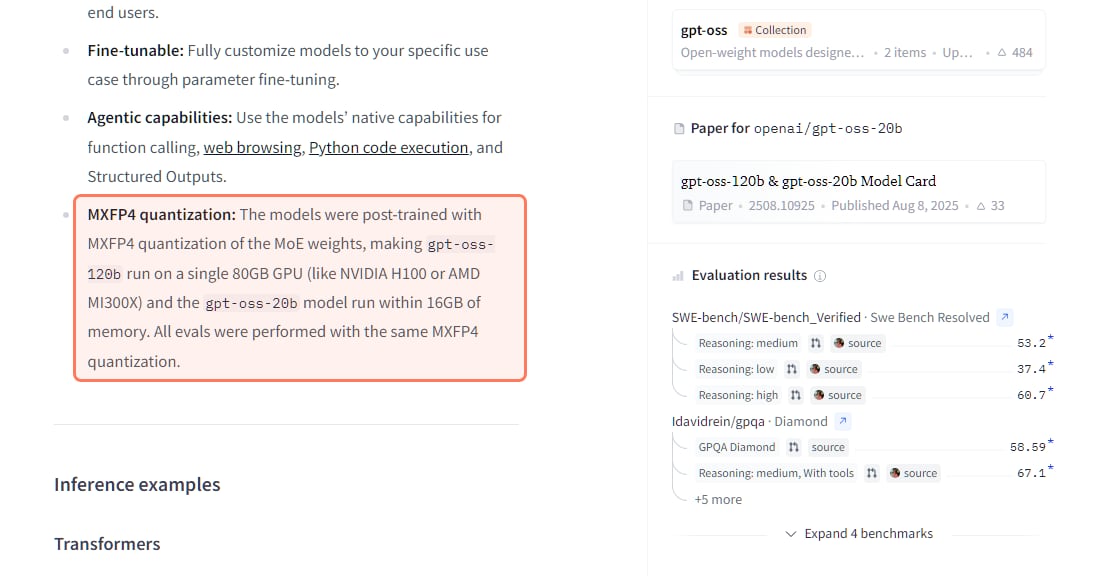
OpenAI's own sizing on the gpt-oss-20b model card, huggingface.co/openai/gpt-oss-20b, read November 3, 2026. · Screenshot of huggingface.co by aliteq
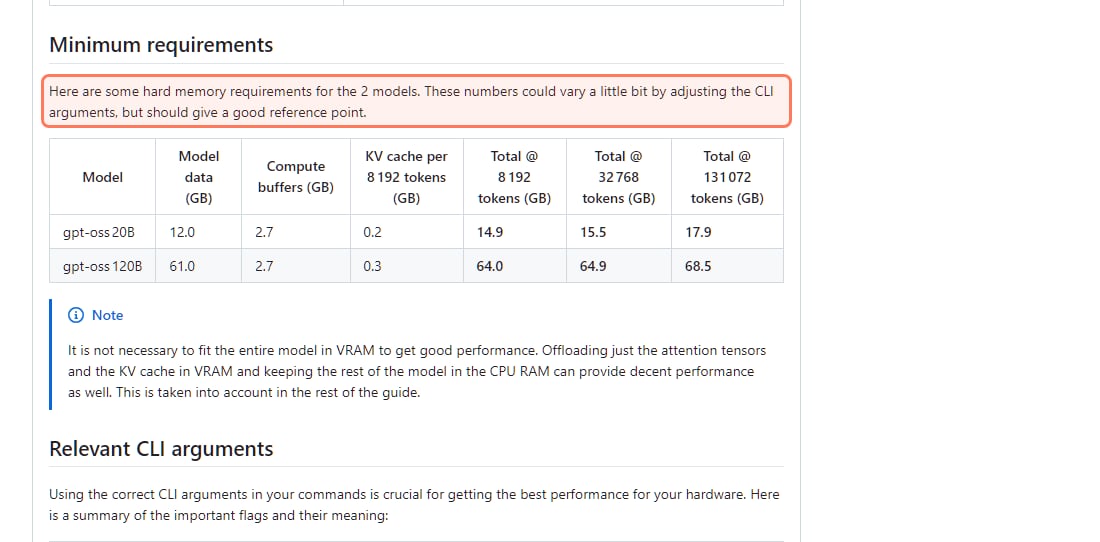
Why does a 21-billion-parameter model fit in 16 GB? OpenAI trained its mixture-of-experts weights in MXFP4, a 4-bit format (see what quantization is), and only 3.6B of the 21B parameters work on each token. The whole model still has to sit in memory, though: the guide counts 12.0 GB of model data plus 2.7 GB of compute buffers before any context.
To check a different card or context length, put it in our VRAM calculator.
How much VRAM does gpt-oss-20b need at long context?
15.5 GB at 32K tokens and 17.9 GB at the full 128K. The model itself stays the same size; what grows is the KV cache, the memory that holds your conversation (our context window explainer shows how). The guide puts it at about 0.2 GB per 8,192 tokens for this model, which is small, so the jump from 8K to 128K is only about 3 GB.
The llama.cpp guide's memory table, github.com/ggml-org/llama.cpp/discussions/15396, read November 3, 2026. · Screenshot of github.com by aliteq
That's why the guide's own 16 GB example (an NVIDIA V100) caps context at 32K: the card is "just at the edge to fit the full context". In practice:
Chat, coding help, short documents: 16 GB is plenty.
Whole books, long agent sessions, big codebases in one prompt: 24 GB, so the full 128K fits without offloading.
How fast is gpt-oss-20b on my GPU?
These are text-generation speeds (llama-bench tg128) from the benchmark runs posted in the llama.cpp guide, with the whole model on the GPU. They were run in 2025 on the guide's own builds, so treat them as a ranking, not a promise for your PC.
gpt-oss-20b speed by card (llama.cpp guide, read Nov 3, 2026)
RTX 5090
VRAM
32 GB
Tokens per second
about 282
RTX 4090
VRAM
24 GB
Tokens per second
about 225
RTX 5080
VRAM
16 GB
Tokens per second
about 205
RTX 5070 Ti
VRAM
16 GB
Tokens per second
about 189
RTX 4080 SUPER
VRAM
16 GB
Tokens per second
about 186
RTX 3090
VRAM
24 GB
Tokens per second
about 162
RTX 5060 Ti 16 GB
VRAM
16 GB
Tokens per second
about 112
AMD RX 7900 XT (ROCm)
VRAM
20 GB
Tokens per second
about 102
Mac M4 Max (36 GB)
VRAM
unified
Tokens per second
about 92
Mac M1 Pro (32 GB)
VRAM
unified
Tokens per second
about 46
VRAM
Tokens per second
RTX 5090
32 GB
about 282
RTX 4090
24 GB
about 225
RTX 5080
16 GB
about 205
RTX 5070 Ti
16 GB
about 189
RTX 4080 SUPER
16 GB
about 186
RTX 3090
24 GB
about 162
RTX 5060 Ti 16 GB
16 GB
about 112
AMD RX 7900 XT (ROCm)
20 GB
about 102
Mac M4 Max (36 GB)
unified
about 92
Mac M1 Pro (32 GB)
unified
about 46
Even the slowest entry writes faster than most people read. If you're choosing a card to buy for it, our best GPU for gpt-oss guide puts NVIDIA's list prices next to these speeds.
Can gpt-oss-20b run on an 8 GB or 12 GB GPU?
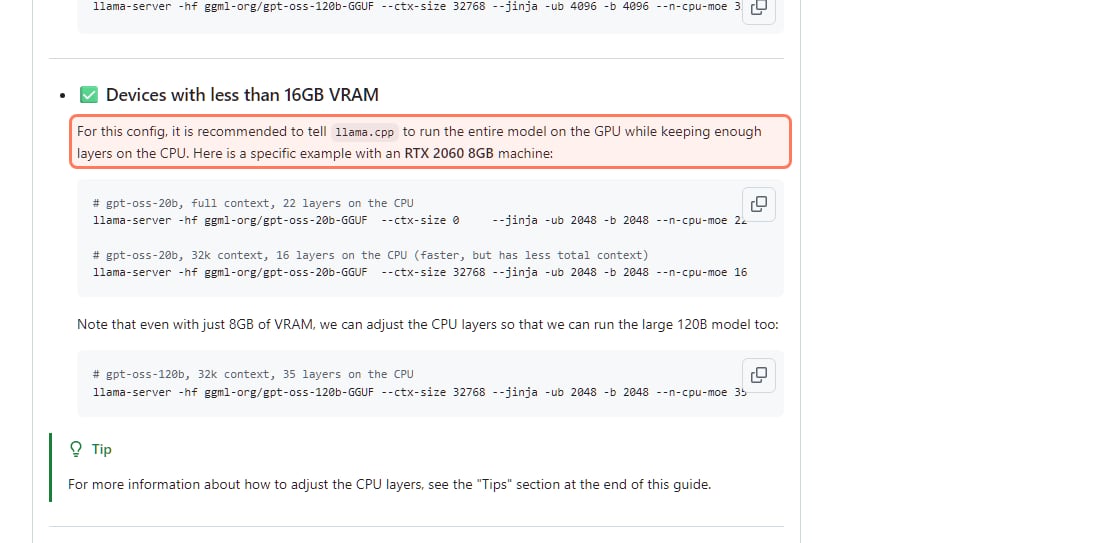
Yes, with some of the model in system RAM. llama.cpp's --n-cpu-moe setting moves expert layers to the CPU while attention and the context stay on the GPU. The guide's example is an RTX 2060 with 8 GB: 16 MoE layers on the CPU for a 32K context, or 22 for the full context.
The llama.cpp guide's settings for cards under 16 GB, github.com/ggml-org/llama.cpp/discussions/15396, read November 3, 2026. · Screenshot of github.com by aliteq
How slow is it? One reader posted results in the guide's comments on November 10, 2025: an RTX 4060 Laptop GPU with 8 GB, a Core i7-14700HX and 64 GB of DDR5, running 14 MoE layers on the CPU, got about 42 tokens a second. That's their machine and their settings, not ours, but it shows 8 GB is usable. A 12 GB card needs fewer layers on the CPU, so it lands between that and the full-GPU numbers above.
What else you need for offloading:
System RAM to hold the layers the GPU doesn't. LM Studio lists 12 GB as the minimum system memory for this model; the 42 tokens/sec laptop above had 64 GB.
The right number for --n-cpu-moe. Too low and the GPU runs out of VRAM; too high and it gets slower than it needs to be. What --n-cpu-moe actually does explains how to find it, and the step-by-step 8 GB and 12 GB setup is in gpt-oss-20b on an 8 GB or 12 GB GPU.
One Windows trap the guide warns about: the driver can let a program allocate more VRAM than the card has, then quietly swap to RAM and crawl. "Just because the model loads without errors, it doesn't mean you have enough VRAM for the settings that you are using", the guide says. Watch "GPU Memory" in Task Manager and keep it under your card's VRAM.
Can I run gpt-oss-20b on a Mac?
Yes, with 16 GB of unified memory or more. The guide says the model "can run efficiently on Macs with at least 16GB RAM", with two limits. On a 16 GB Mac, "Macs don't allow to utilize the full 16GB memory by the GPU", so you keep some layers on the CPU (the guide's example uses --n-cpu-moe 12 with a 32K context). On an 8 GB Mac, in the guide's words, "you are out of luck". Bigger Macs are quick: about 92 tokens a second on an M4 Max with 36 GB. The 16 GB Mac mini setup is covered in gpt-oss-20b on a 16 GB Mac mini, and Mac buying advice in best Mac for local AI.
How do I run gpt-oss-20b?
The easiest way is one of the two apps OpenAI's model card points to (compare them in Ollama vs LM Studio):
Ollama:ollama pull gpt-oss:20b, then ollama run gpt-oss:20b. The download is 14 GB.
LM Studio:lms get openai/gpt-oss-20b, or search "gpt-oss-20b" in the app.
llama.cpp:llama-server -hf ggml-org/gpt-oss-20b-GGUF --ctx-size 0 --jinja -ub 2048 -b 2048 downloads the model and starts a local chat page and API. --ctx-size 0 means the full context, so on a 16 GB card set --ctx-size 32768 as the guide does.
The Ollama setting that cuts your context
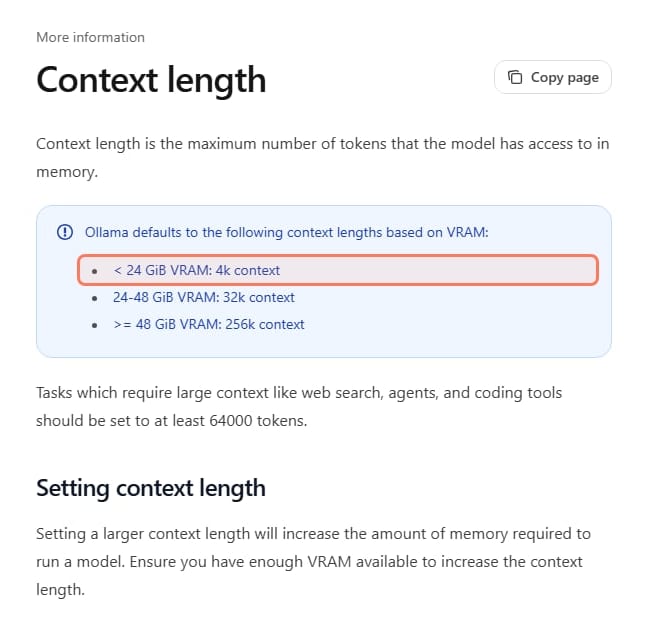
Ollama picks a default context length from your VRAM, and on any card under 24 GB that default is only 4K tokens. A 16 GB card can handle about 32K, so raise it: use the context slider in the Ollama app's settings, or start the server with OLLAMA_CONTEXT_LENGTH=32768 ollama serve. Ollama's docs say coding tools and agents should get "at least 64000 tokens", which on gpt-oss-20b means 24 GB to stay fully on the GPU. Check what you got with ollama ps: the PROCESSOR column should say 100% GPU.
Ollama's default context by VRAM, docs.ollama.com/context-length, read November 3, 2026. · Screenshot of docs.ollama.com by aliteq
Should I rent a GPU for gpt-oss-20b instead?
Rent if you just want to try it or you only have 8 GB; buy if you'll use it every day. At 20:20 UTC on November 3, 2026, our price tracker showed single-GPU on-demand rentals on Vast from about $0.11/hr for an RTX 5060 Ti 16 GB, $0.10/hr for an RTX 3090 and $0.26/hr for an RTX 4090; Runpod listed the RTX 4090 at $0.89/hr. These are the cheapest offers at that moment and they change hourly, so check today's cloud GPU prices or the per-model page at /cost-to-run/gpt-oss-20b before you rent.
What this page can't tell you
Your exact speed. The speeds come from benchmark runs posted in the llama.cpp guide in 2025 and a reader's laptop result, not from our own tests. Ollama, LM Studio, newer llama.cpp builds and longer contexts all change the number.
Every card. The guide covers mostly NVIDIA and Apple hardware. AMD cards run gpt-oss through ROCm or Vulkan; the guide says "Depending on your specific hardware, the results can vary", but the memory numbers are the same.
If your GPU has 16 GB of VRAM, yes, fully and fast, at up to about 32K context. With 24 GB you get the full 128K. With 8 or 12 GB it still runs with some layers in system RAM, at roughly 40 tokens a second on an 8 GB laptop card in one reader's test. Macs need 16 GB or more. Install it with Ollama or LM Studio, and raise Ollama's 4K default context.
Best for: Anyone checking whether their PC or Mac can run OpenAI's gpt-oss-20b
Common questions
How much VRAM do I need to run gpt-oss-20b?
16 GB to run it fully on the GPU. The llama.cpp guide measures 14.9 GB at 8K context, 15.5 GB at 32K and 17.9 GB at the full 128K. OpenAI's model card says it runs within 16 GB of memory.
Can gpt-oss-20b run on an 8 GB GPU?
Yes, slower. llama.cpp's --n-cpu-moe setting keeps some expert layers in system RAM; the guide's RTX 2060 8 GB example uses 16 layers on the CPU for a 32K context. A reader reported about 42 tokens a second on an 8 GB RTX 4060 Laptop GPU with 64 GB of RAM.
Can a 12 GB card like the RTX 3060 run gpt-oss-20b?
Yes, the same way as an 8 GB card but with fewer layers on the CPU, so it runs faster than the 8 GB setups. It won't fit fully on the GPU, which needs about 15 GB.
Is 16 GB enough, or do I need 24 GB?
16 GB is enough for normal chats and coding help at up to about 32K tokens of context. Get 24 GB only if you want the full 128K context fully on the GPU.
How big is the gpt-oss-20b download?
14 GB in Ollama (gpt-oss:20b), with a 128K context window.
Why does Ollama run gpt-oss-20b with a short context?
Ollama sets the default context from your VRAM, and any card under 24 GB gets 4K tokens. Raise it in the app's settings or with OLLAMA_CONTEXT_LENGTH, and check ollama ps to confirm it still runs 100% on the GPU.
Can I run gpt-oss-20b on a Mac?
Yes, on a Mac with 16 GB of unified memory or more. 16 GB Macs need some layers on the CPU because macOS doesn't give the GPU all of it; 8 GB Macs can't run it, per the llama.cpp guide.
Is gpt-oss-20b free to use commercially?
Yes. OpenAI released it under the Apache 2.0 license, which allows commercial use.