Intel sells six Arc desktop cards today, from the 10GB B570 to the 32GB Arc Pro B70. I matched each one against 12 popular local models with our memory math, and found the cheapest 16GB Arc hiding in the workstation aisle.
Here's the thing about Intel Arc and local AI. The search results are full of B580 guides, and the B580 is a great little card. But Intel quietly sells five other Arc desktop cards right now, and three of them have more memory than any consumer card Intel makes. If you only shop the gaming aisle, you never see them.
So I did what I do with every launch thread: I went to the source. On 4 October 2026 I read every Arc desktop card on Intel's own product pages and spec sheets. Then I ran 12 popular open models through the same memory formula behind our VRAM calculator. And I read the official docs for every way to actually run a model on Arc.
If you already own a B580 and just want it running, our step-by-step Intel Arc setup guide is the place to start. This piece answers the question before that one: which Arc card, and which models will fit on it.
Which Intel Arc card should you buy for local AI?
Buy the cheapest Arc whose memory holds your biggest model with room to spare. For 8B to 12B models, the B580 at $249 is plenty. For 14B models and gpt-oss 20B, you need 16GB, and the Arc Pro B50 is Intel's only 16GB option. For 24B to 35B models, look at the 24GB Pro B60 or the 32GB Pro B70.
That's the whole decision. Memory decides what loads. Everything else decides how fast it answers.
The surprise is where the 16GB card lives. Intel's consumer lineup tops out at 12GB. To get 16GB from Intel, you buy a workstation card. Intel's suggested price for the Pro B50 was $299 when it was announced in May 2025. That's $50 above the B580's $249 recommended price, for 4GB more memory.
There's a catch, and it's a big one. The Pro B50 has 224 GB/s of memory bandwidth. The B580 has 456 GB/s. So the B50 holds a bigger model, but it reads that model about half as fast. More on that below.
What Intel Arc cards can you buy right now?
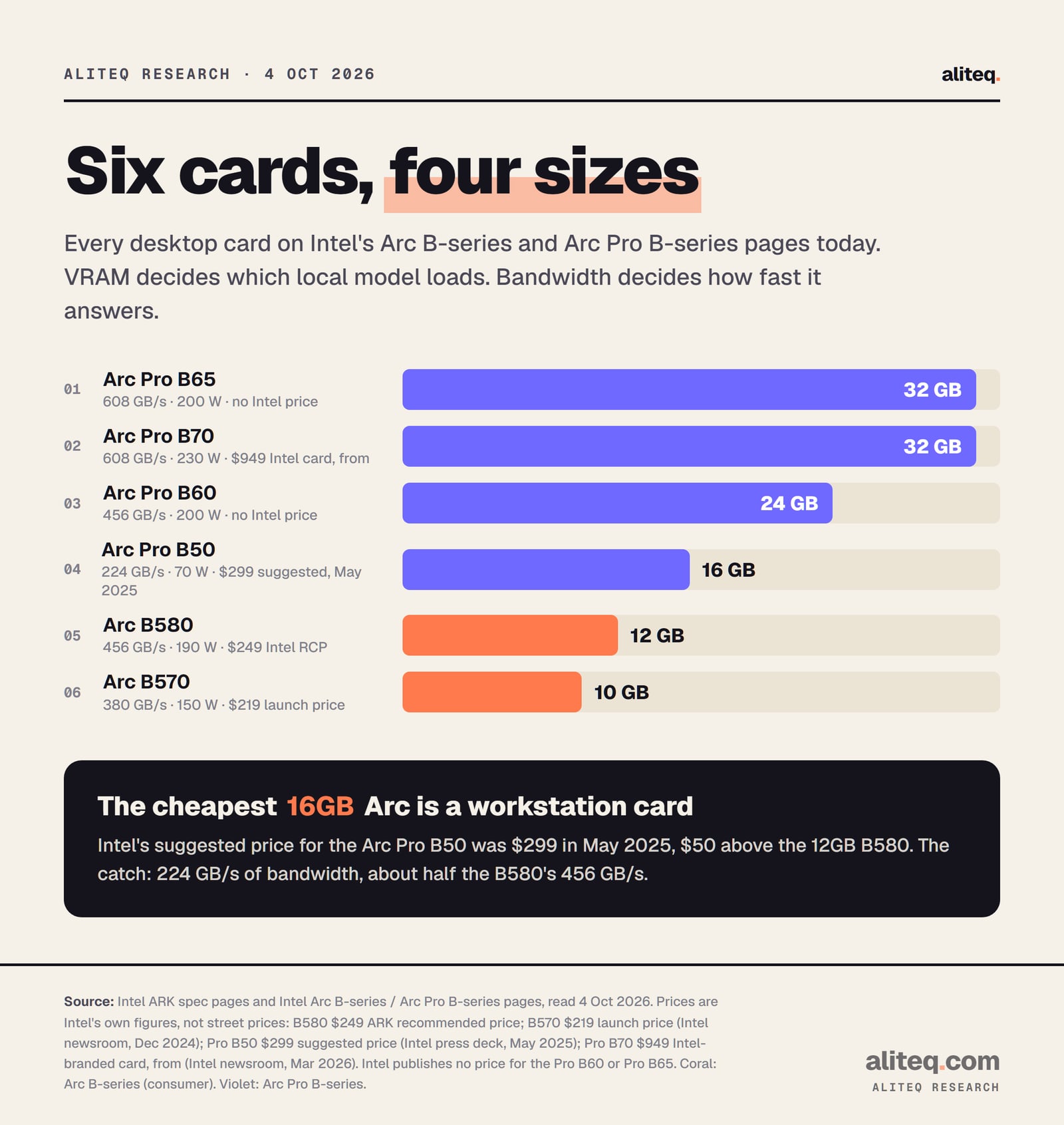
Intel lists six Arc desktop cards today. The consumer B-series page shows two: the B570 and B580. The Arc Pro B-series page shows four: the Pro B50, B60, B65 and B70. They span 10GB to 32GB of memory and 224 to 608 GB/s of bandwidth.
Every Arc desktop card on Intel's product pages, 4 Oct 2026. Prices are Intel's own figures, not what stores charge today. · aliteq research
Every Intel Arc desktop card, matched to local models (4 Oct 2026)
Arc B570
VRAM
10GB
Bandwidth
380 GB/s
Board power
150 W
Intel price figure
$219 (launch, Jan 2025)
Largest model that fits (4-bit, 16K)
Gemma 4 12B
Arc B580
VRAM
12GB
Bandwidth
456 GB/s
Board power
190 W
Intel price figure
$249 (Intel recommended)
Largest model that fits (4-bit, 16K)
Gemma 4 12B (Qwen3 14B tight)
Arc Pro B50
VRAM
16GB
Bandwidth
224 GB/s
Board power
70 W
Intel price figure
$299 (suggested, May 2025)
Largest model that fits (4-bit, 16K)
gpt-oss 20B
Arc Pro B60
VRAM
24GB
Bandwidth
456 GB/s
Board power
200 W
Intel price figure
None published
Largest model that fits (4-bit, 16K)
Gemma 4 31B (Qwen3 32B tight)
Arc Pro B65
VRAM
32GB
Bandwidth
608 GB/s
Board power
200 W
Intel price figure
None published
Largest model that fits (4-bit, 16K)
Qwen3 32B
Arc Pro B70
VRAM
32GB
Bandwidth
608 GB/s
Board power
230 W
Intel price figure
$949 (Intel card, from)
Largest model that fits (4-bit, 16K)
Qwen3 32B
VRAM
Bandwidth
Board power
Intel price figure
Largest model that fits (4-bit, 16K)
Arc B570
10GB
380 GB/s
150 W
$219 (launch, Jan 2025)
Gemma 4 12B
Arc B580
12GB
456 GB/s
190 W
$249 (Intel recommended)
Gemma 4 12B (Qwen3 14B tight)
Arc Pro B50
16GB
224 GB/s
70 W
$299 (suggested, May 2025)
gpt-oss 20B
Arc Pro B60
24GB
456 GB/s
200 W
None published
Gemma 4 31B (Qwen3 32B tight)
Arc Pro B65
32GB
608 GB/s
200 W
None published
Qwen3 32B
Arc Pro B70
32GB
608 GB/s
230 W
$949 (Intel card, from)
Qwen3 32B
A few notes on those prices, because they're the messiest part of this whole topic.
Only the B580 has a recommended price on its Intel spec page today: $249. The B570's $219 comes from Intel's launch announcement. The Pro B50's $299 is from Intel's own Computex 2025 slides, which call it a suggested price "as of 13 May 2025". The Pro B70's $949 is from Intel's March 2026 launch release, for the Intel-branded card. For the Pro B60 and B65, Intel says pricing varies by partner card and publishes no number.
What stores charge in October 2026 can be very different. Check the shelf before you trust any of these.
One more thing I looked for: a newer consumer card. Lots of threads speculate about a bigger B-series gaming card. Intel's desktop page lists the B580 and B570 and nothing else. If a new one shows up, this table changes.
Which local models fit on each Arc card?
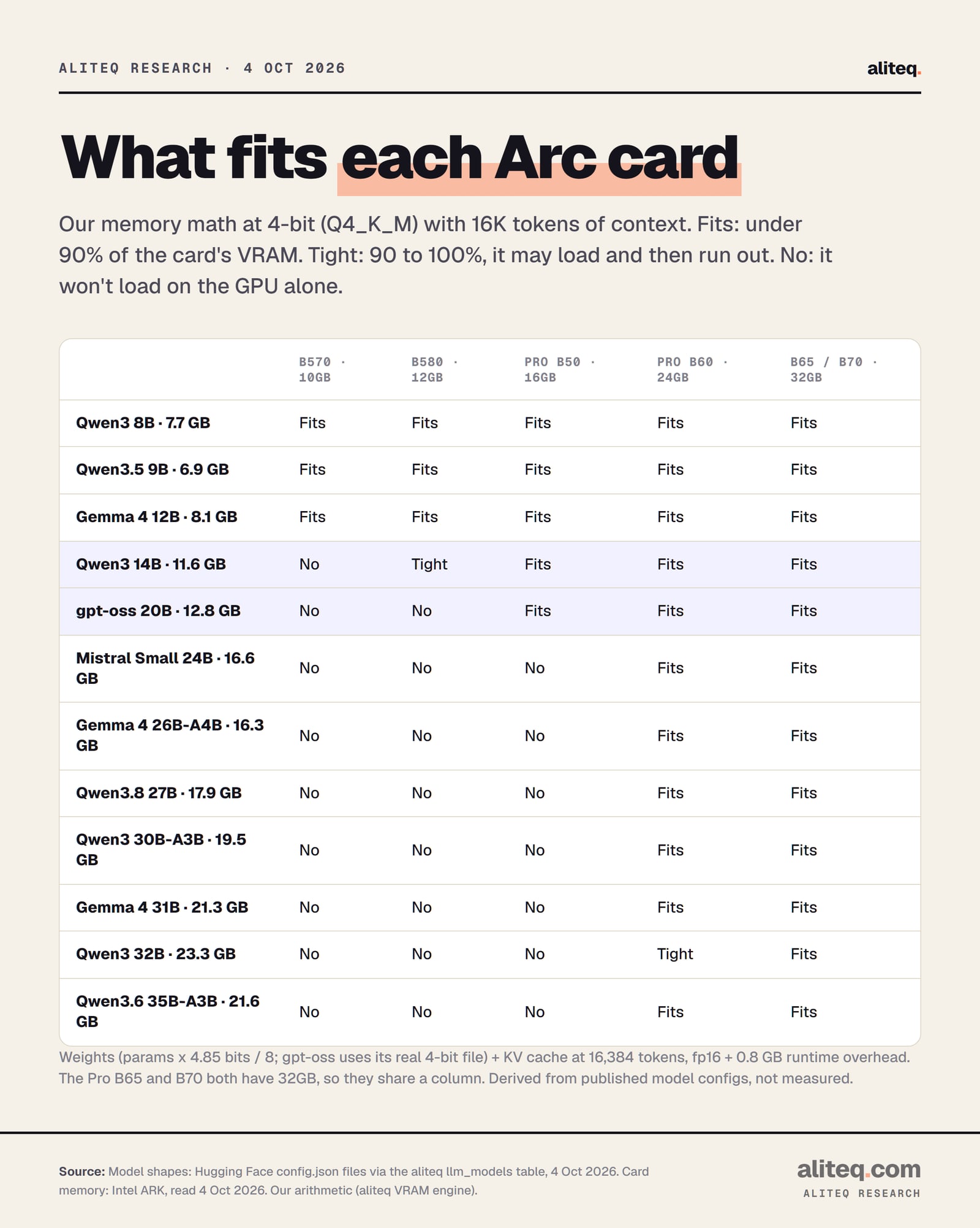
At 4-bit with 16K tokens of context, 10GB and 12GB hold 8B to 12B models. 16GB adds 14B models and gpt-oss 20B. 24GB holds everything up to 31B and the 35B-A3B mixture-of-experts model, with 32B dense models tight. 32GB holds all 12 models on our list.
Fits: under 90% of the card's VRAM. Tight: 90 to 100%. 4-bit, 16K tokens of context, fp16 cache. Derived from model configs, not measured. · aliteq research
Here's how each number was built. A model's memory need has three parts. The weights are the parameter count times bits per weight, divided by 8. We use 4.85 bits for Q4_K_M, the most common 4-bit format, because that's what real files measure. The KV cache, the model's short-term memory of your chat, is 2 x layers x KV heads x head size x tokens x 2 bytes. Then add 0.8 GB for the runtime.
For gpt-oss 20B, I used its real 4-bit file size, 11.28 GB, instead of the formula. For hybrid models like Qwen3.5, Qwen3.8 and Gemma 4, only some layers keep a growing cache, so I counted those and added a small fixed amount for the rest. Our how much VRAM do you need guide walks through the method.
The totals at 4-bit and 16K context:
Qwen3.5 9B 6.9 GB, Qwen3 8B 7.7 GB, Gemma 4 12B 8.1 GB: fine on every Arc card.
Qwen3 14B 11.6 GB: tight on the 12GB B580 (97%), comfortable on 16GB. Check it on the Qwen3 14B page.
gpt-oss 20B 12.8 GB: doesn't load fully on the B580. Comfortable on 16GB. See the gpt-oss 20B page.
Gemma 4 26B-A4B 16.3 GB, Mistral Small 24B 16.6 GB, Qwen3.8 27B 17.9 GB: just over 16GB, so they need the 24GB Pro B60.
Qwen3 30B-A3B 19.5 GB, Gemma 4 31B 21.3 GB, Qwen3.6 35B-A3B 21.6 GB: the 24GB line. The 35B-A3B lands right at our 90% mark.
Qwen3 32B 23.3 GB: tight on 24GB (97%), comfortable on 32GB.
The B580 is enough if you live in the 8B to 12B range. It's short if you want 14B models with long chats, or gpt-oss 20B on the GPU alone. In that case, 16GB is the fix, and the Pro B50 is Intel's only 16GB card. Just know you trade speed for room.
The B580's 14B story is all about context. At 16K tokens, Qwen3 14B needs about 11.6 GB, which is 97% of the card. That's "tight": it may load, then run out of room the moment your desktop or browser wants some GPU memory. Cut the context to 8K tokens and the same model needs about 10.4 GB, or 87%. That fits.
So a B580 owner has a simple lever. Shorter context buys you a bigger model. If you want long documents and a 14B model, you need more memory instead.
gpt-oss 20B is a different case. Its 4-bit weights alone are 11.28 GB. Add the cache and runtime and it's 12.8 GB, more than the B580 has. You can still run it by parking part of the model in system memory, which is slower. Our gpt-oss 20B on an 8GB or 12GB GPU piece explains how that works.
Now the Pro B50. On paper it's a dream: 16GB, 70 W, $299 suggested. In practice, bandwidth matters. Each new word a model writes reads its weights out of memory. The B50's 224 GB/s is 49% of the B580's 456 GB/s. So a model that fits both cards should answer noticeably slower on the B50.
I'm not printing a tokens-per-second number. I couldn't find one on a primary source with the card, model and quant all stated. What I can tell you is the ratio, and it's roughly two to one in the B580's favor.
My take: buy the B580 for speed on small models. Buy the B50 if fitting a 14B or 20B model fully on the GPU matters more than speed. If you're torn, our best GPU for local AI guide compares Arc with the alternatives.
What do the 24GB and 32GB Arc Pro cards unlock?
The 24GB Pro B60 holds 24B to 31B models at 4-bit, plus 30B and 35B mixture-of-experts models. The 32GB Pro B65 and B70 hold every model on our list with room left over. They also hold mid-size models at 8-bit, which is close to lossless, and that's where 32GB earns its price.
At 8-bit (Q8_0), sizes roughly double. On 32GB, Mistral Small 24B needs about 26.6 GB (83%) and Gemma 4 26B-A4B about 27.6 GB (86%). Both fit. Qwen3.8 27B at 29.7 GB is tight. Anything 30B and up at 8-bit doesn't fit. If you're unsure whether 8-bit is worth it, read which quantization should you use.
The B65 and B70 have the same 32GB and the same 608 GB/s on Intel's spec pages. The B70 has more compute: 32 Xe-cores against the B65's 20. For fitting models, they're identical. For prompt processing, the bigger chip should help.
Intel pitches these cards at multi-GPU setups too. Its Pro page says Linux supports combining several cards "to run large AI models requiring 100+ GB of VRAM". That's a workstation project, not a weekend one. It's also where Intel's own serving software, below, is aimed.
Which software should you use on each Arc card?
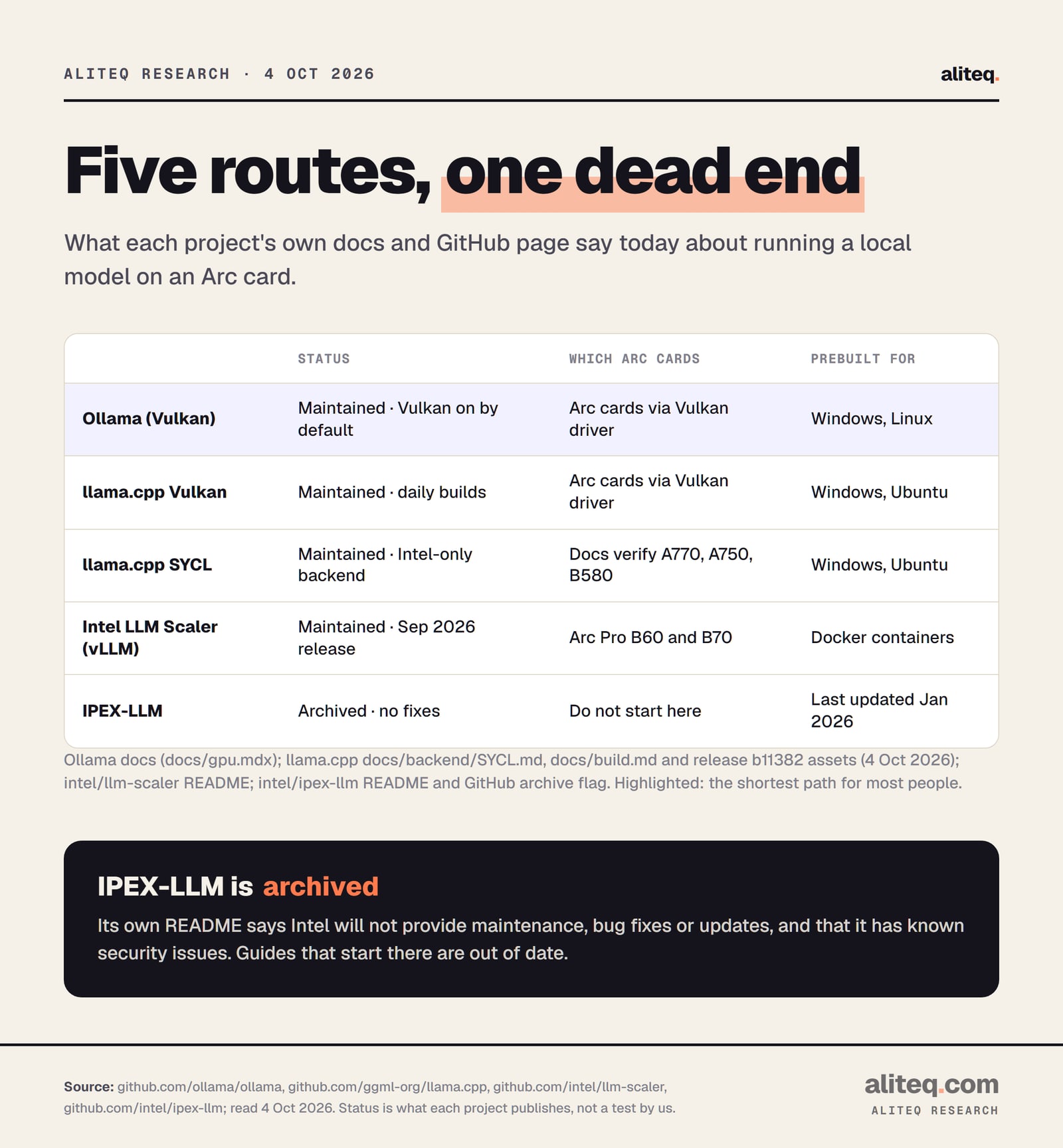
For most people on any Arc card, Ollama or llama.cpp with the Vulkan backend. For more control on Intel hardware, llama.cpp's SYCL backend. For serving models to several users on a Pro B60 or B70, Intel's LLM Scaler. Skip IPEX-LLM: its README says it's archived.
What each project publishes, read 4 Oct 2026. Not a test by us. · aliteq research
Ollama. Ollama's GPU docs say support on Windows and Linux comes "via Vulkan", and that "Vulkan is enabled by default when the backend is installed." On Windows, most GPU drivers already include Vulkan. On Linux, Ollama's docs point to Intel's own driver instructions. If Vulkan misbehaves, the docs give a switch to turn it off and a setting to pick a specific GPU. That matters on a PC with Intel graphics built into the CPU as well as an Arc card. Our setup guide has the steps.
llama.cpp with Vulkan. This is the engine Ollama builds on. The project ships a ready-made Windows Vulkan build and an Ubuntu one in every release. Build b11382, published 4 October 2026, has both.
llama.cpp with SYCL. SYCL is Intel's programming layer for its GPUs, part of the oneAPI toolkit. llama.cpp's SYCL docs list the Arc A770, A750 and B580 as verified. Its September 2026 notes report that a newer oneAPI release made prompt processing 3.1 times faster on a B570, compared with the previous build. Prompt processing is the reading step before the model starts writing. Prebuilt SYCL packages exist for Windows and Ubuntu, but the Ubuntu ones need matching Intel drivers and oneAPI installed.
Intel LLM Scaler. Intel's own GitHub project for Arc Pro cards. Its README says it runs on the "Arc Pro B60 and B70" and builds on vLLM, a popular serving engine, inside Docker containers. Its latest release came out in September 2026. It's the route for serving a model to a team, not for chatting on a gaming PC.
IPEX-LLM. Don't start here. The project's README now opens with: "THIS PROJECT IS ARCHIVED." It adds that Intel won't provide "maintenance, bug fixes, new releases or updates," and that it "has been identified as having known security issues." Its last update was in January 2026. Plenty of older guides still begin with it.
A funny detail: Intel's spec pages for the B580 and B570 still list "Intel Extension for PyTorch (IPEX) Support: Yes". That parent project is archived on GitHub too. Spec pages lag. Docs and repos are the better guide.
There's also a newer option. llama.cpp now has an OpenVINO backend, Intel's AI runtime, with builds in each release. Its docs say it has been validated mainly on Intel Core Ultra laptops and that broader support is "work in progress". Worth watching, not where I'd start on a desktop card.
What about the older Arc A770 16GB?
It's still on Intel's A-series page, with 16GB and 560 GB/s, and llama.cpp's SYCL docs list it as verified. Memory-wise it holds what the Pro B50 holds: 14B models and gpt-oss 20B. It's an older 2022 design, so it makes sense secondhand, not new.
The A-series page also lists the A770 8GB, A750 and A580, all with 8GB. At 4-bit and 16K context, 8GB holds Qwen3.5 9B (6.9 GB), and Qwen3 8B (7.7 GB) only tight. If you're shopping used, the 16GB A770 is the only older Arc I'd look at for local AI.
What do these numbers not tell you?
They don't tell you speed, quality or how smooth the software feels. They're memory arithmetic on published model specs, checked against each card's full VRAM. Real use varies with context length, the app you run and what else is using the GPU. Intel's prices also age fast, so check stores first.
The fit table assumes 16K tokens of context and an fp16 cache. Longer chats grow the cache. Some apps reserve memory for several chats at once. Your desktop takes a slice of the GPU too, which is why we call anything above 90% "tight".
And none of this is a hands-on review. I haven't run these models on these cards. If you want the buying case for the most popular one, our Intel Arc B580 for local AI piece makes it.
What should you check before you buy an Arc card?
Five checks. Name your biggest model. Look up its 4-bit size at your context length. Compare it with the card's VRAM, staying under 90%. Decide if you need speed (bandwidth) or just room (memory). Then check today's store price, because Intel's figures are old.
Name the biggest model you'll actually run, and the next size up you might want within a year.
Look up its 4-bit size at your context length. The scorecard above or our VRAM calculator gives the number.
Compare it with the card's VRAM and stay under 90%: 10GB B570, 12GB B580, 16GB Pro B50, 24GB Pro B60, 32GB Pro B65 or B70.
Decide if you're paying for room or speed. The Pro B50 has the room of a 16GB card but 224 GB/s, half the B580's 456 GB/s.
Check today's store price. Intel's figures are launch or suggested prices, and two Pro cards have none.
Install Ollama or llama.cpp with Vulkan first. Skip any guide that starts with IPEX-LLM.
Intel Arc for local AI: quick answers
Which Intel Arc card is best for local LLMs?
For 8B to 12B models, the 12GB B580 at Intel's $249 recommended price. For 14B models and gpt-oss 20B, a 16GB card such as the Arc Pro B50. For 24B to 35B models, the 24GB Pro B60 or the 32GB Pro B70.
Can an Arc B580 run a 14B model?
Tightly. Qwen3 14B at 4-bit needs about 11.6 GB with 16K tokens of context, 97% of the B580's 12GB on our math. Cut context to 8K and it needs about 10.4 GB, which fits comfortably.
Can an Arc B580 run gpt-oss 20B?
Not fully on the GPU. Its 4-bit weights are 11.28 GB, and with cache and runtime it needs about 12.8 GB. You can run it by keeping part of the model in system memory, which is slower.
Does Ollama support Intel Arc?
Yes, through Vulkan. Ollama's docs say Vulkan support on Windows and Linux is enabled by default when the backend is installed. Windows drivers usually include Vulkan. Linux needs Intel's driver packages.
Should I use IPEX-LLM on Intel Arc?
No. Its GitHub README says the project is archived, that Intel won't provide fixes or updates, and that it has known security issues. Use Ollama, llama.cpp with Vulkan or SYCL, or Intel's LLM Scaler on Pro cards.
Is there an Arc card with more than 12GB for gamers?
Not in the current B-series. The B580's 12GB is the top. Intel's current 16GB, 24GB and 32GB cards are all Arc Pro workstation cards. The older 2022 Arc A770 also came in a 16GB version.