At NVIDIA's own list prices, a gigabyte of VRAM costs the same $62 on both cards. So the real question is which models you want. We ran 13 popular ones through our VRAM math, then priced renting each card by the hour.
This post contains affiliate links. If you buy through them, Aliteq may earn a commission — at no extra cost to you. Prices change; check the seller’s own page for today’s price.
Share
People search "RTX 5080 price" and "RTX 5090 price" and get a lot of numbers. Our story on the RTX 5080 costing more than an RTX 5090 did at launch is one of them. But if you want either card for running AI models at home, price is only half the question. The other half is memory.
I review gadgets the way some people read box scores: spec sheet first, marketing last. So I took NVIDIA's own pages for both cards, read on October 4, 2026. Then I ran 13 popular open models through the same memory math behind our VRAM calculator.
We have not tested either card. Every fit below is arithmetic on published model configs. NVIDIA's numbers are NVIDIA's.
RTX 5080 or RTX 5090: which should you buy for local AI?
Buy the RTX 5080 if your biggest model is 20B or smaller, like gpt-oss 20B, Qwen3 14B or Gemma 4 12B. Buy the RTX 5090 if you want 27B to 35B models, like Qwen3 32B or Gemma 4 31B, at 4-bit or better. If you want 70B models, neither card is enough on its own.
That's the whole decision. Everything else in this piece is the evidence.
The trap is buying the card first and asking what it runs later. A 16GB card that's one tier short of the model you wanted is a $999 lesson. So pick the model, then the card.
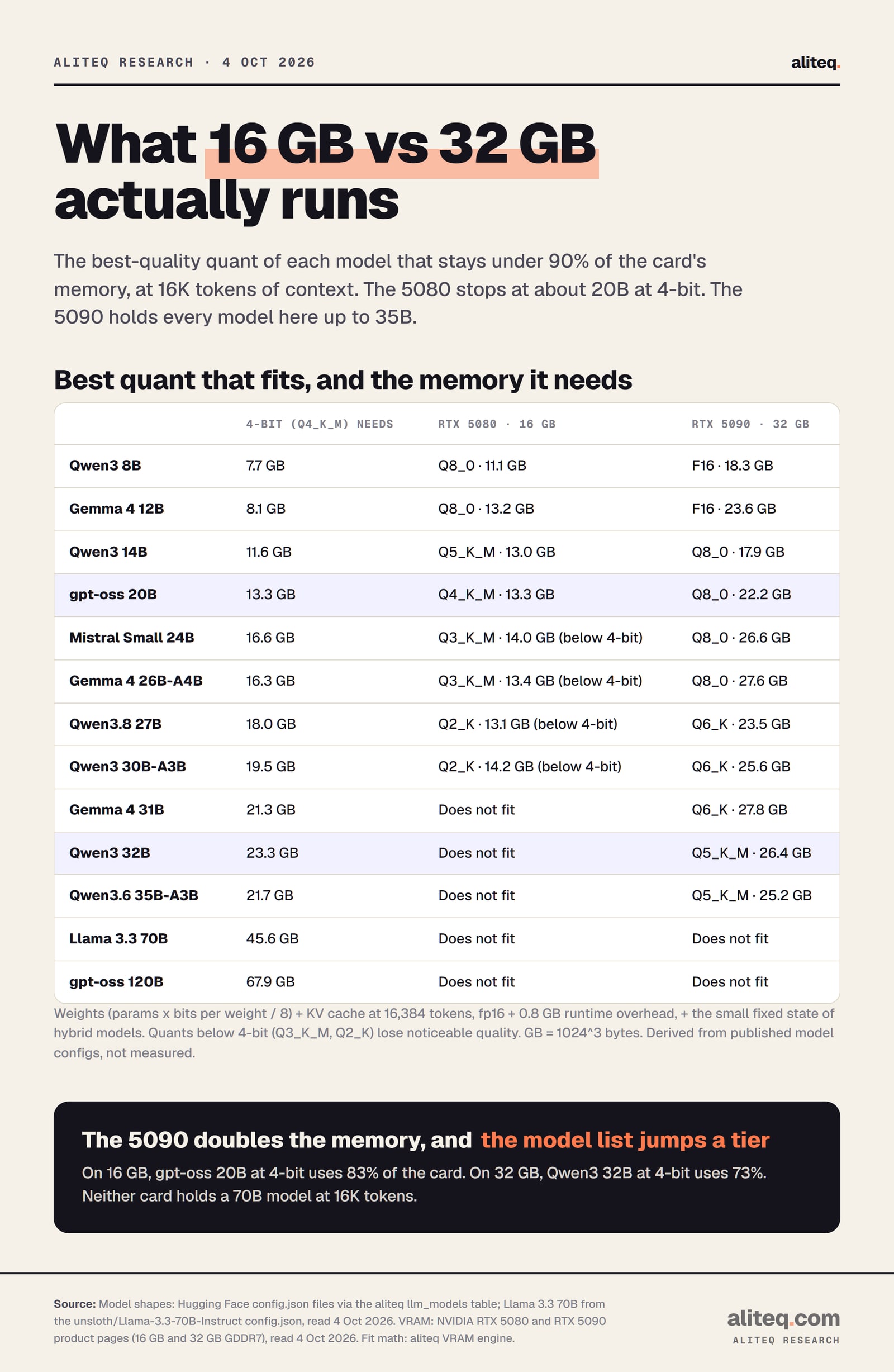
The best-quality quant of each model that stays under 90% of the card's memory, at 16K tokens of context. Derived from our VRAM engine and published model configs, Oct 4, 2026. · aliteq research
What does NVIDIA's spec sheet actually say?
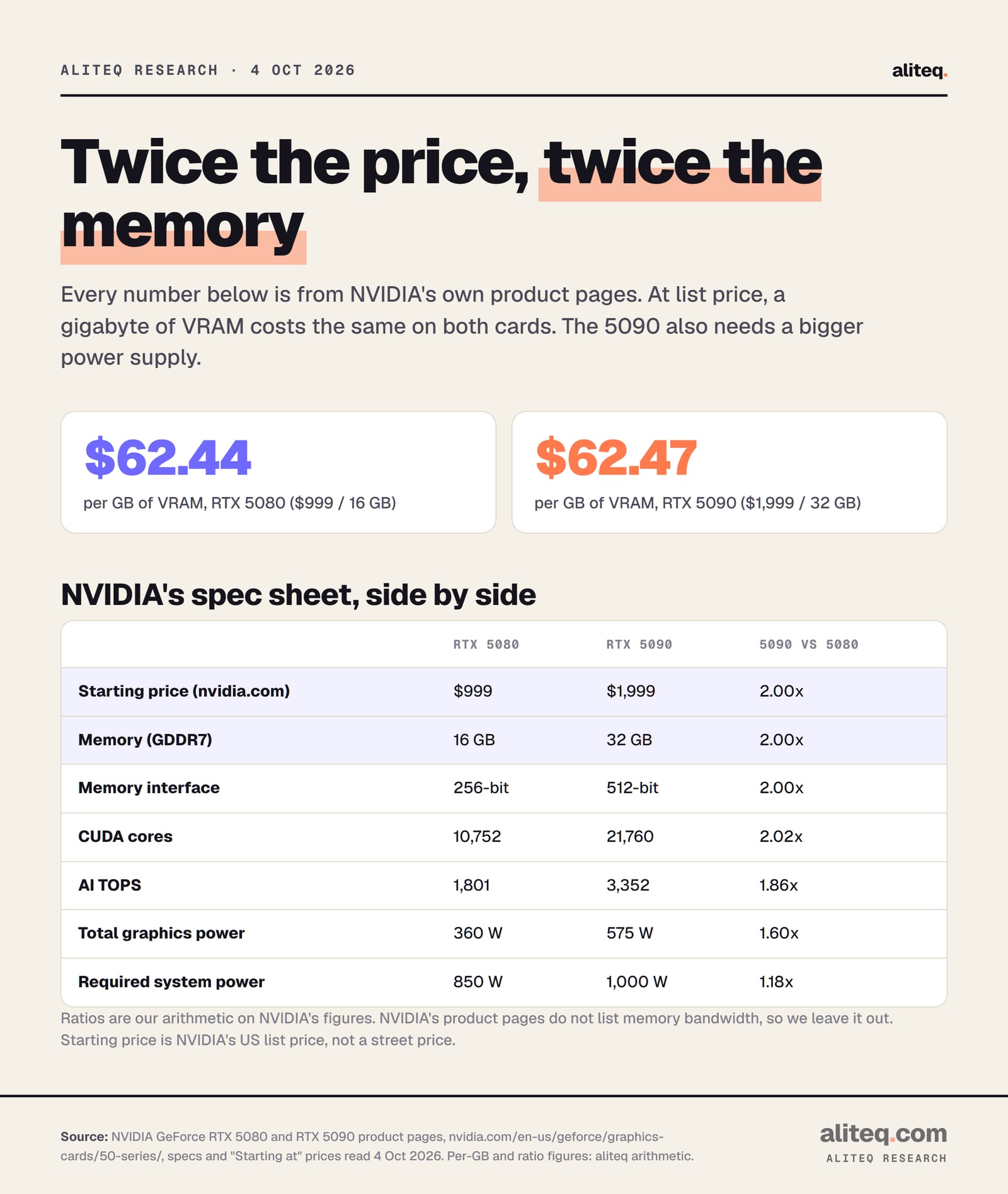
The RTX 5090 is almost exactly two RTX 5080s on paper. NVIDIA lists 32GB of GDDR7 against 16GB, a 512-bit memory bus against 256-bit, and 21,760 CUDA cores against 10,752. It starts at $1,999 against $999. It also draws 575 watts against 360 and wants a 1,000-watt power supply.
Here's what I find funny about those two prices. Divide each by its memory and you get $62.44 per gigabyte for the 5080 and $62.47 for the 5090. Three cents apart. At list price, NVIDIA isn't charging you a premium for the bigger memory pool. You're buying the same thing by the gigabyte, in a bigger box.
Every figure from NVIDIA's RTX 5080 and RTX 5090 product pages, read Oct 4, 2026. Per-GB costs and ratios are our arithmetic. · aliteq research
RTX 5080 vs RTX 5090, NVIDIA's numbers (Oct 4, 2026)
Starting price (nvidia.com, US)
RTX 5080
$999
RTX 5090
$1,999
5090 vs 5080
2.00x
Memory
RTX 5080
16 GB GDDR7
RTX 5090
32 GB GDDR7
5090 vs 5080
2.00x
Memory interface
RTX 5080
256-bit
RTX 5090
512-bit
5090 vs 5080
2.00x
CUDA cores
RTX 5080
10,752
RTX 5090
21,760
5090 vs 5080
2.02x
AI TOPS
RTX 5080
1,801
RTX 5090
3,352
5090 vs 5080
1.86x
Total graphics power
RTX 5080
360 W
RTX 5090
575 W
5090 vs 5080
1.60x
Required system power
RTX 5080
850 W
RTX 5090
1,000 W
5090 vs 5080
1.18x
Founders Edition size
RTX 5080
304 x 137 mm, 2-slot
RTX 5090
304 x 137 mm, 2-slot
5090 vs 5080
same
RTX 5080
RTX 5090
5090 vs 5080
Starting price (nvidia.com, US)
$999
$1,999
2.00x
Memory
16 GB GDDR7
32 GB GDDR7
2.00x
Memory interface
256-bit
512-bit
2.00x
CUDA cores
10,752
21,760
2.02x
AI TOPS
1,801
3,352
1.86x
Total graphics power
360 W
575 W
1.60x
Required system power
850 W
1,000 W
1.18x
Founders Edition size
304 x 137 mm, 2-slot
304 x 137 mm, 2-slot
same
Two things are missing from NVIDIA's pages, and I'd rather say so than fill the gap. Neither page lists memory bandwidth, the number that matters most for how fast a model answers. And neither card supports NVLink, per NVIDIA's own spec list. So you can't bridge two 5080s into one 32GB pool the way some older cards could.
The power line is easy to skip and expensive to forget. If your current power supply is 850 watts, NVIDIA says that's enough for a 5080 and not for a 5090. That can quietly add a new power supply to the 5090's real cost.
Which AI models fit on the RTX 5080's 16GB?
Models up to about 20B fit at 4-bit or better. Qwen3 8B and Gemma 4 12B run at 8-bit, which is close to lossless. Qwen3 14B runs at 5-bit. gpt-oss 20B runs at 4-bit and uses 13.3 GB, or 83% of the card, at 16K tokens of context. Past that, models only squeeze in at 3-bit or 2-bit.
Here's the full list on 16GB, at 16K tokens of context:
gpt-oss 20B: 4-bit (Q4_K_M), 13.3 GB. This is the 16GB sweet spot.
Mistral Small 24B, Gemma 4 26B-A4B: only at 3-bit (Q3_K_M), 14.0 and 13.4 GB.
Qwen3.8 27B, Qwen3 30B-A3B: only at 2-bit (Q2_K), 13.1 and 14.2 GB.
Gemma 4 31B, Qwen3 32B, Qwen3.6 35B-A3B: don't fit at any quant under our 90% line.
"Fits at 2-bit" is not the same as "runs well". Quants below 4-bit lose noticeable quality, and our engine's notes say the same. Our Q4 vs Q5 vs Q8 guide explains the trade. In plain terms, the RTX 5080 is a great 20B card and an awkward 27B card.
Every model we checked up to 35B fits at 4-bit or better, most of them comfortably. Qwen3 32B runs at 5-bit and uses 26.4 GB. Gemma 4 31B and Qwen3.8 27B run at 6-bit. Models up to 26B run at 8-bit. Small models like Qwen3 8B can even run at full 16-bit precision.
On 32GB, at 16K tokens of context:
Qwen3 8B, Gemma 4 12B: full precision (F16), 18.3 and 23.6 GB.
Qwen3 14B, gpt-oss 20B, Mistral Small 24B, Gemma 4 26B-A4B: 8-bit, 17.9 to 27.6 GB.
Qwen3 32B, Qwen3.6 35B-A3B: 5-bit, 26.4 and 25.2 GB. At 4-bit, Qwen3 32B is 23.3 GB, 73% of the card.
So the extra 16GB buys you two things. It buys a whole tier of bigger models, the 27B to 35B class. And it buys quality on the models a 5080 already runs, because you can step up from 4-bit to 8-bit. You can check any of these on its own page, for example Qwen3 32B or gpt-oss 20B.
How I got each number: weights are parameters times bits per weight, divided by 8. The KV cache, the model's short-term memory of your chat, is 2 x layers x KV heads x head size x tokens x 2 bytes. Then add 0.8 GB for the runtime. For hybrid models like Gemma 4 and Qwen3.8, only the full-attention layers keep a growing cache, so I counted those plus their small fixed state. A model "fits" when it uses 90% of the card or less.
Can either card run a 70B model?
No, not on one card at a usable quality. Llama 3.3 70B at 4-bit needs about 45.6 GB at 16K tokens of context. Even at 3-bit (IQ3_XS) it needs 32.9 GB, over the 5090's 32GB. At 8K tokens it squeezes to 30.4 GB, which is 95% of the card: technically loadable, practically fragile.
gpt-oss 120B is further out still, at about 67.9 GB on our math. If 70B-class models are your goal, you want more memory than either card has. Our best GPU for local AI guide covers the bigger options, and one RTX 5090 vs two RTX 3090s looks at the two-card route.
This is the one place the "same price per gigabyte" math stops helping. Doubling 16GB to 32GB moves you up one tier. It doesn't get you to the 70B tier.
How much context can each card hold?
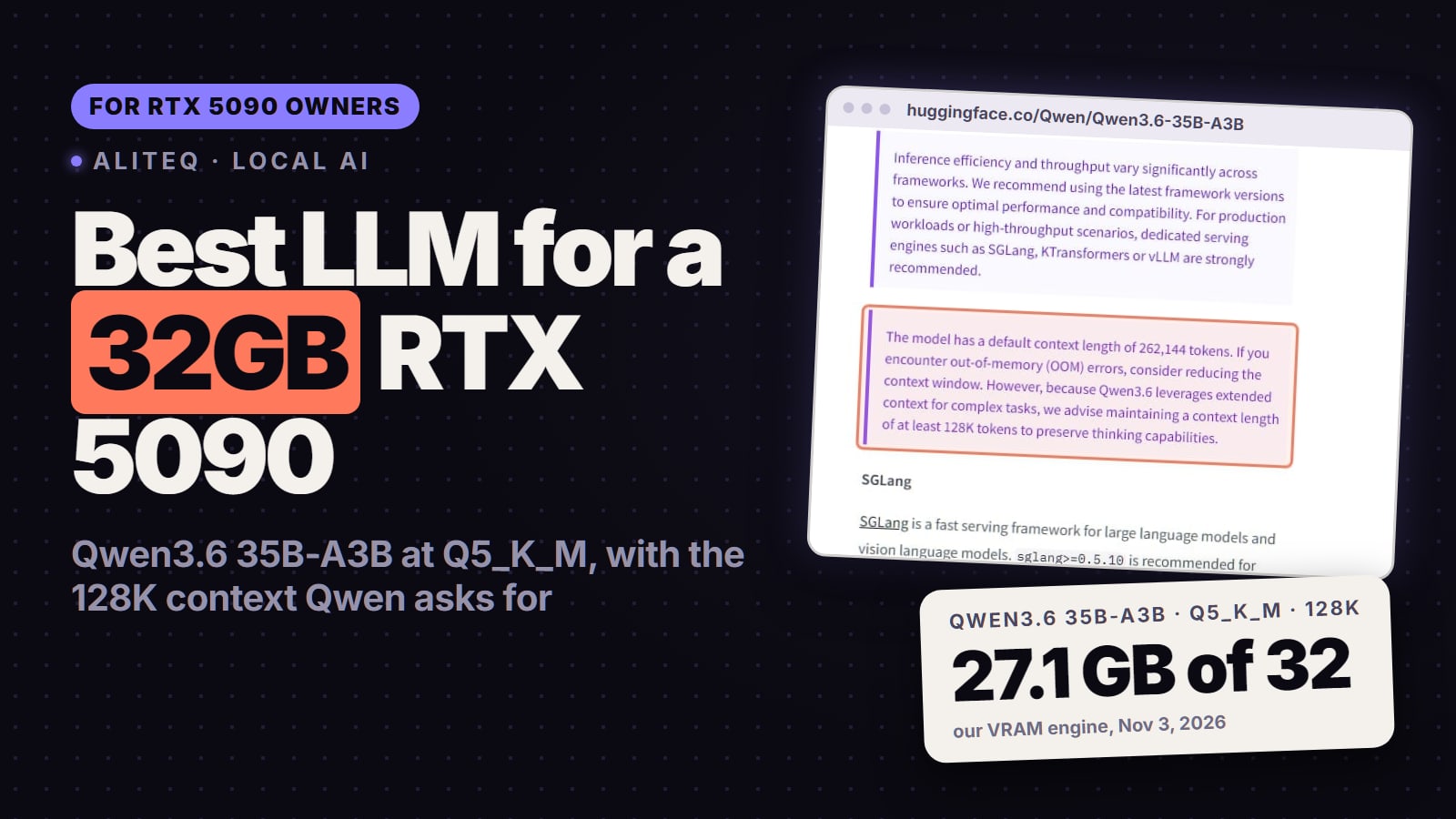
More than you'd think on 32GB, and enough on 16GB for normal chats. At 32K tokens, gpt-oss 20B and Qwen3 14B both still fit the RTX 5080 at 4-bit, at 88% of the card. On the RTX 5090, Qwen3.6 35B-A3B fits its full 262K-token window at 4-bit, using 82% of the card.
Context is the term people forget. Every token you keep in the conversation costs memory, and the cost depends on the model's design. Here are a few limits from our engine, at 4-bit and under our 90% line:
gpt-oss 20B on the RTX 5080: about 38K tokens. On the RTX 5090, its full 131K window uses 18.6 GB.
Qwen3 14B on the RTX 5080: about 33K tokens.
Qwen3 32B on the RTX 5090: about 38K tokens, close to the model's 40,960 maximum.
Gemma 4 31B on the RTX 5090: about 114K tokens.
Long documents, big codebases and long agent sessions all eat context. If that's your use, the 5090's headroom matters even for models that "fit" a 5080.
Is the RTX 5090 twice as fast for AI?
I can't give you a tokens-per-second number, and I won't make one up. NVIDIA's pages list 3,352 AI TOPS for the 5090 against 1,801 for the 5080, about 1.86 times. But how fast a model writes mostly depends on memory bandwidth, which NVIDIA's product pages don't list.
What I can say from the spec sheet: the 5090's memory bus is twice as wide, 512-bit against 256-bit. A wider bus moves more data per clock, and reading the model's weights is most of the work for every word it writes. So the 5090 should be meaningfully faster on the same model. How much faster depends on the model, the quant and the software, and I don't have a primary-source measurement for that.
If speed is the deciding factor for you, rent each card for an hour and run your own model. That costs about a dollar, which brings us to price.
What do the RTX 5080 and RTX 5090 cost right now?
NVIDIA lists the RTX 5080 from $999 and the RTX 5090 from $1,999 on its own pages, read October 4, 2026. Store prices for partner cards are often higher. We couldn't read a retailer's product page directly today, so we're printing NVIDIA's list prices only.
One rule holds whatever the store says. The $62-per-gigabyte parity only exists at list price. If a 5080 sells far above $999 and a 5090 sits near $1,999, the 5090 becomes the cheaper memory. If the 5090 is marked up more, the 5080 wins on value. Divide the price you're actually quoted by 16 or 32 and compare.
Is renting an RTX 5080 or 5090 cheaper than buying one?
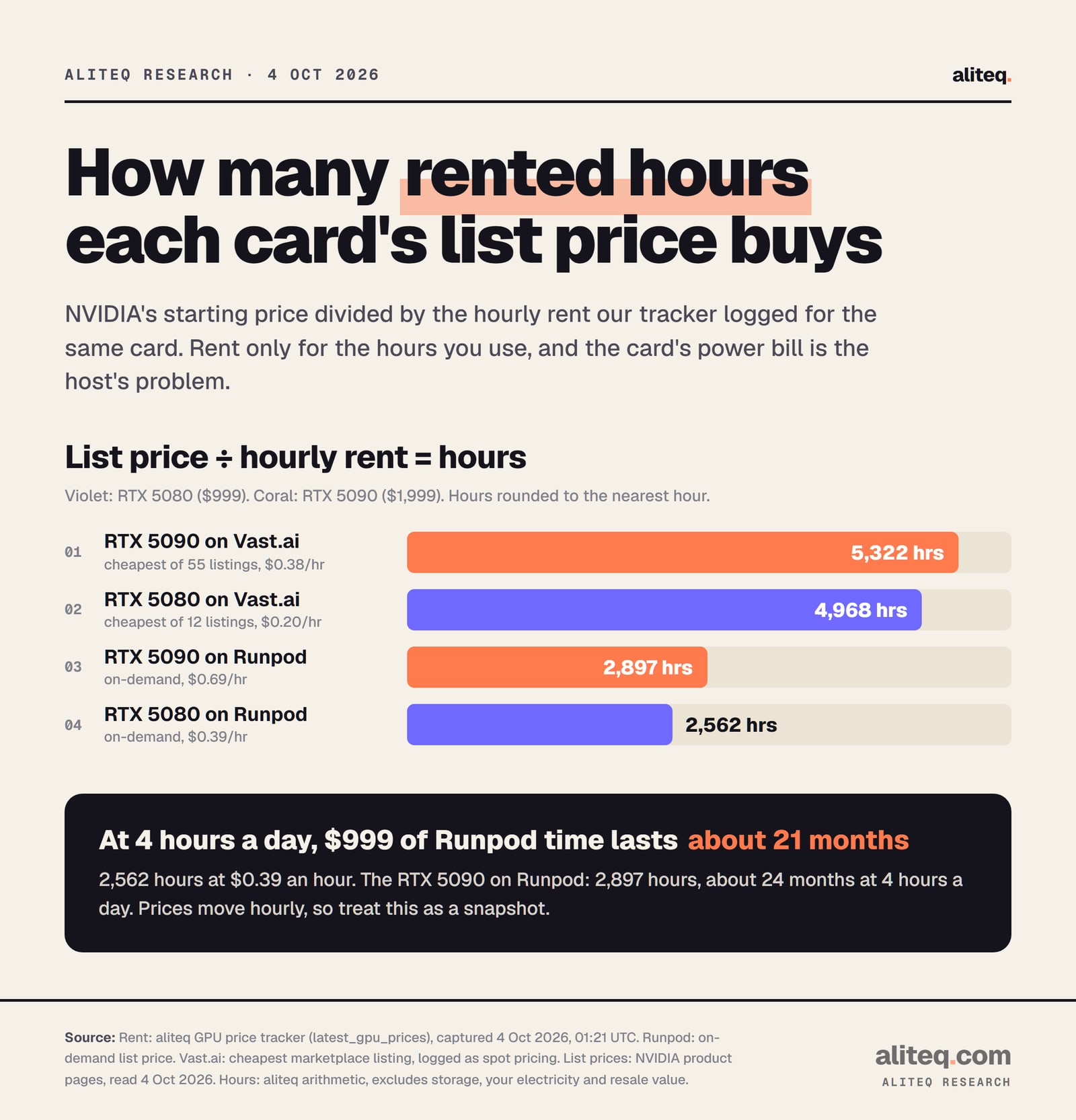
For trying models, yes, by a lot. On October 4, 2026 our tracker logged an RTX 5080 at $0.39 an hour and an RTX 5090 at $0.69 an hour on Runpod, on demand. The cheapest Vast.ai listings were $0.20 and $0.38. NVIDIA's $999 list price buys about 2,562 hours of that Runpod 5080 time.
NVIDIA list price divided by the hourly rent our tracker logged on Oct 4, 2026, 01:21 UTC. Excludes storage, your own electricity and resale value. Prices move hourly. · aliteq research
Put another way, at four hours a day, $999 of Runpod 5080 time lasts about 21 months. The 5090 on Runpod, $1,999 of time, lasts about 24 months at the same pace. Per gigabyte of memory, the 5090 is slightly cheaper to rent: about 2.2 cents per GB-hour against 2.4 for the 5080.
Buying still wins in some cases. You run models every day, for many hours. You want your data to stay on your desk. Or you also game on the card, and the AI use is a bonus. Our rent vs buy guide works through the break-even, and the cloud GPU price board shows the live rates.
What should you check before you buy either card?
Five checks, in order. Name the biggest model you'll run. Look up its 4-bit size at your context length. Compare it with 90% of the card's memory. Check your power supply. Then rent the card for an hour and see if the model is worth it to you.
Name the biggest model you will actually run, and the next size up you might want within a year. 20B or smaller points to 16GB. 27B to 35B points to 32GB.
Look up its size at 4-bit and your context length in our VRAM calculator. Long chats and documents need more room than the model file alone.
Compare it with 90% of the card: about 14.4 GB on the RTX 5080 and 28.8 GB on the RTX 5090. Above that, it may load and then fail.
Check your power supply. NVIDIA says 850 W for the RTX 5080 and 1,000 W for the RTX 5090.
Divide the price you are quoted by 16 or 32. At list price both are about $62 per GB. A big markup on one card flips the value.
Rent the card for an hour or two and run your model. If it changes your work, buy. If not, you spent about a dollar.
What do these numbers not tell you?
They don't tell you speed, answer quality or how a model feels to use. They're memory arithmetic on published model configs, checked against a cautious 90% line. Your app, settings and what else uses the GPU will move the real numbers. And prices change, so recheck before you buy.
Our engine assumes an fp16 cache and 0.8 GB of runtime overhead. A desktop, a browser with video, or a second app on the same GPU all take memory too. If you also game on the card or drive several monitors from it, leave more room than our table does.
None of this is a hands-on review. We haven't run a model on either card. If you want to check a different model or context length, the VRAM calculator runs the same math live.
RTX 5080 vs RTX 5090 for local AI: quick answers
Is 16GB of VRAM enough for local AI?
For models up to about 20B, yes. On our math the RTX 5080 runs gpt-oss 20B at 4-bit using 83% of the card at 16K tokens of context, and Qwen3 14B or Gemma 4 12B at higher quality. Models from 24B up only fit below 4-bit, with noticeable quality loss.
Can the RTX 5090 run a 70B model?
Not well. Llama 3.3 70B needs about 45.6 GB at 4-bit and 16K context. Even at 3-bit it needs 32.9 GB. At 8K context it reaches 95% of the card, which may load but leaves no room for anything else.
What is the best model for the RTX 5090?
The 27B to 35B tier is what 32GB unlocks. On our math Qwen3 32B runs at 5-bit using 26.4 GB, and Gemma 4 31B and Qwen3.8 27B run at 6-bit. Which one is best depends on your task.
Is the RTX 5090 worth twice the price of the RTX 5080 for AI?
At NVIDIA's list prices, $999 and $1,999, you pay the same $62 per gigabyte of memory. So it's worth it if you need the 27B to 35B models or long context. If your models are 20B or smaller, the 5080 does the job for half the money.
How much does it cost to rent an RTX 5080 or RTX 5090?
Our tracker logged $0.39 an hour for an RTX 5080 and $0.69 an hour for an RTX 5090 on Runpod on demand, on Oct 4, 2026. The cheapest Vast.ai listings were $0.20 and $0.38. Prices change hourly.
How much faster is the RTX 5090 than the RTX 5080 for AI?
We don't have a primary-source speed test to quote. NVIDIA lists 3,352 AI TOPS against 1,801 and a memory bus twice as wide. Generation speed depends mostly on memory bandwidth, which NVIDIA's product pages don't list.