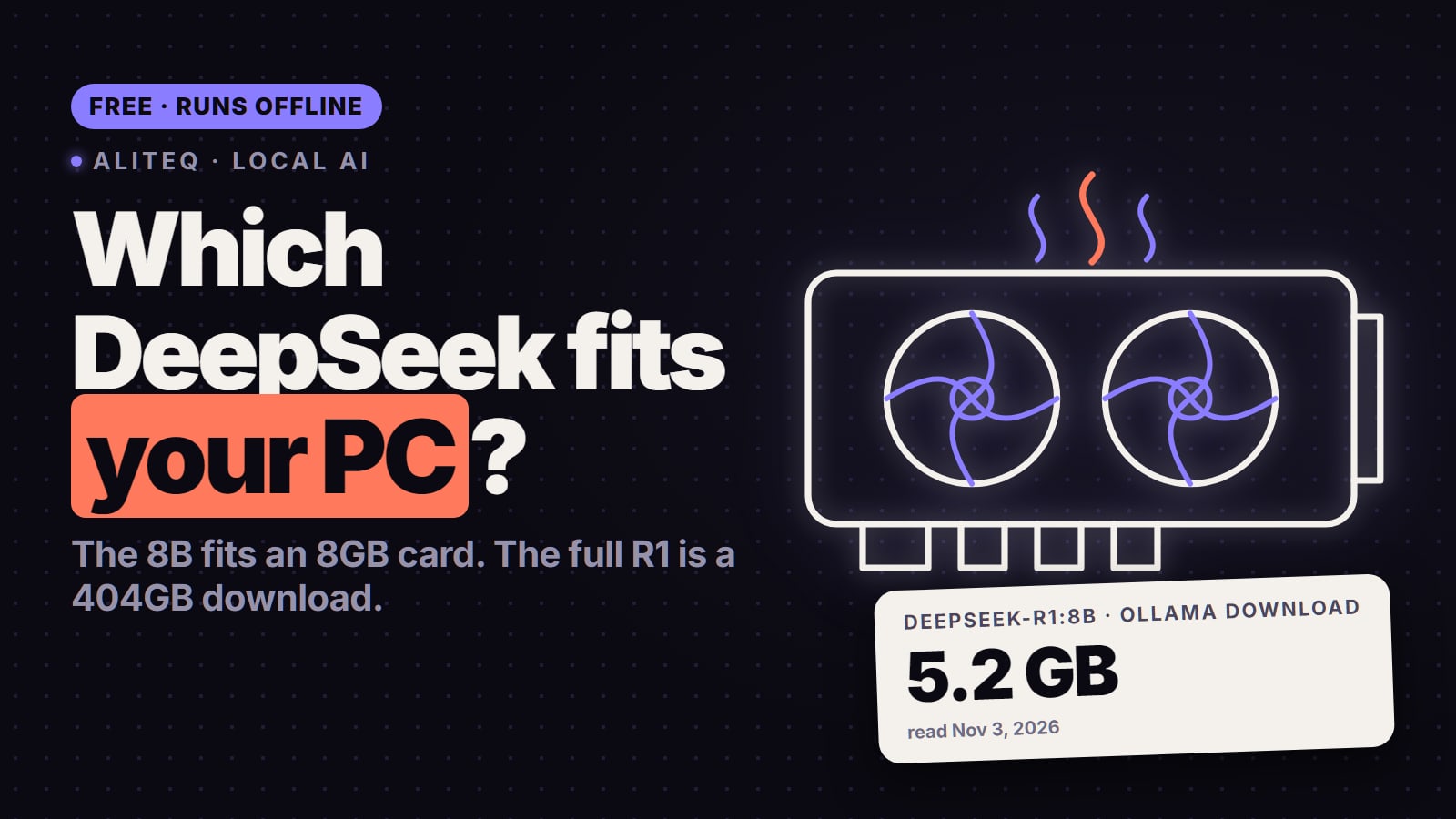
DeepSeek R1 on a home PC means one of six distilled models, from 1.5B to 70B. Here is the one that fits each VRAM size, with Ollama's real download sizes, DeepSeek's own benchmark scores and the context-length catch that trips up 24 GB cards. Checked Nov 3, 2026.
Some links on this page are referral links: we may earn a commission, at no cost to you.
Share
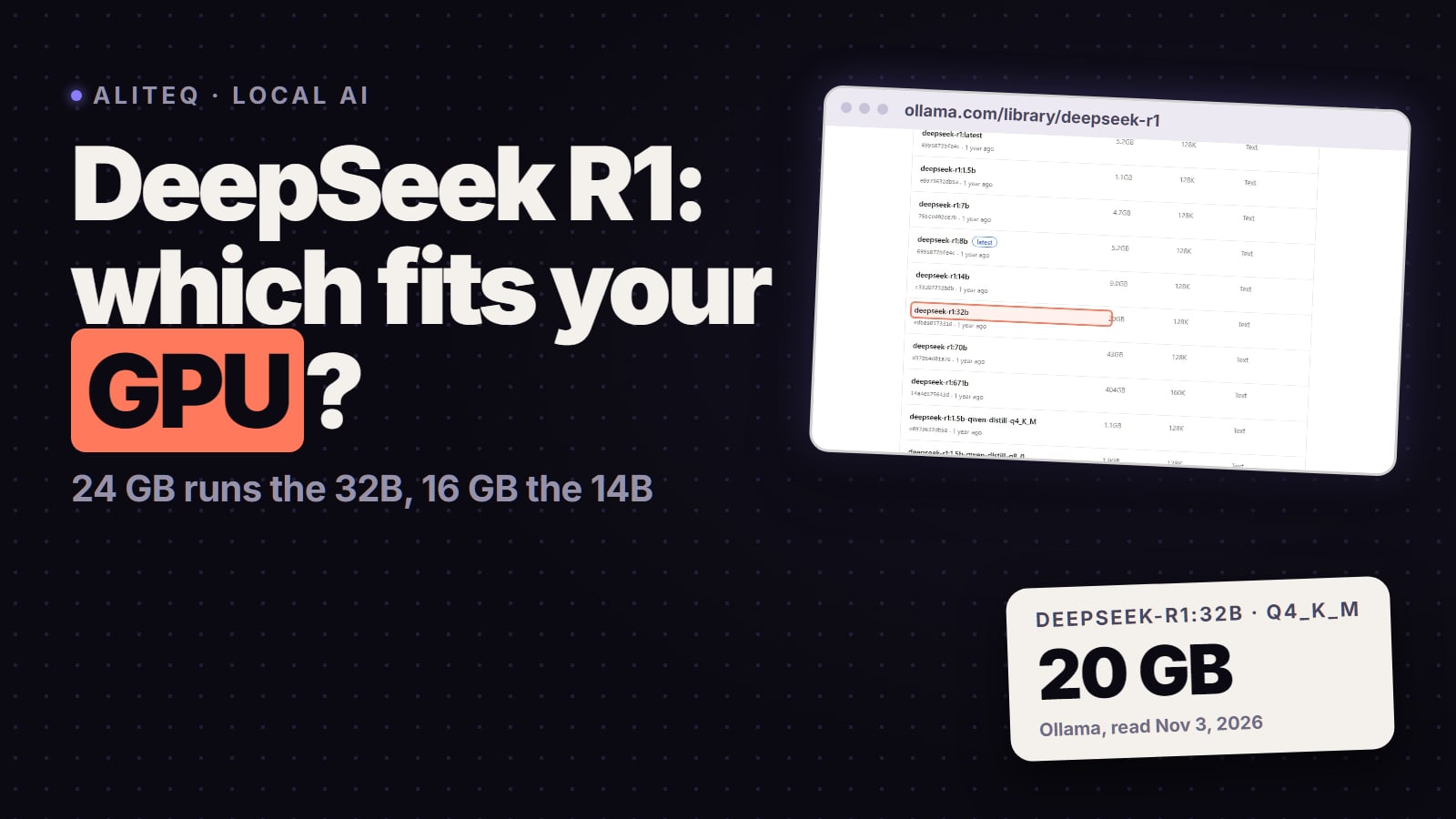
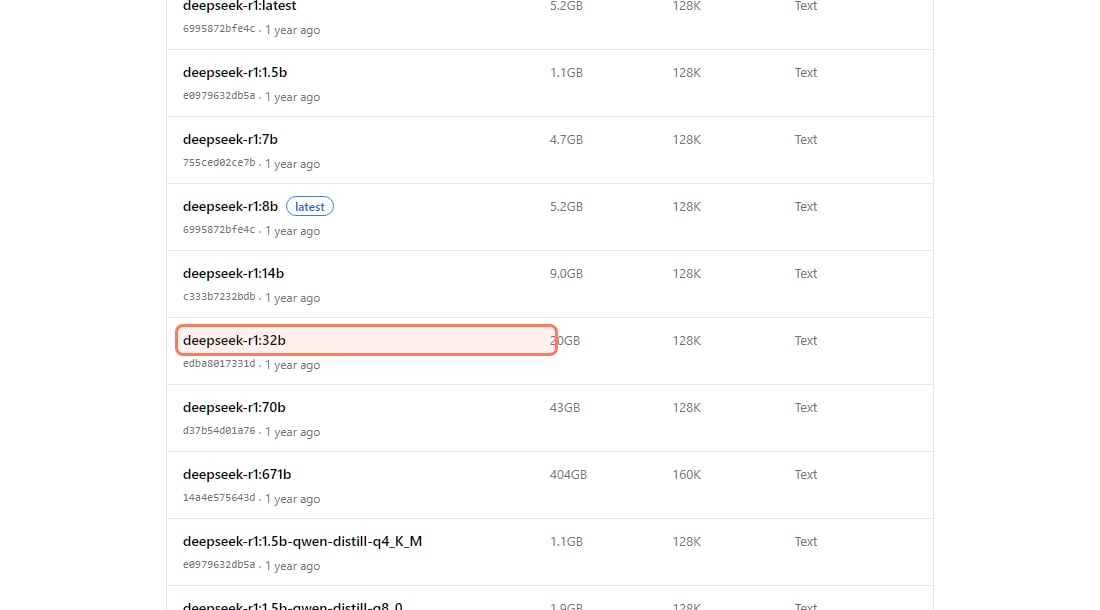
Which DeepSeek R1 model fits your GPU? Match the distill to your VRAM: an 8 GB card runs the 7B or 8B, a 12 GB card runs the 14B at short context, 16 GB runs the 14B comfortably, 24 GB runs the 32B, and the 70B needs about 48 GB (two 24 GB cards, a 48 GB workstation card or a Mac with 64 GB of unified memory). These are Ollama's default 4-bit downloads, read on November 3, 2026; the full 671B DeepSeek R1 is a 404 GB download and doesn't run on a home GPU.
5.2 GB
8B download
Ollama, deepseek-r1:8b (latest), Q4_K_M
9.0 GB
14B download
Ollama, deepseek-r1:14b, Q4_K_M
20 GB
32B download
Ollama, deepseek-r1:32b, Q4_K_M
43 GB
70B download
Ollama, deepseek-r1:70b, Q4_K_M
Which DeepSeek R1 model fits 8, 12, 16, 24 and 48 GB?
The table below is weights plus KV cache plus a fixed 0.8 GB of overhead, the same formula as our VRAM calculator. Weights are the exact byte sizes of Ollama's default Q4_K_M files; the KV cache comes from each model's own config (layers, KV heads, head size) at 16-bit, which is the llama.cpp and Ollama default. Figures are in GiB, the unit your GPU's "24 GB" really means.
DeepSeek R1 distills: memory needed at Q4_K_M (our arithmetic from Ollama's files and each model's config, Nov 3, 2026)
R1 Distill Qwen 1.5B
Model
1.1 GB
Ollama download
2.0 GiB
Needed at 8K context
2.7 GiB
Needed at 32K context
4 GB
R1 Distill Qwen 7B
Model
4.7 GB
Ollama download
5.6 GiB
Needed at 8K context
6.9 GiB
Needed at 32K context
8 GB
R1-0528 Qwen3 8B (Ollama's default)
Model
5.2 GB
Ollama download
6.8 GiB
Needed at 8K context
10.1 GiB
Needed at 32K context
8 GB (12 GB for long context)
R1 Distill Qwen 14B
Model
9.0 GB
Ollama download
10.7 GiB
Needed at 8K context
15.2 GiB
Needed at 32K context
12 GB (16 GB for long context)
R1 Distill Qwen 32B
Model
20 GB
Ollama download
21.3 GiB
Needed at 8K context
27.3 GiB
Needed at 32K context
24 GB (32 GB for long context)
R1 Distill Llama 70B
Model
43 GB
Ollama download
42.9 GiB
Needed at 8K context
50.4 GiB
Needed at 32K context
48 GB (64 GB for long context)
DeepSeek R1 671B (full model)
Model
404 GB
Ollama download
Not a home-GPU model
Needed at 8K context
Not a home-GPU model
Needed at 32K context
Server hardware
Model
Ollama download
Needed at 8K context
Needed at 32K context
Smallest card that fits
R1 Distill Qwen 1.5B
1.1 GB
2.0 GiB
2.7 GiB
4 GB
R1 Distill Qwen 7B
4.7 GB
5.6 GiB
6.9 GiB
8 GB
R1-0528 Qwen3 8B (Ollama's default)
5.2 GB
6.8 GiB
10.1 GiB
8 GB (12 GB for long context)
R1 Distill Qwen 14B
9.0 GB
10.7 GiB
15.2 GiB
12 GB (16 GB for long context)
R1 Distill Qwen 32B
20 GB
21.3 GiB
27.3 GiB
24 GB (32 GB for long context)
R1 Distill Llama 70B
43 GB
42.9 GiB
50.4 GiB
48 GB (64 GB for long context)
DeepSeek R1 671B (full model)
404 GB
Not a home-GPU model
Not a home-GPU model
Server hardware
Ollama's own download sizes for every DeepSeek R1 tag, ollama.com/library/deepseek-r1/tags, read November 3, 2026. · Screenshot of ollama.com by aliteq
Three things decide the fit, in this order:
The weights. At 4-bit (Q4_K_M) a model needs a bit over half a byte per parameter. The 32B's file is 18.5 GiB; at 8-bit (Ollama's 32b-qwen-distill-q8_0 tag, 35 GB) it no longer fits a 24 GB card.
The context. Every token you keep in the conversation costs memory. For the 32B that is 0.25 MB per token at 16-bit, so 8K tokens adds about 2 GiB and 32K adds about 8 GiB. Reasoning models fill context fast, which is the next section.
Headroom. If the same card drives your monitor, the desktop, your browser and the driver also use VRAM, often around 1 GiB. The "up to about" context figures on this page are the edge of the fit; if a model lands on the CPU, step the context down one notch (32K to 24K, 16K to 12K).
Why does DeepSeek R1 run out of memory when it starts thinking?
Because R1 writes its reasoning out as text before it answers, and that text lives in the context. DeepSeek's own R1-0528 model card says the updated model averages 23K tokens per question on its AIME math test, up from 12K for the original R1. A hard question can push a 24 GB card past the point where the 32B fits.
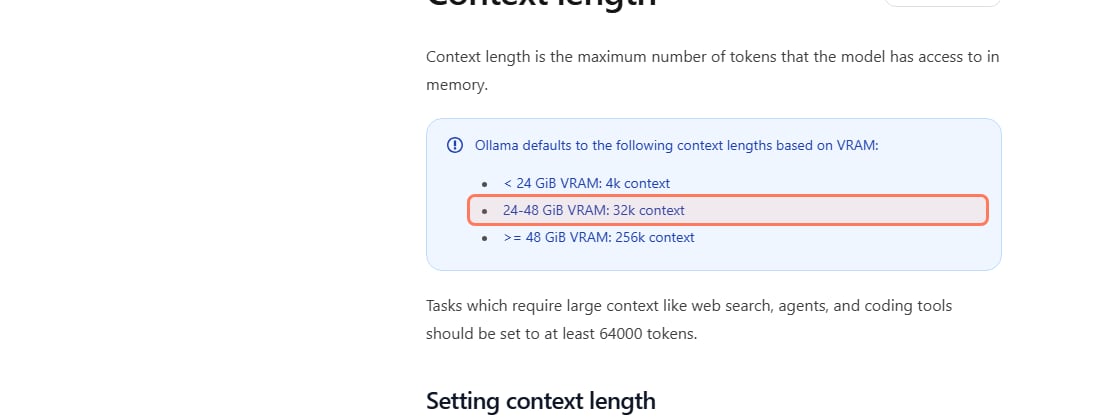
The catch most people hit is the default context. Ollama's docs (read Nov 3, 2026) say it picks the context length from your VRAM: 4k below 24 GiB, 32k on 24 to 48 GiB, and 256k from 48 GiB.
Ollama's default context length by VRAM, docs.ollama.com/context-length, read November 3, 2026. · Screenshot of docs.ollama.com by aliteq
Put the two together and you get two common surprises:
On a 24 GB card, the 32B can start partly on the CPU. At the 32k default, our arithmetic puts the 32B at about 27 GiB, more than the card holds, so some of the model may be pushed to system RAM and run much slower. Run ollama ps and check the PROCESSOR column: you want "100% GPU". If it isn't, set a shorter context, for example OLLAMA_CONTEXT_LENGTH=16384 ollama serve, which brings the 32B to about 23 GiB.
On an 8, 12 or 16 GB card, R1 can lose the thread. The 4k default is short for a model that thinks for thousands of tokens before it answers. If long answers stop making sense, raise the context in the Ollama app's settings slider or with the same variable, and stay within the "32K context" column above.
Which DeepSeek R1 distill is the smartest for its size?
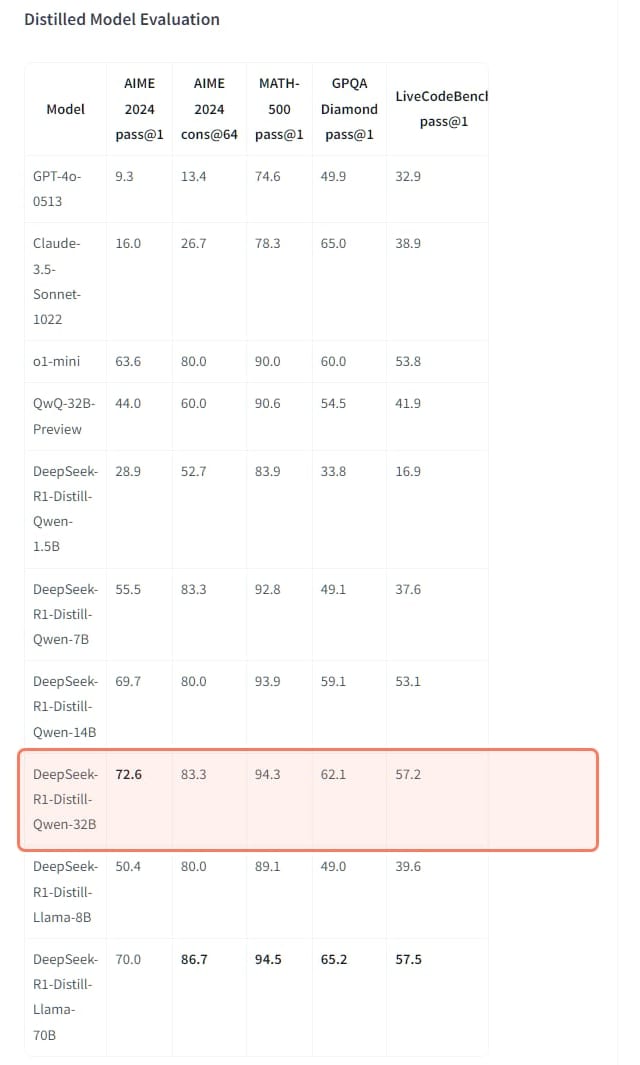
On DeepSeek's own evaluation table, the 14B and the 32B are where the distills overtake OpenAI's o1-mini on math. DeepSeek's model card says the 32B "outperforms OpenAI-o1-mini across various benchmarks". Its table shows where that holds and where it doesn't:
DeepSeek's distilled-model evaluation (DeepSeek-R1 model card, read Nov 3, 2026)
OpenAI o1-mini
Model
63.6
AIME 2024 (pass@1)
90.0
MATH-500 (pass@1)
60.0
GPQA Diamond (pass@1)
1820
R1 Distill Qwen 1.5B
Model
28.9
AIME 2024 (pass@1)
83.9
MATH-500 (pass@1)
33.8
GPQA Diamond (pass@1)
954
R1 Distill Qwen 7B
Model
55.5
AIME 2024 (pass@1)
92.8
MATH-500 (pass@1)
49.1
GPQA Diamond (pass@1)
1189
R1 Distill Llama 8B
Model
50.4
AIME 2024 (pass@1)
89.1
MATH-500 (pass@1)
49.0
GPQA Diamond (pass@1)
1205
R1 Distill Qwen 14B
Model
69.7
AIME 2024 (pass@1)
93.9
MATH-500 (pass@1)
59.1
GPQA Diamond (pass@1)
1481
R1 Distill Qwen 32B
Model
72.6
AIME 2024 (pass@1)
94.3
MATH-500 (pass@1)
62.1
GPQA Diamond (pass@1)
1691
R1 Distill Llama 70B
Model
70.0
AIME 2024 (pass@1)
94.5
MATH-500 (pass@1)
65.2
GPQA Diamond (pass@1)
1633
Model
AIME 2024 (pass@1)
MATH-500 (pass@1)
GPQA Diamond (pass@1)
CodeForces rating
OpenAI o1-mini
63.6
90.0
60.0
1820
R1 Distill Qwen 1.5B
28.9
83.9
33.8
954
R1 Distill Qwen 7B
55.5
92.8
49.1
1189
R1 Distill Llama 8B
50.4
89.1
49.0
1205
R1 Distill Qwen 14B
69.7
93.9
59.1
1481
R1 Distill Qwen 32B
72.6
94.3
62.1
1691
R1 Distill Llama 70B
70.0
94.5
65.2
1633
DeepSeek's own scores for the six distills, huggingface.co/deepseek-ai/DeepSeek-R1, read November 3, 2026. · Screenshot of huggingface.co by aliteq
What the table says for a buyer:
The 32B is the best score per GB. It beats the 70B on AIME 2024 (72.6 vs 70.0) and is within a point on MATH-500, at less than half the memory. The 70B wins on GPQA Diamond (65.2 vs 62.1), a science-question test.
The 14B is close behind on math. 69.7 on AIME 2024 and 93.9 on MATH-500, on a 16 GB card.
o1-mini still wins on competitive coding. Its CodeForces rating of 1820 is above every distill; the 32B's is 1691.
These are DeepSeek's own numbers from the original 2025 R1 release. They are the vendor's own tests, not ours, and newer local models have come out since. For more choices by task, see the best local LLMs for math and reasoning.
Which "8B" do you get when you pull deepseek-r1?
Not the one in the table above. Ollama's deepseek-r1:8b tag, which is also latest, is the newer DeepSeek-R1-0528-Qwen3-8B (tag 8b-0528-qwen3-q4_K_M, 5.2 GB). The original Llama-based 8B distill is still there as 8b-llama-distill-q4_K_M (4.9 GB). On DeepSeek's model card the newer 8B scores 86.0 on AIME 2024, against 76.0 for Qwen3-8B, the model it was trained from. The original Llama 8B distill scores 50.4 on the same test in DeepSeek's R1 table, so on an 8 GB card the default pull is the right one.
Two more things to know before you pull:
Use DeepSeek's settings. The R1 model card recommends a temperature "within the range of 0.5-0.7 (0.6 is recommended) to prevent endless repetitions or incoherent outputs."
Licences differ by base model. The Qwen-based distills come from Qwen2.5 (Apache 2.0), the 8B Llama distill from Llama 3.1 and the 70B from Llama 3.3, under Meta's licences; the R1-0528 8B is MIT. Check the one you pick if you plan to build on it.
So which should you run on your card?
8 GB (RTX 4060, RTX 3060 Ti, RTX 5060):deepseek-r1:8b. Keep context at 8K to 16K.
12 GB (RTX 3060 12 GB): the 14B at up to about 8K, or the 8B if you want long context.
16 GB (RTX 5060 Ti 16 GB, RTX 4070 Ti Super):deepseek-r1:14b, up to about 32K context.
24 GB (used RTX 3090, RTX 4090):deepseek-r1:32b at up to about 16K. This is the tier where local R1 gets genuinely good, and it's the one to aim for if you're buying. More in the best GPU for DeepSeek R1.
32 GB (RTX 5090): the 32B with 32K context to spare.
48 GB and up (two 24 GB cards, an RTX A6000, a Mac with 64 GB or more): the 70B. Most people are better off with the 32B: similar scores, half the memory, one card. See whether you need two GPUs and the best Mac for local AI.
Yes, and it's the cheapest way to find out whether the 32B or 70B is worth buying hardware for. Readings from our price tracker on November 3, 2026 (on-demand, lowest single-GPU listing):
RTX 3090, 24 GB (runs the 32B): from $0.10/hr on Vast; $0.50/hr on Runpod.
RTX 4090, 24 GB: from $0.26/hr on Vast; $0.89/hr on Runpod.
RTX 5090, 32 GB (the 32B with long context): from $0.40/hr on Vast; $1.19/hr on Runpod.
RTX A6000, 48 GB (runs the 70B): from $0.35/hr on Vast; $0.59/hr on Runpod.
Marketplace prices move every hour. Today's prices are on /cloud-gpu, and the cost-to-run page for the 32B shows the cheapest card that fits it right now. Remember that a stopped rented machine can still bill for its storage, so delete it when you're done.
Frequently asked
Which DeepSeek R1 model fits my GPU?
Match it to your VRAM. At Ollama's default 4-bit sizes (read Nov 3, 2026): 8 GB runs the 7B or 8B, 12 GB runs the 14B at short context, 16 GB runs the 14B, 24 GB runs the 32B at up to about 16K tokens of context, 32 GB runs the 32B with long context, and the 70B needs about 48 GB. The full 671B model is a 404 GB download and needs server hardware.
How much VRAM does DeepSeek R1 32B need?
About 21 GiB at 8K context and 23 GiB at 16K, by our arithmetic from Ollama's 20 GB Q4_K_M file and the model's config. That fits a 24 GB card such as an RTX 3090 or RTX 4090. At 32K context it needs about 27 GiB, which is RTX 5090 territory. The 8-bit version is a 35 GB download and doesn't fit a single 24 GB card.
Can a 16 GB GPU run DeepSeek R1?
Yes. A 16 GB card runs the 14B distill (a 9.0 GB download at Q4_K_M) with up to about 32K tokens of context. On DeepSeek's own table the 14B scores 69.7 on AIME 2024 and 93.9 on MATH-500. The 32B doesn't fit 16 GB without moving part of it to system RAM, which makes it much slower.
Can I run DeepSeek R1 on an 8 GB GPU?
Yes, the 8B or 7B. Ollama's default deepseek-r1 tag is the 8B from R1-0528 (a 5.2 GB download), which needs about 6.8 GiB at 8K context. Keep context modest; at 32K it needs about 10 GiB.
Can my GPU run the full DeepSeek R1?
No. The full DeepSeek R1 is a 671B-parameter model; Ollama's 4-bit version is a 404 GB download. That needs several data-center GPUs or a machine with hundreds of GB of memory. What runs on a home GPU are the distilled models, from 1.5B to 70B.
Is the DeepSeek R1 32B better than the 70B?
On math, roughly equal or better. DeepSeek's table gives the 32B 72.6 on AIME 2024 against 70.0 for the 70B, and 94.3 vs 94.5 on MATH-500. The 70B is ahead on GPQA Diamond (65.2 vs 62.1). The 32B needs less than half the memory, so for most people with one 24 GB card it's the better pick.
Why is DeepSeek R1 slow on my 24 GB card?
Most often because part of the model is running on the CPU. Ollama defaults to a 32k context on 24 to 48 GiB cards, and at that length the 32B needs about 27 GiB, more than a 24 GB card has. Check with ollama ps; if the PROCESSOR column isn't 100% GPU, lower the context, for example OLLAMA_CONTEXT_LENGTH=16384.
The short version: 8 GB, the 8B. 16 GB, the 14B. 24 GB, the 32B, with the context kept near 16K. The 70B is for 48 GB setups, and the full 671B R1 isn't a home model. Size your own card in the VRAM calculator before you buy, or rent a card for an hour to try the bigger distills first.