No Pro option in the Gemini app, a daily cap in Google Flow, a refused photo, or a 429 or model-not-found error in the API: each one has its own cause. What Google's and Higgsfield's own pages say about each, how to fix it, and another way to run the model when Google's limits are what's stopping you.
This post contains affiliate links. If you buy through them, Aliteq may earn a commission — at no extra cost to you. Prices change; check the seller’s own page for today’s price.
Share
Nano Banana Pro not working? First check where you're using it, then check that it's really Pro. Nano Banana Pro is Google's Gemini 3 Pro Image model, and every Google app that runs it sets its own rules. In the Gemini app it isn't the model that draws your image: Google's help center makes it a redo option for paid plans, and once the day's Nano Banana 2 quota is gone, "you can’t redo any additional images with Nano Banana Pro." Google Flow caps Pro images per day and doesn't count failed or blocked ones. The Gemini API has no free tier for it, and the model's old preview name was retired in June 2026. Everything below comes from Google's and Higgsfield's own help pages, docs, status pages and terms, read November 7, 2026. We generated nothing for this page.
This page goes symptom by symptom: the Gemini app, Flow, Google AI Studio and the API, then Higgsfield. If your question is whether you can use Pro without paying, start with where Nano Banana Pro is free, and how many images you get; for the platform that offers it next to Kling and Seedance, see our Higgsfield guide.
Where are you using Nano Banana Pro?
Google runs Nano Banana Pro in three places: the Gemini app, Google Flow (its AI filmmaking studio) and the Gemini API with Google AI Studio. Platforms such as Higgsfield offer it next to other models. Each sets its own limits, so the first fix is knowing which one stopped you. This is what each one's own pages said on November 7, 2026:
Who sets your Nano Banana Pro limit (each route's own pages, read Nov 7, 2026)
Gemini app
Who gets Pro
Paid Google AI plans, as a redo of an image; free accounts get Nano Banana 2
The usual limit
Usage limits that refresh every 5 hours up to a weekly limit; no Pro redos after the day's Nano Banana 2 quota
Age and account rules
18+ to edit images, 13+ (or your country's age) to generate; work accounts 18+
Google Flow
Who gets Pro
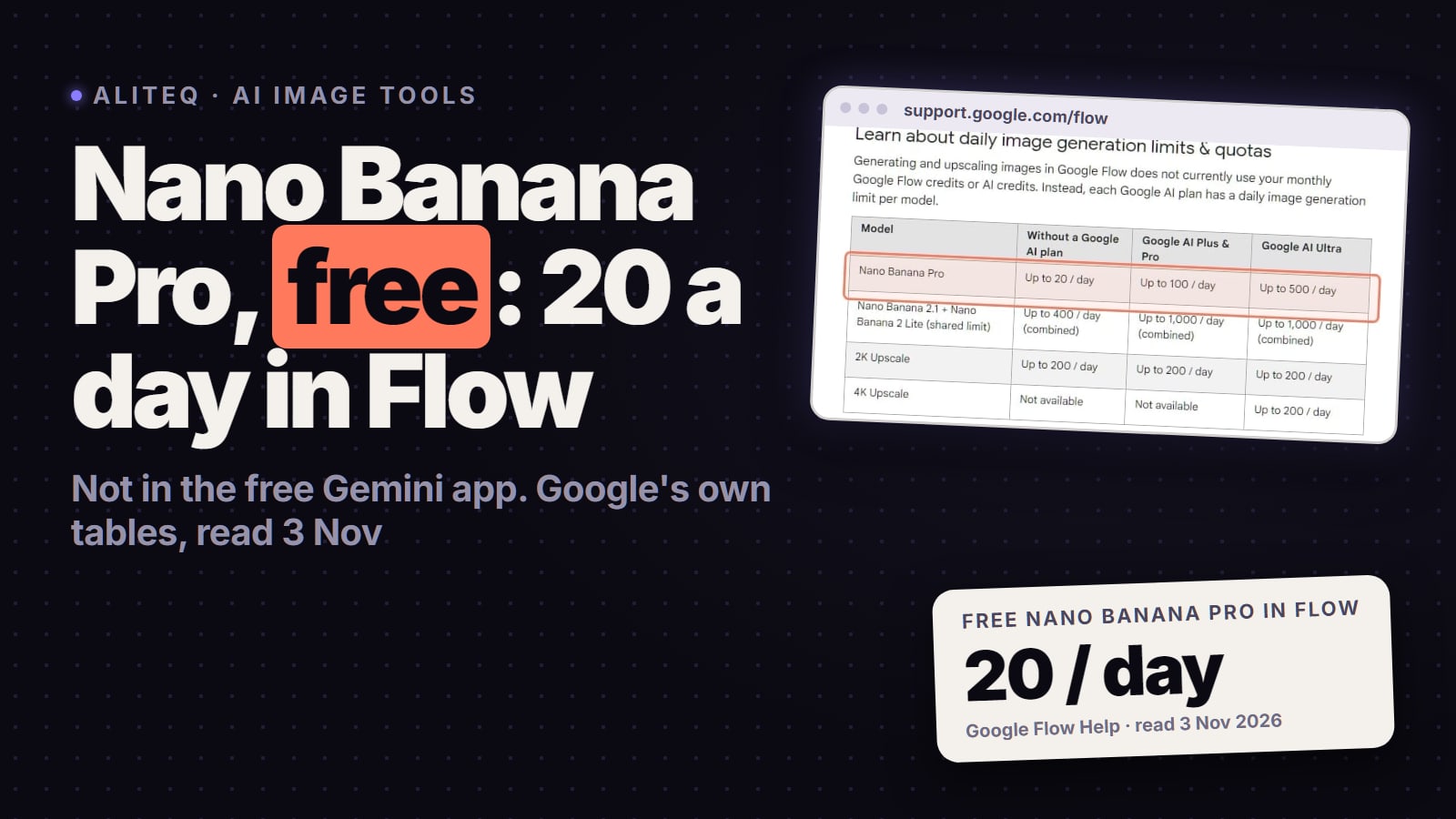
Anyone eligible for Flow, up to 20 Pro images a day without a plan, 100 on Plus or Pro, 500 on Ultra
The usual limit
A daily cap per model that resets 24 hours after your first image; failed or blocked images don't count
Age and account rules
18+ with a verified age, in a supported country
Gemini API and AI Studio
Who gets Pro
Paid tier only: gemini-3-pro-image has no free tier
The usual limit
Rate limits per project; daily quotas reset at midnight Pacific
Age and account rules
AI Studio needs 18+ and a supported region
Higgsfield
Who gets Pro
Paid plans, on Higgsfield's credits; 2 credits an image at 1K or 2K
The usual limit
Parallel-generation limits by plan; no daily image cap on the cards we read
Age and account rules
18+ under Higgsfield's terms; Google's filter still runs
Who gets Pro
The usual limit
Age and account rules
Gemini app
Paid Google AI plans, as a redo of an image; free accounts get Nano Banana 2
Usage limits that refresh every 5 hours up to a weekly limit; no Pro redos after the day's Nano Banana 2 quota
18+ to edit images, 13+ (or your country's age) to generate; work accounts 18+
Google Flow
Anyone eligible for Flow, up to 20 Pro images a day without a plan, 100 on Plus or Pro, 500 on Ultra
A daily cap per model that resets 24 hours after your first image; failed or blocked images don't count
18+ with a verified age, in a supported country
Gemini API and AI Studio
Paid tier only: gemini-3-pro-image has no free tier
Rate limits per project; daily quotas reset at midnight Pacific
AI Studio needs 18+ and a supported region
Higgsfield
Paid plans, on Higgsfield's credits; 2 credits an image at 1K or 2K
Parallel-generation limits by plan; no daily image cap on the cards we read
18+ under Higgsfield's terms; Google's filter still runs
Nano Banana Pro not working? Check in this order
Gemini, Flow, the API or Higgsfield?
Each one sets its own limits
Is it really Pro?
Check the model name; in Gemini, Pro is a redo
Hit a cap?
Gemini's quota, Flow's daily limit or a 429
Refused?
Rephrase, and use images you have rights to
Is your account allowed?
Age, work or school account, country
API error?
Model name, billing, rate limits
Failing for everyone?
AI Studio's status page, Higgsfield's changelog
Gemini, Flow, the API or Higgsfield?
Each one sets its own limits
Is it really Pro?
Check the model name; in Gemini, Pro is a redo
Hit a cap?
Gemini's quota, Flow's daily limit or a 429
Refused?
Rephrase, and use images you have rights to
Is your account allowed?
Age, work or school account, country
API error?
Model name, billing, rate limits
Failing for everyone?
AI Studio's status page, Higgsfield's changelog
Our order of checks, built from Google's Gemini, Flow and AI Studio help pages and Higgsfield's help center, all read November 7, 2026.
Find your Nano Banana Pro symptom (Google's and Higgsfield's own pages, read Nov 7, 2026)
No Pro option in the Gemini app
Likely cause
Pro is a redo for paid plans, with the Gemini model set to Pro
What to do
Create the image, then More and Redo with Pro; with no plan, use Flow's daily Pro allowance
The image came from Nano Banana 2 or 2 Lite
Likely cause
That's Gemini's default (2 Lite on Flash-Lite); in Flow, the Agent picks the model
What to do
In Gemini, switch to Pro and redo; in Flow, turn the Agent off and pick Nano Banana Pro
Redo with Pro stopped working today
Likely cause
The day's Nano Banana 2 quota is used up
What to do
Wait for the daily quota to reset; Google gives no reset time for personal accounts
Flow says you've hit a limit, or that you're too fast
Likely cause
The per-model daily cap, or a short-term rate limit
What to do
Wait for the 24-hour reset and slow down; failed and blocked images don't count
Refused, or the image was removed
Likely cause
A possible policy breach, such as someone else's rights, privacy or likeness, minors or explicit content
What to do
Rephrase and use images you have rights to; don't try to get around the filter
Can't edit a photo you uploaded
Likely cause
Your age: editing images in Gemini is 18+, or your school account's rules
What to do
No workaround under 18; school accounts depend on the admin
Work account with no Pro, or 3 a day
Likely cause
Your Workspace edition
What to do
Ask your admin about a higher edition or an AI add-on
API: model not found
Likely cause
gemini-3-pro-image-preview was shut down on June 25, 2026
What to do
Call gemini-3-pro-image
API: 400 billing, 402 or 403
Likely cause
No free tier for Pro, a used-up Prepay balance, or a project that needs verification or billing
What to do
Set up billing and add credits; don't retry until it's fixed
API: 429
Likely cause
A per-minute limit, the daily quota or a spend-based limit
What to do
Back off and retry, wait for the midnight-Pacific reset, or ask for more
Higgsfield: stuck or failed
Likely cause
The queue, or an issue at the model provider
What to do
Cancel a Queued job; failed jobs refund automatically
Likely cause
What to do
No Pro option in the Gemini app
Pro is a redo for paid plans, with the Gemini model set to Pro
Create the image, then More and Redo with Pro; with no plan, use Flow's daily Pro allowance
The image came from Nano Banana 2 or 2 Lite
That's Gemini's default (2 Lite on Flash-Lite); in Flow, the Agent picks the model
In Gemini, switch to Pro and redo; in Flow, turn the Agent off and pick Nano Banana Pro
Redo with Pro stopped working today
The day's Nano Banana 2 quota is used up
Wait for the daily quota to reset; Google gives no reset time for personal accounts
Flow says you've hit a limit, or that you're too fast
The per-model daily cap, or a short-term rate limit
Wait for the 24-hour reset and slow down; failed and blocked images don't count
Refused, or the image was removed
A possible policy breach, such as someone else's rights, privacy or likeness, minors or explicit content
Rephrase and use images you have rights to; don't try to get around the filter
Can't edit a photo you uploaded
Your age: editing images in Gemini is 18+, or your school account's rules
No workaround under 18; school accounts depend on the admin
Work account with no Pro, or 3 a day
Your Workspace edition
Ask your admin about a higher edition or an AI add-on
API: model not found
gemini-3-pro-image-preview was shut down on June 25, 2026
Call gemini-3-pro-image
API: 400 billing, 402 or 403
No free tier for Pro, a used-up Prepay balance, or a project that needs verification or billing
Set up billing and add credits; don't retry until it's fixed
API: 429
A per-minute limit, the daily quota or a spend-based limit
Back off and retry, wait for the midnight-Pacific reset, or ask for more
Higgsfield: stuck or failed
The queue, or an issue at the model provider
Cancel a Queued job; failed jobs refund automatically
Why can't you find Nano Banana Pro, or why did you get Nano Banana 2?
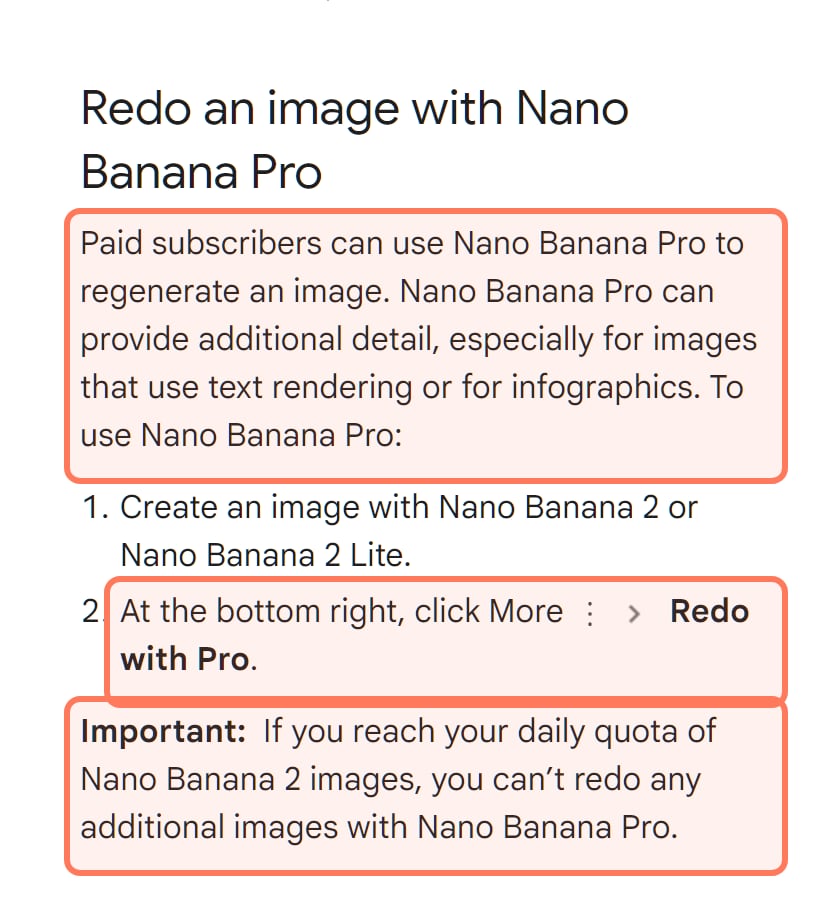
Because in the Gemini app, Pro isn't the model that draws your image. Google's image help article starts images on Nano Banana 2 and offers Pro to paid subscribers as a way to regenerate one, for extra detail, especially on text and infographics. The steps, per that article:
Be on a Google AI plan (Plus, Pro or Ultra). On Google's limits and features page, the Nano Banana Pro redo row is ticked only for those three plans.
Set the Gemini model to Pro before you ask for the image; Google's article ties the Pro redo to the Pro model.
Create the image. It comes from Nano Banana 2, or from Nano Banana 2 Lite when the model is set to Flash-Lite.
At the bottom right of the image, open More and choose Redo with Pro.
Google's Gemini Apps Help, Generate & edit images (support.google.com/gemini, read November 7, 2026): Pro is a redo for paid subscribers, and it stops when the day's Nano Banana 2 quota is used up. Outlines ours. · Screenshot of support.google.com by aliteq
Two more things make Pro look broken in the app. Google's pages name the starting model differently: the help article says Nano Banana 2, while Google's US overview of Gemini image generation says a Google AI plan unlocks Nano Banana 2.1. Either way, Pro isn't the model that draws your first image, so check the model name under the image. And the model can change under you: Google's limits page says a subscriber who reaches the usage limit can keep going on Flash-Lite, and its image article says Flash-Lite requests use Nano Banana 2 Lite. By our reading, that means no Pro redo until the limit refreshes and you switch back to Pro.
In Google Flow
Flow's own pages disagree on where you start. Its image help says the prompt box defaults to Nano Banana Pro, while its models page says Nano Banana 2 Lite "is the default model available at no charge" and calls Pro the default for Ultra subscribers. Flow's Agent mode is a third way to miss Pro: with the Agent on, Flow sends your request to whichever image model it judges best. To be sure, turn the Agent off, click the model name in the prompt box, choose Image and pick Nano Banana Pro.
Gemini's limits are measured in compute, not in a fixed number of images. Google's limits page says "Your limit refreshes every 5 hours until you reach your weekly limit." Image, video and music requests use more of that allowance than chat. Gemini warns you when you're close and, once you hit the limit, tells you when it refreshes; Settings, then Usage Limits, shows where you stand. Google publishes no image count for personal plans.
Your options, per Google: wait for the refresh, or move to a plan with more headroom. Plus gets 2x the standard limits, Pro 4x, and Ultra 5x or 20x Pro's, depending on the subscription. On any plan, the catch in the screenshot above still applies: once the day's Nano Banana 2 quota is gone, Pro redos stop too, and Google gives no reset time for that daily image quota on personal accounts. Google also warns that when demand spikes, accounts without a plan may be limited first.
In Google Flow
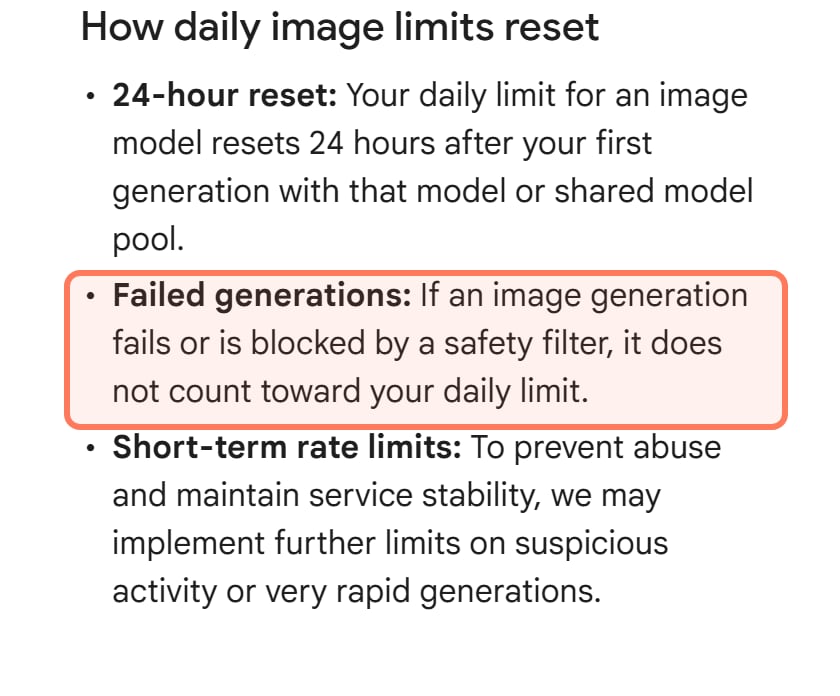
Flow counts images per model per day, without spending its credits. Nano Banana Pro gets up to 20 a day without a Google AI plan, 100 on Plus or Pro and 500 on Ultra. The count resets 24 hours after your first image with that model, and if an image fails or a safety filter blocks it, Google says "it does not count toward your daily limit".
Google Flow Help, Create & edit images (support.google.com/flow, read November 7, 2026): the cap resets 24 hours after your first image, and failed or blocked images don't count. Outline ours. · Screenshot of support.google.com by aliteq
Two other Flow messages point to rate limits, not the daily cap. "You're requesting generations too quickly" means Flow is limiting how many generations you can start, especially on models that cost no credits, and Google's Flow FAQ says that per-minute allowance shrinks after a large number of generations in a day. If a generation fails with a message about unusual activity, Google's fix is to retry after a couple of minutes with any VPN or proxy turned off. A card stuck on Pending may need a manual retry or deletion; check the notifications in the top-right corner first.
On a work or school account
Google publishes separate image limits for Workspace accounts, and on several editions they're tight: three Pro redos a day. Its work and school accounts page notes that "Image generation & editing is in high demand" and that these limits change often and reset daily.
Gemini app image limits on work and school accounts (Gemini Apps Help, read Nov 7, 2026)
Gemini as an additional service (Business Base, Essentials Starter, Workspace Individual and others)
Nano Banana 2 images a day
Up to 20
Pro redos a day
3
Gemini as a core service on Business Starter, Essentials, Frontline or Nonprofits
Nano Banana 2 images a day
Up to 20
Pro redos a day
3
Business Standard or Plus, Enterprise Standard or Plus
Nano Banana 2 images a day
Up to 100
Pro redos a day
Up to 100
With AI Expanded Access
Nano Banana 2 images a day
Up to 100
Pro redos a day
Up to 200
With AI Ultra Access
Nano Banana 2 images a day
Up to 100
Pro redos a day
Up to 1,000
Education Fundamentals, Standard or Plus
Nano Banana 2 images a day
Up to 20
Pro redos a day
3
Google AI Pro for Education
Nano Banana 2 images a day
Up to 100
Pro redos a day
Up to 100
Nano Banana 2 images a day
Pro redos a day
Gemini as an additional service (Business Base, Essentials Starter, Workspace Individual and others)
Up to 20
3
Gemini as a core service on Business Starter, Essentials, Frontline or Nonprofits
Up to 20
3
Business Standard or Plus, Enterprise Standard or Plus
Up to 100
Up to 100
With AI Expanded Access
Up to 100
Up to 200
With AI Ultra Access
Up to 100
Up to 1,000
Education Fundamentals, Standard or Plus
Up to 20
3
Google AI Pro for Education
Up to 100
Up to 100
Work accounts must belong to someone 18 or older, editions that add Gemini as an additional service need the admin to switch it on, and on school accounts some features are for users 18 and over only. If you see no Pro, Expanded or Ultra badge at the top of Gemini, you're on standard access, and only your Workspace admin can change the license.
Why does Nano Banana Pro refuse your prompt or photo?
Google doesn't publish the wording of Gemini's refusals or a list of the people, brands or words that trigger them. What it does publish:
The Gemini app: Google's image help says Gemini may remove images when its systems detect a possible breach of Google's Terms of Service or its Prohibited Use Policy, and asks you not to violate other people's copyright or privacy rights.
The Prohibited Use Policy: Google's policy for its generative AI bars content that violates privacy or intellectual property rights (including using someone's biometrics without the consent the law requires), impersonating a real person, living or dead, without disclosure in order to deceive, sexually explicit content, and anything exploiting children.
Flow: its FAQ says Flow has safeguards for minors and for photos of people you upload, and that some prompts won't generate. Its country page adds that features involving identifiable minors and prominent people vary by region.
The API: a blocked image comes back with a code such as image_safety, image_prohibited_content or image_recitation (copyright), and Google's advice is to change the input and retry. In Google AI Studio, a blocked answer shows as No Content; hover over it and click Safety to see why.
Our advice, from those rules: describe what you want instead of naming a real person, brand or character; use photos you took or have permission to use; keep children out of edits; and if a harmless prompt keeps failing, send Google feedback (Flow has a feedback form, Gemini has thumbs up and down) instead of rewording it to slip past the filter. The policy lists "Circumvention of abuse protections or safety filters" among the things it prohibits. If the image is for a client or a paid ad, who carries the legal risk in AI client work on Higgsfield is worth reading before you put a real person or brand in it.
Is your account allowed to use it?
If nothing generates at all, check the account before the prompt:
Gemini app, personal account: 13+ (or your country's age) to generate images and 18+ to edit them; a Google AI plan in the EEA, Switzerland or the UK needs you to be 18 or older.
Google Flow: you must be 18 or older with a verified age, in one of Flow's supported countries. Google says a VPN won't get you in, and Flow isn't offered everywhere Google AI Pro is sold, so check Flow's country list before you pay for a plan to use it.
Google AI Studio and the API: "You must be 18 or older to use Google AI Studio." A 403 Access Restricted error in AI Studio means a Terms of Service problem, and Google's AI Studio troubleshooting page names being outside a supported region as a common one.
Work or school account: the edition table above applies, and your admin decides.
Nano Banana Pro errors in Google AI Studio and the Gemini API
Most API failures with Nano Banana Pro come down to four things: billing, the model name, rate limits and request parameters.
No free tier, so billing comes first
Google's Gemini API pricing lists Gemini 3 Pro Image with "Not available" in its Free Tier column, for input and output alike. To call it, you need the paid tier: per Google's billing page, that means linking a billing account and prepaying at least $5 of credits, and on a Prepay plan the API serves requests only while your balance stays above zero. A Google Cloud Welcome or free-trial credit "can't be used towards the Gemini API or AI Studio". Paid output costs $0.134 per 1K or 2K image and $0.24 per 4K image.
Billing problems show up as three errors: failed_precondition (400) can mean billing is off, payment_required (402) means the Prepay balance is used up, and permission_denied (403) can mean the project needs verification, billing or a payment. Google's troubleshooting page is blunt about those: "Do not retry on client errors (like 400, 402, or 403)". Fix the cause first.
Model not found? The preview name is gone
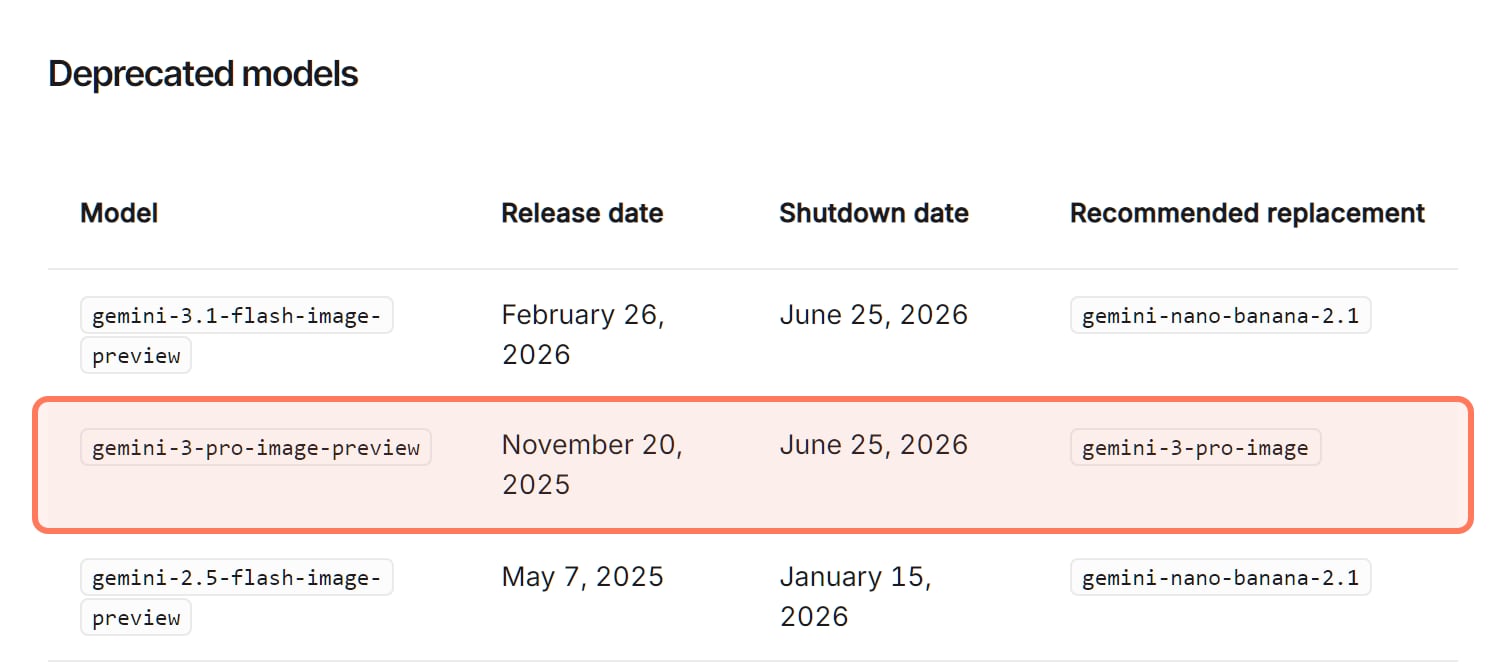
Nano Banana Pro launched in the API as gemini-3-pro-image-preview, and code written before mid-2026 may still call that name. Google's deprecations page lists the preview, released Nov 20, 2025, as shut down on June 25, 2026, with the stable gemini-3-pro-image as its replacement (released May 28, 2026, per the same page). A retired name returns model_not_found (404), and Google's error reference gives the fix: "Verify the model name or fall back to a different model."
Google's Gemini API deprecations page, Nano Banana models (aistudio.google.com/docs, read November 7, 2026): the preview name of Nano Banana Pro was shut down on June 25, 2026. Outline ours. · Screenshot of aistudio.google.com by aliteq
429: which limit did you hit?
A 429 always means a limit, and Google's error reference splits it three ways: rate_limit_exceeded (too many requests or tokens per minute or per second), quota_exceeded (your daily quota) and too_many_requests (too many requests in a short time). Google's troubleshooting and rate-limit pages call the same status RESOURCE_EXHAUSTED. Three details explain most surprises:
Limits apply per project, not per API key, so a second key in the same project shares the same limits.
"Requests per day (RPD) quotas reset at midnight Pacific time."
Image models also have an images-per-minute limit, and paid projects can have a spend-based limit over a rolling 10 minutes ($10 on Tier 1, depending on billing history) that also returns a 429.
For the per-minute kind, Google's fix is exponential backoff with a little random jitter; its Python SDK already retries up to four times by default. For the daily quota, wait for the reset or request a higher limit; your current limits are on AI Studio's rate-limit page.
Parameters that fail on Pro
Size needs a capital K: 1K, 2K or 4K. Google's image docs warn, "Lowercase parameters (e.g., 1k) will be rejected."
Inputs: Pro takes text and images. Video input works only on Nano Banana 2.1, Gemini 3.1 Flash Image and Gemini 3.1 Flash Lite Image, and no Nano Banana model takes audio.
References: up to 14 images, of which Pro handles 5 with high fidelity.
Image count: the model won't always return the exact number of images you ask for.
No image at all:no_image means the model couldn't make one; a blocked image returns one of the image_ codes below.
Gemini API errors you're likely to see with Nano Banana Pro (Google's error reference, read Nov 7, 2026)
failed_precondition
HTTP status
400
What Google says it means
A prerequisite isn't met, for example billing is disabled
Google's fix
Check the project's billing status
payment_required
HTTP status
402
What Google says it means
The Prepay credit balance is used up
Google's fix
Add credits or turn on auto-reload; don't retry until you do
permission_denied
HTTP status
403
What Google says it means
No permission for the key, or a project that's restricted or needs verification or billing
Google's fix
Check key permissions, verification and billing
model_not_found
HTTP status
404
What Google says it means
The model name wasn't found
Google's fix
Check the name (gemini-3-pro-image) or use another model
rate_limit_exceeded
HTTP status
429
What Google says it means
Too many requests or tokens per minute or per second
Safety, prohibited content, copyright, or an unspecified reason blocked the image
Change the input and retry
no_image
Generation error
The model couldn't generate an image
Not listed; retry with a simpler prompt (our advice)
Is Nano Banana Pro down right now?
For the API and AI Studio, Google keeps a status page at aistudio.google.com/status. It showed all systems operational on November 7, 2026, and its history includes two Nano Banana Pro incidents and one outage that hit every API key:
Nano Banana Pro incidents on Google's AI Studio status page (read Nov 7, 2026)
Dec 3, 2025
A Nano Banana Pro outage, resolved the same day
Jun 19, 2026
Issues with Nano Banana 2 and Nano Banana Pro on the Gemini API and AI Studio at 2K or 4K, resolved the same day
Oct 30, 2026
A major AI Studio outage in which all requests using API keys failed, resolved the same day
For the Gemini app on a work or school account, Google's Workspace Status Dashboard has a Gemini row (no incidents on Nov 7). We found no public status page for the Gemini app on personal accounts or for Flow linked from their help centers, so if the app fails for everyone, waiting and retrying is the only fix (our advice).
On Higgsfield, status.higgsfield.ai has an Image Generation component, at 100% uptime over 90 days on November 7. Its changelog, though, logged a rise in failed Nano Banana Pro generations on August 13, 2026, inside that window: "The cause was a temporary provider-side issue." Credits for those failed generations were refunded automatically. For one model, the changelog is the better record (our reading).
Nano Banana Pro stuck, failed or flagged on Higgsfield?
Higgsfield is a separate creative platform that runs Google's Nano Banana Pro on its own credits: open Image, then Nano Banana Pro, per its help center. Signed out on November 7, 2026, its Generate button showed 2 credits for one image at 1K and again at 2K, and its pricing table lists Nano Banana Pro at "2 credit/image", or 4 at 4K. The 4K option carries a Premium tag in the quality menu; signed out, we couldn't select it. When a job there misbehaves, Higgsfield's rules apply, not Google's:
Stuck: a Queued job can be canceled from its tile in Assets, with the credits returned; a Processing or Generating job has to finish or fail. Credit generations run in the priority queue, while Unlimited and free ones share a pool that can be slower.
Failed: "You get the credits back automatically, usually within a few minutes." Check Manage Account, then Usage. If a refund is missing, Higgsfield asks for the generation ID, the model, any error message and your browser and OS. Higgsfield's queue statuses and refunds, explained has the details.
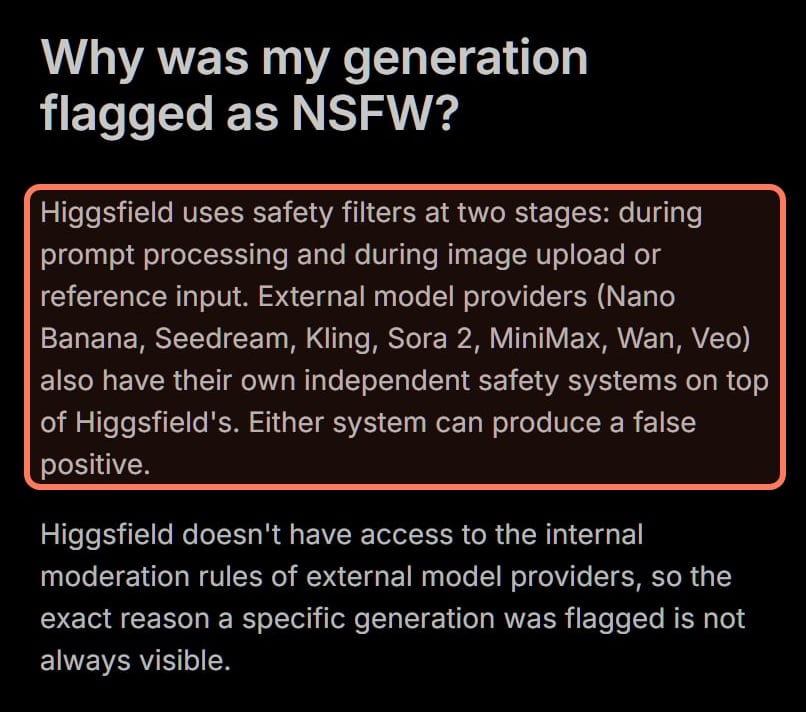
Flagged: Google's filter runs on Higgsfield too. Its help center says model providers, Nano Banana among them, "also have their own independent safety systems on top of Higgsfield's", that Higgsfield can't see those providers' rules, and that it can't reverse a classifier's decision; credits for NSFW-flagged jobs come back for most models. Why Higgsfield flags a generation as NSFW covers false positives and how to report one.
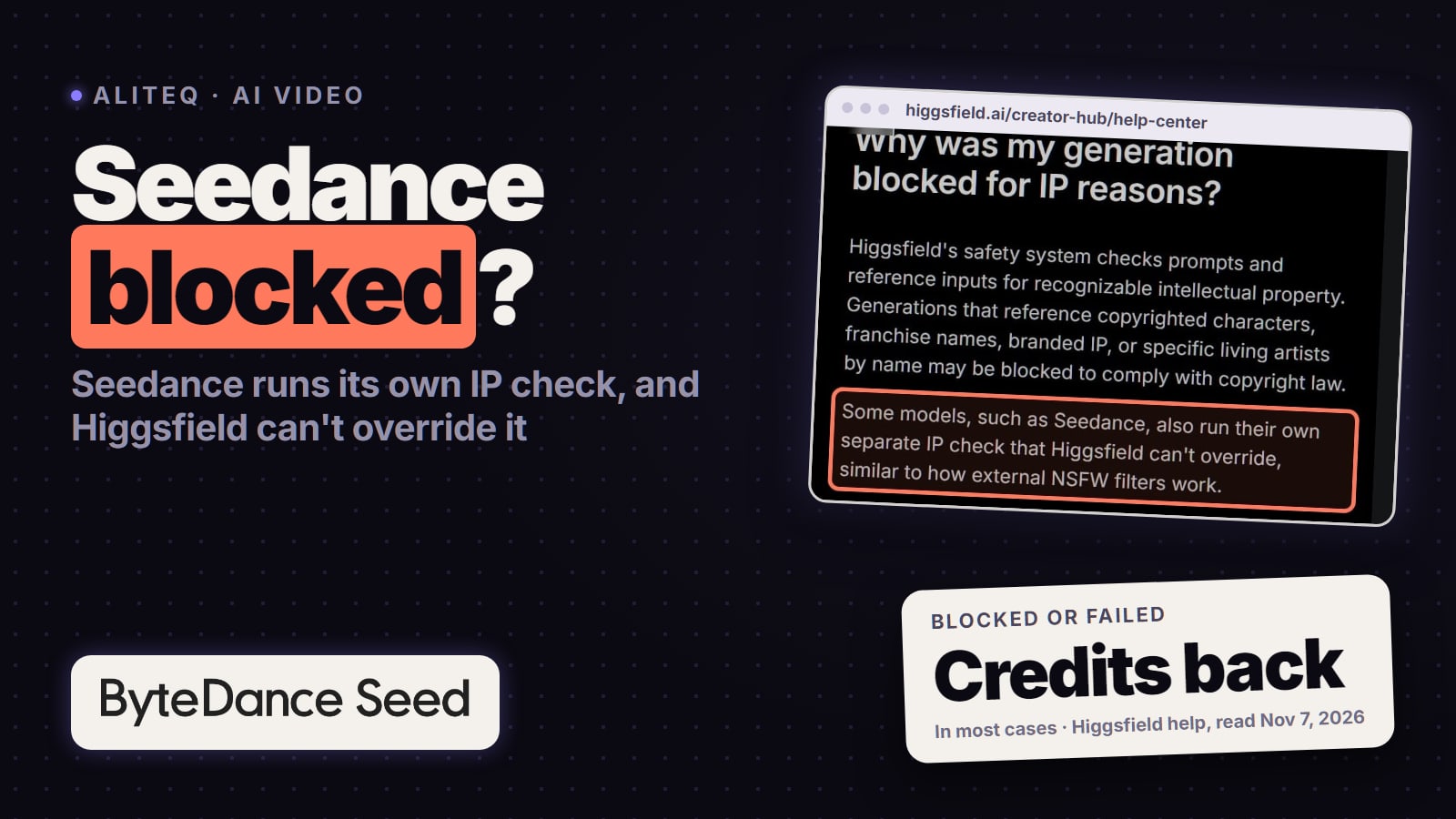
Blocked for copyright or IP: Higgsfield's own check catches named characters, teams, artists and brand logos, in the prompt or in a reference image. Describe instead of naming; Higgsfield applies these blocks platform-wide and won't lift them for one account. Every other message is decoded in Higgsfield error messages.
Higgsfield's help center, Why was my content flagged as NSFW? (read November 7, 2026): Nano Banana's own safety system runs on top of Higgsfield's, so Google's rules still apply there. Outline ours. · Screenshot of higgsfield.ai by aliteq
Higgsfield's own fixes for Nano Banana Pro output
For images that come back wrong rather than failing, Higgsfield's Nano Banana article (last modified Sep 9, 2026) suggests:
Text misspelled or blurry? "Put the exact text in quotes in your prompt", and describe the font, its size and where it goes.
Quantities or layout ignored? Say exactly how many and where. Higgsfield's own example asks for exactly three bottles on the left of the frame instead of a few bottles.
Blurry at 2K or 4K? Retry; if it keeps happening, generate at a lower resolution and upscale the result.
Reference rejected? Use a JPG, PNG or WebP file within the size limit, without heavy compression or a watermark. Pro takes up to 14 references.
Iterate at 1K, changing one thing at a time (prompt or reference), and render the final at 2K or 4K.
Another way to run it when Google's limits block you
Higgsfield offers Google's Nano Banana Pro on its own credits, next to other image and video models. That changes some of Google's limits and not others:
Blocked by Google? What changes on Higgsfield (both companies' pages, read Nov 7, 2026)
Daily cap
Google's rule
Flow: up to 20 Pro images a day without a plan. Gemini: no Pro redos after the day's quota
On Higgsfield
Paid per image in credits; the plan cards and help articles we read list parallel-generation limits, not a daily image cap
No Pro without paying
Google's rule
The Gemini app offers Pro redos only on paid plans
On Higgsfield
A paid plan too; free access doesn't include credits, per Higgsfield's plans article
API billing
Google's rule
No free tier; prepaid billing and an API key
On Higgsfield
Plan credits on higgsfield.ai, no Google API key needed
Refusals
Google's rule
Google's policies and filters
On Higgsfield
Unchanged: Google's filter still runs, plus Higgsfield's own; bypassing moderation is against its terms
Under 18
Google's rule
No image editing in Gemini; Flow and AI Studio are 18+
On Higgsfield
No: Higgsfield's terms require users to be 18 or older
A real person's photo
Google's rule
Google's rules on privacy, likeness and impersonation
On Higgsfield
Higgsfield's terms make you warrant the consents the law requires from everyone whose face you upload
Google's rule
On Higgsfield
Daily cap
Flow: up to 20 Pro images a day without a plan. Gemini: no Pro redos after the day's quota
Paid per image in credits; the plan cards and help articles we read list parallel-generation limits, not a daily image cap
No Pro without paying
The Gemini app offers Pro redos only on paid plans
A paid plan too; free access doesn't include credits, per Higgsfield's plans article
API billing
No free tier; prepaid billing and an API key
Plan credits on higgsfield.ai, no Google API key needed
Refusals
Google's policies and filters
Unchanged: Google's filter still runs, plus Higgsfield's own; bypassing moderation is against its terms
Under 18
No image editing in Gemini; Flow and AI Studio are 18+
No: Higgsfield's terms require users to be 18 or older
A real person's photo
Google's rules on privacy, likeness and impersonation
Higgsfield's terms make you warrant the consents the law requires from everyone whose face you upload
On Higgsfield's plan cards (signed out, Nov 7, 2026), Starter's 270 credits a month are listed as 135 Nano Banana Pro images, Plus's 1,200 as 600 and Ultra's 3,000 as 1,500. Plus and Ultra also list 7 days of Unlimited Nano Banana Pro at 2K, which Starter's card crosses out. Higgsfield's Unlimited help says that window runs in the standard queue, works only on higgsfield.ai and doesn't restart at renewal, so read how Higgsfield Unlimited works before you count on it. Higgsfield's plans article says free access covers a small set of models and doesn't include credits (the new accounts we made on Oct 31, 2026 did get a few; see what a free Higgsfield account gets), so steady Nano Banana Pro use there means a paid plan. What a credit works out to per Nano Banana Pro image, next to Google's API price, is in what Nano Banana Pro costs when you pay.
What we couldn't verify
How many Nano Banana 2 images a day personal Gemini plans allow. Google gives image counts only for work and school accounts.
Whether Redo with Pro appears with the Gemini model on Flash or auto. Google's article ties it to the Pro model, and we didn't sign in to check.
Which image model Flow starts you on. Its image help and its models page disagree.
Whether teens can generate images in the Gemini app. Google's help article says 13+ (or the local minimum age) can generate and 18+ can edit, while its Gemini image-generation overview page carries a plain 18+ note.
Whether Google AI Studio's playground runs Pro without a paid key. We didn't sign in; the API pricing table lists no free tier for the model.
Google's rules for real people and public figures in Nano Banana Pro images. Google publishes general policies, not a list, and doesn't publish the wording of Gemini's refusals.
Higgsfield's 4K price on the Generate button, and which plans unlock 4K. Signed out, the Premium-tagged option couldn't be selected; the pricing table says 4 credits.
Exactly which Google filter settings apply on Higgsfield. Higgsfield says the provider's system runs on top of its own and that it can't see those rules.
Outages nobody posted. We found no public status page for the Gemini app on personal accounts or for Flow.
Verdict
Check the app, the model and the limit first
When Nano Banana Pro isn't working, check the app, the model and the limit before anything else. In the Gemini app, Pro is a paid redo that stops once the day's Nano Banana 2 quota is gone; in Flow, Pro is capped per day and failed or blocked images don't count; in the API, Pro needs billing, the stable gemini-3-pro-image name and a backoff on 429s. Refusals follow Google's policies wherever you run the model, Higgsfield included, so rephrase rather than work around them. If Google's caps or billing are the only thing in your way, Higgsfield runs the same model on its own credits.
Best for: Anyone whose Nano Banana Pro image is missing, capped, refused or erroring in Gemini, Flow, AI Studio, the API or Higgsfield
Nano Banana Pro troubleshooting: quick answers
Why can't I find Nano Banana Pro in the Gemini app?
Because it isn't the model that draws your image. Google's Gemini help (read Nov 7, 2026) makes Nano Banana Pro a redo option for paid Google AI plans: set the Gemini model to Pro, create the image, then choose More and Redo with Pro at the bottom right. Without a plan there's no Pro redo; Google Flow is the free place to use Pro.
Why did Gemini make my image with Nano Banana 2 instead of Pro?
That's the default. Google's help says Gemini images start on Nano Banana 2, or Nano Banana 2 Lite when the model is set to Flash-Lite, and Pro is only a redo for paid plans. Google's US overview page names Nano Banana 2.1 as the model a paid plan unlocks, so check the model name under your image.
Why can't I redo with Pro anymore today?
Google's help says Pro redos stop once you reach your daily quota of Nano Banana 2 images, so wait for that daily quota to reset; Google gives no exact time for personal accounts. If Gemini says you've hit a usage limit instead, it tells you when that limit refreshes, and Settings, then Usage Limits, shows where you stand.
How many Nano Banana Pro images can I make in Flow, and do failed ones count?
Up to 20 a day without a Google AI plan, 100 on Plus or Pro and 500 on Ultra (Flow help, read Nov 7, 2026). The cap resets 24 hours after your first Pro image, and images that fail or are blocked by a safety filter don't count toward it.
Why does Nano Banana Pro refuse my photo or a real person?
Google doesn't publish a list of blocked people or words. Its policies bar content that violates privacy or intellectual property rights, impersonates someone to deceive, or exploits children, and Flow adds safeguards for minors and for photos of people you upload. In the Gemini app, editing images, uploads included, is for users 18 and over. Rephrase, use photos you have the rights to, and don't try to get around the filter.
What does model not found mean for gemini-3-pro-image-preview?
The preview name was shut down on June 25, 2026, per Google's Gemini API deprecations page. Change the model name in your code to gemini-3-pro-image, the stable version.
Why do I get a 429 error from the Gemini API?
You hit a limit. Google's error reference splits 429s into per-minute limits, the daily quota and too many requests in a short time. Daily quotas reset at midnight Pacific, limits apply per project rather than per key, and paid projects can also hit a spend-based limit. Retry with exponential backoff, or wait for the reset.
Is Nano Banana Pro free in the Gemini API?
No. Google's pricing lists no free tier for Gemini 3 Pro Image; the paid tier costs $0.134 per 1K or 2K image and $0.24 per 4K image, and needs billing with prepaid credits, at least $5 (read Nov 7, 2026). Google Cloud Welcome credits don't cover it.
Is Nano Banana Pro down right now?
Check Google's AI Studio status page for the API and AI Studio. It showed all systems operational on Nov 7, 2026 and lists earlier Nano Banana Pro incidents on Dec 3, 2025 and Jun 19, 2026. We found no public status page for the Gemini app on personal accounts or for Flow. On Higgsfield, check status.higgsfield.ai and its changelog.
Does Higgsfield get around Google's limits?
Some of them. Higgsfield runs Nano Banana Pro on its own credits, 2 credits an image at 1K or 2K when we checked signed out on Nov 7, 2026, and the plan cards we read list no daily image cap. It doesn't get around Google's content rules, since Nano Banana's own safety system runs on top of Higgsfield's, and it isn't for under-18s: its terms require users to be 18 or older.