Your Kling clip is stuck, it failed, or Kling says it's too busy. Find your symptom, see what Kling's own pages say about it, check that your credits came back, and spot when another Kling version or model is the real fix.
This post contains affiliate links. If you buy through them, Aliteq may earn a commission — at no extra cost to you. Prices change; check the seller’s own page for today’s price.
Share
Kling AI not working? First check where you're using it. On kling.ai, a clip stuck in the queue or a "too busy" message points to a busy queue that a free account can't skip, because Kling lists fast-track generation as a premium-only function. A clip that fails should cost you nothing: Kling's Credits Policy says "If the generation fails, the corresponding Credits will be refunded." If you run Kling inside Higgsfield, which hosts Kling next to other video models, the job sits in Higgsfield's queue, so Higgsfield's fixes apply. Kling publishes no status page. Everything below comes from Kling's and Higgsfield's own pages (read November 7, 2026, unless another date is given), two clip tests we ran on Higgsfield, and two user posts on Reddit.
Kling is Kuaishou's video model family. You can use it on Kling's own site, kling.ai, or on platforms that license it next to other models, such as Higgsfield. The queue, the credit balance and the support desk belong to whichever app ran the job, so that first question decides every fix after it.
Kling not working? Check in this order
Where did you press Generate?
kling.ai, or a platform that hosts Kling, such as Higgsfield
On Higgsfield? Use Higgsfield's fixes
Its queue, its refunds, its status page
Stuck or "too busy" on kling.ai?
Fast-track generation is premium-only
Failed? Check the credits came back
Kling's policy refunds failed generations
Refused? Check the prompt and the file
Content review, or Kling 4.0's upload limits
Wrong clip? Fix the prompt, or switch
Give each upload a role; then try Flash, 4.0 or Seedance
Still stuck? Contact Kling
support@kling.ai, Contact Us in the app, or Discord
Where did you press Generate?
kling.ai, or a platform that hosts Kling, such as Higgsfield
On Higgsfield? Use Higgsfield's fixes
Its queue, its refunds, its status page
Stuck or "too busy" on kling.ai?
Fast-track generation is premium-only
Failed? Check the credits came back
Kling's policy refunds failed generations
Refused? Check the prompt and the file
Content review, or Kling 4.0's upload limits
Wrong clip? Fix the prompt, or switch
Give each upload a role; then try Flash, 4.0 or Seedance
Still stuck? Contact Kling
support@kling.ai, Contact Us in the app, or Discord
Our order of checks, built from Kling's Credits Policy, Community Guidelines and Kling 4.0 guide and from Higgsfield's help center, all read November 7, 2026.
Find your symptom (Kling's and Higgsfield's own pages, read Nov 7, 2026)
Stuck in the queue, or "too busy"
What it usually is
A busy queue; fast-track is premium-only
On kling.ai
Wait, or get a paid membership; credits alone don't add fast-track
On Higgsfield
Credit jobs use the priority queue; Unlimited and free jobs share a slower pool
Failed
What it usually is
A job that ended without a clip
On kling.ai
Credits are refunded, per Kling's Credits Policy; check the left sidebar
On Higgsfield
Refunded automatically, usually within minutes; check Manage Account, then Usage
Prompt or image refused
What it usually is
Kling's content review, technical and human
On kling.ai
Reword in plain, concrete terms; Kling's guidelines allow an appeal
On Higgsfield
Kling's filter runs on top of Higgsfield's; blocked jobs are refunded
Upload won't attach
What it usually is
A file outside Kling 4.0's limits
On kling.ai
Images up to 30 MB, videos up to 300 MB, aspect ratio 2:5 to 5:2
On Higgsfield
Higgsfield's help center: heavy input files can fail or run slow; simplify and retry
1080p, extension or watermark removal won't unlock
What it usually is
Premium-only functions
On kling.ai
A paid membership unlocks them; credits don't
On Higgsfield
Kling 4.0 runs at 720p or 1080p; Kling's guide lists 4K on kling.ai
The clip ignores your brief
What it usually is
A prompt or reference problem, or the start frame wins
On kling.ai
Give each reference a role; describe light, materials and framing
On Higgsfield
Same models, same fix, or switch model on the same credits
Fails for everyone at once
What it usually is
Possibly an outage
On kling.ai
No public status page; ask in Kling's Discord or email support
On Higgsfield
Check status.higgsfield.ai and Higgsfield's changelog
What it usually is
On kling.ai
On Higgsfield
Stuck in the queue, or "too busy"
A busy queue; fast-track is premium-only
Wait, or get a paid membership; credits alone don't add fast-track
Credit jobs use the priority queue; Unlimited and free jobs share a slower pool
Failed
A job that ended without a clip
Credits are refunded, per Kling's Credits Policy; check the left sidebar
Refunded automatically, usually within minutes; check Manage Account, then Usage
Prompt or image refused
Kling's content review, technical and human
Reword in plain, concrete terms; Kling's guidelines allow an appeal
Kling's filter runs on top of Higgsfield's; blocked jobs are refunded
Upload won't attach
A file outside Kling 4.0's limits
Images up to 30 MB, videos up to 300 MB, aspect ratio 2:5 to 5:2
Higgsfield's help center: heavy input files can fail or run slow; simplify and retry
1080p, extension or watermark removal won't unlock
Premium-only functions
A paid membership unlocks them; credits don't
Kling 4.0 runs at 720p or 1080p; Kling's guide lists 4K on kling.ai
The clip ignores your brief
A prompt or reference problem, or the start frame wins
Give each reference a role; describe light, materials and framing
Same models, same fix, or switch model on the same credits
Fails for everyone at once
Possibly an outage
No public status page; ask in Kling's Discord or email support
Check status.higgsfield.ai and Higgsfield's changelog
Did Kling refund your credits for a failed generation?
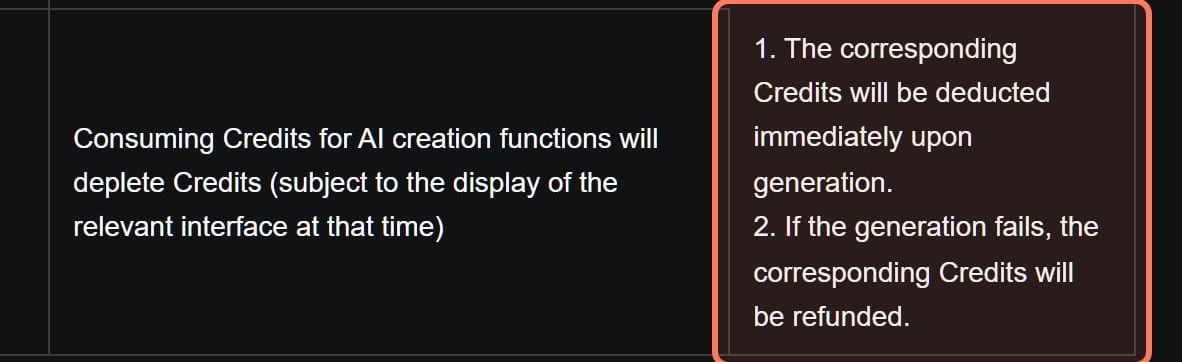
It should have, without you asking. Kling's Credits Policy, read November 7, 2026, has two rules for credits spent on generation: "The corresponding Credits will be deducted immediately upon generation." And: "If the generation fails, the corresponding Credits will be refunded." So the credits leave your balance when you press Generate, and a failed job puts them back.
To see it, the policy points to the "Sidebar on the left, then click on the number indicating remaining Credits", or, in the Kling AI app, the top-left menu, then Contact Us. Kling doesn't say how quickly a refund lands; if it hasn't appeared, email support@kling.ai with the date and time of the failed job (our advice).
Used Kling on Higgsfield? Then Higgsfield's rule applies, not Kling's: failed generations come back "automatically, usually within a few minutes", per its help center (Higgsfield's refund rules, explained).
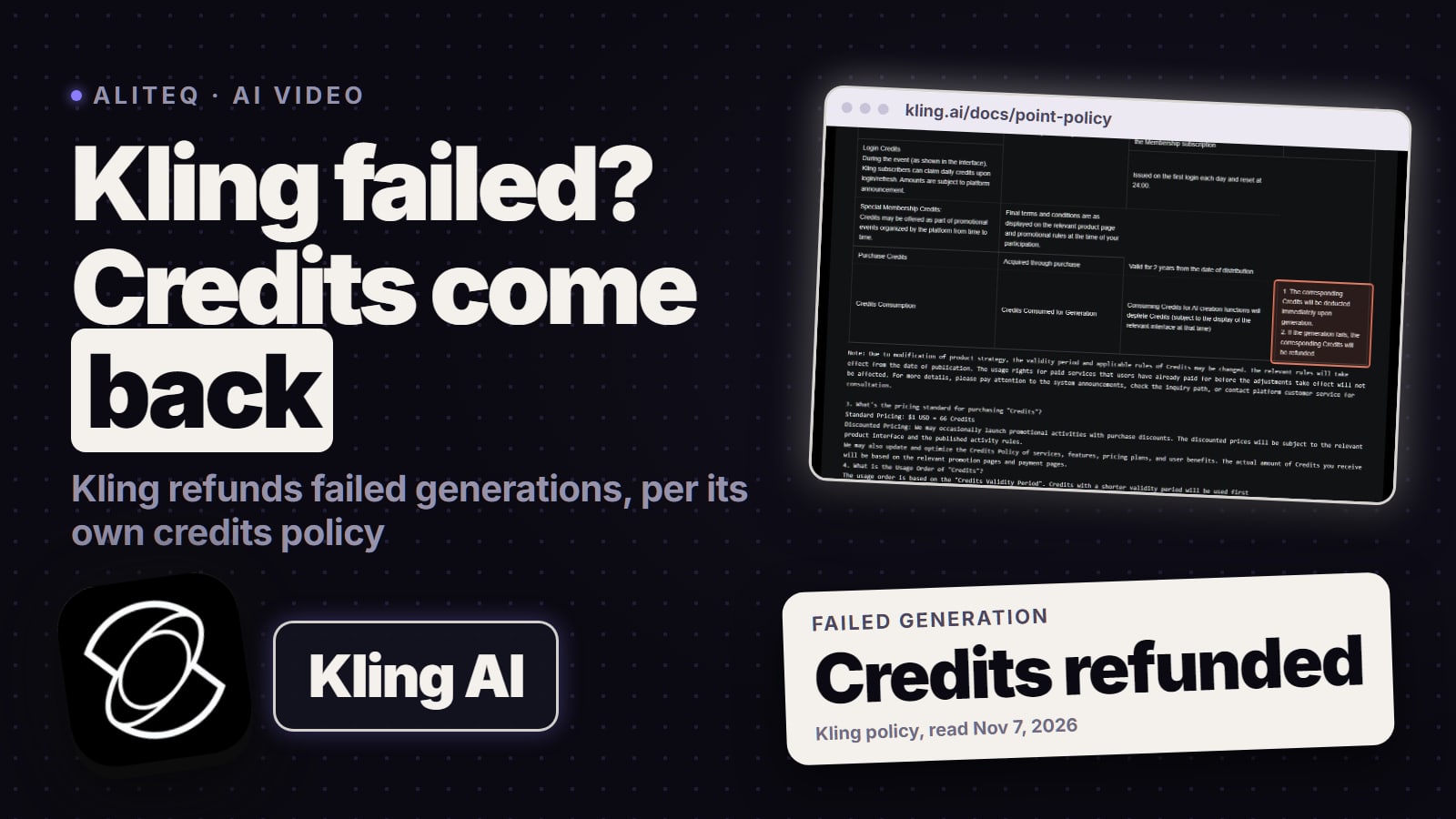
Kling's Credits Policy (kling.ai/docs/point-policy, read November 7, 2026): credits leave when you generate and come back if the generation fails. Outline ours. · Screenshot of kling.ai by aliteq
Why does Kling say "too busy", or sit in the queue?
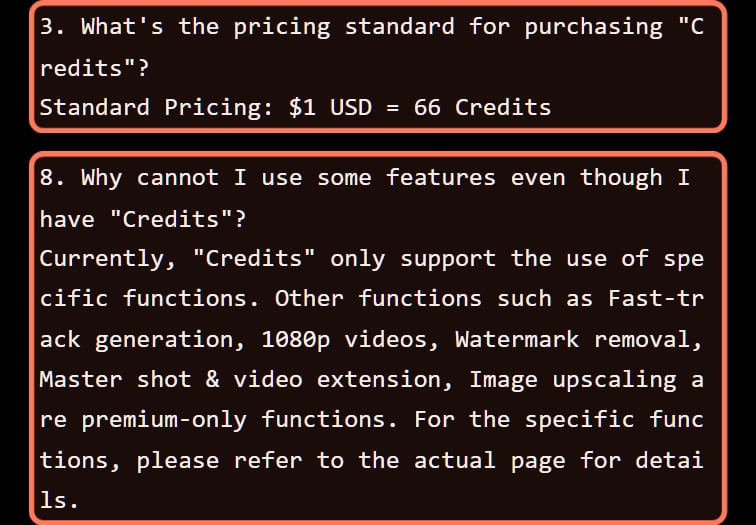
Usually because the queue is busy and your account can't skip it. Kling's Credits Policy answers its own question about why credits don't unlock some features by naming "Fast-track generation, 1080p videos, Watermark removal, Master shot & video extension, Image upscaling" as "premium-only functions". So credits bought on a free account pay for generations, not for priority. Users describe the result as "too busy": a student on r/AI_India said Kling "just keeps showing “too busy” and won’t let me generate the video" (r/AI_India). What the free plan's queue means, and what a paid plan changes, is in why Kling says "too busy" on a free account.
Kling's own answer to why credits don't unlock fast-track or 1080p (kling.ai/docs/point-policy). Screenshot from November 3, 2026; the wording was the same when we re-read the page on November 7. · Screenshot of kling.ai by aliteq
How long is too long? Kling publishes no wait times, for free or paid accounts. The one timing we have is from Higgsfield, not kling.ai: on November 7, 2026, on a paid Higgsfield Ultra plan paying credits (so Higgsfield's priority queue), a 5-second 720p Kling 4.0 clip came back in about three minutes, while a Seedance 2.5 clip we submitted first took about six (one run each; queues vary; what to do when Seedance stalls or fails). Free jobs can take longer on either site: Kling keeps fast-track for premium members, and Higgsfield runs free generations on its shared pool.
Why can't you use 1080p, video extension or watermark removal?
Because those are membership features, not credit features: they sit on the same premium-only list as fast-track. Three more things look broken but aren't, per the Kling 4.0 guide, dated November 4, 2026, and Higgsfield's model catalogue, read November 7:
Kling 4.0's longest features aren't out yet. The guide marks both video extension "up to 2 minutes" and 10-bit HDR output as coming soon.
Kling 4.0 Flash stops at 20 seconds and 720p. Kling says Flash "supports videos up to 20 seconds at a maximum resolution of 720p, but does not currently support start-and-last frames or multiple keyframes."
On Higgsfield, Kling 4.0 tops out at 1080p. Higgsfield offers it at 720p or 1080p; Kling's own site lists 720p, 1080p and 4K.
Kling refused your prompt or upload
A refused prompt or image
Kling's Community Guidelines, effective September 8, 2026, say Kling checks content "through a combination of technical review and human moderation", and that its measures include: "Prohibit the generation of content; reject, block, or cease displaying relevant works". In a Reddit thread about Kling 4.0, users said the filters had got stricter, and one wrote that Kling "increased their censorship to a point where I can't make anything I used to make" (r/KlingAI_Videos).
Store ads have a trap of their own. The same guidelines ask users to respect others' "rights of reputation, likeness, privacy, copyright, and trademarks", and they prohibit "Copying, adapting, or disseminating content owned by others without authorization" and "imitating official brand promotional materials". So a prompt or upload with a real person's face, a celebrity, another company's logo or character, or a copy of another brand's official ad is a likely trip (our reading of the guidelines; Kling doesn't say which checks its technical review runs).
For a false positive, our advice: describe what you want to see in plain, concrete words, and if you added a reference image, run the prompt once without it to learn which of the two trips the check. If the block still looks wrong, the guidelines say you "may submit an appeal in accordance with the appeal procedures published by the Platform". We couldn't find those procedures on kling.ai, so email support@kling.ai with the prompt and the time. Don't try to get around the filter: Kling's penalties run from "restrictions on content generation" to "account suspension or termination".
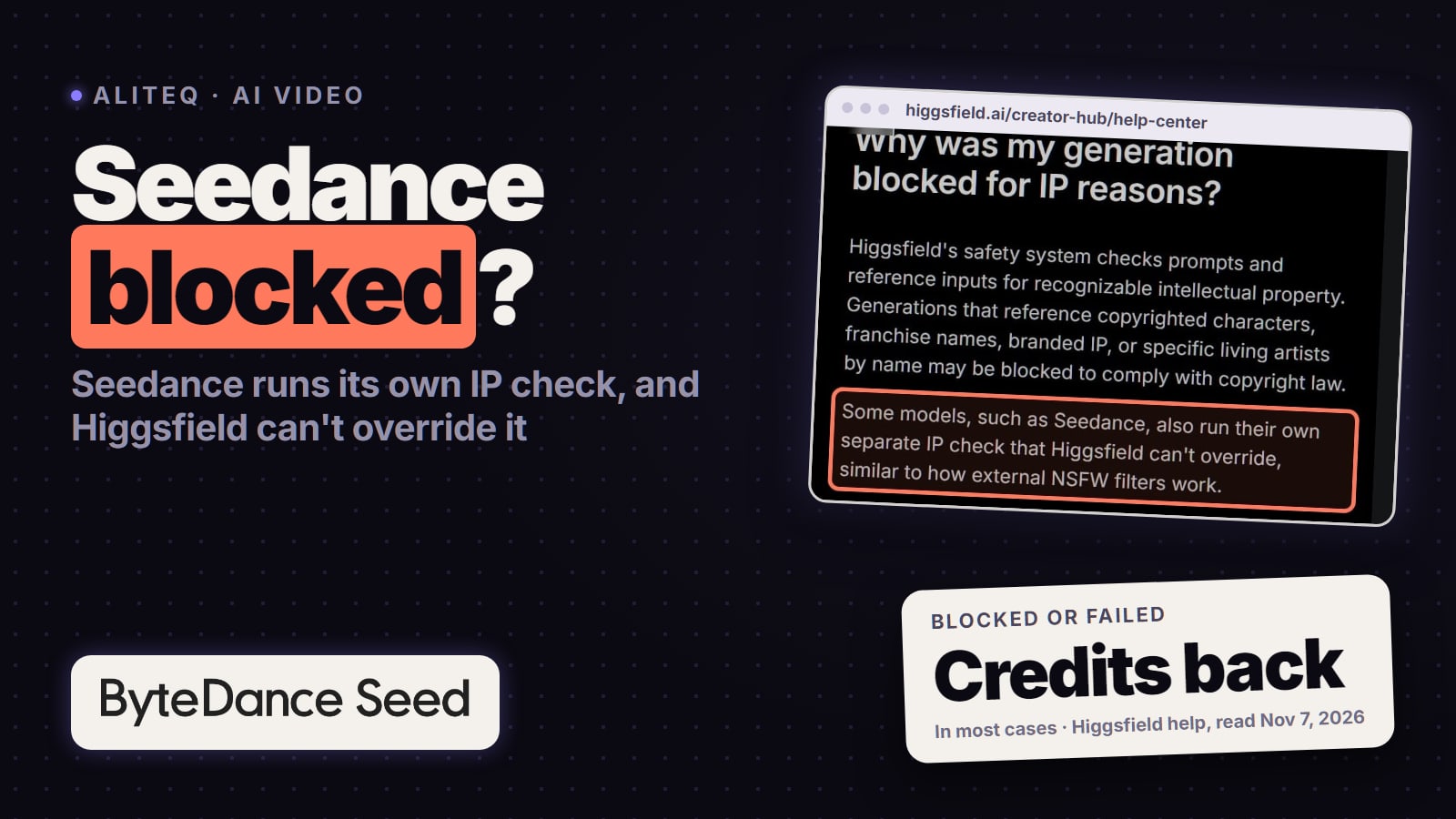
On Higgsfield, Kling's own filter runs on top of Higgsfield's, and a blocked job is refunded; Higgsfield's NSFW flag, explained covers false positives and how to report one.
An upload Kling won't take
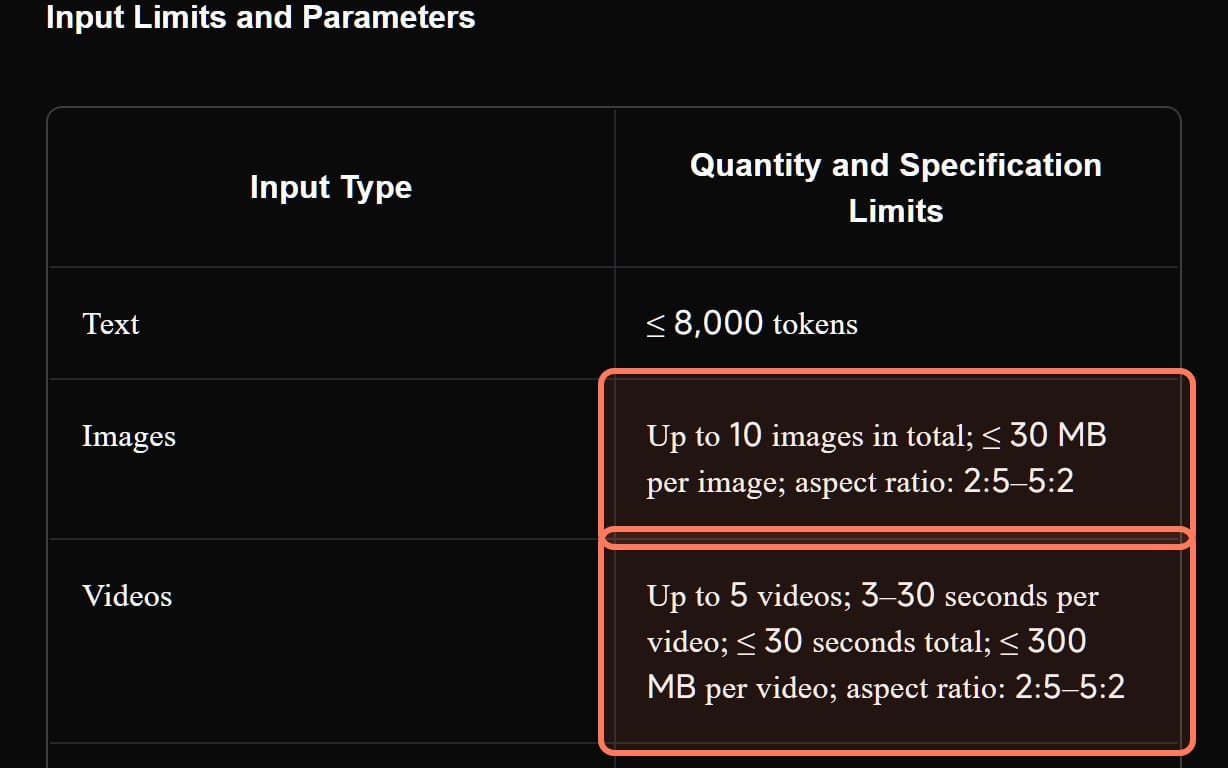
The Kling 4.0 guide sets limits for every input; check your file against them before anything else.
Kling 4.0 input limits (Kling 4.0 guide, dated Nov 4, 2026, read Nov 7)
Images
Omni Reference
Up to 10; 30 MB each; aspect ratio 2:5 to 5:2
Keyframes
Up to 10; 30 MB each; aspect ratio 2:5 to 5:2
Videos
Omni Reference
Up to 5; 3 to 30 s each, 30 s in total; 300 MB each; aspect ratio 2:5 to 5:2
Keyframes
Not accepted
Voice profiles
Omni Reference
Up to 3; 5 to 30 s of audio; 50 MB per file
Keyframes
Not accepted
Elements
Omni Reference
Up to 7, including up to 3 video elements made from 3 to 8 s of footage
Keyframes
Not accepted
All references together
Omni Reference
Up to 15
Keyframes
None: Keyframes takes no reference assets, only up to 10 keyframe images
Prompt
Omni Reference
Up to 8,000 tokens
Keyframes
Up to 8,000 tokens
Clip shape
Omni Reference
21:9, 16:9, 1:1, 9:16 or Auto
Keyframes
Follows the first keyframe once you upload images
Omni Reference
Keyframes
Images
Up to 10; 30 MB each; aspect ratio 2:5 to 5:2
Up to 10; 30 MB each; aspect ratio 2:5 to 5:2
Videos
Up to 5; 3 to 30 s each, 30 s in total; 300 MB each; aspect ratio 2:5 to 5:2
Not accepted
Voice profiles
Up to 3; 5 to 30 s of audio; 50 MB per file
Not accepted
Elements
Up to 7, including up to 3 video elements made from 3 to 8 s of footage
Not accepted
All references together
Up to 15
None: Keyframes takes no reference assets, only up to 10 keyframe images
Prompt
Up to 8,000 tokens
Up to 8,000 tokens
Clip shape
21:9, 16:9, 1:1, 9:16 or Auto
Follows the first keyframe once you upload images
Three refusals the guide's own FAQ explains:
A sixth video won't attach. Reference videos, videos for editing and video elements "share the same video quota": 5 clips and 30 seconds combined.
Music won't upload. "Audio input currently supports voice profile references only." Describe the music and sound effects in the prompt instead.
Keyframes and references won't mix. "The two entry points cannot be combined in a single generation task."
The guide doesn't list which file formats it accepts. On Higgsfield, Kling 4.0 takes up to seven Kling elements (its model catalogue, Nov 7, 2026), and its help center warns that "Very long or complex prompts and heavy input files can fail or take longer than usual: simplify and retry."
Kling 4.0's Omni Reference input limits, from Kling's own user guide (kling.ai, read November 7, 2026). Outlines ours. · Screenshot of kling.ai by aliteq
The clip came back, but not what you asked for
This kind of "not working" costs credits, because no refund covers it. Kling's own guide has fixes for it, and our two tests on Higgsfield show what the problems look like.
What the Kling 4.0 guide says:
Be concrete. "Use descriptive language and minimize abstract terms and negative instructions." It warns that "Negative prompts can increase the likelihood of errors", and its example swaps "Premium look" for side backlighting on the edges, a blurred background and fine matte grain.
Only two negatives are needed. They are "no subtitles and no background music", because "The model may add these by default".
Give every upload a job. "If you provide only asset IDs without specifying their roles, the model will infer their intended use, making the results less predictable." Its example is "@Image1: preserve the character's appearance".
Sound and cuts are on by default. Audio-visual sync and Smart Storyboard "are enabled by default and have no separate toggles". To get one continuous shot, say so: Kling's own one-shot example prompt spells out "No cuts".
The first keyframe sets the shape. In Keyframes mode, "After uploading images, the aspect ratio follows the first keyframe."
What our tests showed:
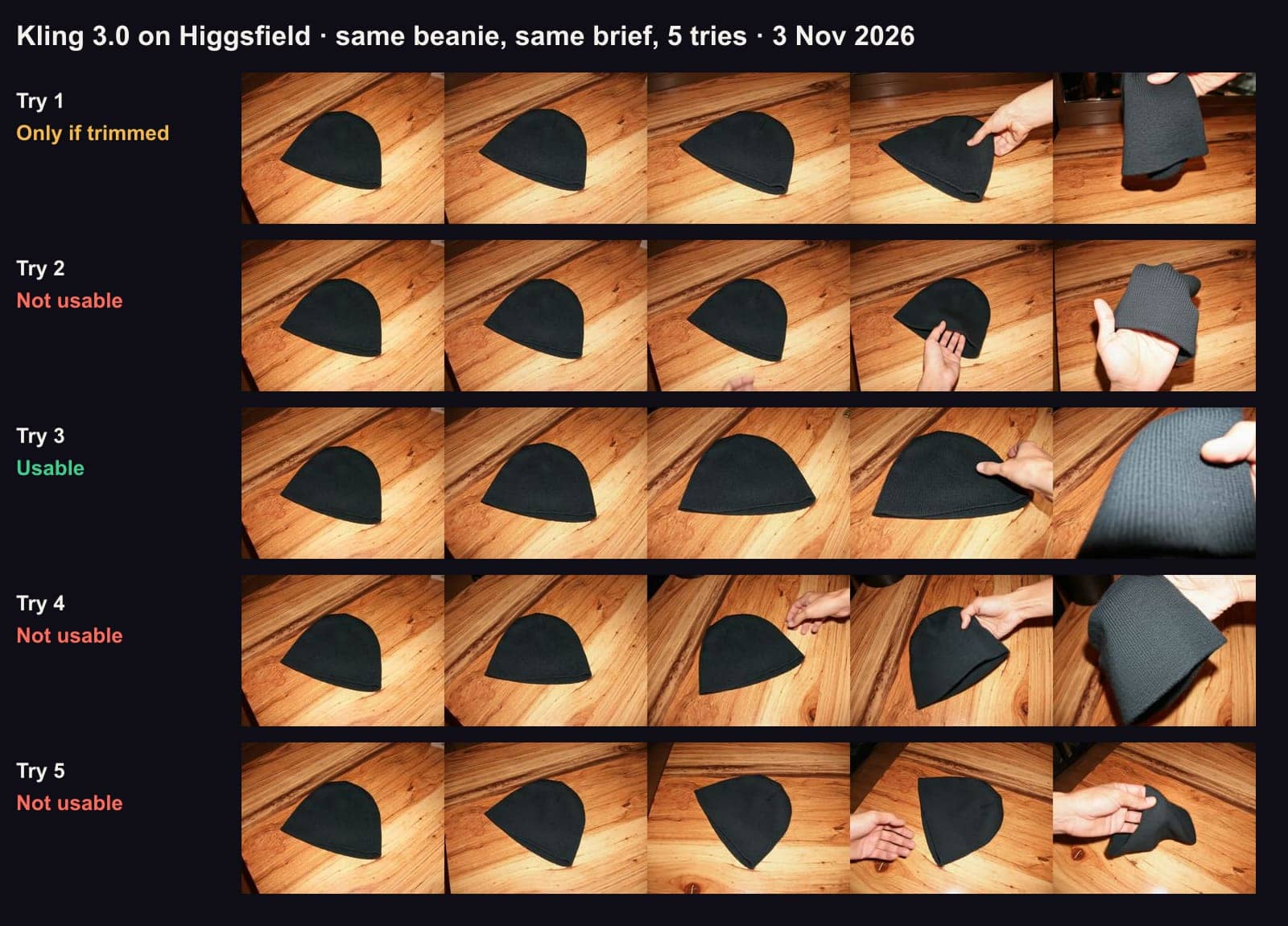
Nov 3, 2026, Kling 3.0, the product photo as the start frame: 1 of 5 tries usable. Every try kept the photo's wooden table and landscape shape, although the brief asked for a grey studio and a vertical frame, and three of the four failures went wrong in the last second, as a hand lifted the product.
Kling 3.0, five tries of the same brief, November 3, 2026, frames at 0, 1.25, 2.5, 3.75 and 5 seconds. Every try kept the photo's wooden table and landscape shape, and three of the four failures went wrong as the hand lifted the hat. · Aliteq test, made with Kling 3.0 on Higgsfield
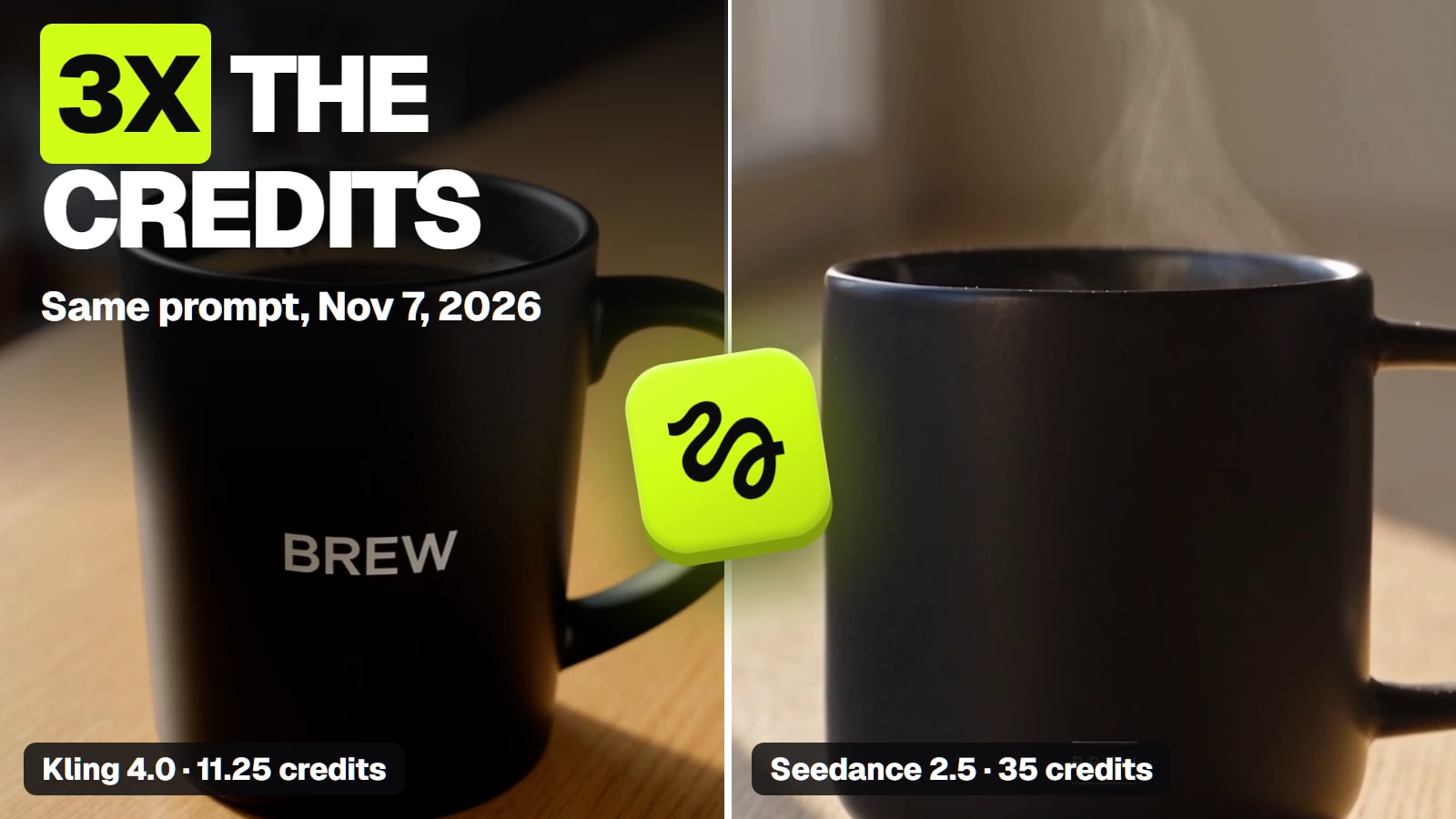
Nov 7, 2026, Kling 4.0, text-to-video: the café, the soft window light and the hand sliding the mug forward all came out as asked, but the BREW logo was large and clearly readable in every frame, bigger than the "small" logo the prompt asked for. Seedance 2.5, given the same prompt, kept the logo small but changed the room and the light.
What we'd add to Kling's own rules (our advice; the first three come from those tests):
Scrub to the last second before you accept a clip. In our Nov 3 test, three of Kling's four failed clips went wrong at the end.
Fix the start frame first. Kling kept our photo's background and shape, so put the product in the scene you want before you animate it.
Ask for less hand contact. In the same test, those late failures came as a hand lifted the hat, so a slow camera move with no hands is the safer shot.
Test the wording on Kling 4.0 Flash, which Kling built for "faster generation and greater cost efficiency", before you pay for a long Kling 4.0 render; check its cost on the Generate button first.
If Kling still misses the brief after a few rewrites, the model may be the problem. That's the switching section below.
Using Kling on Higgsfield? It's Higgsfield's queue
When you pick Kling inside Higgsfield, Higgsfield runs the job: its queue, its credit balance, its refunds and its support. On November 7, 2026 Higgsfield's help center said "Credit generations run in the priority queue and finish faster", while "Unlimited and free generations run on a shared pool, so they can take longer, depending on current load." Which Kling models count as Unlimited keeps changing. When we read Higgsfield's public plan cards on November 7, 2026 (signed out, monthly and yearly), Starter, Plus and Ultra listed no Kling video model as Unlimited, and only the annual Scale business plan listed Kling 3.0 as Unlimited; how Higgsfield Unlimited works tracks the list. So on an individual plan, a Kling job is normally paid with credits and runs in the priority queue. If your plan card or an offer on your account does include Kling Unlimited (Higgsfield's cards can differ by region and account), those Unlimited jobs wait in the shared pool, which can explain a slow Kling job.
Higgsfield's own Kling article adds two Kling-specific rules: "The highest-quality models run at high demand: use a Turbo variant for drafts and switch to the full model for finals", and "If a generation is stuck for more than 10 hours, contact us through the contact page." What each tile status means, which jobs you can cancel and where refunds show are in why Higgsfield is slow or stuck, every message is decoded in Higgsfield error messages, and Higgsfield's status page, status.higgsfield.ai, has a Video Generation component (checked Nov 7, 2026). Higgsfield's changelog also posts resolved incidents: its latest Kling entry, dated Nov 2, 2026, says generations on all Kling models, Kling 4.0 included, were failing, and that "Credits for failed generations were refunded automatically" (read Nov 7, 2026).
When switching Kling version or model is the fix
If the same problem keeps coming back, the version can be at fault, not your prompt. Every spec below is from the Kling 4.0 guide or Higgsfield's model catalogue, read November 7, 2026.
Which Kling to switch to (Kling 4.0 guide and Higgsfield's catalogue, read Nov 7, 2026)
Kling 4.0
Clip length
3 to 30 s
Resolution
720p or 1080p on Higgsfield; Kling's guide also lists 4K on kling.ai
Switch to it when
You need over 20 s, 1080p (4K on kling.ai), start-and-last frames or multiple keyframes, none of which Flash offers
Kling 4.0 Flash
Clip length
3 to 20 s
Resolution
720p only
Switch to it when
You want faster 720p drafts (it takes references too) and don't need start-and-last frames or multiple keyframes
Kling 3.0
Clip length
3 to 15 s
Resolution
Standard (720p), Pro or 4K mode on Higgsfield
Switch to it when
15 s is enough and you want a cheaper clip than Kling 4.0
Kling 3.0 Turbo
Clip length
3 to 15 s
Resolution
720p or 1080p
Switch to it when
You're drafting; Higgsfield suggests a Turbo variant for drafts
Clip length
Resolution
Switch to it when
Kling 4.0
3 to 30 s
720p or 1080p on Higgsfield; Kling's guide also lists 4K on kling.ai
You need over 20 s, 1080p (4K on kling.ai), start-and-last frames or multiple keyframes, none of which Flash offers
Kling 4.0 Flash
3 to 20 s
720p only
You want faster 720p drafts (it takes references too) and don't need start-and-last frames or multiple keyframes
Kling 3.0
3 to 15 s
Standard (720p), Pro or 4K mode on Higgsfield
15 s is enough and you want a cheaper clip than Kling 4.0
Kling 3.0 Turbo
3 to 15 s
720p or 1080p
You're drafting; Higgsfield suggests a Turbo variant for drafts
At 720p with sound, moving from Kling 3.0 to Kling 4.0 adds just over a credit per 5-second clip, while Seedance 2.5 costs about three times Kling 4.0's price (our arithmetic). Kling 3.0 with sound off is cheaper still at 7.5 credits; Kling 4.0 on Higgsfield has no sound-off setting. Higgsfield's prices for the same clip:
Credits per try: one 5-second 720p clip with sound, on Higgsfield (read Nov 3 and Nov 7, 2026)
Kling 3.0, sound on10 credits
Kling 4.011.25 credits
Sound is always on (no toggle)
Seedance 2.535 credits
Audio is on by default
Seedance 2.5 is the model to try when Kling keeps ignoring the brief, at about three times Kling 4.0's credits per 5-second clip (our arithmetic from the prices above). Our two tests split, though. From a product photo, Seedance 2.5 beat Kling 3.0, 3 usable tries of 5 against 1, partly because Kling took the photo as its start frame and Seedance took it as a reference. From one text prompt, Kling 4.0 got the café and the soft light right, while Seedance 2.5 kept the logo small, as asked, but barely readable. Our Kling vs Seedance comparison puts both tests side by side, frame by frame, and Seedance's credit prices by version cover the rest of the range.
Kling has three channels and no status page. All checked on November 7, 2026:
Email: support@kling.ai, listed under Contact Us in the footer of kling.ai and on its Quickstart pages.
In the app: the top-left menu has a Contact Us item, which Kling's Credits Policy names as a place to check your credit details.
Community:Kling's Discord server, linked from the social icons on its Kling 4.0 guide, next to its TikTok and Instagram accounts.
No status page: we found none on kling.ai, and the address status.kling.ai doesn't exist (it didn't resolve on November 7, 2026). If many people in Kling's Discord report the same failure at the same time, that's the closest thing to an outage signal (our advice).
Our advice on what to send, so support can find the job: the date and time with your time zone, the model and version (for example Kling 4.0 or 4.0 Flash), the entry point (Omni Reference or Keyframes), the length and resolution, the exact prompt, and screenshots of the message and of your credit balance.
Using Kling's API?
Kling's API error codes list every failure with Kling's own suggested fix. These are the ones that mean "not working":
Kling API codes that mean not working (Kling's API docs, read Nov 7, 2026)
1102
What Kling says it means
Resource pack exhausted or expired (prepaid scenario)
Kling's suggested fix
Purchase additional resource packages, or activate the post-payment service (if available)
1301
What Kling says it means
Trigger the platform's content security policy
Kling's suggested fix
Check the input content, modify it, and resend the request
1302
What Kling says it means
Too many requests; rate limit exceeded
Kling's suggested fix
Reduce the request frequency, try again later, or contact customer service to increase the limit
1303
What Kling says it means
Concurrency or QPS exceeds the prepaid resource package limit
Kling's suggested fix
Reduce the request frequency, try again later, or contact customer service to increase the limit
5001
What Kling says it means
Server temporarily unavailable, usually due to maintenance
Kling's suggested fix
Try again later, or contact customer service
5002
What Kling says it means
Server internal timeout, usually due to a backlog
Kling's suggested fix
Try again later, or contact customer service
What Kling says it means
Kling's suggested fix
1102
Resource pack exhausted or expired (prepaid scenario)
Purchase additional resource packages, or activate the post-payment service (if available)
1301
Trigger the platform's content security policy
Check the input content, modify it, and resend the request
1302
Too many requests; rate limit exceeded
Reduce the request frequency, try again later, or contact customer service to increase the limit
1303
Concurrency or QPS exceeds the prepaid resource package limit
Reduce the request frequency, try again later, or contact customer service to increase the limit
5001
Server temporarily unavailable, usually due to maintenance
Try again later, or contact customer service
5002
Server internal timeout, usually due to a backlog
Try again later, or contact customer service
Code 1303 reads like a request-rate limit, but Kling's concurrency rules say the limit counts tasks running at once and "is unrelated to Queries Per Second (QPS). The system does not impose any QPS limits." That page shows 1303 with the message "parallel task over resource pack limit", says a task holds a slot "from entering the Submitted status until completion (including failures)", and notes that status queries don't use a slot. So the fix is fewer tasks at once: wait for running tasks to finish, retry with "an exponential backoff algorithm" (Kling recommends an initial delay of at least 1 second), or ask customer service to raise the limit.
What we couldn't verify
Kling's on-screen error wording. We didn't reproduce failures on kling.ai, and Kling publishes no list of app error messages. "Too busy" is how users describe the message.
Wait times. Kling publishes none, for free or paid accounts. Our one timing is a single run on Higgsfield.
How fast a refund lands, and which credits come back. The policy says failed generations are refunded, not when, and it spends "Credits with a shorter validity period" first; it doesn't say whether a refund keeps the original expiry date.
Whether a refused prompt counts as a failed generation for Kling's refund rule. The policy doesn't say. On Higgsfield, blocked jobs are refunded, per its help center.
Kling's appeal procedure. The guidelines mention "appeal procedures published by the Platform"; we didn't find them on kling.ai.
File formats. The Kling 4.0 guide lists sizes, lengths and aspect ratios, not formats.
The "coming soon" Kling 4.0 features, video extension up to 2 minutes and 10-bit HDR. Your account may or may not have them yet.
Kling 4.0 Flash's price on Higgsfield. Kling calls Flash more cost-efficient, and Higgsfield's changelog puts its cost at "lower per generation than Kling 4.0", but neither gives a number, Higgsfield's public pricing table doesn't list it, and we didn't read its Generate button. Check the cost there first.
Verdict
Check the queue, your credits and the input first
When Kling "isn't working", check three things before anything else. A queue a free account can't skip, a failed job whose credits Kling says it refunds, or a prompt or upload that hits Kling's content review or its file limits. Check your credit balance after a failure, check the file against the Kling 4.0 guide's limits before you upload, and give every reference a role. If Kling keeps missing the brief after that, switching version (Flash for drafts, 4.0 for long clips) or switching model is the real fix. And if you use Kling on Higgsfield, Higgsfield's queue and help center are where to look.
Best for: Anyone whose Kling clip is stuck, failed or refused, on kling.ai or on Higgsfield
Quick answers
Is Kling AI down right now?
Kling publishes no status page, so there's no official way to confirm an outage, and status.kling.ai doesn't exist (checked Nov 7, 2026). On kling.ai, a slow job on a free account can simply be the queue, since fast-track is premium-only; if jobs never finish, ask in Kling's Discord or email support@kling.ai. If you use Kling on Higgsfield, check status.higgsfield.ai, which has a Video Generation component.
Why does Kling say "too busy"?
Usually the queue is full and your account can't skip it. Kling's Credits Policy lists fast-track generation as a premium-only function, so credits bought on a free account pay for generations but not for priority. A paid membership adds fast-track; otherwise, wait and retry. Running Kling on another platform, such as Higgsfield, only buys priority if you pay with credits there: its help center says Unlimited and free jobs share a slower pool.
Do I get my credits back when a Kling generation fails?
Yes, per Kling's Credits Policy (read Nov 7, 2026): credits are "deducted immediately upon generation", and "If the generation fails, the corresponding Credits will be refunded." Kling's policy says the credit number in the left sidebar opens your balance and usage details. The rule covers failed generations, not clips that finish but come out wrong, and Kling doesn't turn credits back into cash.
Why won't Kling accept my image or video?
Check it against Kling 4.0's limits (Kling 4.0 guide, dated Nov 4, 2026): images up to 30 MB and videos up to 300 MB, both with an aspect ratio between 2:5 and 5:2; videos of 3 to 30 seconds each and 30 seconds in total, at most 5 clips; up to 15 reference assets in all. The Keyframes entry takes only keyframe images (up to 10) and no reference assets, and audio uploads are limited to voice profiles.
How long should a Kling video take to generate?
Kling doesn't publish generation times. In our one run on Higgsfield on Nov 7, 2026, on a paid plan paying credits, a 5-second 720p Kling 4.0 clip came back in about three minutes. On kling.ai, fast-track generation is premium-only, so a free account can't buy priority with credits.
How do I contact Kling support?
Email support@kling.ai, the address in the footer of kling.ai. In the Kling AI app, the top-left menu has a Contact Us item. Kling also links its Discord server from its Kling 4.0 guide. Send the time, the model and version, your settings, the prompt and screenshots of the error and your credit balance.
My Kling video is stuck on Higgsfield. What should I do?
It's Higgsfield's queue, not Kling's. A Queued job can be canceled with its credits returned; a Processing or Generating job has to finish or fail, and failed jobs refund automatically, usually within minutes. Higgsfield's Kling help article suggests a Turbo variant for drafts and says to contact Higgsfield if a generation is stuck for more than 10 hours; its general stuck-or-failed article says to contact support about a job stuck in Processing or Generating, with the generation ID, the model, any error message and your browser and OS.
Why did Kling add subtitles or music I didn't ask for?
The Kling 4.0 guide (dated Nov 4, 2026) says the model may add subtitles and background music by default, so those are the two negative instructions it says are worth writing: "no subtitles and no background music". It also says audio-visual sync and Smart Storyboard are on by default with no separate toggles, so for one continuous shot, describe a single shot, as Kling's own example prompts do with "no cuts".