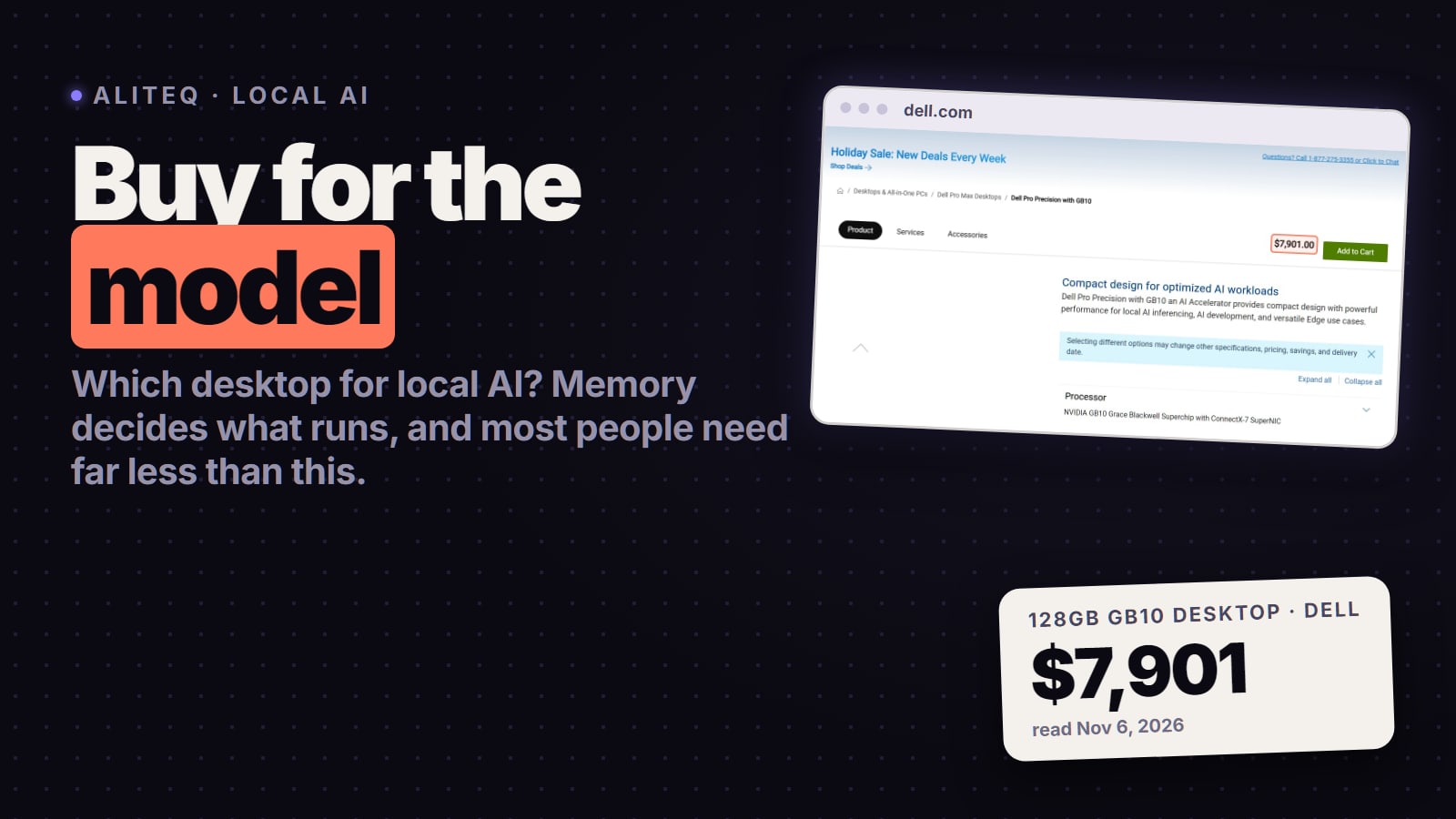
Buy for the biggest model you will really run, not for the biggest box. A 16GB graphics card runs 14B models, a 32GB RTX 5090 runs 32B, and 70B-plus needs a 64-128GB unified-memory desktop that costs thousands. US prices from Apple, Dell and NVIDIA, read Nov 6, 2026.
Some links on this page are referral links: we may earn a commission, at no cost to you.
Share
Which desktop should you buy for local AI? The one whose memory fits the biggest model you'll really run, and for most people that costs far less than an "AI desktop". A PC you already own plus a 16GB graphics card runs 14B models. A 32GB RTX 5090 runs 32B models fast. You only need a 64GB to 128GB unified-memory desktop (Mac Studio, AMD Ryzen AI Max, NVIDIA GB10) for 70B and 120B-class models, and those cost thousands. If you don't know yet, rent a GPU by the hour first. Prices below are from Apple, Dell and NVIDIA's own US pages, read Nov 6, 2026.
What the decision costs (vendor US pages, Nov 6, 2026)
$379
RTX 5060 Ti, from
NVIDIA's starting price for the family
$1999
RTX 5090, from
32GB GDDR7, NVIDIA's starting price
$2499
Mac Studio, from
M5 Max, 36GB; up to 128GB
$7901
Dell GB10 desktop
128GB, 2TB SSD, dell.com
How much memory do you need for local AI?
Enough to hold the model's weights plus some room for context. That is the whole buying decision; speed comes second. The numbers below are weights only at Q4_K_M, the community-default 4-bit format, using the 4.85 bits per weight our VRAM calculator uses. Context (the conversation the model remembers) adds more on top, so leave headroom.
Weights at 4-bit (Q4_K_M), before context
8B
Model size
Qwen3 8B, Llama 3.1 8B
Example
about 5 GB
Weights
8GB GPU (tight), 16GB comfortable
14B
Model size
Qwen3 14B
Example
about 8 GB
Weights
16GB GPU
32B
Model size
Qwen3 32B
Example
about 19 GB
Weights
24GB to 32GB GPU, or 36GB+ Mac
70B
Model size
Llama 3.3 70B
Example
about 40 GB
Weights
64GB unified memory, or two 24GB GPUs
120B (MoE)
Model size
gpt-oss-120b
Example
about 66 GB
Weights
96GB to 128GB unified memory
235B (MoE)
Model size
Qwen3 235B-A22B
Example
about 133 GB
Weights
192GB to 256GB unified memory, or a multi-GPU tower
Model size
Example
Weights
Smallest memory that makes sense
8B
Qwen3 8B, Llama 3.1 8B
about 5 GB
8GB GPU (tight), 16GB comfortable
14B
Qwen3 14B
about 8 GB
16GB GPU
32B
Qwen3 32B
about 19 GB
24GB to 32GB GPU, or 36GB+ Mac
70B
Llama 3.3 70B
about 40 GB
64GB unified memory, or two 24GB GPUs
120B (MoE)
gpt-oss-120b
about 66 GB
96GB to 128GB unified memory
235B (MoE)
Qwen3 235B-A22B
about 133 GB
192GB to 256GB unified memory, or a multi-GPU tower
Here's the honest ladder, cheapest first. Every price is from the maker's own US page on Nov 6, 2026. Prices for memory-heavy machines have moved several times in 2026, so check the vendor page on the day you buy.
AI desktops by budget (US prices, read Nov 6, 2026)
Your PC + RTX 5060 Ti 16GB
Option
16GB GDDR7, 448 GB/sec
Memory for AI
From $379 (NVIDIA, family price; buy the 16GB)
Price (vendor page)
7B to 14B
Mac mini (M6 or M5 Pro)
Option
16GB to 32GB (M6), 24GB to 64GB (M5 Pro)
Memory for AI
From $899 (M6), from $1,699 (M5 Pro)
Price (vendor page)
8B to 32B, quietly
Your PC + RTX 5090
Option
32GB GDDR7, 1,792 GB/sec
Memory for AI
From $1,999 (NVIDIA, card only)
Price (vendor page)
Up to 32B, fastest single card here
Mac Studio M5 Max
Option
36GB, configurable to 128GB (614GB/s on the 40-core GPU)
Memory for AI
From $2,499 (36GB)
Price (vendor page)
32B at 36GB; 70B to 120B at 128GB
AMD Ryzen AI Max+ desktop (Framework, HP Z2 Mini G1a)
Option
Check the configurator
Memory for AI
70B; 120B-class MoE
NVIDIA GB10 desktop (DGX Spark, Dell)
Option
64GB or 128GB unified
Memory for AI
Dell 128GB with 2TB, $7,901
Price (vendor page)
70B to 120B; NVIDIA says up to 200B parameters
Mac Studio M5 Ultra
Option
96GB, configurable to 256GB or 512GB (1.2TB/s)
Memory for AI
From $5,499 (96GB)
Price (vendor page)
120B to 235B-class MoE
Option
Memory for AI
Price (vendor page)
Runs well
Your PC + RTX 5060 Ti 16GB
16GB GDDR7, 448 GB/sec
From $379 (NVIDIA, family price; buy the 16GB)
7B to 14B
Mac mini (M6 or M5 Pro)
16GB to 32GB (M6), 24GB to 64GB (M5 Pro)
From $899 (M6), from $1,699 (M5 Pro)
8B to 32B, quietly
Your PC + RTX 5090
32GB GDDR7, 1,792 GB/sec
From $1,999 (NVIDIA, card only)
Up to 32B, fastest single card here
Mac Studio M5 Max
36GB, configurable to 128GB (614GB/s on the 40-core GPU)
From $2,499 (36GB)
32B at 36GB; 70B to 120B at 128GB
AMD Ryzen AI Max+ desktop (Framework, HP Z2 Mini G1a)
Check the configurator
70B; 120B-class MoE
NVIDIA GB10 desktop (DGX Spark, Dell)
64GB or 128GB unified
Dell 128GB with 2TB, $7,901
70B to 120B; NVIDIA says up to 200B parameters
Mac Studio M5 Ultra
96GB, configurable to 256GB or 512GB (1.2TB/s)
From $5,499 (96GB)
120B to 235B-class MoE
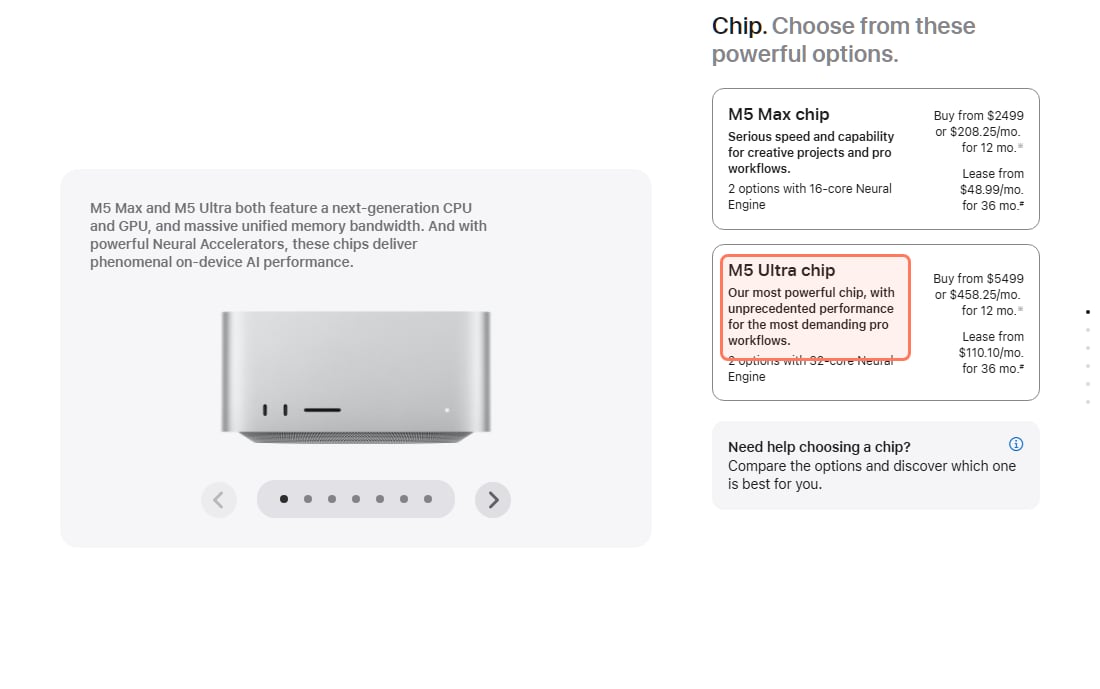
Apple's own Mac Studio store page, read Nov 6, 2026. The $2,499 M5 Max starts at 36GB; Apple's spec page lists 48GB, 64GB or 128GB on the 40-core M5 Max and 256GB or 512GB on the top M5 Ultra. · Screenshot of apple.com by aliteq
Under $500: add a 16GB graphics card to the PC you have
This is where most people should start. NVIDIA lists the RTX 5060 Ti family from $379 on its own page (the family includes an 8GB card; buy the 16GB one, which costs more). 16GB holds a 14B model at 4-bit with room for context, which covers most chat, coding-helper and summarizing work. Our best GPU for local AI guide compares the cards, and a used 24GB RTX 3090 is the other common route: see the used RTX 3090 buying guide. Building from scratch? The local AI PC under $1,000 guide has a full parts list.
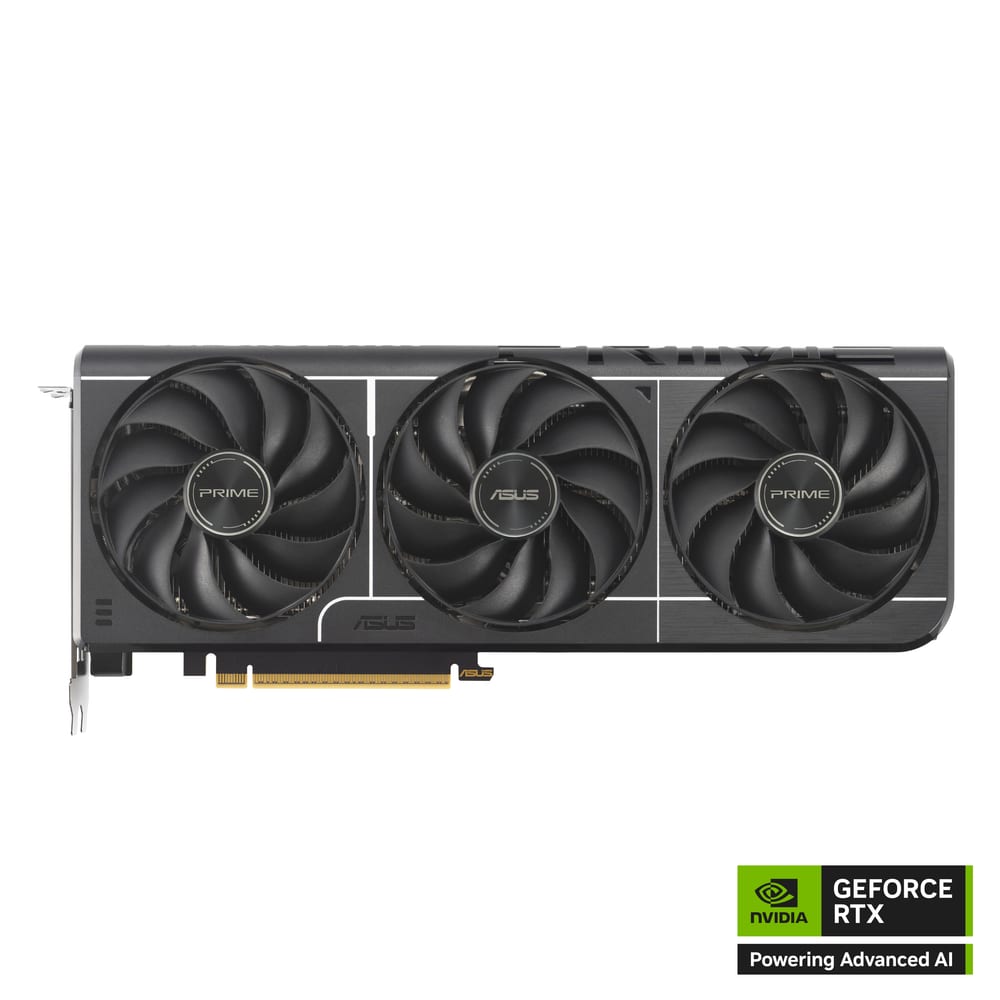
ASUS Prime GeForce RTX 5060 Ti 16GB
16GB of GDDR7 with DLSS 4 and Multi Frame Generation, per NVIDIA. It is the 16GB version, not the 8GB one, which is the one that matters for 14B models.
Best for: 1440p gaming, and local AI that needs 16GB of VRAM on a budget.
About $2,000: an RTX 5090 for the fastest 32B models
NVIDIA's page lists the RTX 5090 with 32GB of GDDR7 and 1,792 GB/sec of memory bandwidth, starting at $1,999 for the card alone. Store prices for high-end cards have run above NVIDIA's list in 2026 (why GPU prices rose). 32GB holds a 32B model at 4-bit with plenty of context, and the bandwidth is why it generates text much faster than any unified-memory box on this page. What it can't do: hold a 70B model (about 40 GB of weights) on one card. See is the RTX 5090 worth it for local AI.
$2,500 to $8,000: unified memory for 70B and 120B models
This is the "AI desktop" tier everyone is talking about. These machines share one big pool of memory between CPU and GPU, so 128GB can hold models no single consumer card can. The trade: they generate tokens more slowly than an RTX 5090 on models that fit both.
Mac Studio (Apple). From $2,499 with the M5 Max and 36GB; Apple's spec page lists 48GB, 64GB or 128GB on the 40-core M5 Max (614GB/s). The quietest way into 70B models. Compare Macs in the best Mac for local AI, and the smaller Mac mini buying guide.
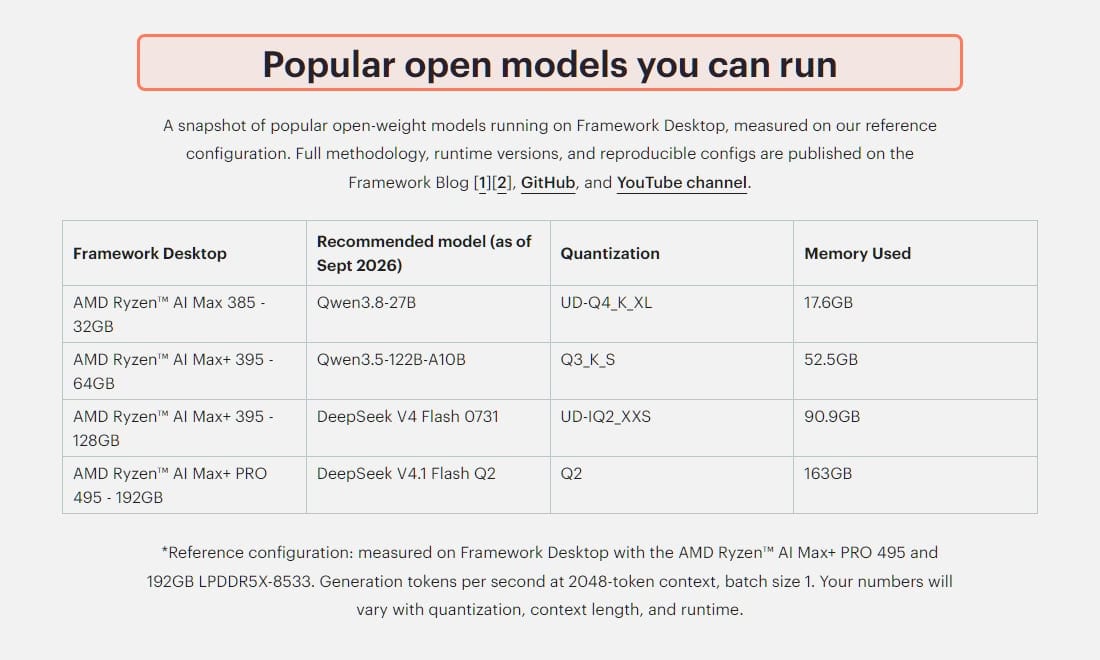
AMD Ryzen AI Max+ desktops. HP says the Z2 Mini G1a takes up to 128GB of unified memory and lets you assign up to 96GB to the GPU. Framework's Desktop offers 32GB, 64GB, 128GB and 192GB options, and its own table shows a 128GB Ryzen AI Max+ 395 running DeepSeek V4 Flash at a 2-bit quant in 90.9GB. We couldn't load a US price from Framework's store on Nov 6, 2026, so check its configurator. Windows and Linux both work. More in how much VRAM Strix Halo really gives you.
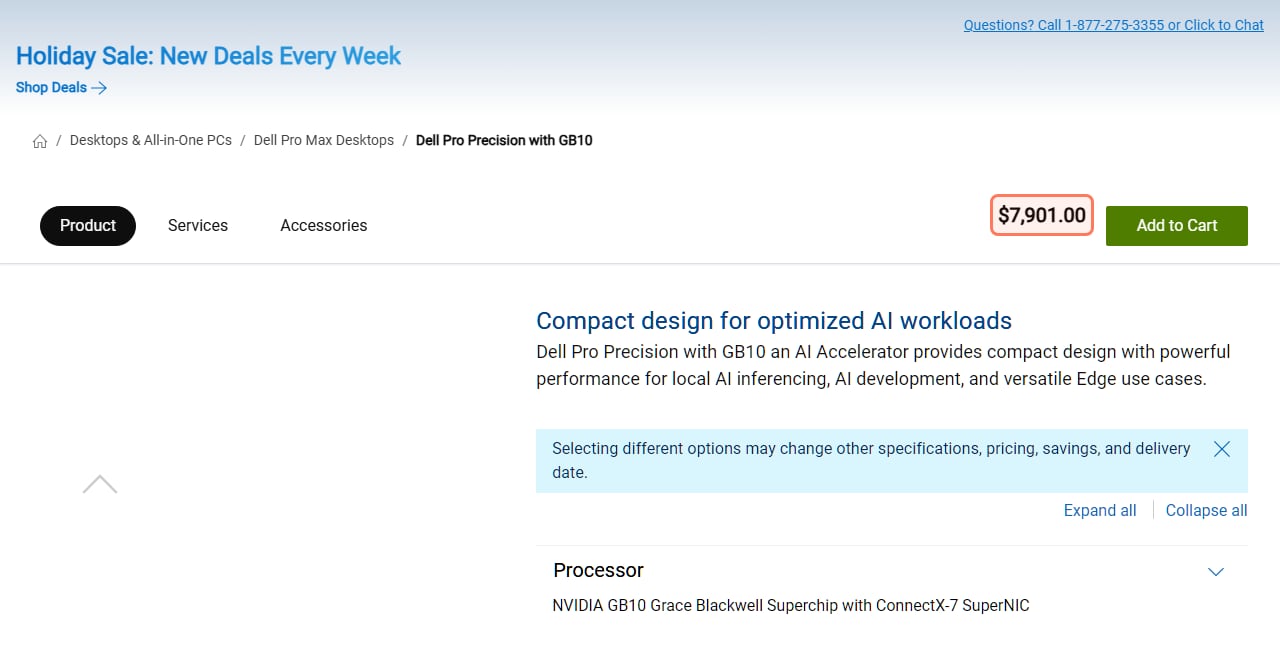
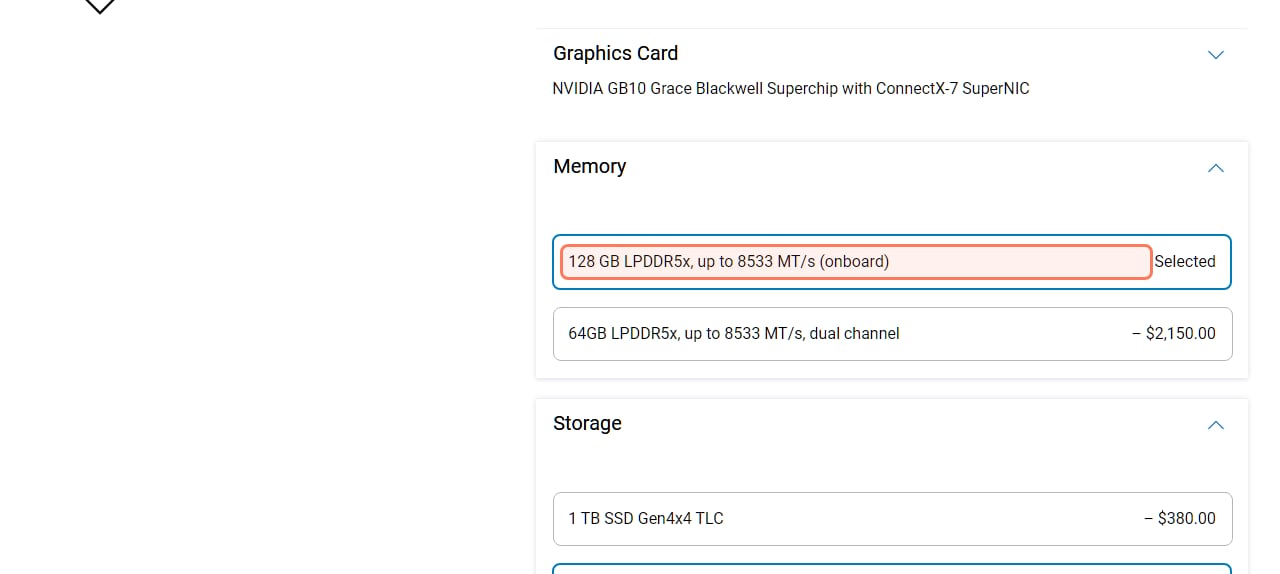
NVIDIA GB10 (DGX Spark and partner versions). NVIDIA offers 64GB or 128GB, says the 64GB version is sold only through OEM partners, and claims inference on models "up to 200 billion parameters." Dell's US store listed its 128GB version with a 2TB SSD at $7,901 on Nov 6, 2026; choosing 64GB took $2,150 off. Pick this if you want NVIDIA's CUDA software stack in a small box. Our take: is the DGX Spark worth it.
Dell's US store, read Nov 6, 2026: $7,901 for the GB10 desktop as configured with 128GB of memory and a 2TB SSD. · Screenshot of dell.com by aliteq
Same Dell page: the 128GB memory option is selected; 64GB is $2,150 less and a 1TB SSD is $380 less. Read Nov 6, 2026. · Screenshot of dell.com by aliteq
Framework's own measured model table (recommended models as of Sept 2026), read Nov 6, 2026. Note the low-bit quants on the biggest models: more memory buys bigger models, not full quality. · Screenshot of frame.work by aliteq
$5,500 and up: 200B-plus models or serving a team
Apple's Mac Studio M5 Ultra starts at $5,499 with 96GB and goes to 256GB or 512GB with 1.2TB/s of bandwidth, the most memory in a single quiet desktop. Past that are workstation towers with several RTX PRO 6000 cards: StorageReview's leaderboard lists the Dell Precision 7875 with 192GB of GDDR7 across two cards and the HP Z8 Fury G6i at up to 384GB. Those make sense for multiple users or production serving, not for one person chatting with a model. Before buying even one card, read is the RTX PRO 6000 worth it for local AI.
What did the lab test actually rank?
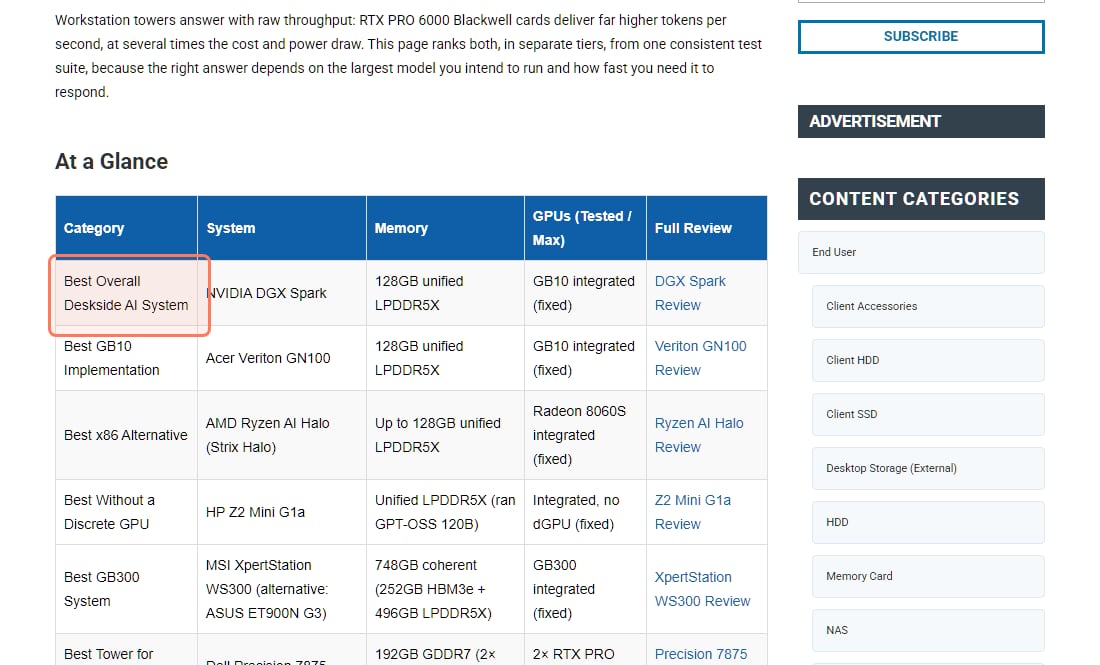
StorageReview's Best Desktops for Local AI leaderboard (published Aug 13, 2026, marked updated Oct 24, 2026) scores systems on "a composite of vLLM online serving throughput, time-to-first-token, time-per-output-token, MAMF compute efficiency, GDSIO storage performance, and street price." Its picks:
StorageReview's lab-tested leaderboard, read Nov 6, 2026. · Screenshot of storagereview.com by aliteq
Best Overall Deskside AI System: NVIDIA DGX Spark (128GB). StorageReview calls it "the reference point every other deskside AI box is measured against."
Best GB10 Implementation: Acer Veriton GN100.
Best x86 Alternative: AMD Ryzen AI Halo (Strix Halo). In StorageReview's words, "in our testing it handled 200B-parameter-class models."
Best Without a Discrete GPU: HP Z2 Mini G1a, which "ran GPT-OSS 120B with no discrete GPU at all."
Best GB300 System: MSI XpertStation WS300 (748GB coherent memory), with the ASUS ExpertCenter Pro ET900N G3 as the alternative.
Towers: Dell Precision 7875 (Best Tower for Local AI), HP Z8 Fury G6i (Best Multi-GPU Platform), Comino Grando with eight RTX PRO 6000 cards (The Extreme Pick).
The leaderboard also notes that NVIDIA "launched a 64GB DGX Spark SKU on October 23 at $4,999," sold through OEM partners. Read the ranking as "best at serving big models," which is a different question from "best value for one person at home." A box can win the first and still be the wrong buy for the second.
Should you rent a GPU before you buy?
Yes, if you aren't sure which model size you'll settle on. On Nov 6, 2026 at 21:20 UTC, our price tracker's cheapest single-GPU on-demand listings on Vast.ai were $0.44/hr for a 32GB RTX 5090 and $0.10/hr for a 24GB RTX 3090; Runpod listed the RTX 5090 at $1.19/hr. Those are marketplace prices and they move hourly, so see /cloud-gpu for today's numbers. The simple math: at $0.44/hr, the $1,999 RTX 5090 list price buys about 4,500 hours of rented 5090 time, and Dell's $7,901 GB10 desktop buys about 17,800. Rent for a week of real use, note the model and context you actually needed, then buy the cheapest machine that fits it.
Prebuilt AI desktop or build your own?
If the answer is "a graphics card," adding it to a PC you already own is the cheapest path by far, as long as your power supply and case fit the card. The unified-memory machines (Mac Studio, Ryzen AI Max boxes, GB10) can't be built from parts in the same way, because the memory is soldered to the chip, so you buy them as complete systems and pick the memory up front. You can't add more later. The trade-offs are in prebuilt vs DIY local AI PC.
What this page can't tell you
Speed on your exact model. We haven't run these machines ourselves. Speed numbers come from the vendors and StorageReview's lab; your tokens per second depend on model, quant, context length and software.
Street prices tomorrow. Memory-heavy hardware prices changed several times in 2026. Every price here is the vendor's US page on Nov 6, 2026.
Low-bit quality. Squeezing a huge model into memory with a 2-bit or 3-bit quant (as in Framework's own table) runs, but answers get worse. A smaller model at 4-bit is often the better choice.
Verdict
The buy call
Buy for the model, not the hype. For most people a 16GB graphics card in the PC they own (from $379 per NVIDIA) is enough, and a 32GB RTX 5090 (from $1,999) is the fast ceiling for one card. Spend $2,500 to $8,000 on a 64 to 128GB unified-memory desktop only once you know you need 70B-plus models. Rent first if you don't know.
Best for: Chat, coding help and summaries at home: a 16GB to 32GB GPU. 70B to 120B models at home: Mac Studio, Ryzen AI Max+ or GB10 with 64 to 128GB. Teams or 200B-plus: Mac Studio M5 Ultra or a multi-GPU tower.
What's the best desktop for local AI?
The one whose memory fits your model. For 7B to 14B models, a PC with a 16GB GPU. For 32B, an RTX 5090 with 32GB. For 70B to 120B, a 64 to 128GB unified-memory desktop such as a Mac Studio, an AMD Ryzen AI Max+ machine or an NVIDIA GB10 box. StorageReview's lab-tested leaderboard ranks the DGX Spark best overall, but that tier is more than most home users need.
How much should I spend on a computer for local AI?
Most people can start under $500 by adding a 16GB graphics card (NVIDIA lists the RTX 5060 Ti family from $379, Nov 6, 2026) to a PC they own. About $2,000 buys an RTX 5090 (NVIDIA's starting price). Unified-memory desktops for 70B-plus models ran from $2,499 (Mac Studio, 36GB) to $7,901 (Dell GB10, 128GB) on vendor pages on Nov 6, 2026.
How much RAM or VRAM do I need to run a 70B model?
About 40 GB just for the weights at 4-bit (Q4_K_M), plus room for context, so 64GB of unified memory or two 24GB graphics cards. Check your exact setup in our VRAM calculator.
Is the DGX Spark worth it for home use?
Only if you want NVIDIA's CUDA software in a small box and need 70B to 120B models. NVIDIA sells 64GB and 128GB versions; Dell's 128GB version was $7,901 with a 2TB SSD on Nov 6, 2026. For smaller models, a single graphics card is cheaper and faster.
Mac Studio or a PC with a graphics card for local AI?
A graphics card is faster for models that fit in its memory (up to 32GB on an RTX 5090). A Mac Studio holds much bigger models (up to 128GB on the M5 Max and 512GB on the M5 Ultra, per Apple) but generates text more slowly than an RTX 5090 on models that fit both.
Do I need a discrete GPU to run local AI?
No. StorageReview reports the HP Z2 Mini G1a "ran GPT-OSS 120B with no discrete GPU at all," using AMD's Ryzen AI Max+ unified memory. A dedicated card is still faster on models small enough to fit in it.
None of this is a call to buy the biggest box you can afford. Find the model you'll really run, check its memory in the VRAM calculator, rent it for an hour on /cloud-gpu if you're unsure, then buy the cheapest machine that holds it.