Higgsfield's CLI is built for coding agents like Claude Code, Cursor and Codex. Higgsfield documents two commands, one to add its three Skills and one to sign in, with no API key. Every CLI generation spends your plan credits at web rates, and Unlimited never applies. Here are the steps exactly as Higgsfield gives them, what the Skills do, and when MCP or the API fits better. Read November 22, 2026.
You live in a terminal or a coding agent and want images and video without switching to a browser tab. Higgsfield has a route for that. It's not a classic standalone CLI tool so much as a set of Skills your coding agent calls for you, signed in to your own Higgsfield account.
How do I set up the Higgsfield CLI?
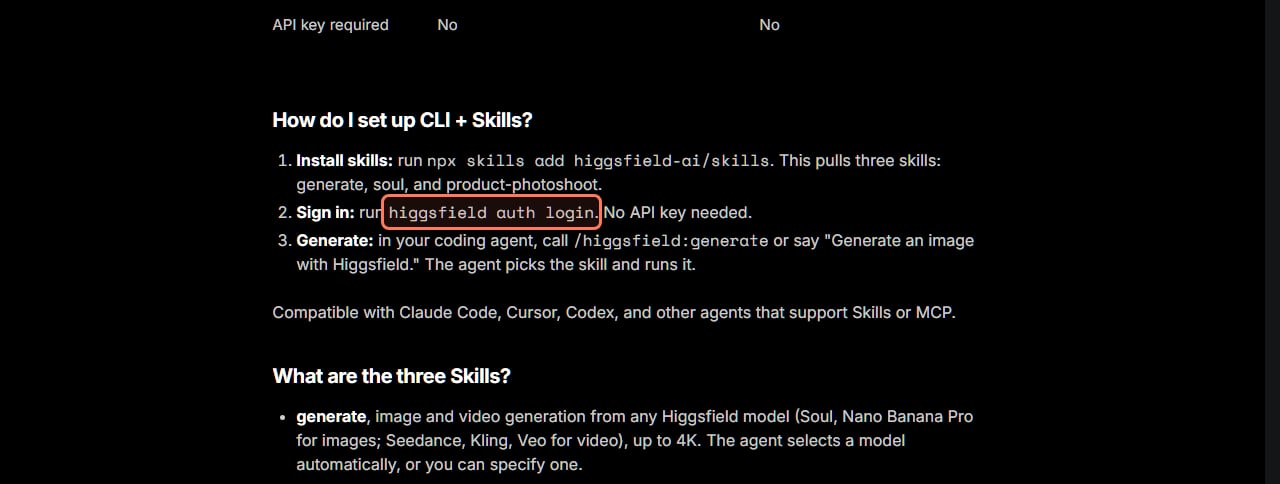
Higgsfield's CLI article lists three steps. Here they are as Higgsfield gives them.
Install skills: run npx skills add higgsfield-ai/skills. This pulls three skills: generate, soul, and product-photoshoot.
Sign in: run higgsfield auth login. No API key needed.
Generate: in your coding agent, call /higgsfield:generate or say "Generate an image with Higgsfield." The agent picks the skill and runs it.
npx comes with Node.js, so you need Node.js installed for the first command. Higgsfield's Skills page adds that signing in "connects your account so the skills can submit jobs through the hf CLI." To update later, Higgsfield says to run the same npx skills add higgsfield-ai/skills command again. That also fixes an older bug: "earlier versions had an issue with passing references."
Higgsfield's own CLI setup steps, from its help center, read November 22, 2026. The outline is ours. · Higgsfield help center, screenshot by aliteq
What can the three Higgsfield Skills do?
The CLI article describes three Skills:
generate makes "image and video generation from any Higgsfield model (Soul, Nano Banana Pro for images; Seedance, Kling, Veo for video), up to 4K." The agent picks the model, or you name one.
soul trains a Soul character from photos and "handles upload, training, and naming."
product-photoshoot turns "a product link or images into studio-quality product shots and video ads", for physical products and apps.
Product-photoshoot comes with named presets. For images, Higgsfield lists product_shot, lifestyle_scene, closeup_product_with_person, pinterest_pin, hero_banner, social_carousel (3 to 10 slides), ad_creative_pack, virtual_model_tryout, conceptual_product and restyle. For video it lists UGC, Tutorial, Unboxing, Hyper Motion, Product Review, TV Spot, Wild Card, UGC Virtual Try On and Pro Virtual Try On.
Don't mix these up with Supercomputer Skills. Higgsfield says they are "two separate systems with the same name" and "not interchangeable." Generations from the CLI land in your Assets on higgsfield.ai, "the same as web and MCP generations."
What does the Higgsfield CLI cost?
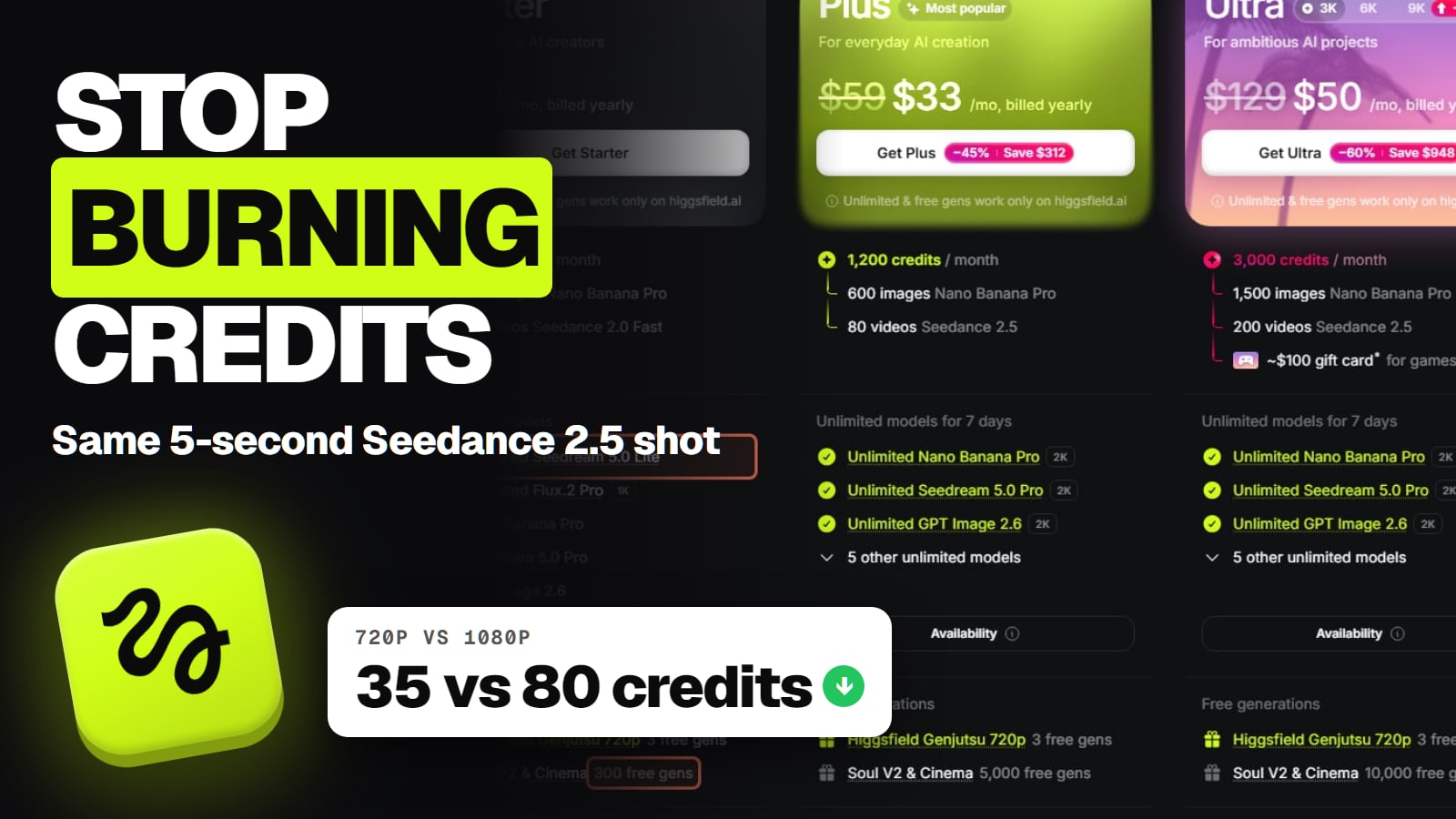
Your plan credits, at the same rates as the web. The CLI itself is free to install, but Higgsfield's credits article says "any generation made outside" higgsfield.ai, "including through MCP, CLI, Canvas, Supercomputer, and other automated tools, always deducts credits, regardless of plan."
That matters if you pay for Unlimited. Higgsfield's MCP article explains why: Unlimited access and free generations "are intended for manual use, not for automated or programmatic generation." So a model that's unlimited for you on the website still costs credits when your agent calls it. Our Higgsfield credits explainer shows what each model costs.
Agents can also spend faster than you'd click. The CLI article says you're "responsible for what a coding agent generates through your account", under the Developer Terms in Higgsfield's Terms of Use. Check your balance before a big batch, and ask the agent to tell you the cost before it runs.
CLI, MCP or the API, which one should I use?
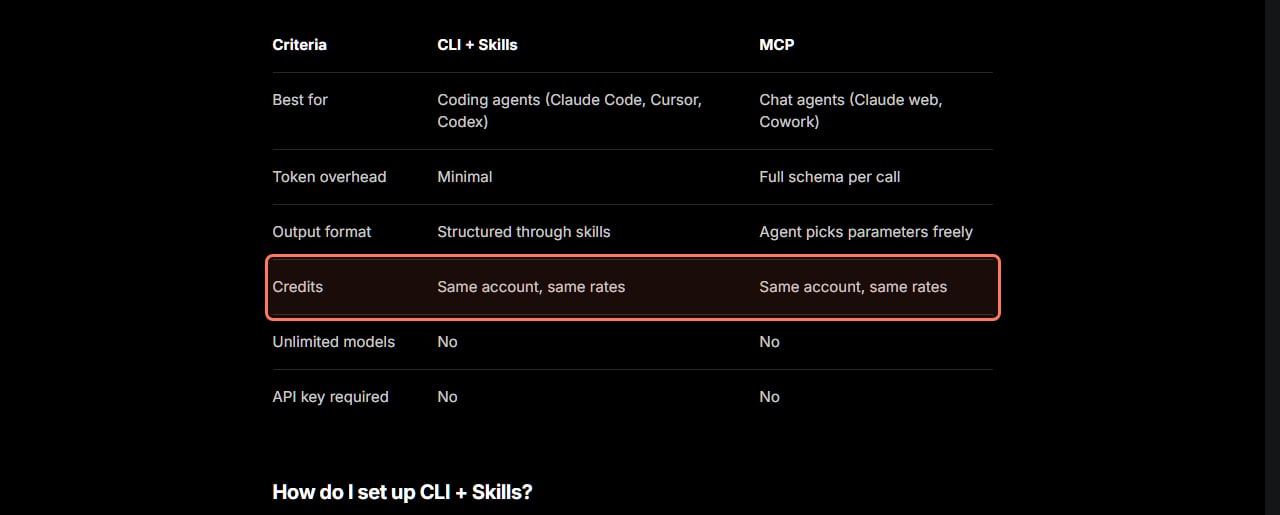
Higgsfield has three ways to generate from outside its website, and they differ in who they're for and how you pay. This table combines Higgsfield's CLI, MCP and API articles, read November 22, 2026.
Best for
CLI + Skills
Coding agents (Claude Code, Cursor, Codex)
MCP
Chat agents (Claude web, Cowork)
Higgsfield API
Building generation into your own product
Account
CLI + Skills
Your higgsfield.ai account
MCP
Your higgsfield.ai account
Higgsfield API
A separate API account
Billing
CLI + Skills
Plan credits, web rates
MCP
Plan credits, web rates
Higgsfield API
US dollars per generation, prepaid, minimum top-up $5
Unlimited models
CLI + Skills
No
MCP
No
Higgsfield API
Not applicable
API key
CLI + Skills
No
MCP
No (OAuth sign-in)
Higgsfield API
Yes
Token overhead
CLI + Skills
Minimal
MCP
Full schema per call
Higgsfield API
Not applicable
Setup
CLI + Skills
npx skills add higgsfield-ai/skills then higgsfield auth login
MCP
Connector URL mcp.higgsfield.ai/mcp
Higgsfield API
Key from open.higgsfield.ai
CLI + Skills
MCP
Higgsfield API
Best for
Coding agents (Claude Code, Cursor, Codex)
Chat agents (Claude web, Cowork)
Building generation into your own product
Account
Your higgsfield.ai account
Your higgsfield.ai account
A separate API account
Billing
Plan credits, web rates
Plan credits, web rates
US dollars per generation, prepaid, minimum top-up $5
Unlimited models
No
No
Not applicable
API key
No
No (OAuth sign-in)
Yes
Token overhead
Minimal
Full schema per call
Not applicable
Setup
npx skills add higgsfield-ai/skills then higgsfield auth login
Connector URL mcp.higgsfield.ai/mcp
Key from open.higgsfield.ai
Higgsfield's own CLI versus MCP comparison, from its help center, read November 22, 2026. The outline is ours. · Higgsfield help center, screenshot by aliteq
The short version, in Higgsfield's words: "Use MCP for chat agents like Claude web, and CLI for coding agents like Claude Code or Cursor." You don't need both. Its Skills page says that if you use "Claude Code, Codex, OpenClaw, Hermes, it's better to use the CLI."
Pick the API if you're shipping a product. Higgsfield's API article says it runs on its own key and dollar balance and "doesn't touch your account or credits at all." Failed requests aren't billed, and funds expire one year after you add them. Our API vs subscription comparison works out which costs less.
Pick a plugin if you live in Premiere, After Effects, Blender or Figma. See Higgsfield's plugins.
Which models work through the CLI?
All of them, according to Higgsfield. The CLI article says "all Higgsfield models" are available and "the agent selects automatically unless you specify one." The generate Skill names Soul and Nano Banana Pro for images and Seedance, Kling and Veo for video. That's a difference from the API, which Higgsfield says "has its own curated catalog" that "may differ from the model lineup on higgsfield.ai."
What we couldn't verify
How the higgsfield command itself gets installed. The help article goes straight from npx skills add to higgsfield auth login, and the Skills page mentions "the hf CLI", but neither gives a separate install step. If higgsfield auth login isn't found after the first command, check the GitHub link on Higgsfield's Skills page rather than a third-party package.
Whether the free plan can use the CLI. The CLI article doesn't say which plans can sign in; it only says generations use plan credits.
A CLI without an AI agent. Higgsfield documents the CLI only through Skills called by a coding agent, not as commands you run on their own to generate.
Rate limits or parallel jobs through the CLI. Not stated in any article we read.
Our verdict
If you already work in Claude Code, Cursor or Codex, the Higgsfield CLI is the lowest-friction way in: two commands, your existing account, no key to manage. Just treat it as a credit meter, not a way around one. Unlimited and free generations stay on the website, and an agent running a batch spends at full web rates. If you build a product, use the API instead, and if you chat rather than code, use MCP.
Because every CLI generation spends credits, an agent running a batch can trigger Auto-Refill if you've turned it on.
Yes. Higgsfield's CLI article (read Nov 22, 2026) calls it CLI and Skills, built for coding agents. You run npx skills add higgsfield-ai/skills, then higgsfield auth login, then call /higgsfield:generate in your agent.
Do I need an API key for the Higgsfield CLI?
No. The CLI signs in to your normal Higgsfield account. API keys belong to the Higgsfield API, a separate developer product with its own dollar balance.
Does Unlimited work through the Higgsfield CLI?
No. Unlimited models and free generations apply only on higgsfield.ai. Every generation through the CLI, MCP, Canvas or Supercomputer deducts credits at standard rates.
Which agents work with the Higgsfield CLI?
Higgsfield names Claude Code, Cursor and Codex, plus other agents that support Skills or MCP.
Should I use the CLI or MCP?
Higgsfield says to use MCP for chat agents like Claude web and the CLI for coding agents like Claude Code or Cursor. Both use the same account and the same credit rates.
How do I update the Higgsfield CLI skills?
Run npx skills add higgsfield-ai/skills again. Higgsfield says this pulls the latest version and fixes an older issue with passing reference images.
Higgsfield sales like 11.11 and Black Friday change prices for a few days at a time. When one starts, we read the real prices on Higgsfield's own page and email you what changed.
Written and sent by hand. One-click unsubscribe in every email. Emails may contain referral links.