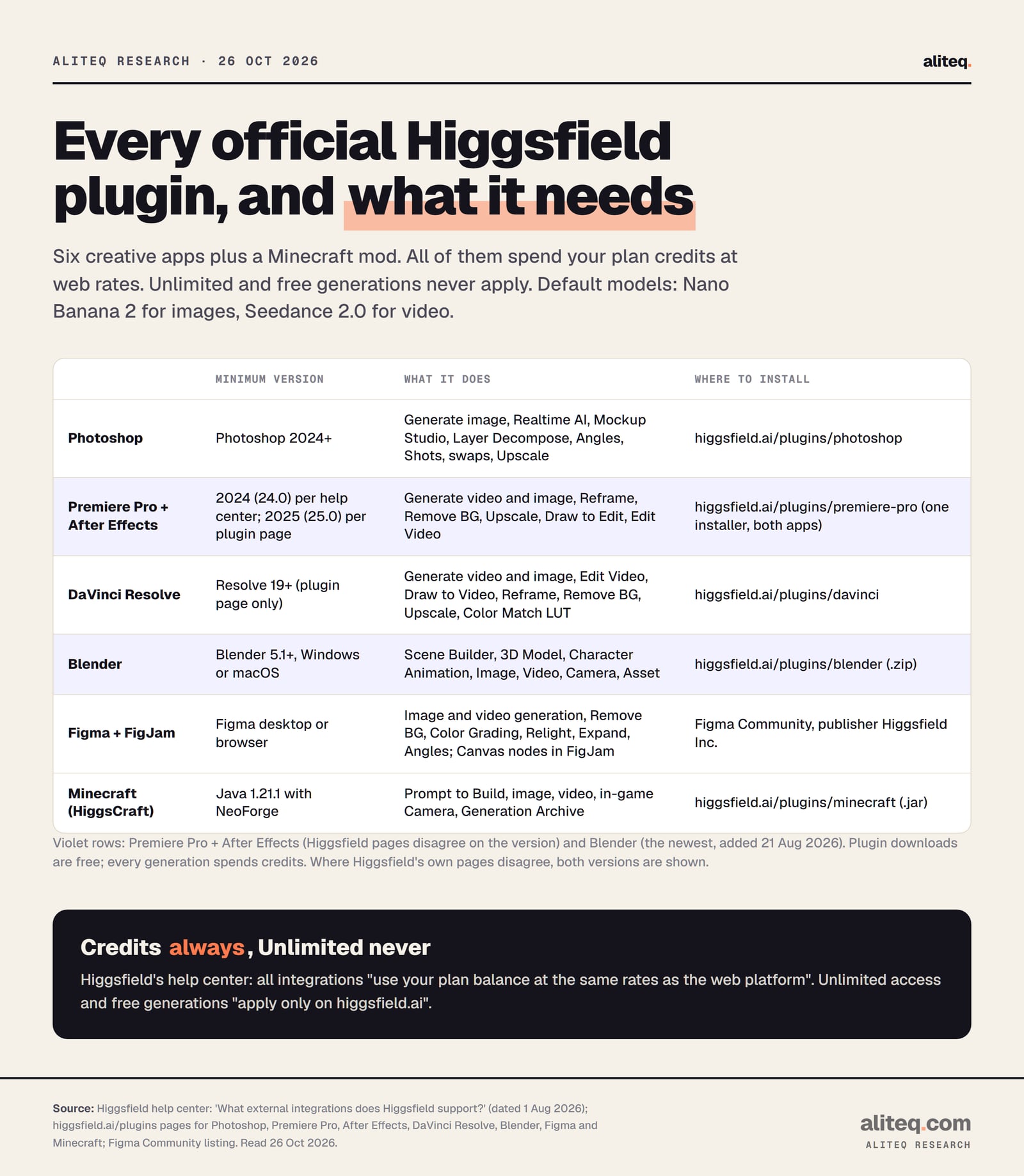
Yes. Higgsfield makes official plugins for Premiere Pro and After Effects, Photoshop, DaVinci Resolve, Blender, Figma and FigJam, plus a Minecraft mod. The downloads are free, but every generation spends your plan credits at web rates, and Unlimited never applies. Here is where to install each one, what version it needs and what it does.
This post contains affiliate links. If you buy through them, Aliteq may earn a commission — at no extra cost to you. Prices verified at publish time.
Share
Which apps does Higgsfield have plugins for?
Higgsfield has official plugins for seven pieces of software: Adobe Premiere Pro, Adobe After Effects, Adobe Photoshop, DaVinci Resolve, Blender, and Figma with FigJam, plus a Minecraft mod. Higgsfield's external integrations help article lists them as "official plugins and integrations", and adds an eighth item, Higgsfield Gaming, which is a game builder inside Supercomputer and MCP rather than a plugin for another app.
All of them work the same way: the plugin is a panel inside your app, you sign in with your Higgsfield account, and generation runs on Higgsfield's servers. The plugin pages say so for every app, for example Blender: "Generation runs in the cloud, so a powerful GPU is not required." You need an internet connection; none of them works offline.
Our table puts the official install source, minimum version and features of each plugin side by side. Higgsfield doesn't publish it in one place.
Every official Higgsfield plugin, its minimum version and where to install it. Higgsfield help center and plugin pages, read 26 October 2026. · aliteq research
Premiere Pro + After Effects
Minimum version
2024 (24.0) per the help center; 2025 (25.0) per the plugin page
What it does
Generate video and image into the timeline, Reframe, Remove Background, Upscale, Draw to Edit, Edit Video
Where to install
One installer for both apps, from Higgsfield's site
Higgsfield's rule for spotting fakes applies here too: if a "Higgsfield plugin" isn't on higgsfield.ai or linked from it, treat it as unofficial. Our Higgsfield app guide covers the copycat apps.
How do I install a Higgsfield plugin and sign in?
You download the installer from the plugin's page on higgsfield.ai (or open the Figma Community listing), install it with your creative app closed, open the Higgsfield panel inside the app, and sign in with your existing Higgsfield account. There's no API key to paste; the plugin connects to the same account and credits you use on the website.
Installing a Higgsfield plugin, in five steps
Check your app version
Blender 5.1+, Photoshop 2024+, Premiere or After Effects 2025 to be safe
Download from higgsfield.ai/plugins
Figma installs from Figma Community instead
Quit the app, then install
Adobe apps must be fully closed while installing
Open the Higgsfield panel and sign in
Same Higgsfield account as the website, no API key
Generate, spending plan credits
The cost shows before you press Generate
Check your app version
Blender 5.1+, Photoshop 2024+, Premiere or After Effects 2025 to be safe
Download from higgsfield.ai/plugins
Figma installs from Figma Community instead
Quit the app, then install
Adobe apps must be fully closed while installing
Open the Higgsfield panel and sign in
Same Higgsfield account as the website, no API key
Generate, spending plan credits
The cost shows before you press Generate
Common to every Higgsfield plugin, from its help center and plugin pages, read 26 October 2026. The exact menu differs per app (see below).
Where the panel lives in each app, per Higgsfield's help article and plugin pages:
Premiere Pro and After Effects: Window → Extensions → Higgsfield. On macOS, the help article says to open the .dmg, drag Higgsfield to Applications and run the installer, which "detects Premiere Pro and After Effects automatically". On Windows, the help article and one FAQ on the plugin page describe the free ZXP Installer from aescripts with a .zxp file, while another FAQ on the same page describes a native .msi installer. Use whichever file the download button gives you.
Photoshop: Window → Extensions → Higgsfield. The help article calls the download a ".UXP installer"; the plugin page's own steps call it a ".CCX" file. Either way it comes from higgsfield.ai/plugins/photoshop.
DaVinci Resolve: the Resolve plugin page says to run the installer and open Workspace → Workflow Integrations → Higgsfield; its FAQ says Workspace → Scripts → Higgsfield. The help article says to place the plugin in your Resolve plugins folder. Check both menus.
Blender: drag the .zip onto any open Blender window and "it installs and enables itself", or use Edit → Preferences → Add-ons → Install. Keep the file zipped.
Figma and FigJam: Plugins → Find more plugins, search "Higgsfield AI" by Higgsfield Inc. No installer; it "loads through Figma itself", in the desktop app or the browser.
Minecraft: install NeoForge for 1.21.1, put the .jar in your mods/ folder, then type the sign-in command in chat. The help article says /higgsfield auth; the plugin page's FAQ says /higgscraft auth.
What can the Premiere Pro and After Effects plugin do?
The Higgsfield plugin for Premiere Pro and After Effects generates video clips and images from a text prompt straight into your timeline, and edits footage you already have: Reframe to another aspect ratio, Remove Background without a green screen, Upscale, Draw to Edit and prompt-based Edit Video. One installer covers both apps.
The Premiere Pro and After Effects plugin page lists the editing tools as "Reframe", "Remove Background", "Upscale", "Draw to edit" and "Edit Video", and says Upscale boosts clips "up to 4K or 8K". Reframe crops to 9:16, 16:9, 4:3, 3:4, 21:9 or 1:1 with subject tracking. The help article adds Generate Video and Generate Image for "clips, B-roll, transitions, or visuals from a text prompt, dropped straight into your timeline".
Which version you need is the one thing Higgsfield's pages disagree on. The help article says "version 2024 (24.0) and newer". The plugin page's FAQ says "Adobe Premiere Pro — version 2025 (25.0) and newer" and "We don't currently support older versions of Adobe." If you're on 2024 and the panel doesn't appear under Window → Extensions, update through Creative Cloud. On Windows, the plugin page supports Windows 10 and 11, 64-bit only; the macOS installer is a universal binary for Apple Silicon and Intel.
Higgsfield's changelog also shows After Effects being driven by AI agents: on 13 July 2026 "The Adobe After Effects plugin now works in Supercomputer and Claude via MCP", working "directly with compositions, layers, keyframes, effects". That route spends credits too; our Higgsfield MCP guide explains the connector.
What does the Higgsfield Blender add-on do?
The Higgsfield Blender add-on puts a floating prompt bar over the 3D viewport with seven tabs: Scene Builder, 3D Model, Character Animation, Image, Video, Camera and Asset. It needs Blender 5.1 or later on Windows or macOS, and you install it from a .zip on Higgsfield's Blender page, not from the Blender Extensions platform, where a search for "higgsfield" returned no results on 26 October 2026.
What each tab produces, per Higgsfield's pages:
Scene Builder: "Real scene data, not a picture. Objects, layout and light arrive as editable geometry in the open .blend."
3D Model: a mesh lands at the 3D cursor, "Clean topology" with "Materials included", from a prompt or a reference photo.
Character Animation: "A fitted, weighted rig plus keyframes on the timeline — standard Blender bones and actions."
Image and Video: images insert as a plane or wire into a material; video renders the shot.
Asset: your generation library, filtered by 3D, Images or Video.
The Blender page names more models than the plugin defaults: "Nano Banana 2, GPT Image, Seedream 5.0 Pro and Z Image for images, Seedance 2.5 for video, Meshy 5 for 3D". It also says "The number on the Generate button is the credit price — you see it before you press." Your GPU still matters for your own Cycles and EEVEE renders, but not for Higgsfield's generations.
There's also Blender Bridge, a separate MCP endpoint at bridge.higgsfield.ai/mcp. Higgsfield says it "connects an agent to the add-on itself — so Claude can build in your open scene". You add it as a custom connector named Higgsfield Bridge in your AI agent's settings.
The plugins run inside the software you already use; the generation happens on Higgsfield's servers. Illustration made by us with Higgsfield GPT Image 2, 26 October 2026, one attempt, no edits; the person is fictional. · Generated with Higgsfield (GPT Image 2) by aliteq
What do the Photoshop, DaVinci Resolve, Figma and Minecraft plugins do?
Each plugin brings Higgsfield's image tools, and for the video apps its video tools, into that program, and puts the result where you work: a new layer in Photoshop, the Media Pool or timeline in Resolve, the canvas in Figma, an in-game item in Minecraft.
Photoshop (2024+): Generate AI Image, Realtime AI ("AI syncs to each brush stroke in real time"), Mockup Studio, Layer Decompose (split a flat image into editable layers), Angles, Shots, Character Swap, Remove Background, Face Swap, Upscale, Skin Enhancer and AI Stylist. The help article says "Cinema Studio and Marketing Studio are accessible directly inside the plugin." Results come back as new editable layers, per the Photoshop plugin page.
DaVinci Resolve: Video and Image Generation, Edit Video, Draw to Video, Reframe, Remove Background, Upscale ("up to 4K" in the help article, "8K" on the plugin page), Color Match to build a grade or LUT from a reference frame, and Import to Resolve. The plugin page says Resolve 19 or newer, macOS or Windows.
Figma and FigJam: image generation, Vector Generation (SVG), Mockup Studio, Remove Background, Color Grading, Expand, Relight, Angles, Face Swap and animation; FigJam adds Higgsfield Canvas nodes. The Figma Community listing is published by Higgsfield Inc. and showed 2,951 users and 609 likes when we read it.
Minecraft (HiggsCraft): Prompt to Build ("describe a structure and it materializes block by block"), images as Photo Slides, video on a Video Screen or Projector, an in-game Camera and a Generation Archive. It needs Java Edition 1.21.1 with NeoForge; the page says it is "Not an official Minecraft product".
When each Higgsfield plugin arrived
Jun 3, 2026
Figma and FigJam plugin, per Higgsfield's changelog.
Jun 5, 2026
Minecraft mod, generating images, video and builds in-game.
Jun 7, 2026
DaVinci Resolve plugin, with Color Match to build a LUT.
Jun 14, 2026
Photoshop plugin, with Realtime AI and Layer Decompose.
Jul 13, 2026
The After Effects plugin starts working with Supercomputer and Claude via MCP.
Aug 21, 2026
"Higgsfield. Now in Blender": the Blender add-on arrives.
Oct 26, 2026
Our check of the help article and all seven plugin pages.
How much do Higgsfield plugins cost, and does Unlimited work?
The plugins themselves are free to download, but every generation spends credits from your Higgsfield balance, at the same rates as the website. Unlimited models and free generations don't work in any plugin. Higgsfield's help article answers both questions in its FAQ: "All integrations use your plan balance at the same rates as the web platform", and Unlimited access and free generations "apply only on higgsfield.ai".
The pricing page footnote says the same about the other off-site routes: Unlimited and free generations "are not accessible on MCP/CLI, Canvas or Supercomputer". So if your plan gives you Unlimited Nano Banana 2 on the website, the same model still costs credits in Photoshop. Higgsfield's Unlimited models article lists which plans include what, and our Higgsfield Unlimited explainer breaks it down.
The default plugin models are Nano Banana 2 for images and Seedance 2.0 for video. On the pricing page we read on 26 October 2026, Nano Banana 2 costs 2 credits an image, and Seedance 2.0 costs about 22 credits per 5 seconds at 720p, about 60 at 1080p and about 110 at 4K. That's our own arithmetic for what a month of plan credits buys in a plugin with the defaults:
Seedance 2.0 clips (5 s, 720p) a month of plan credits buys in a plugin
These are rounded down from Higgsfield's own approximate rates ("~22" credits per 5 s clip) and assume you spend the whole month's credits on one model. Re-runs, longer clips and higher resolution cost more; the exact price is on the Generate button. Our Higgsfield credits explained page covers how credits reset and expire.
Which Higgsfield plan do I need for the plugins?
Higgsfield doesn't name a minimum plan for its plugins; they need credits, and in practice that means a paid plan. Higgsfield's pricing page lists the Free plan with no monthly credits ("Limited use"), and you can't top up without one: its Credit Packs article says "An active subscription is required to purchase a Credit Pack."
Higgsfield's own plugin pages say something different. The Premiere page says that without an account "you can sign up free at higgsfield.ai and try the plugins with starter credits", and the Photoshop page says "Free credits are included with every account". We couldn't confirm a free credit allowance on the pricing page, so don't count on it.
On 26 October 2026 the plans on sale were:
Starter
Credits a month
270
Price shown to us
$19 a month
Plugin note
Lists "Access to Seedance 2.0 Fast & 2.0 Mini" and "selected models"
Plus
Credits a month
1,200
Price shown to us
$59 monthly, $47 a month billed yearly
Plugin note
"Access to all Seedance models" and all features
Ultra
Credits a month
3,000 (also 6,000 or 9,000)
Price shown to us
$129 monthly, $99 a month billed yearly
Plugin note
All models and features
Credits a month
Price shown to us
Plugin note
Starter
270
$19 a month
Lists "Access to Seedance 2.0 Fast & 2.0 Mini" and "selected models"
Plus
1,200
$59 monthly, $47 a month billed yearly
"Access to all Seedance models" and all features
Ultra
3,000 (also 6,000 or 9,000)
$129 monthly, $99 a month billed yearly
All models and features
One catch for video work: the plugin's default video model is Seedance 2.0, and the Starter plan card names only Seedance 2.0 Fast and 2.0 Mini. We couldn't confirm whether full Seedance 2.0 runs on Starter through a plugin, so if video in Premiere, After Effects or Resolve is the reason you're buying, Plus is the safer pick. For images in Photoshop or Figma, Starter's credits work.
If you only want Higgsfield from your own code rather than inside an app, the API is a separate product with prepaid dollar billing and no plan. Our Higgsfield API vs subscription comparison does the maths.
What we couldn't verify
The Premiere Pro and After Effects minimum version. The help article says 2024 (24.0); the plugin page says 2025 (25.0). We didn't test 2024.
The Windows Adobe installer. Higgsfield's pages describe both a .zxp file for the aescripts ZXP Installer and a native .msi. We didn't download either.
The DaVinci Resolve menu path and version. The plugin page gives two menu paths (Workflow Integrations and Scripts) and Resolve 19+; the help article names no version and says to copy the plugin into a plugins folder.
Free credits for new accounts. Two plugin pages mention free or starter credits; the pricing page lists the Free plan with no monthly credits.
Full Seedance 2.0 on Starter. The plugin default is Seedance 2.0; the Starter card names only 2.0 Fast and 2.0 Mini.
The Minecraft credit numbers. The HiggsCraft FAQ says images cost "around 1 credit" and video "around 450 per clip", generated through Kling 3. The 450 doesn't match the pricing page's Kling 3.0 rates (about 7 to 30 credits per 5 s), and the help article names Seedance 2.0 as the default video model. Trust the Generate button.
Adobe Exchange and the Blender Extensions platform. We found no Higgsfield listing on the Blender Extensions platform, and Higgsfield's Adobe pages link only to their own downloads; we didn't search Adobe Exchange exhaustively.
Hands-on behaviour. We didn't install any plugin or run a generation inside the apps.
Our verdict
If you edit in Premiere Pro, After Effects or DaVinci Resolve, model in Blender, or design in Photoshop or Figma, Higgsfield's plugins are the official way to use its models without exporting files back and forth. Install them only from higgsfield.ai/plugins or, for Figma, the Figma Community listing by Higgsfield Inc.
Know the trade-off before you subscribe: the plugins always spend credits, even on models where your plan gives you Unlimited on the website. If you mostly want Unlimited generations, work on higgsfield.ai and import the files. If you want video inside your editor, plan on Plus or above and check your app version first, especially Premiere and After Effects (2025 to be safe) and Blender (5.1 or later).
Skip the plugins if your app is older than the minimum, or if you need to work offline: every generation runs on Higgsfield's servers. To sign up safely, go to higgsfield.ai directly, and know the refund rule: first purchase only, within 7 days, with zero credits used, minus a fee of up to 6%.
Quick answers
Is there a Higgsfield plugin for Premiere Pro?
Yes. One official installer adds a Higgsfield panel to Premiere Pro and After Effects (Window → Extensions → Higgsfield). It generates video and images into your timeline and does Reframe, Remove Background, Upscale, Draw to Edit and Edit Video.
Does the Higgsfield Blender add-on need a powerful GPU?
No. Higgsfield says generation runs on its servers, so any machine that can open your scene can use it. You need Blender 5.1 or later and an internet connection.
Are Higgsfield plugins free?
The downloads are free, but every generation spends credits from your Higgsfield balance at the same rates as the website. Unlimited models and free generations don't apply in plugins.
Where do I download the Higgsfield plugins?
From Higgsfield's own pages at higgsfield.ai/plugins (Photoshop, Premiere Pro, After Effects, DaVinci Resolve, Blender, Minecraft). The Figma plugin installs from Figma Community, published by Higgsfield Inc.
What models do Higgsfield plugins use?
By default, Nano Banana 2 for images and Seedance 2.0 for video, per Higgsfield's help center. Some plugins let you pick other models; the Blender page lists GPT Image, Seedream 5.0 Pro, Seedance 2.5 and Meshy 5 among them.
Which Photoshop version does the Higgsfield plugin need?
Photoshop 2024 or newer, on macOS (Apple Silicon or Intel) or Windows. Higgsfield says older versions don't support UXP plugins.