ByteDance's official Seedance 2.5 prompt guide says to number every reference, sum the clip up in one sentence, then write it shot by shot or second by second. Here's that formula with its own examples, what 2.5 changes for multi-shot, references and sound, and our two real Seedance prompts with every result.
Some links on this page are referral links: we may earn a commission, at no cost to you.
Share
The Seedance prompts that ByteDance itself recommends follow one structure: name every reference by its upload number, sum the clip up in one sentence (subject, location, event, style, camera), then write the plot shot by shot or second by second, and keep negatives for subtitles and sound only. That's from BytePlus's official Dreamina Seedance 2.5 prompt guide, updated November 7 and read November 8, 2026. Below are its rules and examples, labelled as ByteDance's, and the only two Seedance prompts we've actually run (on Higgsfield, November 3 and 7, 2026), labelled as ours, with what came out. Everything else about the model, from price to free credits, is on our Seedance hub.
Which Seedance 2.5 prompt for which job (ByteDance's prompt guide on BytePlus, updated Nov 7, 2026)
Text only
Start the prompt with
The one-sentence summary, then shots or timestamps
Words ByteDance says trigger it
None needed
Locks the output?
No; you set length and aspect ratio
Reference (subject, motion, style, audio)
Start the prompt with
What each asset is for: "Refer to Image 1 for lighting and filters"
Words ByteDance says trigger it
Numbered assets (Image 1, Video 1, Audio 1)
Locks the output?
No
First frame, or first and last frame
Start the prompt with
"Image 1 is the first frame", or set the image's role to first_frame
Words ByteDance says trigger it
The first_frame / last_frame role
Locks the output?
Aspect ratio follows the first image
Edit a clip
Start the prompt with
What changes, from A to B: "Change the man's action from drinking coffee to mopping the floor from 4-6 seconds in Video 1"
Words ByteDance says trigger it
edit video, add, insert, remove, delete, modify, replace, change to
Locks the output?
Aspect ratio and length follow the source clip
Extend a clip
Start the prompt with
"Extend Video 1 by 5 seconds", then what happens next
Words ByteDance says trigger it
extend forward, extend backward, continue, continue from, extend the story
Locks the output?
Aspect ratio follows the source clip
Multi-panel storyboard
Start the prompt with
Asset mapping, a story summary, then the plot panel by panel
Words ByteDance says trigger it
One image holding up to about 15 panels, line art recommended
Locks the output?
No; the storyboard is a loose plot reference
Keyframes
Start the prompt with
"Use Images 1 to 7 in order as keyframes."
Words ByteDance says trigger it
Each frame uploaded as its own image
Locks the output?
No, but the video follows the frames closely
Start the prompt with
Words ByteDance says trigger it
Locks the output?
Text only
The one-sentence summary, then shots or timestamps
None needed
No; you set length and aspect ratio
Reference (subject, motion, style, audio)
What each asset is for: "Refer to Image 1 for lighting and filters"
Numbered assets (Image 1, Video 1, Audio 1)
No
First frame, or first and last frame
"Image 1 is the first frame", or set the image's role to first_frame
The first_frame / last_frame role
Aspect ratio follows the first image
Edit a clip
What changes, from A to B: "Change the man's action from drinking coffee to mopping the floor from 4-6 seconds in Video 1"
edit video, add, insert, remove, delete, modify, replace, change to
Aspect ratio and length follow the source clip
Extend a clip
"Extend Video 1 by 5 seconds", then what happens next
extend forward, extend backward, continue, continue from, extend the story
Aspect ratio follows the source clip
Multi-panel storyboard
Asset mapping, a story summary, then the plot panel by panel
One image holding up to about 15 panels, line art recommended
No; the storyboard is a loose plot reference
Keyframes
"Use Images 1 to 7 in order as keyframes."
Each frame uploaded as its own image
No, but the video follows the frames closely
Is there an official Seedance prompt guide?
Yes, two, both on BytePlus, ByteDance's model platform: the "Dreamina Seedance 2.5 prompt guide" and the "Dreamina Seedance 2.0 series prompt guide", each updated November 7, 2026. ByteDance Seed's own Seedance 2.5 page has no prompt tips or example prompts (read Nov 8). Two apps that run Seedance publish shorter advice: Dreamina asks you to "Describe your scene, including environment, lighting, action, camera movement and mood", and Higgsfield's Seedance article says "subject and action first, setting and lighting second, camera move third, mood or style last" (both read Nov 8).
BytePlus's guide says every example asset in it was made by Seedance or Seedream, and it opens with ByteDance's own answer to "Seedance prompt generator": "We strongly recommend using the Seedance 2.5 Skill to optimize your prompts." It installs into a local project with npx and runs in an AI chat box as /sd25-pe followed by your prompt:
We haven't run the Skill. Websites and apps that call themselves a "Seedance prompt generator" under another domain aren't ByteDance's.
What's ByteDance's Seedance prompt formula?
The 2.5 guide's starting point is "Treat Seedance 2.5 as a visual content producer, and write structured prompts with a visual storytelling mindset." Its four parts, in its words:
Asset referencing. "Clearly identify each image, video, or audio asset by its upload order and intended purpose, such as which asset represents the subject, voice, action, scene, and so on."
Detailed plot. "Use timestamps or "Shot N" to divide the video into segments, and describe each segment's specific visuals, camera movement, actions, dialogue, sound effects, and other details."
Additional notes. "Add any visual details that should remain consistent throughout, such as camera angle, camera movement, environment, scene setting, sound, atmosphere, and other recurring elements."
The 2.0 guide packs the same idea into one line, which still works as a checklist on 2.5: "precise subject + action details + scene/environment + lighting & color tone + camera movement + visual style + image quality + constraints". It also says to "Use positive descriptions whenever possible", the 2.5 guide's wording too, and to describe emotion through the body ("lowering the head, shoulders trembling slightly") rather than words like "very sad".
Here's the example ByteDance's 2.5 guide gives for that structure, copied from the guide. ByteDance ran it; we haven't.
ByteDance's example from its Seedance 2.5 prompt guide (BytePlus, updated Nov 7, 2026; not run by us)
Text-to-video, ByteDance's basic example
Realistic nature documentary style, natural lighting and shadows. On a warm afternoon, on a grassy slope in the forest, a chubby panda cub rolls down the hill.
The panda has fluffy, realistic black-and-white fur, a small round body, and clumsy, adorable movements. The scene is a green forest slope. The ground is covered with grass, moss, clover, soil, small stones, dry branches, and a few small yellow flowers. Tall tree trunks and dense woods are softly blurred in the background. The camera is a low-angle medium-wide shot with a slight handheld feel. The framing remains mostly stable, keeping the panda in frame at all times.
0s-3s: A panda cub lies on a green grassy slope, its body round and chubby. It begins to slowly roll sideways down the slope with clumsy movements, gently bending the grass beneath its body. A light breeze passes through, and sunlight filters through the trees from the upper left, creating dappled light and shadow.
3s-8s: The panda rolls toward the lower right of the frame and gradually comes to a stop, shifting from lying on its side to lying on its belly. Its round face turns toward the camera, and its front paws press into the grass. The panda lies in the foreground grass, adjusts into a comfortable position, slightly raises and lowers its head, and makes a soft little humming sound.
Low camera position, slight handheld feel, subtly following the panda as it moves toward the lower right. Natural depth of field: the foreground grass is slightly blurred, the panda remains clear, and the background forest is softly out of focus. Natural environmental audio only, including wind, rustling grass, and the soft plop of the panda rolling. The overall mood is warm, realistic, and natural.
Notice what it does: style and light first, a full description of the subject and set, two timed segments, then the camera and the sound it wants ("Natural environmental audio only").
How do you write a multi-shot Seedance prompt?
Split the clip into "Shot 1, Shot 2…" or into timed segments, and give each one its camera, action and sound. The version matters here:
Seedance 2.5 reads timestamps. The 2.5 guide lists "Timestamp support" as its first difference: "Seedance 2.0 does not respond to timestamps and only responds to shot numbers, while Seedance 2.5 supports integer-second timestamps." Use "1-second intervals as the basic unit", avoid gaps such as "0-3s... 5-6s...", and don't overpack a segment: too much in one range "may contain excessive cuts or omit parts of the plot".
On Seedance 2.0, use shot numbers and let it pace. The 2.0 guide warns that "The model's support for precise timing (such as 0–3 seconds) is unstable". It orders each shot as camera move, then action and expression, then position, then audio, and says to "specify only 1 type of camera movement in a single shot".
Name transitions with a time and a method. ByteDance's example: "At the 5-second mark, the camera quickly transitions leftward using a left wipe combined with a natural dissolve."
Storyboards are a loose guide, keyframes a strict one. A storyboard image works best at "15 panels or fewer" in simple line art without text, and the video "retains a degree of autonomy". For a video that must follow your frames, upload each as its own image and start the prompt with "Use Images X to X in order as keyframes."
The 2.0 guide's own before-and-after shows the difference in one line. Its negative example: "A man runs nervously down the street, and the scene feels very cinematic." Its positive one, as three shots: "Shot 1: Side shot of a street alley; the man slowly starts running, with a sense of rapid breathing. Shot 2: The man knocks over a fruit stand; the camera shakes quickly and gives a close-up of the man's frightened face. Shot 3: The man climbs over a low wall and disappears; the camera slowly pulls back and freezes on the empty street."
How do you use references in a Seedance prompt?
Number them in upload order and say in the text what each one is for. The 2.5 guide is blunt about the most common mistake: "It is not recommended to provide mapping information only inside the image itself", so writing a character's name on their picture and then using the name in the prompt "can easily cause character confusion or duplication". Its examples:
"Images 1-2 are Character 1 and correspond to Audio 1; Images 3-4 are Character 2 and correspond to Audio 2."
"Refer to the action of casting the spell in Video 1 and the wrap-around camera movement in Video 2."
"Strictly refer to the actions and camera movements in Video 1, and keep the sequence consistent with the video." When a reference is exact, it says, don't re-describe it.
Limits and what works best, from the same guide: up to 30 images (up to 4K), 10 videos and 10 audio clips per request, with videos and audio each capped at 30 seconds in total. Character references work best with "1-5 subjects" for audio and video and "1-8 subjects" for images, reference clips of "5-10 seconds", and edits on source videos "within 20 seconds". If characters get swapped, it says to upload references "in the order in which the subjects first appear". The 2.0 guide adds that more isn't better: "It is not recommended to use the full asset limit", and it suggests 4 to 5 assets, such as one or two character images, one scene, one camera-move video and one audio clip.
On Higgsfield, the same references sit in Seedance 2.5's reference mode, up to "30 images, 10 video clips, and 10 audio files", and its help center adds that a saved Element keeps a character consistent across separate generations.
How do you prompt sound, dialogue and "no music"?
Seedance 2.5 makes sound with the picture, so say what you want to hear. The 2.0 guide gives each kind its own brackets, and the 2.5 guide uses the same dialogue braces in its examples:
Symbols ByteDance's Seedance 2.0 prompt guide uses for sound and on-screen text (BytePlus, updated Nov 7, 2026)
Music
Symbol
( )
ByteDance's example
(fast-paced rock music is playing in the background)
Sound effect
Symbol
< >
ByteDance's example
< dog barking can be heard in the distance >
Dialogue
Symbol
{ }
ByteDance's example
{Hello, world}; for a less common language, name it: says in Japanese {こんにちは}
Subtitles
Symbol
[ ]
ByteDance's example
[Chapter One: Departure]
Symbol
ByteDance's example
Music
( )
(fast-paced rock music is playing in the background)
Sound effect
< >
< dog barking can be heard in the distance >
Dialogue
{ }
{Hello, world}; for a less common language, name it: says in Japanese {こんにちは}
Subtitles
[ ]
[Chapter One: Departure]
The negatives the 2.5 guide supports are "Do not add subtitles", "No subtitles", "No BGM; generate only environmental sounds and action sounds" and "No audio". Its FAQ admits both can leak through. For stray music it says to list every word for it ("music, background music, BGM, score, instrumental, melody, synth effects, and ambient pad") and repeat the rule "at both the beginning and the end of the prompt". For stray subtitles it says not to repeat dialogue words after a line, to write "Character's line (emotion): content", and to use reference videos without subtitles. Keep each line of dialogue in one language; the 2.0 guide says to avoid "mixing Chinese and English" except for proper nouns. On Higgsfield there's also a plain sound switch for Seedance 2.5, and Higgsfield says it doesn't change the price.
Why does Seedance misspell text and logos?
ByteDance's FAQ says it happens ("Letters in English words may be substituted, added, or omitted") and gives two fixes: "Split the word into individual letters and require them to appear one by one in sequence", or "Prepare the text that must be rendered accurately as an image and provide it as a reference asset." Its before prompt asked for a title called "DIHETAO", which came out as "DIHERTAO"; its after prompt ends "Then, the letters "D", "I", "H", "E", "T", "A", and "O" should appear one by one in sequence."
That's the problem our November 7 prompt ran into, below. We haven't rerun it with either fix.
The prompts we actually ran, and what came out
These are our only two Seedance prompts, both run on Higgsfield, both quoted exactly as we sent them. Neither was written to ByteDance's guide, which we read afterwards.
November 3: a product photo turned into a store ad (5 tries)
Our Nov 3, 2026 brief, run five times on Seedance 2.5 (reference mode, 720p, 5 s, no audio, the product photo as an image reference)
Image-reference video, 5 s, 720p, 35 credits a try
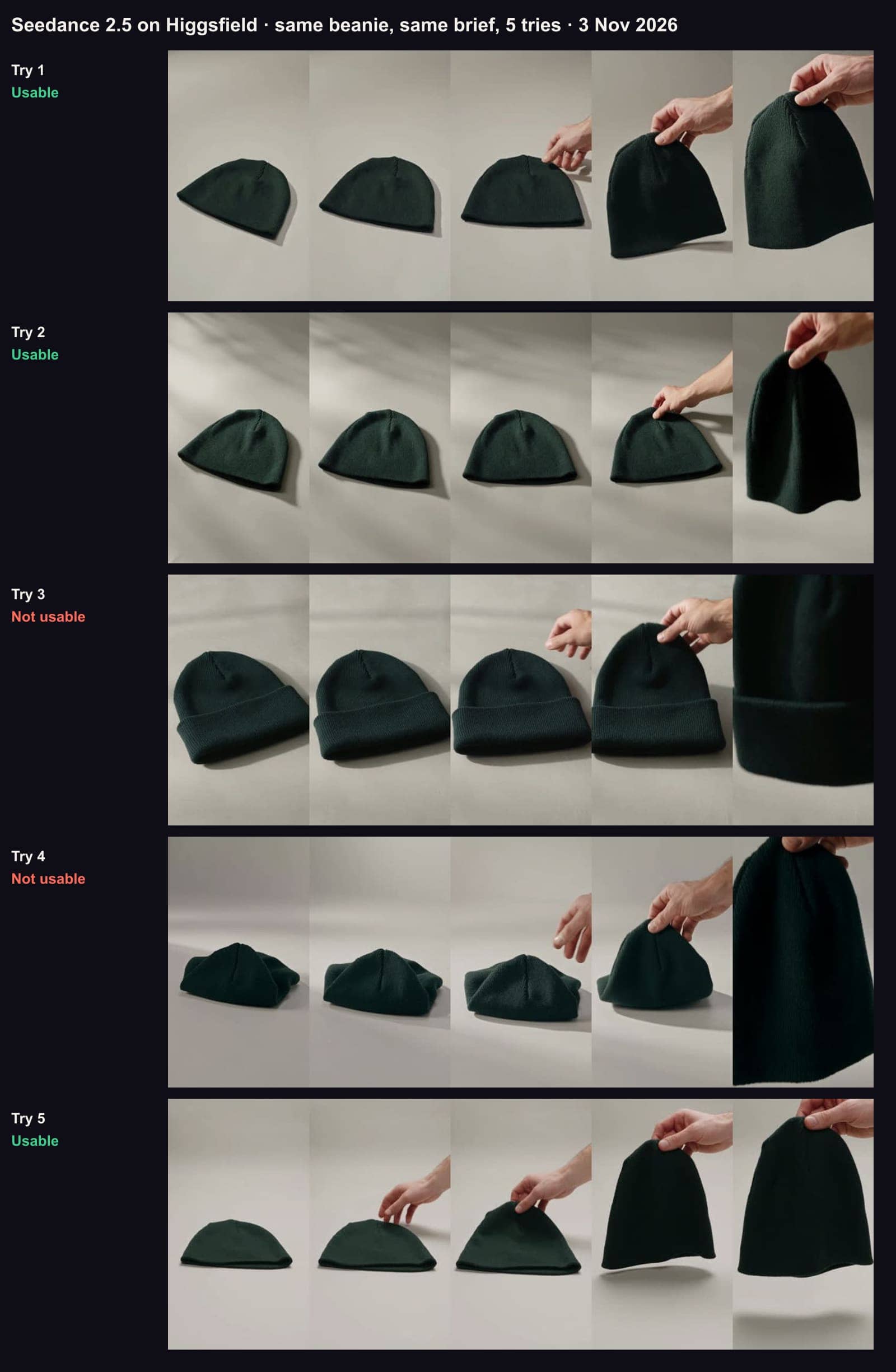
Vertical product video for an online store. The exact knit beanie from the reference photo sits on a clean light-grey studio surface, soft daylight, the camera slowly circles it, then a hand lifts it toward the camera. Keep the product identical to the photo: same colour, same knit pattern, no cuff, no logo, no added details, no text.
What came out: 3 usable clips of 5. Seedance built the vertical grey studio the brief asked for, which Kling 3.0, given the same photo as a start frame, never did. The two failures changed the product from their first frame: try 3 added a folded cuff, although the brief said "no cuff", and try 4 started as a crumpled, pinched shape. At 35 credits a try that's about 58 credits per usable clip.
Our Nov 3, 2026 brief, five tries on Seedance 2.5, frames at 0, 1.25, 2.5, 3.75 and 5 seconds, unedited. Tries 1, 2 and 5 kept the product; try 3 added a cuff, try 4 collapsed the hat. · Aliteq test, made with Seedance 2.5 on Higgsfield
November 7: a café ad from text only (1 try)
Our Nov 7, 2026 prompt, run once on Seedance 2.5 (and once on Kling 4.0)
Text-to-video, 5 s, 720p, 9:16, 35 credits
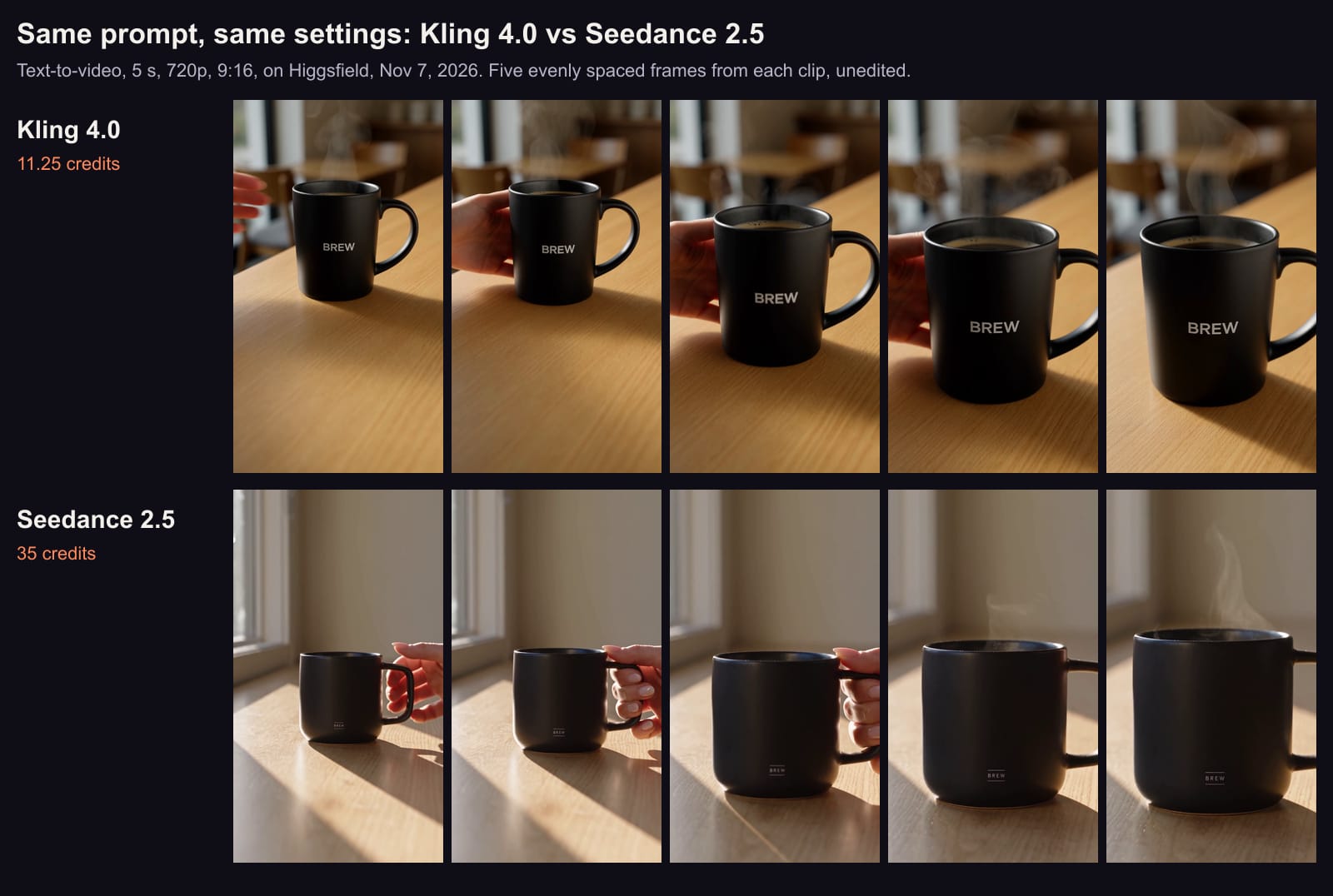
Vertical product ad. A matte black ceramic coffee mug with a small white logo that reads BREW sits on a light oak café counter. A woman's hand slides the mug toward the camera and lets go; steam rises from the coffee. Morning sunlight from a window on the left, soft shadows. Slow push-in camera. Photorealistic, shallow depth of field.
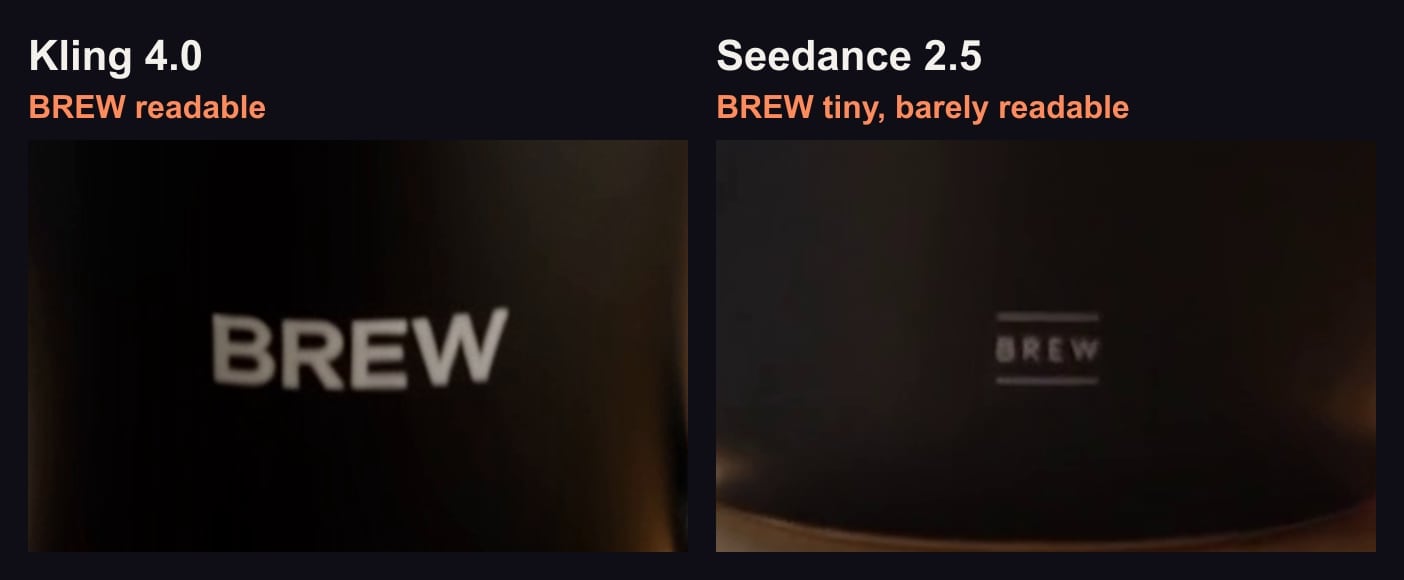
What came out: the mug kept its shape, a hand slid it forward and let go, and steam rose clearly in the last frames. But the BREW logo came back small, as asked, and barely readable at 720p, the setting was a plain room by a window rather than a café, and the light fell in hard sun stripes instead of soft shadows. The file was 720×1280 at 24 frames a second with a stereo track we hadn't asked for, and took about six minutes. Kling 4.0, from the same prompt, built the café and kept the logo readable for 11.25 credits; the frame-by-frame comparison is in Kling vs Seedance: our two tests.
Our Nov 7, 2026 prompt on Kling 4.0 (top, 11.25 credits) and Seedance 2.5 (bottom, 35 credits), one try each, text-to-video, 5 s, 720p, 9:16, unedited. · Aliteq test, made with Kling 4.0 and Seedance 2.5 on Higgsfield
The logo at 2.5 seconds in each Nov 7 clip, cropped and enlarged 2x at the same scale. Cut from our clips; nothing was generated for this image. · Frames from our own Higgsfield test clips
What ByteDance's guide says we'd change
Reading our two prompts against the guide, these are the changes it points to. They're our reading, and we haven't tested any of them:
Bind the photo by number. Our Nov 3 brief said "the reference photo"; the guide's pattern would be "the beanie in Image 1".
Say what to keep, not what to avoid. "No cuff, no logo, no added details" are visual negatives, and the guide supports negatives for subtitles and audio while asking for positive descriptions elsewhere. One of five tries added a cuff anyway. Whether a positive wording would have helped, we don't know.
Spell the logo out, or upload it. For the Nov 7 mug, the guide's text fixes are letters one by one, or the logo as a reference image. "Small" and "readable" also pull against each other at 720p.
Time the action. With Seedance 2.5 reading whole seconds, the slide, the let-go and the steam could each get a segment.
Ask for the sound. Both clips came back with a stereo track. "No BGM; generate only environmental sounds and action sounds" is the guide's wording if you want ambience only.
Check the bitrate first. Not in the guide, but it bears on small text: our Nov 7 clip came through Higgsfield's connector at the default "standard" bitrate, and Higgsfield's changelog says High gives "higher video quality at the same credit cost". The causes we checked for a clip that comes back wrong are in Seedance not working.
How do you edit or extend a clip with a prompt?
Say what changes and what doesn't. The 2.5 guide wants an edit described "from A to B", with timestamps for partial edits; its examples include "Change the man's action from drinking coffee to mopping the floor from 4-6 seconds in Video 1, and leave the rest of the content unchanged." The 2.0 guide adds a wording trap: for edits and extensions, write "Video 1" directly, not "reference Video 1", "to avoid being incorrectly identified as a reference task". An extension prompt starts with the trigger and the length: "Extend @Video 1 by 5 seconds. A bee flies in and lands on the flower." Both guides recommend MOV output for edits and extensions, to keep colour and sound continuous.
On Higgsfield, edits and extensions are separate Seedance 2.5 modes. An edit is billed by the source clip's length and keeps its aspect ratio, matching ByteDance's "locked" rule.
Which prompts get blocked?
Names and faces, mostly. ByteDance's own guide includes an example that names well-known anime characters; don't copy that habit on Higgsfield, whose help center says Seedance runs "its own separate IP check that Higgsfield can't override" and lists named characters, brand logos and living artists among the triggers (read Nov 7). Describe the look instead of the name. On BytePlus, the Seedance 2.5 launch post describes controls that restrict video from images or videos "that contain real faces". A blocked prompt usually costs nothing: Higgsfield returns credits for IP blocks "in most cases", and BytePlus charges only for videos that generate.
Which Seedance prompt should you start from?
One product shot from your own photo: our Nov 3 brief, with the photo bound as Image 1. It's the only Seedance prompt we've seen keep a product 3 times in 5. For other photo-to-video tools, see the best image-to-video AI.
A scene from text only: ByteDance's panda structure, with your subject swapped in. The best text-to-video AI compares what other models do with text alone.
A clip with dialogue: shots with {dialogue}, one language, and the sound you want named. The best AI video generator with audio covers which models speak.
ByteDance's examples. We quote the guide's prompts; we haven't run any of them, or the Seedance 2.5 Skill.
Any fix in the guide on our own prompts. The changes above are untested. Our evidence is two prompts, six clips.
Whether Higgsfield passes timestamps and symbols through unchanged. We sent plain prompts on Higgsfield; we didn't test timed segments or bracket symbols there.
Seedance 2.0 on our prompts. Both tests used Seedance 2.5.
Inline parameters outside BytePlus. BytePlus's sample puts "--ratio 16:9 --resolution 720p --duration 5" inside the prompt text; on Higgsfield and Dreamina those are settings in the panel, and we didn't test typing them into a prompt.
Verdict
Follow ByteDance's structure, then test one clip
Write Seedance prompts the way ByteDance's own guide does: references numbered and given a job, a one-line summary, then shots or whole-second timestamps, with constants and sound at the end. Use negatives for subtitles and music, and positive wording for everything else. For text that must read, spell it out or upload it as an image. Our own results say the rest: Seedance followed a product brief well (3 of 5) but drew a small logo faintly, so test one clip before you spend on many.
Best for: Anyone writing prompts for Seedance 2.5 or 2.0 on Dreamina, Higgsfield or the API
Frequently asked
Where is the official Seedance prompt guide?
On BytePlus, ByteDance's model platform: the Dreamina Seedance 2.5 prompt guide and the Dreamina Seedance 2.0 series prompt guide in the ModelArk docs, both updated Nov 7, 2026. ByteDance Seed's own Seedance 2.5 page has no prompt tips.
What is the best prompt structure for Seedance?
ByteDance's 2.5 guide: name each reference by upload order and purpose, write a one-sentence summary (subject, location, event, style, camera), describe the plot by "Shot N" or timestamps, then add what stays constant. Its 2.0 guide's checklist is "precise subject + action details + scene/environment + lighting & color tone + camera movement + visual style + image quality + constraints".
Is there a Seedance prompt generator?
ByteDance recommends its own Seedance 2.5 Skill (sd25-pe), installed with npx and used in an AI chat box as /sd25-pe followed by your prompt, per BytePlus's guide (Nov 7, 2026). We haven't run it. Sites selling a "Seedance prompt generator" on other domains aren't ByteDance's.
Does Seedance understand timestamps like 0-3s?
Seedance 2.5 does, in whole seconds, per ByteDance's guide. Seedance 2.0 "does not respond to timestamps and only responds to shot numbers", so use Shot 1, Shot 2 on 2.0.
How do I stop Seedance adding music or subtitles?
Write "No BGM; generate only environmental sounds and action sounds" or "No subtitles". ByteDance's FAQ says both can still slip through, so list every word for music and repeat the rule at the start and end, and write dialogue as "Character's line (emotion): content". On Higgsfield you can also switch Seedance's sound off at no change in price.
Do you have Seedance prompt examples that you tested?
Two, both on Higgsfield. A product-photo brief on Nov 3, 2026 gave 3 usable clips of 5 on Seedance 2.5, and a café-ad text prompt on Nov 7 gave one clip with the right motion and steam but a barely readable logo and the wrong setting. Both prompts are quoted in full above.