The monthly bill for a faceless Instagram page, job by job: visuals, motion, voiceover, editing, scheduling. Every price was read on the vendor's own page on Nov 3, 2026, along with the Instagram rules that decide whether a faceless reel can earn.
A faceless Instagram page costs $0 a month in AI tools to test and about $25 a month to run. The lean stack is Higgsfield Starter ($19 a month, 270 credits) for images and short video clips, ElevenLabs Starter ($6 a month; the page showed a $1 first month until Nov 8) for a commercially licensed voiceover, and two free tools from Instagram itself: the Edits app for editing and captions, and the built-in scheduler. A page that posts a lot of video needs more credits, about $65 a month on Higgsfield Plus. Every price below was read on the vendor's own page on Nov 3, 2026; the totals are our arithmetic.
The faceless Instagram budget in four numbers (our arithmetic, Nov 3, 2026)
$0
To test the idea
Free plans, watermarks and limits
$25
Lean stack, per month
Higgsfield Starter + ElevenLabs Starter
$65
Video-heavy stack, per month
Higgsfield Plus + ElevenLabs Starter
36
Kling 3.0 5-second 720p tries a month
Higgsfield credits on Starter
Which AI tool does which job on a faceless Instagram page?
Six jobs, and three of them are free in Instagram's own apps. Here's the split, with each price as the vendor listed it on Nov 3, 2026.
Images for posts and carousels
Tool we'd use
Higgsfield (or Kling)
Free option
Higgsfield free tier, "Limited use"; Kling Basic, watermark, not for commercial use
Paid price (monthly)
Higgsfield Starter $19 for 270 credits; Kling Standard $8.80 for 660 credits
Short motion clips for reels
Tool we'd use
Same credits as images
Free option
Edits can "Bring images to life with AI animation"
Not needed; CapCut Pro is $19.99 if you prefer CapCut
Carousels
Edits by Instagram
Free; the App Store notes say "Create carousels in Edits"
Not needed
Scheduling
The Instagram app
Free for public accounts, up to 25 posts a day, 30 days ahead
Not needed
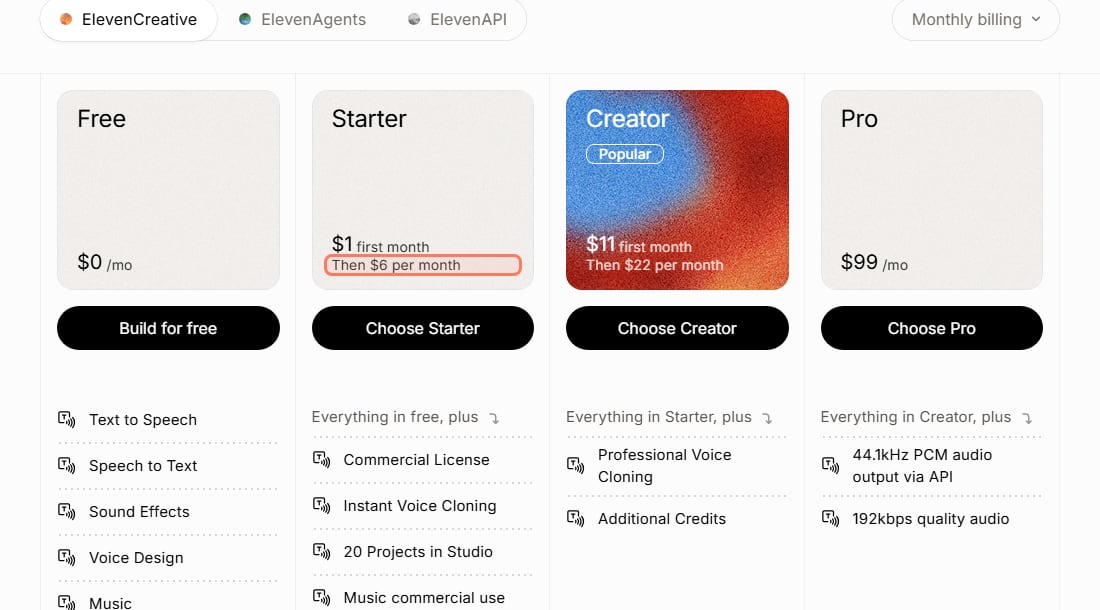
Two things follow from that table. First, the only jobs you really pay for are generating visuals and generating a voice. Second, "free" isn't the same as "usable for a business": Kling's Basic plan says its "generated content is not for commercial use", and ElevenLabs lists "Commercial License" as something Starter adds over Free. A faceless page that runs affiliate links or sells a product is commercial, so plan on paying for the tools whose output you post.
ElevenLabs' own plan cards (elevenlabs.io/pricing, read Nov 3, 2026). Starter is the cheapest plan that lists a Commercial License. · Screenshot of elevenlabs.io by aliteq
How much does a month of faceless posts cost on each stack?
About $25 for four reels and three carousels a week, if each reel uses one 5-second clip. Here are the three stacks, built only from prices on the vendors' pages on Nov 3, 2026.
Three faceless Instagram stacks (our arithmetic from vendor pages, Nov 3, 2026)
Visuals and clips
Test ($0)
Higgsfield free tier or Kling Basic
Lean
Higgsfield Starter, $19 (270 credits)
Video-heavy
Higgsfield Plus, $59 (1,200 credits)
Voiceover
Test ($0)
ElevenLabs Free (no commercial license)
Lean
ElevenLabs Starter, $6
Video-heavy
ElevenLabs Starter, $6
Editing, captions, carousels
Test ($0)
Edits (free)
Lean
Edits (free)
Video-heavy
Edits (free)
Scheduling
Test ($0)
Instagram app (free)
Lean
Instagram app (free)
Video-heavy
Instagram app (free)
Total per month
Test ($0)
$0
Lean
About $25
Video-heavy
About $65
Test ($0)
Lean
Video-heavy
Visuals and clips
Higgsfield free tier or Kling Basic
Higgsfield Starter, $19 (270 credits)
Higgsfield Plus, $59 (1,200 credits)
Voiceover
ElevenLabs Free (no commercial license)
ElevenLabs Starter, $6
ElevenLabs Starter, $6
Editing, captions, carousels
Edits (free)
Edits (free)
Edits (free)
Scheduling
Instagram app (free)
Instagram app (free)
Instagram app (free)
Total per month
$0
About $25
About $65
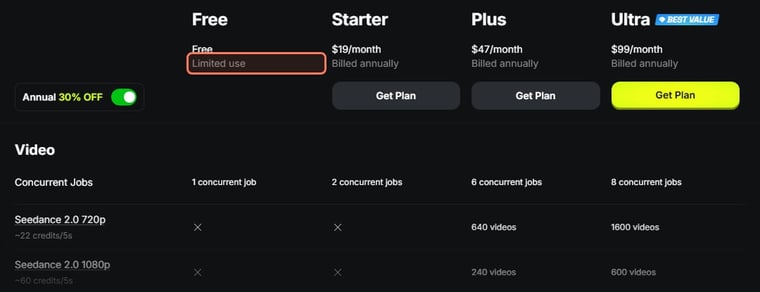
Higgsfield's Plus price drops to $47 a month if you pay for a year, and Ultra is $129 a month ($99 on annual billing) for 3,000 credits. Starter was $19 a month on both monthly and annual billing that day. Prices exclude tax; Higgsfield says taxes are "calculated at checkout".
What 270 credits actually buy
Higgsfield's pricing page lists what each generation costs in credits. On Nov 3, 2026 it listed Nano Banana Pro at 2 credits an image, Higgsfield Soul 2.0 at 0.12 credits an image, and Kling 3.0 at about 7 credits per 5-second clip at 720p. In our own product-video test the same day, Higgsfield charged 7.5 credits per 5-second 720p Kling 3.0 try. So Starter's 270 credits are roughly:
36 tries of a 5-second Kling 3.0 clip at 720p, or
135 images on Nano Banana Pro (Higgsfield's own Starter card says "135 images Nano Banana Pro"), or
2,250 images on Soul 2.0.
A realistic month mixes them. Here's one worked example, with our assumptions spelled out:
16 reels (4 a week)
Assumption
One 5-second Kling 3.0 clip each, 2 tries per kept clip, 7.5 credits a try
Credits
240
12 carousels (3 a week)
Assumption
6 slides each, 2 tries per kept slide on Soul 2.0, 0.12 credits an image
Credits
About 17
**Total**
Assumption
Credits
About 257 of 270
Assumption
Credits
16 reels (4 a week)
One 5-second Kling 3.0 clip each, 2 tries per kept clip, 7.5 credits a try
240
12 carousels (3 a week)
6 slides each, 2 tries per kept slide on Soul 2.0, 0.12 credits an image
About 17
**Total**
About 257 of 270
That fits Starter with almost nothing spare. It is also conservative: Higgsfield's Starter card listed 300 free Soul V2 & Cinema generations on Nov 3, 2026, so the carousel slides may not draw on credits at all. The weak point is the "2 tries" assumption. In our cost-per-usable-clip test, only 1 of 5 Kling 3.0 tries kept a product right. Moody background footage is more forgiving than a product that must look exact, but if you find yourself re-rolling three or four times per clip, Starter runs out around the middle of the month, and Plus is the plan that fits.
Higgsfield's plan table (higgsfield.ai/pricing, read Nov 3, 2026, annual billing shown). Monthly billing that day: Starter $19, Plus $59, Ultra $129. · Screenshot of higgsfield.ai by aliteq
A cheaper option for video: Kling directly
If you only need one video model, Kling's own Standard plan is the lowest paid entry we found: $6.99 for the first month, then $8.80 a month for 660 credits, which Kling's plan table equates to "33 720p videos". Standard also removes the watermark and allows commercial use. Add ElevenLabs Starter and the stack is about $15 a month. The trade-off is one model instead of several in one place. Our Kling free plan check covers what Kling's free and paid plans really include.
Which faceless formats can Instagram itself pay for?
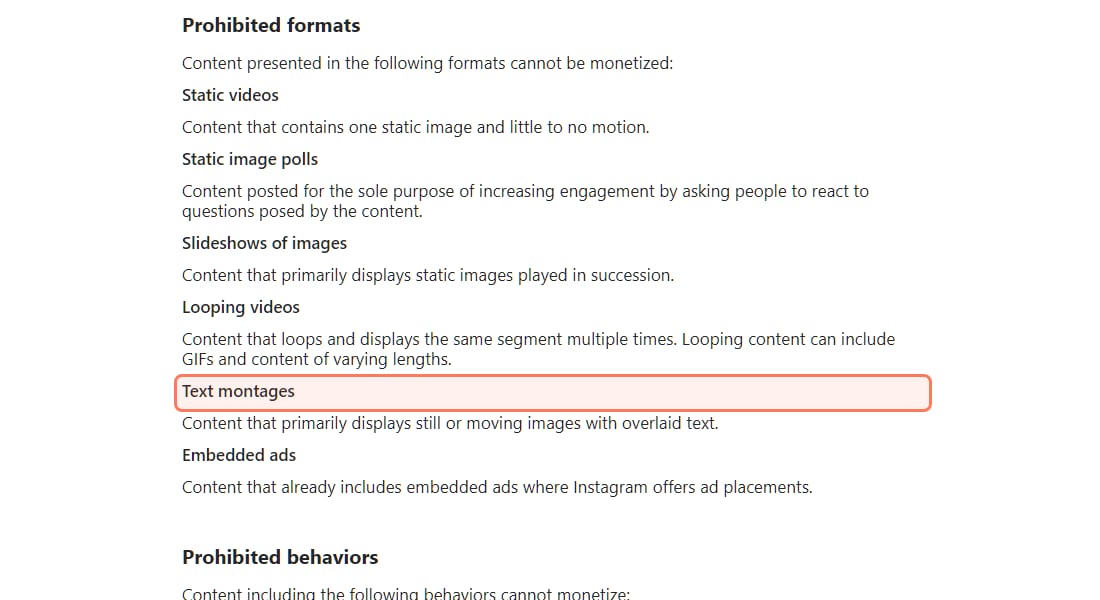
Not the most common faceless ones. Instagram's Content Monetization Policies list formats that "cannot be monetized", and they read like a list of cheap faceless content:
Text montages: "Content that primarily displays still or moving images with overlaid text."
Slideshows of images: "Content that primarily displays static images played in succession."
Static videos: "Content that contains one static image and little to no motion."
Looping videos: "Content that loops and displays the same segment multiple times."
The same page says "Content that is unoriginal or reproduced without making meaningful enhancements" can't be monetized either.
Instagram's Content Monetization Policies (help.instagram.com, read Nov 3, 2026). A quote over a background is a text montage. · Screenshot of help.instagram.com by aliteq
These rules cover Instagram's own monetization features. They don't stop you from posting a quote reel or linking to an affiliate product in your bio. But they explain why most faceless pages make their money off Instagram, from the audience rather than from views:
Affiliate links to products your niche already buys, disclosed in the post or Story.
Your own digital products, such as presets, templates and printables. The AI digital products on Etsy playbook carries over.
Brand deals, once a niche audience trusts the page.
We don't publish income figures: what a page earns depends on the niche and audience, and we haven't run one ourselves.
Do you have to label AI content on a faceless Instagram page?
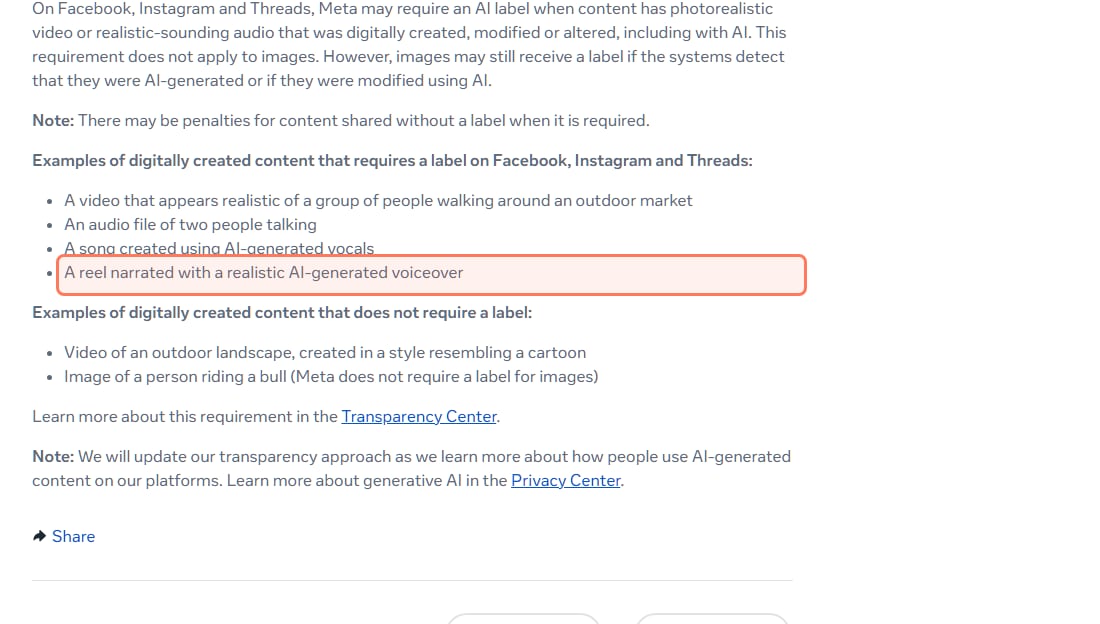
Sometimes, and voiceover reels are the main case. Meta's help page says it "may require an AI label when content has photorealistic video or realistic-sounding audio that was digitally created, modified or altered, including with AI." One of its own examples of content that needs a label is "A reel narrated with a realistic AI-generated voiceover." That's the standard faceless format with an ElevenLabs voice.
Images are different: Meta says "This requirement does not apply to images", though images "may still receive a label" if Meta's systems detect AI. And it warns: "There may be penalties for content shared without a label when it is required." Accounts that mostly post AI content can also add an "AI creator" label to their profile.
Meta Help Center, How to identify AI content on Meta products (read Nov 3, 2026). The AI voiceover reel is one of Meta's own examples. · Screenshot of meta.com by aliteq
How do you keep the bill at the lean end?
The credit bill grows with re-rolls, not with posts. Four habits keep it down:
Pick one format and one look. A locked palette and style means fewer rejected generations. Narrow niches ("cozy autumn interiors", "budget home-gym setups") are easier to keep consistent than "aesthetic content".
Batch once a week. Generate a week of visuals in one sitting, keep the ones that match, and schedule them in the Instagram app, which allows up to 25 posts a day, up to 30 days ahead, on a public account.
Use images where motion adds nothing. A Soul 2.0 image is 0.12 credits; a 5-second clip is about 60 times that. Carousels made from images are the cheap half of the feed.
Test cheap, then scale. Run a new prompt at 720p and 5 seconds before you commit credits to longer or sharper clips. If you build a recurring AI character, the consistent AI influencer guide covers the setup; Higgsfield credits explained covers how the credits work.
A sustainable cadence for one person, which the lean budget above is built on:
A cadence the lean stack can pay for
Reels
Format
4 a week
Cadence
About 240 credits a month at 2 tries per clip
Carousels
Format
3 a week
Cadence
About 17 credits a month on Soul 2.0
Stories
Format
Most days
Cadence
Reuse feed visuals; no new credits
Batch session
Format
1 a week
Cadence
Schedule the week in the Instagram app
Format
Cadence
Credit cost (Higgsfield Starter)
Reels
4 a week
About 240 credits a month at 2 tries per clip
Carousels
3 a week
About 17 credits a month on Soul 2.0
Stories
Most days
Reuse feed visuals; no new credits
Batch session
1 a week
Schedule the week in the Instagram app
Pros
+ Testable for $0 with Instagram's own free editing and scheduling
+ A lean paid stack is about $25 a month at Nov 3, 2026 prices
+ No camera, no face, no filming
+ The audience can be monetized several ways off Instagram
Cons
− Free generator plans carry watermarks or exclude commercial use
− Re-rolls can double the credit bill
− Instagram won't monetize text montages, image slideshows or static videos
− Reels with a realistic AI voice may need an AI label
7/ 10
Verdict
About $25 a month runs a lean faceless page
Test the format for $0 with Edits, Instagram's scheduler and free generator credits. Once the page posts for a business reason, pay for the two jobs that matter, visuals and voice, which is about $25 a month at Nov 3, 2026 prices, and move to a bigger credit plan only when re-rolls, not posting volume, push you past it.
Best for: Anyone budgeting a faceless Instagram page before buying tools
How much does it cost to run a faceless Instagram page with AI?
About $25 a month for a lean setup and about $65 for a video-heavy one, by our arithmetic from vendor prices read Nov 3, 2026: Higgsfield Starter ($19, 270 credits) or Plus ($59, 1,200 credits), plus ElevenLabs Starter ($6, commercial license). Editing, captions and scheduling are free in Instagram's Edits app and the Instagram app.
Can you run a faceless Instagram page for free?
You can test one for free. Edits and Instagram's scheduler are free, and ElevenLabs, Kling and Higgsfield have free tiers. But Kling's Basic plan isn't for commercial use and adds a watermark, and ElevenLabs Free has no commercial license, so a page that sells anything should pay for the tools whose output it posts.
Which AI tool is best for faceless Instagram reels?
It depends on the job. A generator such as Higgsfield or Kling makes the images and short clips, ElevenLabs makes the voiceover, and Edits by Instagram handles editing and auto captions for free. Higgsfield puts several video and image models on one credit plan; Kling's own Standard plan is cheaper if you only need Kling.
Does Instagram pay faceless pages?
Not for the most common faceless formats. Instagram's Content Monetization Policies say text montages, slideshows of images, static videos and looping videos cannot be monetized. Faceless pages usually earn off Instagram, through affiliate links, their own digital products, brand deals or a store.
Do I have to label AI reels on Instagram?
Sometimes. Meta says it may require an AI label on photorealistic video or realistic-sounding audio made with AI, and lists "A reel narrated with a realistic AI-generated voiceover" as an example. It says the requirement does not apply to images, though images may still be labeled automatically.
How far ahead can I schedule Instagram posts for free?
Instagram's Help Center (read Nov 3, 2026) says a public account can schedule up to 25 posts a day, up to 30 days in advance, from the Instagram app, including reels, photos and carousels.
The short version: the AI bill for a faceless Instagram page is small, and it's driven by re-rolls, not posts. The bigger costs are the rules. Label realistic AI voices, and don't expect Instagram itself to pay for quote reels or slideshows. For the full menu of ways the same tools earn, see AI Money; if long-form video suits you better, the faceless YouTube playbook runs on the same tools.