Without a strong graphics card you have three real options: a free app with limits, a paid app at about 14 cents an image on Higgsfield Starter, or a rented 24 GB GPU from 9 cents an hour on Vast. What each costs, checked on the vendors' own pages Nov 3, 2026, and which one fits you.
Some links on this page are referral links: we may earn a commission, at no cost to you.
Share
The cheapest way to make AI images without a good GPU is a free app, if you can live with its limits. Bing Image Creator is free with a Microsoft account and gives 15 fast images a day; Higgsfield's free account works too, but every image carries a watermark. Once you pay, a hosted app is the easiest per image (Higgsfield Starter: $19 a month for 270 credits, and a Nano Banana Pro image costs 2 credits, about $0.14). A rented GPU is the cheapest per hour (an RTX 3090 from $0.09 an hour on Vast, $0.50 on Runpod), but only if you're willing to set up and run ComfyUI yourself. Every number here was read on the vendor's own page on Nov 3, 2026.
The four numbers that decide it (vendor pages, Nov 3, 2026)
15
Free fast images a day
Bing Image Creator, then standard speed
$0.14
Per image on a paid app
Higgsfield Starter, Nano Banana Pro
$0.09
Per hour on Vast
RTX 3090 24 GB, lowest listing
$0.50
Per hour on Runpod
RTX 3090 24 GB, Secure Cloud list price
App or rented GPU: which is cheaper for AI images?
It depends on how many images you make and whether you'll set things up yourself. Here are the three paths side by side.
Free app (Bing Image Creator, Higgsfield free)
What it costs (Nov 3, 2026)
$0, with daily limits or a watermark
Setup
None
Best for
Trying it out, personal use
Paid app (Higgsfield Starter)
What it costs (Nov 3, 2026)
$19 billed monthly, 270 credits; Nano Banana Pro 2 credits an image (about $0.14)
Setup
None
Best for
Good images fast, no software to manage
Rented GPU + ComfyUI (Vast, Runpod)
What it costs (Nov 3, 2026)
RTX 3090 from $0.09/hr on Vast (median $0.20), $0.50/hr on Runpod
Setup
You install and run it
Best for
High volume, custom workflows, your own models
What it costs (Nov 3, 2026)
Setup
Best for
Free app (Bing Image Creator, Higgsfield free)
$0, with daily limits or a watermark
None
Trying it out, personal use
Paid app (Higgsfield Starter)
$19 billed monthly, 270 credits; Nano Banana Pro 2 credits an image (about $0.14)
None
Good images fast, no software to manage
Rented GPU + ComfyUI (Vast, Runpod)
RTX 3090 from $0.09/hr on Vast (median $0.20), $0.50/hr on Runpod
You install and run it
High volume, custom workflows, your own models
The honest comparison: one hour on the cheapest Vast RTX 3090 costs less than one Nano Banana Pro image on Higgsfield Starter. But the rented GPU runs open models such as Flux or Stable Diffusion, not the same model, and the hour only pays off if you spend it generating rather than setting up. If you'll make a handful of images a week, an app is cheaper once you count your time. If you'll make hundreds in a sitting with your own workflow, renting wins.
How much does a free AI image app really give you?
Enough to learn, with limits that matter if you want to sell what you make.
Bing Image Creator. Microsoft's help page says it's "free for everyone with a Microsoft Account (MSA)!" and that "Every day, you'll get a total of 15 free fast image creations". After that you can "continue creating for free at our standard speed if you don't mind waiting", up to 200 prompts in a 24-hour period. We didn't find commercial-use terms on that help page, so check Microsoft's terms before you use the images in a business.
Higgsfield's free account. Higgsfield's pricing table lists the Free plan as "Limited use" and shows commercial use as not included. Its help center is blunt about the watermark: "On a free account, every generation carries a Higgsfield watermark." Upgrading doesn't clean old files; you regenerate them. Our is Higgsfield free page and the free Higgsfield credits guide cover what new accounts get.
What does a paid AI image app cost per image?
On Higgsfield's Starter plan, about $0.14 per Nano Banana Pro image, and under a cent per image on Higgsfield's own Soul 2.0 model. For eight other image models priced per image, from Google's cheaper Nano Banana 2.1 to the open FLUX and Qwen-Image models you can run yourself, see Nano Banana Pro alternatives.
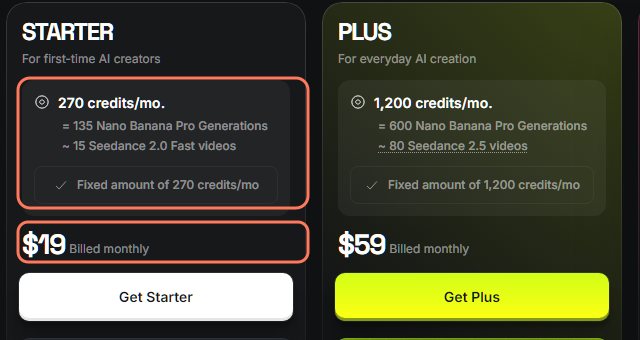
Higgsfield's pricing page, monthly billing, read Nov 3, 2026. The Starter credits and price are outlined. · Screenshot of higgsfield.ai by aliteq
Starter: $19 billed monthly for 270 credits a month, which Higgsfield equates to "135 Nano Banana Pro Generations". That's $19 ÷ 135 = about $0.14 per image.
Plus: $59 billed monthly for 1,200 credits, or 600 Nano Banana Pro images, about $0.10 each.
Cheaper models cost fewer credits. The same page lists Higgsfield Soul 2.0 at 0.12 credits an image, Nano Banana at 1 credit and FLUX.2 Pro at 1 credit. At Starter's rate (about $0.07 a credit), a Soul 2.0 image is under one cent.
What you get for the money: no watermark on paid plans, commercial use, and nothing to install. The trade-off is less low-level control than your own ComfyUI workflow.
Credit costs change often, so read the cost the app shows before you press Generate. Our Higgsfield credits explained page tracks them.
How much does it cost to rent a GPU for AI images?
A 24 GB card is the comfortable size for Flux and ComfyUI workflows, and it's cheap by the hour.
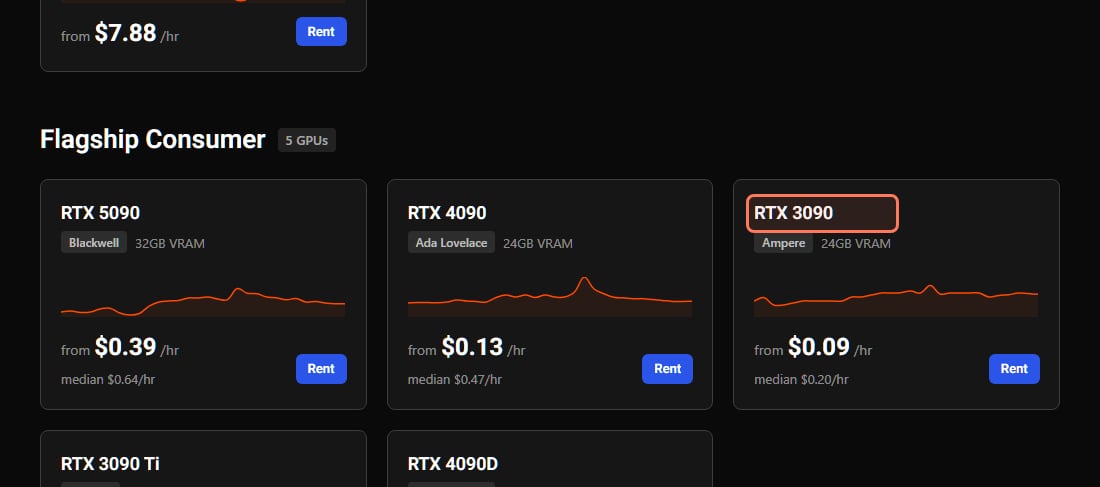
Vast's pricing page, read Nov 3, 2026. The RTX 3090 is outlined. "From" is the lowest current listing; the median is what a typical machine costs. · Screenshot of vast.ai by aliteq
Vast: an RTX 3090 from $0.09 an hour (median $0.20), an RTX 4090 from $0.13 (median $0.47). Vast is a marketplace, so the price, reliability and download speed vary by host.
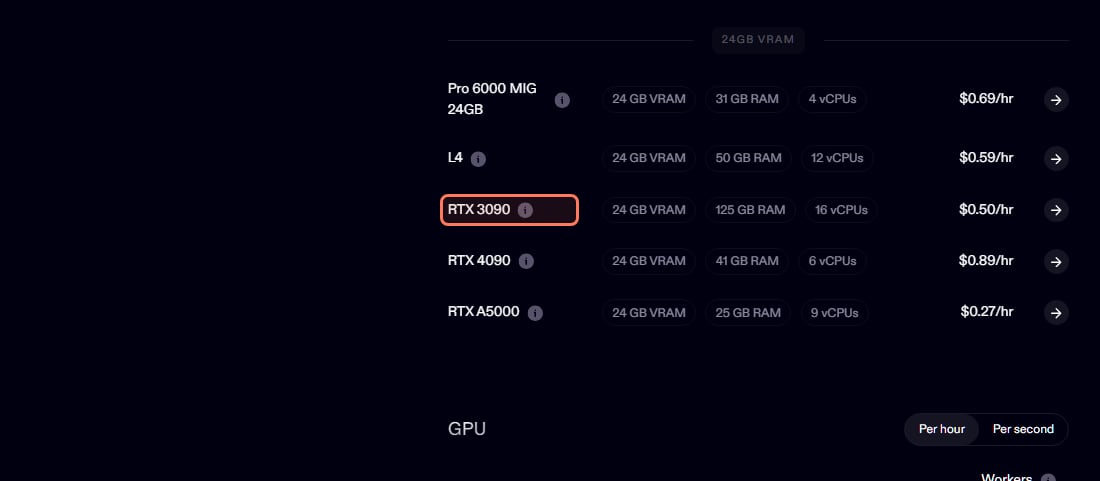
Runpod: an RTX 3090 at $0.50 an hour, an RTX 4090 at $0.89 and an RTX A5000 (also 24 GB) at $0.27, at fixed list prices.
Our live reading: at 20:20 UTC on Nov 3, 2026, our hourly snapshot had the cheapest on-demand RTX 3090 on Vast at $0.0956. Today's prices are on our cloud GPU page.
Runpod's pricing page, 24 GB cards, read Nov 3, 2026. The RTX 3090 row is outlined. · Screenshot of runpod.io by aliteq
The software is free: ComfyUI is open source under the GPL-3.0 licence. Check the licence of each model you download before you use the images commercially. Not sure a model fits a card? Check it in our VRAM calculator.
What are the hidden costs of renting a GPU?
Setup time, prepaid credit, and storage that keeps billing.
Prepaid credit. Vast's billing docs say: "Vast requires pre-payment of credits for GPU rentals."
Storage while stopped. The same page says: "Stopping an instance does not avoid storage costs." A stopped machine with your models on its disk still costs money until you delete it.
Setup time is paid time. You pay the hourly rate while the instance boots, ComfyUI installs and the model downloads. Community templates make this much faster, and our cloud GPU for ComfyUI guide walks through it.
A learning curve. ComfyUI is a node graph. If you've never used it, expect your first session to be learning, not generating.
So which should you pick?
You want to try AI images today, for free: a free app. Accept the daily limit or the watermark.
You want good images for a shop, social posts or a client, without managing software: a paid app. Read the credit cost per model and pick the cheapest model that looks right.
You'll make hundreds of images, want custom workflows, LoRAs or your own models, and you don't mind setup: rent a 24 GB GPU and run ComfyUI. Shut it down after each session.
Plenty of people start on an app to learn what they want, then rent a GPU once they're generating at volume.
Quick answers
Can I make AI images without a good GPU?
Yes. Use an app that runs the GPU for you (free ones exist, such as Bing Image Creator, with 15 fast creations a day per Microsoft's help page on Nov 3, 2026), or rent a cloud GPU by the hour and run free tools like ComfyUI yourself. Neither needs you to buy a graphics card.
Is it cheaper to rent a GPU or pay for an AI image app?
Per hour, renting is cheaper: an RTX 3090 started at $0.09 an hour on Vast on Nov 3, 2026, less than one Nano Banana Pro image on Higgsfield Starter (about $0.14). Per image, it depends on how many images you make in that hour and how long setup takes. For a few images a week, an app is usually cheaper once you count your time; for hundreds in a session, renting wins.
What's the cheapest GPU to rent for AI images?
A 24 GB card such as an RTX 3090. On Nov 3, 2026 Vast listed it from $0.09 an hour (median $0.20) and Runpod at $0.50; Runpod's 24 GB RTX A5000 was $0.27. You don't need an H100 for image generation. Live prices are on aliteq.com/cloud-gpu.
Is there a completely free way to make AI images?
Yes, with limits. Bing Image Creator is free with a Microsoft account (15 fast images a day, then slower standard speed, up to 200 prompts in 24 hours). A free Higgsfield account lets you try it ("Limited use" on its pricing page), but every image has a watermark and the plan doesn't include commercial use.
Do I pay for a rented GPU when it's stopped?
On Vast, yes, for storage. Vast's billing docs say "Stopping an instance does not avoid storage costs." Delete the instance when you're finished if you don't need the files on it.
Do I need technical skills to make AI images?
Not for an app: you type a prompt in a browser. Running ComfyUI on a rented GPU takes some setup, though ready-made templates help. Start with an app if you want zero setup.