Kling 3.0 on Higgsfield is our pick for listing clips: it animates your real photo as the first frame instead of redrawing the room, for about $0.37 a room on monthly Plus. Veo 3.1 in Google Flow is the cheapest route. Plus the California, MLS and NAR rules that follow staged photos into video.
Some links on this page are referral links: we may earn a commission, at no cost to you.
Share
The best AI video generator for real estate is Kling 3.0 on Higgsfield, because used with your listing photo as its start frame it animates the room you photographed instead of inventing a new one. A 5-second clip at 720p without sound costs 7.5 credits, about $0.37 on monthly Plus, so a 10-room listing is under $4 before retakes. If you already pay for Google AI Pro, Veo 3.1 Lite in Google Flow is cheaper per clip and makes both wide (16:9) and vertical (9:16) video. Either way, the photo rules follow you into video: California law and several MLSs require a disclosure on digitally altered listing images, and none of the rules we read exempts video. Prices and rules checked on vendor, MLS and statute pages through November 8, 2026. This isn't legal advice.
Listing photos to video: what decides it (vendor pages and our test, Nov 3 to Nov 8, 2026)
Kling 3.0 on Higgsfield, no sound
Keeps the room as photographed?
Yes, start frame; kept the photo's scene in 5 of 5 tries in our test
Wide and vertical
16:9, 9:16, 1:1
One clip
7.5 credits per 5 s, about $0.37 (Plus monthly)
10-room listing, one shape
75 credits, about $3.69
Veo 3.1 Lite in Google Flow
Keeps the room as photographed?
First and last frame supported; not tested by us
Wide and vertical
16:9, 9:16
One clip
10 Flow credits per clip up to 8 s, about $0.20 (AI Pro)
10-room listing, one shape
100 Flow credits, about $2.00
Veo 3.1 Fast in Google Flow
Keeps the room as photographed?
First and last frame supported; not tested by us
Wide and vertical
16:9, 9:16
One clip
20 Flow credits, about $0.40 (AI Pro)
10-room listing, one shape
200 Flow credits, about $4.00
Wan 3.0 on Higgsfield
Keeps the room as photographed?
First and last frame supported; not tested by us
Wide and vertical
16:9, 9:16, 1:1, 4:3, 3:4
One clip
9 credits per 5 s, about $0.44 (Plus monthly)
10-room listing, one shape
90 credits, about $4.43
Seedance 2.5 on Higgsfield
Keeps the room as photographed?
No: as a reference it builds a new scene
Wide and vertical
16:9, 9:16 and five more
One clip
35 credits, about $1.72 (Plus monthly)
10-room listing, one shape
350 credits, about $17.22
Keeps the room as photographed?
Wide and vertical
One clip
10-room listing, one shape
Kling 3.0 on Higgsfield, no sound
Yes, start frame; kept the photo's scene in 5 of 5 tries in our test
16:9, 9:16, 1:1
7.5 credits per 5 s, about $0.37 (Plus monthly)
75 credits, about $3.69
Veo 3.1 Lite in Google Flow
First and last frame supported; not tested by us
16:9, 9:16
10 Flow credits per clip up to 8 s, about $0.20 (AI Pro)
100 Flow credits, about $2.00
Veo 3.1 Fast in Google Flow
First and last frame supported; not tested by us
16:9, 9:16
20 Flow credits, about $0.40 (AI Pro)
200 Flow credits, about $4.00
Wan 3.0 on Higgsfield
First and last frame supported; not tested by us
16:9, 9:16, 1:1, 4:3, 3:4
9 credits per 5 s, about $0.44 (Plus monthly)
90 credits, about $4.43
Seedance 2.5 on Higgsfield
No: as a reference it builds a new scene
16:9, 9:16 and five more
35 credits, about $1.72 (Plus monthly)
350 credits, about $17.22
Dollar figures are our arithmetic, assuming you use every credit: Higgsfield Plus is $59 for 1,200 credits a month; Google AI Pro is $19.99 for 1,000 Flow credits. Making both a 16:9 and a 9:16 version doubles the listing figure. Retakes are on top. Our best AI video generator hub compares the models for other jobs.
Why a start-frame model suits a listing
Because a listing has to show the property that's for sale. Image-to-video models take your photo in one of two ways. As a start frame, the photo is the first frame and the model only adds motion: a slow push-in, a pan across the kitchen. As a reference, the model looks at the photo and draws a new scene, which is great for an ad and a liability for a listing.
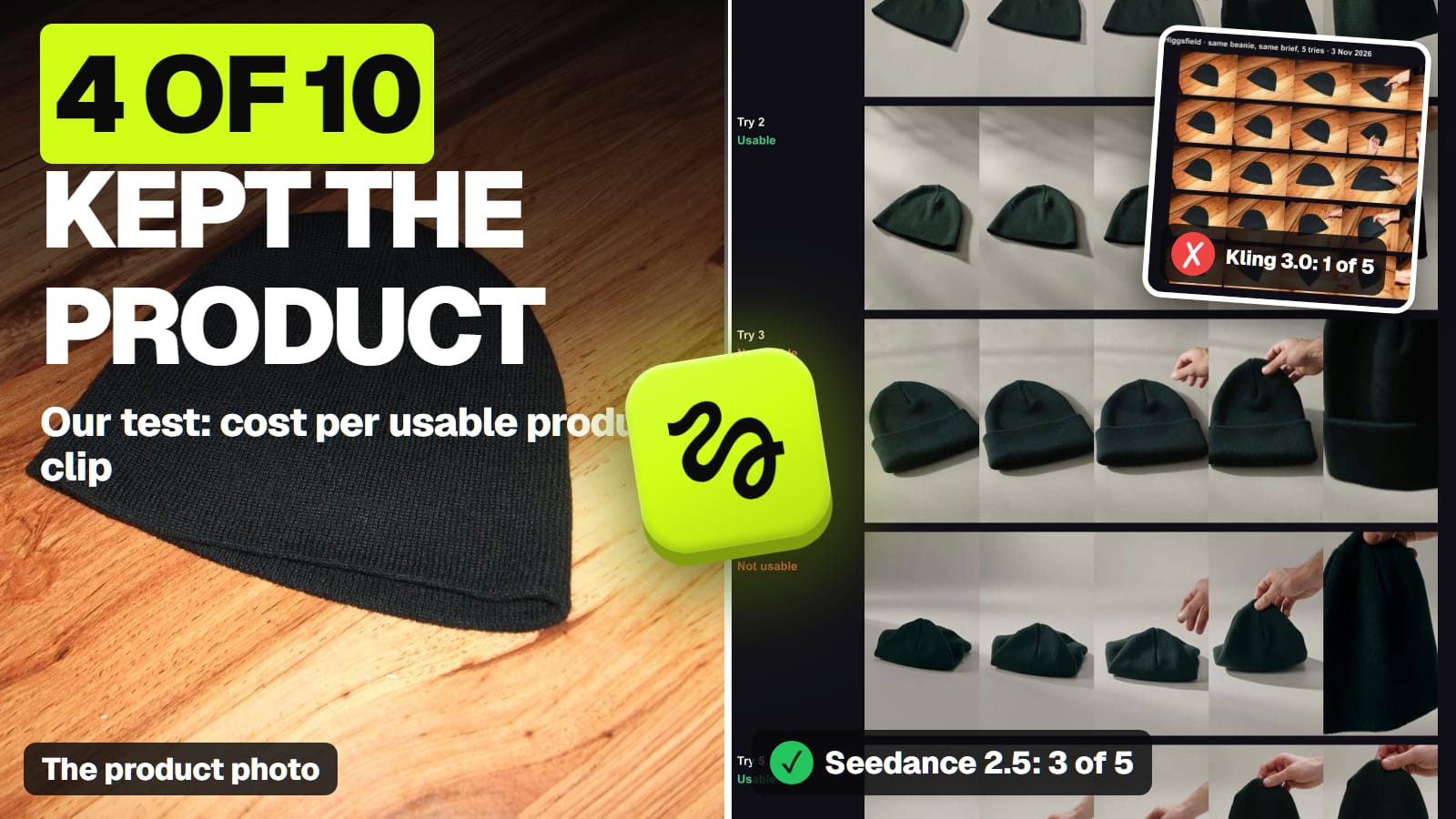
We saw the difference ourselves. In our 10-clip product video test on November 3, Kling 3.0, given the photo as its start frame, kept the photo's wooden table, flash lighting and landscape shape in all five tries, even though our brief asked for a new grey studio and a vertical frame. Seedance 2.5, given the same photo as a reference, built the new studio. For a store ad, Kling's stubbornness was a problem. For a living room, it's the point.
Two practical consequences:
Crop first for vertical. A start-frame clip keeps the photo's shape (xAI's docs say the same of Grok Imagine: the clip "always matches" the still's aspect ratio). For a 9:16 Reel or TikTok, crop the listing photo to vertical before you animate it. Under California's statute, cropping and straightening are among the "common photo editing adjustments" that don't count as altering the image.
Ask for camera moves, not changes. Prompt "slow push-in, no other changes", and check every clip for things the model added: a window, a lamp, a different view outside. Those are exactly the edits the rules below call alterations.
What do the disclosure rules say about AI listing video?
Every rule we found is written for images. None of them carves out video, so the safe reading is that a frame showing virtual staging or an altered feature needs the same label in a video.
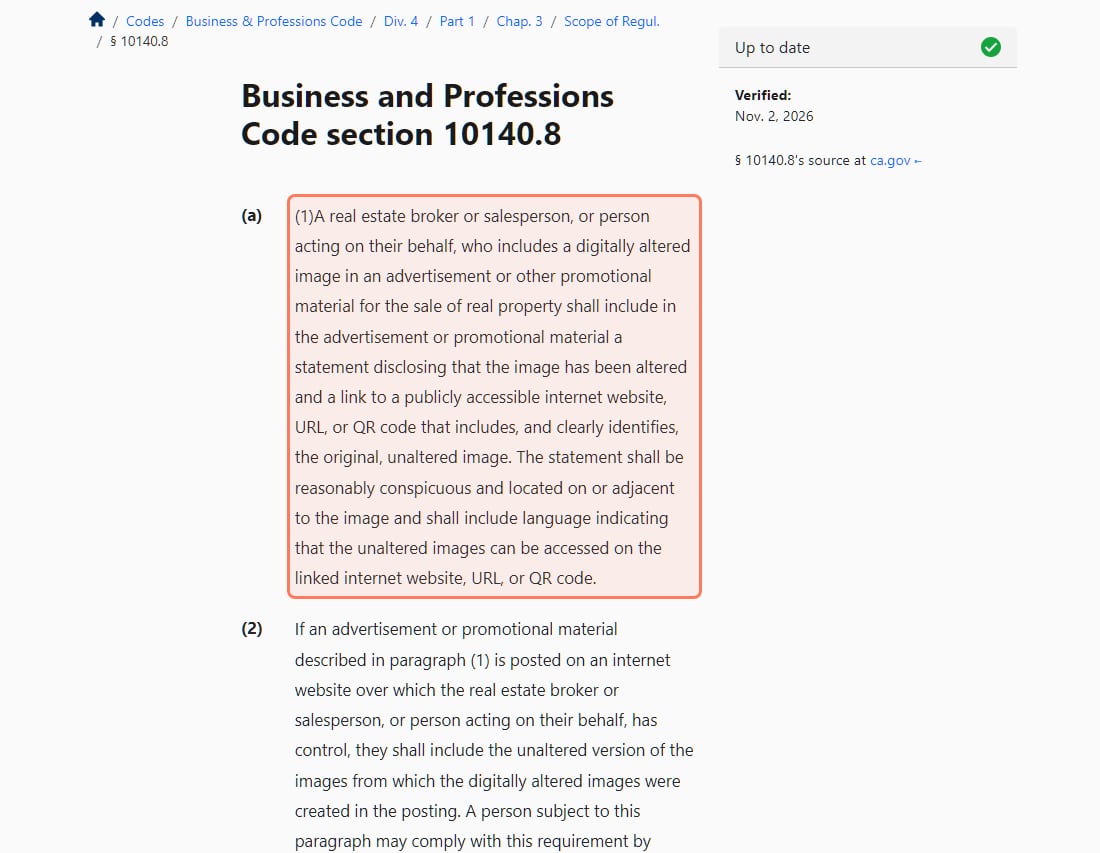
Section 10140.8 as published by California.Public.Law, screenshot from November 3, 2026; the text was unchanged when we re-read it on November 8, 2026. · Screenshot of california.public.law by aliteq
California (state law). A broker, salesperson "or person acting on their behalf" who uses a "digitally altered image" in "an advertisement or other promotional material for the sale of real property" must include a statement that the image was altered and a link, URL or QR code to the original, unaltered image, placed on or next to the image. Altered means adding, removing or changing elements such as furniture, flooring, paint colour, landscaping or what's visible from the property. Lighting, white balance, colour correction, cropping, straightening and exposure fixes don't count. The statute doesn't mention video; a listing video is promotional material, so we'd treat altered frames in it the same way. San Diego's MLS gives January 1, 2026 as the effective date.
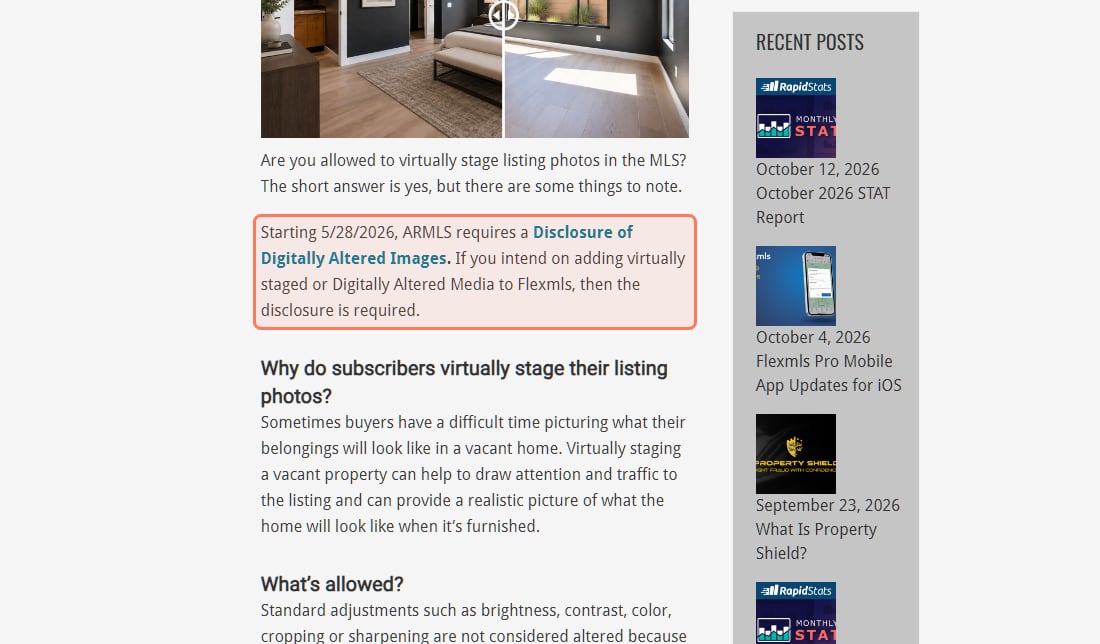
ARMLS (Arizona). "Starting 5/28/2026, ARMLS requires a Disclosure of Digitally Altered Images" when you add virtually staged or digitally altered media to Flexmls. The page talks about photos; it doesn't say whether video is covered.
NorthstarMLS. Its proposed guidelines (July 10, 2026) ask for the disclosure in the photo caption, filename or on the photo, at least one unaltered "Before" image for each staged room, and prohibit "alterations that change or hide permanent or structural elements of the property". They cover still photos only.
NAR members everywhere. Article 12 of the 2026 Code of Ethics says REALTORS® "shall present a true picture in their advertising, marketing, and other representations", and Standard of Practice 12-10 names "use of misleading images".
ARMLS's own page, screenshot from November 3, 2026; the same wording was live when we re-read it on November 8, 2026. · Screenshot of armls.com by aliteq
If your MLS isn't one of these, look up its rules before the listing goes live; many haven't published an AI rule, and the NAR line applies either way if you're a member. The full photo-by-photo walk-through of these rules is in what real estate agents must disclose about AI staging.
What does a listing video cost?
Take a 10-room listing, one 5-second clip per room, one shape:
A 10-room listing, one 5-second clip per room, one try each (our arithmetic, Nov 3 to Nov 8, 2026)
Veo 3.1 Lite in Flow, Google AI Proabout $2.00
10 Flow credits a clip, clips up to 8 s
Kling 3.0 on Higgsfield, Ultra billed yearlyabout $2.48
7.5 credits a clip at $0.033
Kling 3.0 on Higgsfield, Plus monthlyabout $3.69
7.5 credits a clip at $0.049
Veo 3.1 Fast in Flow, Google AI Proabout $4.00
Wan 3.0 on Higgsfield, Plus monthlyabout $4.43
9 credits a clip at 720p
Add these before you budget:
Both shapes. A wide clip for the portal or YouTube and a vertical one for Reels and TikTok doubles the bill, about $7.38 on Kling 3.0 and monthly Plus.
Retakes. Rooms move less than a product in a hand, but a model can still add or change something. If you redo every other clip, add half again.
Sound. Kling 3.0 is 10 credits with sound on. Most listing videos get music in the editor, so render silent.
Google's free credits. Flow's credits page says you get 50 credits a day "with or without a subscription", while its getting-started page says you need a Google AI plan; is Veo 3 free goes through the contradiction. Lite and Fast prices are listed for subscribers.
Virtual staging itself happens on the still photos before any of this. Our AI listing photos guide for solo agents covers staging, sky and twilight edits, and the label each one needs.
Can you use AI listing video commercially?
On Higgsfield's paid plans, yes: its Terms of Use (s.4.4) don't restrict commercial use of outputs. Its pricing table lists commercial use as not included on Free, and free files carry a visible watermark, so use a paid plan for listings. The same section lets Higgsfield use your uploads to train its models unless you're on Enterprise; for a seller's home that's already on the market, that rarely matters, but ask the seller before you upload photos of an off-market property. Google's Flow help says Google won't claim ownership of what you make. More on Higgsfield's terms in Higgsfield commercial use.
Which one should a listing agent use?
Short clips from your own photos, a few listings a month: Kling 3.0 on Higgsfield, photo as the start frame, sound off.
You already pay for Google AI Pro: Veo 3.1 Lite in Flow, wide or vertical, about $0.20 a clip.
Virtually staged rooms in the video: stage the still first, label it, keep the unaltered original linked, and keep the label on screen while that room is shown.
A room that needs a new look: don't generate it in video. Stage the photo, disclose it, and keep permanent features exactly as they are.
The best AI video generator for other jobs
Each page below answers one job from the same checked facts. All of them, grouped by job, are in our best AI video generator guide.
Best image to video AI: Seedance 2.5 to put your photo's subject in a new scene; Kling 3.0 when the photo is already the first frame.
Best AI video generator for ads: A paid Higgsfield plan: its terms allow ads and client handover; Kling 3.0 tests a 5-second hook in any shape for 10 credits.
Room clips specifically. Our tests used a product and a mug, not interiors. We haven't run Kling, Veo or Wan on listing photos.
Whether video is covered. California's statute, ARMLS and NorthstarMLS speak of images and photos; none addresses video directly.
Every MLS. We read three MLS pages. Yours may differ or have no written AI rule.
Kling 3.0's shapes on kling.ai. We have Higgsfield's list (16:9, 9:16, 1:1); Kling's own pages we read don't list them.
Flow's free tier. Google's own pages disagree on whether the 50 daily credits need a plan.
Verdict
Kling 3.0, start frame, labelled
For listing video made from your own photos, Kling 3.0 on Higgsfield is the pick: as a start-frame model it keeps the room you photographed, costs about $0.37 a room on monthly Plus, and makes 16:9, 9:16 and 1:1. Veo 3.1 Lite in Google Flow is cheaper per clip if you already pay for Google AI Pro. Crop for vertical before you animate, ask only for camera moves, and carry every staging label into the video.
Best for: Listing agents and real estate photographers turning listing photos into short videos
Questions about AI video for real estate
What is the best AI video generator for real estate listings?
Kling 3.0 on Higgsfield, used with your listing photo as the start frame, because it animates the room you photographed. It costs 7.5 credits per 5-second clip without sound, about $0.37 on monthly Plus (Nov 2026). Veo 3.1 Lite in Google Flow is cheaper per clip on Google AI Pro.
Can I turn listing photos into a video with AI?
Yes. Image-to-video models animate a still with camera motion. Use the photo as the start frame, ask for a slow push-in or pan with no other changes, and check every clip for anything the model added.
Do I have to disclose AI in a listing video?
If the video shows a digitally altered image, such as virtual staging, the rules we read point to yes. California's Business and Professions Code 10140.8 requires a statement and a link to the unaltered image for altered images in promotional material; ARMLS requires a Disclosure of Digitally Altered Images. Neither mentions video, so check your MLS.
How much does an AI listing video cost?
About $2.00 to $4.43 for a 10-room listing with one 5-second clip per room, by our arithmetic from Nov 2026 prices: Veo 3.1 Lite in Flow is cheapest on Google AI Pro, Kling 3.0 on Higgsfield is about $3.69 on monthly Plus. Both shapes double it; retakes add more.
How do I make a vertical listing video for Reels and TikTok?
Crop the listing photo to 9:16 before you animate it, because start-frame clips keep the photo's shape. California's statute counts cropping as a common adjustment, not an alteration. Kling 3.0, Veo 3.1 and Wan 3.0 all list 9:16.