Kling 4.0 on Higgsfield is our pick. Its maker documents animation styles, tells you how to prompt them, takes up to 10 reference images of your character and runs to 30 seconds. Seedance 2.5 takes more references but says nothing about style. And no franchise characters: Higgsfield blocks them.
Some links on this page are referral links: we may earn a commission, at no cost to you.
Share
The best AI anime video generator is Kling 4.0 on Higgsfield, because it's the only flagship model whose maker documents animation styles and explains how to prompt for them, and it holds a character across shots from up to 10 reference images. None of the big video models is built for anime; Higgsfield's catalogue has no model labelled for it. Anime is a style you prompt for, and the reliable way to keep it is to start from your own character art. Kling 4.0 clips run up to 30 seconds and cost 11.25 credits for 5 seconds at 720p on Higgsfield. One hard rule: franchise characters get blocked. Checked on the makers' and Higgsfield's own pages on November 8, 2026.
Anime-style AI video: what each maker documents (read Nov 8, 2026)
Kling 4.0
Stylised output in the maker's docs
Yes: animation, fantasy, pixel art, felt listed
Your art goes in as
Start frame, up to 10 reference images, 10 keyframes
Longest clip
30 s
5 s at 720p on Higgsfield
11.25 credits (discounted)
Seedance 2.5
Stylised output in the maker's docs
Not mentioned on ByteDance's page
Your art goes in as
Start and end frame, up to 30 reference images
Longest clip
30 s
5 s at 720p on Higgsfield
35 credits
Kling 3.0
Stylised output in the maker's docs
Not on the pages we read
Your art goes in as
Start and end frame; up to 7 references via Kling 3.0 Omni
Longest clip
15 s
5 s at 720p on Higgsfield
7.5 credits, no sound
Grok Imagine 1.5
Stylised output in the maker's docs
Not on the pages we read
Your art goes in as
Start frame, up to 14 reference images (Lite takes none)
Longest clip
15 s
5 s at 720p on Higgsfield
22.5 credits; Lite 5
Gemini Omni Flash
Stylised output in the maker's docs
Not on the pages we read
Your art goes in as
Up to 6 reference images for character consistency
Longest clip
15 s on the API
5 s at 720p on Higgsfield
Not recorded
Wan 2.2 (open weights)
Stylised output in the maker's docs
README: no style list; Wan-Animate animates a character image
Your art goes in as
Character image plus a motion video (Animate-14B)
Longest clip
5 s example
5 s at 720p on Higgsfield
Not on Higgsfield; your own or a rented GPU
Stylised output in the maker's docs
Your art goes in as
Longest clip
5 s at 720p on Higgsfield
Kling 4.0
Yes: animation, fantasy, pixel art, felt listed
Start frame, up to 10 reference images, 10 keyframes
30 s
11.25 credits (discounted)
Seedance 2.5
Not mentioned on ByteDance's page
Start and end frame, up to 30 reference images
30 s
35 credits
Kling 3.0
Not on the pages we read
Start and end frame; up to 7 references via Kling 3.0 Omni
15 s
7.5 credits, no sound
Grok Imagine 1.5
Not on the pages we read
Start frame, up to 14 reference images (Lite takes none)
15 s
22.5 credits; Lite 5
Gemini Omni Flash
Not on the pages we read
Up to 6 reference images for character consistency
15 s on the API
Not recorded
Wan 2.2 (open weights)
README: no style list; Wan-Animate animates a character image
Character image plus a motion video (Animate-14B)
5 s example
Not on Higgsfield; your own or a rented GPU
"Not on the pages we read" means the maker's own page didn't say either way; a model can still render anime-style frames from a good prompt or a drawn start frame. Credit prices are Higgsfield's Generate-button figures from November 3 to November 7. Our best AI video generator hub covers these models for other jobs.
Is there an AI video model made for anime?
Not among the big ones. When we searched Higgsfield's model catalogue for "anime" on November 8, it returned nothing; asked for an anime image-to-video model with a consistent character, it recommended general models (Seedance 2.5, Wan 2.7, FLUX 3 Video, Grok Video 1.5). ByteDance's Seedance 2.5 page, MiniMax's H3 launch post, Pika's Pika 2.5 page and the Wan 2.2 README don't mention anime or 2D animation at all.
Kling is the exception, and only in its 4.0 guide. It lists "cinematic, animation, fantasy, pixel art, felt, and other visual styles" and gives one practical instruction:
When specifying an animation style, explicitly exclude photorealism to avoid inconsistent results that mix the two styles.
Kling 4.0 user guide
That's the most useful sentence in this whole topic. General video models lean towards photoreal motion and lighting; if you ask for anime without saying "not photorealistic", you get a half-real hybrid. Say the style, say what it isn't, and give it a drawn start frame.
How do you keep the same anime character across shots?
Start from your own drawing, and give the model more than one view of it. A start frame fixes the first frame of one clip; references carry the character into new shots.
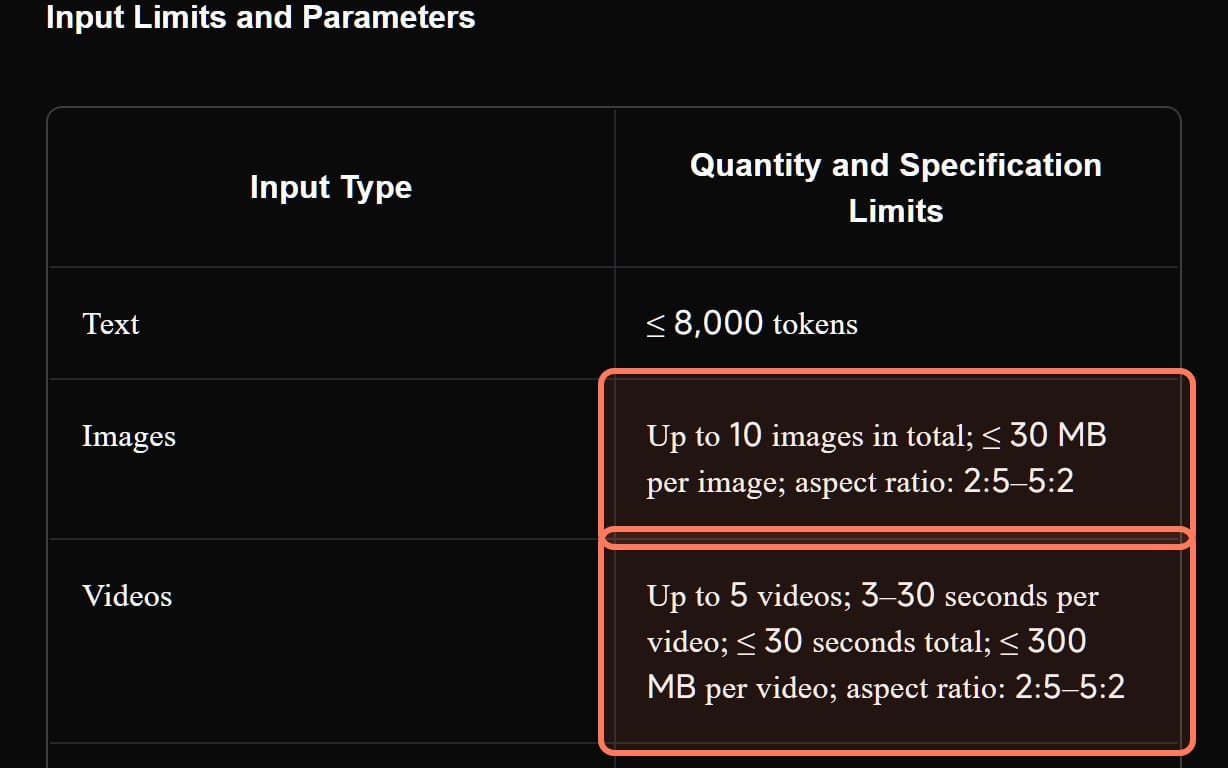
Kling 4.0's Omni Reference input limits, from Kling's own user guide (kling.ai, read November 7, 2026). Outlines ours. · Screenshot of kling.ai by aliteq
Kling 4.0: up to 10 reference images and up to 10 keyframes; its guide says references now work together "keeping characters, actions, camera shots" consistent. On Higgsfield it takes images, videos and up to 7 Kling elements, but no voice input.
Seedance 2.5: "omni reference" takes up to 30 images, 10 video clips and 10 audio clips in one pass, the most of any model here, though ByteDance says nothing about drawn styles.
Grok Imagine 1.5: up to 14 reference images (the cheaper 1.5 Lite takes none), and an image-to-video clip keeps your drawing's aspect ratio.
Gemini Omni Flash: Google's docs describe "character consistency across up to 6 reference images".
What to draw for the reference set: a front view, a side view, the full outfit, and the face close up, all on a plain background, so the model has nothing else to copy. Even with references, small details drift: in our own same-face, eight-shot test of image models, one model dropped freckles and added piercings between shots. Check the hair, eyes and outfit in every clip.
Can you make anime videos of existing characters?
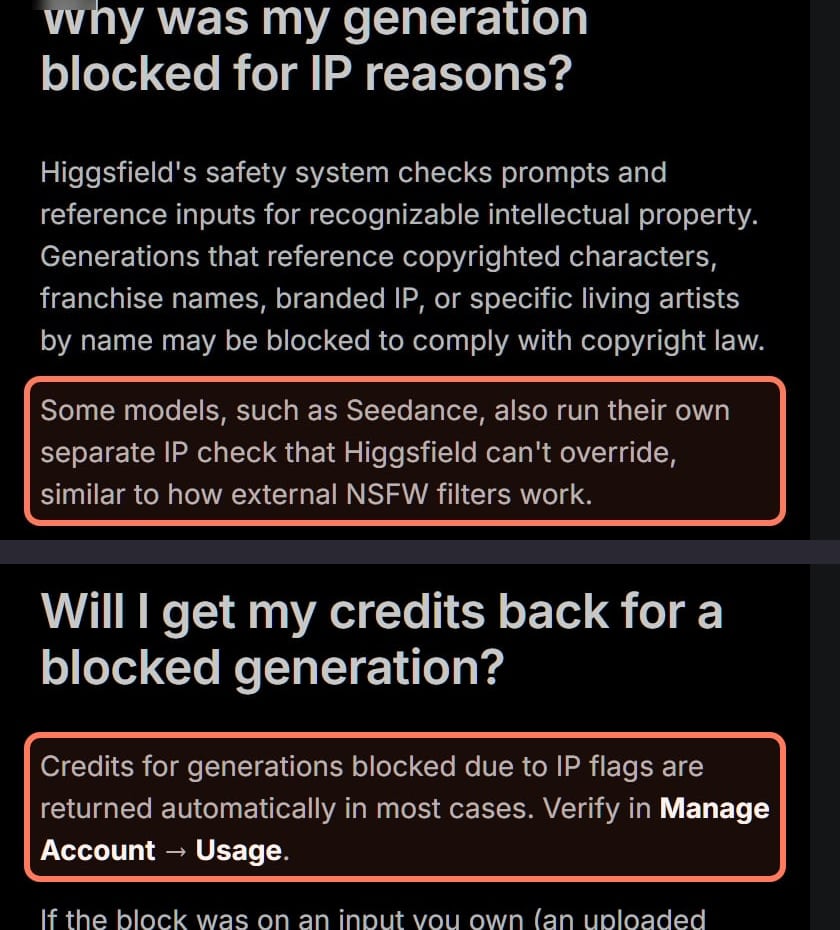
Not on Higgsfield, and you shouldn't anywhere you plan to publish. Higgsfield's help article on copyright blocks lists "named fictional characters from major franchises (Disney, Marvel, DC, Pixar, Nintendo, and others)" as a common trigger, along with named living artists and branded logos.
Higgsfield's help center, Why was my generation blocked for copyright or IP? (screenshot November 7, 2026; re-read November 8, 2026). Two crops from the same article; outlines ours. · Screenshot of higgsfield.ai by aliteq
Seedance adds its own check. The article says Seedance runs an IP check "that Higgsfield can't override".
Blocked credits usually come back. "Credits for generations blocked due to IP flags are returned automatically in most cases", per the same article.
No account-level override. "IP blocks apply platform-wide and can't be overridden for individual accounts." If the blocked input is art you own, an "I own the rights for this image" button may appear for eligible inputs.
Style isn't the same as a character. Prompting a general anime look is what the models are for; naming a franchise character or a living artist is what gets blocked. Describe the look in your own words.
Can you sell or monetise AI anime videos?
On a paid plan, the platforms we read allow commercial use; the risk is the character, not the tool. Higgsfield's Terms (s.4.4) don't restrict commercial use of outputs and warn that outputs "may not be unique", so two users can get similar results. Kling's own free Basic plan says its content "is not for commercial use". If you post anime clips on YouTube, its altered-or-synthetic disclosure is aimed at photorealistic content, and clearly unrealistic animation generally doesn't need the label; the details are in YouTube's rules on altered or synthetic content. For channels built on generated clips, our faceless YouTube guide covers the monetisation line on mass-produced content.
What does an anime clip cost?
On Higgsfield, per 5-second clip at 720p (Generate-button figures, November 3 to 7):
One 5-second anime-style clip at 720p on Higgsfield, Plus monthly (our arithmetic, Nov 2026)
Grok Imagine 1.5 Lite (no references)about $0.25
5 credits
Kling 3.0, no soundabout $0.37
7.5 credits
Kling 4.0 (launch discount)about $0.55
11.25 credits
Grok Imagine 1.5about $1.11
22.5 credits
Seedance 2.5about $1.72
35 credits
Dollars use Plus at $59 for 1,200 credits and assume every credit gets used; Ultra billed yearly is about a third cheaper per credit. Higgsfield charges Grok generations when they start, so a failed Grok clip isn't refunded. The open Wan 2.2 route costs GPU time instead of credits; our ComfyUI cloud GPU guide covers running it on a rented card.
Which one should you use for anime?
Your own character, short scenes with motion: Kling 4.0 on Higgsfield, with a reference sheet and "not photorealistic" in the prompt. Our Kling page collects its plans and fixes.
Many references or a 30-second scene from one pass: Seedance 2.5, up to 30 reference images, with the caveat that ByteDance doesn't document stylised output. More on Seedance.
Cheap tests of motion on a finished drawing: Grok Imagine 1.5 Lite or Kling 3.0 with your art as the start frame.
Full control on your own hardware: Wan 2.2's open weights, which include Wan-Animate for animating a character image from a motion video.
Fan art of a franchise character: don't. It gets blocked on Higgsfield and it isn't yours to publish.
The best AI video generator for other jobs
Each page below answers one job from the same checked facts. All of them, grouped by job, are in our best AI video generator guide.
Best AI animation generator: Kling 3.0 animates your drawing from its first frame; Kling 3.0 Omni and 4.0 keep one character across scenes.
Best image to video AI: Seedance 2.5 to put your photo's subject in a new scene; Kling 3.0 when the photo is already the first frame.
Best AI music video generator: Kling 3.0 with sound off for the footage, plus Sync Lipsync 3 for sung shots: about 270 credits per 3-minute song.
Best text to video AI: Kling 4.0: up to 30 seconds per prompt, multi-shot and stereo sound; Google Flow and Dreamina for free tries.
What we couldn't verify
How anime actually looks on each model. We haven't generated anime-style clips on any model; the style claims above are the makers' words.
Grok's, Gemini's and Kling 3.0's style support. The pages we read don't list styles for them.
Kling 4.0's sentence on animation, word for word on every version of the guide. We read it through a page extraction on November 8; the guide is long and was updated on November 4.
When Kling 4.0's discount ends. Higgsfield listed it at 13.75 credits and charged 11.25 on November 7.
Whether an IP block triggers on art that merely resembles a franchise. Higgsfield's article names named characters, artists and logos; it doesn't define a look-alike.
Verdict
Kling 4.0, with your own character art
For anime-style AI video, Kling 4.0 on Higgsfield is the pick: Kling documents animation styles and how to prompt them, it keeps a character consistent from up to 10 reference images, and clips run to 30 seconds for 11.25 credits per 5 seconds at 720p. Seedance 2.5 takes more references but says nothing about style. Animate characters you own; franchise characters are blocked.
Best for: Creators making anime-style shorts, intros and story clips with original characters
Questions about AI anime video
What is the best AI anime video generator?
Kling 4.0, on what the makers document (Nov 8, 2026). Kling's guide lists animation among its supported styles and advises excluding photorealism when you ask for one, and it takes up to 10 reference images for a consistent character. On Higgsfield a 5-second 720p clip costs 11.25 credits.
Can I turn my anime drawing into a video?
Yes. Use the drawing as the start frame (Kling 3.0, Kling 4.0, Grok Imagine) or as reference images for new shots (Kling 4.0, Seedance 2.5). Say "anime style, not photorealistic" in the prompt.
How do I keep my anime character consistent in AI video?
Give the model several views of your own character: front, side, full outfit and face, on plain backgrounds. Kling 4.0 takes up to 10 reference images, Seedance 2.5 up to 30, Grok Imagine 1.5 up to 14. Check the details in every clip.
Can I make AI videos of anime characters like Naruto or Pokémon?
Not on Higgsfield: its help center says named fictional characters from major franchises commonly trigger its copyright block, and Seedance runs its own IP check. Publishing them would also use characters you don't own. Create your own.
Is there a free AI anime video generator?
Not one with clear commercial rights. Kling's free Basic plan isn't for commercial use, and Higgsfield's help center promises no credits on its free plan (new accounts may get some) while its pricing table lists commercial use as not included on Free. Wan 2.2's open weights are free to download but need a GPU.